The Smell of Molten Projects in the Morning

Ed Nisley's Blog: Shop notes, electronics, firmware, machinery, 3D printing, laser cuttery, and curiosities. Contents: 100% human thinking, 0% AI slop.

Author: Ed

  • Tour Easy: Bafang Mid-drive vs. Cateye Cadence Sensor

    Tour Easy: Bafang Mid-drive vs. Cateye Cadence Sensor

    For inscrutable reasons, the Bafang 500C display includes all stopped time in its average trip speed. While that is, in fact, the average speed over the entire trip, the Cateye cyclocomputers we’ve been using forever stop averaging after a few seconds at 0 mph.

    Bonus: Although the Bafang BBS02 motor knows the pedal cadence, it’s not part of the display.

    The Bafang BBS02 bottom bracket shaft put its pedal cranks much farther from the Tour Easy’s frame than the Shimano cranks, to the extent that the existing Cateye cadence sensor position just wasn’t going to work, so I printed a simple clip to fit over the motor’s “fixing plate”:
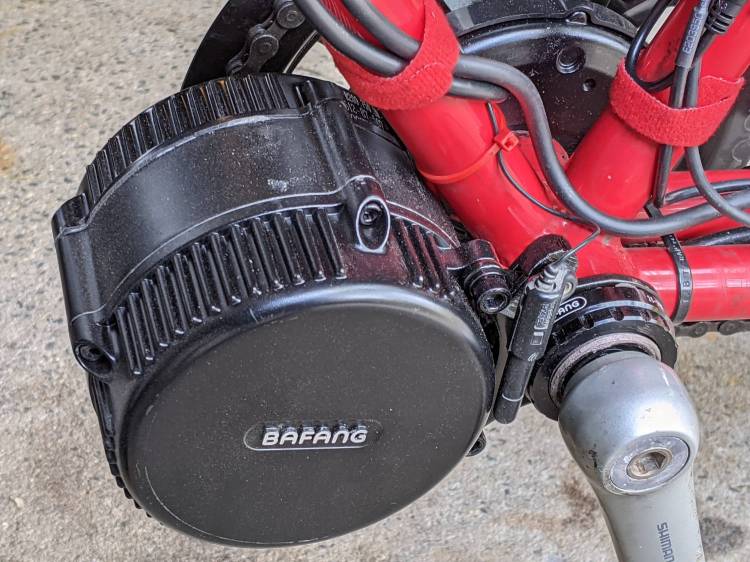
    Tour Easy Bafang BBS02 motor
    Tour Easy Bafang BBS02 motor

    It turns out putting a magnetic sensor immediately next to the winding end of a high-current three-phase motor isn’t the brightest idea I’ve ever had. The Cateye cadence display spent most of its time maxed out at 199 rpm, far faster than Mary can spin for, well, a single revolution.

    A somewhat more complex mount put the sensor roughly where it used to be:

    Cateye Cadence Sensor mount - installed
    Cateye Cadence Sensor mount – installed

    It looks precarious, but it spent nigh onto two decades there without incident, so we have precedent.

    Those are the original 165 mm Shimano cranks, because the 170 mm Bafung cranks threatened to lock out her knees. More on this in a while, as it’s a more complex issue than it may appear.

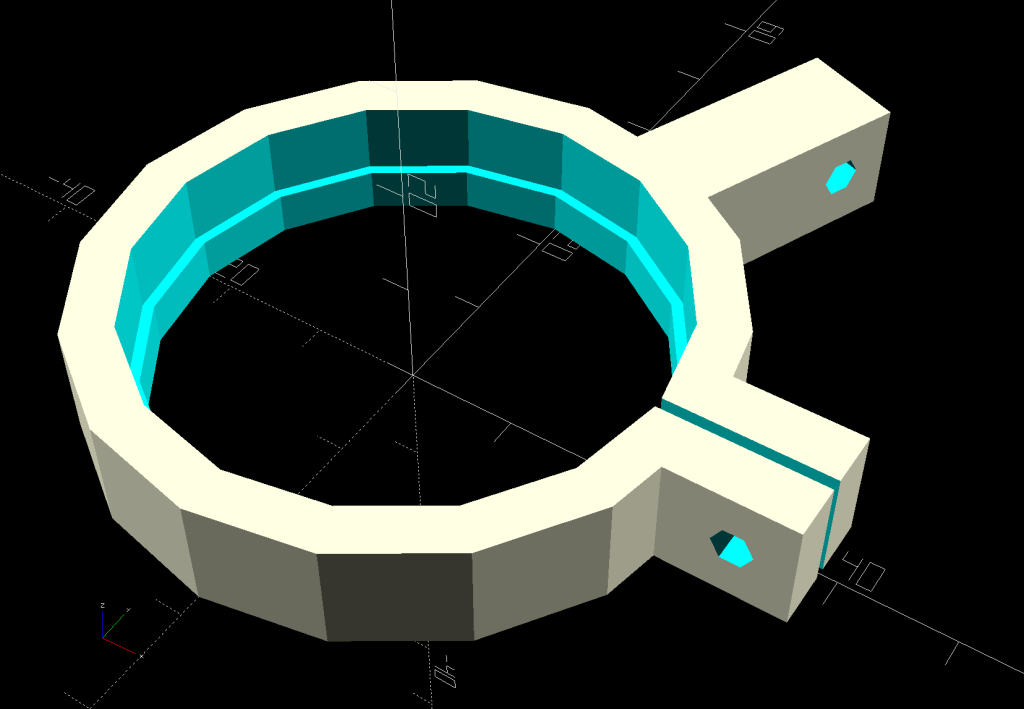
    The solid model looks about like you’d expect:

    Cateye Cadence Sensor mount - solid model
    Cateye Cadence Sensor mount – solid model

    The OpenSCAD code replaces the simple clip in the original GitHub Gist:

    // Cateye cadence sensor bracket
    
    LockRingDia = [44.0,46.0];
    LockRingLen = [4.0,6.5];
    LockRingOAD = LockRingDia[1] + 2*WallThick;
    LockRingOAL = LockRingLen[0] + LockRingLen[1];
    
    Notches = 16;
    SensorAngle = 3*360/Notches;
    SensorBase = 10.0;
    
    module Cateye() {
    
        difference() {
            union() {
                cylinder(d=LockRingOAD,h=LockRingOAL,$fn=Notches);
                translate([LockRingOAD/2 + LockRingOAL/2 - WallThick/2,0,LockRingOAL/2])
                    cube([LockRingOAL + WallThick,2*WallThick + Kerf,LockRingOAL],center=true);
          rotate(SensorAngle)
                    translate([LockRingOAD/2 + SensorBase - WallThick/2,0,LockRingOAL/2])
                        cube([2*SensorBase + WallThick,2*WallThick,LockRingOAL],center=true);
            }
            translate([0,0,LockRingLen[0]])
                PolyCyl(LockRingDia[1],LockRingOAL,Notches);
            translate([0,0,-Protrusion])
                PolyCyl(LockRingDia[0],2*LockRingOAL,Notches);
    
            translate([LockRingDia[0],0,0])
                cube([2*LockRingDia[0],Kerf,4*LockRingOAL],center=true);
            translate([LockRingOAD/2 + LockRingOAL/2,2*WallThick,LockRingOAL/2])
                rotate([90,0,0])
                    PolyCyl(3.0,4*WallThick,6);
    
            rotate(SensorAngle)
                translate([LockRingOAD/2 + 2*SensorBase - SensorBase/2,2*WallThick,LockRingOAL/2])
                    rotate([90,0,0])
                        PolyCyl(3.0,4*WallThick,6);
        }
    
    }
    
  • M2 Nozzle Clog: FOD

    M2 Nozzle Clog: FOD

    This happened while switching from natural to black PETG:

    M2 nozzle clog - exterior
    M2 nozzle clog – exterior

    A closer look:

    M2 nozzle clog - exterior detail
    M2 nozzle clog – exterior detail

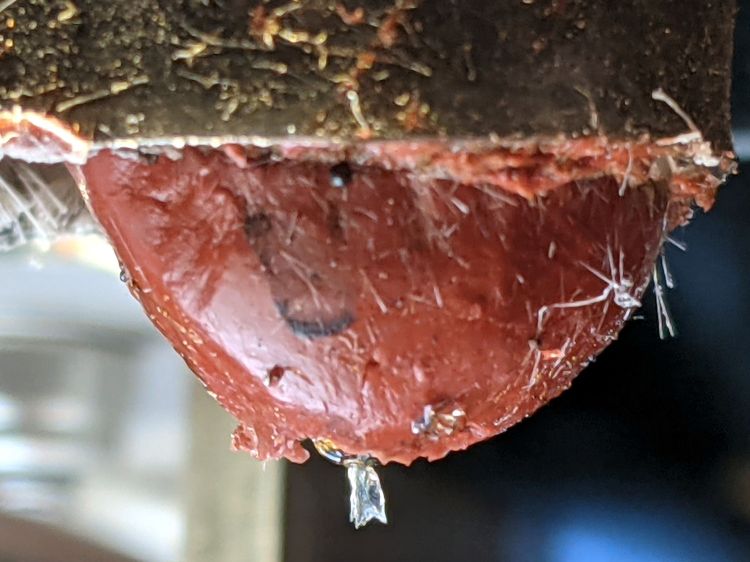
    Those pix happened after trying to extract whatever-it-is with tweezers, so it’s definitely something with a higher melting point than PETG.

    Removing the (warm) nozzle with the block held in a vise reveals a tuft of something:

    M2 nozzle clog - interior
    M2 nozzle clog – interior

    The tuft accumulated several turns while unthreading the nozzle from the hot end.

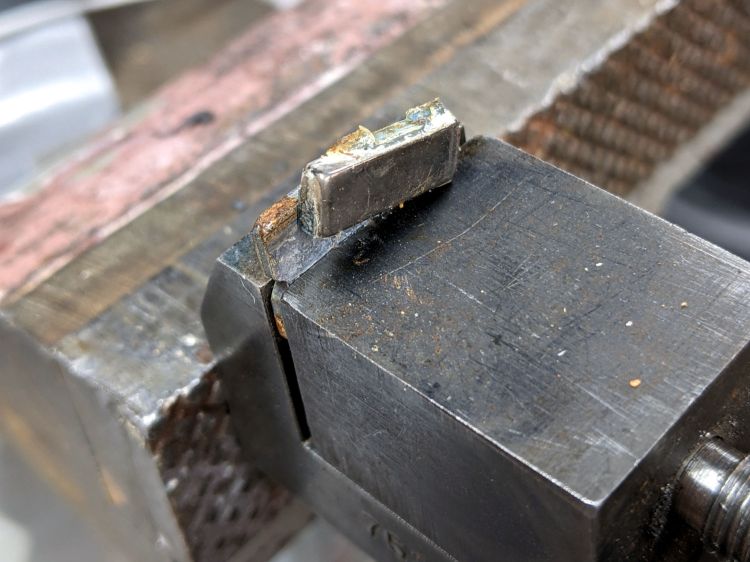
    Heating the nozzle a bit more released the tuft:

    M2 nozzle clog - extracted tuft
    M2 nozzle clog – extracted tuft

    The black-to-clear transition tailing off at the bottom came from the PETG around the tuft in the cone-shaped end of the nozzle above the aperture. The 100 mil squares suggest the tuft was a distinct entity, rather than a collection of threads, and might have been over 5 mm long.

    Perhaps a fragment of PTFE or another high-melting-point plastic?

    Reassemble in reverse order, reset the nozzle to Z=0 on the platform, and it’s all good.

  • Tour Easy: Asymmetric Handlebar Grips

    Tour Easy: Asymmetric Handlebar Grips

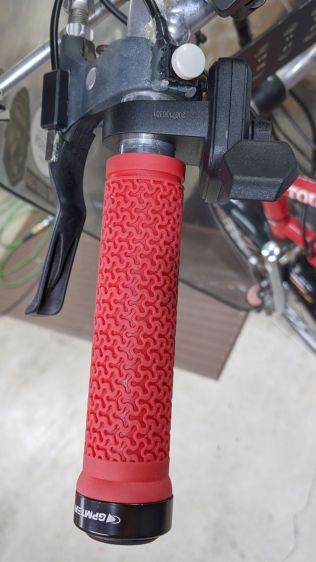
    Installing the Bafang BBS02 motor on Mary’s Tour Easy replaced the triple chainring, so I removed the front derailleur and SRAM grip shifter. This produced enough room for the thumb throttle and a full-length handgrip on the left side:

    Tour Easy grips - left installed
    Tour Easy grips – left installed

    The round button is the PTT switch for the HT.

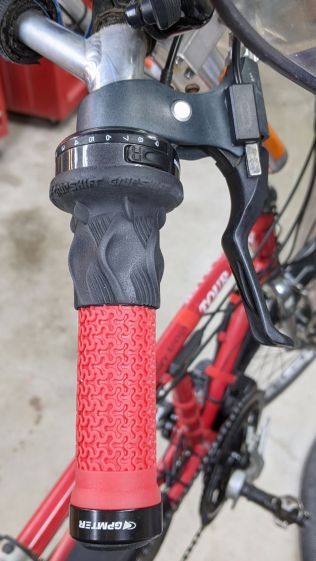
    The right handlebar still has the rear shifter, so it requires a shorter grip:

    Tour Easy grips - right installed
    Tour Easy grips – right installed

    Although it may be possible to buy such a grip and, thereby, get a backup pair of mismatched grips, it seemed easier straightforward to just shorten the grip to the correct length and be done with it.

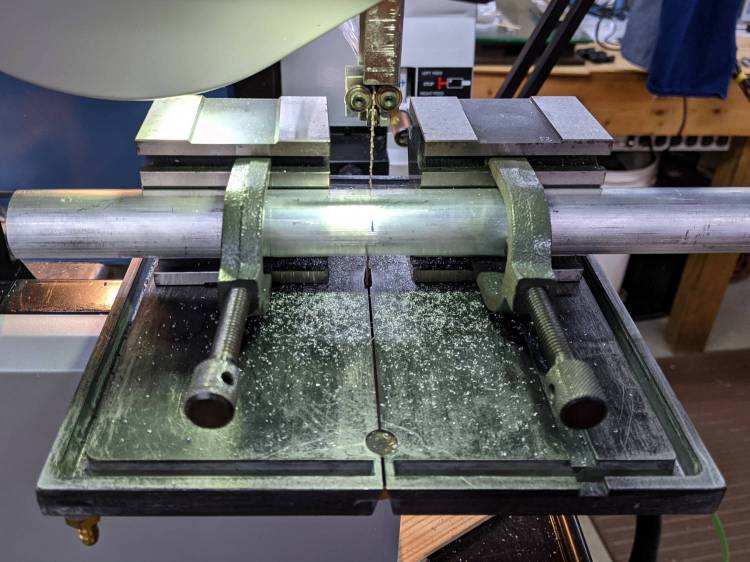
    Saw off a convenient length of aluminum rod:

    Tour Easy grips - mandrel sawing
    Tour Easy grips – mandrel sawing

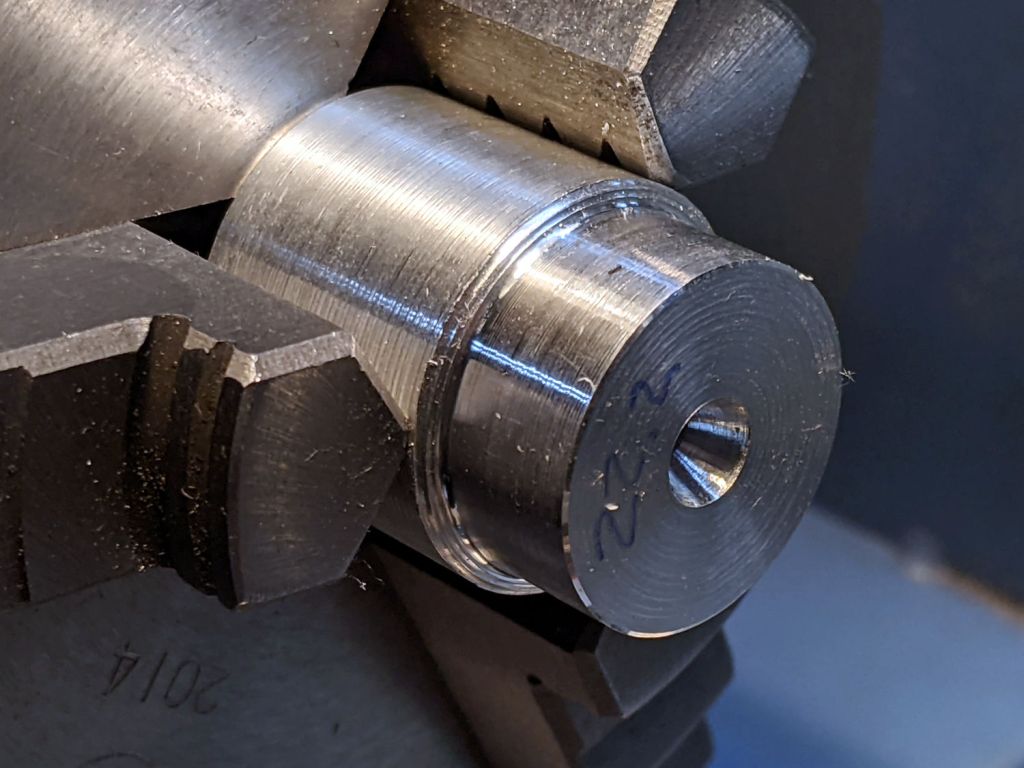
    Although I actually used a steady rest to produce this, it happened during a remote Squidwrench meeting and I have no proof:

    Tour Easy grips - lathe mandrel
    Tour Easy grips – lathe mandrel

    The 22.2 mm = 7/8 inch end matches the more-or-less standard handlebar diameter, so the grip clamp can get a good hold:

    Tour Easy grips - right peeled
    Tour Easy grips – right peeled

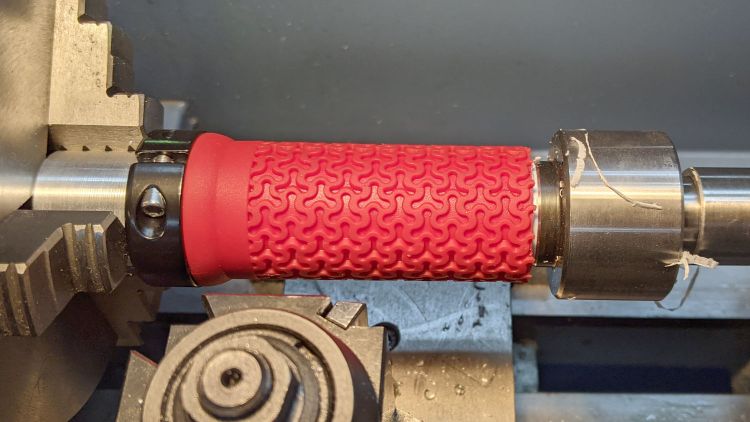
    A live center supports the right end of the grip.

    The red coating seems to be gooey silicone rubber molded atop a PVC tube. Rather than (try to) use a lathe bit to cut through the silicone, I cut two slits with a utility knife and the spindle turning slowly in reverse, then peeled off the rubber between the slits.

    With the silicone out of the way, an ordinary cutoff tool made short work of the PVC:

    Tour Easy grips - right trimming
    Tour Easy grips – right trimming

    That was a cleanup pass with the utility knife, as the cutoff tool left a slight flange around part of the circumference. If I had the courage of my convictions, I could probably have cut the PVC with the knife.

    Chamfer the end of the cut, slide it on the handlebar, tighten the clamp, and it’s all good.

    The alert reader will note the clamp should go on first, but that would produce an inconvenient lump against the right shifter. Sliding them on backwards puts the clamp at the end of the handlebar and works out better in this admittedly unusual situation.

  • Bafang USB Programming Adapter

    Bafang USB Programming Adapter

    Changing (“programming”) the Bafang BBS02 motor controller parameters requires a USB-to-serial adapter with a connector matching the end of the cable from the motor to the display. While you can buy such things directly from the usual randomly named Amazon sellers, I happen to have a wide variety of bare adapter boards, so I just bought a display extender cable and cut it in half to get the connector; you can apparently buy pigtailed connectors (for more than the price of an extender) if you dislike cutting cables in half.

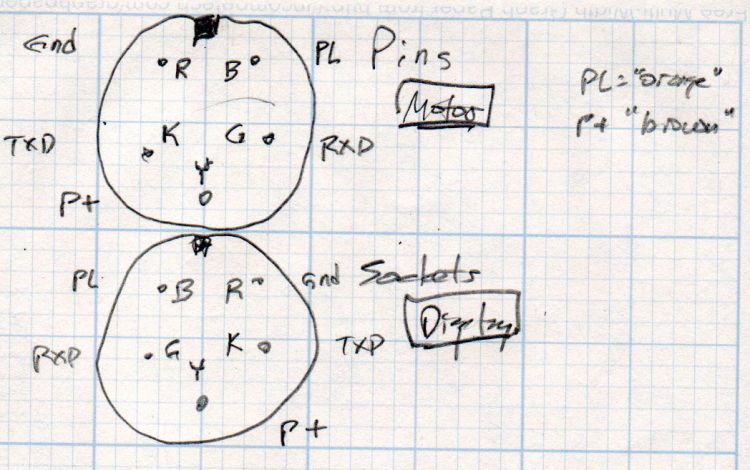
    Various documents provide versions of the canonical illustration of the motor end of the display cable, as ripped from Penoff’s original documentation:

    Bafang BBS02 display cable pinout
    Bafang BBS02 display cable pinout

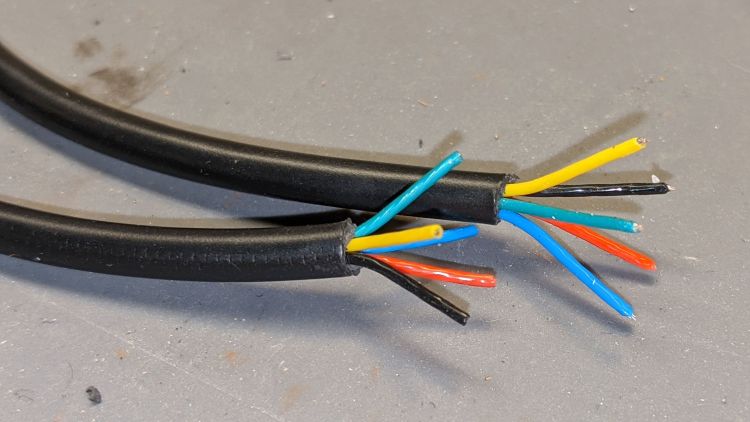
    The pin colors correspond to the wiring inside the motor cable, but the extender uses different colors, because nobody will ever know:

    Bafang programmer - wire colors
    Bafang programmer – wire colors

    A bit of work with a continuity meter gave the pinout:

    Bafang BBS02 display extender - wire colors
    Bafang BBS02 display extender – wire colors

    Don’t trust stuff you read on the Intertubes: make your own measurements and draw your own diagrams!

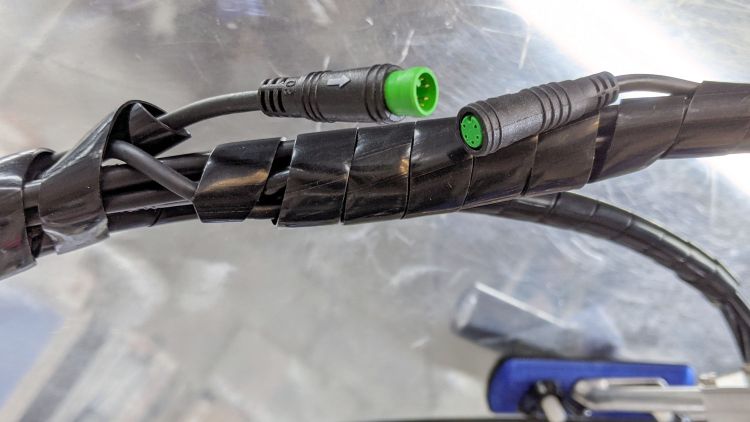
    You want the cable end carrying the sockets to mate with the pins on the motor cable (coming in from the left):

    Bafang programmer - cable ends
    Bafang programmer – cable ends

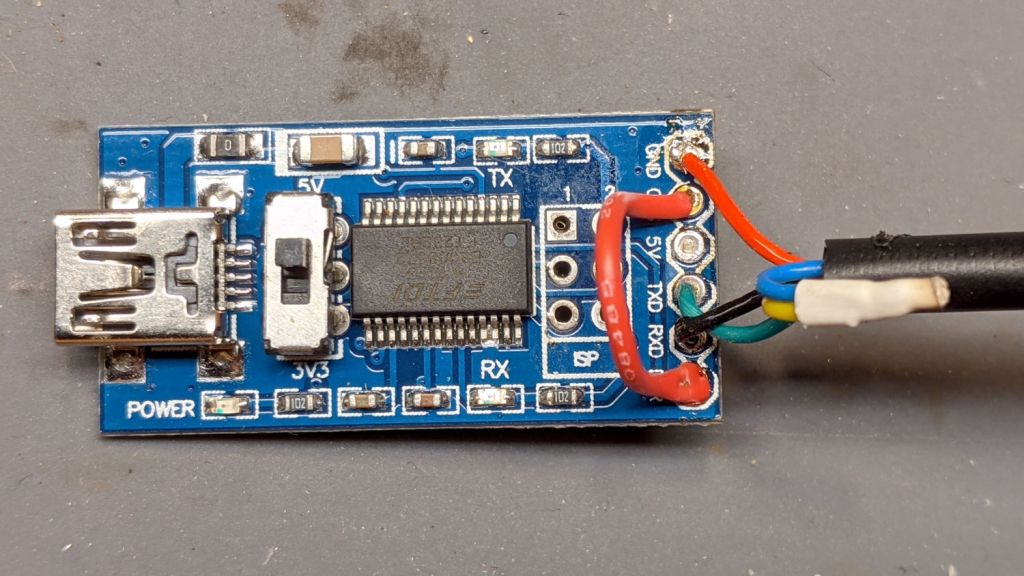
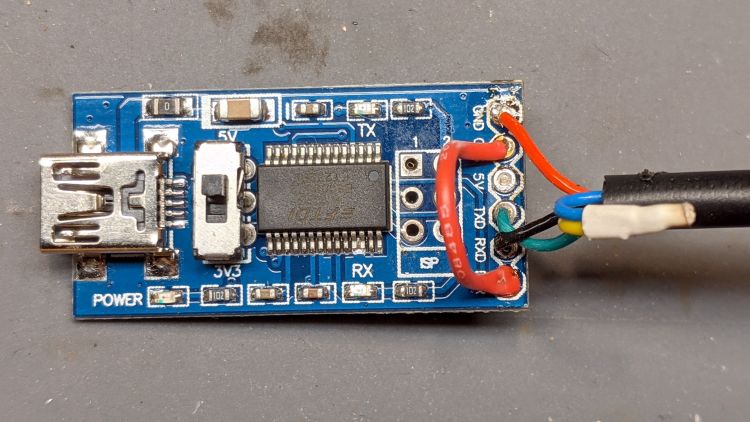
    Soldering the cable to a known-counterfeit FTDI USB adapter went swimmingly:

    Bafang programmer - USB adapter wiring
    Bafang programmer – USB adapter wiring

    Note that the yellow-blue connection carries the full 48 V from the battery and may or may not have any current limiting / fusing / protection, so be a little more careful than usual in your wiring layout.

    The red jumper from DTR to CTS, shown in all the Amazon and eBay listIngs, turns out to be unnecessary.

    A quick and dirty case (eventually held together with generous hot-melt glue blobs) protects the PCB and armors the cables:

    Bafang USB-serial adapter interior
    Bafang USB-serial adapter interior

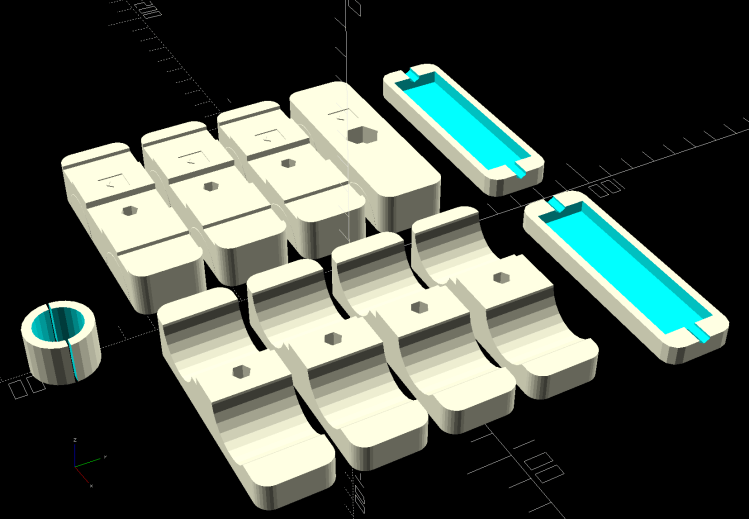
    The solid model over on the right looks about like you’d expect:

    Bafang Battery Mount - complete build view
    Bafang Battery Mount – complete build view

    Most of the instructions will tell you to hot-plug the cable to the motor with the battery connected, which strikes me as foolhardy; not all of those pins make contact in the right order, which means you will slap 50-odd volts across the wrong parts of the circuitry.

    Instead:

    • Disconnect the battery
    • Unplug the display
    • Plug the adapter cable into the motor connector
    • Plug the USB cable into the Token Windows Laptop
    • Reconnect the battery
    • Fire up the “programming” routine
    • Send the new configuration to the motor controller
    • Disconnect the battery
    • Unplug the adapter cable
    • Reconnect the display cable
    • Reconnect the battery

    Makes more sense to me, even if it’s more tedious.

    Tuck this OpenSCAD source code for the case into the original program that produces the battery mounts:

    Layout = "Build";               // [Frame,Block,Show,Build,Bushing,Cateye,Case]
    
    … snippage …
    
    // Programming cable case
    
    ProgCavity = [70.0,19.0,10.0];
    ProgBlock = [85.0,25.0,15.0];
    ProgCableOD = 4.0;
    
    module ProgrammerCase() {
    
        difference() {
            hull() {
                for (i=[-1,1], j=[-1,1])
                    translate([i*(ProgBlock.x/2 - CornerRadius),j*i*(ProgBlock.y/2 - CornerRadius),-ProgBlock.z/2])
                        cylinder(r=CornerRadius,h=ProgBlock.z,$fn=12);
                }
            translate([-ProgBlock.x,0,0])
                rotate([0,90,0])
                    PolyCyl(ProgCableOD,3*ProgBlock.x,6);
            cube(ProgCavity,center=true);
        }
    }
    
    // Half case sections for printing
    
    module HalfCase(Section = "Upper") {
    
        intersection() {
           translate([0,0,ProgBlock.z/4])
                cube([2*ProgBlock.x,2*ProgBlock.y,ProgBlock.z/2],center=true);
            if (Section == "Upper")
                translate([0,0,-Kerf/2])
                    ProgrammerCase();
            else
                translate([0,0,ProgBlock.z/2])
                    ProgrammerCase();
        }
    }
    
    … snippage …
    
    // tuck this into the Build conditional
    
        translate([0,3*Block.x,0]) {
    
            translate([gap*ProgBlock.x/2,0,ProgBlock.z/2])
                rotate([180,0,0])
                    HalfCase("Upper");
            translate([-gap*ProgBlock.x/2,0,0])
                HalfCase("Lower");
    

  • Pixel 3a Boot Failure

    Pixel 3a Boot Failure

    Attempting to rub a smudge off the phone’s screen while it was booting causes problems:

    Pixel 3a boot fail
    Pixel 3a boot fail

    Rebooting that sucker cleared the problem, so it wasn’t permanently fatal.

    Whew!

  • Miniblind Mounting Brackets: Version 4

    Miniblind Mounting Brackets: Version 4

    Miniblinds don’t last forever:

    Miniblind failure
    Miniblind failure

    The plastic frame failed at the pull cord opening, obviously a weak and, alas, non-repairable point.

    A quick trip to Lowe’s produced a new miniblind with mounting hardware completely different from the old one. This came as no surprise, as every new miniblind differs from all previous ones; miniblind mounting hardware is not strongly conserved.

    The broken frame fit into the plastic end caps mounted just beyond the scarred paint marking the bracket location required for the previous miniblind:

    Miniblind bracket - V3
    Miniblind bracket – V3

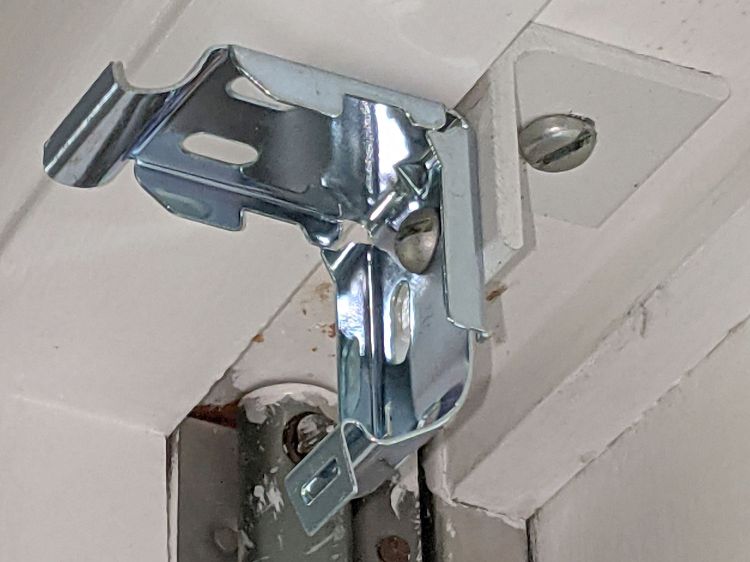
    Note that the caps mount with a single screw in the homebrew bracket’s face, which has two holes to match the previous-previous cap.

    Also note how the curved moulding strips around the 1955-era windows in this house do not fit any contemporary miniblind hardware, thus requiring Quality Shop Time with every installation.

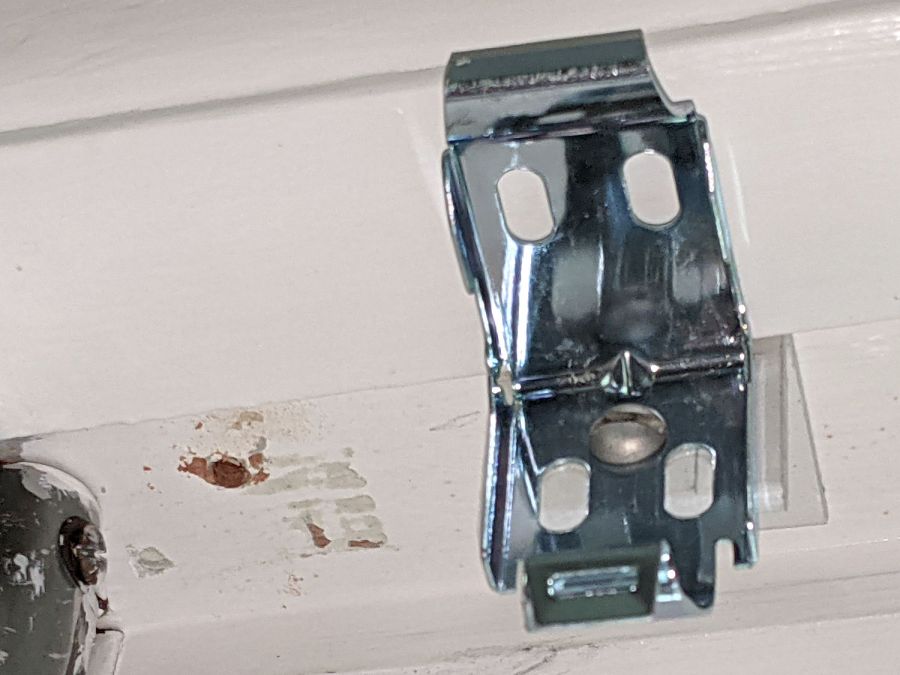
    Although the shiny new hardware had two slots, they neither lined up with the existing bracket holes nor extended quite far enough vertically. I lined things up, marked and drilled a single midline hole in both the new hardware and the old bracket, and reused the old screw and nut:

    Miniblind bracket - V4 side
    Miniblind bracket – V4 side

    Moving the bracket back to its previous-previous location exposed the scarred paint under the previous position:

    Miniblind bracket - V4 front
    Miniblind bracket – V4 front

    Fortunately, it’s hidden by the installed miniblind.

    That was, all things considered, easy …

  • Tour Easy: Bafang Brake Sensors

    Tour Easy: Bafang Brake Sensors

    Over the decades, we have devoted considerable time and attention to adjusting the reach and travel of the brake levers on Mary’s bike, so I ordered a pair of brake sensors for the Bafang BBS02 motor to mount on the existing hardware:

    Tour Easy Bafang BBS02 - brake sensor - installed
    Tour Easy Bafang BBS02 – brake sensor – installed

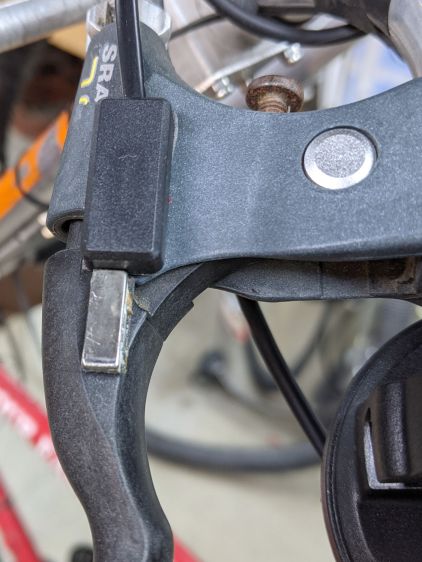
    The sensor is the black block secured to the brake mount (with good outdoor foam tape), with the bar magnet similar secured to the handle. The magnet ended up slightly off-center from the switch due to the overlapping joint between the lever and the mount; I can’t detect any difference from having it centered.

    The Bafang switches included cute little disk-shaped neodymium magnets which weren’t suited for the levers and stuck out in all directions without getting particularly close to the sensor. As a result, the least pressure on the brake handle produced a hair-trigger switch activation.

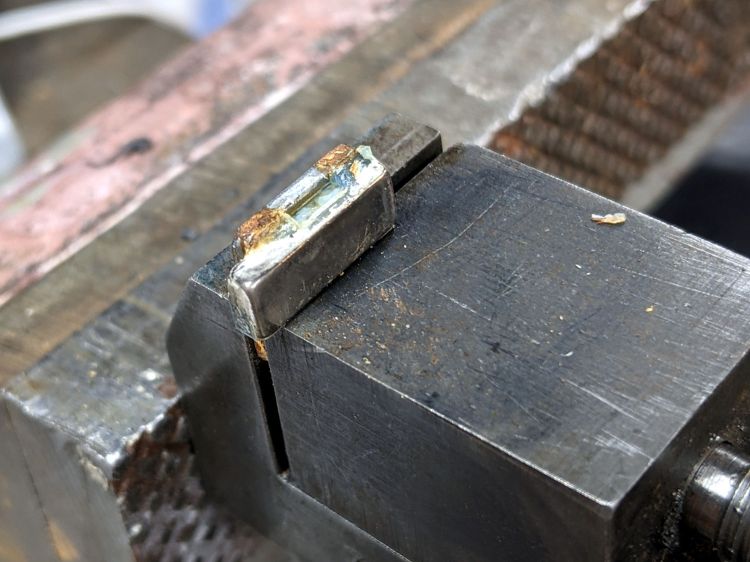
    So I harvested two bar-shaped magnets from a defunct Philips Sonicare toothbrush head, reducing the rather large assortment I’ve been saving for just such an occasion by one item. Each brush head contains a pair magnets attached to a steel backing plate, seen here after removing the lower magnet:

    Tour Easy Bafang BBS02 - brake sensor - donor magnet assembly
    Tour Easy Bafang BBS02 – brake sensor – donor magnet assembly

    I don’t know how Philips attaches the magnets, but a few shots to the steel backing plate with a drift punch breaks the bond without any obvious damage:

    Tour Easy Bafang BBS02 - brake sensor - donor magnet loosened
    Tour Easy Bafang BBS02 – brake sensor – donor magnet loosened

    Neodymium magnets have a nickel plating to prevent corrosion, but AFAICT the only way to know whether I’ve cracked the plating is waiting to see if the magnet falls apart. If it does, I promise to be more careful with the next toothbrush head.

    They’re magnetized through the thinnest section, not along the length like an old-school bar magnet, but the disk magnets are similarly magnetized and I think the net effect is about the same.

    The bars fit the brake handles more closely, put more of the magnet closer to the switch, and allow about 5 mm of travel before tripping the switch.

    Pending more road testing, the switches seem more usable.

    Protip 1: Demagnetize your tools after working with neodymium magnets.

    Protip 2: Don’t put a loose magnet anywhere near your bench block, because it will shatter when it snaps onto the block from a surprising distance.