A backlash test found on the LightBurn forum puts the machine through a series of difficult maneuvers:
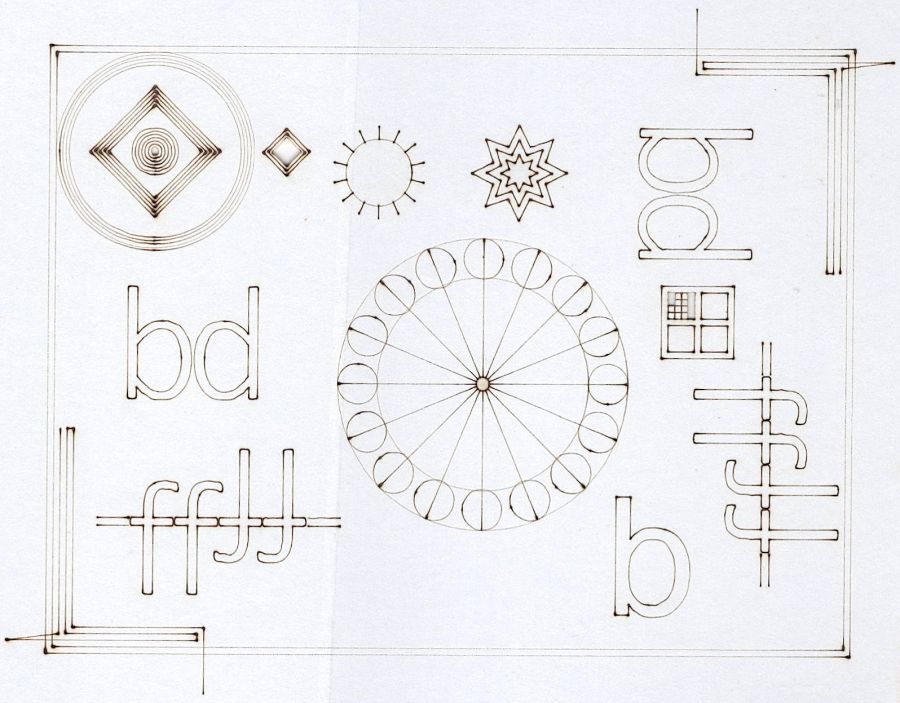
That’s burned on the back of a paperboard box at 400 mm/s @ 15%/10% power, which is slightly too intense for the smaller patterns.
The key point is that the machine has no detectable trace of backlash, with all the opposing lines matching up and equal spacing regardless of the approach direction.
Whew!
The acceleration may be a little too high, as seen on some recent beam alignment targets:

The larger targets on the right let the machine reach a speed closer to the nominal 400 mm/s around the arc, so the cut along the tape tab after the right-angle turn comes out a bit wobbly; the smaller targets are fine. The red lines are just under 0.5 mm wide and the wobble is on the same order, so it’s pretty close to being OK.
 The Smell of Molten Projects in the Morning
Comments
6 responses to “Laser Cutter: Backlash Test”
Interesting. Looks like an opportunity for some firmware improvements. Driving a car, (most) drivers don’t just approach a curve full speed, but decelerate before hitting that curve. Firmware would probably benefit from that behavior. The approach that comes to mind is replacing, line+curve with line+slower_line+curve.
(The pie in the sky setup would be a stepper driver that knows the moving mass and can do speed/inertia calculations.)
It does do that
Yeah! I invented the wheel.
There’s definitely deceleration going on! The motion planners use at least a trapezoid speed curve, with some curve-tolerance trickery around corners to avoid complete stops.
It looks like min power is too high. Try lowering it. Pro tip: it takes fractional values (mine seems to be near 9.4). Too high and the corners and tights curves are over-burned; too low and they are under cut or engraved. Your goal is that look the same as the long straight lines. My understanding is that when the gantry must slow down below your set speed, in order to change direction or navigate a tight curve, it lowers the laser power to compensate for the lower speed by interpolating between max power and min power.
In general, I don’t do vector marking, particularly on paper. The gotcha is having the minimum power bounded by the 10% minimum laser firing current and the maximum limited by wanting a mark, rather than a through cut.
For cutting, I (try to) set the minimum for a clean cut in the corners with the maximum controlling the longer stretches, but it’s largely guesswork because I rarely cut the same thing twice.