When Aitch moved to NC, he unloaded a stack of printer paper on me to avoid paying half a buck a pound to haul it along. One package contained some high-end HP photo paper that, not being a high-end photo kind of guy, I figured I’d use for my 3D printing brag sheets.
Alas, after trying several permutations of image quality / paper type / ink density, it seems that the cheap generic ink I’m using in the Epson R380 simply isn’t compatible with the HP paper. The top image shows that the ink doesn’t wet the paper and forms a weird alligator-skin pattern:
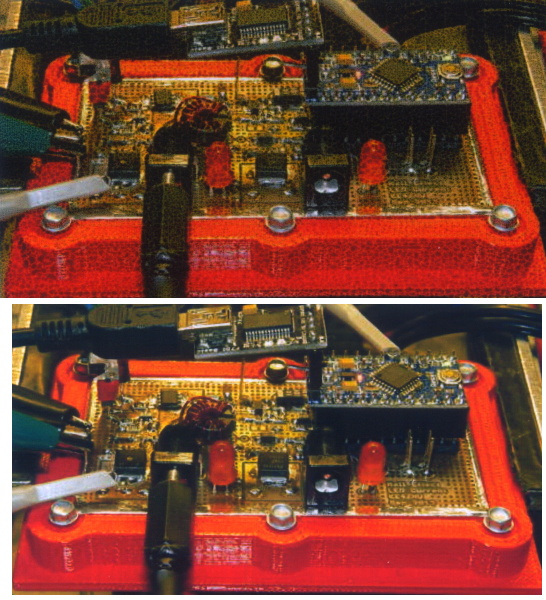
The bottom image looks perfectly fine; it’s on cheap Staples photo paper, printed with the usual Photo quality on Photo paper.
I’ve read vague statements here-and-there that some HP ink uses an entirely different chemistry from the usual inkjet printers and, perhaps, that accounts for the mismatch. Not a problem, but it did blow an hour while proving that it wasn’t the configuration settings doing me in.
 The Smell of Molten Projects in the Morning
Comments
11 responses to “HP Super Glossy Paper vs. Generic Ink: FAIL”
I noticed that on HP photo paper with original ink – prints lasts long years without fading but not so with generic stuff!
Even using the same paper and ink, changing the print settings causes wide variations. Then there’s the same ink on different papers…
Definitely some magic happening in there…
Inkjet printers use either dye or pigment based inks, or in some cases both. Dyes soak into the paper. Pigments contain solid particles which sit on top of the paper, and are good for longevity. Looks like the HP paper is intended for pigment ink and you’re using a dye ink.
Got it in one! The cheap generic inks avoid pigments, probably because it’s hard to keep solids in suspension without R&D money. I definitely don’t do enough fancy printing to justify expensive generic inks…
Back in the ’80s, we were up at the printer division in Corvallis, Oregon meeting about some driver ICs for them. Part of the thing was a tour of the ink/printhead operation, and they mentioned that they were doing a lot of work on the chemistry of the ink. This was prior to the photo paper, but even the inkjet paper was special–short fibers to keep the inkdots from spreading too much. (They were willing to share some inside information to fellow HP employees, but IIRC, we gave out a lot more than we got…)
I still have a 1998 vintage inkjet printer in the stash, but it hasn’t fired a dot in anger for a while. Still have a few NOS black cartridges, but I’m out of color. (It’s _MY, as I recall.) I do recall that the inkjet division used/tried/considered a lot of measures to defeat the scourge of outside vendors in their printers, whether reverse engineered cartridges or refill kits. I think they got really ticked off when Kodak did a clone to the first generation ThinkJet cartridges.
I can appreciate the desire to maintain control over the entire user experience (see: Apple), to ensure every customer gets a known-good result every time. As a bottom feeder, though, I’d appreciate the ability to use cheap ink for less-than-wonderful results…
Paying for ink priced as if it were blended with the blood of virgin unicorns makes no sense, particularly when all I want is a microcontroller manual printed out so I can mark it up.
The proposal that got me nervous was when one of our designers said he was answering an inquiry about adding a counter to an integrated print driver IC. It would brick the print cartridge after a certain number of dots [wince] Never went anywhere, fortunately, but that the printer folks even considered it turned me off. (Putting the driver IC into the disposable print head also bothered me–not that cheap an IC, and the current designs were reliable as hell.)
I gather the vendors try to use the old Gillette marketing strategy: give the razor (or sell it cheap), and make money on the consumables. Still, you could use Wilkensons in a Schick. At least once upon a time. On the gripping hand, I have a full beard. [grin]
That’s pretty much what they did with the HP2000C printer that gave me so much hassle. All the printers finally died; my stockpile still has lengths of polished steel guide rods from that episode…
I don’t mind paying for expensive ink (and paper), if I can get a reliable result in a reasonable amount of time. However, I don’t print often enough for inkjet to be viable. I end up using about half my ink (and an hour or so) cleaning the nozzles every time I print something. I finally got an old printer with replaceable (and therefore removable) printheads, and I just take ’em out and wipe ’em down with a damp paper towel before I print. I know this is supposed to be a no-no, but I can get a good print in five minutes after six months of idle time. My next printer will be a dye sub – the supplies are more expensive, but it’s good to go immediately after any amount of idle time, and given how often I print photos, that’s a win. Unfortunately, Canon contracted out their dye sub printer manufacturing to “Delta Electronics” in China, who also supplied the (awful) driver. Specs aren’t available, and Gutenprint needs work. I can either buy a USB analyzer and a windoze box and reverse engineer the protocol, or buy a dye sub printer with a real driver (Ricoh looks like the front runner). While it would be nice to help out all the other people stranded by Canon, I’ll likely take the easy (and cheaper) way out.
You ever notice how, when you buy a Big Name Brand based on previous experience, what you get isn’t the same any more? All those Big Names now come attached to stuff from a totally different company; they may have “licensed” the Big Name, but the product has nothing else in common. Pfft!
Yup, the standard line these days seems to be “we’re not responsible for that, we just outsourced it and put our name on it.” As far as I’m concerned, when someone sells something with their name on it, they’re responsible. Canon’s poor handling of this mess has earned them a place on my non-preferred vendor list.