Ed Nisley's Blog: Shop notes, electronics, firmware, machinery, 3D printing, laser cuttery, and curiosities. Contents: 100% human thinking, 0% AI slop.
The object being to light up a falling object at a known position, I ran off the usual Physics 1 spreadsheet relating position, time, and speed for the ideal case:
Initial Timing Estimates
I wanted the flash to occur when the object was about 200 mm below the trigger point (the laser-photodiode beam-break sensor), which turns out to be, conveniently enough, 200 ms after the drop. A 1/25 = 40 ms shutter time allowed for the ±10 ms or so of jitter that I assumed would be due to the CHDKmotion-detection script, but I did not have a good estimate of the delay from motion detection to shutter opening; I assumed it would be nearly zero. That meant the LED flash must occur about 50 ms earlier, at about 150 ms from the drop and 60 ms from the beam break; assuming I dropped the object about 30 mm above the beam break sensor.
Soooo, I baked those numbers into an Arduino program (more on that later), lashed the hardware together, and fired it up.
The beam-break sensor worked, the Arduino code worked, the LED and Xenon strobe fired, but all the pictures were black: the LED triggered the motion detection script, but the flash occurred either before or after the shutter opened.
After considerable adjustment of times, twisting of knobs, and general flailing around, this happened:
Strobe flash – falling ruler – top
If you look very, very closely, you can see a thin rectangular object at the top edge of the picture, just to the left of the machinist’s scale supporting the beam-break sensor, which, in turn, is barely visible to the left of the mysterious rectangle.
The round eye-like object peering at you from 1/3 up the scale is the 10 mm white LED that triggered the motion-detection script. It’s dark, because that flash ended long before the shutter opened.
More flailing around stopped the object in the middle of the image:
Strobe flash – falling ruler – middle
The motivation for dropping a ruler: it’s long enough that you’re bound to catch at least part of it and the graduations let you estimate distances and times fairly accurately. That’s after you manage to catch at least part of it, of course.
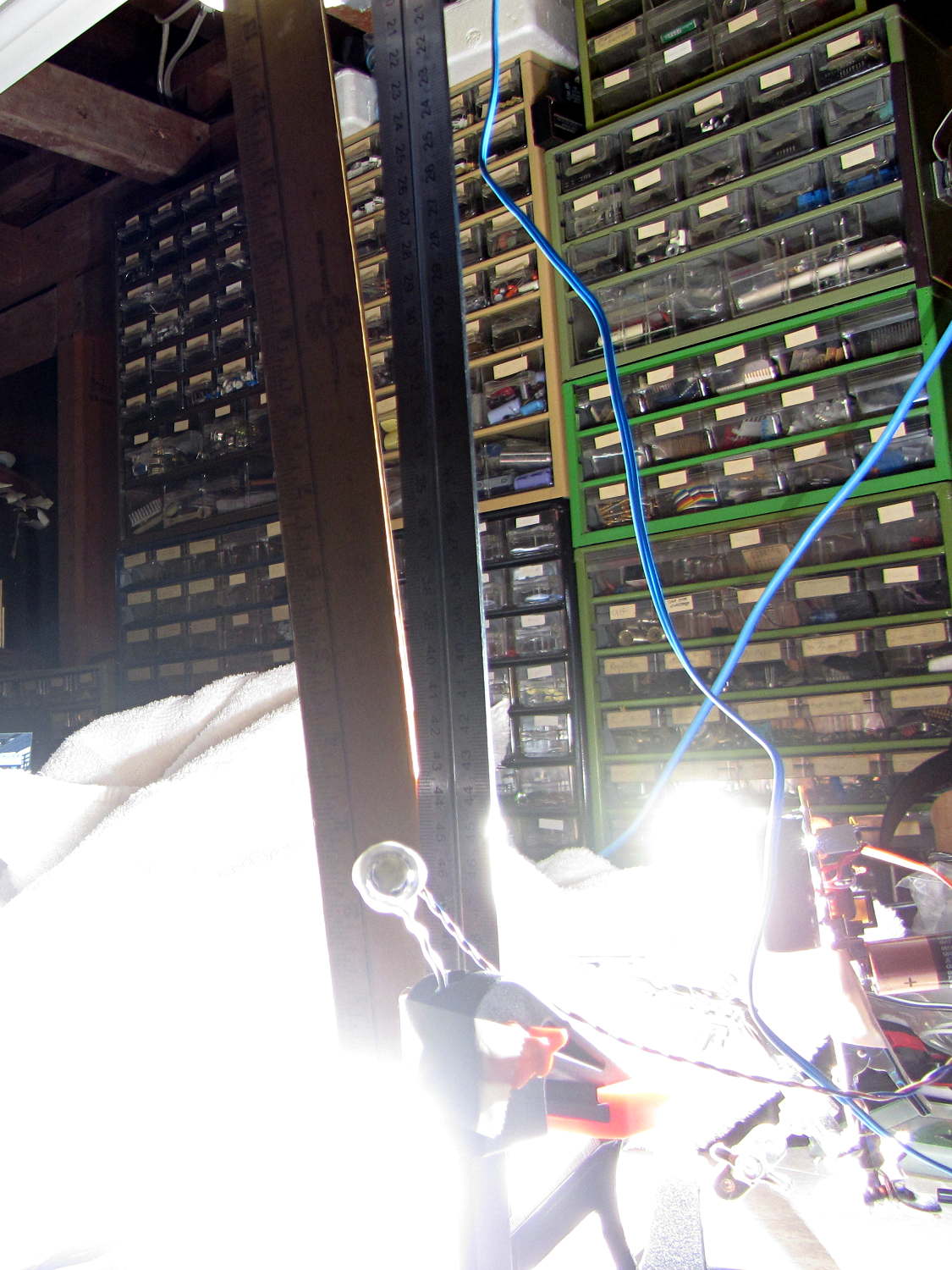
Increasing the flash delay caught it just before it hit the white towel causing the retina-burn glare at the bottom:
Strobe flash – falling ruler – bottom
A bit of detail from another picture with the ruler near the middle shows that the 1 ms Xenon strobe flash really does stop the action:
Strobe flash – falling ruler – detail
Even though the initial timing estimates were completely wrong, there’s some hope this will actually work…
The game plan: drop a small object through a laser beam that shines on a photodiode, thus causing an electrical signal that triggers various flashes and cameras and so forth and so on. This fixture holds the laser and photodiode in the proper orientation, with enough stability that you (well, I) can worry about other things:
Laser-photodiode fixture – on blade
It’s mounted on the blade of a dirt-cheap 2 foot machinist’s square clamped to the bench which will probably get a few holes drilled in its baseplate for more permanent mounting.
The solid model looks about like you’d expect:
Laser-photodiode fixture – solid model
There’s a small hole in the back for an 8-32 setscrew that locks it to the blade; the fit turned out snug enough to render the screw superfluous. I added those two square blocks with the holes after I taped the wires to the one in the picture.
The two semicircular (well, half-octagonal) trenches have slightly different diameters to suit the heatshrink tubing around the photodiode (a.k.a., IR LED) and brass laser housing. A dab of fabric adhesive holds the tubes in place, in addition to the Gorilla Tape on the ends.
The laser came focused at infinity, of course. Unscrewing the lens almost all the way put the focus about 3/4 of the way across the ring; call it 40 mm. The beam is rectangular, about 1×2 mm, at the center of the ring, and I rotated the body to make the short axis vertical; that’s good enough for my purposes.
The cable came from a pair of cheap earbuds with separate Left/Right pairs all the way from the plug.
The model builds in one piece, of course, and pops off the platform ready to use:
Laser-photodiode fixture – on platform
If you were doing this for an analytic project, you’d want a marker for the beam centerline on the vertical scale, but that’s in the nature of fine tuning. As it stands, the beam sits 8 mm above the base and flush with the top surface of the ring; if that were 10 mm, it’d be easier to remember.
The OpenSCAD source code has a few tweaks and improvements:
// Laser and LED-photodiode break-beam sensor
// Ed Nisley - KE4ZNU - March 2014

Layout = "Show";			// Build Show Ring Mount Guide

//- Extrusion parameters must match reality!
//  Print with 2 shells and 3 solid layers

ThreadThick = 0.20;
ThreadWidth = 0.40;

HoleWindage = 0.2;			// extra clearance

Protrusion = 0.1;			// make holes end cleanly

AlignPinOD = 1.70;			// assembly alignment pins: filament dia

inch = 25.4;

function IntegerMultiple(Size,Unit) = Unit * ceil(Size / Unit);

//----------------------
// Dimensions

LaserOD = 6.0;				// brass focus tube
LaserLength = 20.0;			//  ... wire clearance

SensorOD = 6.5;				// including light shield
SensorLength = 20.0;		//  ... wire clearance

RingSize = [50.0,70.0,8.0,8*4];	// support ring dimensions
RING_ID = 0;
RING_OD = 1;
RING_THICK = 2;
RING_SIDES = 3;

StrutWidth = 2.5;					// strut supporting this thing
StrutLength = 26.5;

StrutBlock = [10.0,35.0,20.0];		// block around the clearance slot
BLOCK_WIDTH = 0;
BLOCK_LENGTH = 1;
BLOCK_HEIGHT = 2;

StrutScrewTap = 2.7;				// 6-32 SHCS

GuideID = 4.0;						// guide for cables
GuideOD = 3*GuideID;

BuildSpace = 3.0;					// spacing between objects on platform

//----------------------
// Useful routines

module PolyCyl(Dia,Height,ForceSides=0) {			// based on nophead's polyholes

  Sides = (ForceSides != 0) ? ForceSides : (ceil(Dia) + 2);

  FixDia = Dia / cos(180/Sides);

  cylinder(r=(FixDia + HoleWindage)/2,
           h=Height,
           $fn=Sides);
}

module ShowPegGrid(Space = 10.0,Size = 1.0) {

  RangeX = floor(100 / Space);
  RangeY = floor(125 / Space);

	for (x=[-RangeX:RangeX])
	  for (y=[-RangeY:RangeY])
		translate([x*Space,y*Space,Size/2])
		  %cube(Size,center=true);

}

module Ring() {

	difference() {
		union() {
			rotate(180/RingSize[RING_SIDES])
				cylinder(d=RingSize[RING_OD],h=RingSize[RING_THICK],
						$fn=RingSize[RING_SIDES]);
			translate([-LaserOD,(-LaserLength - RingSize[RING_ID]/2),0])
				cube([2*LaserOD,LaserLength,RingSize[RING_THICK]],center=false);
			translate([-SensorOD,(-0*SensorLength + RingSize[RING_ID]/2),0])
				cube([2*SensorOD,SensorLength,RingSize[RING_THICK]],center=false);
		}
		rotate(180/RingSize[RING_SIDES])
			translate([0,0,-Protrusion])
				cylinder(d=RingSize[RING_ID],h=(RingSize[RING_THICK] + 2*Protrusion),
						$fn=RingSize[RING_SIDES]);
		translate([0,0,RingSize[RING_THICK]])
			rotate([90,0,0]) rotate(180/8)
				PolyCyl(LaserOD,3*LaserLength,8);
		translate([0,0,RingSize[RING_THICK]])
			rotate([-90,0,0]) rotate(180/8)
				PolyCyl(SensorOD,3*SensorLength,8);
	}
}

module Mount() {
	translate([0,0,StrutBlock[2]/2])
		difference() {
			cube(StrutBlock,center=true);
			cube([StrutWidth,StrutLength,2*StrutBlock[2]],center=true);
			translate([0,-StrutLength/3,0])
				rotate([90,0,0])
					PolyCyl(StrutScrewTap,StrutLength/2,6);
		}
}

module Guide() {

	difference() {
		translate([0,0,RingSize[RING_THICK]/2])
			cube([GuideOD,GuideOD,RingSize[RING_THICK]],center=true);
		translate([0,0,-Protrusion]) rotate(180/8)
			PolyCyl(GuideID,(RingSize[RING_THICK] + 2*Protrusion),8);
	}
}

module Assembly() {
	Ring();
	translate([(RingSize[RING_OD]/2 + StrutBlock[BLOCK_LENGTH]/2
				- (StrutBlock[BLOCK_LENGTH] - StrutLength)/2) + Protrusion,0,0])
		rotate(90)
			Mount();
	for (i=[-1,1])
		translate([(RingSize[RING_OD]/2 + GuideID/2),
				  i*(StrutBlock[BLOCK_WIDTH]/2 + GuideID),
				  0])
			Guide();
}

//- Build it

ShowPegGrid();

if (Layout == "Ring") {
	Ring();
}

if (Layout == "Mount") {
	Mount();
}

if (Layout == "Guide") {
	Guide();
}

if (Layout == "Show") {
	Assembly();
}

if (Layout == "Build") {

	translate([-5/2,-5/2,0])
		cube(5);
}
There’s nothing too complicated about any of that. I used 2N2907A PNP transistors because I’m running out of those cute little ZVNL110A logic-level MOSFETs; remember that you can’t hitch the emitter to anything higher than +5 V, unless you want to toast the Arduino. Using a PNP switch means that the initial state of the Arduino pins won’t inadvertently turn the LED / laser / flash on.
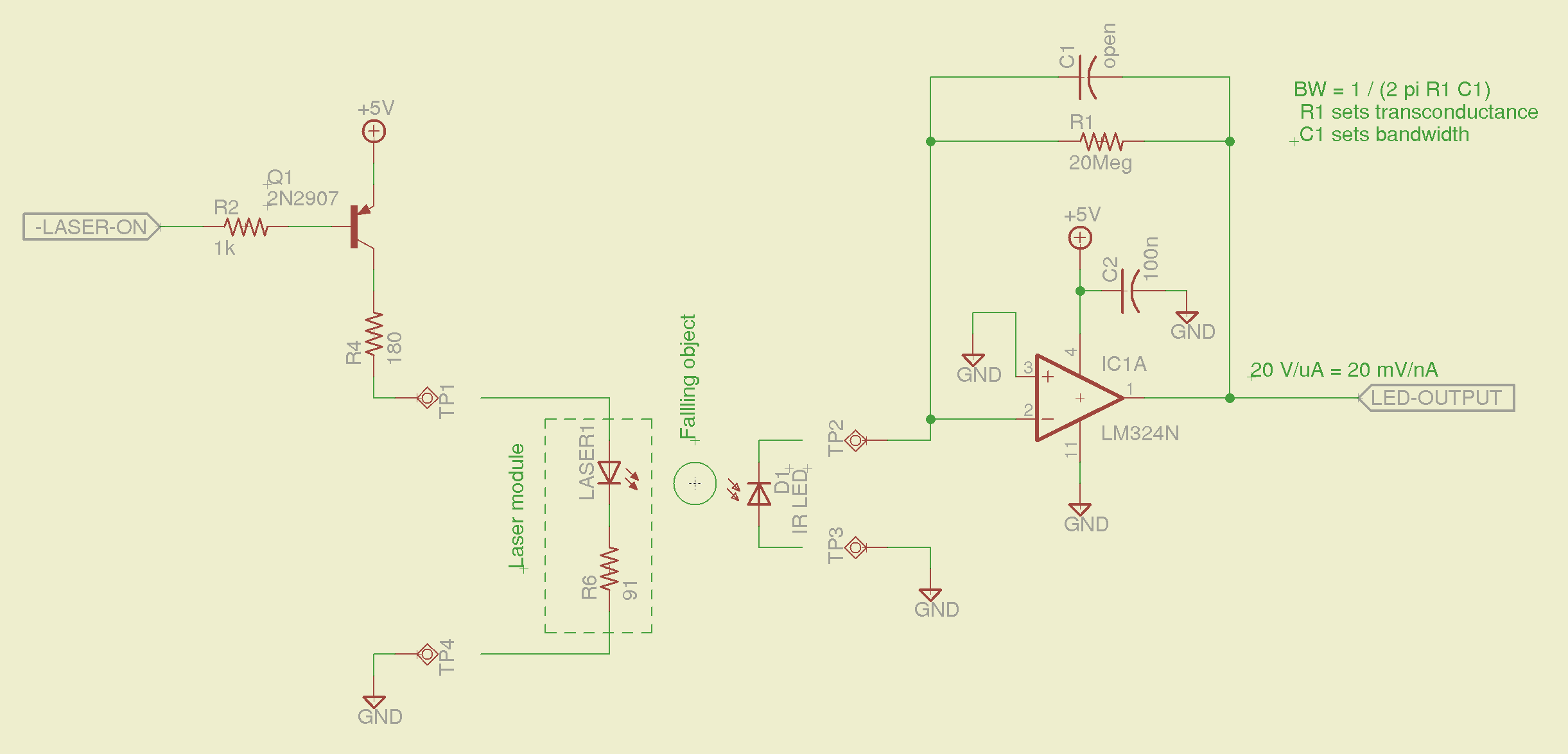
The laser-photodiode detector:
Laser-photodiode detector – schematic
The 20 MΩ resistor sets the gain at 20 mV/nA, which is both absurdly high and seems to work. The IR LED serving as the photodiode doesn’t pass much photocurrent, particularly with the laser running just above threshold, but the fact that it’s totally unresponsive to room light helps a lot; there’s something to be said for a narrow spectral response, which a real photodiode doesn’t have. I do have some IR photodiodes in tinted packages and might be forced to do some rummaging.
I expected to need a comparator after the transconductance amplifier, but with that much gain the LM324 has a nice, steep edge when the object goes past. The laser beam is small enough that there’s not much error due to convolving the object’s edge with the beam; it’s basically binary.
With the LM324 quad op amp running from +5 V, its output can’t get above +4 V. That’s good enough for a logic-level trigger, although a real circuit should use something like the MAX4330 I hacked into a DIP footprint.
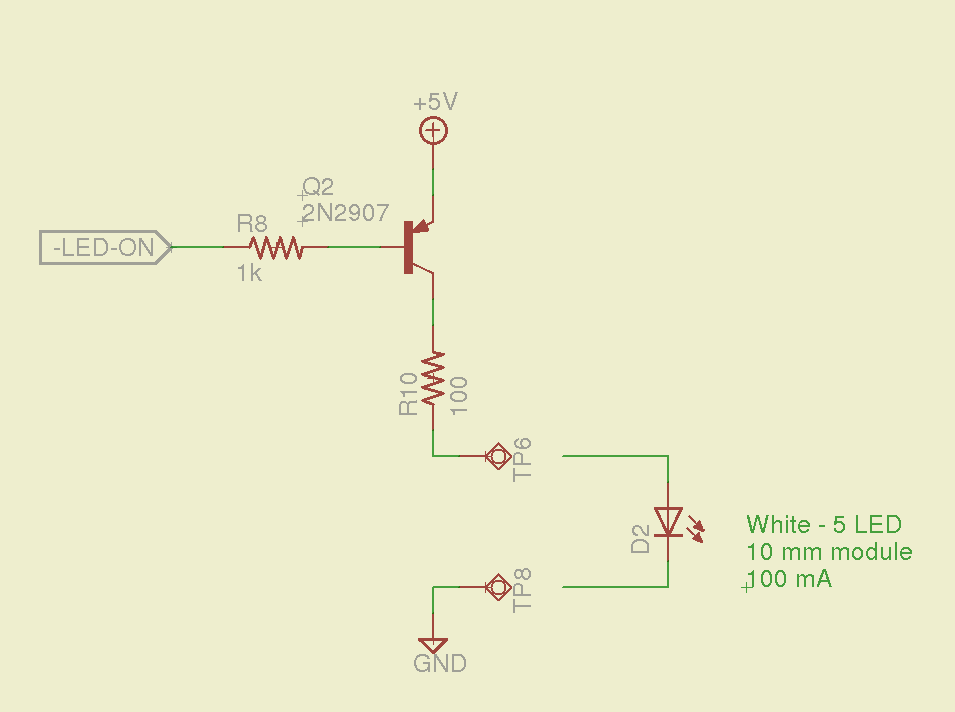
The white LED driver uses a 10 mm package with five white LED chips in parallel that runs at 100 mA:
White LED driver – schematic
I found an LED lashup that I’d built to light up a bird box, so the resistor (which is 12 Ω, not the 100 Ω due to a finger fumble) actually lives at the LED on the other end of the cable, inside a heatshrink strain relief.
The Xenon photoflash driver uses a small relay hacked into the trigger circuit, with a Schottky diode to recirculate the winding current when the transistor turns off:
Xenon flash relay driver – schematic
The diode increases the relay release time, which doesn’t matter here.
The delays from the laser beam break to the flashes should be variable, so there should be a knob with a pushbutton: turn to set the Xenon flash delay, push-and-turn to set the LED flash delay. I doubt that this calls for a digital display, as you can see whether the flash happens at the right time…
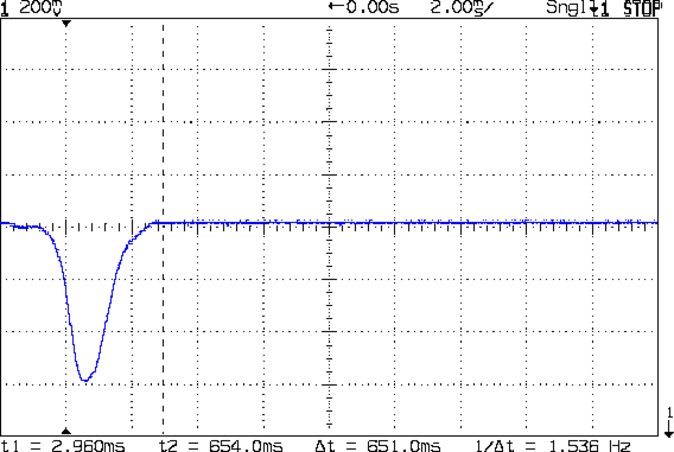
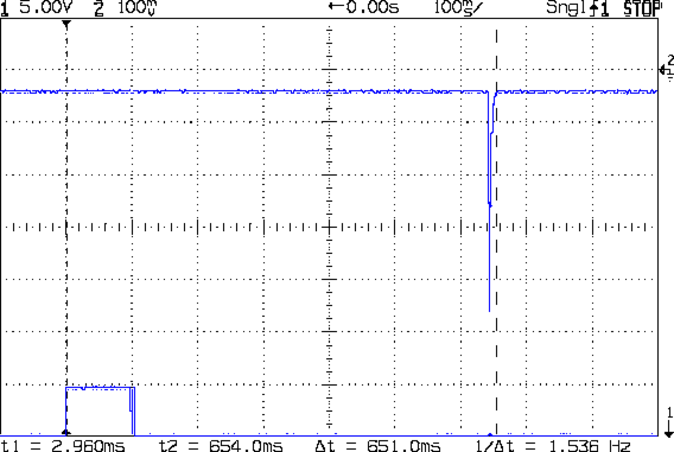
The blip comes from the shaft of a small screwdriver falling through the beam.
That’s in photovoltaic mode directly connected to the oscilloscope, but you’d want to run it through a low-gain transimpedance amplifier to get the zero bias photocurrent and a comparator for a clean digital edge. That’s obviously overkill for a simple optical interrupter, but the analog circuitry should come in handy for something else later on.
OK, now I can detect a moving object, trigger a camera, and fire a xenon flash, all under an Arduino’s control…
The CHDK firmware for Canon point-and-shoot cameras includes a USB remote trigger feature that depends on simply applying +5 V to the USB power leads, which is exactly what happens when you plug an ordinary USB cable into a PC.
Chopping up a spare cable, adding header pins, attaching a bench supply, and whacking the pins with clip leads showed that the camera takes quite a while to haul itself to its feet and click the shutter:
Canon SX230HS – USB trigger – flash
That’s with:
Manual mode: preset shutter & aperture
Manual focus
Focus assist off
Image stabilization off
AF guide light off
Red eye reduction off
Flash enabled, medium intensity, precharged
Turning the flash off slightly reduces the delay, at least judging from when I hear the shutter click while watching the trace trundle across the screen. I may have forgotten to turn something else off, but I doubt it’ll get an order of magnitude faster.
I’d hoped to synchronize an outboard flash with the shutter, but watching a few traces shows that the time from trigger to flash isn’t very consistent; maybe 100 ms jitter, more or less.
The CHDK motion-sensing script works and is “lightning fast”, but it turns out that lightning strokes actually glow for tens to hundreds of milliseconds, so my 1 ms xenon flash will be over and done with by the time the script reacts and opens the camera shutter.
Other ways to synchronize an outboard flash with the shutter:
Fire the outboard flash from the camera flash, with the camera flash inside a shield
Use an absurdly long shutter time with the camera & objects inside a very, very dark enclosure
Use the CHDK motion detection script, but blink an LED into the lens to trigger the shutter, then fire the xenon flash to expose the image
Choice 1 has positive synchronization to the camera shutter, but the shutter delay jitter means the flash won’t happen after a fixed delay from the triggering event. Maybe it’s not as bad as I think.
Choice 2 requires that the shutter stay open longer than the maximum delay jitter, so the flash will happen at known time after the triggering event. I like that, but not the dark enclosure part.
Choice 3 depends on the timing jitter of the script, which should be on the order of a few tens of milliseconds. A shutter speed of 1/25 s = 40 ms might be Good Enough.
This obviously requires a bit of Arduino fiddling…








 The Smell of Molten Projects in the Morning