
Some upcoming presentations on 3D printing need a way to show what’s going on inside the box. I’ve had various webcams affixed to various parts of the Thing-O-Matic, but nothing worked quite right: the camera was either in the wrong spot, at the wrong angle, or just flat-out in the way.
The helmet mirror project produced a trio of three-draw telescoping shafts that looked promising, so I drilled suitable holes in two chunks of scrap make-from plastic and produced a pole mount for a Logitech camera without doing a bit of machining. The camera wants to clamp onto a notebook and works fine atop a block of acrylic, with the cable secured to the base of the pole to prevent the whole thing from falling over at the slightest tug.
I briefly considered printing a nice clip to hold the cable to the pole, then came to my senses and used a cable tie. After all, that’s what they’re for, right?
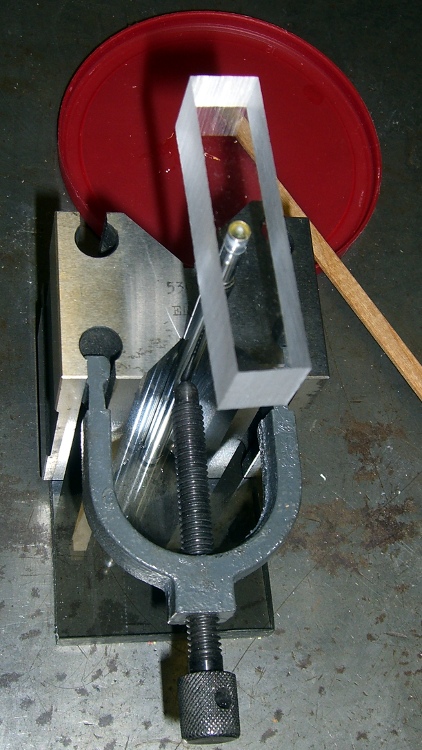
A dot of clear epoxy in each hole prevents the blocks from rotating on the shafts; they’re sufficiently un-round to give it a decent grip. I clamped the pole in a V-block to keep it perpendicular to the base while the epoxy cured:
The white LEDs under the Z-stage produce far too much glare and reflect in the Kapton tape; a switch to knock ’em off for video viewing seems in order.
(If anybody else is keeping track, this is Post 1000. Although we humans love numbers with plenty of zeroes, Post 10000 will pose a challenge…)
 The Smell of Molten Projects in the Morning
Comments
11 responses to “Thing-O-Matic: Webcam Pole Mount”
I was thinking that the white LEDs might still be useful as fill light, at reduced current. So I figured maybe you could switch a resistor into the circuit to dim them some, but that doesn’t give much control, and could lead to flicker or uneven brightness. Then I thought about a variable current regulated power supply, which seems a little overkill. I suppose you could PWM them, but that would likely beat somehow with the camera and cause banding or other artifacts. Could it be that I am overengineering this?
No more than necessary, I’m sure… [grin]
Better that, than no engineering at all. Selah.
Looks good Ed. My bot always bangs its way out that window a lot. So, I’m just giving you a note from my own trepidations of location. I know in your thoroughness you planned for a print where the X doesn’t glide on those unrestricted bearings right into the pole. ;-)
But, my setup does have the ABP with the wiring attached to that side of my bot. Yours is the HBP with attachments on the front?
Yeah, having the platform poke out the front during the build is just another one of those little annoyances. The whole printer now sits on a plank that keeps the camera out of trouble: I put it there when I need it and put it on the side when I don’t.
The HBP terminals stick out the front so they don’t scrape on the X home switch, which seemed like the least awful orientation. Of course, the cables whack the front window even more often…
PWM dimmer via 555 IC.
Sorry – Didn’t see the need you are facing. You’ve already got the answer but, here are some links. These are what I am referencing for my LED PWM dimmer build right now.
http://www.satcure-focus.com/tutor/page10.htm
http://www.reuk.co.uk/LED-Dimmer-Circuit.htm
http://pcbheaven.com/circuitpages/LED_PWM_Dimmer/
Since I’m EE ignorant I have chosen the last link from which to build. Less caps and possibly closer to 0%-100% range? I don’t know – probably – subconsciously – I like the presentation, schematic, video and BOM. Whatever – for my bot and the little LED quantity and low power and such – It likely does not matter. They will all work.
I’m not sure about the pcbheaven.com circuit: the OUT and DIS terminals seem reversed and you really want a small cap on the CONT pin to keep that voltage from bouncing around. On the other paw, the 555 is sufficiently weird that nearly any connection will do something, even if not quite what you expected.
In these days, though, the easiest and cheapest way to do LED dimming would use an 8-pin microcontroller, a power MOSFET, two pushbuttons, and a handful of code…
I added a switch to turn the ring LEDs off: the strips along the front opening cast enough light for the camera and it works perfectly!
Gotcha – Now, I just had a brain fart. Maybe you could know the frame rate of your cam (given) and then set a PWM circuit frequency for lights to be 180 out of phase with the camera. You know, one of those all powerful programmer using microcontroller sort of actions. ;-) So, you see the light but the camera takes the pictures in the off cycle when it is dark. Clear vision for you. No glare for the cam. Maybe too much work but sure Geeky Cool.
I bet there’s a little PCB trace deep inside the camera pulsing at the frame rate, but … [grin]
Argh – I forgot. Since you did not volunteer and I did not ask I did not know which is better. You did tell me out of my three circuits under consideration I chose the worst case. Ed, which of the 2 remaining circuits would be closer to a good circuit for PWM dimming using the 555? Or if you would be so kind – what would be good circuit using the 555, caps, 2N3904 transistor, a pot and resistors w/o a microcontroller and programming?
Without actually building ’em, it’s impossible to say…
The satcure-focus.com one seems aggressive; it runs the LEDs at 500 mA and 10% duty cycle, but any glitch (as in, a goof while you’re adjusting it) will burn ’em out in short order. If you’re using LED strips, then their internal ballast resistors will limit the current to the DC value and that circuit won’t give you the brightness you expect.
Hobson’s Choice says do the reuk.co.uk version. The 2N3904 can run up to 100 mA or so, but that’s not a lot in terms of LED strip lighting: maybe three or four 3-LED groups. The DC gain is fairly low, too, so tweak the base resistor for maybe 5 mA to keep it saturated.
Better: ditch the NPN, get a power MOSFET, and be happy…
[…] Logitech notebook webcam that peers into the Thing-O-Matic has terrible dynamic range compensation; turning on the LED ring […]