Ed Nisley's Blog: Shop notes, electronics, firmware, machinery, 3D printing, laser cuttery, and curiosities. Contents: 100% human thinking, 0% AI slop.
Tag: Thing-O-Matic
Using and tweaking a Makerbot Thing-O-Matic 3D printer
The Skeinforge Outline plugin draws a rectangle around the first perimeter layer of an object. I use that single-width, single-layer extrusion to monitor the height of the nozzle above the build platform and the tilt of the plate. The Outline extrusion will either peel off separately or come off as the film peels away from the plate when I twist the object off.
These Outlines come from a variety of objects. The one in the lower left was a test case that I stopped after extruding only the Outline.
ABS coatings from aluminum build plates
I measure the Outline along each edge; larger objects provide three data points along each side of the build platform.
The good part of this is that it reports the build platform’s behavior during an actual extrusion, so you can keep an eye on whether it’s drifting out of alignment. The aluminum plates present a sufficiently flat surface that any variations will be due to a non-level HBP or an off-calibration Z-axis.
These numbers from around a large Outline told me that I should tweak the Z axis height down by 0.1 mm to increase the first layer thickness back to about 0.33 mm. The lower-right corner was slightly thicker because the wiper hit the Thermal Core insulation.
0.24
0.22
0.17
0.27
0.17
0.27
0.22
0.28
0.32
0.22
0.21
0.24
Given those values, I can tweak the leveling screws to adjust the platform tilt. What I don’t have at this point is any long-term record of how consistent my hacked HBP will be. But at least I’ve got numbers!
Printing ABS objects on an ABS film atop a heated aluminum plate works just about as perfectly as I could want, as witness those calibration objects. It turns out that the thickness of the ABS film makes a big difference in how well the first layer bonds to it.
I’m coating the plates with scrap ABS objects dissolved in MEK, because MEK seems to be less aggressively flammable than acetone. It smells horrible, though, and spreading a layer of toxic gunk with the consistency of honey can’t possibly be good for me. I use dead credit cards as spreaders and wonder if there’s a better way; a brush would clog up almost instantly.
The rough rule of thumb:
If the ABS layer isn’t obvious, then it’s too thin.
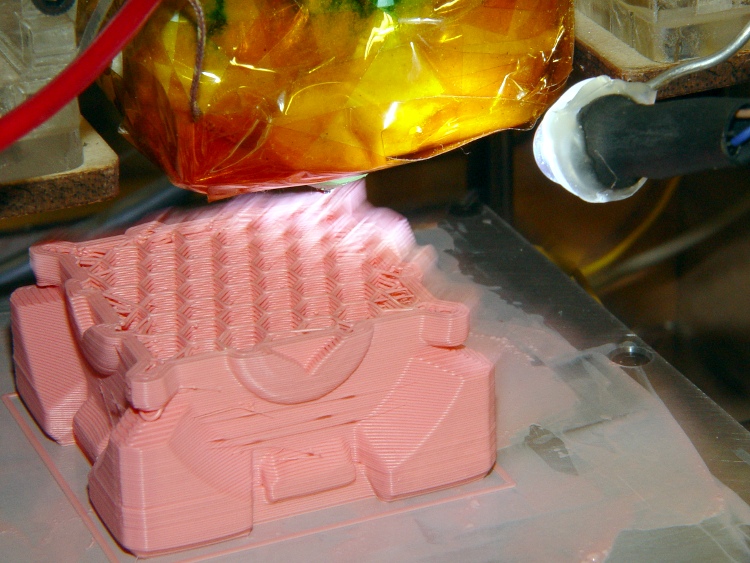
A Companion Cube growing out of a good pink film layer:
Companion Cube on ABS coated plate
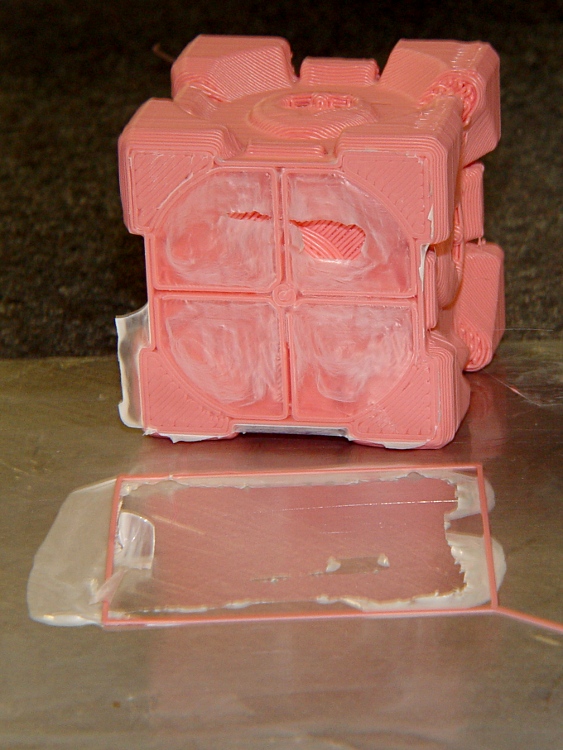
Peeling a smaller Cube off a plate shows how well it bonds to clear film. Notice how the film peels off the build plate without leaving any residue except for a tear in the film covering the hollow underside of the Cube.
Companion Cube – Bottom surface with ABS coating
These outline extrusions show the effect of a too-thin film, where the extrusion simply peeled off the film. Where it’s thick enough, the extrusion is welded right to the surface. Intermediate thicknesses tend to rip on both sides of the extrusion.
ABS coatings from aluminum build plates
In round numbers, the perfectly formed film at the lower left is between 0.05 mm (the darker regions) and 0.09 mm (the deepest pink). The others range from 0.02 mm to 0.05 mm and are too thin for good bonding. Even the thickest film doesn’t add much to the first layer thickness.
The other part of the secret is extruding the first layer at 10 mm/s, which is 25% of the 40 mm/s I use for the rest of the object layers. The platform is at 120 °C, the Thermal Core at 210 °C, and the extrusion sticks like it’s welded… which, in fact, it is.
I think that a too-thin film cools the extrusion before it can bond with the film, while a just-right film melts slightly on contact. Extruding at 10 mm/s guarantees enough contact time for the filament to melt the film and cool down before the nozzle puts any tension on it: corners come out perfectly.
The other part of the puzzle requires an absolutely level build platform at a constant height from the nozzle. The platform leveling described there helps, but it’s a hassle to get everything set up.
This should go without saying, but I got it wrong the first time: protect those little pins that drive the ABP belt motor if you’re not using them, particularly if you have a grounded aluminum build plate a few millimeters away.
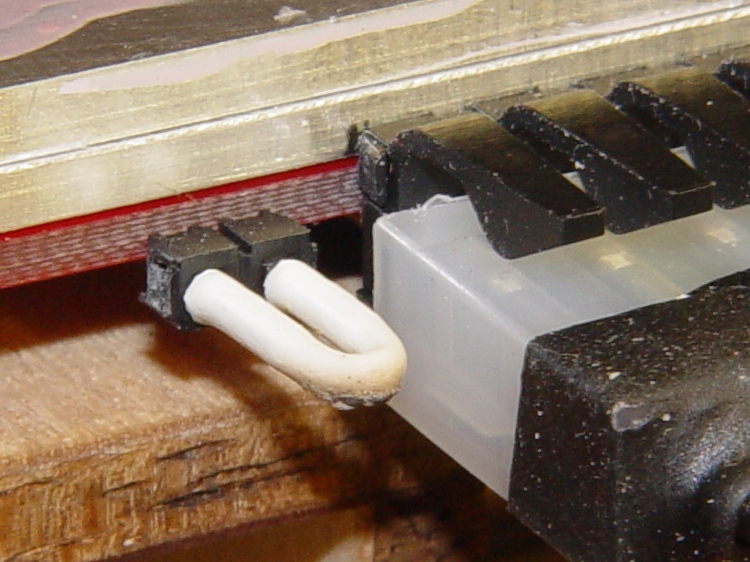
I used a pair of jumpers, side by side, that did not connect the two pins, because they were close at hand when I first shorted the build plate to the pin carrying +12 V. A jumper that connects the pins will blow the motor control MOSFET on the Extruder Controller if you (or the G-Code) should happen to ever turn it on by mistake, so you need two.
Protected motor terminals on HBP
Better, just put some heatshrink tubing over both pins.
Heatshrink on ABP motor terminals
You could print up a little dummy plug for the thing…
The first aluminum build plates had to fit around the gimcrackery atop my tweaked ABP: two solderless grounding lugs and a lump of Wire Glue. The new HBP setup put the grounding lug below the fixed plate and did away with the lump, so the removable plate could have five holes and a wiper cutout without any fancy trimming.
I’d squared up three plates and machined only two for the ABP, so I had one plate that just needed drilling. Rather than machining two new plates, I filled the cutouts on the old plates with JB Industro Weld epoxy, flycut the excess, and drilled new holes.
Flycut and drilled epoxy fill
This was straightforward manual CNC: get the plate square on the table, touch off the plate edges, and then drill the holes in two steps.
If those thin epoxy webs break off the outside of the holes, it’s not the end of the world: the plates won’t go anywhere because they’re indexed by the holes on the other side.
Memo to Self: Next time, make a fixture to hold the plates relative to a starting hole and eliminate all the tedious alignment steps.
An aluminum plate coated with ABS provides a very flat, very adhesive build platform, but that kludge atop the ABP didn’t provide enough stability or adjustability. I decided to scrap the ABP and modify the HBP to use the same removable plates.
The ABP kludge involved simply resting an aluminum plate atop the Heater PCB, which is ordinary PCB material with heat applied to only one surface and, on my ABP, has developed a pronounced warp. I decided to clamp the Heater to a thinner aluminum plate, ignoring the fact that PCB material has a much higher coefficient of thermal expansion than aluminum. Although the heater PCB may want to distort, I’m counting on the aluminum to maintain a flat upper surface.
HBP Heater and aluminum sub-platform adjuster
Those bolt heads sit in a 0.2 mm recess that lowers them just enough to be flush with the surface of the removable plate.
Then the removable plate sits atop the flat plate atop the heater: the two plates should snuggle together in Z and I think there’s no need to clamp them together. The holes have slight clearance around the bolt heads, making the plate a drop-in fit.
HBP with aluminum plates
This view shows the small notch filed in the front left corner of the removable plate. I use a small scraper blade to pry the hot top plate loose after a build session, grab it with pliers, and carry it away for cooling. The Sherline mill’s tooling plate provides a wonderful cold surface and the ABS gives off a distinct snap when it cools enough to detach from the aluminum plate.
Separation notch in aluminum build plate
Although it’s not automated, swapping plates isn’t a tedious affair. The real delay comes from heating a cold plate to operating temperature again, which requires about five minutes.
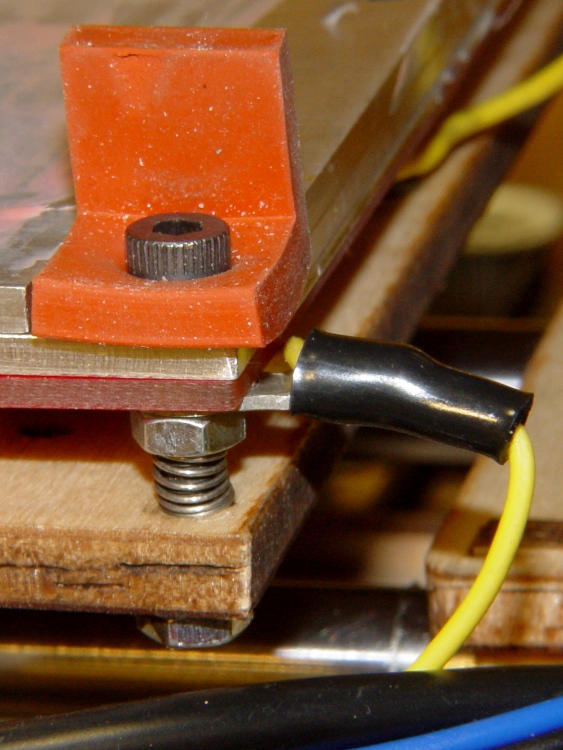
The silicone wiper holds the removable plate against the bolt heads, providing some stability in the XY plane. There’s no need for precise indexing.
HBP Heater and sub-platform with wiper
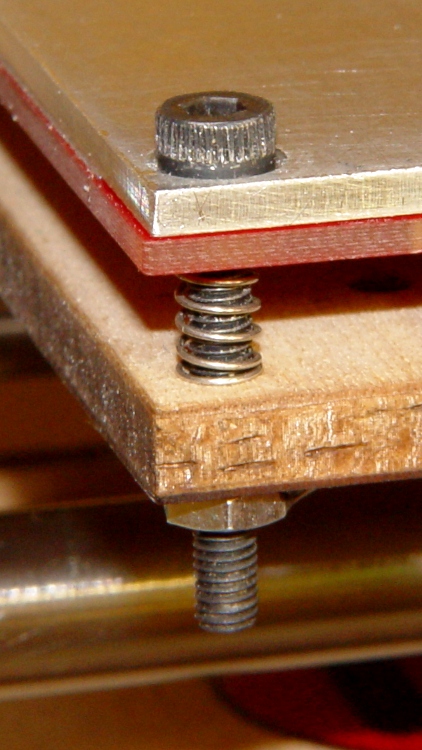
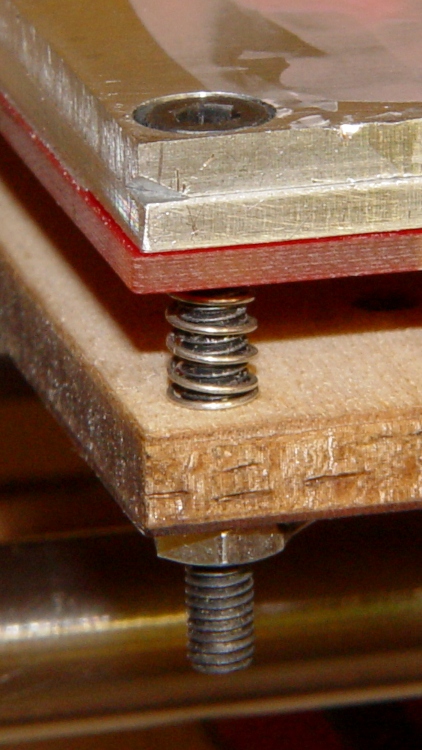
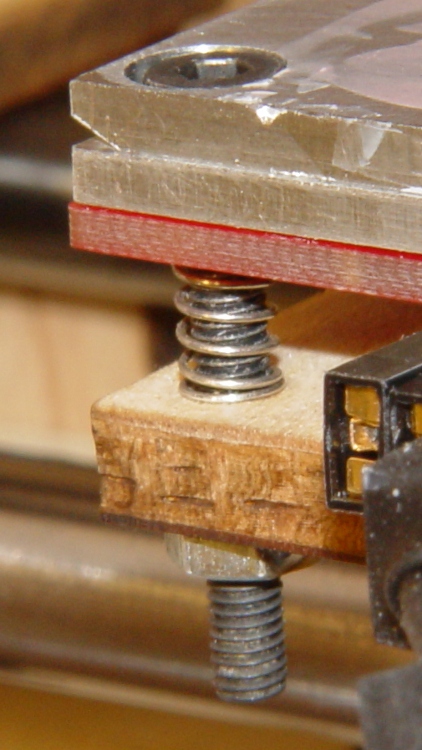
The Heater normally attaches to the HBP with six bolts, which severely overconstrains the surface. Here, three (center left, front+rear right) bolts clamp the heater to the sub-plate and three (front+rear left, center right) extend through the HBP plywood to nuts epoxied to the bottom surface.
Six matching springs from my Parts Heap support the whole affair, with the three on the clamping bolts being more compressed by the nuts below the Heater PCB. They come without pedigree and nearly anything that fits should work; it’s not like they must support an engine block.
The M3 bolts have a 0.5 mm thread pitch, so one turn changes the plate height by 0.5 mm and 1/6 turn (which is easy to make with a hexagonal wrench) changes it by 0.08 mm. The threads catch on the plate and Heater, so I may saw off some longer partially threaded bolts to get a smooth cylinder through the holes.
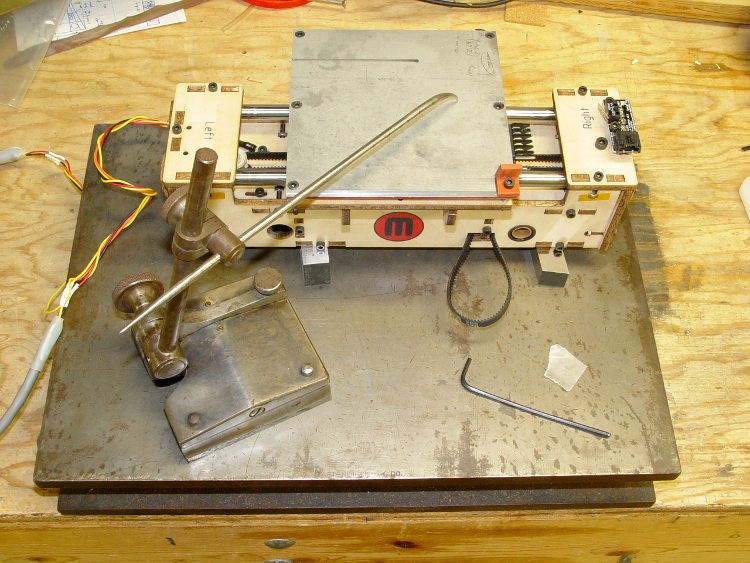
I did the initial adjustment on the surface plate with the entire XY stage assembly up on parallel blocks. Those blocks really should be under the Y guide rods inserted in the bearings, but this was enough to get a good first approximation to a level surface.
HBP initial height adjustment
And then it went back into the Thing-O-Matic…
I thought of the X Rod Follower while I had this all apart, but after putting it together, I wasn’t going to build the follower just to tear the stage down right away.
As the Y stage moves front-to-back, the X axis motor wires tend to bend at the cable tie lashing them to the Y stage. While I had the XY stage apart, I wrapped a bit of self-vulcanizing tape around the skein of motor wires to provide some strain relief.
A batch of LED ring lights arrived from halfway around the planet and I’d earmarked one for a microscope ring illuminator, despite the crappy color spectrum of white LEDs. It’s better than the fluorescent desk lamp I’d been using up to this point.
This shows the business end of the LED ring light, which would probably look better more professional without the full-frontal Barbie color scheme:
Microscope LED Ring light – snout view
It’s less overwhelming from the top:
Microscope with LED illuminator
The power cable came with the ring. I unsoldered it, fed the end through the shade, resoldered it, snipped off the automobile lamp adapter, wired it to a switch and a 12 V 200 mA wall wart, and hot-melt-glued the switch to the microscope. Yet another vampire load, alas.
The two parts must be printed separately to eliminate any problem with overhang, as the finished widget would have vertical walls on both sides. I thought about support material, realized that would be a lot like work, and split the thing into two parts.
LED ring light – mounting plate and shade
The walls on the shade ring show the same backlash problem that cropped up there; I built these before tweaking the belts.
The mounting plate screws into the microscope’s accessory thread:
Microscope LED Ring Light – Mount Plate
Admittedly, “screws into” may be an exaggeration: the mount is just a cylindrical feature slightly larger than the microscope’s minor thread diameter; it’s barely more than a snug friction fit. I clipped out four small sections to allow that ring to bend slightly as it engages the threads.
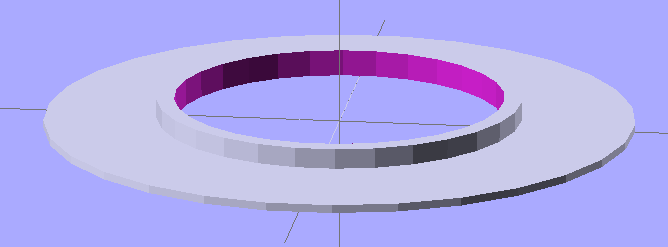
A shade contains the LED ring and keeps direct light off the objective lenses. There’s a tiny hole on one side to let the power wires out:
Microscope LED Ring Light – Shade
The two parts got glued together with the same ABS-in-MEK gunk that I apply to the aluminum build plate:
Clamping LED ring light parts
I applied three blobs of hot-melt glue inside the shade, lined up the LED ring’s power wire with the exit hole, and smooshed it into place. Pause for a breath and it’s done!
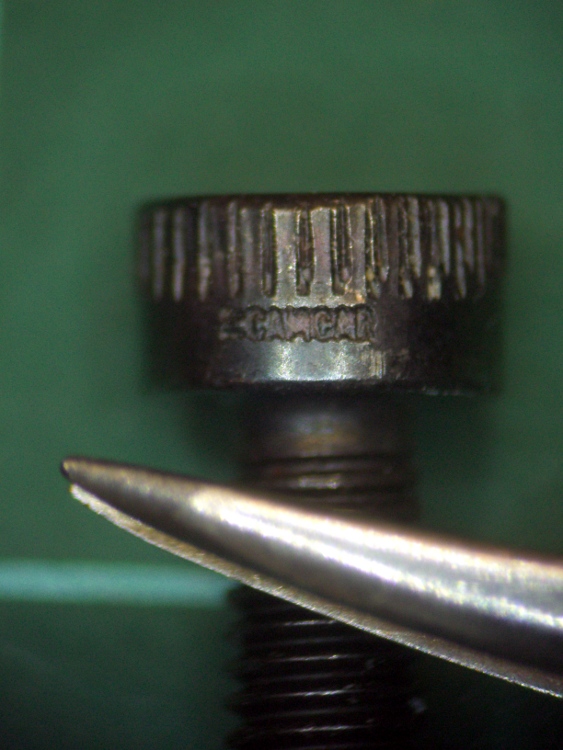
The result actually looks pretty good, despite the weird yellow-and-blue spectrum you get free with every “white” LED. I reset the camera’s color correction using a white sheet of paper. This is an ordinary M3 socket head cap screw, familiar to Thing-O-Matic owners everywhere, and a tweaked needle-point tweezer:
Sample image using LED ring light
The microscope camera mount works surprisingly well, particularly given how simple it was to build.
The OpenSCAD source makes the shade walls a bit taller than you see above. When I run out of pink filament, this one’s on the rebuild list!
// Microscope LED Ring Illuminator Mount
// Ed Nisley - KE4ZNU - Mar 2011

// Build with...
//	extrusion parameters matching the values below
//	2 extra shells
//	3 solid surfaces at top + bottom

Build = "Ring";					// Mount or Ring

// Extrusion parameters for successful building

ThreadZ = 0.33;						// should match extrusion thickness
WT = 1.75;							// width over thickness
ThreadWidth = ThreadZ * WT;			// should match extrusion width

HoleWindage = ThreadWidth;			// enlarge hole dia by extrusion width

// Screw mount dimensions

MountOD = 46.85 - ThreadWidth;		// Microscope thread diameter (thread minor)
MountDepth = 2.5;					// ... length
MountID = MountOD - 6*ThreadWidth;	// ID of mount body -- must clear lenses

echo(str("Mount ID: ",MountID));
echo(str("Mount OD: ",MountOD));

PlateThick = 3*ThreadZ;				// Thickness of mounting plate beyond rings

echo(str("Plate: ",PlateThick));

// LED Ring holder dimensions

RingID = 54.0;
RingOD = 71.0;
RingFit = 0.5;						// radial gap from ID and OD

InnerShade = 6.0;					// Shade walls around ring
OuterShade = 10.0;
ShadeWall = 4*ThreadWidth;			//  wall thickness

HolderID = RingID - 2*RingFit - 2*ShadeWall;
HolderOD = RingOD + 2*RingFit + 2*ShadeWall;

echo(str("Holder ID:",HolderID));
echo(str("Holder OD:",HolderOD));

LeadWidth = 4.0 + HoleWindage;		// LED power lead hole
LeadTall = 2.0 + HoleWindage;

Protrusion = 0.1;					// extend holes beyond surfaces for visibility

//---------------
// Create thread gripper and plate

module Mount() {

  difference() {
	union() {
	  translate([0,0,PlateThick])
		cylinder(r=(MountOD/2 + HoleWindage),h=MountDepth);
	  cylinder(r=HolderOD/2,h=PlateThick);
	}

	translate([0,0,-Protrusion])
	  cylinder(r=MountID/2,h=(PlateThick + MountDepth + 2*Protrusion));
  }

}

//----------------
// Create LED ring holder

module Ring() {

  difference() {
	union() {
	  cylinder(r=HolderOD/2,h=PlateThick);

	  translate([0,0,PlateThick]) {
		difference() {
		  cylinder(r=HolderOD/2,h=OuterShade);
		  cylinder(r=(HolderOD/2 - ShadeWall),h=(OuterShade + Protrusion));
		}

		cylinder(r=(HolderID/2 + ShadeWall),h=InnerShade);
	  }
	}

	translate([0,0,-Protrusion])
	  cylinder(r=HolderID/2,h=(InnerShade + PlateThick + 2*Protrusion));

	translate([(HolderOD/2 - ShadeWall/2),0,(PlateThick + ShadeWall/2 + LeadTall/2)]) {
	  scale([ShadeWall*2,LeadWidth,LeadTall])
		rotate(a=[0,90,0])
		  cylinder(r=0.5,h=1.0,center=true,$fn=12);
	}
  }

}

//---------------
// Build what's needed

if (Build == "Mount") {
  Mount();
}
else {
  Ring();
}







 The Smell of Molten Projects in the Morning