The Smell of Molten Projects in the Morning

Ed Nisley's Blog: Shop notes, electronics, firmware, machinery, 3D printing, laser cuttery, and curiosities. Contents: 100% human thinking, 0% AI slop.

Tag: Thing-O-Matic

Using and tweaking a Makerbot Thing-O-Matic 3D printer

  • Thing-O-Matic: Z-Minimum Platform Height Switch

    Z-minimum switch - left view
    Z-minimum switch – left view

    Getting a good bond between the build platform and the first extrusion layer depends on the nozzle height above the platform: too high and it doesn’t stick, too low and the excess plastic ruffles up to ruin the next layer. I’ve been setting the height manually, but that’s tedious, fraught with error, and goes best with a cool platform that may change size when it heats up. Measuring the Outline or Skirt extrusion provides after-the-fact information about build platform alignment, but doesn’t ensure that the current print will work.

    The best way to do this is to measure the actual height of the nozzle above the build platform immediately before starting the extrusion, with everything at operating temperature, then set the Z axis so that Z=0.0 puts the nozzle on the platform. Nophead put a height measurement station beside the build platform and I’ve built a tool length probe for my Sherline, so I’m not breaking new ground here.

    The catch is that the switch must sit flat on a 120 °C platform, withstand being poked with a 220 °C nozzle, repel ABS, and trip with better than 0.1 mm repeatability. I don’t know that what I’ve done here meets all those criteria, but it’s a first step along the way.

    The top picture shows a surplus SMD pushbutton switch with a metal actuator button mounted on a small steel strip. The gray epoxy blob to the front secures a brass tube that protrudes from the bottom into the middle socket head cap screw along the right edge of the platform.

    [Update: The surplus place was likely Electronic Goldmine, but it seems they have no more. Sorry. Maybe glue a metal disk atop a plastic switch?]

    Drilling thin sheet metal
    Drilling thin sheet metal

    The steel strip was an RF shield from a junked wireless network card. I bent the edge in a small sheet-metal brake to keep the whole thing rigid and, somewhat to my surprise, the strip remained as flat as I can measure throughout the adventure.

    Drilling a good hole through sheet metal is easier when you clamp it between two sacrificial sheets and drill through the whole stack. That keeps the metal from warping and gives you a nice, circular hole; otherwise, you get a rumpled sheet with a triangular hole that’s good for nothing. You can see the bent edge sticking up on the left; the drill center is 4 mm from that side.

    The brass tube in the hole and the bent edge constrain the switch to a known position relative to the underlying HBP. The tube fits snugly in the center bolt’s hex socket to set the XY position and the bent edge keeps the whole affair parallel to Y. That allows the upper plate to shift slightly in XY while the switch remains in the same location relative to the TOM’s XY home switches (the bent edge allows a bit of slop in X for the top plate’s hole tolerance)

    The Z height, of course, depends only on the altitude and thickness of the top plate, which is exactly what’s being measured relative to the nozzle.

    I built it in two stages: epoxy the brass tube, then mount the switch and a second tube as a strain relief around the wire. A layer of Kapton tape insulates the SMD switch terminals from the steel strip; the epoxy sticks well enough to the tape for my present purposes.

    Attaching Z-min switch and cable
    Attaching Z-min switch and cable

    None of the dimensions are critical, although having the whole assembly narrow enough to stay out of the build area seems like a Good Idea. The center line of the platform bolts sits 4 mm inward of the plate edge, to give you an idea of the scale.

    The right-side bulldog clamp holds it securely in place, with the wire from the switch threaded beside the platform and wrapped around a solderless lug on the front corner:

    Z-minimum switch on build plate
    Z-minimum switch on build plate

    I think a tiny neodymium magnet embedded in the top plate would work just as well, although it’d tend to suck steel swarf out of the rest of the shop. This is not the right place for a random speck of grit!

    The wire connects to a 24 inch CD-ROM audio cable fresh from the usual eBay supplier. I snipped off the end and added a resistor to resemble an MBI mechanical endstop switch: 10 KΩ to +5 V, switch connects the resistor to ground. No LED, alas.

    Next, a dab of G-Code to poke the nozzle into the switch…

  • Thing-O-Matic: Build Plate Clamps

    I’m using a removable aluminum plate atop a fixed plate on the HBP, but haven’t clamped the two together because I couldn’t figure out how to do it without an overly complex gadget.

    It turned out to be easier than I expected, after I found a couple of bulldog clips in a drawer while looking for something else:

    Aluminum plates with bulldog clips
    Aluminum plates with bulldog clips

    The clip on the right must be well toward the rear in order to clear the X axis limit switch and its cable. The clip on the left then goes near the front just for symmetry.

    The nozzle can’t quite reach the left clip, but it can clobber the right one. I try to align the end of the clip with the middle of the bolt heads to keep them out of the build area.

    The wire handles don’t quite touch the TOM’s case on the left side and have plenty of clearance on the right. They don’t get too hot after an hour’s worth of printing; clips with solid metal handles wouldn’t work well at all.

    News flash: that’s almost the last of the pink plastic!

  • Thing-O-Matic: Fastest Cephalopods EVAH!

    Having printed out a quartet of small octopi in half an hour, I decided to see just exactly how fast this printer can go with its new steppers.

    The starting point:

    • Print = 40 mm/s
    • Travel = 60 mm/s
    • Extrude = 2 rpm
    • Thickness = 0.33 mm
    • Width = 0.58 mm = 1.75 w/t
    • First layer = 10 mm/s

    Which produced another batch of these cuties:

    Small octopus quartet
    Small octopus quartet

    From here on, though, they’re full sized critters that sprawl over the entire aluminum plate.

    Print = 40 mm/s, travel = 100 mm/s, extrude = 2 rpm:

    Octopus at 40 mm per sec
    Octopus at 40 mm per sec

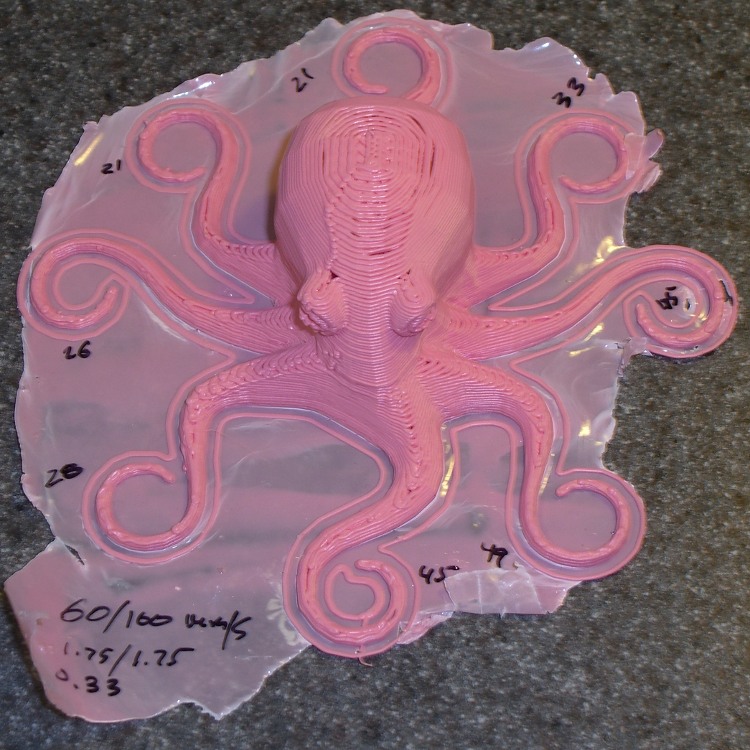
    The numbers scrawled around the tentacles indicate the thickness of the single-layer Skirt extrusion around the outside of the octopus. The platform is high by 0.1 mm in the left rear and low by 0.1 mm in the right front.

    Print = 60 mm/s, travel = 100 mm/s, extrude = 3 rpm:

    Octopus at 60 and 100 mm per sec
    Octopus at 60 and 100 mm per sec

    Still low on the back and high in the front, which is comforting. I forgot decided not to adjust that before starting the next part; given my proclivity for hurting myself, that makes sense.

    Print = 80 mm/s, travel = 100 mm/s, extrude = 4 rpm:

    Octopus at 80 and 100 mm per sec - lost Y steps
    Octopus at 80 and 100 mm per sec – lost Y steps

    This one failed with at least two cases of Y step loss, giving it a rather rakish, swept-back ‘tude that doesn’t look all that bad on an octopus. The motor was still at 900 mA (REF = 1.8 V), so I goosed it to 1.1 A (REF = 2.2 V) and tried again:

    Octopus at 80 and 100 mm per sec - success
    Octopus at 80 and 100 mm per sec – success

    That one worked perfectly, which just goes to show that diagnostic tests never find the errors that crop up in real life.

    So here’s a data point: a Super Stock Thing-O-Matic laying down ABS at 80 mm/s!

    As it turns out, the TOM actually prints at top speed only up to about the eyeballs, at which point the Cool plug-in begins slowing things down. I started with a minimum of 15 s/layer, then dropped it to 10 s/layer for the 80 mm/s prints. It still takes about 25 minutes overall, with most of the time devoted to pasting the first layer on the build plate at 10 mm/s.

    I didn’t do any optimizing for these prints: I just increased the speeds & flows, then reduced the first layer speed ratio to compensate. I’m sure some tweakage would improve things, but the results look pretty good right out of the box!

    In particular, the Reversal plugin is still at 25 rpm, 90 ms in/out, 3 mm threshold, no early action. Those aren’t optimized, but the results seem workable.

    The Y axis motor has a winding resistance of 2.2 ohms, so 1.1 A dissipates about 2.7 W. I left the motors continuously energized for about four hours while printing, pausing to make pizza for supper, and printing some more. After an hour at 1.1 A, the Y axis motor was at the high end of “comfortably warm” to the touch and the driver chip was just barely over room temperature. No heatsinks, no fans, no muss, no fuss: the right steppers Just Work.

    This is without acceleration limiting, so the X and Y stages must accelerate to full speed in less than two full motor steps. That’s absurd, but that’s how it works right now.

    In truth, I think anything over 50-ish mm/s shakes the printer entirely too hard and certainly doesn’t print as precisely, so I don’t plan to run it at those speeds. Except maybe for demos.

    Cuing Jan & Dean on Turntable One…

  • Thing-O-Matic: Stronger Filament Tensioner Springs

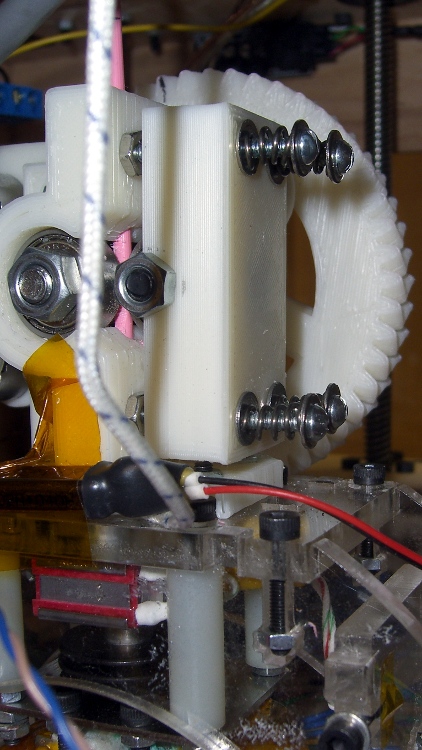
    Stronger filament tensioner springs
    Stronger filament tensioner springs

    When I built the Wade-ScribbleJ filament tensioner, I used four of the stiffest springs available in the Little Box o’ Small Springs. They came without a pedigree, of course, and worked quite well. However, the filament would occasionally stop feeding, usually after an intense series of reversals, and it seemed more pressure on the filament was in order.

    The 1.5 inch 4-40 screws limit the available length to no more than 12 mm and the tensioner must have at least 1 mm of free travel to accommodate filament thickness variations. Those springs had fairly dense coils and they were pretty much fully compressed.

    They turned out to compress 9 mm with 2.5 pounds applied, for a spring constant of 1.2 N/mm or, for we metric-challenged Yanks, 7 lb/in. Some rummaging turned up my Brownell’s No. 71 Compression Gun Spring assortment and I found a spring that compressed 5 mm with 5 lb applied: 4.4 N/mm or 25 lb/in.

    I know you’d love pix of that process, but I was already one hand shy of having enough to push the spring scale against the [4-40 screw + washer + spring + washer] over a metric ruler, then apply enough force to compress the spring  while reading the distance between the washers. Use your imagination, OK?

    I sliced four 4.5 turn lengths from that spring with a Dremel cutoff wheel, cleaned up the ends a bit to get them all to about 13 mm, reassembled the tensioner, and cranked the screws to compress the springs down to 8 mm. The quartet now apply something like 25 lb = 110 N to the idler bearing. That’s about four times what it was before, so that filament should have no reason to slip, even under cough extreme duress.

    Tomorrow: Applying some extreme duress…

  • Thing-O-Matic: Reset on Power (Not So) Good

    Having added a dummy load to pull a minimum current from both the +5 V and +12 V supplies, it seemed reasonable to connect the ATX +Power Good signal to the Arduino’s -Reset input. That ensures a power glitch will force a hard reset, rather than produce random crashes / instability / weirdness, and make the problem obvious.

    Of course, that presumes the power supply notices the glitch and drops the +Power Good line. That’s probably an incorrect assumption, but the only way to test it requires hitting the power supply with a crowbar and I’m just not going to go there.

    Anyhow.

    This also ensures the Arduino gets a hard reset when I turn the power off by triggering the manual shutdown button on the thermal lockout control box. The Arduino draws power through the USB cable from the PC (at least on the Foxconn box I’m using) and sometimes starts up crazy; that will no longer happen.

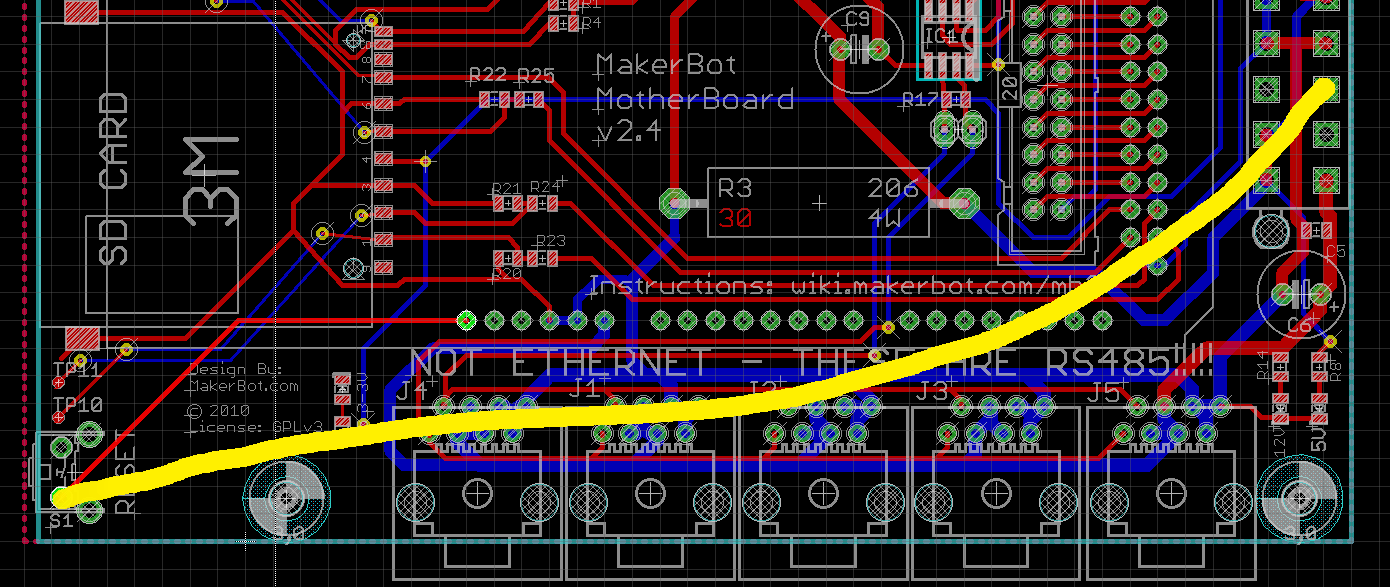
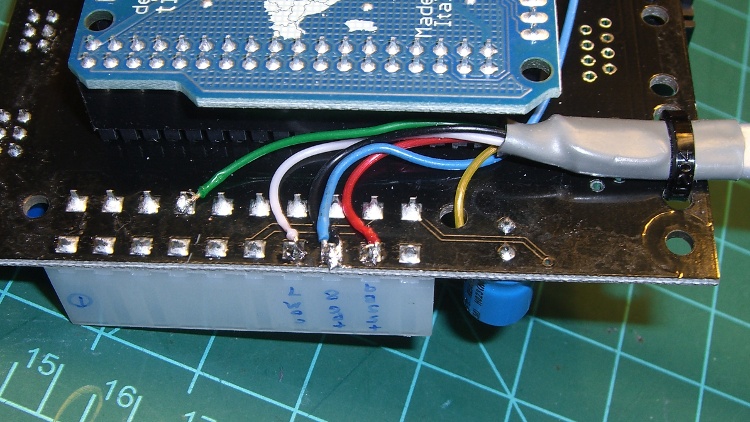
    The +Power Good signal arrives through the Gray wire on ATX pin 8 (it also drives an LED on the lockout box) and the -Reset signal is the outside pin on the Motherboard’s manual reset pushbutton. The new connection looks like this:

    Power Good to Reset - MB Schematic
    Power Good to Reset – MB Schematic

    Being no fool somewhat cautious, however, I added a switch that can disconnect the two lines; if it turns out the +Power Good signal has any glitches, I can use the original mode while scratching my head.

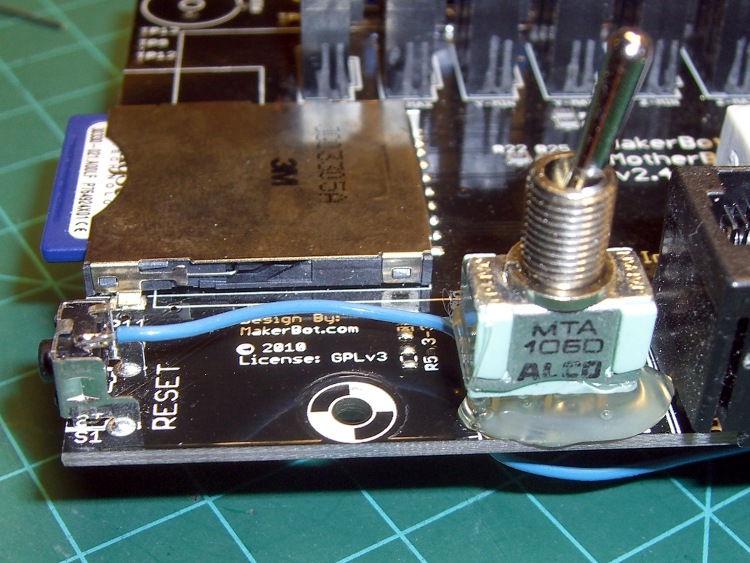
    A giant blob of hot melt glue holds the switch in position:

    Power Good Enable Switch to MB Reset Button
    Power Good Enable Switch to MB Reset Button

    A wire burrows through one of the unused RS-485 connector mounting holes under the switch on its way to the ATX connector. It’s the Blue wire below the board in the previous picture, enters from the top right here, and terminates on the third pad over with the Black wire that joins the cable on the way to the Lockout box

    ATX Power Good connection
    ATX Power Good connection

    Now I’ll see whether the Thing-O-Matic begins resetting at random moments. After doing all the various mods & improvements you’ve seen over the past few months the printer has been quite reliable, so I have some hope that this change will produce … no change.

    As a quick test, I let the printer sit all day with the Thermal Core and HBP temperatures cycling around 50 °C and all four steppers enabled. Any reset would disable the steppers and make itself obvious, but after two days it’s all good.

    One good sign: the LED ring around the extruder head just barely changes brightness as the heaters cycle.

    Oh, and the steppers don’t overheat, either. This thing is starting to behave like a real 3D printer should!

    If it does start resetting, however, I’ll add a latch inside the Thermal Lockout box that captures short +Power Good glitches and lights Yet Another LED.

  • Thing-O-Matic: Revised Wipe and Splodge

    Notched wiper
    Notched wiper

    So I finally got around to properly trimming & installing the silicone wiper to suit the aluminum build plates, then measuring where it sits in XYZ coordinates.

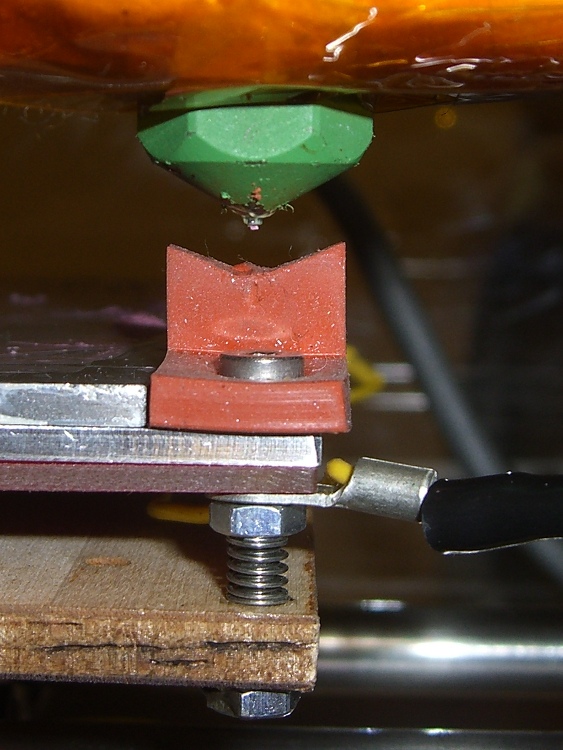
    The notched upper edge (that’s not a shadow) more-or-less matches the nozzle shape, but I doubt that’s critical. The key part: make it short enough to miss the bottom of the insulation blanket around the Thermal Core, which is much thicker on my Extruder than yours.

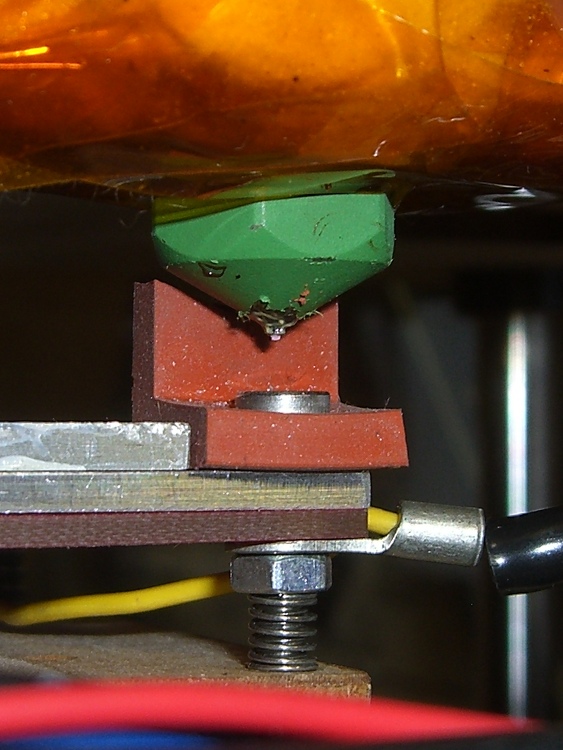
    From this angle you can see the nozzle just in front of the wiper. I used a low-profile bolt, although it’s still slightly higher than the top aluminum build plate.

    Nozzle in wipe position
    Nozzle in wipe position

    This G-Code routine helped figure out all the parameters. Define the maximum Z height properly, then fiddle with everything else to center the nozzle on the platform, pause in front of the wiper, and stop at the splodge position.

    (---- manual wipe and splodge alignment ----)
    (MakerBot Thing-O-Matic with aluminum HBP)
    (Tweaked for TOM 286)
    (Ed Nisley - KE4ZNU - April 2011)
    (-- set initial conditions)
    G21		(set units to mm)
    G90		(set positioning to absolute)
    (-- home axes)
    G162 Z F1500	(home Z to get nozzle out of danger zone)
    G161 Y F4000	(retract Y to get X out of front opening)
    G161 X F4000	(now safe to home X)
    G92 X-53.0 Y-59.0	(set XY coordinate zeros)
    G92 Z116.0    (set Z for HBP with aluminum sheet platform)
    G0 X0 Y0 Z10	(pause at center to build confidence)
    G4 P2000
    (-- manual nozzle wipe)
    G0 X56 Y-57.0 Z15	(move to front of cut-down wiper)
    G0 Z5   		(down to wipe level)
    G4 P4000		(Wait for filament to stop oozing)
    G1 Y-40	F1000		(slowly wipe nozzle)
    (-- manual splodge)
    G0 X-52 Y-58  (to front left corner)
    G1 Z0.50      (just over surface)
    

    This becomes a chunk of the heavily tweaked start.gcode that Skeinforge folds into every sliced file.

    Of course, just when I get this figured out, Skeinforge 40 eliminates the Outline plug-in, shuts off the extruder before zipping off to begin the Skirt (starting from the right side!), and prints the perimeter thread of the bottom layer first. More pondering is definitely in order…

  • What Archaeologists See In Their Nightmares

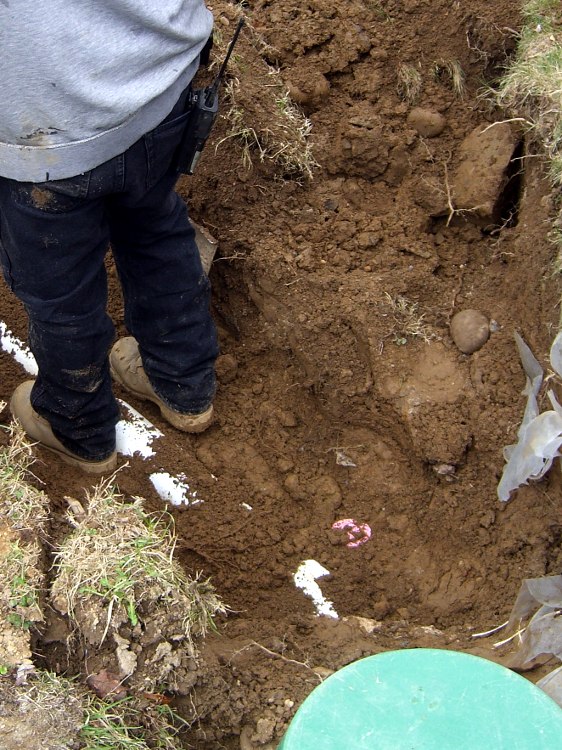
    Last view of the plug
    Last view of the plug

    Some day, when all we know has crumbled to dust, somebody will unearth that plug and wonder “WTF was this all about?” Maybe the pipe and tank nearby will be a hint, but for all I know ABS will outlast even concrete.

    This was our last sighting before the earth closed over it…

    The new drain field works fine and, even better, it’ll be months before I need even think of mowing the front yard for the first time.

    Insert obligatory Ozymandias reference here.