Ed Nisley's Blog: Shop notes, electronics, firmware, machinery, 3D printing, laser cuttery, and curiosities. Contents: 100% human thinking, 0% AI slop.
Tag: Thing-O-Matic
Using and tweaking a Makerbot Thing-O-Matic 3D printer
A first cut at a holder for Canon NB-5L batteries with those dimensions, with the intent of connecting them to a battery tester.
NB-5L Battery Holder Doodle
The cloud in the middle of the bottom holds pin dimensions, which I measured after I’d been doodling for a bit. They come from my heap; they’re nice heavy-gold plated male pins (yeah, I have the other gender, too) intended for a multi-pin connector. They have a convenient hole that’s normally used to verify you’ve actually soldered the wire properly. I plan to stick a music-wire spring in the hole and secure it through the bottom of the holder with a rectangular pocket below the pin that limits the travel in both directions. Drilling the hole completely through the pin to let the spring wire stick out would prevent having it fall out at the end of travel.
The spring pocket dimensions are right down around the very limit of the feature sizes my TOM can achieve. I’m not sure those blind holes will actually open up far enough.
I’m also not sure the Powerpoles will actually fit in there like that. There’s nothing wrong with pigtail leads.
It’s obviously styled after the Official Canon NB-5L charger, although they use nice bent-steel spring contacts that are trivially easy to make in mass production:
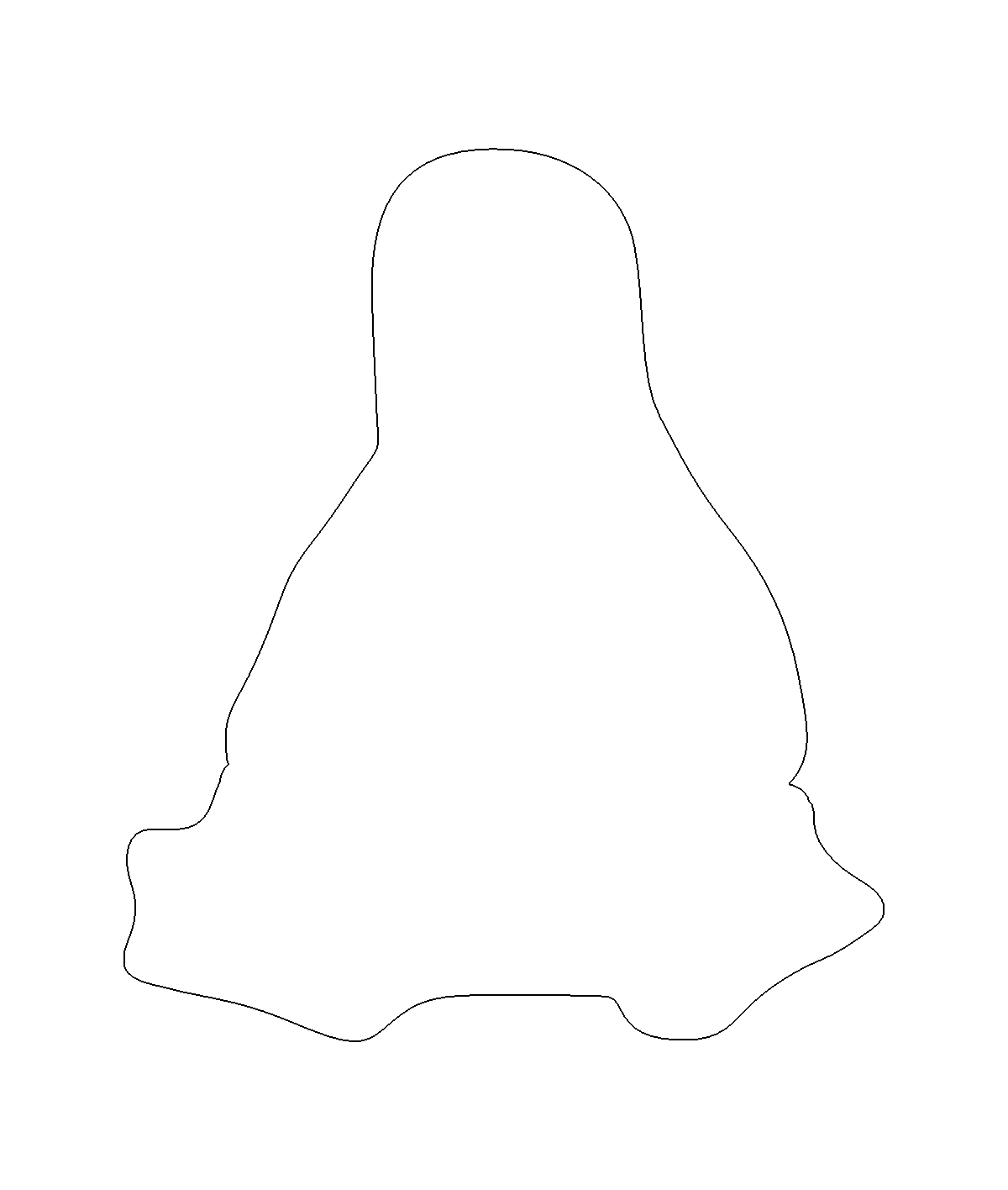
For Tux pix, one should start with Larry Ewing’s drawings; I used the EPS version to get a scalable vector drawing. Run it through The GIMP, close the outline at the flippers, fill with black, save as PNG. Then import into Inkscape, trace the outline, and something like this pops out:
Tux Outline
The reason for using Inkscape is that OpenSCAD imports a very limited subset of all possible DXF files and, while Inkscape can (with some care) produce a DXF format that OpenSCAD can import, somehow the shape lacked interior fill. Sean took a slightly different approach with the same tools and managed to create a useful DXF file that produced this chunk o’ bits:
Tux Slab – solid model
The DXF import still didn’t work dependably, so I exported the Tux Slab from OpenSCAD to an STL file; if you want to extrude a solid Tux, that’s probably the way to go. Importing the STL in the next steps worked fine.
The Parametric Cookie Cutter by nateoostendorp creates thin cutter walls by subtracting a linear dimension from the X- and Y-axis extents of the shape. Unfortunately, Tux has crazy flipper feet that didn’t respond well to that; the walls developed gaps at the inflection points from self-intersections.
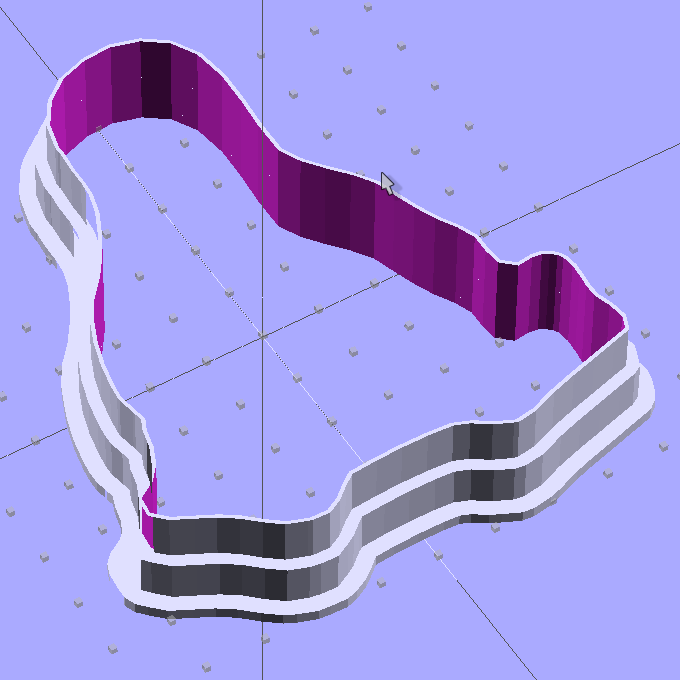
So I started from scratch with a Minkowski sum, which in this case amounts to rubbing a cylinder all over the Tux shape, then intersecting the resulting mega-penguin-post with a slab of the appropriate thickness sitting on the Z=0 plane. The Minkowski enlarges the XY outline by the cylinder’s radius and the Z thickness by twice the cylinder’s height, which I picked to be grossly excessive. Three Minkowskis produce the lip, wall, and tip of the cutter, which then stack up with a Tux-shaped hole subtracted from their midst:
Tux Cookie Cutter – solid model
The thicknesses and heights all derive directly from the extrusion parameters used to print the thing, because there’s not much room for roundoff. The middle section (the wall) is four threads wide, but Skeinforge divides the interior pair of threads into shorter sections with breakpoints at each sharp corner. The cutter section (the lip) is one thread wide, because I couldn’t get a good result with two threads.
The OpenSCAD preview has trouble with the Minkowski result and produces weird rendering glitches, but the CGAL model comes through fine. Note that Tux now has the opposite chirality, a gross oversight that became obvious only after the third cutter emerged from the Basement Laboratory. Here’s the second cutter:
Tux Cutter – reversed
Each cutter takes about 35 minutes to build, so I boiled the highlights down into a thrilling 6 minute movie.
The OpenSCAD source code, into which you can substitute your very own STL shape file:
// Tux cookie cutter using Minkowski sum
// Ed Nisley KE4ZNU - Sept 2011

//- Extrusion parameters - must match reality!

ThreadThick = 0.33;
ThreadWidth = 2.0 * ThreadThick;

function IntegerMultiple(Size,Unit) = Unit * ceil(Size / Unit);

MaxSize = 110;				// larger than any possible dimension ...

//- Cookie cutter parameters

Size = 100;

TipHeight = IntegerMultiple(8,ThreadThick);
TipThick = 1*ThreadWidth;

WallHeight = IntegerMultiple(7,ThreadThick);
WallThick = 4*ThreadWidth;

LipHeight = IntegerMultiple(1.5,ThreadWidth);
LipThick = IntegerMultiple(5,ThreadWidth);

//- Wrapper for the shape of your choice

module Shape(Size) {
  Tux(Size);
}

//- A solid slab of Tux goodness in simple STL format
// Choose magic values to:
//		center it in XY
//		reversed across Y axis (prints with handle on bottom)
//		bottom on Z=0
//		make it MaxSize from head to feet

module Tux(Scale) {
  STLscale = 250;
  scale(Scale/STLscale)
	translate([105,-145,0])
	  scale([-1,1,24])
		import_stl(
		  file = "/mnt/bulkdata/Project Files/Thing-O-Matic/Tux Cookie Cutter/Tux Plate.stl",
		  convexity=5);
}

//- Given a Shape(), return enlarged slab of given thickness

module EnlargeSlab(Scale, WallThick, SlabThick) {

	intersection() {
	  translate([0,0,SlabThick/2])
		cube([MaxSize,MaxSize,SlabThick],center=true);
	  minkowski() {
		Shape(Scale);
		cylinder(r=WallThick,h=MaxSize);
	  }
	}

}

//- Put peg grid on build surface

module ShowPegGrid(Space = 10.0,Size = 1.0) {

  Range = floor(50 / Space);

	for (x=[-Range:Range])
	  for (y=[-Range:Range])
		translate([x*Space,y*Space,Size/2])
		  %cube(Size,center=true);

}

//- Build it

ShowPegGrid();

//cube(5);

difference() {
  union() {
	translate([0,0,(WallHeight + LipHeight)])
	  EnlargeSlab(Size,TipThick,TipHeight);
	translate([0,0,LipHeight])
	  EnlargeSlab(Size,WallThick,WallHeight);
	EnlargeSlab(Size,LipThick,LipHeight);
  }
  Shape(Size);					// punch out cookie hole
}
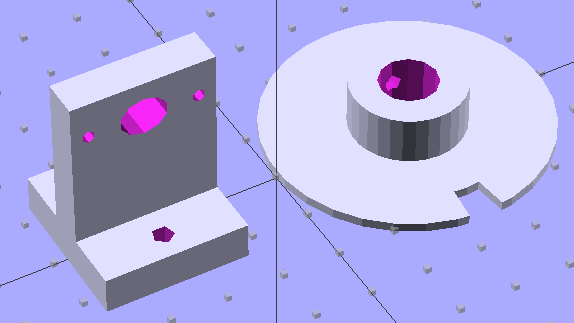
The wheel fits the shaft with a 4-40 setscrew to hold it in place. The post has 4-40 mounting holes for one of those optical switches, plus a big hole for the wiring. The solid models look about like you’d expect:
Wheel and post solid model
I located the post’s holes on the baseplate with a spindly pair of transfer punches, after transferring the wheel’s centerline by eyeballometric guesstimation:
Locating holes with transfer punches
Then aligned the baseplate on the Sherline, located the holes, and drilled ’em with manual CNC to get the proper spacing:
Drilling opto switch post holes
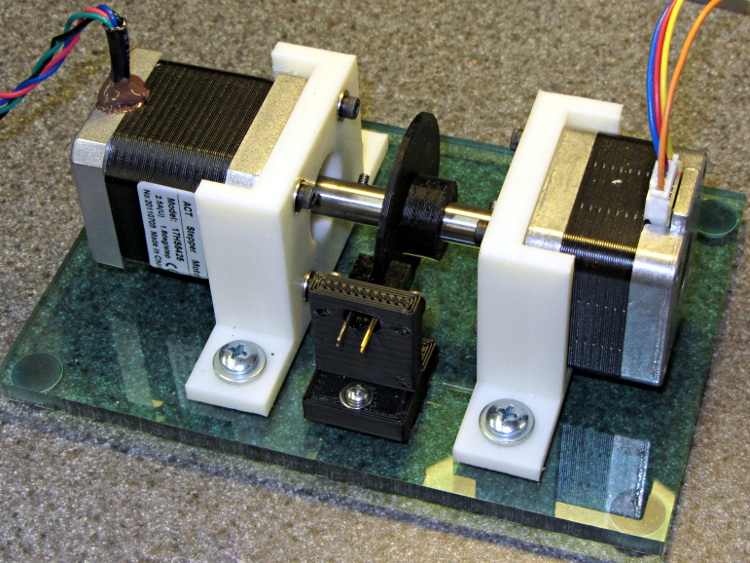
And then it went together quite smoothly:
Dyno with sync wheel
What’s really nice about 3D printing is you can build stuff like this without too much fuss & bother: figure out the solid model, walk gingerly through the software minefield, and (usually) assemble the parts later that day.
A bit of wiring to power the LED and pull up the phototransistor should do the trick.
The OpenSCAD code, including a few tweaks that rationalize spacings and sizes and suchlike:
My first pass at the NEMA 17 motor mount bracket used additive modeling, glomming together several blocks made from cube primitives:
The motor mounting plate, less five holes
Two side struts to stiffen the motor plate
The baseplate, minus two mounting holes
Makes perfect sense to me; perhaps I’m an additive kind of guy. That produced an OpenSCAD model with positive surfaces for the various parts and negative surfaces inside the holes:
NEMA 17 Mount – additive model
Compile that through CGAL, export as STL, inhale into RepG 25, and you (well, I) get what looks to be a fine object in the preview pane:
NEMA 17 RepG preview – additive
Then run it through Skeinforge 40, which emits a flurry of messages along these lines:
[19:11:08] Warning, the triangle mesh slice intersects itself in getLoopsFromCorrectMesh in triangle_mesh.
[19:11:08] Something will still be printed, but there is no guarantee that it will be the correct shape.
[19:11:08] Once the gcode is saved, you should check over the layer with a z of:
[19:11:09] 0.165
The usual searching suggested that sometimes Skeinforge has problems with coincident surfaces, such as between the motor mount plate and the struts and the base, or coincident edges where two blocks abut. Judging from the messages, the problem ran all the way to the top of the struts. Oddly, Skeinview didn’t show any problems, so the G-Code was (presumably) OK.
Error messages tend to make me twitchy, though. I modified the OpenSCAD code to extend the struts 0.1 mm inside the base and ran that model through the software stack, which produced not a single complaint about anything, anywhere.
Success!
However, painful experience has caused me to review the G-Code for every single object with the Skeinlayer plugin, which, right on cue, revealed this interesting anomaly:
NEMA 17 Mount – Skeinview – Bad gcode
That happened for every layer in the square motor mount plate: the lower right corner is fine, the upper left seems to be the negative of the actual solid model. The holes are filled, the plate is empty. The Skirt outline ignores the smaller holes, goes around the large one, and continues on its merry way.
I putzed around for a while and discovered that the failure seems acutely sensitive to the side strut thickness. Yeah, like that makes any sense.
Any variations along those lines that I tried generated either:
A flurry of mesh error messages, with seemingly good G-Code
No error messages whatsoever, with totally bogus G-Code
Running the STL files through netfabb Cloud Service produced the same diagnostic for both:
Number of holes: 3
Number of shells: 2
Mesh is not manifold and oriented.
 We unfortunately have not yet enough experience with the occuring server loads, that we can securely enable shell merging at the moment.
However, the repaired STL files produce correct G-Code: evidently OpenSCAD spits out bogus STL data. The fact that RepG/SF treats the two files differently suggests improved diagnostics would be in order, but that’s in the nature of fine tuning.
So I junked the additive model and went subtractive, chewing the recesses out of one huge block:
NEMA 17 Stepper Mount – solid model
That worked:
Number of holes: 0
Number of shells: 1
Mesh is manifold and oriented.
I like processes that don’t emit error messages or result in mysterious failures, although it’s not obvious that subtractive modeling will always produce correct results. Heck, I’m not sure I can think in terms of negative volumes all that well.
The OpenSCAD code for the additive model, with a highlight on the conditional that will trigger the two errors:
OpenSCAD depends on CGAL for all the 3D heavy lifting, which puts any STL export problems further upstream. I suppose I could open Yet Another RepG ticket to get better diagnostics, but the others haven’t gotten much attention so far and I suppose it’s not really their problem anyway.
This mount will hold a NEMA 17 stepper firmly in place so I can attach things to the shaft:
NEMA 17 Mount on build plate
The baseplate holes fit 10-32 screws, which work in the plastic sheet that will go below this thing, and the motor mount plate holes fits 3 mm bolts for the motors. Washers under the heads, of course. Build with three additional shells, three solid layers, and 0.25 fill for useful rigidity; the flanges came out completely solid.
Somewhat to my surprise, this didn’t show any signs of delamination due to the rather low 190 °C extrusion temperature. The flanges aren’t all that massive, though, so perhaps trouble still lies await.
The OpenSCAD solid model uses subtractive construction, for reasons that I’ll go into later:
NEMA 17 Stepper Mount – solid model
The OpenSCAD source code:
// NEMA 17 stepper mount for dynamometer
// Ed Nisley KE4ZNU August 2011

include </home/ed/Thing-O-Matic/lib/MCAD/units.scad>

//-- Layout Control

Layout = "Build";				// Build Show

//-- Extrusion parameters

ThreadThick = 0.33;
ThreadWT = 2.0;
ThreadWidth = ThreadThick * ThreadWT;

HoleWindage = 0.3;			// enlarge hole dia by this amount

function IntegerMultiple(Size,Unit) = Unit * ceil(Size / Unit);

//-- Useful sizes

Tap10_32 = 0.159 * inch;
Clear10_32 = 0.190 * inch;
Head10_32 = 0.373 * inch;
Head10_32Thick = 0.110 * inch;
Nut10_32Dia = 0.433 * inch;
Nut10_32Thick = 0.130 * inch;

NEMA17_ShaftDia = 5.0;
NEMA17_ShaftLength = 24.0;
NEMA17_PilotDia = 0.866 * inch;
NEMA17_PilotLength = 0.080 * inch;
NEMA17_BCD = 1.725 * inch;
NEMA17_BoltDia = 3.5;
NEMA17_BoltOC = 1.220 * inch;

//-- Mount Sizes

MountWidth = IntegerMultiple(NEMA17_BCD,ThreadWidth);		// use BCD for motor clearance
MountThick = IntegerMultiple(8.0,ThreadThick);				// for stiffness

MountBoltDia = 3.0;

StandThick = IntegerMultiple(5.0,ThreadWidth);				// baseplate

StrutThick = IntegerMultiple(4.0,ThreadWidth);				// sides holding motor mount

UprightLength = MountWidth + 2*StrutThick;

StandBoltHead = IntegerMultiple(Head10_32,5);				// bolt head rounded up
StandBoltOC = IntegerMultiple(UprightLength + 2*StandBoltHead,5);

StandLength = StandBoltOC + 2*StandBoltHead;
StandWidth = IntegerMultiple(2*StandBoltHead,ThreadThick);

StandBoltClear = (StandLength - UprightLength)/2;			// flat around bolt head

MotorRecess = StandWidth - MountThick;

echo(str("Stand Base: ",StandLength," x ",StandWidth," x ",StandThick));
echo(str("Stand Bolt OC: ",StandBoltOC));
echo(str("Strut Thick: ",StrutThick));

//-- Convenience values

Protrusion = 0.1;		// make holes look good and joints intersect properly

BuildOffset = 3 * ThreadWidth;

//----------------------
// Useful routines

module PolyCyl(Dia,Height,ForceSides=0) {			// based on nophead's polyholes

  Sides = (ForceSides != 0) ? ForceSides : (ceil(Dia) + 2);

  FixDia = Dia / cos(180/Sides);

  cylinder(r=(FixDia + HoleWindage)/2,
           h=Height,
	   $fn=Sides);
}

module ShowPegGrid(Space = 10.0,Size = 1.0) {

  Range = floor(50 / Space);

	for (x=[-Range:Range])
	  for (y=[-Range:Range])
		translate([x*Space,y*Space,Size/2])
		  %cube(Size,center=true);

}

//----------------------
// Combined stand and mounting plate

module Combined() {

  difference() {
	translate([StandThick/2,0,StandWidth/2])
	  cube([(MountWidth + StandThick),StandLength,StandWidth],center=true);
	translate([-Protrusion/2,0,StandWidth - (MotorRecess - Protrusion)/2])
	  cube([(MountWidth + Protrusion),MountWidth,(MotorRecess + Protrusion)],center=true);
	translate([0,0,-Protrusion])				// pilot hole
	  PolyCyl(NEMA17_PilotDia,(MountThick + 2*Protrusion));
	for (x=[-1,1])								// motor bolt holes
	  for (y=[-1,1])
		translate([x*NEMA17_BoltOC/2,y*NEMA17_BoltOC/2,-Protrusion])
		  PolyCyl(MountBoltDia,(MountThick + 2*Protrusion));
	for (y=[-1,1])								// cutouts over bolts
	  translate([-Protrusion/2,
				y*((StandLength - StandBoltClear)/2 + Protrusion),
				StandWidth/2])
		cube([(MountWidth + Protrusion),
			 (StandBoltClear + Protrusion),
			 (StandWidth + 2*Protrusion)],center=true);
	for (y=[-1,1])								// stand bolt holes
	  translate([(MountWidth/2 - Protrusion),y*StandBoltOC/2,StandWidth/2])
		rotate([0,90,0])
		  PolyCyl(Clear10_32,StandThick + 2*Protrusion,8);

  }

}

//----------------------
// Lash everything together

ShowPegGrid();

if (Layout == "Build") {
  translate([0,0,0])
	Combined();
}

if (Layout == "Show") {
  translate([-StandWidth/2,0,(StandThick + MountWidth/2)])
	rotate([0,90,0])
	  Combined();
}
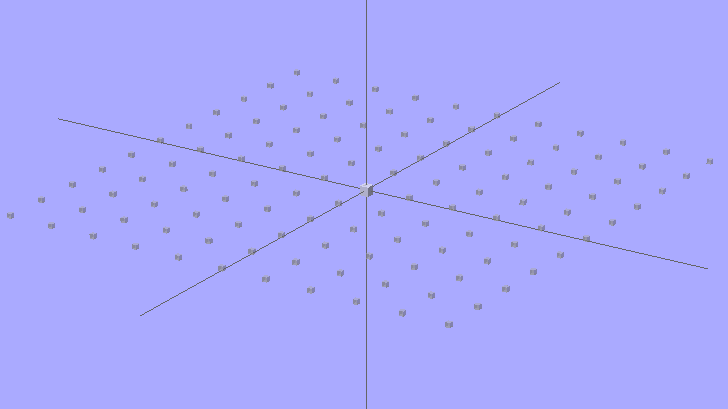
It looks about the same as before, only now it’s transparent gray. The 2-unit cube in the middle marks the “your object goes there” spot; the % prefix on the grid cubes causes OpenSCAD to ignore them.
OpenSCAD Build Surface Grid – revised
The OpenSCAD source code:
module ShowPegGrid(Space = 10.0,Size = 1.0) {

Range = floor(50 / Space);

for (x=[-Range:Range])
for (y=[-Range:Range])
translate([x*Space,y*Space,Size/2])
%cube(Size,center=true);

}

ShowPegGrid();
cube(2,center=true);
Unlike most folks, it seems, I’m a big fan of automatic wiping at the start of each print. It’s particularly important with the Z-min platform height switch, because a little ABS snot on the end of the nozzle changes the initial layer thickness in a bad way: additional height at the switch reduces the first layer thickness.
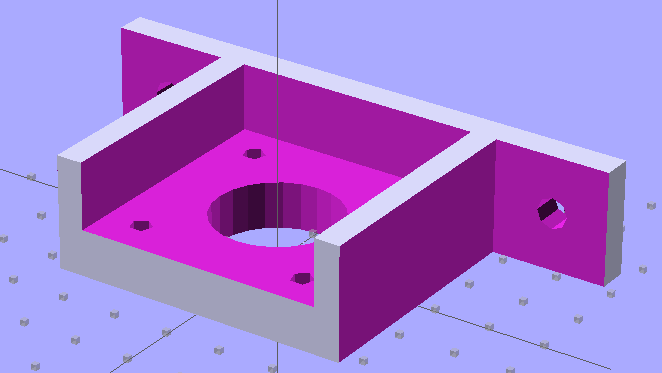
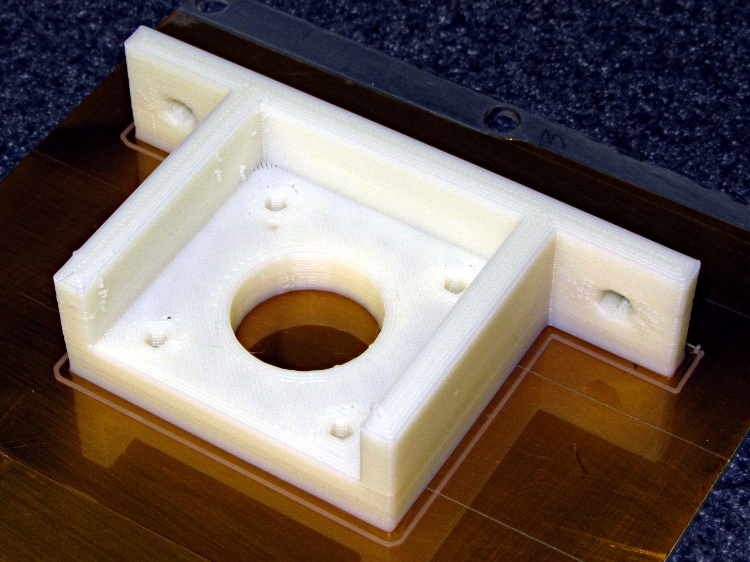
The problem is that the default wiper position at the right front corner of the platform requires a cutout in the build plates and the wiper gets in the way of the first several layers of very large objects.
I’m thinking of moving the wiper to the center rear of the platform, sticking out beyond the plates. There’s a convenient hole in the HBP platform for a mounting bracket, it won’t hit either of the Z axis rods at either end of the X axis travel, and maybe it’ll be low enough to stay out of the way.
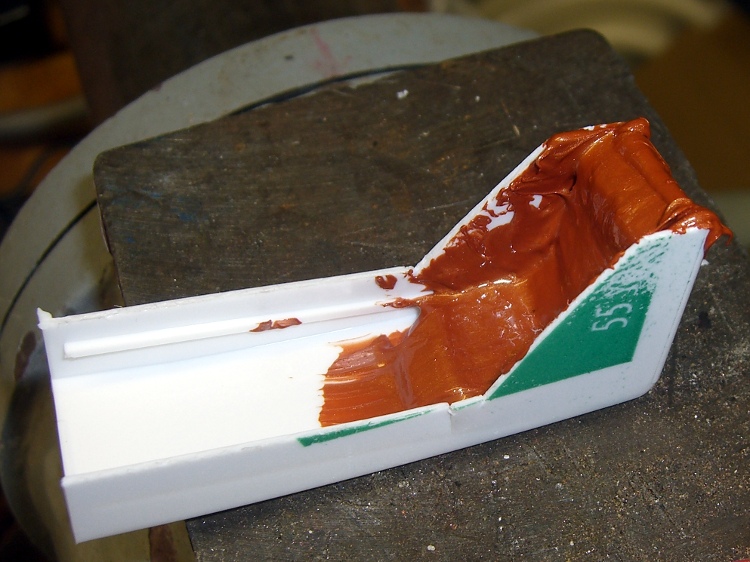
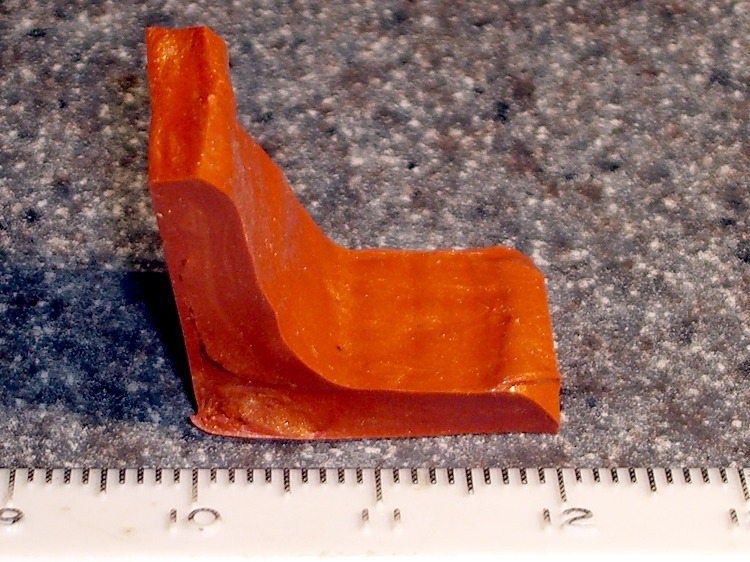
In the nature of a prototype, I smoothed a layer of Permatex copper-loaded silicone gasket compound into the corner of an old dental floss container to get a more-or-less right-angled shape:
Silicone-copper wiper – curing
That’s much thicker than the usual gasket that you’re supposed to make from this stuff, so I let it cure for a few days before popping it out, then another few days to get into that big lump in the corner. As expected, it doesn’t stick to polyethylene at all.
After trimming, it looks more like a wiper blade, albeit with Orc Engineering artistic sensibilities:
Trimmed wiper
It’s fairly soft stuff, which is what you want in a gasket, so it’ll require support on the bottom and back. Right now, I’m not sure which is which, which is why I troweled the stuff into the mold with one thick side and one thin side.
A simple bent-metal bracket should do the trick, with a screw in a hole punched through the wiper blade mounting the whole affair to the HBP plywood. Of course, it’d be even better with a printed bracket.
The silicone’s temperature rating goes up to 700 C for intermittent use, which sounds about right for this application.








 The Smell of Molten Projects in the Morning