The Smell of Molten Projects in the Morning

Ed Nisley's Blog: Shop notes, electronics, firmware, machinery, 3D printing, laser cuttery, and curiosities. Contents: 100% human thinking, 0% AI slop.

Tag: RPi

Raspberry Pi

  • Streaming Radio Player: Timing Tweaks

    Slowing the SPI clock and updating the drivers having had no noticeable effect on the OLED display corruption, I once again pondered the SH1106 controller timing specs.

    The chip reset seems remarkably slow, even at maximum VCC:
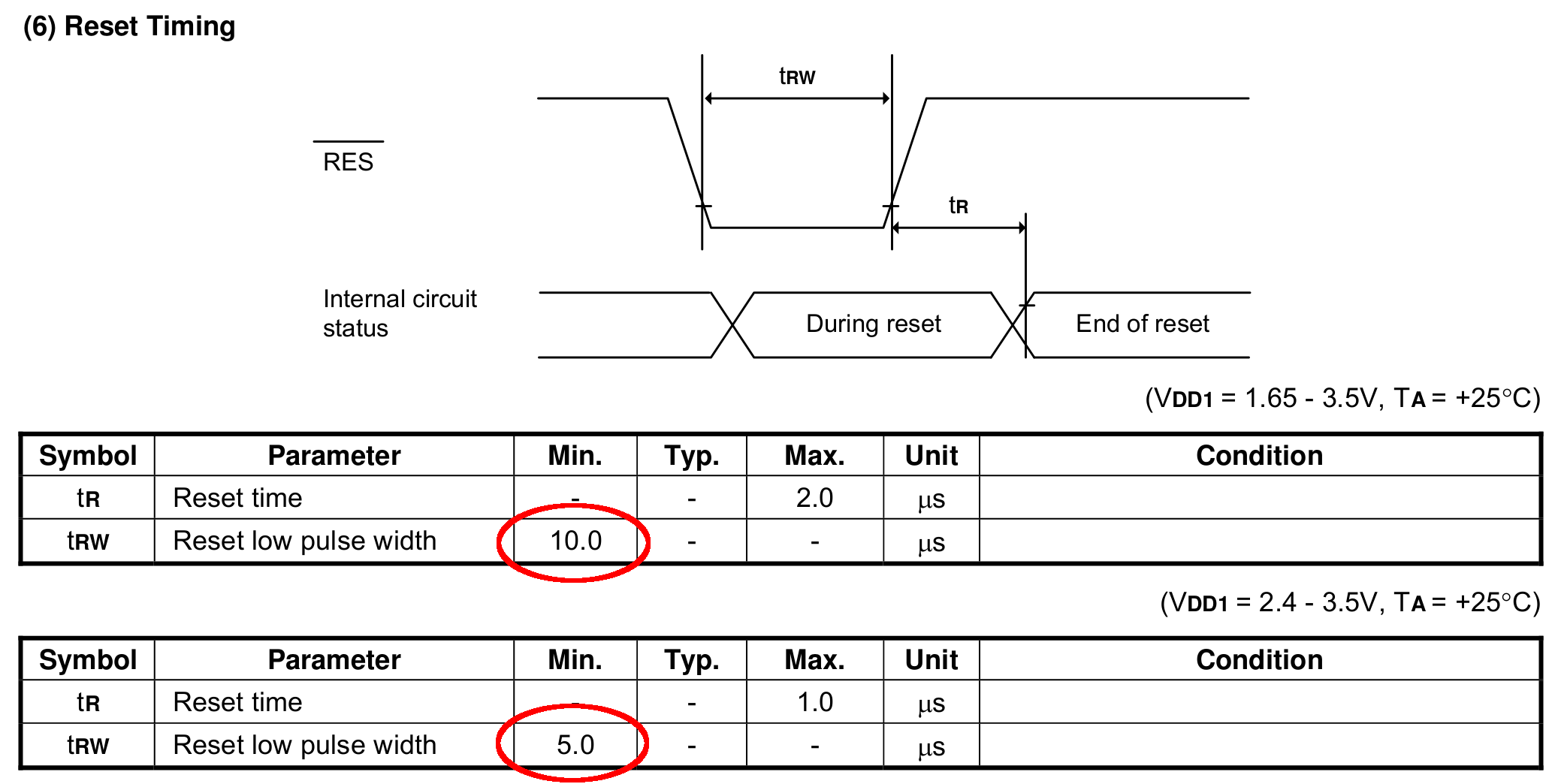
    SH1106 - Reset Timing Specs
    SH1106 – Reset Timing Specs

    I think the relevant code is in the luma.core driver’s serial.py file. On the RPi, it resides in /usr/local/lib/python2.7/dist-packages/luma/core/interface/.

    As far as I can tell, the bitbang class handles all the setup and teardown around the actual data transfers, but it’s not clear (to me, anyway) how it interacts with the underlying hardware SPI machinery.

    So, let’s add some sleepiness to the Reset code:

            if self._RST is not None:
                self._gpio.output(self._RST, self._gpio.LOW)  # Reset device
                time.sleep(1.0e-3)
                self._gpio.output(self._RST, self._gpio.HIGH)  # Keep RESET pulled high
                time.sleep(1.0e-3)
    

    A few milliseconds, rather than a few (hundred) microseconds, won’t make any perceptible difference.

    Similarly, the Chip Select and Address (Command/Data) signals require more delay than might occur between successive Python statements:

    SH1106 - SPI Address and Select Timing Specs
    SH1106 – SPI Address and Select Timing Specs

    This should do the trick, again with excessive delay:

            if self._DC:
                self._gpio.output(self._DC, self._cmd_mode)
                time.sleep(1.0e-3)
    
    ... snippage ...
    
            if self._DC:
                self._gpio.output(self._DC, self._data_mode)
                time.sleep(1.0e-3)
    
    ... snippage ...
    
            if self._CE:
                gpio.output(self._CE, gpio.LOW)  # Active low
                time.sleep(1.0e-3)
    
    ... snippage ...
    
            if self._CE:
                gpio.output(self._CE, gpio.HIGH)
                time.sleep(1.0e-3)
    

    Although it shouldn’t be necessary, I blew away the pyc files to prevent future confusion over who’s doing what with which.

    Once again, this will require several weeks to see whether the situation changes for the better.

  • MPCNC: Raspberry Pi Screw-down Case

    Directly from  0110-M-P’s Thingiverse thing, because a Raspberry Pi in a 75 mm VESA mount case will work for me:

    RPi in VESA case
    RPi in VESA case

    The hole fits a 25 mm fan, but the thing runs cool enough it should survive without forced air; think of it as a contingency. Mounting the case on standoffs seems like a Good Idea, however, as the bottom plate includes many vent slots for Good Circulation.

    The top plate builds upside-down, so I had Slic3r add teeny support plugs inside the recessed screw holes. I think button-head screws would fit neatly in the recesses, but we’re obviously not in this for the looks.

    The tiny white stud is a Reset switch hot-melt glued into the slot. I plan to just turn off the AC power after shutting the RPi down, so a power-on will suffice as a reset.

  • Streaming Radio Player: RPi and OLED Updates

    Because the OLED driver came from the pip package manager, not the Raspberry Pi’s system-level apt package manager, it (or they, there’s plenty of code under the hood) don’t get updated whenever I do system maintenance. The doc says this should do the trick:

    sudo -H pip install --upgrade luma.oled
    

    However, it turns out the new version has a slightly longer list of pre-requisite packages, causing the update to go toes-up at a missing package:

    Could not import setuptools which is required to install from a source distribution.
    Please install setuptools.
    

    So update (or install, for the new ones) the missing pieces:

    sudo apt-get install python-dev python-pip libfreetype6-dev libjpeg-dev build-essential
    

    Doing so produced a backwards-compatibility error in my Python code:

    ... change ...
    from luma.core.serial import spi
    ... into ...
    from luma.core.interface.serial import spi
    

    The motivation for all this fuffing and fawing came from watching some OLEDs wake up completely blank or become garbled in one way or another. Evidently, my slower-speed SPI tweak didn’t quite solve the problem, although it did reduce the frequency of failures. I have decided, as a matter of principle, to not embrace the garble.

    Soooo, let’s see how shaking all the dice affects the situation.

    It’s entirely possible the OLED controllers don’t quite meet their specs, of course, or have begun deteriorating for all the usual reasons.

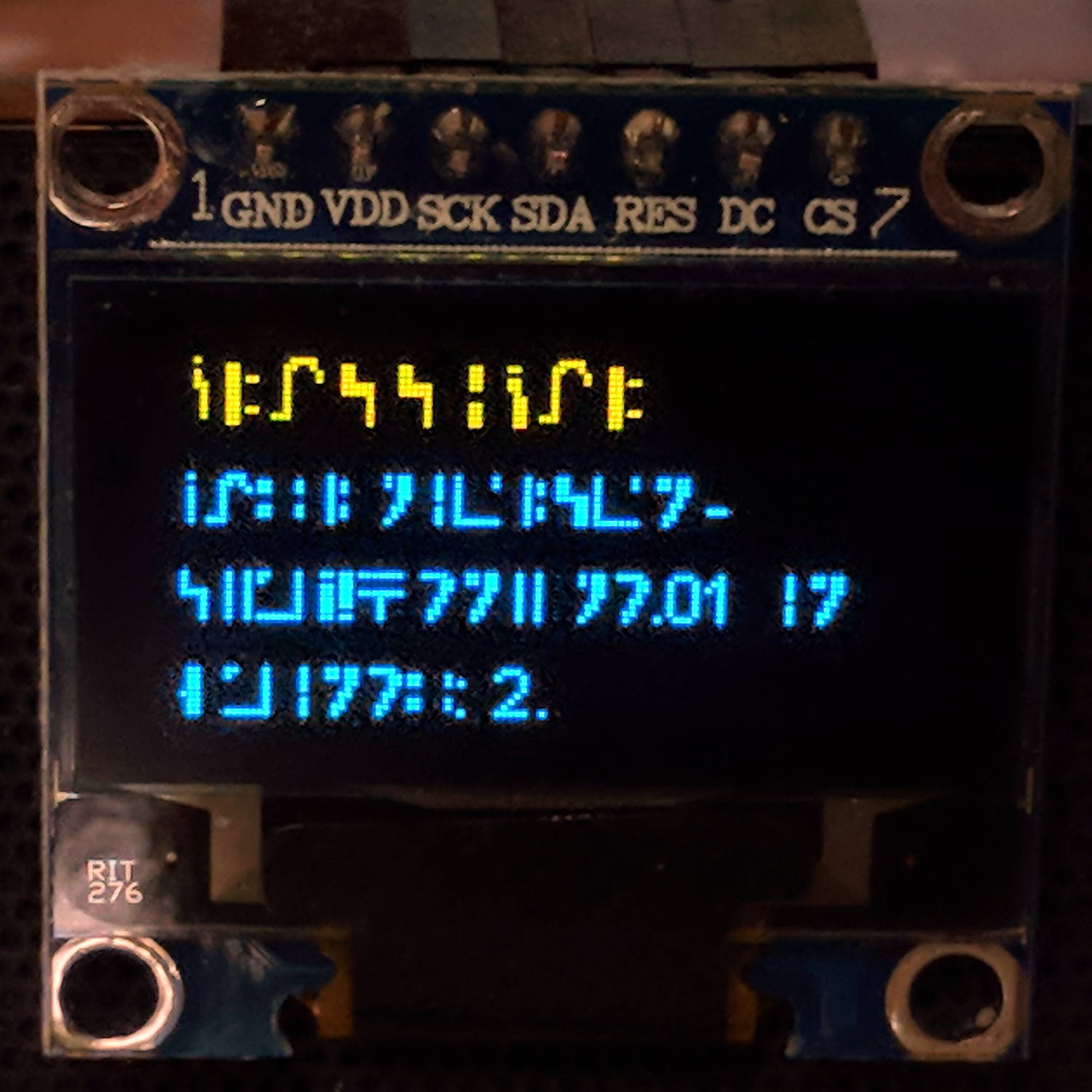
  • Streaming Radio Player: Standard Galactic Alphabet

    Prompted by Jacob’s comment about the most recent OLED garble:

    RPi Streaming Player - Standard Galactic Alphabet
    RPi Streaming Player – Standard Galactic Alphabet

    If ya can’t fix it, feature it!

    That’s the First SGA Font from the Standard Galactic Font origin story. I copied the font file to one of the streamers, then re-aimed the font setup:

    #font1 = ImageFont.truetype('/usr/share/fonts/truetype/dejavu/DejaVuSansMono.ttf',14)
    font1 = ImageFont.truetype('/home/pi/sga.ttf',14)
    #font2 = ImageFont.truetype('/usr/share/fonts/truetype/dejavu/DejaVuSans.ttf',11)
    font2 = ImageFont.truetype('/home/pi/sga.ttf',11)
    

    It looks surprisingly good on such a low-res display.

    The user community seems divided over the update … [grin]

  • Streaming Radio Player: OLED Garble

    Even in the dim light of dawn, it’s obvious slowing the SPI clock to 1 MHz didn’t quite solve the problem:

    RPi OLED display - garbled
    RPi OLED display – garbled

    The display started up fine, became encrypted during the next few hours, and remained garbled as the track information changed. This is almost certainly a bad SPI transfer trashing the OLED module’s control registers.

    Dropping the clock to the absolute minimum of 0.5 MHz didn’t help, either:

    serial = spi(device=0,port=0,bus_speed_hz=500000)
    device = sh1106(serial)
    

    This particular display woke up blank after loading the new code, then worked OK after another reset. The other streamers lit up as expected on the first try, so the slower SPI isn’t making the situation instantly worse.

    Running the clock at 1 MHz definitely reduced the failure rate, which suggests it’s a glitchy thing.

    Good embedded systems practice suggests resetting the entire display from scratch every now and again, but my streamer code has no concept of elapsed time. Opening that particular can o’ worms would almost certainly result in an on-screen clock and I do not want to go there.

    I suppose I must get a new oscilloscope with SPI bus decoding to verify all the SPI setup and hold times …

  • MPCNC: Z Height Probe vs. Tempered Glass Sheet

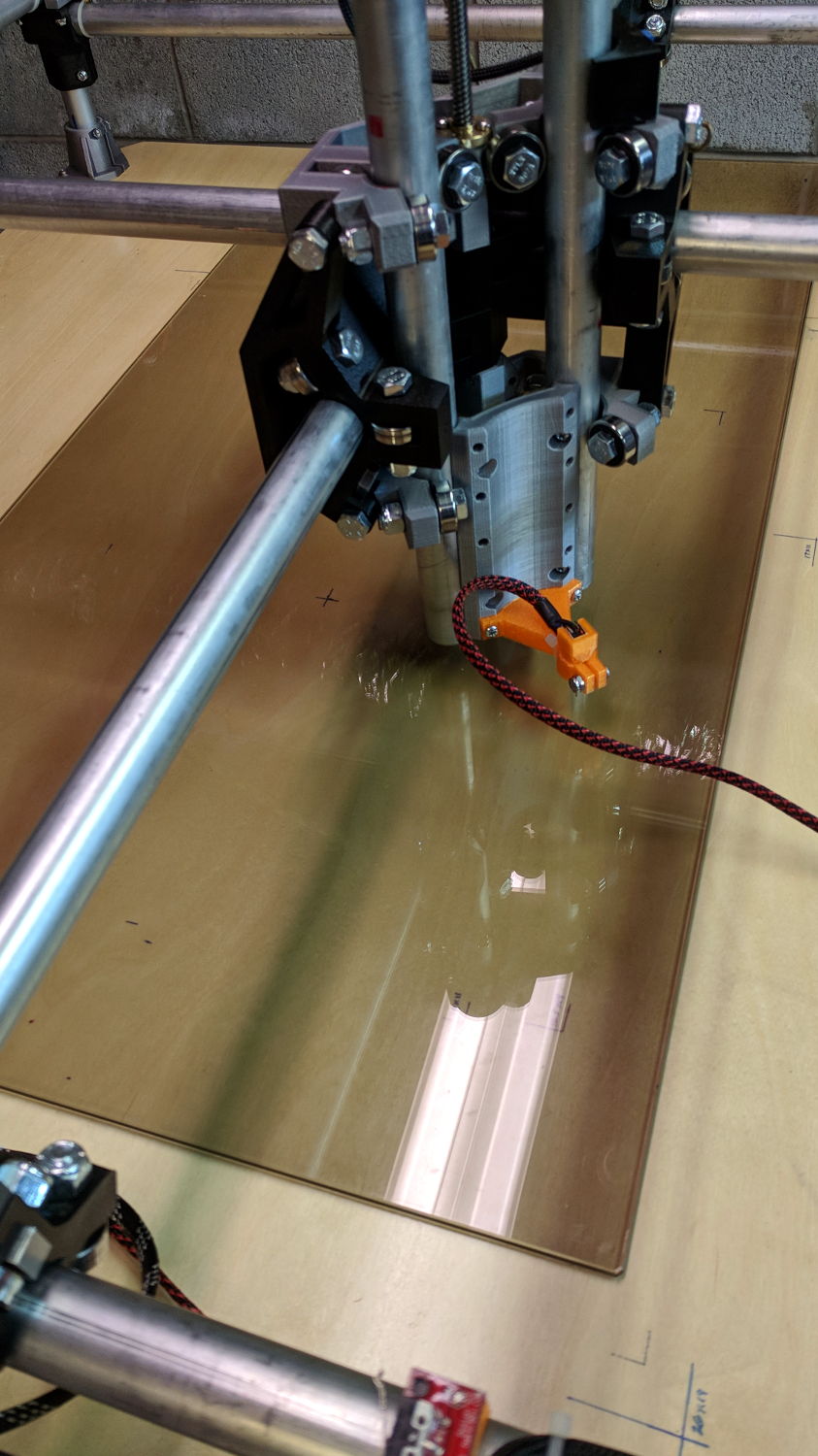
    Sliding the tempered glass sheet I used for the initial trials and B-size Spirograph plots under the Z height probe eliminated the plywood benchtop’s small-scale irregularities:

    MPCNC - Z-probing glass plate
    MPCNC – Z-probing glass plate

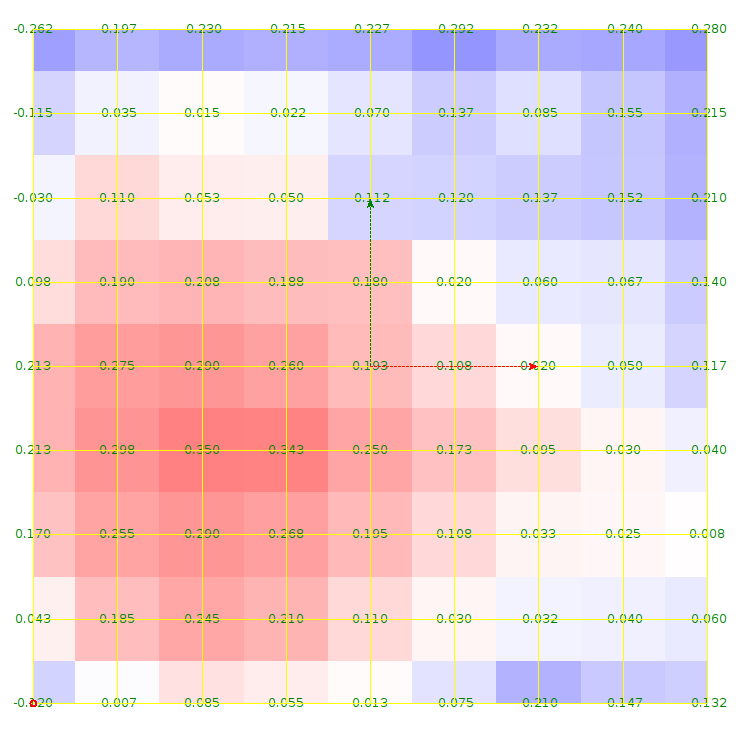
    The first height map looks like a mountain sproinged right up through the glass:

    ProbeArray-Glass-50
    ProbeArray-Glass-50

    More red-ish means increasing height, more blue-ish means increasing depth, although you can only see the negative signs along the left edge.

    The Z axis leadscrew produces 400 step/mm for a “resolution” of 0.0025 mm. The bCNC map rounds to three places, which makes perfect sense to me; I doubt the absolute accuracy is any better than 0.1 mm on a good day with fair skies and a tailwind.

    The peak of the mountain rises 0.35 mm above the terrain around it, so it barely counts as a minor distortion in the glass sheet. Overall, however, there’s a 0.6 mm difference from peak to valley, which would be enough to mess up a rigidly held pen tip pretty badly if you assumed the glass was perfectly flat and precisely aligned.

    Rotating the glass around the X axis shows a matching, albeit shallower, dent on the other side:

    ProbeArray-Glass-flip-50-2018-01-05
    ProbeArray-Glass-flip-50-2018-01-05

    For all its crudity, the probe seems to be returning reasonable results.

    The obvious question: does it return consistent results?

  • Raspberry Pi Swap File Size

    As part of some protracted flailing around while trying to get GNU Radio running on a Raspberry Pi 3, I discovered Raspbian defaults to a 100 MB swap file, rather than a swap partition, and everything I thought I knew about swap management seems inoperative. The key hint came from some notes on gr-gsm installation.

    Tweak the /etc/dphys-swapfile config file to set CONF_SWAPFACTOR=2 for a 2 GB swap file = twice the size of the Pi’s 1 GB memory.

    Start it up:

    sudo dphys-swapfile swapoff
    sudo dphys-swapfile setup
    sudo dphys-swapfile swapon
    

    And verify it worked:

    cat /proc/meminfo 
    MemTotal:         949580 kB
    MemFree:          194560 kB
    MemAvailable:     594460 kB
    Buffers:           85684 kB
    Cached:           377276 kB
    SwapCached:            0 kB
    Active:           600332 kB
    Inactive:         104668 kB
    Active(anon):     250408 kB
    Inactive(anon):    20688 kB
    Active(file):     349924 kB
    Inactive(file):    83980 kB
    Unevictable:           0 kB
    Mlocked:               0 kB
    SwapTotal:       1918972 kB
    SwapFree:        1918972 kB
    Dirty:                40 kB
    Writeback:             0 kB
    AnonPages:        242072 kB
    Mapped:           136072 kB
    Shmem:             29060 kB
    Slab:              33992 kB
    SReclaimable:      22104 kB
    SUnreclaim:        11888 kB
    KernelStack:        1728 kB
    PageTables:         3488 kB
    NFS_Unstable:          0 kB
    Bounce:                0 kB
    WritebackTmp:          0 kB
    CommitLimit:     2393760 kB
    Committed_AS:     947048 kB
    VmallocTotal:    1114112 kB
    VmallocUsed:           0 kB
    VmallocChunk:          0 kB
    CmaTotal:           8192 kB
    CmaFree:            6796 kB
    

    Then it became possible to continue flailing …