The Smell of Molten Projects in the Morning

Ed Nisley's Blog: Shop notes, electronics, firmware, machinery, 3D printing, laser cuttery, and curiosities. Contents: 100% human thinking, 0% AI slop.

Tag: Rants

And kvetching, too

  • Ubuntu 9.10 HAL FDI: Input Device Configuration – Kensington Expert Mouse FAIL

    The recent Ubuntu 9.10 release uses HAL & UDEV to permit hotplugging USB mice / trackballs / tablets without killing the X server. This is a vast improvement over the Bad Old Days, with two minor issues:

    1. You must now write an FDI file to configure your widget
    2. There is absolutely no documentation on how to do that

    Basically, you’re left to find a blog post somewhere that describes an fdi file for something similar to your widget, then puzzle out how to get from there to what you have. If you’re reading this (and you’re not one of the few dozen folks who read my posts for their pure amusement value), then you’ve probably stalled on Step 2 and arrived here via search engine.

    So, here’s how the rest of the story goes down. I assume you’ve read all the various posts scattered here & there and have a vague notion of what goes into an fdi file and why it’s needed. I am not an expert on this stuff, but I did manage to get a few things working with an afternoon of concerted heads-down effort.

    Start with the widget plugged in. Type:

    lshal | less
    

    Then rummage through that steaming pile until you find the stanzas that (seem to) have something to do with the widget. One stanza should mention a driver that sounds familiar: evdev, wacom, whatever you formerly found in /etc/X11/xorg.conf.

    For example, I want to flip the buttons on my Kensington Expert Mouse (it’s really a trackball) to make it left-handed. The userland GUI mouse configuration isn’t relevant, because I also have a tablet and another trackball that must remain right-handed.

    Here’s the appropriate stanza for the trackball, with the key lines highlighted:

    udi = '/org/freedesktop/Hal/devices/usb_device_47d_1020_noserial_if0_logicaldev_input'
     info.capabilities = {'input', 'input.mouse'} (string list)
     info.category = 'input'  (string)
     info.parent = '/org/freedesktop/Hal/devices/usb_device_47d_1020_noserial_if0'  (string)
     info.product = 'Kensington      Kensington Expert Mouse'  (string)
     info.subsystem = 'input'  (string)
     info.udi = '/org/freedesktop/Hal/devices/usb_device_47d_1020_noserial_if0_logicaldev_input'  (string)
     input.device = '/dev/input/event7'  (string)
     input.originating_device = '/org/freedesktop/Hal/devices/usb_device_47d_1020_noserial_if0'  (string)
     input.product = 'Kensington      Kensington Expert Mouse'  (string)
     input.x11_driver = 'evdev'  (string)
     linux.device_file = '/dev/input/event7'  (string)
     linux.hotplug_type = 2  (0x2)  (int)
     linux.subsystem = 'input'  (string)
     linux.sysfs_path = '/sys/devices/pci0000:00/0000:00:1d.3/usb5/5-1/5-1:1.0/input/input20/event7'  (string)
    

    I don’t know what the difference between info.product and input.product might be, but it looks like the same string for both.

    Most of the fdi files I’ve seen try to match the largest possible number of different devices. I take the other tack: I only have one of the things and if I get something similar, it’ll likely be configured entirely differently. So, my fdi files assume one widget of that type, match its name directly without thinking, and are pared to the bare minimum.

    I called the file 10-expertmouse.fdi and plunked it in /usr/share/hal/fdi/policy/20thirdparty. The proper directory seems to move around, the files get renamed, and so forth and so on. This was the correct file in the correct spot for the current Ubuntu 9.10 configuration…

    <?xml version="1.0" encoding="ISO-8859-1"?>
    <deviceinfo version="0.2">
     <device>
     <match key="input.product" string="Kensington      Kensington Expert Mouse">
     <merge key="input.x11_options.ButtonMapping" type="string">3 8 1 4 5 6 7 2</merge>
     </match>
     </device>
    </deviceinfo>
    

    You get the X button numbers using xev; write them on the trackball for future reference.

    The default Expert Mouse trackball buttons are:

    • upper-left = 2 — middle mouse button
    • upper-right = 8 — page back in browsers, mostly
    • lower-left = 1 — left mouse button
    • lower-right = 3 — right mouse button

    So the ButtonMapping line swaps (2 & 8) and (1 & 3). If you prefer not interchanging the 2 and 8 buttons, so as to keep the “page back” button on the upper-left corner, then 3 2 1 will suffice.

    The scroll ring emits buttons 4 and 5 as usual. If you don’t like the rotation-to-up/down mapping you can (presumably) swap those using ZAxisMapping as you did before.

    The syntax for, say, button mapping is whatever the driver expects and if you can find that doc, great. I used whatever I used in xorg.conf and that seems to work; it matches what the current evdev doc suggests. Leaving out all the config other than the button mapping line seems to work, but I’m sure that’s not a general rule. Maybe it only works with devices that are already automagically recognized as some sort of mouse or tablet.

    With that fdi file in place, you just unplug and replug the trackball: no need to reboot or restart X or whatever you’re thinking.

    Here’s the new stanza…

    udi = '/org/freedesktop/Hal/devices/usb_device_47d_1020_noserial_if0_logicaldev_input'
     info.capabilities = {'input', 'input.mouse'} (string list)
     info.category = 'input'  (string)
     info.parent = '/org/freedesktop/Hal/devices/usb_device_47d_1020_noserial_if0'  (string)
     info.product = 'Kensington      Kensington Expert Mouse'  (string)
     info.subsystem = 'input'  (string)
     info.udi = '/org/freedesktop/Hal/devices/usb_device_47d_1020_noserial_if0_logicaldev_input'  (string)
     input.device = '/dev/input/event7'  (string)
     input.originating_device = '/org/freedesktop/Hal/devices/usb_device_47d_1020_noserial_if0'  (string)
     input.product = 'Kensington      Kensington Expert Mouse'  (string)
     input.x11_driver = 'evdev'  (string)
     input.x11_options.ButtonMapping = '3 8 1 4 5 6 7 2'  (string)
     linux.device_file = '/dev/input/event7'  (string)
     linux.hotplug_type = 2  (0x2)  (int)
     linux.subsystem = 'input'  (string)
     linux.sysfs_path = '/sys/devices/pci0000:00/0000:00:1d.3/usb5/5-1/5-1:1.0/input/input21/event7'  (string)
    

    Shazam! Suddenly, the trackball is completely left-handed and that configuration survives hotplugging and all that happens without killing X.

    Well, at least that’s what you’d expect, based on all the doc you can find on the Web.

    As it turns out, something in the Ubuntu 9.10 udev mouse event hal X input button stack absolutely prohibits swapping buttons 1 and 3. You can verify this by looking at what the X button IDs are, using xinput:

    xinput list --short
    "Virtual core pointer"    id=0    [XPointer]
    "Virtual core keyboard"    id=1    [XKeyboard]
    "Logitech Logitech USB Headset"    id=2    [XExtensionKeyboard]
    "Microsoft Comfort Curve Keyboard 2000"    id=3    [XExtensionKeyboard]
    "stylus"    id=4    [XExtensionKeyboard]
    "stylus cursor"    id=5    [XExtensionKeyboard]
    "eraser"    id=6    [XExtensionKeyboard]
    "Microsoft Comfort Curve Keyboard 2000"    id=7    [XExtensionKeyboard]
    "Power Button"    id=8    [XExtensionKeyboard]
    "Power Button"    id=9    [XExtensionKeyboard]
    "Macintosh mouse button emulation"    id=10    [XExtensionPointer]
    "Logitech USB Receiver"    id=12    [XExtensionPointer]
    "Kensington      Kensington Expert Mouse"    id=11    [XExtensionPointer]
    
    xinput get-button-map "Kensington      Kensington Expert Mouse"
    1 8 3 4 5 6 7 2 9 10 11 12
    

    Notice that buttons 2 and 8 are swapped, so you know the fdi file is in full effect.

    You can force the button mapping using xinput like this (leaving 2 and 8 unswapped, for effect):

    xinput set-button-map "Kensington      Kensington Expert Mouse"  3 2 1 4 5 6 7 8
    xinput get-button-map "Kensington      Kensington Expert Mouse"
    3 2 1 4 5 6 7 8 9 10 11 12
    

    As you might expect by now, whenever the trackball disconnects itself, the xinput mapping Goes Away and the button handedness changes. That completely defeats the entire purpose of the whole obscene-gerund HAL fdi concept.

    You might then think you could whip up a nice udev rule that would fire off xinput when the trackball reappears, but udev scripts execute outside the entire user-terminal-X paradigm: xinput complains that it can’t talk to the X server. Of course, you can’t hear it scream, because it’s not connected to a terminal…

    Game over. Thanks for playing.

    Equally of course, there’s no documentation for the Officially Approved way to configure these devices, if, indeed, there is a way.

    Oh, and the real punch line? HAL is (about to be?) Officially Deprecated, so all this information is (or should be, shortly, we’re told) completely obsolete.

    I would love to be proved wrong. Let me know…

    Surprisingly, Xubuntu 9.10 not only enumerates all the mouse-like objects, but also allows you to set their handedness. That part works fine, but occasionally the Kensington trackball’s scroll ring stops working for a while: xev reports no “button” events happening. Then, unpredictably, it starts up again and works fine. I’d love to believe it’s a hardware problem, but I have two of the things and it happens with both of ’em.

    Tomorrow: fun with a Wacom tablet.

  • Kubuntu 9.10 Karmic: Static IP FAIL

    Once again, it seems to be impossible to set a static IP address in the Latest & Greatest version of Kubuntu… with KDE 4.whatever, the triumph of glitz over usability.

    This seems peculiar, as Unix-oid operating systems have networking built into their DNA since the beginning and every single Unix-oid system has a network connection of some sort. Evidently, all Ubuntu systems for the last couple of years have had only wireless NICs and nobody in their whole obscene-gerund testing universe has ever tried to set a static IP address.

    Maybe I’m exaggerating, but it does look that way.

    The fix is the same as in 8.10… as described there.

    This time, use KPackageKit (aka, the KDE package manager) to remove network-manager & plasma-widget-network-manager. Evidently, the Gnome version is pooched, too.

    Sheesh…

  • KMyMoney Exports: Don’t Use Double-Quote Marks

    So when I entered that impact socket in KMyMoney 0.9, which is how I do my exceedingly simple bookkeeping, I entered it just like that: 1-1/16″.

    That worked fine, right up to the point where I exported the summary of transactions report in CSV (comma-separated-values) format and tried to open it as an OpenOffice spreadsheet: only the first third of the file made it into the spreadsheet.

    Having screwed up exactly like this before, I knew where to look: CSV format wraps fields with double-quote marks and KMyMoney isn’t bright enough to escape the double-quote mark, resulting in a broken file. That may be fixed in the current version (1.0.2 right now), but I’m still running Xubuntu 8.10 with some KDE-based programs spliced in because KDE 4.x still has problems with rotated dual monitors.

    That escape mechanism is actually part of the CSV standard, such as it is:

    Fields with embedded double-quote characters must be enclosed within double-quote characters, and each of the embedded double-quote characters must be represented by a pair of double-quote characters.

    I knew better than that, but it’s an easy mistake to make.

    What really ticked me off, though, is that KMyMoney breaks the transaction into two parts (it’s a double-entry bookkeeping system, after all) and, even after I changed the double-quote to the word inch, refused to update the other half of the transaction. Furthermore, I couldn’t get access to that half; the only description I could find had inch.

    Had to delete the whole entry and add it back to get it right… which was better, long term, than hand-editing the CSV file every time.

  • Sears Craftsman Radial Saw Elevation Knob Handle

    Broken Knob
    Broken Knob

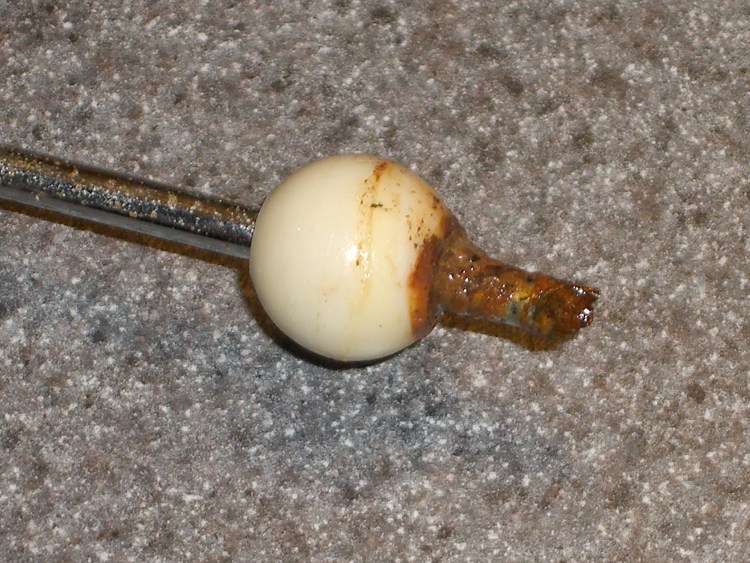
    Mary’s folks visited us for Christmas and her father brought along a shelf that needed cutting; their apartment doesn’t have room for his shop equipment, alas. I cleared the crap off the radial saw, grabbed the elevation knob to crank the blade up to get it set for ripping, and … the handle broke off.

    That’s not the first time this has happened, so I wasn’t entirely surprised. The knob is large enough that I could complete the mission just by grabbing the rim, but it was a near thing.

    The handle is made of some wonderful engineering plastic that doesn’t solvent-bond well with anything in my armory, although Plastruct had enough bite to make me think it would work. That repair actually lasted several years of admittedly low-duty-cycle use, but obviously this couldn’t continue.

    Stress raiser
    Stress raiser

    The problem seems to be built into the handle design. This pic shows that the fracture spans a high-stress part of the handle: between the inside right-angle corner (upper left) that rests on the outside of the knob, across the handle’s web, to the corner of the recess in the flange at the bottom of the picture.

    The red hoodickie is the latch that secures the handle in its deployed position, wherein it sticks out at exactly crotch height for average human males. That accounts for the fluorescent red tape around the handle.

    Broken surface
    Broken surface

    You can see how the latch recess triggered the crack: that notch where the latch wraps around must be the highest-stress part of the handle. I suspect the original design didn’t have the latch (or had something different) and the fat web near the round feature on the left extended all the way to the angled flange on the right.

    That would work!

    I epoxied a pair of rectangular brass tubes across the fracture inside the web, where they fit neatly below the latch. I roughed up the web with an awl to give the epoxy more surface to grab.

    Incidentally, this is one of those cases where you might think a cyanoacrylate adhesive would work. It won’t: too much shock, too much pressure. I used it to hold the parts together while the epoxy cured, but that’s about as far as I’d trust it.

    I’d like to add something to the notch, but I’m not convinced a right-angle brass flange and some epoxy will have enough grip to make any difference. It would certainly require changing the latch, perhaps by thinning the left side, which would make that weaker. On the other paw, I can probably eke out a miserable existence without the latch.

    Brass internal reinforcement
    Brass internal reinforcement

    The picture shows the clamping in operation. A snippet of polypropylene (from some random consumer packaging) under the tip of the clamp prevents it from becoming one with the project; the clamp tip is slippery plastic, but you never know.

    Perhaps this fix will last for a few more years…

    Y’know, I’m beginning to believe that finite-element analysis will be the death of us all. Obviously this handle was modeled to a fare-thee-well, with only enough material to meet the expected stresses in the expected directions. Unfortunately, the real world doesn’t cooperate: the forces are always larger, the conditions always worse, and the materials always weaker than the design anticipated. A “safety factor” of three or four or maybe even ten just isn’t enough!

  • TLC5916 LED Driver Current Monotonicity Hack

    TLC5916 Current Gain vs Config Code
    TLC5916 Current Gain vs Config Code

    I’m using Texas Instruments TLC5916 constant-current LED driver chips for my my friend’s Totally Featureless Clock. An 8-bit configuration value sets the output current, with the external resistor defining the maximum value as described there.

    The problem is that the current-versus-config-value curve has a non-monotonic discontinuity in the middle, where the Current Multiplier bit switches from 0 to 1. I don’t know in which alternate universe this design decision made sense, but right here and now…

    It. Does. Not.

    Why it’s a problem: the LED brightness tracks room illumination as seen by a CdS photoresistor, averaged over maybe half a minute. The brightness changes very slowly, so the jump when it goes from 0x7f to 0x80 is really eyecatching. At least to me, anyway.

    Eyeballometric measurement of the curve shows the current at 0x80 pretty much matches the current at 0x60, soooo let’s just shove the second quarter of the curve (between 0x40 and 0x7f) downward until it meets the high-current value at 0x80.

    This code does the trick:

    if ((Brightness >= 0x40) && (Brightness <= 0x7f)) {
     Brightness = 0x40 + ((Brightness & 0x3f) >> 1);
    }
    

    Basically, that maps 0x7f to 0x5f. The output current for 0x5f is pretty close to the current for 0x80, making the step pretty much a non-issue.

    You could, if you were fussy enough, work out the actual current mapping values from the data sheet equations and make the ends match up perfectly.

  • Digital Concepts AAA NiMH Cells: Craptastic!

    The AAA cells I mentioned there bubbled to the top of the heap on my desk again, so I charged them, let them sit around for a few days to stabilize, then ran a discharge test.

    The top (black) trace is all four AAA cells in series; the two steps correspond to the two weakest cells failing. The red trace is the surviving two cells. The green trace is the strongest cell, which supplied current during all three traces.

    They’re nominally 900 mAh, but the results are pretty much what you’d expect.

    No-name AAA NiMH - Sequential Discharge
    No-name AAA NiMH – Sequential Discharge

    The most durable cell, the last one to fail with the green trace, had a capacity of a bit over 500 mAh: slightly over half the rating. The weakest cell (the first step on the black trace) failed after a mere 250 mAh.

    Junk. Pure junk. I’ll give ’em another charge just to see what happens, but don’t hold your breath anticipating a resurrection.

  • Electronic Voting Machines: Another Reason for Distrust Thereof

    Voting Machine LCD Touchscreen Miscalibration
    Voting Machine LCD Touchscreen Miscalibration

    This is on the “control panel” side of the Sequoia ImageCast Ballot Marking Device voting machines used in Dutchess County. I put my finger in the middle of the CLOSE POLL button and the panel misread a press on the REPORTS button.

    That’s one of several misreadings of the day. Earlier, while setting up the machine for the day, it misread horizontally and gave me a STATUS report instead of a ZERO report.

    Last year the same sort of thing happened. It’s always explained as “being out of calibration”, which makes me wonder just exactly when the panels are calibrated and what the criteria for success might be.

    One of the few good things to come out of having a totally dysfunctional State Legislature is that New York has managed to delay and stall and fumble around until other states demonstrated the utter stupidity of direct-recording, no-paper-trail electronic voting machines. The ImageCast machines are a spectacular boondoggle, but far less catastrophic than what we’ve seen in Florida, Ohio, California, and …

    Oh, and after a 16-hour shift as a BMD Election Inspector, exactly zero handicapped voters (actually, any voters) took advantage of the machine to cast their vote. A report from someone who’s in a position to know says that in the last election, the bottom line was $250 per vote on the ImageCast machines. I think that’s probably low.

    My tax dollars at work, fer shure!