Ed Nisley's Blog: Shop notes, electronics, firmware, machinery, 3D printing, laser cuttery, and curiosities. Contents: 100% human thinking, 0% AI slop.
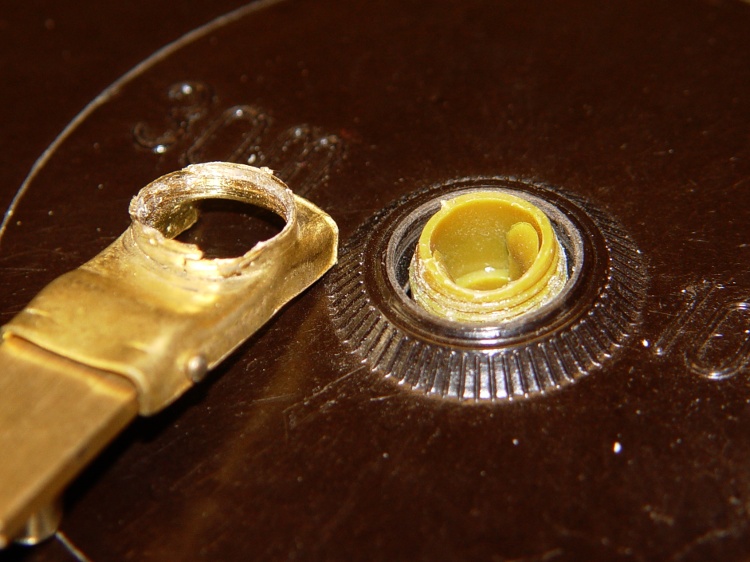
My Shop Assistant (who now merits a Proper Name) returned a fairly new measuring tape to the Basement Laboratory, reporting that the retracting crank handle fell off in “normal use”.
Stripped handle threads
Admittedly, this was a surplus find, but you’d think the build quality would be a bit higher. I’m sure I paid a minute fraction of list price: you could have bought it for much more in a reputable store.
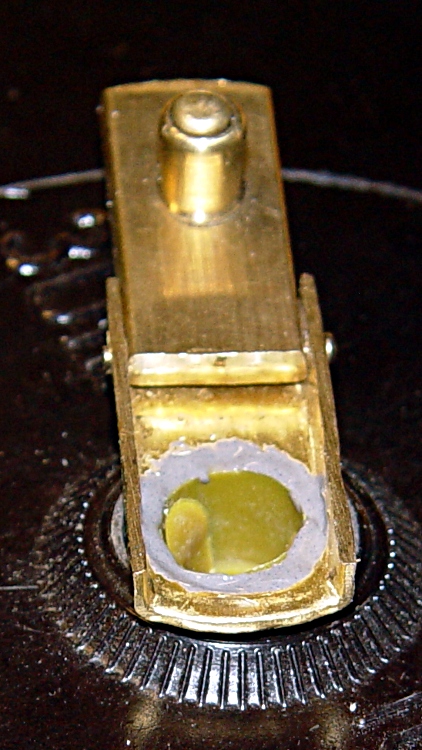
Maybe this is why the whole lot got scrapped out:
Handle detail
I applied a bit of JB Industro Weld to the plastic (?) threads on the spool, twisted the handle in place, squared it up, then eased more epoxy around the top of the threads and let it cure flat on the bench.
Remounted handle
I’d say the original design wasn’t particularly good and the implementation left a lot to be desired. If the interior fittings have similar flaws, I’ll eventually regret applying JB Weld in such a cavalier manner…
Yellow / Light Cyan / Cyan / Light Magenta = 30 ml each
The waste ink container is now a bit more than half full: 90 mm high in a 40 mm diameter cylinder. That works out to 113×103 mm = 113 ml. Given that “high capacity” cartridges for this printer contain 11 ml, I’m looking at 10 cartridges worth of waste ink.
While I was printing handouts for Cabin Fever, the R380 had a brain spasm and announced it didn’t recognize any of its ink cartridges. A power cycle brought it back to its senses and all the continuous-ink cartridges reset themselves to Completely full once again. With another printer, that error message required a complete new set of cartridges, because the printer could (and did!) set bits inside the refill-prevention chips that rendered the cartridges unusable.
I wondered if the Thing-O-Matic would benefit from having its two high-current heaters on a separate +12 V supply than the DC Extruder, after finding that the heaters dragged the +12 V output down by nearly half a volt.
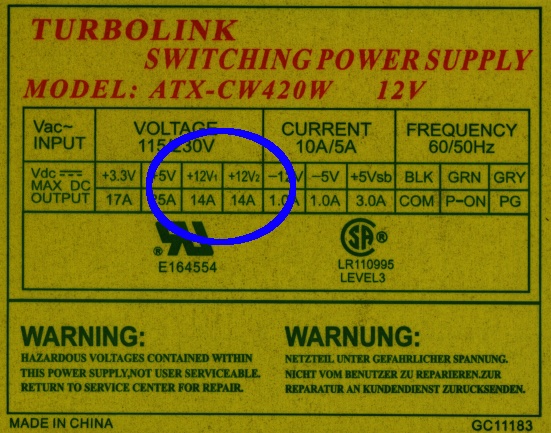
A bit of rummaging turned up a suitable ATX supply with a data plate that might justifiably lead one to believe that the supply provides separate +12 V outputs:
Turbolink ATX-CW420W power supply data plate
There’s no indication which of the four connectors might use +12V1 and +12V2, but, being that sort of guy, I applied an ohmmeter to the various yellow wires and found they were all exactly 0.0 Ω apart.
Huh.
So I opened the Warranty Void If Seal Removed top cover and found this situation:
All the yellow wires terminate in the same solder blob below the PCB
Two incoming wires got neatly spliced together in mid-air, despite having free holes in the PCB
This may not come as much of a shock: they lie…
Perhaps if you spend more money on your supply, it’ll actually live up to the data plate specs. Then, again, perhaps you’ll just be spending more money.
And, if you swap in a fancy supply for the MBI-stock one, it might not make much difference at all. I suspect the various power levels and current capacities have pretty much the same degree of integrity…
Y’know how some folks say they don’t wear a seat belt because they want to be thrown free in a crash? Here’s how that works in actual practice.
The air bag fires as the front bumper begins to deform and your body rises off the seat. Because you’re not belted in, the bag boosts your upper torso against the roof liner, bounces your head off the sunshade and bezel, then feeds you directly into the windshield glass.
Laminated glass doesn’t disintegrate, so your skull probably won’t completely penetrate the windshield. You’ll lose some scalp, though, as you slide down the crumbling glass and wedge above the dashboard.
Even if you survive a broken neck, the ensuing brain trauma means you won’t be the same person ever again.
News flash: massive brain trauma does not make you a better person.
Before laminated windshield glass became mandatory, your head would completely penetrate the windshield. Here’s what happened in 1937, from the incomparably grisly — And Sudden Death by J. C. Furnas:
Safety Glass Windshields
I read one of the many Reader’s Digest editions of that article during my formative years. Probably the one in October 1967, if a bit of Google-fu serves me right. You can’t get reprints of it from RD any longer, it seems.
However, unbelievably, while I was composing this post, I checked eBay and found a typewritten copy of the article, signed by Furnas, with 38 minutes remaining in the auction. I was the only bidder: for nine bucks (delivered) it’s mine.
Most likely it’s a publicity / fundraising copy, because the handwritten notation on the first page reads:
With best
regards to
[name]
J. C. Furnas
Oct 20, 1947
Those SUVs reside in the junkyard along the Dutchess Rail Trail near Creek Road, where I might get a new seat to rebuild my comfy office chair this spring.
In general, you cannot solve a bed bug problem by attracting and trapping bugs: there are simply too many bugs that are breeding ahead of their losses. We had (presumably) brought very few bugs home in our luggage, so every one we trapped was one less bug in the room. In any event, the number of bugs caught in the traps would give some idea of how much trouble we were in.
The bottom line: we trapped one or two bed bug instars and no adults.
Anything labeled for use against bed bugs carries a staggering markup and considerable smoke-and-mirrors marketing, but if you go back to the original sources (see the references in the first post), you’ll find out what actually works, which is quite different from what’s advertised.
The study by Wang, et. al., tested carbon dioxide, heat, and chemical lures. Tested singly: CO2 is pretty good, heat is OK, chemical lures definitely come in last. Basically, I think there are way too many significant figures in their results, but under idealized test conditions in a small arena, they collected about 80% of the bugs after six hours.
One key number: the CO2 flow rate was about 170 ml/min, roughly that produced by an adult human.
Another interesting number:
The visual inspections found ≤23 bed bugs in each apartment and they were considered as low levels of infestations.
CO2 mug and powder trap
Based on that, we decided to build some CO2 traps, which led to those observations. Our version of a dry-ice trap used a huge insulated mug filled with dry ice, perched atop an inverted dog food dish. We deployed two traps like that.
The dog dish has a cloth skirt (so the bed bugs can get traction on the way in) and a layer of talcum powder inside (so they can’t get any traction on the way out). The gas flow rate was in the right ballpark.
After several days, we had collected exactly zero bed bugs.
That wasn’t surprising, of course, because we knew we didn’t have all that many bugs, but we were still getting bitten in other parts of the house. Like, alas, the guest-room bed where we’d moved after gutting our bedroom.
Using dry ice as a CO2 source is relatively expensive and exceedingly inconvenient. We went through two iterations and decided that this was far too expensive, given the expected results.
It turns out that baker’s yeast metabolizes sugar into ethanol and carbon dioxide as the yeast gradually dies in a sea of dilute ethanol; if you have a distillation rig handy, you can probably get a decent yield of vodka from this project. Normally I use the carbon dioxide to stretch bread dough, but in this case it came in handy all by itself.
You can buy, for $50, a Bed Bug Beacon or you can build your own carbon dioxide lure and trap from ordinary household items for pretty close to zero dollars. Your choice.
I built and deployed four yeast reactor lures, built from gallon milk jugs and Tygon tubing from the parts heap. This picture tells you pretty nearly everything you need to know.
Yeast CO2 generator
I used a hollow punch to poke those the neat holes in the lids, but a razor knife will suffice. Seal the opening on the bottle cap with something sticky; nothing adheres well to polyethlyene and Tygon, although the contact cement I got with the dryer rear seal worked well.
Cap detail
Put three quarts / liters of warm water in the jug, add a cup of sugar (lots of sugar = longer production = more gas) and a teaspoon of yeast (lots of yeast = more production = live hard, die young), put on a solid cap, and shake vigorously to mix. Swap in the cap with the tubing and deploy. The recipe is totally non-critical and would make a great science fair project…
The dingus on the other end of the hose is the bottom of a cottage cheese container, artfully sculpted into a shallow dish with four small feet between low arched openings. Basically, it’s a little cover to trap the CO2 in a confined area and let it leak out in relatively concentrated streams. I have no idea if that’s how it works, but it was easy to do and keeps the hose from wandering away.
What they don’t tell you is that the gas production from a small yeast reactor is maybe 5%, tops, of the 150-200 ml/min required to mimic a human: I bubbled the gas into an inverted 60 ml syringe and used a stopwatch. The gas production varies strongly with time; after a week it’s down to essentially zero, so I’d say the “11 day” claims for the BBB’s lifetime are, mmmm, fanciful, at best.
Gas production is proportional to the total number of active yeast. Methinks a cup of sugar in three quarts of water will yield more yeast than a packet of sugar in, what, a pint jar? If you drop fifty bucks on a BBB, make some measurements and let me know, OK?
Maybe they use brewer’s yeast, which is an ethanol-tolerant strain of ordinary baker’s yeast. The end product, after a week, smells strongly of ethanol, so I’m not sure how much difference that would make.
In any event, my opinion is that such a minimal gas flow can attract bugs from only a very limited radius, so the results are far less conclusive than dry ice or pressurized-gas lures. Of course, if you have floors crowded with bed bugs, a few of them will stumble across the lure simply by accident.
Of course, there is one lure that’s absolutely guaranteed to attract bed bugs from across the room: you. I’ll discuss that after covering traps and barriers…
Given that diatomaceous earth (DE) is the only useful insecticide-like substance with residual killing effect, the general idea is to turn your floors into killing fields by spreading a thin layer of DE everywhere. In practical terms, that means around the border of the room, under your bed, and anywhere you don’t walk.
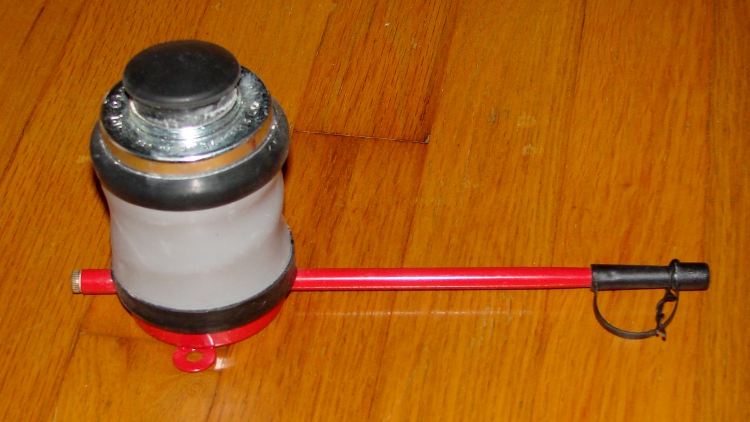
J. T. Eaton makes the canonical duster, which is what I used in our house:
Eaton 530RD Insecticidal Duster
They also have a green-painted version, which they deem more suitable for “green” pest control operators; a red duster evidently signifies a powerful chemical at odds with planet-friendly symbolism. The dusters don’t care what’s inside and the powders all look the same, so do what you like.
This is the “improved” #530 version, BTW, with an insulated plastic tip so you don’t kill yourself poking it into electrical boxes. I can detect the faint odor of a lawsuit behind that improvement, can’t you?
The molded strap holding the cap on the end of the tube wants to spring closed, so I added a twist tie loop to keep the cap out of the way. Pop the cap, hold it against the tube, slide the loop to capture the strap. Sheesh.
Were this sort of thing made by, say, Hitachi, it would resemble a large white plastic pregnant guppy containing a microcontroller, a powder dispensing auger, a projected hologram application guide pattern, LCD coverage readout in g/m2, and a data uplink. Oh, and a USB-charged lithium battery. For twenty bucks in Walmart.
You fill the spring-loaded rubber can halfway with DE, jam in the cork, and discover that you have no idea how to use the mumble thing. The Eaton website has some videos (or search Youtube for the obvious keywords), but here’s what the result looks like under our bed:
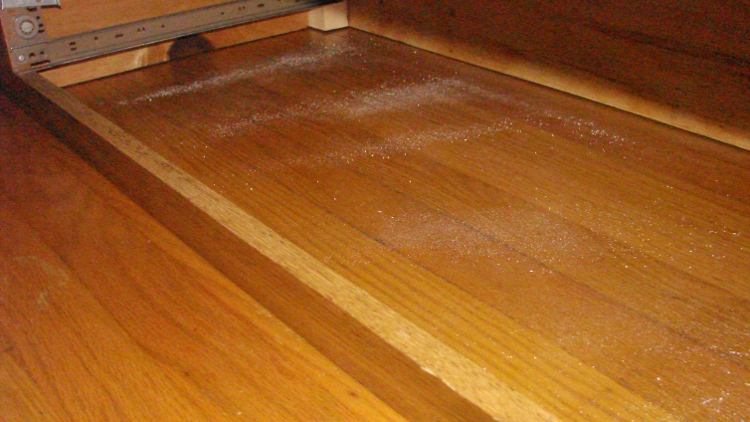
Diatomaceous Earth under bed
The CoP says
Dose rate is not critical: even low doses of the DED can result in the death of the insect, it just takes longer.
A mumerical value in, oh, g/m2 wouldn’t be helpful, as I have no way to determine what’s coming out of the nozzle, nor how much each puff covers. Evidently, a barely visible dusting will suffice; those sprinkles indicate I probably applied too much.
There’s a fine layer of DE over the entire floor surface under there, so isn’t not as irregular as it might appear. That’s because, regardless of your intent, the duster poots out a huge blast on the first squeeze: the tube is full of powder and there’s nowhere else for it to go. Hold the duster sideways to get what you see above (after the first poot) or upside down for a minimal layer.
If it clogs, there’s a brass rod screwed into the rear of the tube, but that means you’re definitely getting carried away with the thing.
If you do this in a sunlit room, you’ll be astounded at the amount of dust left floating in the air. It’s a good idea to wear a dust respirator, at least an N95 mask, while you’re poofing away. You definitely won’t want to dispense actual toxins like this, either.
I have no way to evaluate the effectiveness of this treatment, except for our anecdotal evidence that the number of bites we sustained dropped after I dusted the living room, the two bedrooms we were using, and the connecting hallway. That could be due to other factors, but we needed all the help we could get.
As mentioned there, I have reason to distrust electronic voting machines, which stir the unreliability of PC-based computing into the boiling pot of election politics.
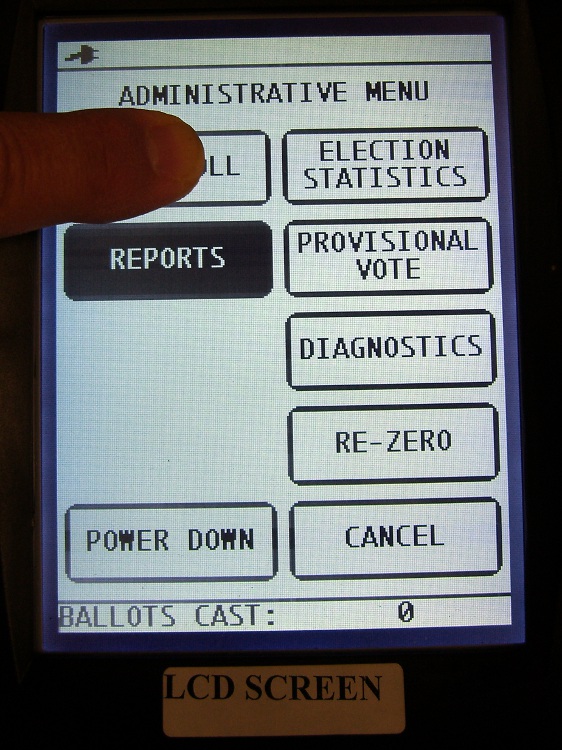
Voting machine LCD miscalibration – Open Poll
Attempting to open the polls with the Administrative Menu on the LCD produced this incorrect response. Fortunately, the next screen in the Reports section had a Cancel option, so I could back out and try again by tapping the screen well above the Open Poll button. That worked.
Later on in the day, for the first time in my experience as a Ballot Marking Device Election Inspector, a voter requested to use the BMD machinery to cast her ballot.
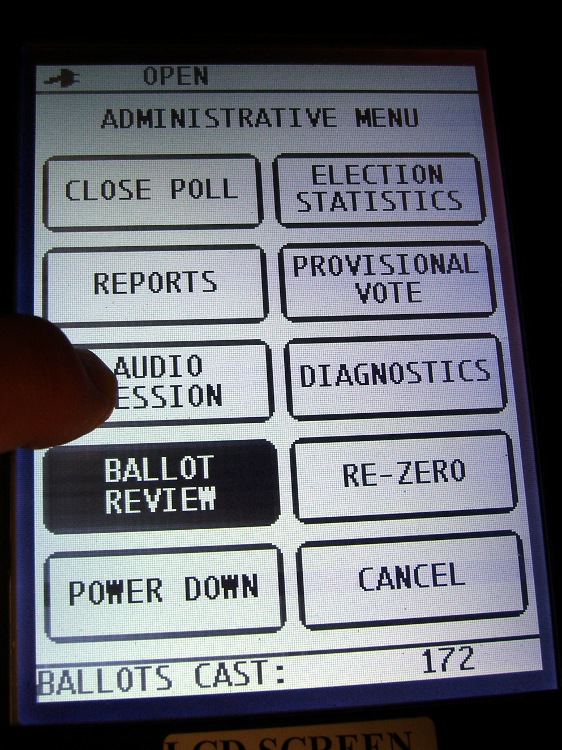
Here’s what happened when I tried to start the somewhat misleadingly named Audio Session that invokes the BMD: Ballot Review turns on a mode that presents the scanned values from the next ballot on that tiny little LCD, one contest at a time.
When I called the Board of Elections to get help, the tech said “Hmmm. That shouldn’t happen.” We did get the Audio Session started and the voter commenced entering her choices, eventually succeeding in producing a printed ballot that she found satisfactory.
The tech sent to fix the situation (we Election Inspectors are not encouraged to fiddle around with the machinery, for well and good reason) was stumped. Eventually we scanned a ballot, using a live vote as a debugging aid, and managed to get the option turned off again. Obviously we hit a corner case, but that’s not what you want in an election with voters lining up behind a dysfunctional scanner.
It was, of course, the one-and-only scanner in the polling place.
While this does not directly affect the election results, it certainly does not inspire confidence in the architecture, the programming, or the operator training of the election system.



 The Smell of Molten Projects in the Morning