The Smell of Molten Projects in the Morning

Ed Nisley's Blog: Shop notes, electronics, firmware, machinery, 3D printing, laser cuttery, and curiosities. Contents: 100% human thinking, 0% AI slop.

Tag: Memo to Self

Maybe next time I’ll get it right

  • CD Longevity, Lack Thereof

    Remember when they said CDs would last for a hundred years?

    Some years back, a bit o’ PC shuffling around here spat out a 60 GB hard drive and brought the Big Box of CDs up from the fireproof safe at the same time. A little mental math: hey, why not?

    Turns out that all 130+ of my “purchased” CDs, mostly with Windows programs & device drivers, add up to 42 GB of ISO images. Creating ISOs is trivial with Linux:

    dd if=/dev/cdrecorder of=image.iso

    and you’re done. Depending on your system, you’ll get faster transfer with a bigger blocksize: bs=1M is more than enough.

    I used the two upstairs PCs as readers, with the hard drive installed in the milling-machine PC downstairs. It took the better part of a day to think up file names and feed CDs into the slots. Typical speeds were 3 MB/s, dropping dramatically with read retries: a minute or two or three per CD. The average CD is half-full.

    I wrote a trivial script to do the tedious work: loaded the CD, issued the dd command, computed MD5 checksums on the raw CD data and the stored file, and ejected the CD. The checksums always matched except when the disc had read errors, but gave me confidence I wasn’t losing any bits along the way, because the CD got read twice and any marginal sectors that were fixed-in-error would pop out.

    One CD was completely unreadable because of a nasty scratch. Another, never used, turned out to be cracked in the sealed envelope.

    What’s scary is the number of previously good, visibly undamaged, used-once-or-twice CDs that couldn’t be read in at least one drive. I don’t abuse the things and I -know- some of these haven’t seen the light of day more than once or twice.

    Dozens (I lost count) weren’t readable in at least one drive and many weren’t readable in three drives. If you happened to have two of those drives in your one-and-only PC you’d be sunk without a trace.

    I had a visibly undamaged CD that couldn’t be read in any of the four drives, although rubbing it down with toothpaste (got nothing to lose!) persuaded it to play in the CD burner. Perhaps a minute scratch? Dunno, but if that CD was damaged, then you can’t even look at ’em without damaging the things.

    The most reliable drive was a CD-only burner. The DVD-ROM and DVD-burner drives could read most discs, but fell flat on others. There’s no obvious difference between a DVD+(only) burner and the DVD+/- burners.

    Bottom line: maybe a quarter of those spendy pressed commercial CDs on your shelf won’t work when you really need to reinstall those programs. Should you happen to do an installation that doesn’t read the part of the CD with rotten bits, then you’ll never notice. I was copying the entire bit stream off the disc, so every single sector had to pass muster. How lucky do you feel?

    If you think you’ll ever need ’em again, get ’em on a hard drive now. Then you can burn ’em as needed. Oh, yeah, put the serial number right in the file name, too, it’ll come in handy.

    Hundred years, ptui!

    Back then I didn’t know about GNU ddrescue. Now, I do. Life is good. Well, better.

    Update: Nowadays, I keep everything on a 500 GB drive in the file server, which does a daily backup to a 500 GB external drive. Once a month, more or less, I dump the contents of the daily backup drive to a similar drive that lives in the fireproof safe.

    Tip: mounting an ISO is easier than finding & mounting the CD. They’re served up over an NFS share mounted locally at /mnt/diskimages, so it goes a little something like this:

    mount -o loop,ro /mnt/diskimages/ISOs/name-of-CD.iso /mnt/loop/

    and away you go. The ro option keeps you from screwing things up with an inadvertent write.

    That doesn’t work in Windows, more’s the pity, but you can find GUI utilities that more-or-less do the same thing from a SAMBA share. Not that I care all that much.
  • Ya Gotta Have Tools, Mobile Division

    Once upon a time we delivered a van full of composted leaves to Mary’s Vassar Farms garden plot in the evening.

    There’s a gate at the entrance that was half-closed, but Mary’s never seen it closed & locked, so we drove in and parked by the plot to toss bags. We were done in about 15 minutes, drove back to the gate, and found the Vassar security folks had locked it… with the van in plain sight.

    My guess is that they were busting our chops, but one should never ascribe to malice what can be explained by stupidity.

    We had a phone, but none of the bystanders knew what number to call. The ladies reported that the other gate was also locked. A chain-link fence surrounds the plots.

    What to do?

    The gate hinges were plain old 1″ bolts and nuts, so I figured I could just dismount a gate, drive out, then put the gate back in place. Non-destructive and easy to explain if The Man arrives while I’m at work. Plan B was to just cut the padlocked chain holding the gates together.

    The back of the van has a small “tool” compartment for the jack and suchlike. I long ago added a multi-bit screwdriver set, a medium adjustable wrench (not quite big enough for a 1″ bolt, alas), a Vise-Grip, and similar odds & ends.

    Fortunately, it turned out that the chain around the middle of the gates had two links held together with a 1/4-20 bolt and two nuts. I suspect this sort of thing has happened before, perhaps to someone else with a Vise-Grip.

    Five minutes later, we were outside, the gate was closed & locked, and the tools were back in place.

    Memo to self: add a bigger wrench.

  • Home Shops

    Found this while I was looking for something else…

    http://www.cnn.com/2007/WORLD/meast/02/22/iraq.main/index.html

    CNN being pretty much ahistorical, that’s a dead link by now. Here’s another copy:

    http://www.powermediaplus.com/news/archive.aspx?newsTypeID=1&newsID=2653

    The money quote:

    We also found the various components of a metal shop,
    including welders, burner stoves, circular saws, sanders
    and other items needed to build explosive devices.

    Remember:

    When guns are outlawed, only machinists will have guns.

    Memo to self: The Man knows that, too.

  • Using DVDs for Backups and the Futility Thereof

    Early this year I made backups of a friend’s PC hard drive on DVDs (using partimage, my full-partition-backup hammer of choice) and now must recover a file for her.

    Each of the seven DVDs has two 2 GB files on it and, on every DVD, the second file is riddled with errors.

    Thousands, nay, tens of thousands of errors.

    The first file on each DVD is perfect: zero read errors.

    I’ve tried them on three different drives and, while the errors vary, the pattern is basically the same.

    Tick me right off. I’ve had a PC running ddrescue on ’em for the last few days. I’m hoping that by reading them on various drives, the recovery program can merge the good parts, but I’m not holding out a lot of hope. (Update: worked like a champ. Whew!)

    Because I’m that type of guy, I always verify the data when I write a CD or DVD, so I know these were good when they were written. Most of the DVDs seem to be visually OK, but some have dark spots in the dye layer. There aren’t any scratches or defects beyond what you’d expect for a DVD that’s been written once and handled by somebody who’s neurotically careful about that sort of thing: they’re not pristine, but they’re not far from it.

    Also because I’m that type of guy, they’re generic no-name DVDs, but so what?

    Achtung: use the GNU version of ddrescue, because it’s the one that creates & uses a log file to help retry the errors on different machines. The other non-GNU version doesn’t do that.

    Memo to self: next time, record -three- sets of DVDs and store the sets separately.

  • Blender repair

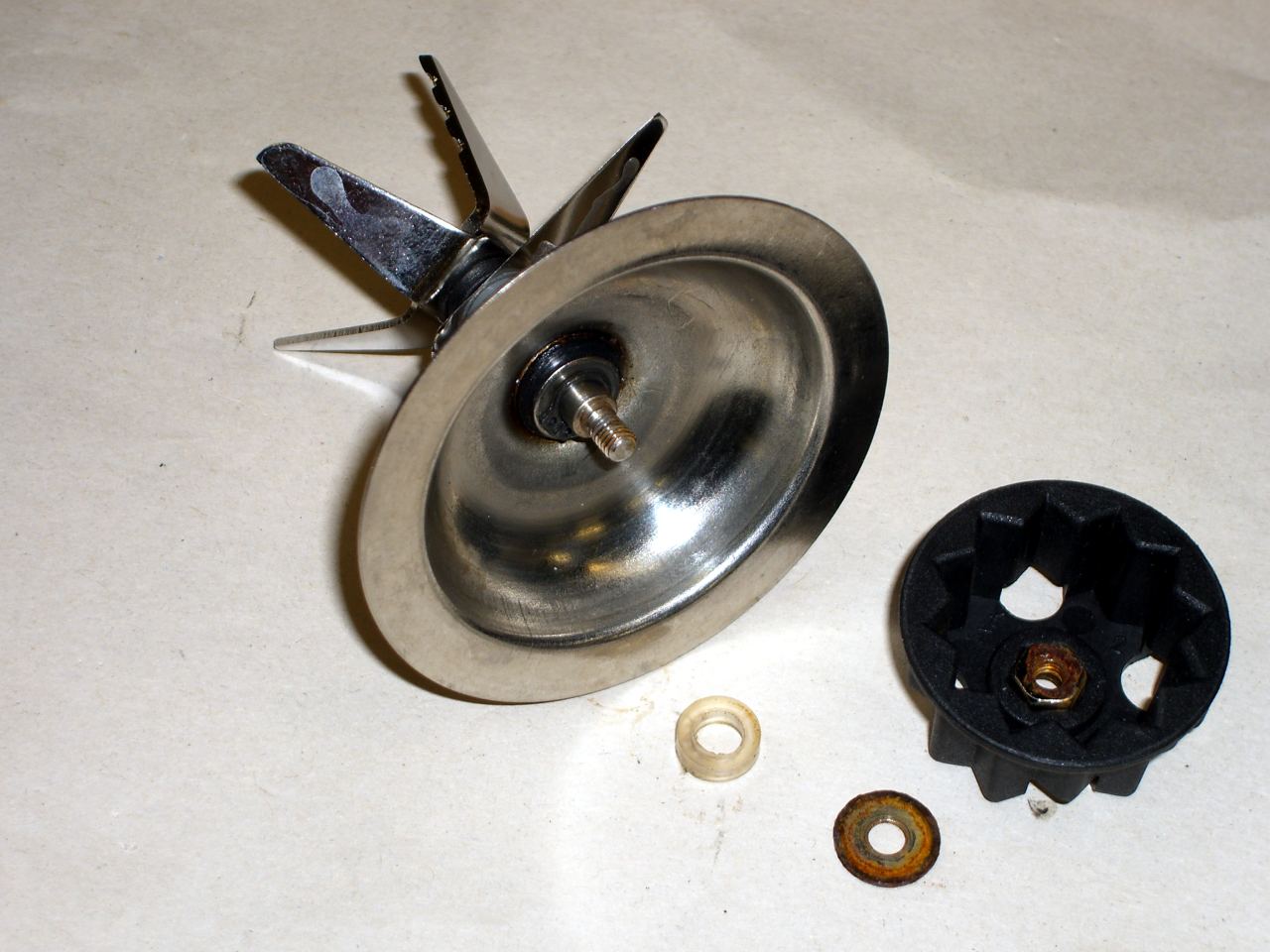
    Blender blade bearing repair
    Blender blade bearing repair

    So a while back I replaced the blade bearings in our cheap-after-rebate Farberware blender: a $20 pack of ten bearings (5 repairs!) from eBay for a $15 mixer.

    [Update: They’re 6 mm ID x 13 mm OD x 5 mm thick.]

    Of course, it turned into a shop project. I added spacers that held the shaft in the right position by eliminating some vertical play, dripped Loctite around the housing to fasten the outer races in place, silicone-lubed the seals, and generally did the last few dollars of engineering & manufacturing they couldn’t afford in a cheap blender.

    The blender now works better than it ever did before. It used to emit a horrible whining rattle and didn’t have much go-power. Now, while it’s not silent, it whirs solidly and engages the pancake batter with a vengeance.

    Blood no longer runs out of our ears…

    I think the original bearings were crap quality, badly sealed, poorly mounted, and failed so fast we never knew how the mixer should behave. Grumble, etc.

    Now that I know what to do, the next four repairs should go much quicker. If, indeed, the new bearings ever fail. The old ones were, IIRC, “dishwasher safe”, but I think that is a cruel hoax from the Planned Obsolescence & Early Failure Department. We’re rinsing the blade assembly by hand now.

    If I thought spending more on a blender would get better bearings, I’d probably still buy cheap-after-rebate ones just for the quality shop time…

    Memos to self: left-hand shaft thread, slightly shorter bottom extension, make stainless hardware.