The Smell of Molten Projects in the Morning

Ed Nisley's Blog: Shop notes, electronics, firmware, machinery, 3D printing, laser cuttery, and curiosities. Contents: 100% human thinking, 0% AI slop.

Tag: Memo to Self

Maybe next time I’ll get it right

  • HP8591 Spectrum Analyzer Screen Dump Sizes

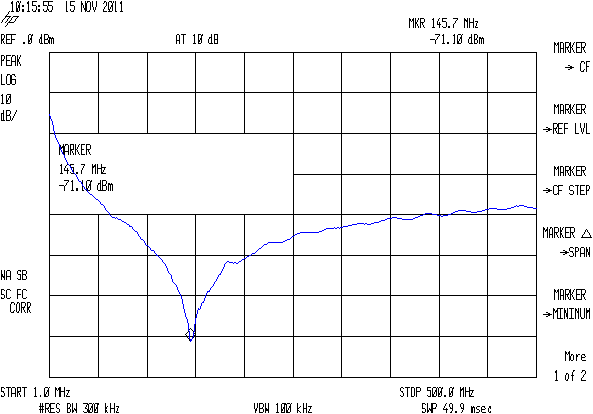
    The script I use to fetch screen dumps from my HP8591 spectrum analyzer works fine, but it turns out that the screen images have (at least) two sizes.

    The hp2xx program converts the screen dumps from HP-GL text files to PNG bitmaps:

    for f in *hgl ; do hp2xx -m png -c 1436 "$f" ; done
    

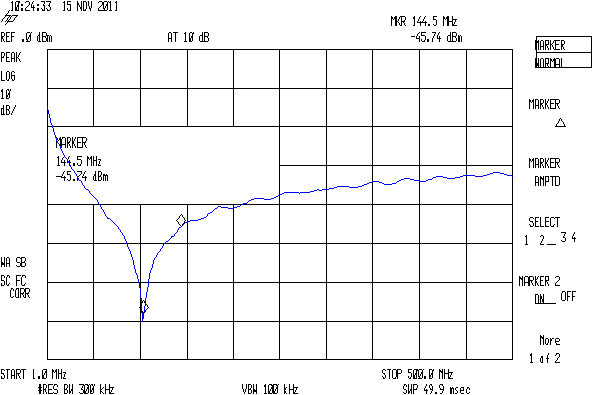
    The usual size is 593x414 pixels:
    SMD 470 pF - Comm Spec
    SMD 470 pF – Comm Spec

    The other size is 593x395 pixels:

    SMD 470 pF - Surplus
    SMD 470 pF – Surplus

    As nearly as I can tell, the spectrum analyzer mashes the Y coordinate when any of the soft keys along the right edge have reverse-video highlights, which print as outlined boxes. There may be other sizes; those are the two I’ve stumbled over so far. This doesn’t much matter unless I’m using the images in a column, in which case it’s awkward to have two sizes: a one-size-fits-all script to trim off the soft keys doesn’t produce the proper results.

    Musing on how to figure this programmatically…

    The file command gives the pixel dimensions, with the file name (which may contain blanks: so sue me) set off  with a colon:

    file "SMD 470 pF - Surplus.png"
    SMD 470 pF - Surplus.png: PNG image, 593 x 395, 8-bit colormap, non-interlaced
    

    Judicious application of cut extracts the relevant numbers, albeit with a trailing comma that requires another pass through the grinder:

    file "SMD 470 pF - Surplus.png" | cut -d\: -f2 | cut -d\  -f4,6
    593 395,
    

    Although I think a sed script might be better, that requires more skull sweat than I have available right now.

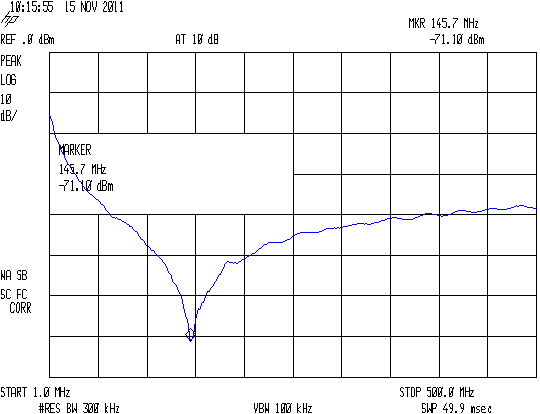
    Given that, then an appropriate mogrify would crop off the softkey labels; the first one is what’s in the script right now:

    mogrify -crop "540x414+0+0" SMD\ 470\ pF\ -\ Comm\ Spec.png
    mogrify -crop "515x395+0+0" SMD\ 470\ pF\ -\ Surplus.png
    

    Which looks like this:
    SMD 470 pF - Comm Spec cropped
    SMD 470 pF – Comm Spec cropped

    The two sizes come out pretty close to the same 1.3 aspect ratio, but resizing the smaller one to match the larger doesn’t work well:

    convert -resize '540x414+0+0!' SMD\ 470\ pF\ -\ Surplus.png SMD\ 470\ pF\ -\ Surplus\ resized.png
    

    You need single quotes around the geometry parameter to prevent Bash (or Dash or whatever) from gnawing on the bang character (yes, that’s how you pronounce “!”).

    The images are lossless PNGs because they consist entirely of single-pixel lines and characters; alas, resizing by non-integer factors close to 1.0 introduces nasty picket-fence aliasing artifacts:

    Resize x 1.049
    Resize x 1.049

    I resize the pix by a nice, even factor of two (which also adds aliasing artifacts, but in small and very regular doses) and set the dots/inch value so the images print at about the right size without further hassle along the production pipeline:

    mogrify -density 300 -resize 200% whatever.png
    

    Which looks like this:

    Resize 2.00
    Resize 2.00

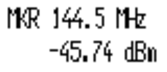
    Resizing from the smaller images to (roughly) the final size in one step doesn’t look quite so awful:

    convert -density 300 -resize 209% "SMD 470 pF - Surplus.png" "SMD 470 pF - Surplus large.png"
    

    Like this, still with a distinctly garbled dBm:
    Resize 2.09
    Resize 2.09

    But it’s decidedly better than this result from a two-step enlargement, although not as wonderful as one might like:

    Resize x 1.049 x 2.00
    Resize x 1.049 x 2.00

    So the script needs a tweak for the file sizes, but …

    Memo to Self: It’d be simpler to not have highlighted softkeys when doing screen dumps!

  • Basement Safe Humidity

    The discussion about drying my silica gel stash prompted me to toss a Hobo datalogger into the safe along with the desiccant bag. We now have enough data to spot a trend:

    Basement Safe Humidity - Oct-Nov 2011
    Basement Safe Humidity – Oct-Nov 2011

    Verily, one measurement trumps a thousand opinions: I was totally wrong about the door seal. Either that or the safe’s contents started out a lot wetter than I thought.

    The basement humidity runs about 55% RH, pumped down by a dehumidifier in the summer and ambient air in the winter, which (I think) sets the upper limit. Modulo having hygroscopic stuff like paper in the safe, I suppose.

    I’ll toss a fresh bag in there, tape over the door crack, and see what happens during the next month.

    FWIW, the Onset HOBOware program doesn’t run under Wine and Wine doesn’t support USB hardware anyway, which is one of the few reasons I have a Token Windows Laptop. I’ve set it up to automagically export the data into CSV files, from which this went into OpenOffice 3.2 for a quick look. Surprisingly, HOBOware is a Java program, but evidently written specifically to avoid portability; they have Windows and Mac versions and that’s all. Worse, there’s no way to extract data from the loggers without using that program, because Onset doesn’t document the interface protocol. Enough said.

    Memo to Self: measure it!

  • Parking Advice: Avoid Drive-Through Spaces

    After driving for five hours I’m never at my best, so I parked with atypical abandon at the motel: on the downhill side of a pull-though parking space. Usually I park off to one side of the lot, directly under a lamp that lights the car and shadows the interior, with the hatch backed against the pole. I claim the stupid excuse.

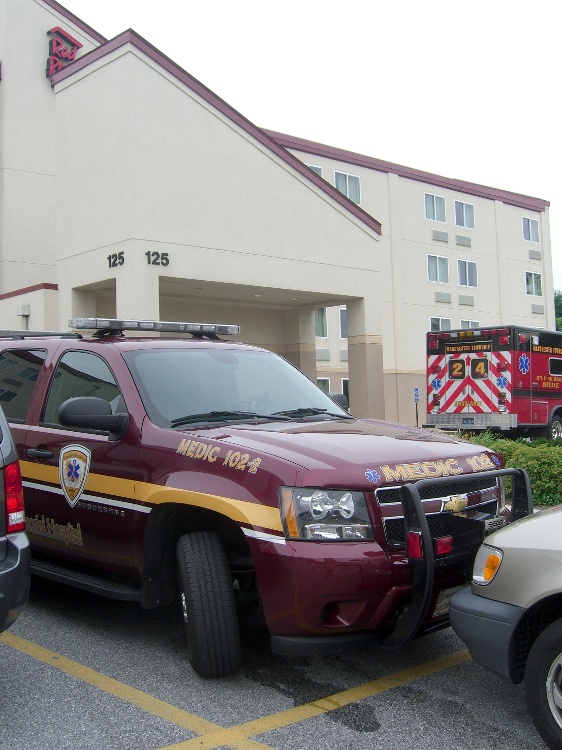
    The next morning we hiked out for breakfast and returned to find emergency vehicles scattered all over the motel’s lot. Even from a distance, we knew this might not have a good outcome for us: that’s our van going nose-to-nose with the EMS Medic’s SUV:

    EMS Medic parking - overview
    EMS Medic parking – overview

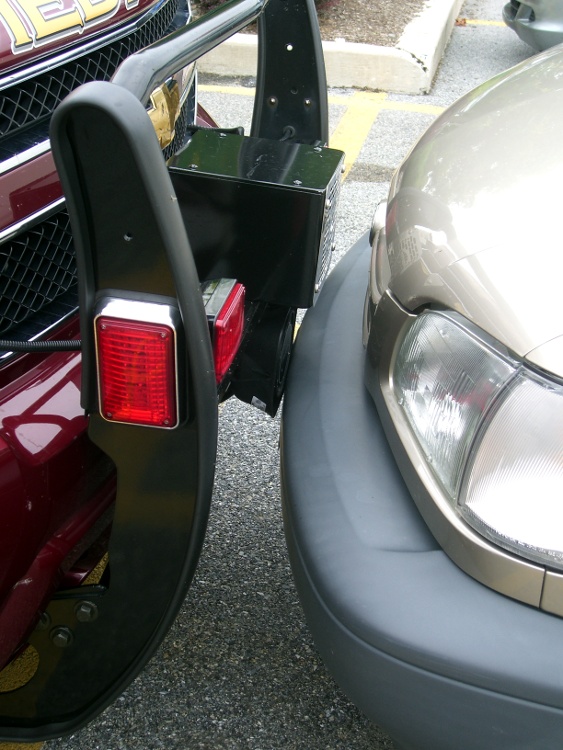
    Up close, the situation turned out to be much much much better than I expected:

    EMS Medic parking - bumper detail
    EMS Medic parking – bumper detail

    The siren was just kissing the front bumper of our van. I think the SUV rolled forward an inch when they released the brakes after slapping the tranny into Park and bailing out.

    For what it’s worth, those fancy pusher bars on the front must be strictly for looks, because the siren & its control box really do stick out far beyond the bars. At the first serious contact they’ll crush back into the grille and do about a kilobuck worth of damage to the front end.

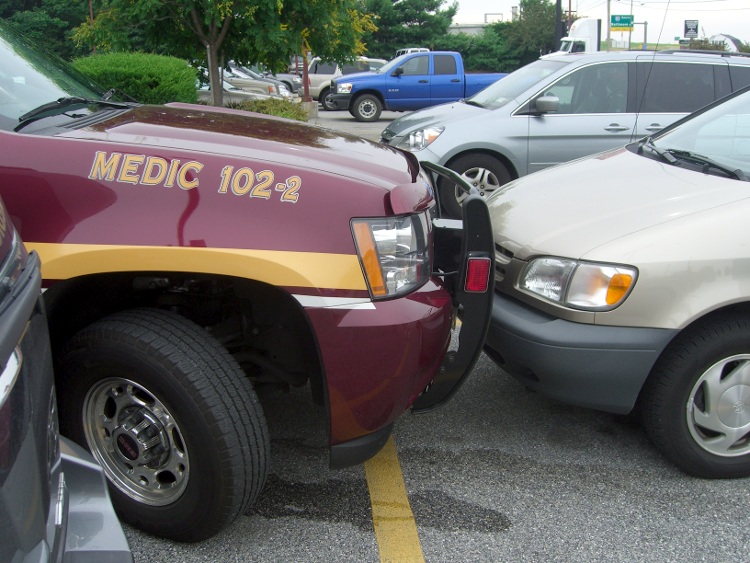
    I think the driver wasn’t fully aware of how much snout that SUV has. It looks to be shiny-new, so perhaps this was the first close quarters parking experience:

    EMS Medic parking - position detail
    EMS Medic parking – position detail

    I left a polite note on the driver’s side window pointing out that another two inches would mean we’d be filling out paperwork until noon.

    They were gone by the time we left. The siren snagged the corner of the license plate and bent it out as they departed, but that’s not the first bend in that particular bit of sheet metal.

    If any of you have a friend on the York PA Medic / EMS staff, give ’em a friendly heads-up for me, OK?

    Memo to Self: Always park off to the side, dammit!

  • OPB815 Optical Switch: Always Measure Your Components

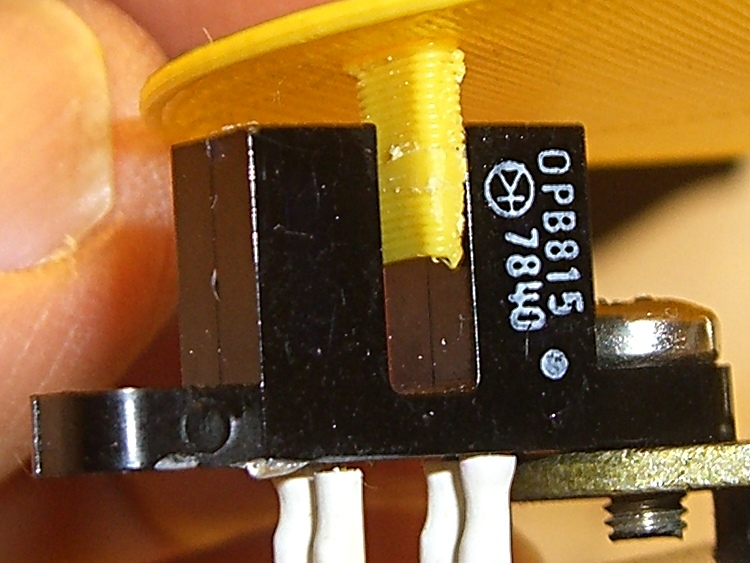
    Given this ID printed on the side of an old OPB815 optical interrupter switch:

    OPB815 Optical Interrupter Switch - detail
    OPB815 Optical Interrupter Switch – detail

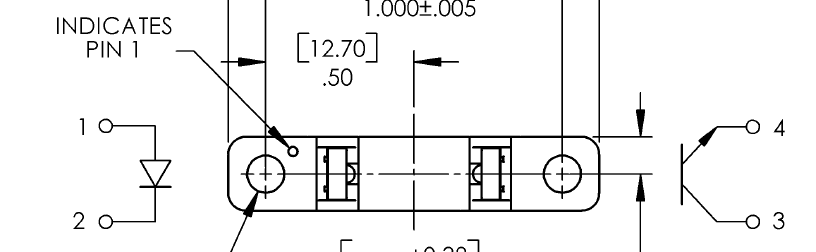
    And this pinout diagram from a randomly chosen datasheet for that part number:

    OPB815 Datasheet Pinout Diagram
    OPB815 Datasheet Pinout Diagram

    One might reasonably be led to believe that the white dot on the part marks the LED anode. That’s what I thought, too, but the innards are actually rotated 180° from the picture: the dot marks the transistor collector.

    Took me a while to figure that out; I eventually tore one apart and used my pocket camera to look for the blue-white glare of the IR emitter.

    After the dust settled, I rummaged around in the impacted shitpile holding my paper documents and found the original 1982 datasheet, with my very own scrawled notes:

    Original OPB815 Datasheet Pinout Diagram
    Original OPB815 Datasheet Pinout Diagram

    Back in the day, the dot on pin 1 marked the transistor collector…

    Memo to Self: No, scanning all that old paper wouldn’t help.

  • Un-milling Some Slots

    The first aluminum build plates had to fit around the gimcrackery atop my tweaked ABP: two solderless grounding lugs and a lump of Wire Glue. The new HBP setup put the grounding lug below the fixed plate and did away with the lump, so the removable plate could have five holes and a wiper cutout without any fancy trimming.

    I’d squared up three plates and machined only two for the ABP, so I had one plate that just needed drilling. Rather than machining two new plates, I filled the cutouts on the old plates with JB Industro Weld epoxy, flycut the excess, and drilled new holes.

    Flycut and drilled epoxy fill
    Flycut and drilled epoxy fill

    This was straightforward manual CNC: get the plate square on the table, touch off the plate edges, and then drill the holes in two steps.

    If those thin epoxy webs break off the outside of the holes, it’s not the end of the world: the plates won’t go anywhere because they’re indexed by the holes on the other side.

    Memo to Self: Next time, make a fixture to hold the plates relative to a starting hole and eliminate all the tedious alignment steps.

  • Thing-O-Matic: Ouch!

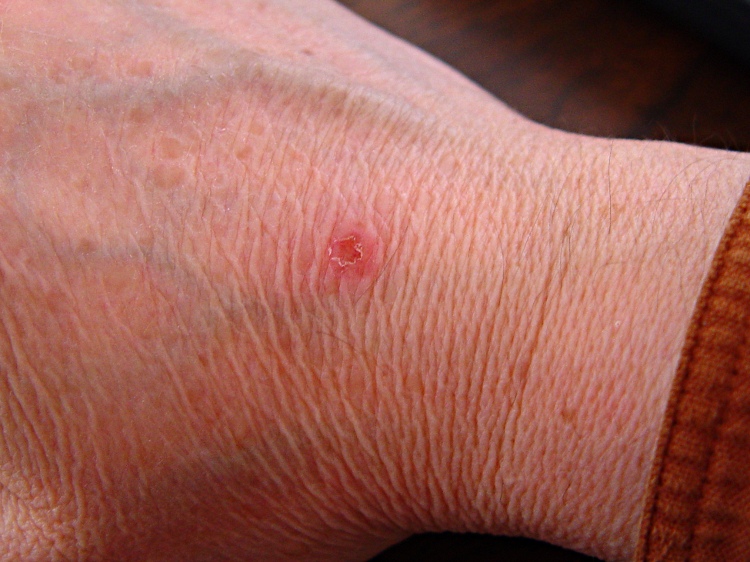
    This should be obvious, but don’t reach across the build platform of your Thing-O-Matic with the extruder at 215 °C: you might bump the nozzle with the back of your hand.

    Scorch mark from TOM nozzle
    Scorch mark from TOM nozzle

    It never really hurt, but the nozzle tip made a nasty punch mark in the middle of a disk of scorched skin.

    Ah, you’re not that stupid, are you…

    Memo to Self: Gloves?

  • Adobe Reader Print Colors

    While printing up handouts for my talk at Cabin Fever, I finally tracked down why Adobe Reader was producing such crappy colors.

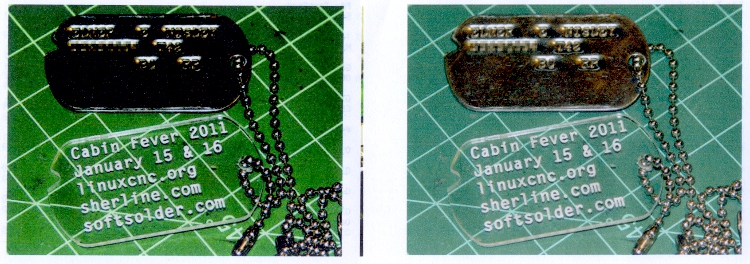
    The left is before and the right is after the fix, scanned at the same time with the same image adjustments:

    Oversaturated vs normal printing
    Oversaturated vs normal printing

    All of the print settings appeared correct (plain paper, 720 dpi, normal contrast, etc, etc), but Adobe Reader (and only Adobe Reader) looked like it was trying to print on vastly higher quality paper than I was using. Too much ink, too much contrast, generally useless results.

    The solution was, as always, trivial, after far too much fiddling around.

    In Reader’s Print dialog, there’s a button in the lower-left corner labeled Advanced. Clicky, then put a checkmark in the box that says Let printer determine colors.

    And then It Just Works.

    Equally puzzling: ask for 25 copies of a two-page document, check the Collate box, and you get 25 page 1, 25 page 2, then more page 1 starts coming out. I bet I’d get 25 x 25 sheets of paper by the time it gave up.

    I have no idea what’s going on, either.

    Memo to Self: verify that the box stays checked after updates.