Ed Nisley's Blog: Shop notes, electronics, firmware, machinery, 3D printing, laser cuttery, and curiosities. Contents: 100% human thinking, 0% AI slop.
For reasons best left to the imagination, we needed some large signs for the front yard. I must look this up every time I do it, so here’s the process…
Create document in LibreOffice (or whatever), save as PDF
Convert PDF to EPS = Encapsulated Postscript
Apply poster to enlarge & paginate
Convert PS to PDF for ease of printing
Bash does the heavy lifting, after you install whatever packages your Linux distro may not have included:
Our Larval Engineer reports that the current techie-thing-to-do involves having a tattoo artist or other unlicensed medical technician implant a tiny bar magnet in one’s finger, a process that adds a sixth sense to one’s built-in repertoire after the anesthetic shot of whiskey wears off. Evidently, converting magnetic field variations into mechanical force tweaks those little nerve endings wonderfully well, provided that your finger doesn’t subsequently rot off.
I point out that a magnet epoxied to a fingernail would probably get you within a few dB of the same result, minus the back-alley surgery thing. She counters that’s tacky and lacks style.
I point out that her medical insurance (for which, harumph, we are currently paying) probably doesn’t cover self-inflicted damage. She counters that most victims people have no problems at all.
I point out that a steampunk-style wristband incorporating a Hall effect sensor, LEDs, and maybe a vibrating pager motor would be at least as cool and probably marketable, to boot. She returns broadside fire by observing such a device requires power and she knows how I feel about batteries.
Game, set, and match.
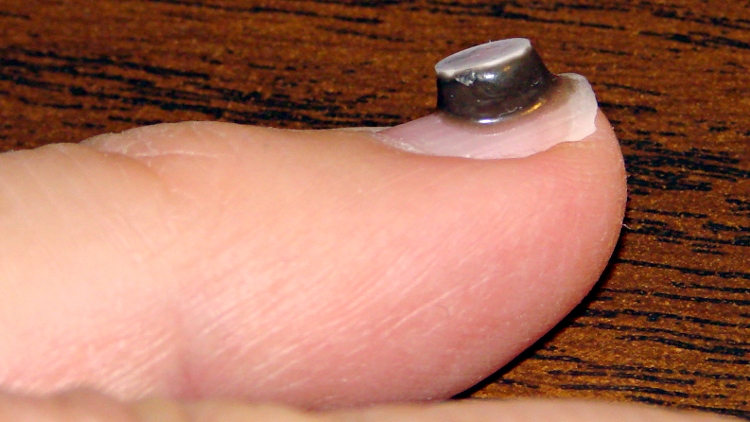
In the interest of science and so as to not be rendered completely obsolete, I’ve epoxied a small neodymium magnet to my left little finger to discover what the world feels like. It’s surrounded by epoxy, which ought to prevent corrosion & deterioration until it eventually falls off or the nail grows out. It came with a white ceramic layer on one pole, which means it’s completely encapsulated:
Neodymium magnet on fingernail
She’s absolutely right: it’s tacky and lacks style.
I used JB KwikWeld fast-setting epoxy. The magnet attracted a tendril of uncured epoxy, so the “steel filled” part of the description seems accurate, and the magnetic field produced a nice smooth coat over the entire side of the disk.
It buzzes gently inside a Sonicare toothbrush handle, snaps firmly to steel surfaces. and is otherwise inoffensive. I must run some calibration tests to figure out what sort of magnetic field intensity a fingernail can detect. I’m certain it’s less sensitive than an implanted magnet, but I’m down with that.
Memo to Self: If you should occasionally use your little finger to ream out your ear or nose, that’s just not going to work any more…
Two lots of linear Hall Effect sensors arrived from halfway around the planet, labeled AH49E and OH49E, and roughly corresponding to the original Honeywell SS49E. The Honeywell datasheet has a non-obvious pinout diagram (that one is better), so I poked one of them into a breadboard and tried it out.
Fortunately, I got it on the first try. Facing the tapered side, with the leads downward, pin 1 is on your left:
Power – typically +5 V
Ground
Output – 0 gauss = 2.5 V
The chip [may | may not], depending on which datasheet you use and which part you have, include an internal 65 μA load on the current source, so you [may not | may] need an external load resistor.
Without a load resistor, this one worked fine. Old-school ferrite and ceramic magnets push it about 1 V off-center, neodymium magnets saturate the output.
I’ve completely offloaded remembering my appointments to the Kindle Fire, which now lives in the right thigh pocket of my cargo pants (it’s a sartorial thing). While waiting for a meeting (which it had correctly reminded me of) to start, I did my usual “What do we find in the way of open WiFi networks?” scan, found one, and connected to it. Unfortunately, it was one of those open WiFi networks that subsequently requires a password, but … then I noticed something odd with the time displayed at the top of the screen.
A bit of tapping produced the Date & Time settings screen:
Kindle Fire – 0503 1 Jan 1970
Evidently, that not-exactly-open WiFi network also features a defunct time server that’s happy to clobber any device asking for a time update. As you might expect, snapping back forty years does horrible things to many Kindle fire apps. The crash handler can only suggest re-downloading the app from the online store, which turns out to not be necessary after a complete shutdown / reboot.
Ah, if I knew then what I know now… I’d certainly get into much more trouble. Not surprisingly, there’s a book about that; maybe it’s better not to know how things will work out.
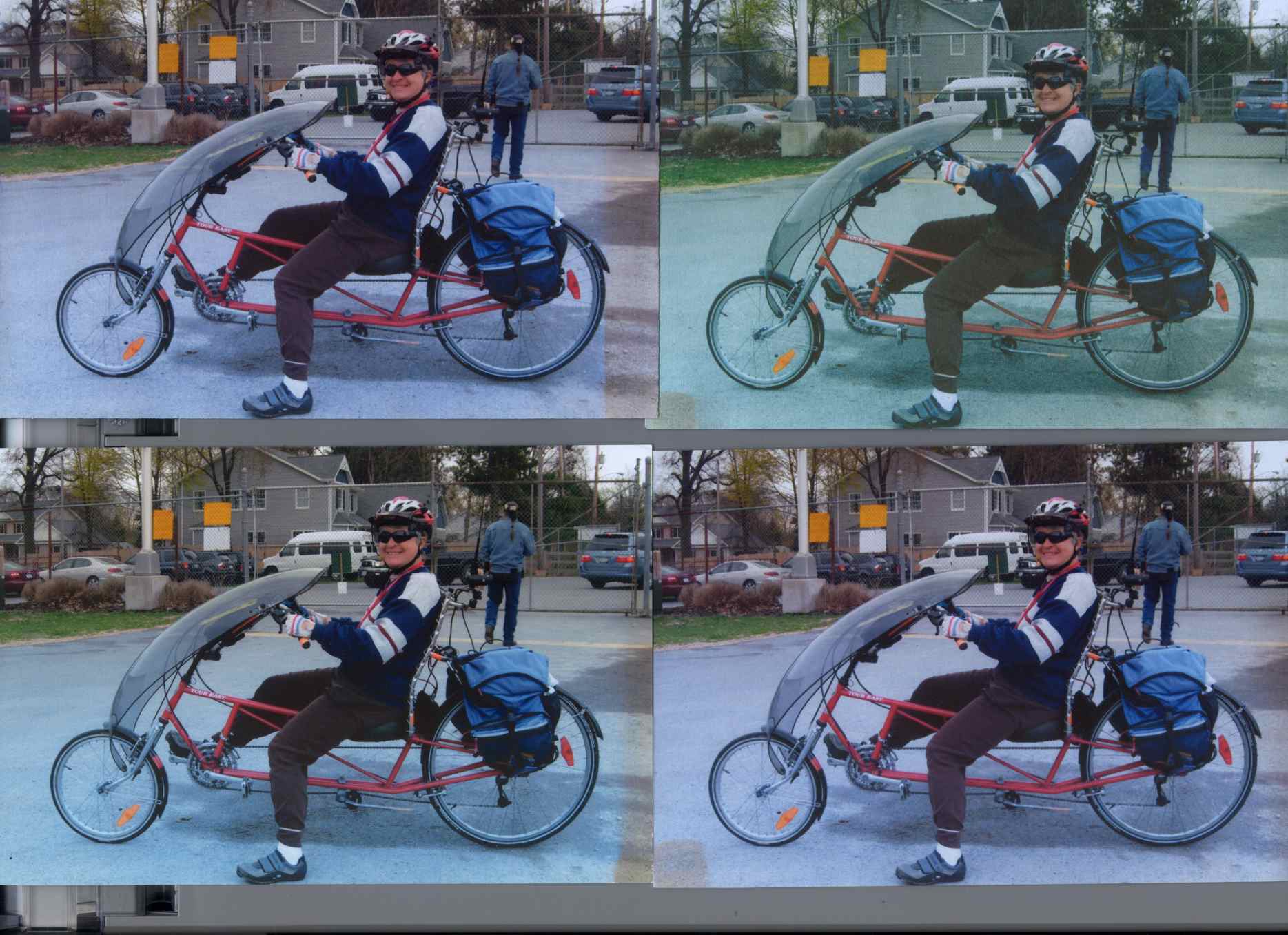
Back in December 2007 I printed four copies of a picture on various papers with the Canon S630 and hung them on a floor joist over my workbench, directly below a fluorescent shop light. Having just hung those screwdrivers where the pictures used to be, it’s time to see what’s happened.
The pictures, scanned on an HP C7670A (aka Scanjet 6300C) against the neutral gray of the ADF platen:
Inkjet Colors vs. Paper vs. Time
The papers, clockwise from lower left:
Glossy
Matte
Plain
Inkjet
While the scanner isn’t renown for its color fidelity, the overall results look about right; the platen really is that shade of gray and the upper-right picture has a sickly green hue.
The faded edges along the right side of the left-hand image show where the adjacent sheet overlapped: the colors didn’t fade nearly as much. The small rectangles on the lower left corners of the right-hand images show where I put clothes pins to keep the sheets from curling.
All of the images have a blue overtone; the magenta dye fades out with exposure to UV from the fluorescent fixture.
As you’d expect, the glossy paper looks best, with very crisp detail. The inkjet paper is next, followed by the matte, and the plain paper in the upper right obviously doesn’t support the ink well at all.
Of course, after five years I no longer have any of those papers and am using entirely different ink…
To show that the scanner really does matter, here’s the same set of images from a Canon LiDE 30:
Inkjet Colors – Canon LiDE30
In both cases. that’s without any color correction / gamma compensation / whatever. I should fish out my scanner calibration targets and go through the whole color calibration dance again; with any luck, the Linux color management infrastructure will be less inadequate by now.
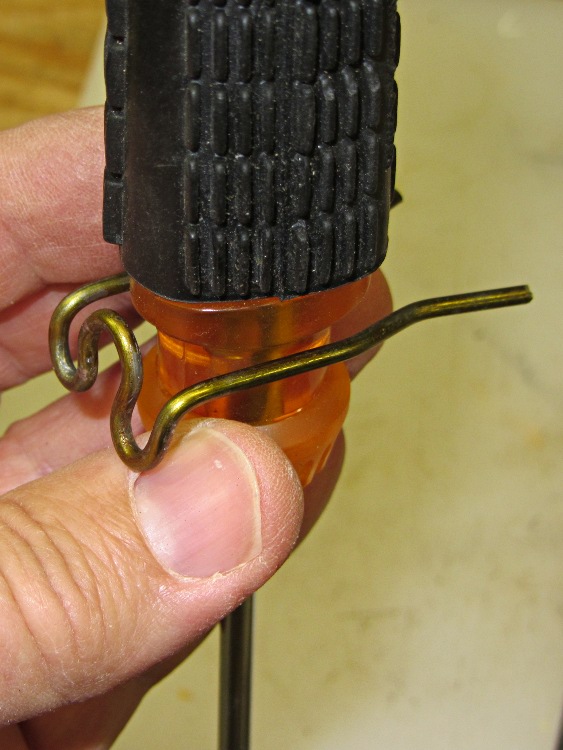
A while back I picked up one of Harbor Freight’s cheap screwdrivers sets; the largest two drivers far exceed my simple needs, but the smaller screwdrivers work surprisingly well. I couldn’t figure out where to store the things, as they’re used often enough to remain ready to hand, while being too bulky for any of the drawers. Emboldened by my success with those shoe latch springs, I decided to bend some coat hanger wire into simple clips that grab the screwdrivers around their waists:
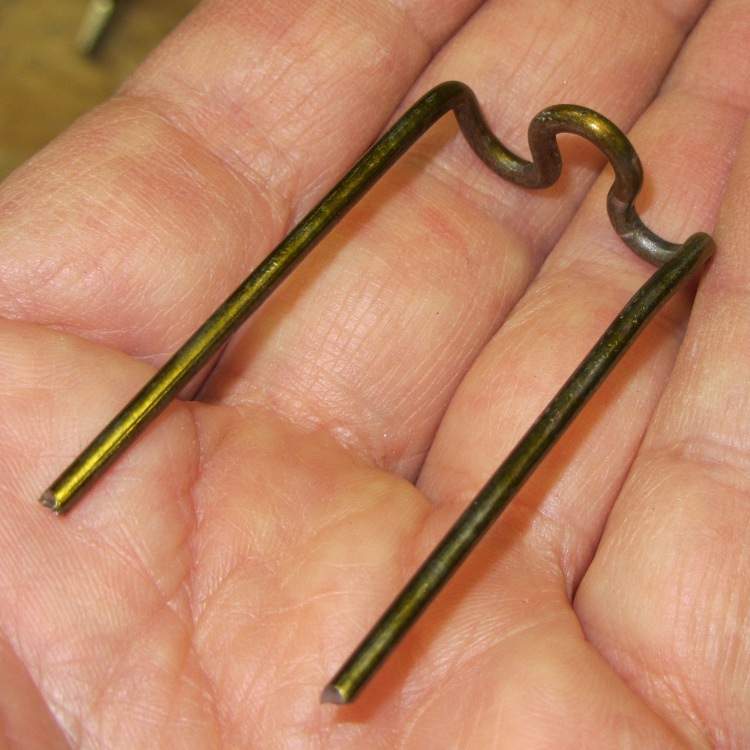
Screwdriver clip – rear view
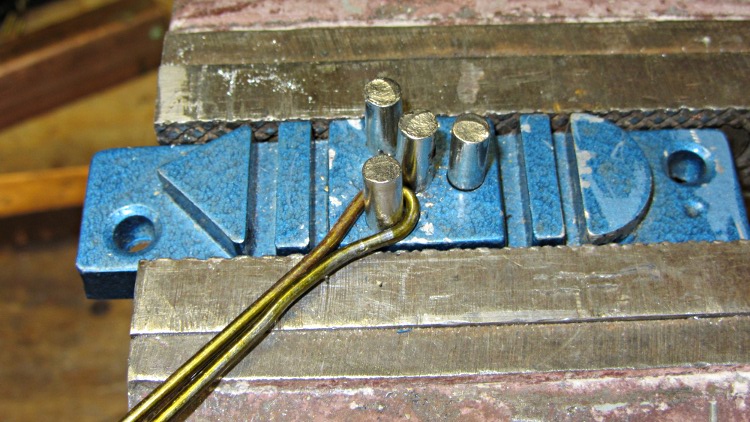
The first step forms a loop where the mounting screw will go; squeezing the wire around the pin with pliers made a reasonably good imitation of a screw hole:
Screwdriver clip – screw bend
The next two bends shape the wire to the arms; I eventually figured out that bending the wire ends to a mutual right angle worked out better than the acute angle you see here:
Screwdriver clip – second bend
Bending both wires at a right angle formed the arms:
Screwdriver clip – arm bend
Two more bends in each arm finished off the clip:
Screwdriver clip – entry bends
I chopped up a coat hanger with smaller diameter wire to make clips for the smallest screwdrivers with narrower handles.
Repeat that a dozen times, drill pilot holes into a ready-to-use bit of scrap lumber, screw the clips with 3/4 inch flat-head screws, add four more holes on the right for finishing nails to hold the red screwdrivers (which have suitable holes in their handles), screw the whole affair to the bottom of the floor joist, and it’s all good:
Screwdriver rack on floor joist
After running the first half dozen screws with great effort, I fetched the beeswax and the rest slid right into place.
The larger driver handles stick up inconveniently far behind the fluorescent lamp fixture that’s barely visible along the top, but (I’m pretty sure) I won’t use those nearly enough for that to be a problem.
I suppose I should dip the raw ends of the wires in goop to avoid harpooning myself; I think I’ll mostly handle the screwdrivers by their shafts, so maybe that won’t be a problem, either.
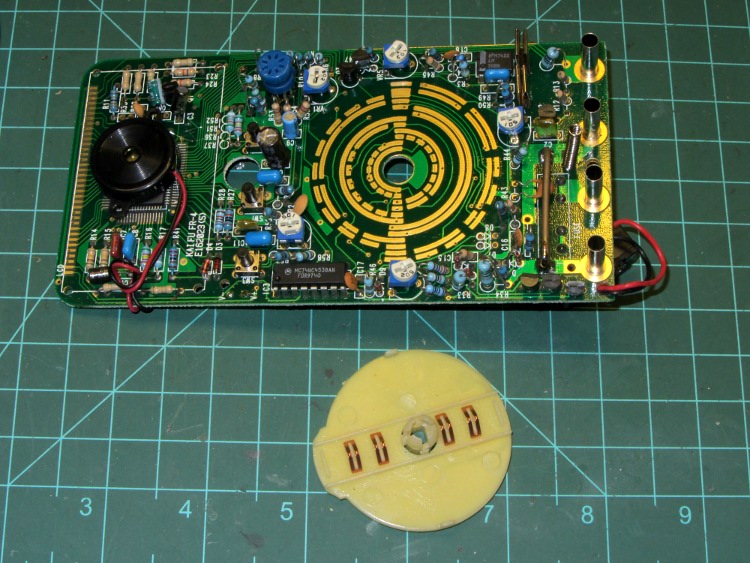
One of my multimeters began reporting bogus values that improved by working the range switch back-and-forth, which suggested the switch contacts need cleaning. Taking the meter apart was easy, right up to the point where I removed the range switch from the PCB by compressing the four locking tabs on the central shaft:
Multimeter range selector switch
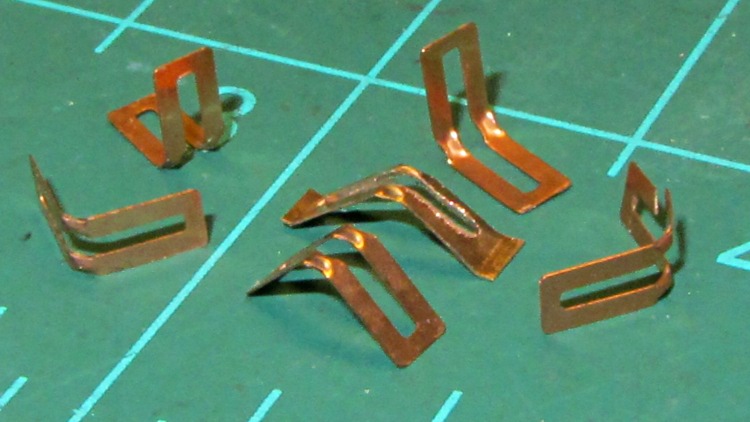
Just before taking that picture, the switch launched half a dozen spring contacts across the bench, my shirt, and the floor… I recovered four for the picture and later found a fifth smashed on the floor, but the last contact remains AWOL.
The contact in the middle, the oddly shaped one with small tabs on the ends, is a prototype replacement conjured from 6 mil phosphor bronze stock:
Multimeter range switch contacts
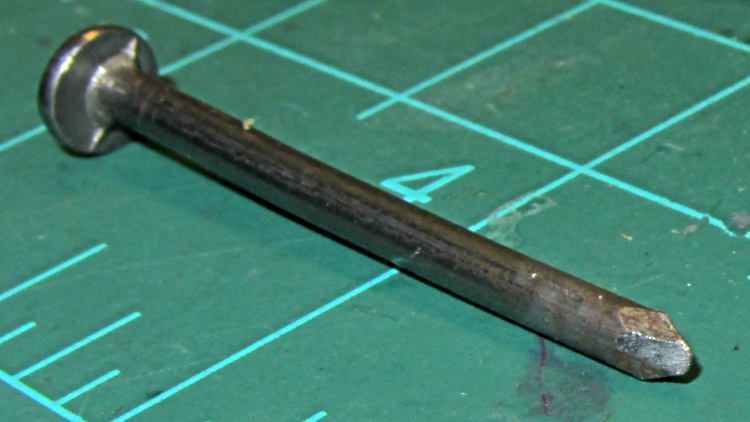
The little domes ensure a good sliding surface, but require two bends in the middle of the contact and some way to shape the metal into a dome. After a few experiments, I filed the end of a nail into a rounded chisel that worked pretty well:
DMM switch contact punch
The original contacts came from 3.5 mil stock and have considerably more flex; 6 mil stock is what I have.
I think I should make half a dozen contact springs to replace the entire set, a task requiring more time than I have right now. For the record, the overall process goes like this:
lay out overall shape, slightly longer than needed
cut center opening with abrasive wheel
cut out contact
punch contact domes (from back = dimples)
bend to shape
trim ends to length (not done in picture)
dress raw edges (not done in picture)
Given the number of parts and the fiddly accuracy required to make the slot, this might be a good job for the Sherline, although clamping each little proto-spring down while getting the abrasive wheel in there seems daunting.
Perhaps cutting the slots and punching the dimples would work better before cutting out the contacts, with a sheet clamped on four sides? The center will be floppy, what with all the slots, but grinding slots on the middle contacts first might be helpful. Would adhesive under the sheet to hold down the middle gunk up the abrasive wheel?






 The Smell of Molten Projects in the Morning