The Smell of Molten Projects in the Morning

Ed Nisley's Blog: Shop notes, electronics, firmware, machinery, 3D printing, laser cuttery, and curiosities. Contents: 100% human thinking, 0% AI slop.

Tag: Improvements

Making the world a better place, one piece at a time

  • IBM Thinkpad 560Z CMOS Battery Connector Polarity

    Thinkpad 560Z Lithium Cell Polarity
    Thinkpad 560Z Lithium Cell Polarity

    Two years ago I converted a $20 Thinkpad 560Z (they’re more expensive now, oddly enough) into a digital picture frame for Mary’s parents, a process documented in two of my late, lamented DDJ columns there and there. It runs a stripped-down Slackware installation that boots directly into a picture viewer, so when you turn it on you get pictures and nothing else. Well, after you get a few screens of the usual white-on-black Linux boot messages, which I think adds a certain geeky charm to a digital picture frame.

    Anyhow, the thing failed just before Thanksgiving with BIOS error messages 161 and 163: its way of telling you that the lithium cell powering the clock chip has gone dead. I hadn’t replaced that cell when I did the conversion and it lasted just about exactly a decade; it was evidently the right size for the job.

    Not being constrained by the confines of the original laptop case, I replaced the coin cell with a grossly oversized CR123A cylindrical lithium cell (having a bunch of them on the shelf and some holders for another project). The connector is in an awkward location, below the IDE socket’s flex-PCB cable, and both wires popped out of the connector shell when I pulled on them. So it goes.

    The top picture shows the proper polarity, as seen inside another 560Z’s lithium cell compartment: red-for-positive on the right, with the circuit board positioned component side down (toward the keyboard). Our daughter did the soldering; she’s since learned about heatshrink tubing and cold joints; it’s good enough.

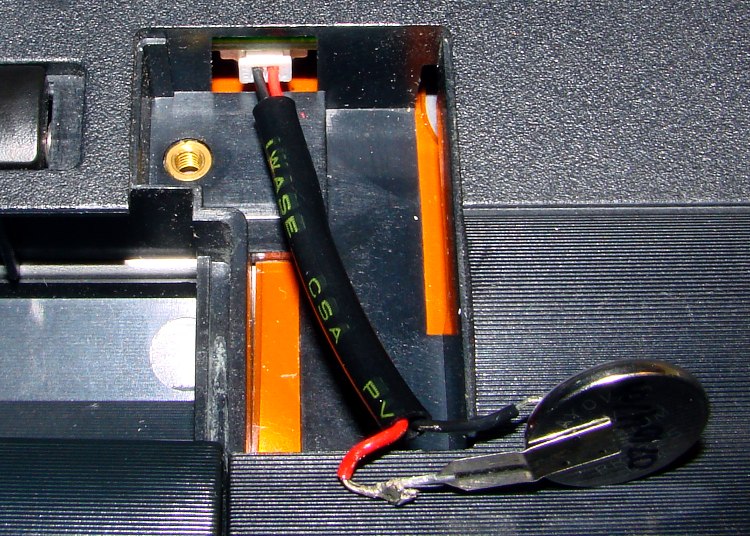
    This picture shows the CR123A all wired up and ready to go in the picture frame. The circuit board here is component side up, so the connector wires go the other way. Notice the small trace from the red-side pin on the circuit board; that’s your clue that it’s the positive battery connection. Measure the voltage at the backside of the connector to be sure you have those miniature pins properly seated in the connector, too.

    CR123A in 560Z Picture Frame
    CR123A in 560Z Picture Frame

    FWIW, I bought three 560Zs while they were cheap; our young lady installed Puppy Linux on the one in the top picture (hence her soldering) and seems reasonably content. They’re old & slow & cramped by contemporary standards, but just fine for most of the things you’d probably buy a fancy new netbook for.

    Hmmm…

  • Put Hand Wiring on EAGLE Layer 15

    Hand wiring on Layer 15
    Hand wiring on Layer 15

    Because nearly all of my printed circuit boards are for one-off homebrew projects, I tend to not obsess over getting the last air wire down on the copper. Instead, I route those pesky all-the-way-across-the-board stragglers on Layer 15 with big fat vias on each end, then solder a jumper wire across the board.

    In effect, my Layer 15 is outside the board.

    The screen shot shows a chunk of a board with some Layer 15 wires. I make ’em fat and use swooping semicircular arcs on the ends: they’re easily visible.

    I don’t worry about actually routing the traces; they’re just straight lines and arcs. This generates all manner of overlaps with the rest of the components & wiring, but after I go down through the DRC list and approve ’em all one time, that’s the end of that hassle.

    Two key advantages:

    • All the remaining air wires are genuine unrouted connections
    • I can print out Layer 15 separately to get a hand wiring map

    I make the vias fairly large (here, 100 mils) and a unique shape (octagonal) so that I know each one should get a wire.

    I usually wind up doing the power connections the same way; those vias are square. Conversely, ground vias stitching the top & bottom planes together are round; they get a short Z-wire through the board.

    This probably won’t work if you’re having the boards built by an actual PCB vendor, as they’ll try to make a three-layer board or kick the board out on layout rule violations… but, on the other hand, if you can afford a four-layer board, then most likely you won’t have any trouble routing the wires.

  • Terracycle Chain Idler: Status Report

    Stainless idler shaft in November 2009
    Stainless idler shaft in November 2009

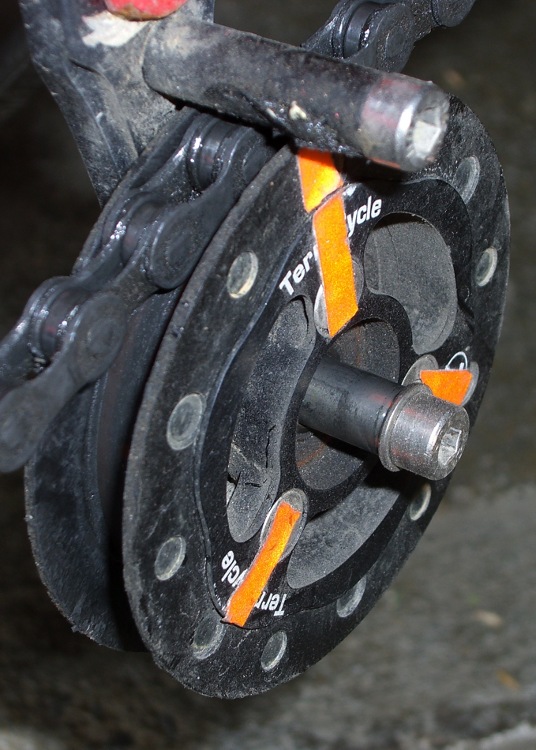
    The 6 mm stainless steel shaft I installed in late June, for reasons described there, has been working just fine.

    Although the shaft has some discoloration, the idler bearing slides freely this way and that. No complaints about noises or bad shifting.

    I spritzed some silicone lube on the shaft and it’s way slippery again. That’s better than petroleum lubes that tend to turn road dust into grinding compound.

  • Write Down What You Learn Where You’ll Need It

    A discussion there reminded me to mention a good habit taught by my buddy Eks: when you must look something up, write the information where you’ll see it the next time you need it.

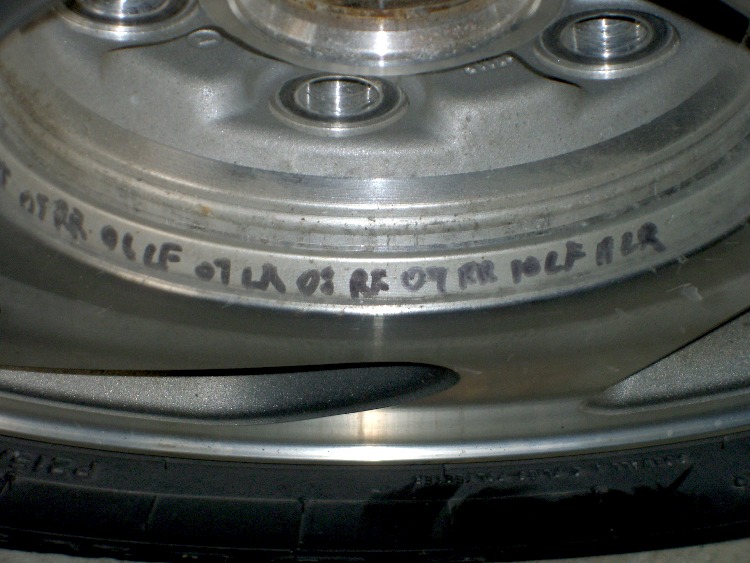
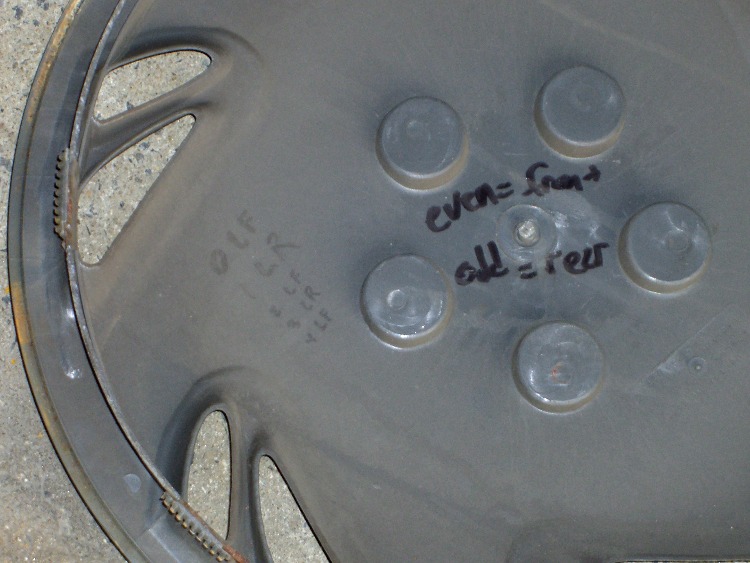
    So, for example, each of the van wheels sports its own tire-rotation schedule inside the cover. When it’s time to swap tires in early spring and late autumn, I pry the cover off, read where the tire should go, and do the deed. I write ’em down four or five years at a time, so there’s not much thinking involved.

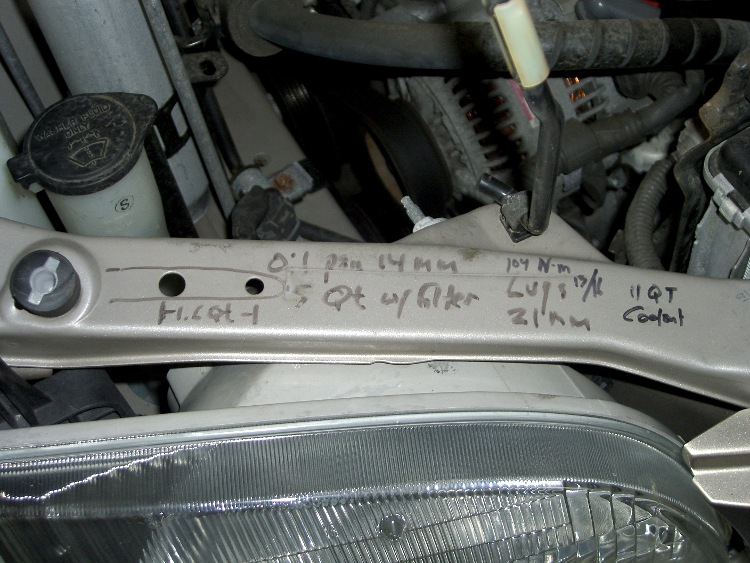
    The engine compartment has all the most-often-used wrench sizes and capacities.

    I write the oil change & inspection info in the maintenance schedule booklet that came with the van, although after a decade that’s pretty much full up.

    Sharpies FTW!

  • Cheese Garrotte

    Cheese Garrotte
    Cheese Garrotte

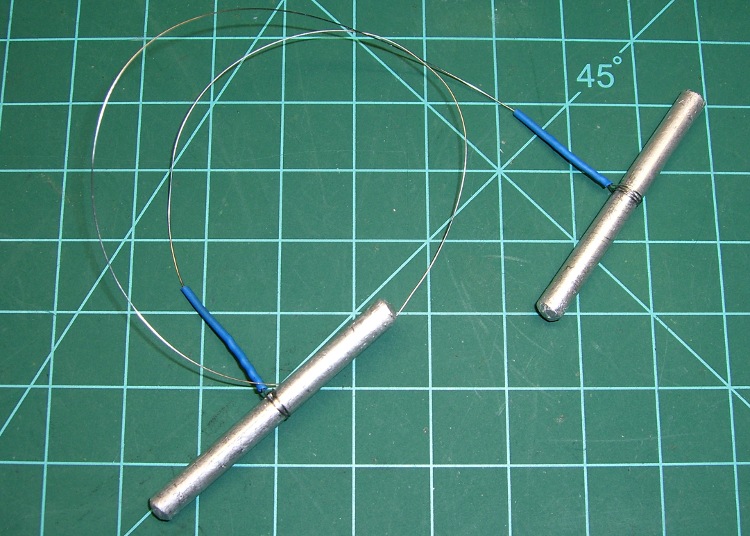
    Just chopped up a 5-lb lump of Provolone into 2-oz chunks for pizza, which brings this simple shop project to mind: a cheese garrotte.

    It’s about a foot of 0.011-inch (call it 0.25 mm) stainless steel wire with the ends wrapped around some aluminum rod, neatly tied off with heatshrink tubing.

    Usage is about what you’d expect: it cuts cheese like nothing else on earth. The only trick is maintaining a straight line, which is easier (for me, at least) when I cut vertically downward.

    It’s difficult to cut all the way to the bottom and that wire is rough on the fingertips, so I tend to flip the cheese over and pull sideways for the last inch or two. Maybe not a perfect cut, but good enough.

    Cheese Garrotte Handle Detail
    Cheese Garrotte Handle Detail

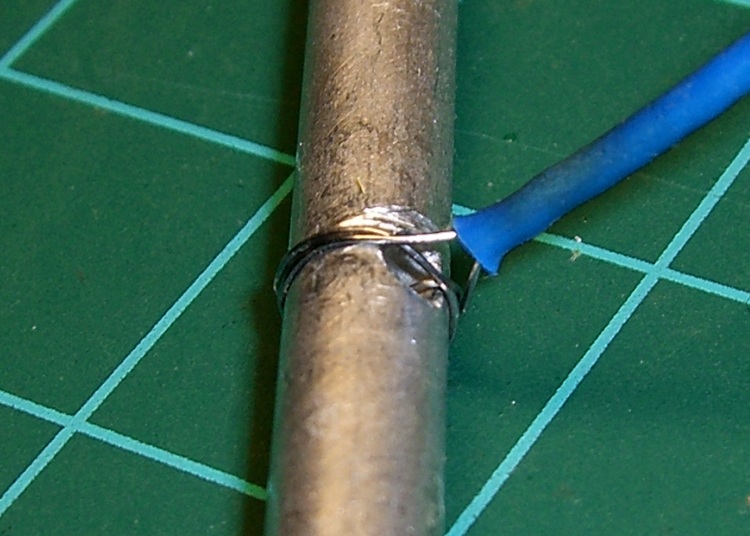
    Construction nuance: loop the wire around the handle once or twice, pass it through the hole, then do another loop before twisting the end. If you run the wire directly through the hole, it’ll break on the far-side sharp edge after a while, even when you countersink the hole.

    I put a shallow groove around the handle, but that’s likely not needed. You can certainly get fancier with the handles if you like. This one is dishwasher safe, which makes up for a lot.

    You really, really need heatshrink tubing over the bare wire ends, as the tip of a 11-mil stainless wire is indistinguishable from a needle.

  • Source Code Reformatting

    I just figured out how to use the WordPress “sourcecode” formatting and applied it to my software-related posts. It produces much nicer results than the manual formatting I was using, mostly by preventing long lines from jamming into the right column.

    The catch: WordPress imposes a round trip from my original text to the screen encoding and back, which sometimes randomly mangles special symbols. Angle brackets and double-quotes, in particular, take serious damage.

    If you happen to remember a favorite chunk of code in a previous post, please take a look at it and see if I missed any of the obvious text-replacement errors. Trawling through the Software category should turn up most of the posts.

    As is always the case with program listings, the errors will be really obvious to everyone except me.

    Thanks…

  • R380 Printer Ink Consumption

    Just refilled the continuous-flow ink tanks on my Epson R380 for the first time this year.

    In milliliters:

    • Yellow 35
    • Light Magenta 40
    • Magenta 40
    • Light Cyan 40
    • Cyan 40
    • Black 50

    Done in that order, the whole process requires only three syringe cleanings.

    I haven’t checked lately, but the last time I worked it out, printer ink cost $1.80/ml. Let’s call it $2 nowadays, which means I just squirted nigh onto 500 bucks worth of ink into those tanks.

    Much of that seems to go into head cleaning, as I don’t print that many photo-quality images on it. Nevertheless, they don’t charge you any less for ink that winds up in the diaper inside the printer.

    I don’t keep track of the ink going into the refillable tanks on my Canon S630, but it’s the same order of magnitude. I have four trios of color tanks and six black tanks for that printer and refill them all when the last set runs low. I’ve been doing that for years with no printhead issues.

    Sooo, for not spending a kilobuck a year on ink cartridges, I’m willing to spend 100 bucks for bulk ink, undergo some hassle, and endure the occasional oddly colored thumb…