Ed Nisley's Blog: Shop notes, electronics, firmware, machinery, 3D printing, laser cuttery, and curiosities. Contents: 100% human thinking, 0% AI slop.
Tag: Improvements
Making the world a better place, one piece at a time
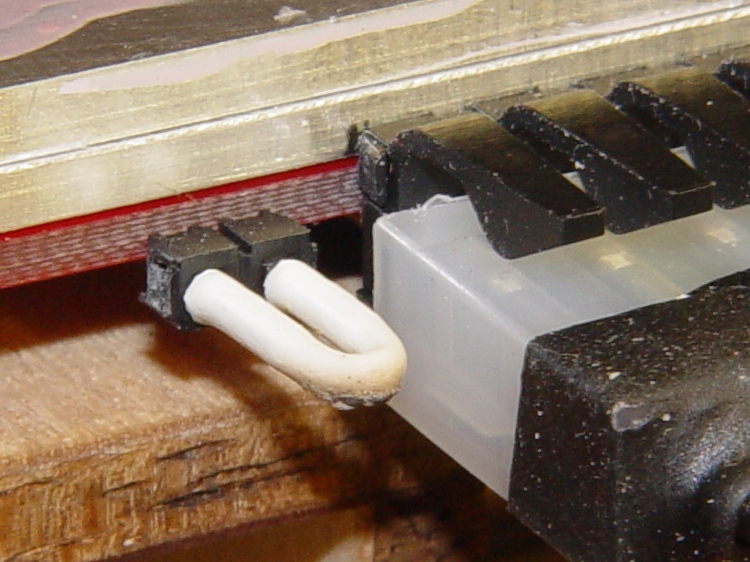
This should go without saying, but I got it wrong the first time: protect those little pins that drive the ABP belt motor if you’re not using them, particularly if you have a grounded aluminum build plate a few millimeters away.
I used a pair of jumpers, side by side, that did not connect the two pins, because they were close at hand when I first shorted the build plate to the pin carrying +12 V. A jumper that connects the pins will blow the motor control MOSFET on the Extruder Controller if you (or the G-Code) should happen to ever turn it on by mistake, so you need two.
Protected motor terminals on HBP
Better, just put some heatshrink tubing over both pins.
Heatshrink on ABP motor terminals
You could print up a little dummy plug for the thing…
An aluminum plate coated with ABS provides a very flat, very adhesive build platform, but that kludge atop the ABP didn’t provide enough stability or adjustability. I decided to scrap the ABP and modify the HBP to use the same removable plates.
The ABP kludge involved simply resting an aluminum plate atop the Heater PCB, which is ordinary PCB material with heat applied to only one surface and, on my ABP, has developed a pronounced warp. I decided to clamp the Heater to a thinner aluminum plate, ignoring the fact that PCB material has a much higher coefficient of thermal expansion than aluminum. Although the heater PCB may want to distort, I’m counting on the aluminum to maintain a flat upper surface.
HBP Heater and aluminum sub-platform adjuster
Those bolt heads sit in a 0.2 mm recess that lowers them just enough to be flush with the surface of the removable plate.
Then the removable plate sits atop the flat plate atop the heater: the two plates should snuggle together in Z and I think there’s no need to clamp them together. The holes have slight clearance around the bolt heads, making the plate a drop-in fit.
HBP with aluminum plates
This view shows the small notch filed in the front left corner of the removable plate. I use a small scraper blade to pry the hot top plate loose after a build session, grab it with pliers, and carry it away for cooling. The Sherline mill’s tooling plate provides a wonderful cold surface and the ABS gives off a distinct snap when it cools enough to detach from the aluminum plate.
Separation notch in aluminum build plate
Although it’s not automated, swapping plates isn’t a tedious affair. The real delay comes from heating a cold plate to operating temperature again, which requires about five minutes.
The silicone wiper holds the removable plate against the bolt heads, providing some stability in the XY plane. There’s no need for precise indexing.
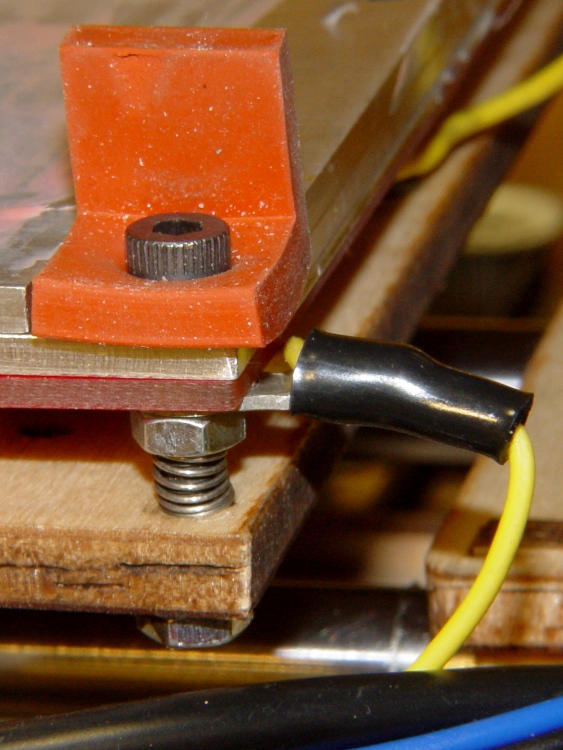
HBP Heater and sub-platform with wiper
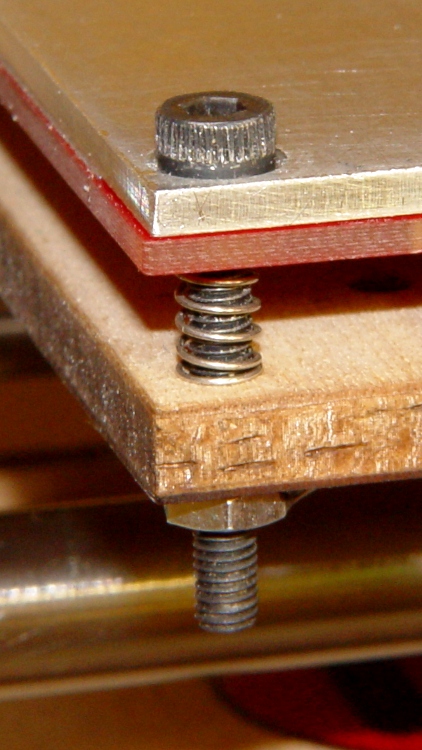
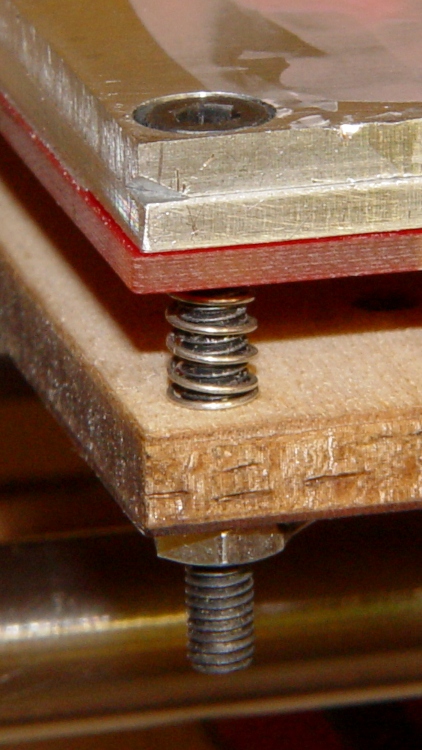
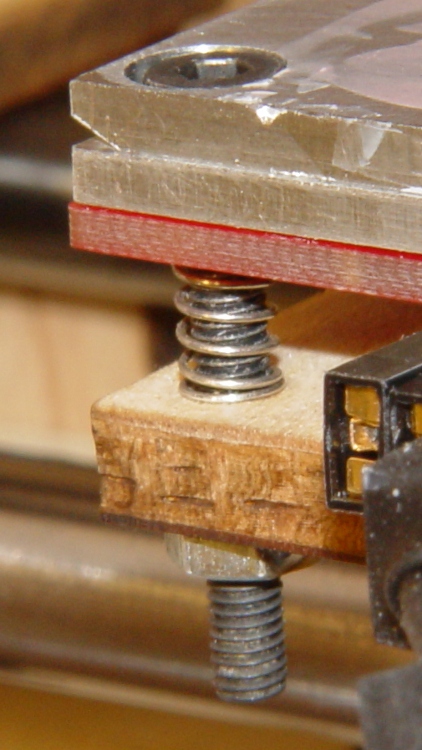
The Heater normally attaches to the HBP with six bolts, which severely overconstrains the surface. Here, three (center left, front+rear right) bolts clamp the heater to the sub-plate and three (front+rear left, center right) extend through the HBP plywood to nuts epoxied to the bottom surface.
Six matching springs from my Parts Heap support the whole affair, with the three on the clamping bolts being more compressed by the nuts below the Heater PCB. They come without pedigree and nearly anything that fits should work; it’s not like they must support an engine block.
The M3 bolts have a 0.5 mm thread pitch, so one turn changes the plate height by 0.5 mm and 1/6 turn (which is easy to make with a hexagonal wrench) changes it by 0.08 mm. The threads catch on the plate and Heater, so I may saw off some longer partially threaded bolts to get a smooth cylinder through the holes.
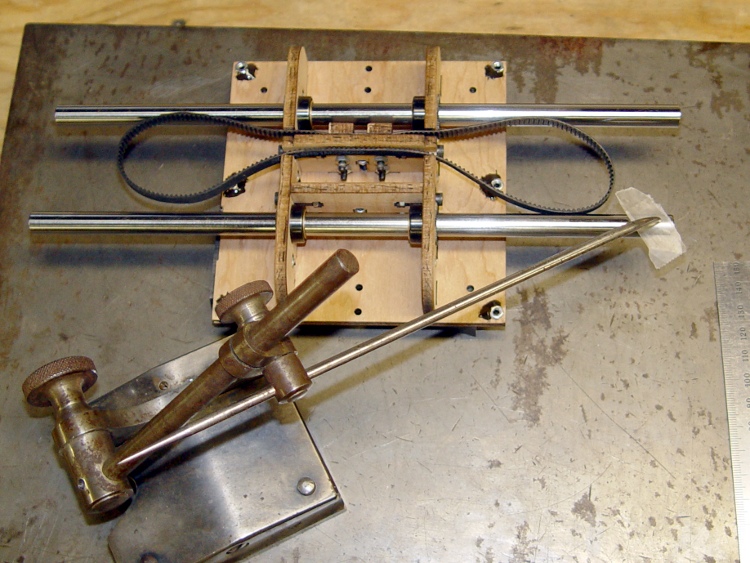
I did the initial adjustment on the surface plate with the entire XY stage assembly up on parallel blocks. Those blocks really should be under the Y guide rods inserted in the bearings, but this was enough to get a good first approximation to a level surface.
HBP initial height adjustment
And then it went back into the Thing-O-Matic…
I thought of the X Rod Follower while I had this all apart, but after putting it together, I wasn’t going to build the follower just to tear the stage down right away.
As the Y stage moves front-to-back, the X axis motor wires tend to bend at the cable tie lashing them to the Y stage. While I had the XY stage apart, I wrapped a bit of self-vulcanizing tape around the skein of motor wires to provide some strain relief.
This represents the first pass at un-constraining the X stage, so the poor little X axis stepper motor doesn’t have such a hard time of it and we can all get out of the sand-the-plywood-to-fit mindset. The Y stage has a similar mechanism, albeit with three bearings on the rod.
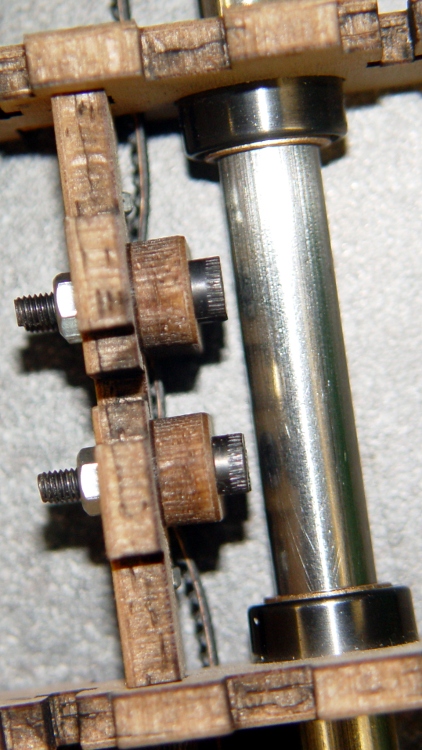
As seen from the front, the rear guide rod constrains the X stage in roll and yaw, while this Follower constrains pitch. The bearings turn in X, slide very slightly as needed in Y, and prevent motion in Z. Slight angle and distance mismatches between the rods no longer matter; I think the as-built (pre-sanding) rods will be sufficiently parallel for all practical purposes.
I have yet to install this, as I have a few other thing to do before tearing the entire XY assembly apart again; this is just a see-if-it-fits prototype:
Prototype X Axis rod follower
The front view:
X Axis follower – model front view
I wanted to mount it on the rear face of the X stage Idler plate, but there’s simply not enough room between the rod and the plywood Idler plate. Indeed, this version may be slightly too chubby for the space available in front of the Drive plate.
The OpenSCAD code produces a recess that clamps the belt into the drive serrations; the prototype doesn’t have that. The rear view shows the recess; I don’t know if that will build successfully. The dimple just below the top bearing bolt hole fits around the nut holding the build platform in place.
X Axis follower – model rear view
My Little Box o’ Tiny Bearings disgorged a pair of hard-inch bearings, but something along the lines of a 603 or 693 bearing would be better. Having shields on both sides would be a nice touch. The recently expanded table there gives some useful bearing dimensions.
The M3x12 bolts on the bearings cut their own threads on the way into the slightly undersized holes. I think that will be adequate, but you could sink nuts into the back.
The OpenSCAD source code will should auto-size the Follower around the bearings and your own measured / guesstimated clearances. Obviously, smaller bearings are better and there’s precious little clearance to the Y stage even with 3/8 inch OD bearings.
Make sure the extrusion settings near the top match your actual build values and that both collections match what the printer actually produces, because there’s not much room around the features for fill.
The top fits flush underneath the HBP stage to maintain proper alignment. That’s not really necessary, given the four bolts holding the Follower to the Drive plate, but there it is.
The Preload value adjusts the Z position of the lower bearing: + up, – down. It’s at zero for the prototype and the as-built Follower has 0.16 mm of preload: the bearings are 0.16 mm too close together. I think that’s OK, although I might dial it back a little bit by setting Preload=-0.1. For all I know, it’ll relax to fit and eventually wind up being marginally rattly.
The Build value at the top controls whether the model has the rods & bearings to show how it fits together (as above) or just the Follower block laid on its back for exporting to the STL file.
The OpenSCAD source:
// Thing-O-Matic X Stage rear guide rod follower
// Ed Nisley - KE4ZNU - Mar 2011

include </home/ed/Thing-O-Matic/lib/MCAD/units.scad>

Build = false;						// set true to generate buildable layout

$fn = 8;							// default for holes

// Extrusion values
// Use 2 extra shells behind the perimeter
//  ... and 3 solid shells on the top & bottom

ThreadThickness = 0.33;
ThreadWT = 1.75;
ThreadWidth = ThreadThickness * ThreadWT;

HoleWindage = ThreadWidth;			// enlarge hole dia by extrusion width

Protrusion = 0.1;					// extend holes beyond surfaces for visibility

// Bearing dimensions

BearingOD = (3/8) * inch;			// I used a hard-inch bearing -- try a 603 or 693
BearingID = (1/8) * inch;
BearingThick = (5/32) * inch;

BearingBoltDia = 3.0;				// allow this to shrink: drill & tap the threads!
BearingBoltRadius = BearingBoltDia/2;

BearingStemOD = BearingBoltDia + 6*ThreadWidth;
BearingStemRadius = BearingStemOD/2;
BearingStemLength = 2.0;

// X guide rod dimensions

RodDia = (3/8) * inch;				// hard inch rod
RodRadius = RodDia/2;
RodLength = 75;						// for display convenience

RodClearTop = 12.6;					// clearance from HBP to rod
RodClearSide = 9.0;					//  ... idler to rod
RodClearBottom = 10.7;				//  ... rod to Y stage

RodClearCirc = 1.5;					//  ... around circumference

// Drive mounting piece (from ABP teardown)

DriveHolesX	= 16.0;					// on-center distance
DriveHolesZ = 9.0;					// on-center distance
DriveHoleZOffset = -5.0;			// below bottom of HBP platform

DriveHeight = 28.0;

DriveBoltDia = 3.0 + HoleWindage;	// bolt dia to hold follower in place
DriveBoltRadius = DriveBoltDia/2;

DriveBoltHeadDia = 6.0 + HoleWindage;
DriveBoltHeadRadius = DriveBoltHeadDia/2;
DriveBoltWeb = 4.5;					// leave this on block for 12 mm bolts

HBPNutDia = 4.0;					// HBP mounting nut in middle of idler
HBPNutRadius = HBPNutDia/2;
HBPNutRecess = 0.5;					//  ... pocket for corner of nut
HBPNutZOffset = -10.0;				//  ... below bottom of HBP platform

BeltWidth = 7.0;					// drive belt slots
BeltThick = 1.2;					//  ... backing only, without teeth
BeltZOffset = -22.5;				//  ... below bottom of HBP platform

// Bearing locations

Preload = 0.0;						// positive to add pressure on lower bearing

TopZ = RodRadius + BearingOD/2;
BottomZ = Preload - TopZ;

// Follower dimensions

BlockWidth = 28.0;					// along X axis, must clear bolts in idler
BlockHeight = RodDia + 2*BearingOD - Preload;
BlockThick = (RodClearSide + RodRadius) - BearingThick/2 - BearingStemLength;

BlockHeightPad =  RodClearTop - BearingOD;

echo(str("Block Height: ",BlockHeight));
echo(str("Block Height Pad: ",BlockHeightPad));
echo(str("Block Thick: ",BlockThick));

BottomPlateWidth = 10.0;
BottomPlateThick = 5.0;

BlockTop = RodRadius + RodClearTop;

BlockOffset = BlockThick/2 + BearingThick/2 + BearingStemLength;

// Construct the follower block with

module Follower() {

  difference() {
	union() {
	  translate([0,BlockOffset,0])
		difference() {
		  union(){
			cube([BlockWidth,BlockThick,BlockHeight],center=true);
			translate([0,0,(BlockHeight + BlockHeightPad)/2])
			  cube([BlockWidth,BlockThick,BlockHeightPad],center=true);
		  }
		  for(x=[-1,1]) for(z=[0,1])
			  translate([x*DriveHolesX/2,
						Protrusion/2,
						(BlockHeight/2 + BlockHeightPad + DriveHoleZOffset - z*DriveHolesZ)])
				rotate([90,0,0])
				  cylinder(r=DriveBoltRadius,
							h=(BlockThick + Protrusion),
							center=true);
			for(x=[-1,1]) for(z=[0,1])
			  translate([x*DriveHolesX/2,
						(-(DriveBoltWeb + Protrusion)/2),
						(BlockHeight/2 + BlockHeightPad + DriveHoleZOffset - z*DriveHolesZ)])
				rotate([90,0,0])
				  cylinder(r=DriveBoltHeadRadius,
							h=(BlockThick - DriveBoltWeb + Protrusion),
							center=true);
		  translate([0,
					((BlockThick - BeltThick + Protrusion)/2),
					(BlockHeight/2 + BlockHeightPad + BeltZOffset)])
			cube([(BlockWidth + 2*Protrusion),
				 (BeltThick + Protrusion),
				 BeltWidth],center=true);
		  }

	  translate([0,BearingStemLength/2 + BearingThick/2,TopZ])
		rotate([90,0,0])
			cylinder(r=BearingStemRadius,h=BearingStemLength,center=true,$fn=10);
	  translate([0,BearingStemLength/2 + BearingThick/2,BottomZ])
		rotate([90,0,0])
		  cylinder(r=BearingStemRadius,h=BearingStemLength,center=true,$fn=10);
	}

	translate([0,(BlockOffset - BearingStemLength/2),TopZ])
	  rotate([90,0,0])
		cylinder(r=BearingBoltRadius,
				h=(BlockThick + BearingStemLength + 2*Protrusion),
				center=true);
	translate([0,(BlockOffset - BearingStemLength/2),BottomZ])
	  rotate([90,0,0])
		cylinder(r=BearingBoltRadius,
				h=(BlockThick + BearingStemLength + 2*Protrusion),
				center=true);

	translate([0,
			  (BlockThick + BearingStemLength + BearingThick/2 - (HBPNutRecess - Protrusion)/2),
			  (BlockHeightPad + BlockHeight/2 + HBPNutZOffset)])
	  rotate([90,0,0])
		cylinder(r=HBPNutRadius,h=(HBPNutRecess + Protrusion),center=true);

	rotate([0,90,0])
	  cylinder(r=(RodRadius + RodClearCirc),h=RodLength,center=true,$fn=32);

  }
}

// Arrange things for construction

if (Build)
	translate([0,(-BlockHeightPad/2),(BlockOffset + BlockThick/2)])
	  rotate([-90,0,0])
		Follower();

// Arrange things for convenient inspection

if (!Build) {

  Follower();

  translate([0,0,TopZ])
	rotate([90,0,0])
	  #cylinder(r=BearingOD/2,h=BearingThick,center=true,$fn=32);

  translate([0,0,BottomZ])
	rotate([90,0,0])
	  #cylinder(r=BearingOD/2,h=BearingThick,center=true,$fn=32);

  rotate([0,90,0])
	  #cylinder(r=RodDia/2,h=RodLength,center=true,$fn=32);

}
Having salvaged the sliding bearings from the ABP, I built up the HBP, stuck it into the Thing-O-Matic, and wasn’t in the least surprised to discover that it was mechanically jammed solid on the rods. This time, however, I wanted to measure the actual rod (mis)alignment to see what was going on.
Remember that, as described there, the X stage overconstrains the rods by forcing them through four bearings. It would be much better to use a pair of sliding bearings on one rod and a set of ball bearings rolling on the other, much as MBI did with the Y stage. Something involving 603 or 693 bearings, perhaps… there’s a scant 12 mm clearance from the top of the rod to the bottom of the HBP.
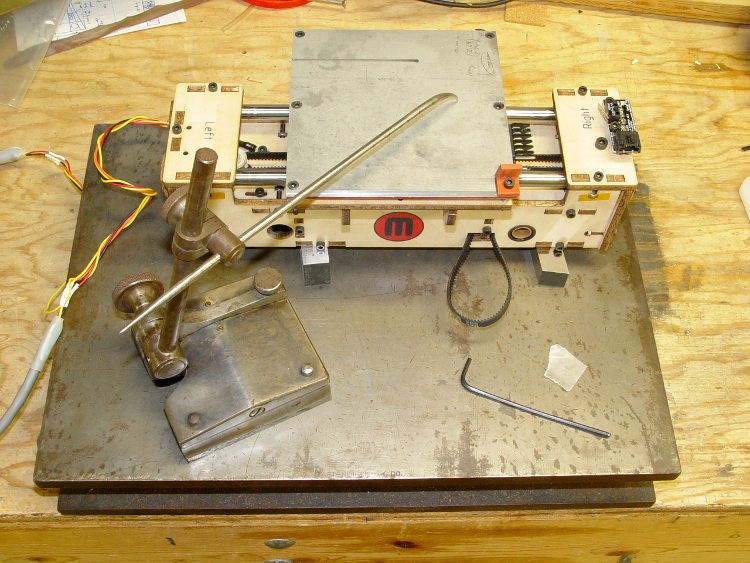
So I laid it upside down on the surface plate and tickled it with a scribe mounted in a surface gage. Of course, I’m doing it all wrong, but the results are close enough. What you can’t see are the two half-inch chrome-steel lathe bits supporting the platform; it may be warped a bit, but that’s part of what’s being measured.
Measuring HBP rod misalignment
I adjusted the scribe to just kiss the slip of waxed paper (0.02 mm) atop each end of each rod, which turns out to be surprisingly easy to do by feel.
Measuring rod height
Then eyeball the result on a scale.
Rod height on scale
One should tweak the surface gage until a dial test indicator reads zero, then stack up gage blocks to the same height. I actually hauled out my box o’ blocks before I came to my senses.
Anyhow.
The far rod was spot-on level and the front rod was off by 1 mm from one end to the other. They were within 0.2 mm of equal spacing horizontally, which was somewhat surprising given the amount of side sanding required to fit the ABP into Y stage.
Height
Right
Center
Left
Back
42.6
42.7
42.7
Front
43.5
43
42.5
Separation
39.93
39.72
I sanded out one of the holes, laid a bead of expanding urethane adhesive around the bearing housing, slid it into place, and then held the rod level with the tip of the scribe. The two random cylinders held the rods in the proper horizontal alignment.
Setting HBP rod alignment
When the glue cured, the rods were basically dead parallel in both planes.
Note the nuts epoxied on the bottom surface. That’s part of the cough precision platform alignment system…
After modifying the ABP to use an aluminum build plate, I’m going to junk it and modify a Heated Build Platform to get much more precise control over the plate alignment.
As with the ABP, the HBP instructions tell you to use short-headed bolts to clear the guide rod. There’s no need to do that if you take the time to modify the plywood clamps, as described there, so they actually clamp across the entire width of the belt, thusly:
Those plates handle the upper mount points, but the fairing also attaches to each side of the front fork. A nice rounded oval mates the fairing to the bracket, with two foam pads adapting the flat plates to the curved fairing surface. This view shows the outside of the fairing:
Lower mount – front
The hole position requires a mirror-image pair of mounts that, mercifully, all fit on the build platform at once. The solid models look about like you’d expect:
Lower Bushings
Those little tabs on the inside edge of the bracket recess printed about as poorly as you’d expect, but they’re not really critical.
I printed a set of white plates for my bike, installed the new filament tensioner, and went full frontal Barbie for my favorite ladies. This view shows the inside of the fairing:
Lower mount – rear
Turns out my ladies don’t like pink any more than I do.
The OpenSCAD source:
// Clamp plates for Zzipper fairing on Tour Easy recumbents
// Ed Nisley - KE4ZNU - Mar 2011

// Build with...
//	extrusion parameters matching the values below
//	4 outer shells
//	4 solid surfaces at top + bottom

include </home/ed/Thing-O-Matic/lib/MCAD/units.scad>

// Extrusion parameters for successful building

ThreadWidth = 0.55;					// should match extrusion width
ThreadZ = 0.33;						// should match extrusion thickness

HoleWindage = ThreadWidth;			// enlarge hole dia by extrusion width

// Plate dimensions

Layer1X = 35;						// against fairing surface
Layer1Y = 30;
Layer1Z = 2*ThreadZ;

HoleOffsetX = 5.0;					// will be sign-flipped as needed
HoleOffsetY = -(Layer1Y/2 - 10.0);

Layer2Margin = 1.5;					// uncovered edge
Layer2X = Layer1X - 2*Layer2Margin;
Layer2Y = Layer1Y - 2*Layer2Margin;
Layer2Z = 3*ThreadZ;

MountX = 16.3 + HoleWindage;		// front fork mounting plate
MountHoleOffset = 13.0;				// Y end to hole center
MountY = Layer1Y;
MountZ = 4*ThreadZ;					// recess depth
MountCap = 3.0;						// endcap arc height
MountR = (pow(MountCap,2) + 0.25*pow(MountX,2)) / (2*MountCap);	// ... radius

Layer3Margin = 1.5;
Layer3X = Layer2X - 2*Layer3Margin;
Layer3Y = Layer2Y - 2*Layer3Margin;
Layer3Z = 3*ThreadZ;

PlateZ = Layer1Z + Layer2Z + Layer3Z;

HoleDia = 0.25 * inch;				// these are 1/4-20 bolt holes

// Convenience settings

BuildOffsetX = 3.0 + Layer1X/2;		// build X spacing between top & bottom plates
BuildOffsetY = 3.0 + Layer1Y/2;		//	... Y

Protrusion = 0.1;					// extend holes beyond surfaces for visibility

//---------------
// Create plate

module Plate() {

  union() {
	  translate([0,0,Layer1Z/2])
		scale([Layer1X,Layer1Y,1]) cylinder(r=0.5,h=Layer1Z,$fn=32,center=true);
	  translate([0,0,Layer1Z + Layer2Z/2])
		  scale([Layer2X,Layer2Y,1]) cylinder(r=0.5,h=Layer2Z,$fn=32,center=true);
	  translate([0,0,Layer1Z + Layer2Z + Layer3Z/2])
		  scale([Layer3X,Layer3Y,1]) cylinder(r=0.5,h=Layer3Z,$fn=32,center=true);
  }

}

//---------------
// Create hole

module Hole(OffsetX,OffsetY) {

  translate([OffsetX,OffsetY,PlateZ/2])
	cylinder(r=(HoleDia + HoleWindage)/2,
			h=(PlateZ + 2*Protrusion),
			center=true,$fn=10);

}

//---------------
//-- Build the things...

// Right side

translate([BuildOffsetX,BuildOffsetY,0])
  difference() {
	Plate();
	Hole(HoleOffsetX,HoleOffsetY);
  }

translate([BuildOffsetX,-BuildOffsetY,0])
  difference() {
	  Plate();
	  Hole(-HoleOffsetX,HoleOffsetY);
	  translate([-HoleOffsetX,(HoleOffsetY - MountY/2 + MountHoleOffset),(PlateZ - MountZ/2 + Protrusion/2)])
		intersection() {
		  cube([MountX,MountY,(MountZ + Protrusion)],center=true);
		  translate([0,(MountY/2 - MountR),0]) cylinder(r=MountR,h=(MountZ + Protrusion),center=true);
		}
  }

// Left side

translate([-BuildOffsetX,BuildOffsetY,0])
  difference() {
	Plate();
	Hole(-HoleOffsetX,HoleOffsetY);
  }

translate([-BuildOffsetX,-BuildOffsetY,0])
  difference() {
	  Plate();
	  Hole(HoleOffsetX,HoleOffsetY);
	  translate([HoleOffsetX,(HoleOffsetY - MountY/2 + MountHoleOffset),(PlateZ - MountZ/2 + Protrusion/2)])
		intersection() {
		  cube([MountX,MountY,(MountZ + Protrusion)],center=true);
		  translate([0,(MountY/2 - MountR),0]) cylinder(r=MountR,h=(MountZ + Protrusion),center=true);
		}
  }







 The Smell of Molten Projects in the Morning