The Smell of Molten Projects in the Morning

Ed Nisley's Blog: Shop notes, electronics, firmware, machinery, 3D printing, laser cuttery, and curiosities. Contents: 100% human thinking, 0% AI slop.

Tag: Improvements

Making the world a better place, one piece at a time

  • Thing-O-Matic: Axis Calibration vs. ABS Shrinkage

    In the process of adapting my HT GPS interface to a Wouxun KG-UV3D radio, I printed some trial-fit pieces that consistently came out a little short. A bit of division showed that the larger pieces tended to be small in the X & Y axes by about 0.5%. This makes no difference for most 3D printed objects, but in this case the pieces must match up precisely with the radio’s existing battery interface layout. Half a percent matters a lot across a 75 mm part.

    The advice found with most calibration pieces seems to boil down to fudging the printer’s steps/mm setting to make the answer come out right. The default Thing-O-Matic calibration (in machines/thingomatic.xml, wherever that’s hidden in your installation) looks like this:

    <axis id="x" length="106" maxfeedrate="6000" homingfeedrate="2500" stepspermm="47.069852" endstops="min"/>  <!-- Pulley dia: 10.82mm / 1/8 step = 1/(10.82 * pi / 1600) -->
    <axis id="y" length="120" maxfeedrate="6000" homingfeedrate="2500" stepspermm="47.069852" endstops="min"/>  <!-- Pulley dia: 10.82mm / 1/8 step = 1/(10.82 * pi / 1600) -->
    

    You will, of course, have twiddled the maxfeedrate, homingfeedrate, and maybe even the comments to make the answers work on your machine.

    Nophead slapped me upside the head when I made the same mistake that produced the stock stepspermm values: the pulley moves the belt by a fixed number of teeth on each revolution, so you just multiply by the belt tooth pitch to find the distance per revolution. Divide that into the number of (micro)steps per revolution and you get the exact stepspermm value. The stock MBI pulleys have 17 teeth and the belt has a 2 mm tooth pitch, so:

    47.05882 step/mm = 1600 step / (17 * 2 mm)

    That differs from the stock value by not very much at all:

    0.999766 = 47.05882 / 47.069852

    Given that these steppers aren’t losing steps (don’t start with me, you know how I get), I’m quite confident that the X and Y stages move by exactly the commanded distance every time.

    The printer uses a heated build plate and the first layer is 0.33 mm, give-or-take about 0.05 mm, and the objects come out with essentially straight vertical walls. However, the walls aren’t quite perfect, tending to be a bit larger where they contact the plate, and I finally asked the obvious question (abs plastic shrinkage), which produces, among many other hits, that useful table.

    The money quote is that ABS shrinks just about exactly 0.5% as it cools. That’s modulo the starting temperature, the molding process, and so forth and so on, but it’s a pretty nice match.

    Therefore, fudging the printer’s scale isn’t appropriate, because that affects everything you might do with it. Such as, for example, the initial homing sequence, which depends on fairly precise locations that must match up with reality and have no shrinkage problems whatsoever.

    Skeinforge’s Scale plugin applies a factor to the object, so that’s (probably) a more appropriate location for this adjustment. The myriad SF settings get broken down by Craft (extrusion, milling, whatever) and material (ABS, PLA, whatever), so if you can keep all that straight, then you can apply the appropriate Scale for each process and material.

    The Scale doc may seem a tad sparse, but the plugin does have separate settings for the XY plane and the Z height. The latter (probably) doesn’t need scaling, because the nozzle height sets the actual extrusion level; the top layer or two will stretch to make the vertical size come out right as the object cools while it’s a-building.

    I’ll toss a 1.005 scale factor into the XY mix and see what horrors that unleashes by way of unintended consequences.

    More on the radio interface & suchlike in a while…

  • NB-5L Holder: Plug Spring Holder

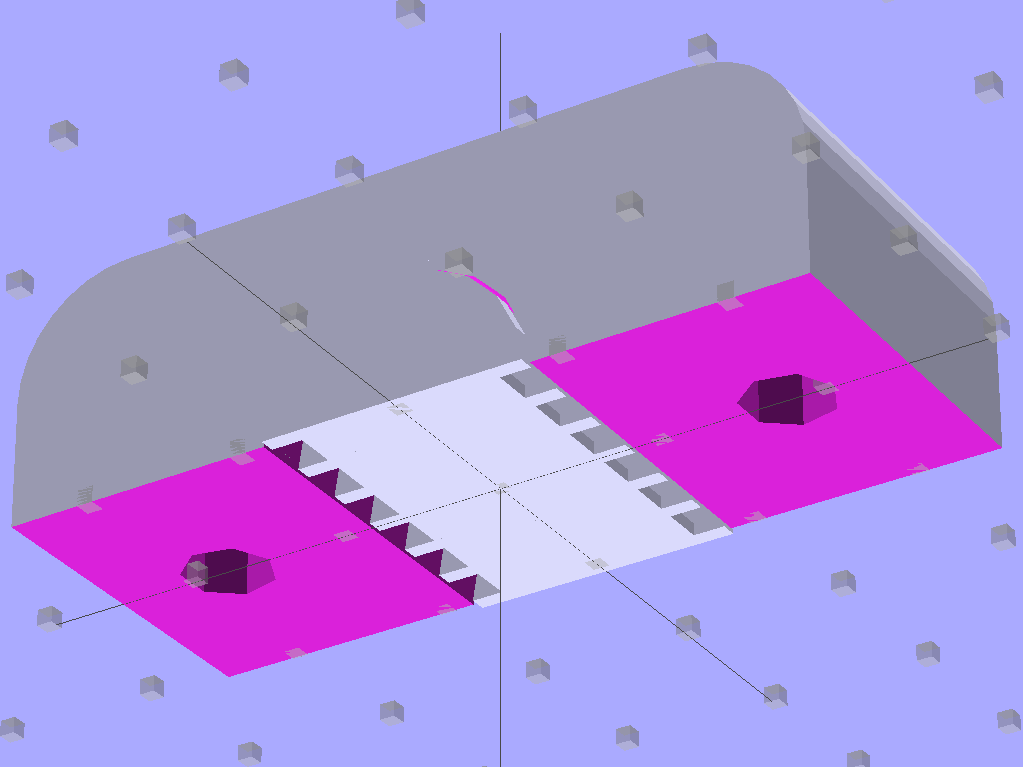
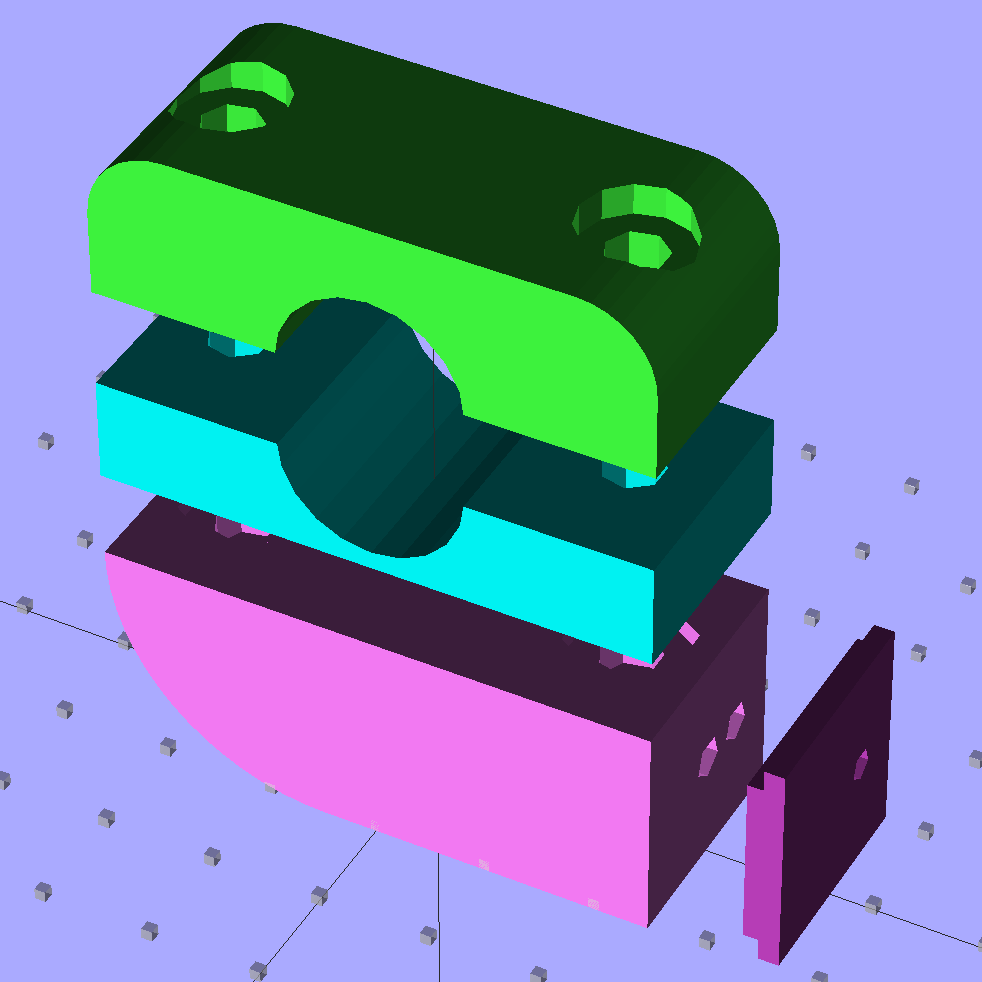
    After that failure, I thought maybe making the spring guide pocket a bit wider and seating the spring wire in a solid plug would work. A tweak to the OpenSCAD script produced this, along with slightly larger locating ribs around the battery compartment:

    Plug spring - solid model
    NB-5L Holder – Plug spring – solid model

    A closer look at the plug spring assembly:

    NB-5L Holder - Plug spring - detail
    NB-5L Holder – Plug spring – detail

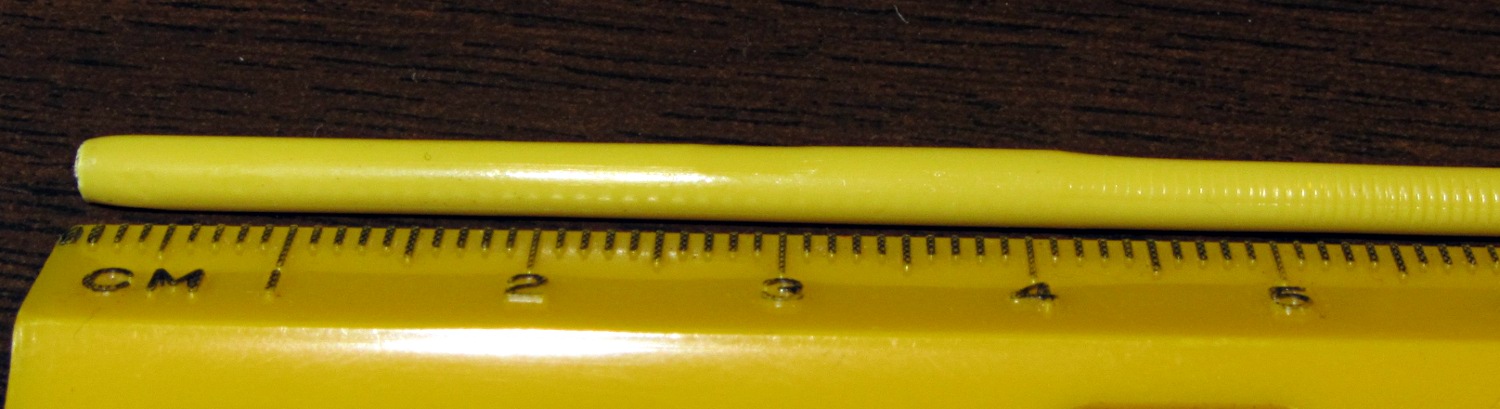
    The hole is now slightly larger, distinct from the side of the pocket, and the partition between the pocket and plug (although something of a formality) seats the plug during assembly. The plug started out at 3 mm in diameter, as I intended to try ramming a heated wire into a length of filament. That worked, mmmm, somewhat poorly, so I drilled a hole in a length of filament:

    Music wire in filament plug
    Music wire in filament plug

    Unfortunately, that whole bodge didn’t work any better than the spring in the first pass at a holder, so I gave up and cast the springs in epoxy. The OpenSCAD code produces a 5 mm diameter hole that should provide a larger epoxy plate with better grip than the 3 mm holes in this picture, but it probably won’t make much difference:

    Music wire in epoxy plug
    Music wire in epoxy plug

    The alert reader will note a complete faceplant: yeah, I forgot to solder the wires into the pins before blobbing the springs in place. Fortunately, the epoxy cures slowly enough that I could:

    • Take the picture
    • Immediately see the obvious problem
    • Ease the music wire springs out just a tidge
    • Extract the pins
    • Quick-like-a-bunny solder wires to pins
    • Insert pins with proper polarity
    • Ease springs back in place

    I hate it when that happens…

    With springs & wires properly in place and the epoxy cured overnight, the pins had considerably better springiness and free motion than before, although they didn’t have quite the range of travel I wanted. I think the spring wire bent slightly on the first push, as the pins never came quite as far out after that.

    So this was a qualified success, but not a solid win. Time for round three…

    The OpenSCAD source code:

    // Holder for Canon NB-5L Li-Ion battery
    // Ed Nisley KE4ZNU August 2011
    
    include </home/ed/Thing-O-Matic/lib/MCAD/units.scad>
    include </home/ed/Thing-O-Matic/lib/MCAD/boxes.scad>
    include </home/ed/Thing-O-Matic/Useful Sizes.scad>
    
    // Layout options
    
    Layout = "Show";					// Case Lid Show Build Fit
    
    //- Extrusion parameters - must match reality!
    //  Print with +2 shells and 3 solid layers
    
    ThreadThick = 0.33;
    ThreadWidth = 2.0 * ThreadThick;
    
    HoleWindage = 0.2;
    
    function IntegerMultiple(Size,Unit) = Unit * ceil(Size / Unit);
    
    Protrusion = 0.1;			// make holes end cleanly
    
    BuildOffset = 3.0;			// clearance for build layout
    
    //- Battery dimensions - rationalized from several samples
    //  Coordinate origin at battery corner by contact plates on bottom surface
    
    BatteryLength = 45.25;
    BatteryWidth = 32.17;
    BatteryThick =  7.85;
    
    ContactWidth = 2.10;
    ContactLength = 4.10;
    ContactRecess = 0.85;
    
    ContactOC = 3.18;			// center-to-center across contact face
    ContactOffset = 4.45;		// offset from battery edge
    ContactHeight = 3.05;		// offset from battery bottom plane
    
    AlignThick = 2.2;			// alignment recesses on contact face
    AlignDepth = 2.0;			// into face
    AlignWidth1 = 0.7;			// across face at contacts
    AlignWidth2 = 2.8;			//  ... other edge
    
    //- Pin dimensions
    
    PinTipDia = 1.6;
    PinTipLength = 10.0;
    
    PinTaperLength = 2.3;
    
    PinShaftDia = 2.4;
    PinShaftLength = 6.8;
    
    PinFerruleDia = 3.0;
    PinFerruleLength = 2.0;
    
    PinLength = PinTipLength + PinTaperLength + PinShaftLength + PinFerruleLength;
    
    PinHoleOffset = 13.9;			// tip to spring hole
    
    ExtendRelax = 1.5 + ContactRecess;		// pin extension when no battery is present
    ExtendOvertravel = 1.0;					//  ... beyond engaged position
    
    //- Holder dimensions
    
    GuideRadius = ThreadWidth;						// friction fit ridges
    GuideOffset = 10;
    WallThick = 4*ThreadWidth;						// holder sidewalls
    
    BaseThick = IntegerMultiple(6.0,ThreadThick);	// bottom of holder to bottom of battery
    TopThick = 6*ThreadThick;	// top of battery to top of holder
    
    ThumbRadius = 10.0;			// thumb opening at end of battery
    
    CornerRadius = 3*ThreadThick;			// nice corner rounding
    
    CaseLength = 2*WallThick + PinLength - ExtendRelax + ExtendOvertravel + BatteryLength + GuideRadius;
    CaseWidth = 2*WallThick + 2*GuideRadius + BatteryWidth;
    CaseThick = BaseThick + BatteryThick + TopThick;
    
    //- XY origin at front left battery corner, Z on platform below that
    
    CaseLengthOffset = -(WallThick + PinLength - ExtendRelax + ExtendOvertravel);
    CaseWidthOffset = -(WallThick + GuideRadius);
    CaseThickOffset = BaseThick;
    
    LidLength = ExtendRelax - CaseLengthOffset;
    
    //- Spring dimensions
    
    SpringPlugDia = 5.0;					// epoxy plug holding spring wire
    SpringPlugLength = IntegerMultiple(1.5,ThreadThick);
    
    SpringDia = 0.024 * inch;	// music wire spring
    SpringTravel = ExtendRelax + ExtendOvertravel;
    SpringLength = BaseThick + ContactHeight - SpringPlugLength - 2*ThreadThick;
    
    echo(str("Spring wire from end: ",WallThick + PinLength - PinHoleOffset));
    echo(str("            from side: ",WallThick + GuideRadius + ContactOffset));
    echo(str("Pin spacing on centers: ",ContactOC));
    
    //----------------------
    // Useful routines
    
    module PolyCyl(Dia,Height,ForceSides=0) {			// based on nophead's polyholes
    
      Sides = (ForceSides != 0) ? ForceSides : (ceil(Dia) + 2);
    
      FixDia = Dia / cos(180/Sides);
    
      cylinder(r=(FixDia + HoleWindage)/2,
               h=Height,
    	   $fn=Sides);
    }
    
    module ShowPegGrid(Space = 10.0,Size = 1.0) {
    
      Range = floor(50 / Space);
    
    	for (x=[-Range:Range])
    	  for (y=[-Range:Range])
    		translate([x*Space,y*Space,Size/2])
    		  %cube(Size,center=true);
    
    }
    
    //-------------------
    
    //-- Guides for tighter friction fit
    
    module Guides() {
      	  translate([GuideOffset,-GuideRadius,CaseThickOffset])
    		PolyCyl(2*GuideRadius,(BatteryThick - Protrusion),4);
    	  translate([GuideOffset,(BatteryWidth + GuideRadius),CaseThickOffset])
    		PolyCyl(2*GuideRadius,(BatteryThick - Protrusion),4);
    	  translate([(BatteryLength - GuideOffset),-GuideRadius,CaseThickOffset])
    		PolyCyl(2*GuideRadius,(BatteryThick - Protrusion),4);
    	  translate([(BatteryLength - GuideOffset),(BatteryWidth + GuideRadius),CaseThickOffset])
    		PolyCyl(2*GuideRadius,(BatteryThick - Protrusion),4);
    	  translate([(BatteryLength + GuideRadius),GuideOffset/2,CaseThickOffset])
    		PolyCyl(2*GuideRadius,(BatteryThick - Protrusion),4);
    	  translate([(BatteryLength + GuideRadius),(BatteryWidth - GuideOffset/2),CaseThickOffset])
    		PolyCyl(2*GuideRadius,(BatteryThick - Protrusion),4);
    
    }
    
    //-- Contact pins (holes therefore)
    
    module PinShape() {
    
    PolyPin = false;
    
      union() {
    	if (PolyPin)
    	  PolyCyl(PinTipDia,(PinTipLength + Protrusion));
    	else
    	  cylinder(r=(PinTipDia + HoleWindage)/2,h=(PinTipLength + Protrusion),$fn=6);
    
    	translate([0,0,PinTipLength])
    	  if (PolyPin)
    		PolyCyl(PinShaftDia,(PinTaperLength + PinShaftLength + Protrusion));
    	  else
    		cylinder(r=(PinShaftDia + HoleWindage)/2,
    				 h=(PinTaperLength + PinShaftLength + Protrusion),$fn=6);
    
    	translate([0,0,(PinLength - PinFerruleLength)])
    	  if (PolyPin)
    		PolyCyl(PinFerruleDia,(PinFerruleLength + Protrusion));
    	  else
    		cylinder(r=(PinFerruleDia + HoleWindage)/2,
    				 h=(PinFerruleLength + Protrusion),$fn=6);
    
    	translate([0,0,PinLength])
    	  if (PolyPin)
    		PolyCyl(PinFerruleDia,PinLength);			// very long holes to punch case
    	  else
    		cylinder(r=(PinFerruleDia + HoleWindage)/2,h=PinLength,$fn=6);
      }
    
    }
    
    module PinAssembly() {
    
      translate([ExtendRelax,ContactOffset,CaseThickOffset + ContactHeight]) {
    	rotate([0,270,0]) {
    	  PinShape();												// pins
    	  translate([0,(2*ContactOC),0])
    		PinShape();
    	}
      }
    
      translate([-(PinHoleOffset - ExtendRelax + SpringTravel/2 - SpringDia/2 - HoleWindage/2),
    			 ContactOffset,
    			 (CaseThickOffset + ContactHeight - SpringLength/2 - Protrusion)]) {
    	  cube([(SpringTravel + SpringDia/2 + HoleWindage),
    		    PinShaftDia,
    			(SpringLength + 2*Protrusion)],
    		   center=true);										// spring deflection pocket
    	  translate([0,(2*ContactOC),0])
    		cube([(SpringTravel + SpringDia/2 + HoleWindage),
    			 PinShaftDia,
    			 (SpringLength + 2*Protrusion)],
    			 center=true);
      }
    
      translate([-(PinHoleOffset - ExtendRelax),
    			 ContactOffset,
    			 (-Protrusion/2)]) {
    	PolyCyl(SpringDia,(BaseThick + ContactHeight + Protrusion),4);		// spring wire
    	PolyCyl(SpringPlugDia,(SpringPlugLength + Protrusion));				// wire holder
    	translate([0,(2*ContactOC),0]) {
    	  PolyCyl(SpringDia,(BaseThick + ContactHeight + Protrusion),4);
    	  PolyCyl(SpringPlugDia,(SpringPlugLength + Protrusion));
    	}
      }
    
    }
    
    //-- Case with origin at battery corner
    
    module Case() {
    
      difference() {
    
    	union() {
    
    	  difference() {
    		translate([(CaseLength/2 + CaseLengthOffset),
    				  (CaseWidth/2 + CaseWidthOffset),
    				  (CaseThick/2)])
    		  roundedBox([CaseLength,CaseWidth,CaseThick],CornerRadius); 	// basic case shape
    
    		translate([-ExtendOvertravel,-GuideRadius,CaseThickOffset])
    		  cube([(BatteryLength + GuideRadius + ExtendOvertravel),
    				(BatteryWidth + 2* GuideRadius),
    				(BatteryThick + Protrusion)]);						// battery space
    
    	  }
    
    	  Guides();
    
    	  translate([-ExtendOvertravel,-GuideRadius,BaseThick])
    		cube([(AlignDepth + ExtendOvertravel),
    			  (AlignWidth1 + GuideRadius),
    			  AlignThick]);											// alignment blocks
    	  translate([-ExtendOvertravel,
    				 (BatteryWidth - AlignWidth2),
    				 BaseThick])
    		cube([(AlignDepth + ExtendOvertravel),
    			  (AlignWidth2 + GuideRadius),
    			  AlignThick]);
    
    	}
    
    	translate([(-ExtendOvertravel),
    			   (CaseWidthOffset - Protrusion),
    			   (CaseThickOffset + BatteryThick)])
    	  cube([CaseLength,
    		    (CaseWidth + 2*Protrusion),
    		    (TopThick + Protrusion)]);								// battery access
    
    	translate([(CaseLengthOffset - Protrusion),
    			   (CaseWidthOffset - Protrusion),
    			   (CaseThickOffset + BatteryThick)])
    	  cube([(CaseLength + 2*Protrusion),
    		    (CaseWidth + 2*Protrusion),
    		    (TopThick + Protrusion)]);								// battery insertion allowance
    
    	translate([(BatteryLength - Protrusion),
    			    (CaseWidth/2 + CaseWidthOffset),
    			    (CaseThickOffset + ThumbRadius)])
    	  rotate([90,0,0])
    		rotate([0,90,0])
    		  cylinder(r=ThumbRadius,
    				   h=(WallThick + GuideRadius + 2*Protrusion),
    				   $fn=22);											// remove thumb notch
    
    	PinAssembly();
    
      }
    
    }
    
    module Lid() {
    
      difference() {
    	translate([0,0,(CaseThick/2 - BaseThick - BatteryThick)])
    	  roundedBox([LidLength,
    				 CaseWidth,CaseThick],CornerRadius);
    
    	translate([0,0,-(CaseThick/2)])
    	  cube([(LidLength + 2*Protrusion),
    		    (CaseWidth + 2*Protrusion),
    		    (CaseThick)],center=true);
      }
    
    }
    
    //-------------------
    // Build it!
    
    ShowPegGrid();
    
    if (Layout == "Case")
      Case();
    
    if (Layout == "Lid")
      Lid();
    
    if (Layout == "Show") {								// reveal pin assembly
      difference() {
    	Case();
    
    	translate([(CaseLengthOffset - Protrusion),
    			   (CaseWidthOffset - Protrusion + WallThick + ContactOffset + ContactOC),
    			   (BaseThick + ContactHeight)])
    	  cube([(-CaseLengthOffset + Protrusion),
    			 (CaseWidth + 2*Protrusion),
    			 CaseThick + BaseThick - ContactHeight + Protrusion]);
    
    	translate([(CaseLengthOffset - Protrusion),
    			   (CaseWidthOffset - Protrusion),
    			   -Protrusion])
    	  cube([(-CaseLengthOffset + Protrusion),
    			 (WallThick + GuideRadius + ContactOffset + Protrusion),
    			 CaseThick]);
      }
    
      translate([ExtendRelax,ContactOffset,CaseThickOffset + ContactHeight]) {	// pins
    	rotate([0,270,0]) {
    	  %PinShape();
    //	  translate([0,(2*ContactOC),0])
    //		%PinShape();
    	}
      }
    
    }
    
    if (Layout == "Build") {
      translate([-(CaseLength/2 + CaseLengthOffset),-(CaseWidthOffset - BuildOffset),0])
    	Case();
      translate([0,(CaseLengthOffset/2 - BuildOffset),0])
    	rotate([0,0,90])
    	  Lid();
    
    }
    
    if (Layout == "Fit") {
      Case();
      translate([(-LidLength/2 + ExtendRelax),
    			(CaseWidth/2 + CaseWidthOffset),
    			(BaseThick + BatteryThick)])
    	  Lid();
      translate([ExtendRelax,ContactOffset,CaseThickOffset + ContactHeight]) {	// pins
    	rotate([0,270,0]) {
    	  %PinShape();
    	  translate([0,(2*ContactOC),0])
    		%PinShape();
    	}
      }
    
    }
    
  • Mower Blade Hub Adapter

    Mower blade compatibility
    Mower blade compatibility

    So I picked up a new mower blade that sported a sticker claiming it probably fit my Craftsman mower. Got it home, took off the old blade, and it actually fit the mower; the holes matched the hub’s drive pins, although the bolt hole was oversized.

    The old blade was a replacement, too, with a square hub hole and an adapter to fit the bolt. The blade had slots for the drive pins, so the adapter was required.

    Seeing as how nothing exceeds like excess, I rummaged around in the heap to find something that would serve as an adapter in the central hole. It’s not really necessary, but I’m that type of guy.

    As it turned out, an ordinary lockwasher for a 3/8 inch bolt was just about perfect. I crunched one in a short bolt with two nuts jammed in place …

    Lockwasher ground for mower blade
    Lockwasher ground for mower blade

    … introduced it to the coarse side of Mr Grinding Wheel, and, after a few shots with a hammer, it became a perfect fit:

    Lockwasher in blade
    Lockwasher in blade

    Bolted it on the mower, put in two hours of yard aerobics, and it worked just fine. Sliced the top off a root that evaded the attention of the previous blade, too.

  • Thing-O-Matic: Wiper Rebuild Doodles

    Unlike most folks, it seems, I’m a big fan of automatic wiping at the start of each print. It’s particularly important with the Z-min platform height switch, because a little ABS snot on the end of the nozzle changes the initial layer thickness in a bad way: additional height at the switch reduces the first layer thickness.

    The problem is that the default wiper position at the right front corner of the platform requires a cutout in the build plates and the wiper gets in the way of the first several layers of very large objects.

    I’m thinking of moving the wiper to the center rear of the platform, sticking out beyond the plates. There’s a convenient hole in the HBP platform for a mounting bracket, it won’t hit either of the Z axis rods at either end of the X axis travel, and maybe it’ll be low enough to stay out of the way.

    In the nature of a prototype, I smoothed a layer of Permatex copper-loaded silicone gasket compound into the corner of an old dental floss container to get a more-or-less right-angled shape:

    Silicone-copper wiper - curing
    Silicone-copper wiper – curing

    That’s much thicker than the usual gasket that you’re supposed to make from this stuff, so I let it cure for a few days before popping it out, then another few days to get into that big lump in the corner. As expected, it doesn’t stick to polyethylene at all.

    After trimming, it looks more like a wiper blade, albeit with Orc Engineering artistic sensibilities:

    Trimmed wiper
    Trimmed wiper

    It’s fairly soft stuff, which is what you want in a gasket, so it’ll require support on the bottom and back. Right now, I’m not sure which is which, which is why I troweled the stuff into the mold with one thick side and one thin side.

    A simple bent-metal bracket should do the trick, with a screw in a hole punched through the wiper blade mounting the whole affair to the HBP plywood. Of course, it’d be even better with a printed bracket.

    The silicone’s temperature rating goes up to 700 C for intermittent use, which sounds about right for this application.

  • Thing-O-Matic: Extruder Motor Support

    Extruder motor support
    Extruder motor support

    In the process of tracking down the source of those Reversal zits, I noticed the motor mount flexed slightly as it reversed. That could produce a bit of backlash, so I added a quick-and-dirty support strut under the motor.

    It’s a threaded standoff with a screw in one end. The nut (secured with a dab of Loctite) lets a wrench do the height adjustment. It just stands there, held in place by compression loading.

    Unfortunately, it really didn’t have much of an effect on the problem, about which I’ll say more in a bit.

    Stepper extruder design has advanced during the last half year, so I may print up the latest iteration of Greg’s Extruder. There’s also a beefy NEMA 17 on its way around the curve of the planet that might suffice as a direct-drive extruder motor along the lines of the MBI MK6 StepStruder motor, but with lower winding resistance for better performance.

  • Thing-O-Matic: Overhead Filament Spool Holder

    Three spools of filament just arrived and needed a home; up to this point, I’ve been using the Lazy Susan Filament Spool for loose bundles atop the Thing-O-Matic. Until I use the last of the loose filament, which could take a while, I figured I could tack the spools to the floor joists.

    It turns out 1-1/2 inch PVC drain pipe fits perfectly through the spool bore, so I squared up the ends of a chunk long enough to span the floor joists at a convenient distance from the printer. That steady rest doesn’t see a lot of use, but when I need it, I need it bad:

    Turning spool axle
    Turning spool axle

    The endplate solid model looks about like you’d expect:

    Filament spool axle endplates
    Filament spool axle endplates

    I could turn those things from two chunks of plate, but this is much neater; a 3D printer makes short work of custom-sized parts.

    The two pegs of yellow filament keep the axle endplate from turning on the central screw (and, inevitably, unscrewing themselves); add glue in the blind holes and trim to fit with a flush-cutting nipper. The aluminum brackets come from a pile I’ve been using for years: as almost always, the holes were in exactly the right places.

    Filament spool axle endplate
    Filament spool axle endplate

    With all that in hand, up it went:

    Overhead filament spools
    Overhead filament spools

    I bent some coat hanger wire into a guide bar with three eyelets for the filaments, plus another chunk to hold the guide in position. Three small (color coordinated!) clamps prevent the unused filament from unwinding.

    I’m not completely happy with this arrangement, because there’s not enough control over the filament energy: the coil around each spool wants to expand into a tangle exactly the size and shape of the Basement Laboratory and there’s not a lot preventing that. I think a variation on tbuser’s Spool Guard theme might be in order: let the filament expand within a tightly enclosed space around each spool.

    The OpenSCAD source code:

    // Filament spool shaft adapter
    // Ed Nisley KE4ZNU July 2011
    
    include </home/ed/Thing-O-Matic/lib/MCAD/units.scad>
    
    Layout = "Show";					// Show or Build
    
    //-- Extrusion parameters
    
    ThreadThick = 0.33;
    ThreadWT = 2.0;
    ThreadWidth = ThreadThick * ThreadWT;
    
    HoleWindage = 0.1;			// enlarge hole dia by this amount
    Protrusion = ThreadThick;
    
    //-- End Plate dimensions
    
    PlateOD = 51.0;
    PlateThick = ThreadThick * ceil(3.0 / ThreadThick);
    
    AxleID = 40.0;
    AxleThick = ThreadThick * ceil(5.0 / ThreadThick);
    
    HoleSpacing = 0.75 * inch;
    
    StubDepth = ThreadThick * ceil(2.5 / ThreadThick);
    StubDia = 3.0;
    
    ScrewDepth = PlateThick + AxleThick;
    
    PrintOffset = 0.8*PlateOD/2;			// fraction of dia to offset objects for printing
    
    Tap6_32 = 0.1065 * inch;
    Clear6_32 = 0.1495 * inch;
    Head6_32 = 0.270 * inch;
    Head6_32Thick = 0.097 * inch;
    Nut6_32Dia = 0.361 * inch;		// across points
    Nut6_32Thick = 0.114 * inch;
    
    //----------------------
    // Useful routines
    
    module PolyCyl(Dia,Height,ForceSides=0) {			// based on nophead's polyholes
    
      Sides = (ForceSides != 0) ? ForceSides : (ceil(Dia) + 2);
    
      FixDia = Dia / cos(180/Sides);
    
      cylinder(r=(FixDia + HoleWindage)/2,
               h=Height,
    	   $fn=Sides);
    }
    
    PegSize = 1.0;
    
    module ShowPegGrid(Size) {
    	for (x=[-5:5])
    	  for (y=[-5:5])
    		translate([x*10,y*10,Size/2])
    		  %cube(Size,center=true);
    
    }
    
    //----------------------
    // Single endplate
    
    module AxleEndPlate() {
    
      difference() {
    	union() {
    	  cylinder(r=PlateOD/2,h=PlateThick,$fa=10);
    	  translate([0,0,PlateThick])
    		cylinder(r=AxleID/2,h=AxleThick,$fa=10);
    	}
    
    	translate([0,0,-Protrusion])
    	  PolyCyl(Tap6_32,ScrewDepth + 2*Protrusion);
    
    	for(y=[-HoleSpacing,HoleSpacing])
    	  translate([0,y,-Protrusion])
    		PolyCyl(StubDia,StubDepth + Protrusion);
    
      }
    
    }
    
    //----------------------
    // Lash it together
    
    if (Layout == "Show")
    	ShowPegGrid(PegSize);
    
    translate([-PrintOffset,-PrintOffset,0]) AxleEndPlate();
    
    translate([PrintOffset,PrintOffset,0]) AxleEndPlate();
    
    
  • Thing-O-Matic: Un-twisting the Build Platform

    Shimmed X-axis rod
    Shimmed X-axis rod

    The aluminum build platform plates remain both flat and level, but the outline and test extrusions are consistently thin by 0.05 to 0.10 mm in the right rear corner and thick by about the same amount in the right front. That means the rear corner is too high and the front corner is too low, but the whole left side is flat to within my ability to measure it.

    The effect is significant, because I’m laying down the first layer at 10 mm/s with a layer thickness of 0.33 mm; the first layer looks exactly like all the other layers in the object. With the middle of the plate at 0.33 mm below the nozzle, the fill can be cramped at 0.23 mm and sparse at 0.43 mm. The long-term Z-min switch repeatability seems to be no better than 0.05 mm, so when the midline goes below 0.30 mm, the higher rear corner really crowds the plastic.

    Given that the left side is level front-to-back, the only way a flat plate can appear non-flat is if the X and Y axis rods aren’t quite parallel: the stage rolls or yaws as it moves.

    That could indicate a bent rod, but the last time I rolled those rods on a surface plate, they’re perfectly straight. Maybe something horrible has happened, but any stress capable of bending one of those rods will wreck the printer in passing.

    Alas, a static platform adjustment can’t fix a dynamic motion, but tweaking the rods to be (more) parallel could reduce the problem. I tried visualizing the possible causes and cures, then decided to stop thinking so much, just change something, then measure the results.

    Why my head exploded:

    • The thickness varies from front-to-back, so the Y axis rods are non-parallel, which should affect both the left and right sides. But the left side is perfectly level and the right side is not.
    • The thickness varies from left-to-right, so the X axis rods are non-parallel, which should affect both the front and back sides. But they vary oppositely: the front tilts down to the right and the back tilts up to the right. The midline from left to right, however, is level to within my ability to measure it.

    I had shimmed the rear X axis rod quite some time ago, so I decided to try a simple adjustment: move the shim from top to bottom. The picture shows the 0.4 mm shim in its original location at the top of the rod; the edge is barely visible. For lack of anything smarter, I moved the shim to the bottom of the rod to push the end upward.

    Shazam! The results of a test extrusion in units of 0.01 mm:

    39 35
    40 35 40
    33 36

    [Update: Typo in the rear-left was 49, should be 39. Drat!]

    Which says it’s give-or-take 0.05 mm around the middle, with the rear-left corner now a tad low; bear in mind that 0.05 mm is about the limit of my measurement ability. It’s off to a good start, anyway, and we’ll see how it fares over the next few weeks.

    Methinks if you’re serious about this 3D printing thing, you need a printer with real axis alignment adjustments and enough stability to make them meaningful. Nophead uses custom code that tweaks the G-Code’s Z-axis coordinates on the fly based on an initial three-point probe, which is a wonderful solution that’s not in the cards for RepG. EMC2 could incorporate that in the kinematics module, but at the moment it does just XY leadscrew mapping. It’s simpler, albeit more expensive on a per-machine basis, to get the mechanical alignment right the first time.