Ed Nisley's Blog: Shop notes, electronics, firmware, machinery, 3D printing, laser cuttery, and curiosities. Contents: 100% human thinking, 0% AI slop.
Here are the pin names for a Logitech Dual Action USB (wired) gamepad, according to EMC2 2.3.4. You’ll need these to wire it up as a control pendant for your EMC2 CNC milling machine…
There’s no need for -KRAL because it has no programmable LEDs.
Prefix all these with input.0. to get the complete name.
Hat Left-Right
abs-hat0x-counts
abs-hat0x-position
Hat Up-Down
abs-hat0y-counts
abs-hat0y-position
Hat Push
none
Left Knob Left-Right
abs-x-counts
abs-x-position
Left Knob Up-Down
abs-y-counts
abs-y-position
Left Knob Push
btn-base5
Right Knob Left-Right
abs-z-counts
abs-z-position
Right Knob Up-Down
abs-rz-counts
abs-rz-position
Right Knob Push
btn-base6
Button 1
btn-trigger
Button 2
btn-thumb
Button 3
btn-thumb2
Button 4
btn-top
Button 5
btn-top2
Button 6
btn-pinkie
Button 7
btn-base
Button 8
btn-base2
Button 9
btn-base3
Button 10
btn-base4
Mode button
swap Hat & Left Knob
lights red LED
All of the buttons have -not output pins.
The Knob position values run from -1.0 to +1.0 (float) and rest (almost) at 0.0 when centered. Their counts (s32) run from 0 to 255 and rest at 127 when centered.
The Hat button position values are only -1.0 and +1.0, centered at 0.0. The counts are only -1 and +1, with 0 when un-pushed. Although they take on only integer values, the position values are floats.
Both Knobs and the Hat have -Y position values at the top and +Y values at the bottom, exactly backwards from what you want. Expect to reverse the Y axis sign when you write the HAL code.
The -X position values are to the left, where you want them.
Although there’s a tactile click when pushing the Hat straight down, there is no corresponding button output. I don’t know if this is an oversight in the HAL interface or if there’s no actual switch in there.
The Mode button swaps the Hat and Left Knob functions. With the red LED on, both the Hat and Knob axes produce only -1 and +1 position and counts values.
A guide to figuring this stuff out is there, with useful pointers elsewhere on the main doc page.
So I measured the thickness of the black acrylic sheet I’m using for the Totally Featureless clock and machined the rabbets to match. Went to assemble everything and the rabbets are too shallow!
Come to find out that the sheet varies in thickness from about 0.437 to 0.475 across the four pieces I’d cut and, of course, I’d measured the thinnest end of the thinnest piece. Makes no sense to me, as I’d expect the thickness to be pretty well controlled over a few feet of sheet, but that’s not how things went down.
The simplest solution was to mill a flat on the inside of the case to match the rabbet, so all four panel ends were the same thickness. The sketch below has the straight dope.
Acrylic sheet thickness fix
Milling with a 3/8-inch end mill at 2500 rpm, 10 ipm, in one pass with no cooling was OK.
I’ll insert some brass shimstock into the rabbets to make the outside edges wind up flush.
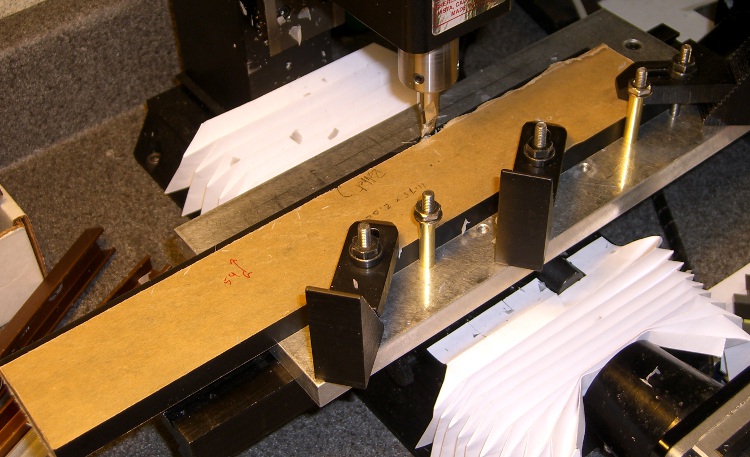
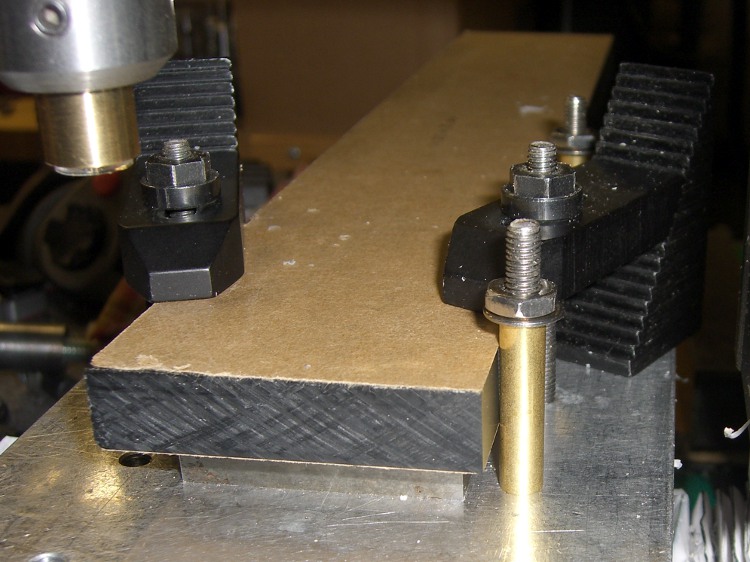
This is pretty much the same general idea and setup as the one I described there, but with the panel flat against the tooling plate.
Milling rabbet on top panel
The cutter sits at the far right end of its maximum travel. I made the rabbet in three manual CNC passes.
To set up for the rest of the cut:
G0 X-4.25 to clear the left end of the panel
Loosen the three clamps, slide the panel leftward
Push the panel against the brass tubes
Tighten the clamps
And away we go…
Complete rabbet
One disadvantage: you can’t do a final finishing pass along the entire length of the cut. There are tool marks at the stopping point, but nothing really objectionable on the back of a clock where a panel will cover the rather ugly guts.
The brass tube “locating pins” work surprisingly well.
About 2000 rpm with 3/8 inch end mill. Cut 1/8 inch wide and 0.25 inch deep @ 10 ipm in three passes. Finish pass 15 ipm at 0.257 deep to make it pretty.
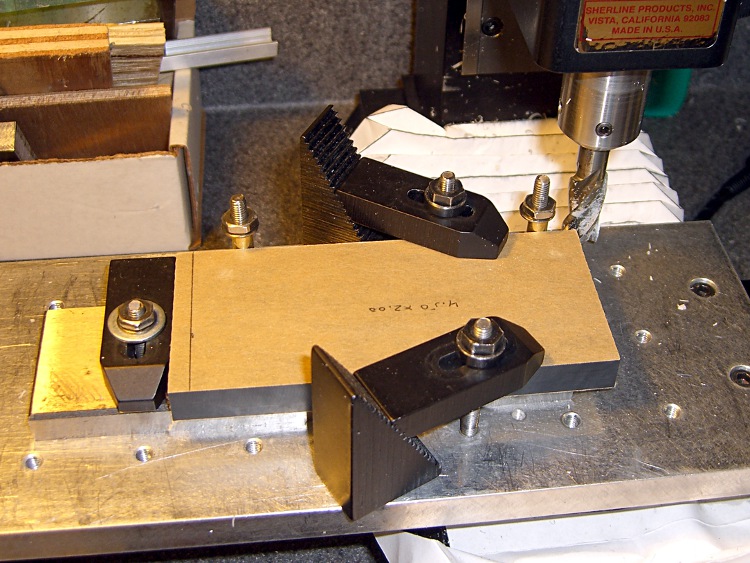
Having flycut the acrylic panels to the proper width, I had to cut them to the proper length, too. This picture shows the lashup I used to hold them down during the operation…
Clock top panel fixture
The brown bar sticking out to the left is one of the bookshelf struts that held the toolmaker’s vises down during the flycutting; it’s now secured to the Sherline table with a T-nut. A vise clamped to the bar serves as an end stop for the panels.
Brass tubing locating posts
A pair of brass tubes around studs serve as locating pins. To get the things lined up:
Loosely clamp a panel down atop a spacing plate
Push it back against the loose tubes: crudely parallel to X axis
Snug the clamps
Align the panel to the X axis using the laser
Push the tubes against the panel
Tighten their nuts
Top panel end trimming detail
Crude, but good enough for this purpose.
Then a bit of manual CNC to shave off the end. Half-inch mill, 1500 rpm, 150 mm/min, more-or-less 0.5 mm cuts. The panels don’t have to be any exact length, as long as the clock circuit boards fit inside, but the ends must be perpendicular and smooth for good gluing.
The exact part will come when I rabbet the side panels…
The side panel setup was much simpler: same brass posts, same spacer, no need for the long bar hanging off to the left.
The Totally Featureless Clock will have a black acrylic case with a Graylite Lexan faceplate. The top & bottom panels are 11.75 inches long, which is much too large for the Sherline’s 9-inch maximum X travel.
Fortunately, in this case I can cheat.
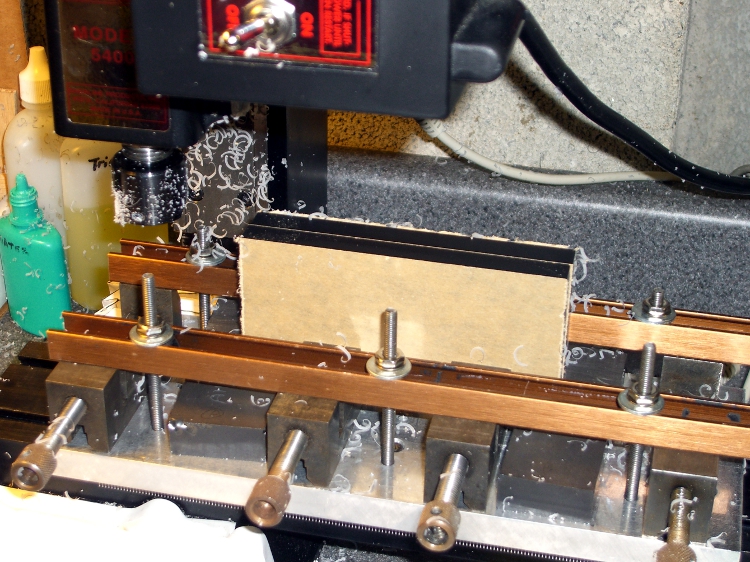
This setup cut the panels to the proper width. A pair of parallel blocks, made from some mysterious glass-like material and ground very nicely flat, support the panel just over the body of the four toolmaker’s vises lined up along the tooling plate. I drilled the brown bookshelf rails to match the tooling plate and secured them with 10-32 studs.
The front rail secures the vise bodies to the tooling plate; they’re aligned parallel to the X axis by the simple expedient of laying a parallel along the back edge and matching that to the tooling plate. No real precision is in order here; the flycut is across the whole top edge.
The rear rail holds the movable vise jaws down; they tend to rise up just slightly when tightened, but the difference amounts to barely enough to release pressure on the parallel blocks. Not enough to matter, as it turned out.
The general notion is to flycut about 2/3 of the length of the panel, then slide it far enough to cut the remainder. Flip it over and flycut the other side the same way.
About 1000 rpm and 150 mm /min, cutting 0.5 mm or so on each pass.
This worked surprisingly well. I expected to find a bow in the middle due to an uneven bandsaw cut on the initial downward side, but it was all good; evidently the blocks were wide enough to average things out.
The joint where the two cuts meet turns out to be visible, but barely detectable with a fingernail: entirely suitable for this application. I’ll hit the sides with sandpaper on a sheet of plate glass before bonding them to the faceplate.
Flycutting the end panels was much simpler: one pass clears their entire length. I moved the clamping rails to simplify the whole process; turned out that clamping the movable jaw didn’t really gain very much at all while complexicating the slide-the-stock process beyond belief.
Flycutting end panels
Overall, the width varies by about two mils along the length of the long panels and they’re perfectly straight as measured against a surface plate. Definitely close enough!
I needed a few strips of single-row pin headers, but the parts bin was empty.
I hate it when that happens.
The heap disgorged a handful of double-row strips and, of course, I Have A Machine Shop.
So: no problem.
This is, I admit, not cost-effective, but it took about 15 minutes to slit the aforementioned handful of strips right down the middle and get back to soldering.
The trick is to use an ultra-thin slitting saw, rather than a regular saw. The one here is 4 mils thick and the better part of 7/8″ in diameter; call it 0.1 mm x 22 mm. I think it came with one of the Dremel tool kits a long while ago.
Cut about 1 mm deep on the first pass, then cut through on the return to avoid having the saw deflect too much. Run about 100 mm/min, 1000 rpm, and no coolant. Line it up by eye, type manual CNC commands into EMC2, and it’s all good.
The trick is finding a mandrel that doesn’t collide with the vise; my larger saws have a rather thick screw-and-washer arrangement that doesn’t fit. I think some padding (chopped-up credit cards?) between the longer pins, mounting the vise vertically, and grabbing the longer pins would fix that. The catch might be clearance between the top of the vise and the bottom of the spindle motor.
Better to just buy some single-row strips. Sheesh… but if all you have is a CNC mill, you have plenty of solutions.
I use a blender to mix up the pancake batter every few days. Over the last week or so, the rotary switch Pulse position wasn’t returning to Off all by itself. After having replaced the impeller bearings, I couldn’t just ditch the mumble thing without at least trying to fix it…
A search for replacement parts reveals that Farberware kitchen appliances are disposable crap: they’re so cheap nobody stocks repair parts. IIRC, this blender was maybe ten or twenty bucks after rebate, which gets you through the shipping charge for the repair part. I would love to believe that paying more for kitchen appliances actually bought better quality.
Switch wire connections
As you’d expect, the four silicone rubber feet pop off to reveal machine screws that hold the plastic base to the metal body. This picture shows the wire connections to the switch:
L = brown
1 = orange
2 = no connection
3 = red
I couldn’t pull the switch knob off the shaft, so I dismantled enough of the motor mount to ease it to one side, apply a right-angle screwdriver to the switch body screws, and loosen the switch. That gave me enough room to jam a screwdriver between the switch and the mounting bracket to pry the knob off. It’s a plastic-on-plastic friction fit.
After the fact, it turns out that two screws behind the knob secure the mounting bracket to the bezel. Remove those screws, the bracket comes off, and it’s trivially easy to remove the switch screws.
The wires attach through those horrible spring-loaded push-and-pray connections: jam the wires in, pull back, and it’s supposed to be a gas-tight joint forever. I don’t believe a word of it. Remove the wires by poking a small screwdriver into the opening and forcing the brass tab away from the wire. Yuch!
Opening switch with slitting saw
The switch body parts are, of course, bonded firmly together: no user serviceable parts inside. I deployed a slitting saw on the Sherline mill, grabbed the switch in the vise, and sliced 2.5 mm deep along the line between the two body parts.
The switch is some sort of engineering plastic, so I ran the saw at about 2000 rpm, cut at 100 mm/min, and dribbled water on the blade to keep it cool. You can see the grayish-brown residue under the switch.
The thing came apart easily enough after that…
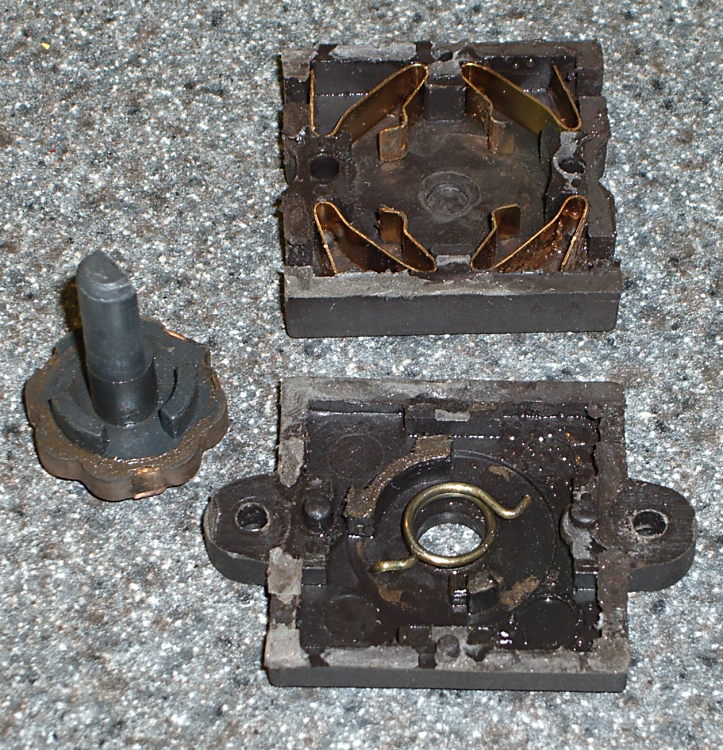
Switch Guts
These pics show the switch components. Note how the spring fits in the body and the four cunningly folded brass strips that simultaneously attach the wires, make the switch contacts, and spring-load the rotary detents.
I took the liberty of bending the strips to restore the clamping force on the wires; poking the tabs with a screwdriver tends to bend them a bit.
So it goes.
There wasn’t anything obviously wrong inside, but after a bit of puzzling, I discovered the problem residing in the coil spring that returns the switch to Off…
Cracked spring
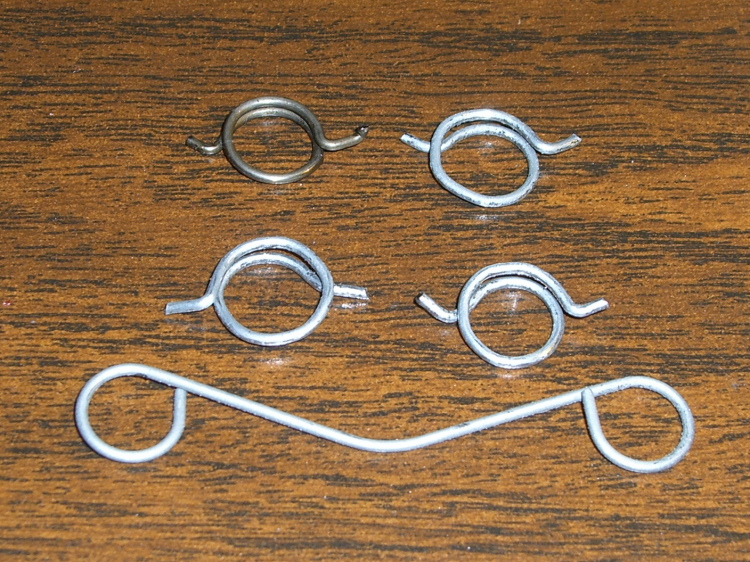
The spring wire is 1 mm diameter. A bit of rummaging in Small Spring Box Number Two disgorged a bag of spring-clip thingies with the proper wire size and just about the right coil diameter, too.
The right way to make a spring is to start with straight music wire, anneal it, make a mandrel, bend up a spring, then heat-treat the spring to make it just the right hardness and toughness for the job.
Spring iterations
I deployed my wire-bending pliers, made a few trial runs (well, OK, they weren’t trial runs when I started…), and got close enough by the third attempt (lower right).
Yup, cold-bending spring steel. It is to shudder, huh?
I bent the wire just off straight and worked my way around the coil about 0.5 mm per bend to produce a rather lumpy coil spring. This is definitely the wrong way to go, because the wire’s much too hard for that treatment: it wants to stay straight and doesn’t like those right-angle bends to form the end tabs. I think this will work well enough for long enough, though.
The spring’s chirality turns out to be important; the coil wants to tighten around the shaft when the knob’s in the Pulse position. The spring-clip thing has two ends; only one produces the correct result, which is perfectly obvious in retrospect.
Spring on switch rotor
The spring fits on the rotor like this, but with a whole lot more preload tension than you’d expect. The end result was a somewhat smaller coil diameter than I started with; I shrank the coil, re-bent a new tab on one end, chopped off about 4 mm of wire, and it was all good.
I also backed off the ramp on the notches that engage the brass contacts in the Pulse position so the switch wasn’t so prone to hang up. That was what motivated me to fix the thing: one morning I manged to leave the switch in Pulse because it didn’t quite snap back to Off, took the lid off the bowl, and the blender started up again. Fortunately, the batter is too thick to jump out of the bowl, but it was a near thing.
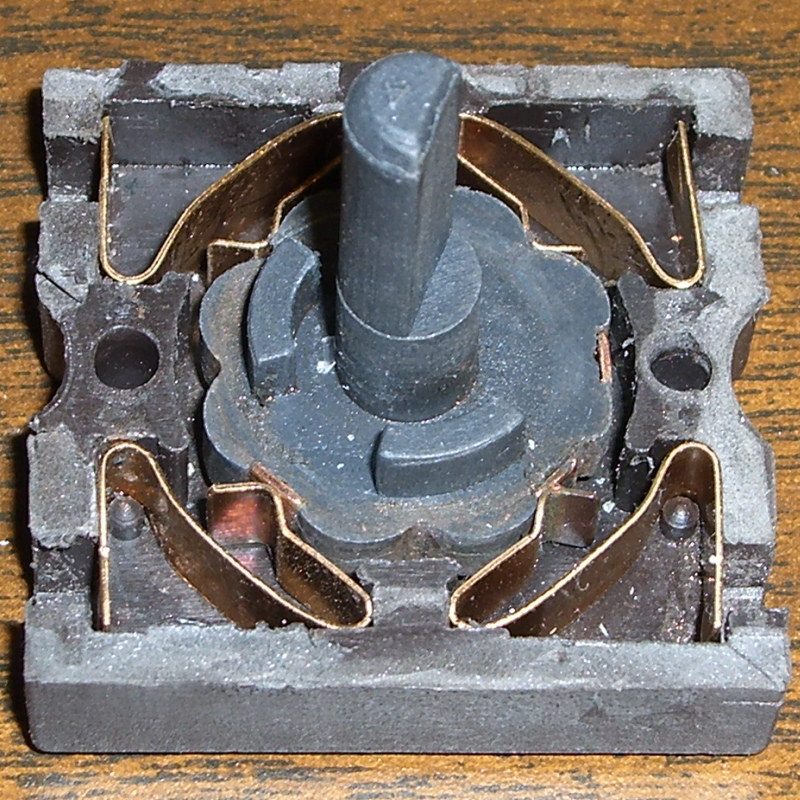
Here are the four switch positions and their contacts, in order from Pulse (most counterclockwise) to Speed 2 (most clockwise). You could, I suppose, conjure up a replacement switch if you puzzled out the connections; all the rotor tabs are connected together.
Switch contacts – PulseSwitch contacts – Off
Notice that, although switch contact 2 is unused, it is connected when the switch is in the Off position.
The back of the switch body takes pressure on the switch knob, as well as engaging the end of the rotor to hold it in the middle of the body. I wasn’t comfortable just gluing the body together again, because I suspect none of my adhesives will actually bond to the plastic.
So I chopped off a length of aluminum U-channel, poked two holes it in, shortened a pair of salvaged screws, and made a clamp for the switch body’s back. The body has three locating pins, so the two parts aren’t shifting with respect to each other, and the clamp holds the back firmly in position.
Repaired switch with back clamp
Reassembly is in reverse order, paying a bit of attention to securing the wires in those crappy push-and-pray contacts and keeping everything away from the cooling fan as the bottom snaps into place.
Done!
The economics of this sort of repair make absolutely no sense at all, but I hate throwing stuff away just because some cheap part failed. In this case, I’d be happy to replace the switch… let me know where you can find one with the requisite contacts and spring arrangement!












 The Smell of Molten Projects in the Morning