-
CNC 3018-Pro: Home Switches
The CNC 3018-Pro doesn’t absolutely need home switches, but (in principle) they let you install a workholding fixture at a known position, home the axes, pick a preset coordinate system for the fixture, and not have to touch off the axes before making parts.
Having used Makerbot-style endstop switch PCBs for the MPCNC, this was straightforward:
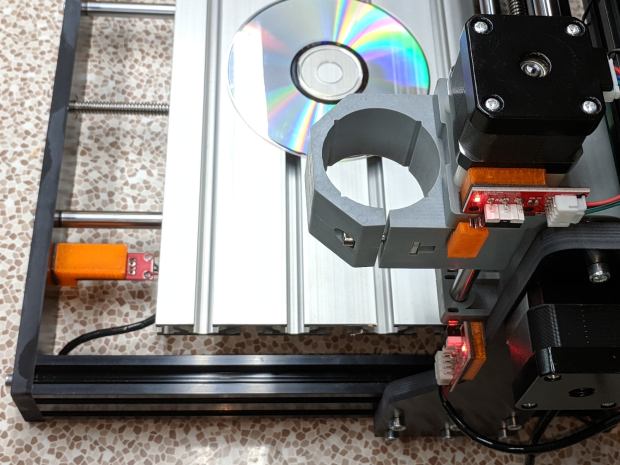
3018 CNC – Endstop switches – overview The X and Z axis switches simply press against the appropriate moving parts:

3018 CNC – X and Z Endstops The little tab stuck on the tool clamp provides a bit of clearance around the upper part of the X axis assembly.
The Y axis switch needed a slightly tapered tab to extend the bearing holder:

3018 CNC – Y axis endstop It’s made from a random scrap of clear plastic, hand-filed to suit, and stuck on the bearing to trigger the switch in exactly the right spot.
You can find elaborate switch mounts on Thingiverse, but I’ve become a big fan of genuine 3M outdoor-rated foam tape for this sort of thing: aggressive stickiness, no deterioration, possible-but-not-easy removal.
The switches need +5 V power, so add a small hack to the CAMTool V3.3 control board to let the connectors plug right in:

3018 CNC CAMTool – Endstop power mod – installed The solid models borrow their central depression around the switch terminals from the MPCNC blocks:

3018 Home Switch Mounts – Slic3r preview The OpenSCAD source code as a GitHub Gist:
This file contains hidden or bidirectional Unicode text that may be interpreted or compiled differently than what appears below. To review, open the file in an editor that reveals hidden Unicode characters. Learn more about bidirectional Unicode characters// 3018-Pro Mount for Makerbot Endstop PCB // Ed Nisley KE4ZNU – 2019-07 /* [Build Options] */ Layout = "Show"; // [Build, Show] /* [Hidden] */ ThreadThick = 0.25; // [0.20, 0.25] ThreadWidth = 0.40; // [0.40] function IntegerMultiple(Size,Unit) = Unit * ceil(Size / Unit); Protrusion = 0.01; // [0.01, 0.1] HoleWindage = 0.2; ID = 0; OD = 1; LENGTH = 2; //- Shapes // Basic PCB with hole for switch pins // origin at switch actuator corner, as seen looking at component side SwitchClear = [15.0,5.0,2.0]; // clearance around switch pins SwitchOffset = [12.5,9.0,0.0]; // center of switch pins from actuator corner PCB = [26.0,16.4,2*SwitchClear.z]; // switch PCB beyond connector, pin height XBlock = [PCB.x,PCB.y,5.0]; module XMount() { difference() { cube(XBlock,center=false); translate(SwitchOffset + [0,0,XBlock.z – SwitchClear.z/2]) cube(SwitchClear + [0,0,Protrusion],center=true); } } YBlock = [PCB.x + 10.0,PCB.y,20.0]; module YMount() { difference() { translate([-10.0,0,0]) cube(YBlock,center=false); translate([0,-Protrusion,10.0]) cube(YBlock + [0,2*Protrusion,0],center=false); translate(SwitchOffset + [0,0,10.0 – SwitchClear.z/2]) cube(SwitchClear + [0,0,Protrusion],center=true); } } ZBlock = [PCB.x,PCB.y,6.0]; ZPin = [20.0,10.0,5.5]; module ZMount() { difference() { cube(ZBlock,center=false); translate(SwitchOffset + [0,0,ZBlock.z – SwitchClear.z/2]) cube(SwitchClear + [0,0,Protrusion],center=true); } translate([0,-ZBlock.y,0]) difference() { cube(ZPin,center=false); translate([ZPin.x/2,-Protrusion,4.0]) cube(ZPin + [0,2*Protrusion,0],center=false); } } //- Build things if (Layout == "Show") { translate([0,YBlock.y,0]) XMount(); translate([0,-YBlock.y/2]) YMount(); translate([0,-(ZBlock.y + YBlock.y)]) ZMount(); } The dimension doodles:
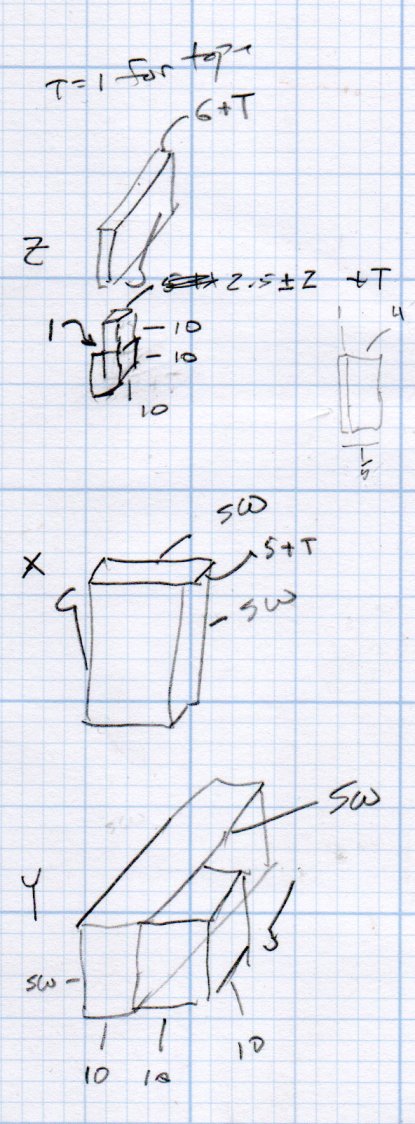
3018 Home Switch Mounts – Dimension Doodles
-
Subscribe
Subscribed
Have a WordPress.com account? Log in now.

