The Smell of Molten Projects in the Morning

Ed Nisley's Blog: Shop notes, electronics, firmware, machinery, 3D printing, laser cuttery, and curiosities. Contents: 100% human thinking, 0% AI slop.

Category: Software

General-purpose computers doing something specific

  • Removing Old Kernels

    Mostly, I don’t worry about the accumulation of old kernels building up in /boot and sudo apt-get autoremove may scrub most of them, but sometimes it doesn’t when I’m doing something else and I must wade through the accumulation of old packages in Synaptic. Removing all those packages by hand gets tedious, but I’m reluctant to unleash a rarely used script on the clutter for fear of creating a worse problem.

    The iterator in this burst of Bash line noise:

    for f in $(ls /boot | grep vmlinuz | cut -d\- -f2,3 | sort | head -n -1) ; do dpkg -l | grep "^ii\ \ linux-" | grep $f | cut -d" " -f 3 >> /tmp/pkgs.txt ; done
    

    … parses the list of kernels in /boot into version numbers, finds the corresponding installed packages, sorts them in ascending order, discards the last entry so as to not uninstall the most recent kernel, and passes each line of the resulting list into the loop.

    N.B: The grep argument has two spaces after the ii that WordPress would destroy without the escaping backslashes. You can try "^ii linux-", but if the loop puts nothing in the file, that’s why.

    Given each kernel version number, the loop extracts the package names from the installed kernel packages and glues the result onto a file that looks like this:

    cat /tmp/pkgs.txt
    linux-headers-3.13.0-73
    linux-headers-3.13.0-73-generic
    linux-image-3.13.0-73-generic
    linux-image-extra-3.13.0-73-generic
    linux-headers-3.13.0-74
    linux-headers-3.13.0-74-generic
    linux-image-3.13.0-74-generic
    linux-image-extra-3.13.0-74-generic
    linux-headers-3.13.0-76
    linux-headers-3.13.0-76-generic
    linux-image-3.13.0-76-generic
    linux-image-extra-3.13.0-76-generic
    

    Convert that file into a one-line string of package names and verify what would happen:

    paste -s -d " " /tmp/pkgs.txt | xargs sudo apt-get --dry-run purge
    

    If everything looks good, change --dry-run to --yes and blow ’em away.

    No, I can’t possibly remember or type that gibberish by hand, but I do know where to find it…

  • Vacuum Tube LEDs: Ersatz Heat Sink Plate Cap

    I wanted a slightly larger “plate cap” to fit a big incandescent bulb and it seemed a fake heatsink might add gravitas to the proceedings:

    Vacuum Tube LEDs - large incandescent bulb
    Vacuum Tube LEDs – large incandescent bulb

    Yeah, that antique ceramic socket holds the bulb at a rakish angle. Worse, even though I painstakingly laid out the position of the heatsink atop the bulb, it’s visibly off-center. Which wouldn’t be so bad, had I not epoxied the damn thing in place.

    After reaming out the M2’s filament drive, the entire blue base printed without incident.

    A closer look at the cap:

    Vacuum Tube LEDs - ersatz heatsink plate cap
    Vacuum Tube LEDs – ersatz heatsink plate cap

    Memo to Self: Next time, line it up with the vertical glass support inside the bulb and ignore the external evidence.

    The boss has a hole for the braid-enclosed cable to the knockoff Neopixel:

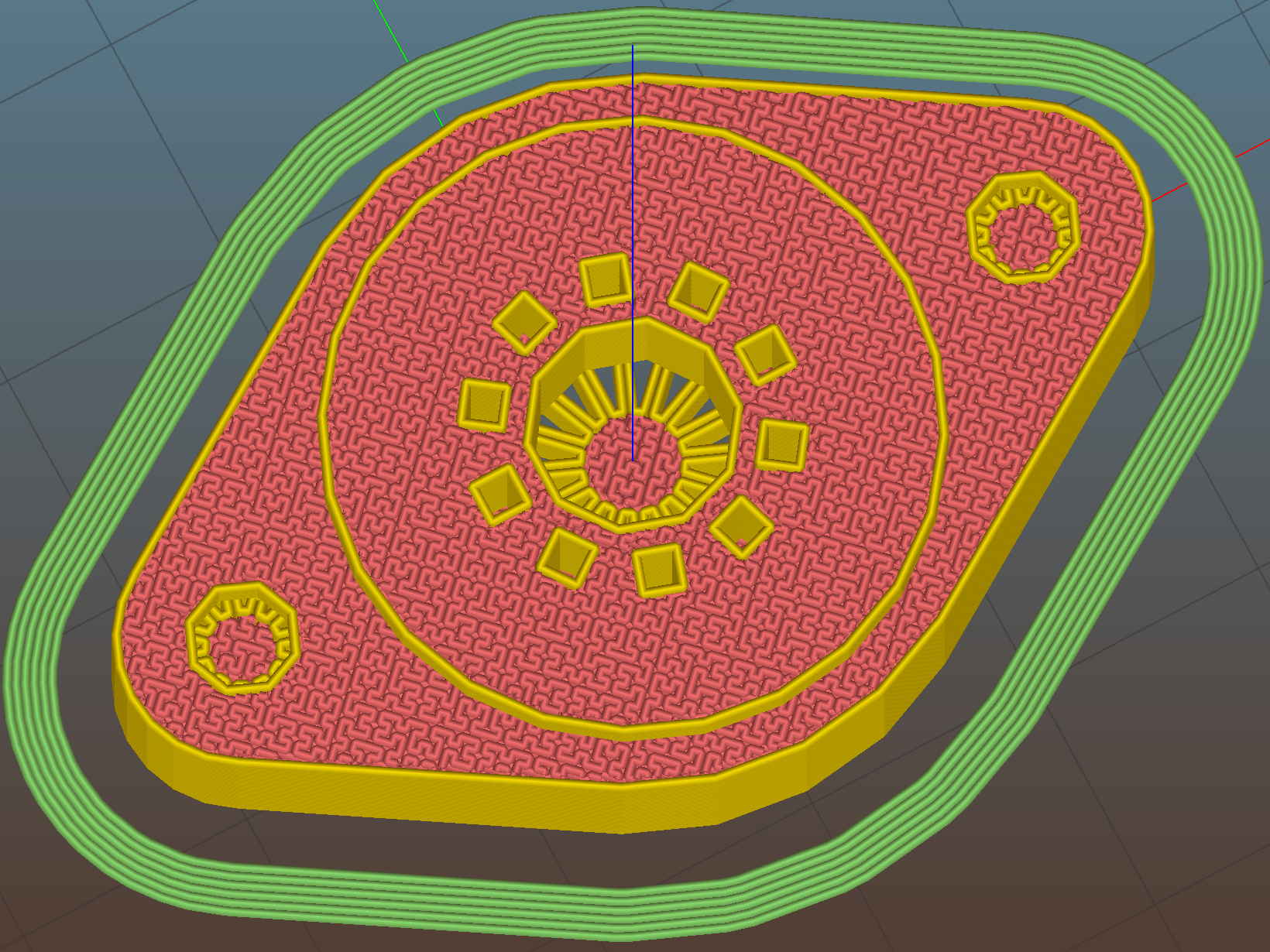
    Vacuum Tube Lights - finned cap - Slic3r preview
    Vacuum Tube Lights – finned cap – Slic3r preview

    The cupped surface perfectly fits the bulb’s 3.75 inch diameter. While you wouldn’t mill out a real heatsink, it definitely looks better this way and (alas) gives the epoxy more footprint for a better grip.

    I built the fins with a 1/8 inch cutter in mind, so the fin root radius allows for a G3/G3 arc without gouging. I doubt machining a fake heatsink from aluminum makes any sense, but the cheap extruded heatsinks on eBay don’t look very good. Plus, they sport completely unnecessary tapped holes for LED mounts and suchlike.

    A cross-section shows the wiring channel and cable entry:

    Vacuum Tube Lights - fin cap solid model - section
    Vacuum Tube Lights – fin cap solid model – section

    I epoxied the Neopixel in place, applied double-sided carpet tape to the whole thing, then painstakingly trimmed around the fins with an Xacto knife:

    Vacuum Tube LEDs - Ersatz Heatsink plate cap - tape
    Vacuum Tube LEDs – Ersatz Heatsink plate cap – tape

    That looked better from the top side (where it was completely hidden) and came heartbreakingly close to working, but after about a day the cable + braid put enough torque on the cap to peel it off the bulb. Obviously, the tape holds much less enthusiastically after that.

    Part of the problem came from the cable’s rather sharp angle just outside the cap:

    Vacuum Tube LEDs - Ersatz Heatink plate cap - detail
    Vacuum Tube LEDs – Ersatz Heatink plate cap – detail

    Rakish angle, indeed. Two of ’em, in fact.

    Unlike the smaller cap on the halogen bulb, this time I didn’t bother with a brass tube ferrule, mostly to see how it looks. I think it came out OK and the black braid looks striking in person. Conversely, a touch of brass never detracts from the appearance.

    Obviously, the cable wasn’t long enough, either. Part of that problem came from underestimating the braid length: it shortens dramatically when slipped over the cable, even when you expect shortening. Somehow I managed to overlook that, despite cutting the cable quite long enough, thankyouverymuch. There’s a tradeoff between gentle angles and having the cable stick out too far for comfort.

    Memo to Self: Use a cable at least four inches longer than necessary, measure the combined cable + braid assembly after screwing the bulb in the socket, and don’t epoxy anything before all the parts are ready for assembly.

    That’s why it’s a prototype made out of blue PETG…

    Protip: running old ceramic sockets through the dishwasher greatly simplifies their subsequent cleanup.

    All in all, I like it.

    The OpenSCAD source code as a GitHub gist:

    // Vacuum Tube LED Lights
    // Ed Nisley KE4ZNU January 2016
    Layout = "FinCap"; // Cap LampBase USBPort Socket(s) (Build)FinCap
    Section = true; // cross-section the object
    Support = true;
    //- Extrusion parameters must match reality!
    ThreadThick = 0.25;
    ThreadWidth = 0.40;
    HoleWindage = 0.2;
    Protrusion = 0.1; // make holes end cleanly
    inch = 25.4;
    function IntegerMultiple(Size,Unit) = Unit * ceil(Size / Unit);
    //———————-
    // Dimensions
    // https://en.wikipedia.org/wiki/Tube_socket#Summary_of_Base_Details
    T_NAME = 0; // common name
    T_NUMPINS = 1; // total, with no allowance for keying
    T_PINBCD = 2; // tube pin circle diameter
    T_PINOD = 3; // … diameter
    T_PINLEN = 4; // … length (overestimate)
    T_HOLEOD = 5; // nominal panel hole from various sources
    T_PUNCHOD = 6; // panel hole optimized for inch-size Greenlee punches
    T_TUBEOD = 7; // envelope or base diameter
    T_PIPEOD = 8; // light pipe from LED to tube base
    T_SCREWOC = 9; // mounting screw holes
    // Name pins BCD dia length hole punch env pipe screw
    TubeData = [
    ["Mini7", 8, 9.53, 1.016, 7.0, 16.0, 11/16 * inch, 18.0, 5.0, 22.5],
    ["Octal", 8, 17.45, 2.36, 10.0, 36.2, (8 + 1)/8 * inch, 32.0, 11.5, 39.0],
    ["Noval", 10, 11.89, 1.1016, 7.0, 22.0, 7/8 * inch, 21.0, 5.0, 28.0],
    ["Duodecar", 13, 19.10, 1.05, 9.0, 32.0, 1.25 * inch, 38.0, 12.5, 39.0],
    ];
    ID = 0;
    OD = 1;
    LENGTH = 2;
    Pixel = [7.0,10.0,3.0]; // ID = contact patch, OD = PCB dia, LENGTH = overall thickness
    Nut = [3.5,8.0,3.0]; // socket mounting nut recess
    BaseShim = 2*ThreadThick; // between pin holes and pixel top
    SocketFlange = 2.0; // rim around socket below punchout
    PanelThick = 2.0; // socket extension through punchout
    //———————-
    // Useful routines
    module PolyCyl(Dia,Height,ForceSides=0) { // based on nophead's polyholes
    Sides = (ForceSides != 0) ? ForceSides : (ceil(Dia) + 2);
    FixDia = Dia / cos(180/Sides);
    cylinder(r=(FixDia + HoleWindage)/2,h=Height,$fn=Sides);
    }
    //———————-
    // Tube cap
    CapTube = [4.0,3/16 * inch,10.0]; // brass tube for flying lead to cap LED
    CapSize = [Pixel[ID],(Pixel[OD] + 3.0),(CapTube[OD] + 2*Pixel[LENGTH])];
    CapSides = 6*4;
    module Cap() {
    difference() {
    union() {
    cylinder(d=CapSize[OD],h=(CapSize[LENGTH]),$fn=CapSides); // main cap body
    translate([0,0,CapSize[LENGTH]]) // rounded top
    scale([1.0,1.0,0.65])
    sphere(d=CapSize[OD]/cos(180/CapSides),$fn=CapSides); // cos() fixes slight undersize vs cylinder
    cylinder(d1=(CapSize[OD] + 2*3*ThreadWidth),d2=CapSize[OD],h=1.5*Pixel[LENGTH],$fn=CapSides); // skirt
    }
    translate([0,0,-Protrusion]) // bore for wiring to LED
    PolyCyl(CapSize[ID],(CapSize[LENGTH] + 3*ThreadThick + Protrusion),CapSides);
    translate([0,0,-Protrusion]) // PCB recess with clearance for tube dome
    PolyCyl(Pixel[OD],(1.5*Pixel[LENGTH] + Protrusion),CapSides);
    translate([0,0,(1.5*Pixel[LENGTH] – Protrusion)]) // small step + cone to retain PCB
    cylinder(d1=(Pixel[OD]/cos(180/CapSides)),d2=Pixel[ID],h=(Pixel[LENGTH] + Protrusion),$fn=CapSides);
    translate([0,0,(CapSize[LENGTH] – CapTube[OD]/(2*cos(180/8)))]) // hole for brass tube holding wire loom
    rotate([90,0,0]) rotate(180/8)
    PolyCyl(CapTube[OD],CapSize[OD],8);
    }
    }
    //———————-
    // Heatsink tube cap
    CableOD = 3.5; // cable + braid diameter
    BulbOD = 3.75 * inch; // bulb OD; use 10 inches for flat
    FinCutterOD = 1/8 * inch;
    echo(str("Fin Cutter: ",FinCutterOD));
    FinSides = 2*4;
    FinCapSize = [(Pixel[OD] + 2*FinCutterOD),30.0,(10.0 + 2*Pixel[LENGTH])];
    BulbRadius = BulbOD / 2;
    BulbDepth = BulbRadius – sqrt(pow(BulbRadius,2) – pow(FinCapSize[OD],2)/4);
    echo(str("Bulb OD: ",BulbOD," recess: ",BulbDepth));
    module FinCap() {
    NumFins = floor(PI*FinCapSize[ID] / (2*FinCutterOD));
    FinAngle = 360 / NumFins;
    echo(str("NumFins: ",NumFins," angle: ",FinAngle," deg"));
    difference() {
    union() {
    cylinder(d=FinCapSize[ID],h=FinCapSize[LENGTH],$fn=2*NumFins); // main body
    for (i = [0:NumFins – 1]) // fins
    rotate(i * FinAngle)
    hull() {
    translate([FinCapSize[ID]/2,0,0])
    rotate(180/FinSides)
    cylinder(d=FinCutterOD,h=FinCapSize[LENGTH],$fn=FinSides);
    translate([(FinCapSize[OD] – FinCutterOD)/2,0,0])
    rotate(180/FinSides)
    cylinder(d=FinCutterOD,h=FinCapSize[LENGTH],$fn=FinSides);
    }
    rotate(FinAngle/2) // cable entry boss
    translate([FinCapSize[ID]/2,0,FinCapSize[LENGTH]/2])
    cube([FinCapSize[OD]/4,FinCapSize[OD]/4,FinCapSize[LENGTH]],center=true);
    }
    for (i = [1:NumFins – 1]) // fin inner gullets, omit cable entry side
    rotate(i * FinAngle + FinAngle/2) // joint isn't quite perfect, but OK
    translate([FinCapSize[ID]/2,0,-Protrusion])
    rotate(0*180/FinSides)
    cylinder(d=FinCutterOD/cos(180/FinSides),h=(FinCapSize[LENGTH] + 2*Protrusion),$fn=FinSides);
    translate([0,0,-Protrusion]) // PCB recess
    PolyCyl(Pixel[OD],(1.5*Pixel[LENGTH] + Protrusion),FinSides);
    PolyCyl(Pixel[ID],(FinCapSize[LENGTH] – 3*ThreadThick),FinSides); // bore for LED wiring
    translate([0,0,(FinCapSize[LENGTH] – 3*ThreadThick – 2*CableOD/(2*cos(180/8)))]) // cable inlet
    rotate(FinAngle/2) rotate([0,90,0]) rotate(180/8)
    PolyCyl(CableOD,FinCapSize[OD],8);
    if (BulbOD <= 10.0 * inch) // curve for top of bulb
    translate([0,0,-(BulbRadius – BulbDepth + 2*ThreadThick)]) // … slightly flatten tips
    sphere(d=BulbOD,$fn=16*FinSides);
    }
    }
    //———————-
    // Aperture for USB-to-serial adapter snout
    // These are all magic numbers, of course
    module USBPort() {
    translate([0,28.0])
    rotate([90,0,0])
    linear_extrude(height=28.0)
    polygon(points=[
    [0,0],
    [8.0,0],
    [8.0,4.0],
    // [4.0,4.0],
    [4.0,6.5],
    [-4.0,6.5],
    // [-4.0,4.0],
    [-8.0,4.0],
    [-8.0,0],
    ]);
    }
    //———————-
    // Box for Leviton ceramic lamp base
    module LampBase() {
    Bottom = 3.0;
    Base = [4.0*inch,4.5*inch,20.0 + Bottom];
    Sides = 12*4;
    Retainer = [3.5,11.0,1.0]; // flat fiber washer holding lamp base screws in place
    StudSides = 8;
    StudOC = 3.5 * inch;
    Stud = [0.107 * inch, // 6-32 mounting screws
    min(15.0,1.5*(Base[ID] – StudOC)/cos(180/StudSides)), // OD = big enough to merge with walls
    (Base[LENGTH] – Retainer[LENGTH])]; // leave room for retainer
    union() {
    difference() {
    rotate(180/Sides)
    cylinder(d=Base[OD],h=Base[LENGTH],$fn=Sides);
    rotate(180/Sides)
    translate([0,0,Bottom])
    cylinder(d=Base[ID],h=Base[LENGTH],$fn=Sides);
    translate([0,-Base[OD]/2,Bottom + 1.2]) // mount on double-sided foam tape
    rotate(0)
    USBPort();
    }
    for (i = [-1,1])
    translate([i*StudOC/2,0,0])
    rotate(180/StudSides)
    difference() {
    # cylinder(d=Stud[OD],h=Stud[LENGTH],$fn=StudSides);
    translate([0,0,Bottom])
    PolyCyl(Stud[ID],(Stud[LENGTH] – (Bottom – Protrusion)),6);
    }
    }
    }
    //———————-
    // Tube Socket
    module Socket(Name = "Mini7") {
    NumSides = 6*4;
    Tube = search([Name],TubeData,1,0)[0];
    echo(str("Building ",TubeData[Tube][0]," socket"));
    echo(str(" Punch: ",TubeData[ID][T_PUNCHOD]," mm = ",TubeData[ID][T_PUNCHOD]/inch," inch"));
    echo(str(" Screws: ",TubeData[ID][T_SCREWOC]," mm =",TubeData[ID][T_SCREWOC]/inch," inch OC"));
    OAH = Pixel[LENGTH] + BaseShim + TubeData[Tube][T_PINLEN];
    BaseHeight = OAH – PanelThick;
    difference() {
    union() {
    linear_extrude(height=BaseHeight)
    hull() {
    circle(d=(TubeData[Tube][T_PUNCHOD] + 2*SocketFlange),$fn=NumSides);
    for (i=[-1,1])
    translate([i*TubeData[Tube][T_SCREWOC]/2,0])
    circle(d=2*Nut[OD],$fn=NumSides);
    }
    cylinder(d=TubeData[Tube][T_PUNCHOD],h=OAH,$fn=NumSides);
    }
    for (i=[0:(TubeData[Tube][T_NUMPINS] – 1)]) // tube pins
    rotate(i*360/TubeData[Tube][T_NUMPINS])
    translate([TubeData[Tube][T_PINBCD]/2,0,(OAH – TubeData[Tube][T_PINLEN])])
    rotate(180/4)
    PolyCyl(TubeData[Tube][T_PINOD],(TubeData[Tube][T_PINLEN] + Protrusion),4);
    for (i=[-1,1]) // mounting screw holes & nut traps
    translate([i*TubeData[Tube][T_SCREWOC]/2,0,-Protrusion]) {
    PolyCyl(Nut[OD],(Nut[LENGTH] + Protrusion),6);
    PolyCyl(Nut[ID],(OAH + 2*Protrusion),6);
    }
    translate([0,0,-Protrusion]) { // LED recess
    PolyCyl(Pixel[OD],(Pixel[LENGTH] + Protrusion),8);
    }
    translate([0,0,(Pixel[LENGTH] – Protrusion)]) { // light pipe
    rotate(180/TubeData[Tube][T_NUMPINS])
    PolyCyl(TubeData[Tube][T_PIPEOD],(OAH + 2*Protrusion),TubeData[Tube][T_NUMPINS]);
    }
    }
    // Totally ad-hoc support structures …
    if (Support) {
    color("Yellow") {
    for (i=[-1,1]) // nut traps
    translate([i*TubeData[Tube][T_SCREWOC]/2,0,(Nut[LENGTH] – ThreadThick)/2])
    for (a=[0:5])
    rotate(a*30 + 15)
    cube([2*ThreadWidth,0.9*Nut[OD],(Nut[LENGTH] – ThreadThick)],center=true);
    if (Pixel[OD] > TubeData[Tube][T_PIPEOD]) // support pipe only if needed
    translate([0,0,(Pixel[LENGTH] – ThreadThick)/2])
    for (a=[0:7])
    rotate(a*22.5)
    cube([2*ThreadWidth,0.9*Pixel[OD],(Pixel[LENGTH] – ThreadThick)],center=true);
    }
    }
    }
    //———————-
    // Build it
    if (Layout == "Cap") {
    if (Section)
    difference() {
    Cap();
    translate([-CapSize[OD],0,CapSize[LENGTH]])
    cube([2*CapSize[OD],2*CapSize[OD],3*CapSize[LENGTH]],center=true);
    }
    else
    Cap();
    }
    if (Layout == "FinCap") {
    if (Section) render(convexity=5)
    difference() {
    FinCap();
    // translate([0,-FinCapSize[OD],FinCapSize[LENGTH]])
    // cube([2*FinCapSize[OD],2*FinCapSize[OD],3*FinCapSize[LENGTH]],center=true);
    translate([-FinCapSize[OD],0,FinCapSize[LENGTH]])
    cube([2*FinCapSize[OD],2*FinCapSize[OD],3*FinCapSize[LENGTH]],center=true);
    }
    else
    FinCap();
    }
    if (Layout == "BuildFinCap")
    translate([0,0,FinCapSize[LENGTH]])
    rotate([180,0,0])
    FinCap();
    if (Layout == "LampBase")
    LampBase();
    if (Layout == "USBPort")
    USBPort();
    if (Layout == "Socket")
    if (Section) {
    difference() {
    Socket();
    translate([-100/2,0,-Protrusion])
    cube([100,50,50],center=false);
    }
    }
    else
    Socket();
    if (Layout == "Sockets") {
    translate([0,50,0])
    Socket("Mini7");
    translate([0,20,0])
    Socket("Octal");
    translate([0,-15,0])
    Socket("Duodecar");
    translate([0,-50,0])
    Socket("Noval");
    }
  • Vacuum Tube LEDs: First Light!

    A test lashup to see how it all works, with an ersatz plate cap atop the IBM 21HB5A Beam Power tube on the far right end:

    Vacuum Tube LEDs - test lashup
    Vacuum Tube LEDs – test lashup

    Those sockets must mount in a chassis, not flop around loose on the cable.

    I hacked the code out of the Hard Drive Platter Mood Light; there’s a lot to not like about what’s left and I must rethink the overall structure. The colors now run an order of magnitude faster than the Platter Mood Light, with a 90° phase angle between successive Neopixels.

    The mica spacers in the 12AT7 Dual Triode tube (second in the sequence, Noval socket) look cool & crystalline:

    Vacuum Tube LEDs - Noval tube - blue phase
    Vacuum Tube LEDs – Noval tube – blue phase

    When the red phase comes around, it becomes a firebottle:

    Vacuum Tube LEDs - Noval tube - red phase
    Vacuum Tube LEDs – Noval tube – red phase

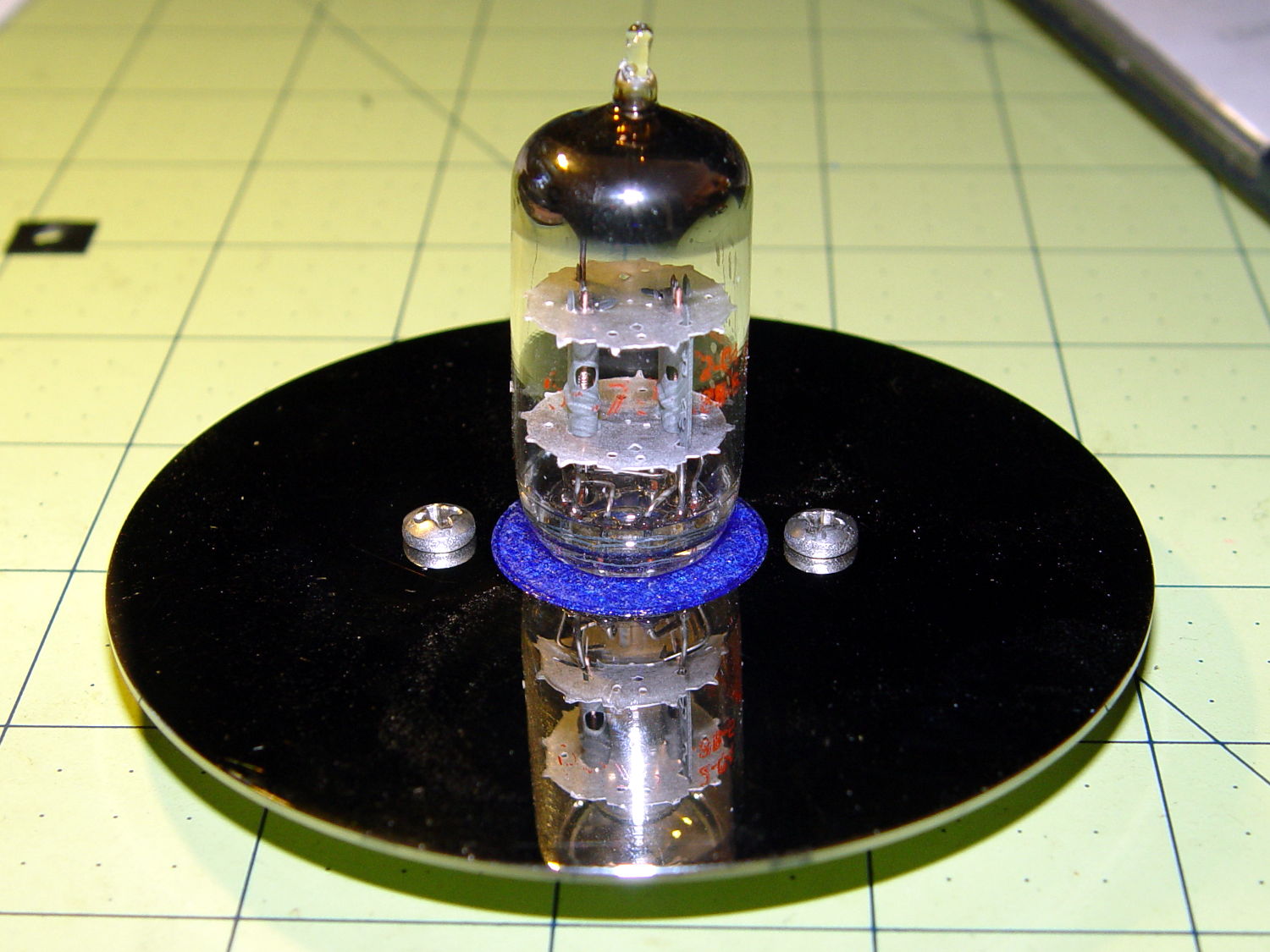
    With a touch of fire in its hole, the IBM 21HB5A Beam Power tube looks just flat-out gorgeous, despite that translucent blue plate cap:

    Vacuum Tube LEDs - IBM 21HB5A Beam Power Tube - violet amber phase
    Vacuum Tube LEDs – IBM 21HB5A Beam Power Tube – violet amber phase

    Cool green works pretty well:

    Vacuum Tube LEDs - IBM 21HB5A Beam Power Tube - green violet phase
    Vacuum Tube LEDs – IBM 21HB5A Beam Power Tube – green violet phase

    If you wait long enough, it’ll probably turn True IBM Blue.

    This worked out even better than I expected!

    The Arduino source code as a GitHub gist:

    // Neopixel lighting for multiple vacuum tubes
    // Ed Nisley – KE4ANU – January 2015
    #include <Adafruit_NeoPixel.h>
    //———-
    // Pin assignments
    const byte PIN_NEO = A3; // DO – data out to first Neopixel
    const byte PIN_HEARTBEAT = 13; // DO – Arduino LED
    //———-
    // Constants
    #define UPDATEINTERVAL 25ul
    const unsigned long UpdateMS = UPDATEINTERVAL – 1ul; // update LEDs only this many ms apart minus loop() overhead
    // number of steps per cycle, before applying prime factors
    #define RESOLUTION 100
    // phase difference between tubes for slowest color
    #define BASEPHASE (PI/4.0)
    // number of LED strips around each tube
    #define LEDSTRIPCOUNT 1
    // number of LEDs per strip
    #define LEDSTRINGCOUNT 5
    // want to randomize the startup a little?
    #define RANDOMIZE true
    //———-
    // Globals
    // instantiate the Neopixel buffer array
    Adafruit_NeoPixel strip = Adafruit_NeoPixel(LEDSTRIPCOUNT * LEDSTRINGCOUNT, PIN_NEO, NEO_GRB + NEO_KHZ800);
    uint32_t FullWhite = strip.Color(255,255,255);
    uint32_t FullOff = strip.Color(0,0,0);
    struct pixcolor_t {
    byte Prime;
    unsigned int NumSteps;
    unsigned int Step;
    float StepSize;
    float TubePhase;
    byte MaxPWM;
    };
    // colors in each LED
    enum pixcolors {RED, GREEN, BLUE, PIXELSIZE};
    struct pixcolor_t Pixels[PIXELSIZE]; // all the data for each pixel color intensity
    byte Map[LEDSTRINGCOUNT][LEDSTRIPCOUNT] = {{0},{1},{2},{3},{4}}; // pixel IDs around each tube, bottom to top.
    unsigned long MillisNow;
    unsigned long MillisThen;
    //– Figure PWM based on current state
    byte StepColor(byte Color, float Phi) {
    byte Value;
    Value = (Pixels[Color].MaxPWM / 2.0) * (1.0 + sin(Pixels[Color].Step * Pixels[Color].StepSize + Phi));
    // Value = (Value) ? Value : Pixels[Color].MaxPWM; // flash at dimmest points
    // printf("C: %d Phi: %d Value: %d\r\n",Color,(int)(Phi*180.0/PI),Value);
    return Value;
    }
    //– Helper routine for printf()
    int s_putc(char c, FILE *t) {
    Serial.write(c);
    }
    //——————
    // Set the mood
    void setup() {
    pinMode(PIN_HEARTBEAT,OUTPUT);
    digitalWrite(PIN_HEARTBEAT,LOW); // show we arrived
    Serial.begin(57600);
    fdevopen(&s_putc,0); // set up serial output for printf()
    printf("Multiple Vacuum Tube Mood Light with Neopixels\r\nEd Nisley – KE4ZNU – January 2016\r\n");
    /// set up Neopixels
    strip.begin();
    strip.show();
    // lamp test: run a brilliant white dot along the length of the strip
    printf("Lamp test: walking white\r\n");
    strip.setPixelColor(0,FullWhite);
    strip.show();
    delay(500);
    for (int i=1; i<strip.numPixels(); i++) {
    digitalWrite(PIN_HEARTBEAT,HIGH);
    strip.setPixelColor(i-1,FullOff);
    strip.setPixelColor(i,FullWhite);
    strip.show();
    digitalWrite(PIN_HEARTBEAT,LOW);
    delay(500);
    }
    strip.setPixelColor(strip.numPixels() – 1,FullOff);
    strip.show();
    delay(500);
    // fill the layers
    printf(" … fill using Map array\r\n");
    for (int i=0; i < LEDSTRINGCOUNT; i++) { // for each layer
    digitalWrite(PIN_HEARTBEAT,HIGH);
    for (int j=0; j < LEDSTRIPCOUNT; j++) { // spread color around the layer
    strip.setPixelColor(Map[i][j],FullWhite);
    strip.show();
    delay(250);
    }
    digitalWrite(PIN_HEARTBEAT,LOW);
    }
    // clear to black
    printf(" … clear\r\n");
    for (int i=0; i < LEDSTRINGCOUNT; i++) { // for each layer
    digitalWrite(PIN_HEARTBEAT,HIGH);
    for (int j=0; j < LEDSTRIPCOUNT; j++) { // spread color around the layer
    strip.setPixelColor(Map[i][j],FullOff);
    strip.show();
    delay(250);
    }
    digitalWrite(PIN_HEARTBEAT,LOW);
    }
    delay(1000);
    // set up the color generators
    MillisNow = MillisThen = millis();
    if (RANDOMIZE)
    randomSeed(MillisNow + analogRead(7));
    else
    printf("Start not randomized\r\n");
    printf("First random number: %ld\r\n",random(10));
    Pixels[RED].Prime = 7;
    Pixels[GREEN].Prime = 5;
    Pixels[BLUE].Prime = 3;
    printf("Primes: (%d,%d,%d)\r\n",Pixels[RED].Prime,Pixels[GREEN].Prime,Pixels[BLUE].Prime);
    unsigned int TubeSteps = (unsigned int) ((BASEPHASE / TWO_PI) *
    RESOLUTION * (unsigned int) max(max(Pixels[RED].Prime,Pixels[GREEN].Prime),Pixels[BLUE].Prime));
    printf("Tube phase offset: %d deg = %d steps\r\n",(int)(BASEPHASE*(360.0/TWO_PI)),TubeSteps);
    Pixels[RED].MaxPWM = 255;
    Pixels[GREEN].MaxPWM = 128;
    Pixels[BLUE].MaxPWM = 255;
    for (byte c=0; c < PIXELSIZE; c++) {
    Pixels[c].NumSteps = RESOLUTION * (unsigned int) Pixels[c].Prime;
    Pixels[c].Step = (RANDOMIZE) ? random(Pixels[c].NumSteps) : (3*Pixels[c].NumSteps)/4;
    Pixels[c].StepSize = TWO_PI / Pixels[c].NumSteps; // in radians per step
    Pixels[c].TubePhase = TubeSteps * Pixels[c].StepSize; // radians per tube
    printf("c: %d Steps: %d Init: %d",c,Pixels[c].NumSteps,Pixels[c].Step);
    printf(" PWM: %d Phi %d deg\r\n",Pixels[c].MaxPWM,(int)(Pixels[c].TubePhase*(360.0/TWO_PI)));
    }
    }
    //——————
    // Run the mood
    void loop() {
    MillisNow = millis();
    if ((MillisNow – MillisThen) > UpdateMS) {
    digitalWrite(PIN_HEARTBEAT,HIGH);
    for (byte c=0; c < PIXELSIZE; c++) { // step to next increment in each color
    if (++Pixels[c].Step >= Pixels[c].NumSteps) {
    Pixels[c].Step = 0;
    printf("Cycle %d steps %d at %8ld delta %ld ms\r\n",c,Pixels[c].NumSteps,MillisNow,(MillisNow – MillisThen));
    }
    }
    for (int i=0; i < LEDSTRINGCOUNT; i++) { // for each layer
    byte Value[PIXELSIZE];
    for (byte c=0; c < PIXELSIZE; c++) { // … for each color
    Value[c] = StepColor(c,-i*Pixels[c].TubePhase); // figure new PWM value
    // Value[c] = (c == RED && Value[c] == 0) ? Pixels[c].MaxPWM : Value[c]; // flash highlight for tracking
    }
    uint32_t UniColor = strip.Color(Value[RED],Value[GREEN],Value[BLUE]);
    if (false && (i == 0))
    printf("L: %d C: %08lx\r\n",i,UniColor);
    for (int j=0; j < LEDSTRIPCOUNT; j++) { // fill layer with color
    strip.setPixelColor(Map[i][j],UniColor);
    }
    }
    strip.show();
    MillisThen = MillisNow;
    digitalWrite(PIN_HEARTBEAT,LOW);
    }
    }
    view raw MultiTube.ino hosted with ❤ by GitHub
  • Vacuum Tube LEDs: Ersatz Tube Sockets

    Even vacuum tubes destined to be decorations need sockets:

    Vacuum Tube Bases - solid models
    Vacuum Tube Bases – solid models

    They’re entirely plastic, of course, but they match the dimensions of “real” tube sockets pretty closely. The bosses around the pins have hard-inch dimensions, so you (well, I) can unleash Genuine Greenlee Radio Chassis Punches on sheet metal.

    All the key dimensions come from a table, so you can build whatever sockets you need. These four seem to cover the most common relics of the Hollow State Empire:

    T_NAME = 0;                                             // common name
    T_NUMPINS = 1;                                          // total, with no allowance for keying
    T_PINBCD = 2;                                           // tube pin circle diameter
    T_PINOD = 3;                                            //  ... diameter
    T_PINLEN = 4;                                           //  ... length (overestimate)
    T_HOLEOD = 5;                                           // nominal panel hole from various sources
    T_PUNCHOD = 6;                                          // panel hole optimized for inch-size Greenlee punches
    T_TUBEOD = 7;                                           // envelope or base diameter
    T_PIPEOD = 8;                                           // light pipe from LED to tube base
    T_SCREWOC = 9;                                          // mounting screw holes
    
    //    Name      pins     BCD   dia  length   hole            punch       env  pipe screw
    TubeData = [
        ["Mini7",     8,    9.53, 1.016,   7.0,  16.0,        11/16 * inch,  18.0,  5.0, 22.5],
        ["Octal",     8,   17.45, 2.36,   10.0,  36.2,    (8 + 1)/8 * inch,  32.0, 11.5, 39.0],
        ["Noval",    10,   11.89, 1.1016,  7.0,  22.0,          7/8 * inch,  21.0,  5.0, 28.0],
        ["Duodecar", 13,   19.10, 1.05,    9.0,  32.0,         1.25 * inch,  38.0, 12.5, 39.0],
    ];
    

    Given that the tubes lack electrical connections, I omitted the base keying: plug them in for best visual effect.

    The hole through the middle passes light from a knockoff Neopixel on a 10 mm OD PCB:

    Vacuum Tube LEDs - Octal base - top
    Vacuum Tube LEDs – Octal base – top

    Seen from the bottom, each base traps a pair of 6-32 nuts for chassis mounting and has a Neopixel press-fit in the middle:

    Vacuum Tube LEDs - Duodecar base - bottom
    Vacuum Tube LEDs – Duodecar base – bottom

    Those recesses require support structures:

    Vacuum Tube Bases - solid models - support
    Vacuum Tube Bases – solid models – support

    The Miniature 7-pin socket has the least space for the 10 mm OD Neopixel PCB and shows the thin layer between the bottom of the pin holes and the top of the openings.

    Vacuum Tube Base - Mini7 - solid model section
    Vacuum Tube Base – Mini7 – solid model section

    You see half of the eight holes in the “7 pin” socket, because it has the eighth hole where a standard socket has a gap between pins 1 and 7.

    Somewhat to my surprise, punching the support spiders out with a 6-32 stud (grabbed in the drill press) worked perfectly:

    Vacuum Tube Base - nut trap overhang - detail
    Vacuum Tube Base – nut trap overhang – detail

    They look like I intended to build tiny decorations:

    Vacuum Tube Base - support structure - detail
    Vacuum Tube Base – support structure – detail

    The cookies held on tenuously, then released with a loud bang! as I gradually increased the pressure. A PETG support structure in a blind recess wouldn’t pop out nearly so well.

    The OpenSCAD source code as a GitHub gist:

    // Vacuum Tube LED Lights
    // Ed Nisley KE4ZNU January 2016
    Layout = "Sockets"; // Cap LampBase USBPort Socket(s)
    Section = true; // cross-section the object
    Support = true;
    //- Extrusion parameters must match reality!
    ThreadThick = 0.25;
    ThreadWidth = 0.40;
    HoleWindage = 0.2;
    Protrusion = 0.1; // make holes end cleanly
    inch = 25.4;
    function IntegerMultiple(Size,Unit) = Unit * ceil(Size / Unit);
    //———————-
    // Dimensions
    // https://en.wikipedia.org/wiki/Tube_socket#Summary_of_Base_Details
    T_NAME = 0; // common name
    T_NUMPINS = 1; // total, with no allowance for keying
    T_PINBCD = 2; // tube pin circle diameter
    T_PINOD = 3; // … diameter
    T_PINLEN = 4; // … length (overestimate)
    T_HOLEOD = 5; // nominal panel hole from various sources
    T_PUNCHOD = 6; // panel hole optimized for inch-size Greenlee punches
    T_TUBEOD = 7; // envelope or base diameter
    T_PIPEOD = 8; // light pipe from LED to tube base
    T_SCREWOC = 9; // mounting screw holes
    // Name pins BCD dia length hole punch env pipe screw
    TubeData = [
    ["Mini7", 8, 9.53, 1.016, 7.0, 16.0, 11/16 * inch, 18.0, 5.0, 22.5],
    ["Octal", 8, 17.45, 2.36, 10.0, 36.2, (8 + 1)/8 * inch, 32.0, 11.5, 39.0],
    ["Noval", 10, 11.89, 1.1016, 7.0, 22.0, 7/8 * inch, 21.0, 5.0, 28.0],
    ["Duodecar", 13, 19.10, 1.05, 9.0, 32.0, 1.25 * inch, 38.0, 12.5, 39.0],
    ];
    ID = 0;
    OD = 1;
    LENGTH = 2;
    Pixel = [7.0,10.0,3.0]; // ID = contact patch, OD = PCB dia, LENGTH = overall thickness
    Nut = [3.5,8.0,3.0]; // socket mounting nut recess
    BaseShim = 2*ThreadThick; // between pin holes and pixel top
    SocketFlange = 2.0; // rim around socket below punchout
    PanelThick = 2.0; // socket extension through punchout
    //———————-
    // Useful routines
    module PolyCyl(Dia,Height,ForceSides=0) { // based on nophead's polyholes
    Sides = (ForceSides != 0) ? ForceSides : (ceil(Dia) + 2);
    FixDia = Dia / cos(180/Sides);
    cylinder(r=(FixDia + HoleWindage)/2,h=Height,$fn=Sides);
    }
    //———————-
    // Tube cap
    CapTube = [4.0,3/16 * inch,10.0]; // brass tube for flying lead to cap LED
    CapSize = [Pixel[ID],(Pixel[OD] + 3.0),(CapTube[OD] + 2*Pixel[LENGTH])];
    CapSides = 6*4;
    module Cap() {
    difference() {
    union() {
    cylinder(d=CapSize[OD],h=(CapSize[LENGTH]),$fn=CapSides); // main cap body
    translate([0,0,CapSize[LENGTH]]) // rounded top
    scale([1.0,1.0,0.65])
    sphere(d=CapSize[OD]/cos(180/CapSides),$fn=CapSides); // cos() fixes slight undersize vs cylinder
    cylinder(d1=(CapSize[OD] + 2*3*ThreadWidth),d2=CapSize[OD],h=1.5*Pixel[LENGTH],$fn=CapSides); // skirt
    }
    translate([0,0,-Protrusion]) // bore for wiring to LED
    PolyCyl(CapSize[ID],(CapSize[LENGTH] + 3*ThreadThick + Protrusion),CapSides);
    translate([0,0,-Protrusion]) // PCB recess with clearance for tube dome
    PolyCyl(Pixel[OD],(1.5*Pixel[LENGTH] + Protrusion),CapSides);
    translate([0,0,(1.5*Pixel[LENGTH] – Protrusion)]) // small step + cone to retain PCB
    cylinder(d1=(Pixel[OD]/cos(180/CapSides)),d2=Pixel[ID],h=(Pixel[LENGTH] + Protrusion),$fn=CapSides);
    translate([0,0,(CapSize[LENGTH] – CapTube[OD]/(2*cos(180/8)))]) // hole for brass tube holding wire loom
    rotate([90,0,0]) rotate(180/8)
    PolyCyl(CapTube[OD],CapSize[OD],8);
    }
    }
    //———————-
    // Aperture for USB-to-serial adapter snout
    // These are all magic numbers, of course
    module USBPort() {
    translate([0,28.0])
    rotate([90,0,0])
    linear_extrude(height=28.0)
    polygon(points=[
    [0,0],
    [8.0,0],
    [8.0,4.0],
    // [4.0,4.0],
    [4.0,6.5],
    [-4.0,6.5],
    // [-4.0,4.0],
    [-8.0,4.0],
    [-8.0,0],
    ]);
    }
    //———————-
    // Box for Leviton ceramic lamp base
    module LampBase() {
    Bottom = 3.0;
    Base = [4.0*inch,4.5*inch,20.0 + Bottom];
    Sides = 12*4;
    Retainer = [3.5,11.0,1.0]; // flat fiber washer holding lamp base screws in place
    StudSides = 8;
    StudOC = 3.5 * inch;
    Stud = [0.107 * inch, // 6-32 mounting screws
    min(15.0,1.5*(Base[ID] – StudOC)/cos(180/StudSides)), // OD = big enough to merge with walls
    (Base[LENGTH] – Retainer[LENGTH])]; // leave room for retainer
    union() {
    difference() {
    rotate(180/Sides)
    cylinder(d=Base[OD],h=Base[LENGTH],$fn=Sides);
    rotate(180/Sides)
    translate([0,0,Bottom])
    cylinder(d=Base[ID],h=Base[LENGTH],$fn=Sides);
    translate([0,-Base[OD]/2,Bottom + 1.2]) // mount on double-sided foam tape
    rotate(0)
    USBPort();
    }
    for (i = [-1,1])
    translate([i*StudOC/2,0,0])
    rotate(180/StudSides)
    difference() {
    # cylinder(d=Stud[OD],h=Stud[LENGTH],$fn=StudSides);
    translate([0,0,Bottom])
    PolyCyl(Stud[ID],(Stud[LENGTH] – (Bottom – Protrusion)),6);
    }
    }
    }
    //———————-
    // Tube Socket
    module Socket(Name = "Mini7") {
    NumSides = 6*4;
    Tube = search([Name],TubeData,1,0)[0];
    echo(str("Building ",TubeData[Tube][0]," socket"));
    echo(str(" Punch: ",TubeData[ID][T_PUNCHOD]," mm = ",TubeData[ID][T_PUNCHOD]/inch," inch"));
    echo(str(" Screws: ",TubeData[ID][T_SCREWOC]," mm =",TubeData[ID][T_SCREWOC]/inch," inch OC"));
    OAH = Pixel[LENGTH] + BaseShim + TubeData[Tube][T_PINLEN];
    BaseHeight = OAH – PanelThick;
    difference() {
    union() {
    linear_extrude(height=BaseHeight)
    hull() {
    circle(d=(TubeData[Tube][T_PUNCHOD] + 2*SocketFlange),$fn=NumSides);
    for (i=[-1,1])
    translate([i*TubeData[Tube][T_SCREWOC]/2,0])
    circle(d=2*Nut[OD],$fn=NumSides);
    }
    cylinder(d=TubeData[Tube][T_PUNCHOD],h=OAH,$fn=NumSides);
    }
    for (i=[0:(TubeData[Tube][T_NUMPINS] – 1)]) // tube pins
    rotate(i*360/TubeData[Tube][T_NUMPINS])
    translate([TubeData[Tube][T_PINBCD]/2,0,(OAH – TubeData[Tube][T_PINLEN])])
    rotate(180/4)
    PolyCyl(TubeData[Tube][T_PINOD],(TubeData[Tube][T_PINLEN] + Protrusion),4);
    for (i=[-1,1]) // mounting screw holes & nut traps
    translate([i*TubeData[Tube][T_SCREWOC]/2,0,-Protrusion]) {
    PolyCyl(Nut[OD],(Nut[LENGTH] + Protrusion),6);
    PolyCyl(Nut[ID],(OAH + 2*Protrusion),6);
    }
    translate([0,0,-Protrusion]) { // LED recess
    PolyCyl(Pixel[OD],(Pixel[LENGTH] + Protrusion),8);
    }
    translate([0,0,(Pixel[LENGTH] – Protrusion)]) { // light pipe
    rotate(180/TubeData[Tube][T_NUMPINS])
    PolyCyl(TubeData[Tube][T_PIPEOD],(OAH + 2*Protrusion),TubeData[Tube][T_NUMPINS]);
    }
    }
    // Totally ad-hoc support structures …
    if (Support) {
    color("Yellow") {
    for (i=[-1,1]) // nut traps
    translate([i*TubeData[Tube][T_SCREWOC]/2,0,(Nut[LENGTH] – ThreadThick)/2])
    for (a=[0:5])
    rotate(a*30 + 15)
    cube([2*ThreadWidth,0.9*Nut[OD],(Nut[LENGTH] – ThreadThick)],center=true);
    if (Pixel[OD] > TubeData[Tube][T_PIPEOD]) // support pipe only if needed
    translate([0,0,(Pixel[LENGTH] – ThreadThick)/2])
    for (a=[0:7])
    rotate(a*22.5)
    cube([2*ThreadWidth,0.9*Pixel[OD],(Pixel[LENGTH] – ThreadThick)],center=true);
    }
    }
    }
    //———————-
    // Build it
    if (Layout == "Cap") {
    if (Section)
    difference() {
    Cap();
    translate([-CapSize[OD],0,CapSize[LENGTH]])
    cube([2*CapSize[OD],2*CapSize[OD],3*CapSize[LENGTH]],center=true);
    }
    else
    Cap();
    }
    if (Layout == "LampBase")
    LampBase();
    if (Layout == "USBPort")
    USBPort();
    if (Layout == "Socket")
    if (Section) {
    difference() {
    Socket();
    translate([-100/2,0,-Protrusion])
    cube([100,50,50],center=false);
    }
    }
    else
    Socket();
    if (Layout == "Sockets") {
    translate([0,50,0])
    Socket("Mini7");
    translate([0,20,0])
    Socket("Octal");
    translate([0,-15,0])
    Socket("Duodecar");
    translate([0,-50,0])
    Socket("Noval");
    }


  • Sears Sewing Table Hinge Covers

    The extension surfaces on the Sears sewing table in the Basement Sewing Room unfold from the top, leaving the hinges exposed:

    Sears Sewing Table - hinge
    Sears Sewing Table – hinge

    Alas, quilts snag on the squared-off ends of the hinges, a situation that is not to be tolerated…

    This protective cap isn’t as small as we’d like, but it must be that thick to cover the hinge, that long to cover the squared-off ends, and that wide for symmetry:

    Sears Sewing Table Hinge Cover - solid model
    Sears Sewing Table Hinge Cover – solid model

    Two neodymium magnets fit in the holes and secure the cover to the all-steel “bronzed” hinges:

    Sears Sewing Table - hinge covers
    Sears Sewing Table – hinge covers

    We’re not sure how well that will work in the long term, but early returns seem promising.

    It could be slightly narrower left-to-right and maybe fewer vertices should be oriented differently.

    The OpenSCAD source code as a GitHub gist:

    // Vacuum Tube LED Lights
    // Ed Nisley KE4ZNU January 2016
    //- Extrusion parameters must match reality!
    ThreadThick = 0.20;
    ThreadWidth = 0.40;
    HoleWindage = 0.2;
    Protrusion = 0.1; // make holes end cleanly
    inch = 25.4;
    function IntegerMultiple(Size,Unit) = Unit * ceil(Size / Unit);
    //———————-
    // Dimensions
    Hinge = [7.0,52.0,6.0];
    TopThick = 3*ThreadThick;
    PlateThick = Hinge[2] + TopThick;
    NumSides = 8*4;
    //———————-
    // Useful routines
    module PolyCyl(Dia,Height,ForceSides=0) { // based on nophead's polyholes
    Sides = (ForceSides != 0) ? ForceSides : (ceil(Dia) + 2);
    FixDia = Dia / cos(180/Sides);
    cylinder(r=(FixDia + HoleWindage)/2,h=Height,$fn=Sides);
    }
    //———————-
    // Build it
    difference() {
    hull()
    for (a=[0:7])
    rotate(a*360/8)
    translate([Hinge[1]/2,0,0])
    scale([1.5,1.5,1])
    sphere(r=PlateThick,$fn=NumSides);
    hull()
    for (k=[-1,1])
    translate([0,Hinge[1]/2,k*(Hinge[2] – Hinge[0]/2)])
    rotate([90,0,0]) rotate(180/8)
    PolyCyl(Hinge[0],Hinge[1],8);
    for (i=[-1,1])
    translate([i*Hinge[1]/2,0,-Protrusion])
    PolyCyl(4.8,2.5 + Protrusion,8);
    translate([0,0,-PlateThick])
    cube(2*[Hinge[1],Hinge[1],PlateThick],center=true);
    }
  • Raspberry Pi: Jessie Lite Setup for Streaming Audio

    As a first pass at a featureless box that simply streams music from various sources, I set up a Raspberry Pi with a Jessie Lite Raspbian image. I’m mildly astonished that they use dd to transfer the image to the MicroSD card, but it certainly cuts out a whole bunch of felgercarb that comes with a more user-friendly interface.

    I used dcfldd (for progress reports while copying) and verify the copied image:

    sudo dcfldd statusinterval=10 bs=4M if=/mnt/diskimages/ISOs/Raspberry\ Pi/2015-11-21-raspbian-jessie-lite.img of=/dev/sdb
    sudo dcfldd statusinterval=10 bs=4M if=/dev/sdb of=/tmp/rpi.img count=350
    truncate --reference /mnt/diskimages/ISOs/Raspberry\ Pi/2015-11-21-raspbian-jessie-lite.img /tmp/rpi.img
    diff -s /tmp/rpi.img /mnt/diskimages/ISOs/Raspberry\ Pi/2015-11-21-raspbian-jessie-lite.img
    

    That fits neatly on a minuscule 2 GB MicroSD card:

    df -h
    Filesystem      Size  Used Avail Use% Mounted on
    /dev/root       1.8G  1.1G  549M  67% /
    devtmpfs        214M     0  214M   0% /dev
    tmpfs           218M     0  218M   0% /dev/shm
    tmpfs           218M  4.5M  213M   3% /run
    tmpfs           5.0M  4.0K  5.0M   1% /run/lock
    tmpfs           218M     0  218M   0% /sys/fs/cgroup
    /dev/mmcblk0p1   60M   20M   41M  34% /boot
    

    Set the name of the Raspberry Pi to something memorable, perhaps streamer1.

    Disable IPV6, because nothing around here supports it, by tweaking /etc/modprobe.d/ipv6.conf:

    alias ipv6 off
    

    Enable the USB WiFi dongle by adding network credentials to /etc/wpa_supplicant/wpa_supplicant.conf:

    ctrl_interface=DIR=/var/run/wpa_supplicant GROUP=netdev
    update_config=1
    
    network={
     ssid="your network SSID goes here"
     psk="pick your own"
    }
    

    Nowadays, there’s no need for a fixed IP address, because after adding your public key to the (empty) list in ~/.ssh/authorized_keys, you can sign in using a magic alias:

    ssh -p12345 pi@streamer1.local
    

    I have absolutely no idea how that works, nor how to find out. If it ever stops working, I’m doomed.

    The Raspberry Pi Model B+ has “improved” audio that, to Mary’s ears, comes across as pure crap; even my deflicted ears can hear low-level hissing and bad distortion at moderate volumes. An old Creative Labs Sound Blaster USB box sidesteps that problem, but requires a tweak in /etc/asound.conf to route the audio to the proper destination:

    # Make USB sound gadget the default output
    
    pcm.!default {
     type hw card 1
    }
    ctl.!default {
     type hw card 1
    }
    

    ALSA then seems to default to the wrong channel (or something), although this tweak in the middle of /usr/share/alsa/alsa.conf may not be needed:

    #pcm.front cards.pcm.front
    pcm.front cards.pcm.default
    

    Good old mplayer seems to handle everything involved in streaming audio from the Interwebs.

    Set up blank /etc/mplayer/input.conf and ~/.mplayer/input.conf files to eliminate kvetching:

    # Dummy file to quiet the "not found" error message
    

    Set up ~/.mplayer/config thusly:

    prefer-ipv4=true
    novideo=true
    #ao=alsa:device=hw=1.0
    ao=alsa
    format=s16le
    #mixer-channel=Master
    softvol=true
    volume=25
    quiet=true
    

    The commented-out ao option will force the output to the USB gadget if you want to route the default audio to the built-in headphone jack or HDMI output.

    Telling mplayer to use its own software volume control eliminates a whole bunch of screwing around with the ALSA mixer configuration.

    The quiet option silences the buffer progress display, while still showing the station ID and track information.

    With that in hand, the Public Domain Project has a classical music stream that is strictly from noncommercial:

    mplayer -playlist http://relay.publicdomainproject.org/classical.aac.m3u
    

    Send them a sack of money if you like them as much as we do.

    By contrast, the local NPR station comes across as talk radio:

    mplayer http://live.str3am.com:2070/wmht1
    

    You can’t feed nested playlists into mplayer, but fetching the contents of the stream playlists produces a one-station-per-line playlist file that one might call RadioList.txt:

    http://relay.publicdomainproject.org:80/classical.aac
    http://relay.publicdomainproject.org:80/jazz_swing.aac
    http://live.str3am.com:2070/wmht1
    

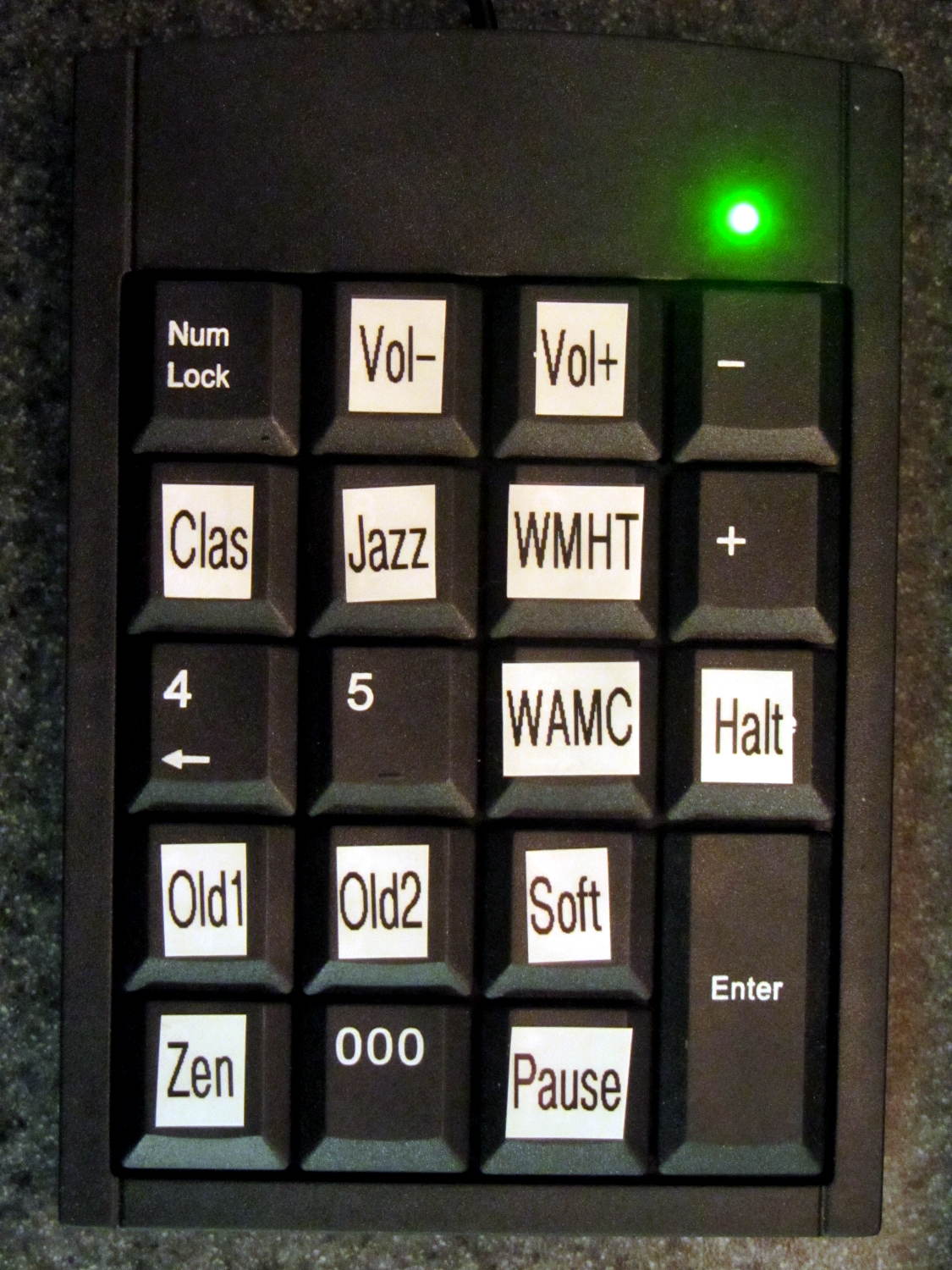
    So far, I’ve been manually starting mplayer just to get a feel for reliability and suchlike, but the setup really needs an autostart option with some user-friendly way to select various streams, plus a way to cleanly halt the system. A USB numeric keypad may be in order, rather than dinking around with discrete buttons and similar nonsense.

    There exists a horrible hack to transfer the stream metadata from mplayer onto an LCD, but I’m flat-out not using PHP or Perl. Perhaps the Python subprocess management module will suffice to auto-start a Python program that:

    • starts mplayer with the default playlist
    • parses mplayer’s piped output
    • updates the LCD accordingly
    • reads / translates keypad input

    This being a Pi, not an Arduino, one could actually use a touchscreen LCD without plumbing the depths of absurdity, but that starts looking like a lot of work…

  • Vacuum Tube LEDs: Halogen Lamp Base

    This lamp needs a base for its (minimal) electronics:

    Vacuum Tube LEDs - plate lead - overview
    Vacuum Tube LEDs – plate lead – overview

    The solid model won’t win many stylin’ points:

    Vacuum Tube Lights - lamp base solid model
    Vacuum Tube Lights – lamp base solid model

    It’s big and bulky, with a thick wall and base, because that ceramic lamp socket wants to screw down onto something solid. The screw holes got tapped 6-32, the standard electrical box screw size.

    The odd little hole on the far side accommodates a USB-to-serial adapter that both powers the lamp and lets you reprogram the Arduino Pro Mini without tearing the thing apart:

    Vacuum Tube Lights - USB adapter cutout
    Vacuum Tube Lights – USB adapter cutout

    The sloped roof makes the hole printable in the obvious orientation:

    Lamp Base - USB port
    Lamp Base – USB port

    There’s an ugly story behind the horizontal line just above the USB adapter that I’ll explain in a bit.

    The adapter hole begins 1.2 mm above the interior floor to let the adapter sit on a strip of double-sticky foam tape. I removed the standard header socket and wired the adapter directly to the Arduino Pro Mini with 24 AWG U-wires:

    Lamp Base - interior
    Lamp Base – interior

    I didn’t want to use pin connectors on the lamp cable leads, but without those you (well, I) can’t take the base off without un-/re-soldering the wires in an awkward location; the fact that I hope to never take it apart is irrelevant. Next time, I’ll use a longer wire from the plate cap and better connectors, but this was a trial fit that became Good Enough for the purpose.

    And then It Just Worked… although black, rather than cyan, plastic would look spiffier.

    Bluish phases look icy cold:

    Vacuum Tube LEDs - halogen lamp - purple phase
    Vacuum Tube LEDs – halogen lamp – purple phase

    Reddish phases look Just Right for a hot lamp:

    Vacuum Tube LEDs - halogen lamp - red phase
    Vacuum Tube LEDs – halogen lamp – red phase

    A ring of white double sided foam tape now holds the plate cap in place; that should be black, too.

    The OpenSCAD source code adds the base to the plate cap as a GitHub gist:

    // Vacuum Tube LED Lights
    // Ed Nisley KE4ZNU January 2016
    Layout = "LampBase"; // Show Build Cap LampBase USBPort
    Section = true; // cross-section the object
    //- Extrusion parameters must match reality!
    ThreadThick = 0.25;
    ThreadWidth = 0.40;
    HoleWindage = 0.2;
    Protrusion = 0.1; // make holes end cleanly
    inch = 25.4;
    function IntegerMultiple(Size,Unit) = Unit * ceil(Size / Unit);
    ID = 0;
    OD = 1;
    LENGTH = 2;
    Pixel = [7.0,10.0,3.0]; // ID = contact patch, OD = PCB dia, LENGTH = overall thickness
    //———————-
    // Useful routines
    module PolyCyl(Dia,Height,ForceSides=0) { // based on nophead's polyholes
    Sides = (ForceSides != 0) ? ForceSides : (ceil(Dia) + 2);
    FixDia = Dia / cos(180/Sides);
    cylinder(r=(FixDia + HoleWindage)/2,
    h=Height,
    $fn=Sides);
    }
    //———————-
    // Tube cap
    CapTube = [4.0,3/16 * inch,10.0]; // brass tube for flying lead to cap LED
    CapSize = [Pixel[ID],(Pixel[OD] + 3.0),(CapTube[OD] + 2*Pixel[LENGTH])];
    CapSides = 6*4;
    module Cap() {
    difference() {
    union() {
    cylinder(d=CapSize[OD],h=(CapSize[LENGTH]),$fn=CapSides); // main cap body
    translate([0,0,CapSize[LENGTH]]) // rounded top
    scale([1.0,1.0,0.65])
    sphere(d=CapSize[OD]/cos(180/CapSides),$fn=CapSides); // cos() fixes slight undersize vs cylinder
    cylinder(d1=(CapSize[OD] + 2*3*ThreadWidth),d2=CapSize[OD],h=1.5*Pixel[LENGTH],$fn=CapSides); // skirt
    }
    translate([0,0,-Protrusion]) // bore for wiring to LED
    PolyCyl(CapSize[ID],(CapSize[LENGTH] + 3*ThreadThick + Protrusion),CapSides);
    translate([0,0,-Protrusion]) // PCB recess with clearance for tube dome
    PolyCyl(Pixel[OD],(1.5*Pixel[LENGTH] + Protrusion),CapSides);
    translate([0,0,(1.5*Pixel[LENGTH] – Protrusion)]) // small step + cone to retain PCB
    cylinder(d1=(Pixel[OD]/cos(180/CapSides)),d2=Pixel[ID],h=(Pixel[LENGTH] + Protrusion),$fn=CapSides);
    translate([0,0,(CapSize[LENGTH] – CapTube[OD]/(2*cos(180/8)))]) // hole for brass tube holding wire loom
    rotate([90,0,0]) rotate(180/8)
    PolyCyl(CapTube[OD],CapSize[OD],8);
    }
    }
    //———————-
    // Aperture for USB-to-serial adapter snout
    // These are all magic numbers, of course
    module USBPort() {
    translate([0,28.0])
    rotate([90,0,0])
    linear_extrude(height=28.0)
    polygon(points=[
    [0,0],
    [8.0,0],
    [8.0,4.0],
    // [4.0,4.0],
    [4.0,6.5],
    [-4.0,6.5],
    // [-4.0,4.0],
    [-8.0,4.0],
    [-8.0,0],
    ]);
    }
    //———————-
    // Box for Leviton ceramic lamp base
    module LampBase() {
    Bottom = 5.0;
    Base = [3.75*inch,4.5*inch,25.0 + Bottom];
    Sides = 12*4;
    Stud = [0.107 * inch,15.0,Base[LENGTH]]; // 6-32 mounting screws, OD = ceramic boss size
    StudOC = 3.5 * inch;
    union() {
    difference() {
    rotate(180/Sides)
    cylinder(d=Base[OD],h=Base[LENGTH],$fn=Sides);
    rotate(180/Sides)
    translate([0,0,Bottom])
    cylinder(d=Base[ID],h=Base[LENGTH],$fn=Sides);
    translate([0,-Base[OD]/2,Bottom + 1.2]) // mount on double-sided foam tape
    rotate(0)
    USBPort();
    }
    for (i = [-1,1])
    translate([i*StudOC/2,0,0])
    rotate(180/8)
    difference() {
    cylinder(d=Stud[OD],h=Stud[LENGTH],$fn=8);
    translate([0,0,Bottom])
    PolyCyl(Stud[ID],(Stud[LENGTH] – (Bottom – Protrusion)),6);
    }
    }
    }
    //———————-
    // Build it
    if (Layout == "Cap") {
    if (Section)
    difference() {
    Cap();
    translate([-CapSize[OD],0,CapSize[LENGTH]])
    cube([2*CapSize[OD],2*CapSize[OD],3*CapSize[LENGTH]],center=true);
    }
    else
    Cap();
    }
    if (Layout == "LampBase")
    LampBase();
    if (Layout == "USBPort")
    USBPort();
    if (Layout == "Build") {
    Cap();
    Spigot();
    }