The Smell of Molten Projects in the Morning

Ed Nisley's Blog: Shop notes, electronics, firmware, machinery, 3D printing, laser cuttery, and curiosities. Contents: 100% human thinking, 0% AI slop.

Category: Software

General-purpose computers doing something specific

  • Source Code Reformatting

    I just figured out how to use the WordPress “sourcecode” formatting and applied it to my software-related posts. It produces much nicer results than the manual formatting I was using, mostly by preventing long lines from jamming into the right column.

    The catch: WordPress imposes a round trip from my original text to the screen encoding and back, which sometimes randomly mangles special symbols. Angle brackets and double-quotes, in particular, take serious damage.

    If you happen to remember a favorite chunk of code in a previous post, please take a look at it and see if I missed any of the obvious text-replacement errors. Trawling through the Software category should turn up most of the posts.

    As is always the case with program listings, the errors will be really obvious to everyone except me.

    Thanks…

  • SPICE Crystal Model

    Linear Technology’s LTSpice generic capacitor model has all the parts you need to synthesize a crystal, which is pointed out in the help file and various spots around the web. What’s missing is the relation between all the parts and the values you have in hand for an arbitrary crystal.

    SPICE Capacitor Model
    SPICE Capacitor Model

    The crystal capacitor model looks like this…

    Cpar (usually C0) along the right edge is the inter-electrode capacitance, on the order of a few pF.

    Rpar (usually R0) along the left edge is the parasitic resistance across the case, on the order of hundreds of MΩ.

    The RCL string in the middle is the “motional” part of the crystal model, generally found with a subscript “m” in the specs.

    • Rser (Rm or ESR) is on the order of 100 Ω
    • Capacitance (Cm) is the motional capacitance, on the order of fF (that’s femtofarad: 10-15)
    • Lser (Lm) is tens to thousands of mH
    • RLshunt is something I haven’t seen in any other model and, in fact, it doesn’t appear in the properties panel.
    Crystal Properties
    Crystal Properties

    Now, the part I screwed up is that the capacitor’s value (the number appearing on the schematic) is Capacitance (in the angle brackets that royally screw up WordPress HTML), not Cpar. So the crystal capacitor properties panel looks like this…

    That models a 10 MHz crystal, taken directly from a sidebar in Refinements in Crystal Ladder Filter Design by the legendary Wes Hayward W7ZOI, in the June 1995 issue of QEX.

    Guess what? Plug it into a model of his crystal-measuring circuit and it works exactly like he says it should. No surprise there…

    SPICE has a bit of trouble simulating high-Q oscillators; they tend to not start up properly. If nothing seems to be happening, wait for a few tens-to-hundreds of milliseconds before despairing. Try chopping Rser down by a factor of two or four to see if that improves its disposition.

    You could try injecting a few (hundred thousand) cycles of a kickstart signal, but that’s fraught with peril: you’re simulating something even further from reality than usual.

    Memo to Self: You can rename the cap from C2 (or whatever) to X1 (or whatever) and everything still works fine.

  • Why Friends Don’t Let Friends Use Windows For Embedded Systems

    OK, this is shooting the low-hanging fish right off the barrel (or some such mixed metaphor), but why does anybody still use Internet Explorer and Windows for embedded systems?

    cimg4138 - IE Was Unable to Link to Web PageThe proximate cause is a dead Internet link, but somebody obviously didn’t take that problem into account during the design phase. I’m sure there’s a keyboard hidden inside the box, wherever the box might be, but the rest of us are left to snicker at a jammed display.

    The problem resolved itself (or somebody plugged in the cable) by the time we walked past the display again.

  • HP8591E Spectrum Analyzer: Capturing Screen Images Therefrom

    While I’m thinking about instrument screen shots, this is the script for my Hewlett-Packard 8591E Spectrum Analyzer.

    You’ll need C-Kermit, ImageMagick, and hp2xx for this one, too.

    The cable must cross-connect RTS/CTS for hardware flow control.

    Set the spectrum analyzer to

    • print-to-plotter
    • 19200 b/s (limited by USB-to-RS-232 converter)
    • One plot per page

    Turning menus off doesn’t seem to have any effect on screen captures from the serial port, so the script crops off that part of the image.

    Copy-n-paste the following text into a file (gethp8591), make it executable (chmod u+x gethp8591), and run it with a file name (./gethp8591 test).

    Unlike the (well, my) 54602 ‘scope, the 8591 responds to serial commands just like the Fine Manual says. So before you run this script, make sure the screen shows what you want.

    #!/usr/bin/kermit +
    # Fetches screen shot from HP8591E spectrum analyzer
    # Presumes it's set up for plotter output...
    # Converts HPGL to PNG image
    
    set modem none
    set line /dev/ttyUSB0
    set speed 19200
    set flow rts/cts
    set carrier-watch off
    
    # Make sure we have a param
    if not defined \%1 ask \%1 {File name? }
    
    set input echo off
    set input buffer-length 200000
    
    # Tell it what size to plot
    echo Triggering plot output...
    output plot 0,0,60000,40000;
    
    log session "\%1.hgl"
    
    # Wait for end of data stream
    input 400 SP;
    
    echo ... HPGL data captured
    
    close session
    close
    
    echo Converting HPGL in
    echo --\%1.hgl
    echo to PNG in
    echo --\%1.png
    
    run hp2xx -m png -c 143 "\%1.hgl"
    
    echo Cropping and resizing
    run mogrify -crop "515x395+0+0!" "\%1.png"
    run mogrify -density 300 -resize 200% "\%1.png"
    
    echo Finished!
    
    exit 0
    

    Here’s a picture of the FM broadcast band, as seen from the Basement Laboratory. The marker looks a bit off from 104.7 MHz, but that’s a combination of broad span and skinny peaks.

    Spectrum Analyzer Screen Capture
    Spectrum Analyzer Screen Capture
  • HP 54602B Oscilloscope: Capturing Screen Images Therefrom

    Back in the early 90s I bought a Hewlett Packard 54602B digital oscilloscope: 150 MHz bandwidth, 4 channels. By and large, a fine piece of gear that’s been worth every penny.

    Over the objections of the HP sales force, I got the HP 54651A RS-232 interface rather than the HP 54650A HPIB (aka GPIB, aka IEEE-488) interface. Reasoning: I’d need a matching interface on the PC side and PC architecture is anything but stable. Turns out that was a good decision, as you’ll realize if you count up the number of different buses since those days and factor in the cost of an IEEE-488 interface for each iteration. RS-232 is slow and not well-suited for complex arrays of test gear, but mostly I needed the scope for screen shots to go with my Circuit Cellar columns.

    Here’s how that works…

    Configure the scope by poking the RS-232 softkey in Print/Utility:

    • Connect to: HP Plot
    • Factors: On (this is absolutely vital)
    • Resolution: High
    • Baud Rate: 19200 (yes, “baud rate” is an oxymoron)
    • Handshake: DTR

    Now the scope will dump HPGL to what it thinks is a plotter, so the trick is to make the PC look like a plotter. Turns out that’s not particularly difficult.

    Despite the name, DTR handshaking does not use the scope’s DTR pin. The relevant manual section looks like this (click the thumbnail for full-size image):

    HP54602B Oscilloscope Serial Port Pin Functions
    HP54602B Oscilloscope Serial Port Pin Functions

    So DTR remains high and the flow-control signaling actually uses the RTS/CTS pins. The cable I’ve been is basically a null modem connection with the appropriate gender on each end:

    PC RS-232 HP 54602B Oscilloscope
    9-pin F Signal 25-pin M Signal
    1 DCD 20 DTR
    2 RxD 2 TxD
    3 TxD 3 RxD
    4 DTR 6 DSR
    also-> 8 DCD
    5 Gnd 7 GND
    6 DSR 20 DTR
    7 RTS 5 CTS
    8 CTS 4 RTS
    9 RI n/c

    Note:

    • PC 1 and 6 <- scope 20
    • PC 4 -> scope 6 and 8

    I wired the cable like that mostly because I have a lifetime supply of nice 9-conductor shielded cable lying around. You could connect the scope’s DTR to its own DSR and DCD pins, apply similar trickery on the PC end, and everybody would be perfectly happy with 5-conductor cable, maybe even 4-conductor if you ran the ground through the shield.

    Using XON/XOFF flow control seems to not work well, although I admit to not trying too hard to figure it out.

    These days, I use a USB-to-RS-232 converter with the now-standard 9-pin connector. The port identifier may be nearly anything after udev/hotplug has its way with the hardware, but it usually works out to /dev/ttyUSB0.

    The script requires C-Kermit (likely the ckermit package), ImageMagick, sed, and hp2xx (yes, spelled exactly like that), all of which should be packages in your favorite Linux distro. Haven’t a clue how this might work with Windows.

    With all that in hand, copy-n-paste the following text into a file (I used gethp54602, for lack of anything more original), make it executable (chmod u+x gethp54602) and run it with a file name (./gethp54602 test). Poke the Print Screen softkey on the scope and settle back for a bit. The scope can’t keep up a steady flow of data at 19200 b/s, so the whole affair takes a minute or three for the 50-ish kB of text in a dual-trace image.

    You’ll end up with three files:

    • test.hgl — raw HPGL text from the ‘scope
    • test.eps — raster conversion from HPGL
    • test.png — bitmapped screen-capture image

    The magic script…

    #!/usr/bin/kermit +
    # Fetches screen shot from HP54602B oscilloscope
    # Presumes it's set up for plotter output...
    # Converts HPGL to PNG image
    
    set modem none
    set line /dev/ttyUSB0
    set speed 19200
    set flow rts/cts
    set carrier-watch off
    
    # Make sure we have a param
    if not defined \%1 ask \%1 {File name? }
    
    set input echo off
    set input buffer-length 200000
    
    # Wait for PRINT button to send the plot
    echo Set HP54602B for HP Plotter, FACTORS OFF, 19200, DTR
    echo Press PRINT SCREEN button on HP54602B...
    
    log session "\%1.hgl"
    
    # Wait for final character
    input 480 \x03
    
    close session
    close
    
    echo Converting HPGL in
    echo --\%1.hgl
    echo to PNG in
    echo --\%1.png
    
    # Without factors
    #run hp2xx -m png -a 1.762 -h 91 -c 14 "\%1.hgl"
    #run mogrify -density 300 -resize 200% "\%1.png"
    
    # With factors
    run sed '/lb/!d' "\%1.hgl" > "\%1-1.hgl"
    run hp2xx -q -m eps -r 270 -a 0.447 -d 300 -w 130 -c 14 -p 34 -f "\%1.eps" "\%1-1.hgl"
    run rm "\%1-1.hgl"
    run convert -density 300 -resize 675x452+2+2 "\%1.eps" "\%1.png"
    
    echo Finished!
    exit 0
    

    [Update: WordPress unpredictably and ruthlessly mangles source code by incorrectly escaping some symbols. The line with sed should have a greater-than symbol to pipe the result into the .hgl file. A more recent version (albeit using my SENA PS410 serial server) hosted as a GitHub gist may help.]

    Here’s a sample of what pops out; it’s the scope’s own calibrator waveform, nothing exciting, but you get the general idea.

    Screen Capture of Calibrator Signal
    Screen Capture of Calibrator Signal

    The commented-out section labeled “Without Factors” converts the format you get with Factors Off. Turns out that there’s no unique ending string without factors, which puts a real crimp in getting the data. The advantage is that the HPGL converts directly to PNG and looks good. The only way I’ve found to capture the scope data is to just time out after a while.

    With Factors On, however, the image data has a unique ending character (ASCII ETX, 0x03) after the label text, but the layout is rotated to plot in landscape mode. A direct conversion to PNG looks awful, perhaps because hp2xx must do software character generation, and I eventually figured out that making a bank shot off EPS vector format produced much better results.

    However, hp2xx dutifully renders the text into the EPS image, but it doesn’t inject a carriage return after each linefeed: the text dribbles off to the far right of the actual screen image. To fix that, the sed editor hacks off the label text following the lb command. Mercifully, hp2xx doesn’t choke on the incomplete command.

    And then convert does its usual magic. The image size is just right to drop into my Circuit Cellar columns; you may want something different for your purposes.

    [Update: The PNG has an alpha channel that selects only the traces, so the background color depends on where you put it. A small tweak is there.]

    For reasons that I absolutely do not understand, I cannot control the oscilloscope through the serial interface. The scope sends data to the PC just fine and I can get the scope to complain about the character format if I send truly bogus junk (like, mismatching the baud settings), but it simply will not respond to commands. Maybe the interface is broken or, more likely, I’m screwing something up. Hasn’t been a problem, though, for my simple needs.

    Memo to Self: One of these days, eBay will have a 54652B serial/parallel interface that might work better.

  • Converting Day-of-Year to Month and Day-of-Month, Then Back Again

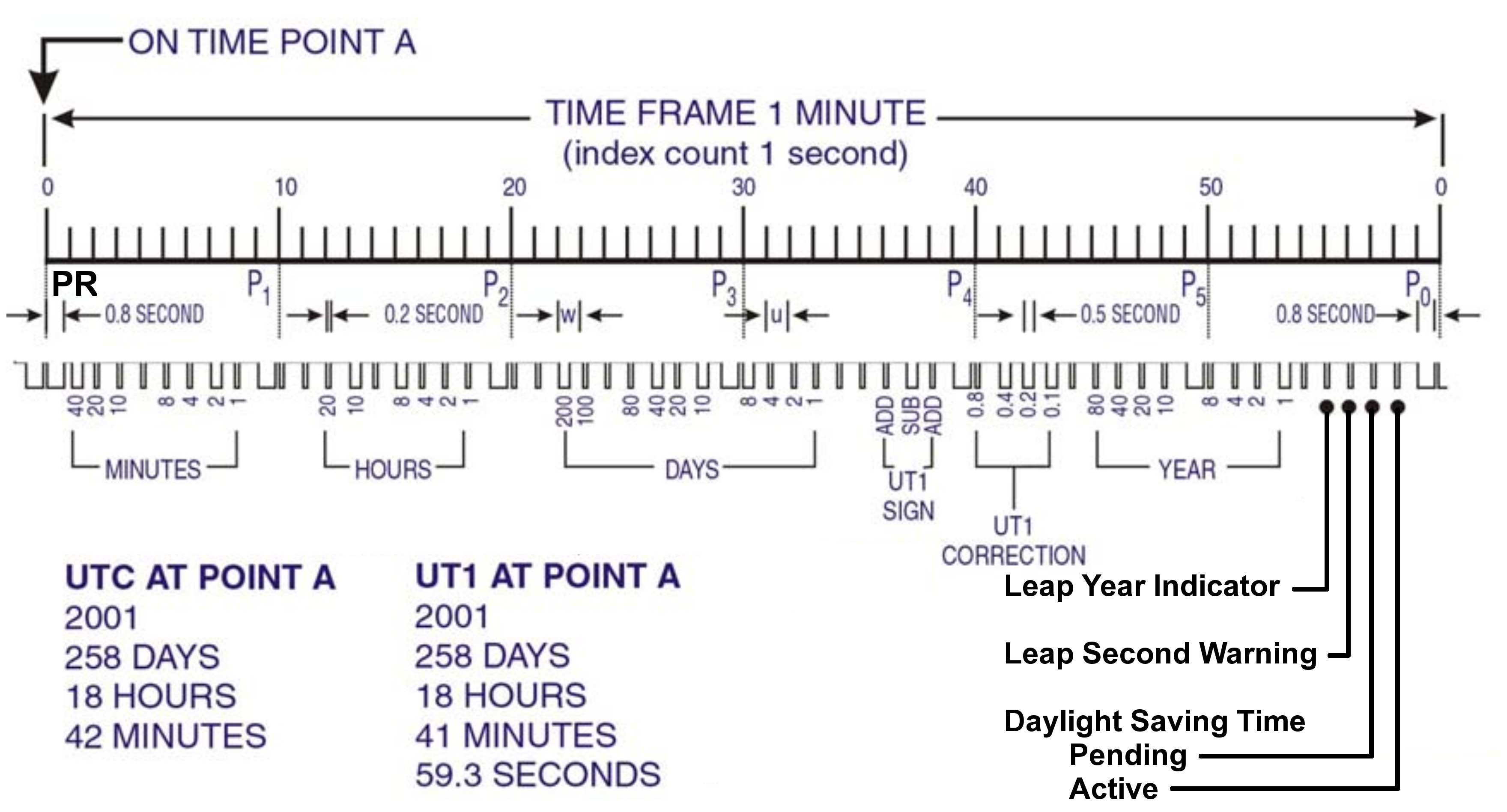
    I needed the conversions for a WWVB simulator, so it knows when to twiddle the leap-year and leap-second bits.

    The general notion is a table with the Day-of-Year values for the last day of each month. The most expedient way of doing this is with two columns: one for normal years and the other for leap years, thusly…

    Month EOM EOM-LY DOY DOY-LY
    0 0 0 0 0
    1 31 31 31 31
    2 28 29 59 60
    3 31 31 90 91
    4 30 30 120 121
    5 31 31 151 152
    6 30 30 181 182
    7 31 31 212 213
    8 31 31 243 244
    9 30 30 273 274
    10 31 31 304 305
    11 30 30 334 335
    12 31 31 365 366

    Hint: even if you can recite the “Thirty days hath November …” jingle, it’s much better to build a spreadsheet so the additions all work out. It’s even better if you don’t attempt any of this with a late-summer head cold. You might want to check all my work, because I’m still stuffy.

    With table in hand, the code is straightforward.

    Define a structure with all the various bits & pieces of the current time, much of which isn’t used here. It’s all needed in the WWVB simulator:

    enum EVENTSTATE {EVENT_INACTIVE,EVENT_PENDING,EVENT_ACTIVE};
    
    struct timecode_ {			// The current moment in time...
      byte Year;				// 0 - 99
      word DayOfYear;			// 1 - 366
      byte Hour;				// 0 - 23
      byte Minute;				// 0 - 59
      byte Second;				// 0 - 60 (yes!)
      byte Tenth;				// 0 - 9
      enum EVENTSTATE LeapYear;		// 0 = no, 1 = pending, 2 = active
      enum EVENTSTATE LeapSecond;		// 0 = no, 1 = pending, 2 = active in this minute
      enum EVENTSTATE DaylightSavingTime;	// 0 = no, 1 = pending, 2 = active
      char UT1Correction;			// 100 ms units, -10 to +10 range (+/- 1 second)
      byte MinuteLength;			// 60 or 61
      byte Month;				// 1 - 12 (not sent in frame)
      byte DayOfMonth;			// 1 - 28..31	(not sent in frame)
    };
    

    That’s obviously overspecified, because DayOfYear with LeapYear uniquely determines Month and DayOfMonth. It’s handy to have both forms around, sooo there they are.


    Then set up the table, glossing over the quick matrix transposition that turns the entries for each year into rows rather than columns:

    prog_uint16_t PROGMEM MonthEnds[2][13] = {
      0,31,59,90,120,151,181,212,243,273,304,334,365,
      0,31,60,91,121,152,182,213,244,274,305,335,366
    };
    

    Conversion from DayOfYear to Month and DayOfMonth requires searching backwards through the appropriate table row until you find the entry that’s smaller than the DayOfYear value, at which point you’ve found the right month.

    void ConvertDOYtoDOM(struct timecode_ *pTime) {
    byte Index,LY;
    word EndOfMonth;
      LY = (EVENT_INACTIVE != pTime->LeapYear) ? 1 : 0;
      Index = 12;
      while ((EndOfMonth = pgm_read_word(&MonthEnds[LY][Index])) >= pTime->DayOfYear) {
    	--Index;
      };
      pTime->Month = Index + 1;									// months start with 1, not 0
      pTime->DayOfMonth = (byte)(pTime->DayOfYear - EndOfMonth);
    }
    

    Converting from Month and DayOfMonth to DayOfYear is much easier, as it’s pretty much just a table lookup:

    word ConvertDOMtoDOY(struct timecode_ *pTime) {
    word EndOfMonth;
      EndOfMonth = pgm_read_word(&MonthEnds[(EVENT_INACTIVE != pTime->LeapYear) ? 1 : 0][pTime->Month - 1]);
      return EndOfMonth + pTime->DayOfMonth;
    }
    

    This code might actually work, but if I were you, I’d test it pretty thoroughly before lashing it into your project…


    The PROGMEM and pgm_read_word() stuff is the Arduino mechanism that puts the lookup table into Flash program memory rather than the ATMega168’s exceedingly limited RAM space. The definitive word about that process resides there.

    Memo to Self: Using const simply makes the variable kinda-sorta read-only, but still initializes RAM from Flash. The PROGMEM routines delete the RAM copy entirely.

  • Arduino: Be Careful With the Preprocessor

    This trips me up every damn time…

    Although the Arduino language looks like C and parses like C and runs like C, it’s not really C. It’s a specialized language gnawed on by a vast conversion monster and eventually shat out as executable ATmega-style instructions.

    Here’s a (rather contrived) trivial working program…

    #define PIN_ARDUINOLED    13     // standard LED
    
    typedef struct {
     int initial;
     int on;
     int off;
     int reps;
    } timeout_ ;
    
    timeout_ Trial = {2000,100,1000,5};
    
    void setup() {
     pinMode(PIN_ARDUINOLED,OUTPUT);
    }
    
    void loop() {
    
    int counter;
    
     digitalWrite(PIN_ARDUINOLED,LOW);
     delay(Trial.initial);
    
     for (counter = 0; counter < Trial.reps; ++counter) {
     digitalWrite(PIN_ARDUINOLED,HIGH);
     delay(Trial.on);
     digitalWrite(PIN_ARDUINOLED,LOW);
     delay(Trial.off);
     }
    
    }

    That compiles and runs just like you’d expect: a long delay, followed by five blinks, repeating endlessly.

    Now, use some preprocessor conditionals to gut-and-replace the code, with a bit of garish colorization to make things more obvious. This is Bad Programming Practice, but work with me…

    #define PIN_ARDUINOLED    13        // standard LED
    
    #if 0
    typedef struct {
     int initial;
     int on;
     int off;
     int reps;
    } timeout_ ;
    #endif
    
    #if 0
    timeout_ Trial = {2000,100,1000,5};
    #else
    int LoopCount = 50;
    #endif
    
    void setup() {
     pinMode(PIN_ARDUINOLED,OUTPUT);
    }
    
    void loop() {
    
    int counter;
    
    #if 0
     digitalWrite(PIN_ARDUINOLED,LOW);
     delay(Trial.initial);
    
     for (counter = 0; counter < Trial.reps; ++counter) {
     digitalWrite(PIN_ARDUINOLED,HIGH);
     delay(Trial.on);
     digitalWrite(PIN_ARDUINOLED,LOW);
     delay(Trial.off);
     }
    #else
     digitalWrite(PIN_ARDUINOLED,LOW);
     for (counter = 0; counter < LoopCount; ++counter) {
     digitalWrite(PIN_ARDUINOLED,HIGH);
     delay(250);
     digitalWrite(PIN_ARDUINOLED,LOW);
     delay(500);
     }
    
    #endif
    
    }

    The error message lump resulting from compiling that looks like:

    In function ‘void setup()’:
    error: ‘OUTPUT’ was not declared in this scope In function ‘void loop()’:
     In function ‘int main()’:

    Really?

    Delete the lines already removed by the preprocessor, the lines that shouldn’t be there when the code reaches the compiler, and you have:

    #define PIN_ARDUINOLED        13              // standard LED
    
    int LoopCount = 50;
    
    void setup() {
     pinMode(PIN_ARDUINOLED,OUTPUT);
    }
    
    void loop() {
    
    int counter;
    
     digitalWrite(PIN_ARDUINOLED,LOW);
     for (counter = 0; counter < LoopCount; ++counter) {
     digitalWrite(PIN_ARDUINOLED,HIGH);
     delay(250);
     digitalWrite(PIN_ARDUINOLED,LOW);
     delay(500);
     }
    
    }

    Which compiles and runs like a champ, of course. It blinks merrily away, more off than on, forever. The LoopCount variable doesn’t do much for us, but it’s the thought that counts.

    Put the original lines back, comment out the new stuff, and you get:

    #define PIN_ARDUINOLED        13              // standard LED
    
    typedef struct {
     int initial;
     int on;
     int off;
     int reps;
    } timeout_ ;
    
    timeout_ Trial = {2000,100,1000,5};
    
    #if 0
    int LoopCount = 50;
    #endif
    
    void setup() {
     pinMode(PIN_ARDUINOLED,OUTPUT);
    }
    
    void loop() {
    
    int counter;
    
     digitalWrite(PIN_ARDUINOLED,LOW);
     delay(Trial.initial);
    
     for (counter = 0; counter < Trial.reps; ++counter) {
     digitalWrite(PIN_ARDUINOLED,HIGH);
     delay(Trial.on);
     digitalWrite(PIN_ARDUINOLED,LOW);
     delay(Trial.off);
     }
    
    #if 0
     digitalWrite(PIN_ARDUINOLED,LOW);
     for (counter = 0; counter < LoopCount; ++counter) {
     digitalWrite(PIN_ARDUINOLED,HIGH);
     delay(250);
     digitalWrite(PIN_ARDUINOLED,LOW);
     delay(500);
     }
    
    #endif
    
    }

    And that compiles and runs perfectly, just like you’d expect. Uh-huh. Right.

    Basically, there’s a complex interaction between ordinary C preprocessor directives, ordinary C language elements, and the inscrutable innards of the Arduino IDE & compiler chain.

    As nearly as I can tell, you can wrap #if whatever around simple declarations and most executable code with impunity, but putting anything more elaborate than that, like a simple typedef struct, inside the conditionals causes bizarre problems.

    In fact, just typedef can cause problems, particularly if you attempt to use the ensuing tag in a function declaration. Don’t even think about anything along these lines:

    typedef struct {whatever} taggit_;
    ... snippage ...
    void SomeFunction(taggit_ *pThing) {
    ... snippage ...
    }

    However, this seems to work fine:

    struct taggit_ {whatever};
    ... snippage ...
    void SomeFunction(struct taggit_ *pThing) {
    ... snippage ...
    }

    Trying to make sense of this will drive you mad (well, it drives me mad), but when you get bizarre error messages that can’t be explained by the usual operator screwups, well, most likely you’re being too clever with the preprocessor.

    Or you’ve (also) made a trivial typo that cannot be discovered by inspection.

    It seems the right (only?) way to handle typedef definitions is to put ’em in a separate header file, as described there, then add the header file to your sketch in a separate tab. That seems to insert the definitions in the proper order within the *.cpp file that actually goes into the compiler.

    However, some limited fiddling reveals that I don’t understand the nuances or I’m screwing it up. Probably both.

    Memo to Self: define the structs & variables without typedefs, then prepare for some protracted tweakage…