The Smell of Molten Projects in the Morning

Ed Nisley's Blog: Shop notes, electronics, firmware, machinery, 3D printing, laser cuttery, and curiosities. Contents: 100% human thinking, 0% AI slop.

Category: Software

General-purpose computers doing something specific

  • Printing from QCAD in Xubuntu

    Went to print up a bunch of cards & pocket stationery again. Alas, QCAD wasn’t showing any of the printers. The obligatory search unearthed a discussion that solved some of the problem. The hack:

    sudo ln -s /var/run/cups/printcap /etc/printcap

    That’s recommended for KDE printing in Gnome, which is close enough to the situation: a QT app in Xubuntu. Maybe that’s solved in 9.10; I’m still using 8.10.

    The print dialog now shows all three CUPS printers on the file server downstairs.

    Can’t select Borderless paper, which means the crop lines don’t all appear.

    The Copies field doesn’t work: only one copy prints. That’s not a killer flaw, but it’s annoying when you need half a dozen copies of the biz card sheet.

    But it’s close enough for something I do once in a blue moon.

    Why print biz cards? One year they changed our house number and street name, changed the street name back, changed the area code, and then tweaked the ZIP code. I swore a mighty oath on the bones of my ancestors to never ever buy a commercial card again.

    Memo to Self: Trim the stationery in this order…

    • vertical edges
    • horizontal edges
    • vertical cuts
    • horizontal cut
  • KMyMoney Exports: Don’t Use Double-Quote Marks

    So when I entered that impact socket in KMyMoney 0.9, which is how I do my exceedingly simple bookkeeping, I entered it just like that: 1-1/16″.

    That worked fine, right up to the point where I exported the summary of transactions report in CSV (comma-separated-values) format and tried to open it as an OpenOffice spreadsheet: only the first third of the file made it into the spreadsheet.

    Having screwed up exactly like this before, I knew where to look: CSV format wraps fields with double-quote marks and KMyMoney isn’t bright enough to escape the double-quote mark, resulting in a broken file. That may be fixed in the current version (1.0.2 right now), but I’m still running Xubuntu 8.10 with some KDE-based programs spliced in because KDE 4.x still has problems with rotated dual monitors.

    That escape mechanism is actually part of the CSV standard, such as it is:

    Fields with embedded double-quote characters must be enclosed within double-quote characters, and each of the embedded double-quote characters must be represented by a pair of double-quote characters.

    I knew better than that, but it’s an easy mistake to make.

    What really ticked me off, though, is that KMyMoney breaks the transaction into two parts (it’s a double-entry bookkeeping system, after all) and, even after I changed the double-quote to the word inch, refused to update the other half of the transaction. Furthermore, I couldn’t get access to that half; the only description I could find had inch.

    Had to delete the whole entry and add it back to get it right… which was better, long term, than hand-editing the CSV file every time.

  • Thinkpad 560Z Configuration

    Turns out the ancient $20 Thinkpad 560Z I’d been using to capture WWVB receiver data didn’t have the IBM configuration utility on it, which made it tough to tweak the LCD timeout. The key parameter for this laptop is that it runs at about 8 W with the LCD turned off, which is just what you want for long-term data collection.

    The thing runs from a 2 GB CompactFlash card stuck in a CF-to-IDE adapter, so it has a (rather slow) solid-state hard drive. The nice part is being able to just jam the CF into the card reader on my desktop box, make appropriate changes, and pop it back in the 560Z.

    Xubuntu automagically mounts all the partitions, so that part is easy. It has a FreeDOS partition that runs the DOS-only config program, a swap partition (not heavily used), and an Ubuntu 8.04 command-line-only installation.

    The IBM config stuff is in a directory on a hard-drive image (saved from the picture frame project), so mount that and copy it over:

    sudo mount -o loop,uid=ed,ro,offset=$((63*512)) develop.hd /mnt/loop
    cp -a /mnt/loop/ThinkPad/ /media/FreeDOS/
    

    While figuring out what to change, it occurred to me that I should just make a batch file with all the proper settings. Here’s a cheat sheet for the available settings:

    Refer to ps2.msg for raw help file
     some commands/options do not apply to 560Z
    
    1. Power Management
    DEFAULT     suspend time, screen off, HD off, standby time, proc speed
    DISK        power-down timeout
    SAfe        safe suspend
    S2H         suspend to hibernate time
    PMode       power mode
    ON          auto-on date/time from suspend
    RI          resume on Ring Detect from serial port
    HSWITCH     hibernate on power off
    SErial      serial port enable
    HFile       create hibernation file
    HTimer      time to hibernate
    CPUPower    stop clock when idle
    POwer       time to suspend
    Cover       suspend with closed cover
    TImer       Power command = suspend or hibernate
    PCIBUSPower PCI power saving
    LCd         time to display power off
    DOCK        suspend when docked
    LBattery    suspend / hibernate with low battery
    SPeed       CPU speed selection
    
    2. Display Device
    SCreen      select LCD / CRT
    HVEXPansion expand 640x480 to 800x600
    F8          F8 selects LCD expansion
    
    3. Alarm Related
    BEEP        beep settings
    
    4. Thinkpad Setup
    IRQ         interrupt assignments
    JStick      joystick config
    PCIIRQ      PCI IRQ assignment
    DMA         DMA channel assignment
    PARallel    parallel port config
    IR          IR port config
    KRate       keyboard repeat rate
    SERA        serial port config
    AUdio       sound system config
    FNSticky    sticky Fn key
    STARTup     display startup screen
    MIDIport    MIDI config
    TPOint      Trackpoint enable / disable
    PRESENtation  disable screen, standby, suspend
    AUDIOCTRL   audio control port config
    
    5. Others
    SUSpend     suspend NOW
    FDD         diskette drive int / ext
    OFF         turn off NOW
    HIBernation hibernate NOW
    TURN        turn off NOW
    BRightness  LCD brightness on battery
    

    And then the batch file:

    ps2 default
    ps2 disk 0 ac
    ps2 pmode custom ac
    ps2 serial off
    ps2 hfile c
    ps2 htimer 0 ac
    ps2 power 0 ac
    ps2 cover disable
    ps2 lcd 5 ac
    ps2 speed auto medium ac
    ps2 hvexpansion off
    ps2 jstick disable
    ps2 parallel disable
    ps2 ir disable
    ps2 krate fast
    ps2 sera disable
    ps2 audio disable
    ps2 midi disable
    ps2 audioctrl disable
    

    The time-of-day clock drifts with breathtaking speed, which may have something to do with the CPUPower option that shuts the processor clock off when there’s nothing useful going on.

  • Character-string Histogram

    I’m in the midst of counting glitches on a WWVB receiver, a glitch being any pulse with a duration that isn’t close to 200, 500, or 800 ms. It’s useful to know the pulse width distribution, which is what a histogram does for a living.

    Rather than a graphic histogram, though, I’ve been using a character array (a string!) with one character for each possible pulse duration, measured in units of 20 ms. The value of each character indicates the number of pulses having that duration during the previous minute.

    The counting sequence goes like this:

    • No counts: . (a period)
    • 1 to 9 counts: 1 .. 9
    • 10 to 35 counts: A .. Z
    • 36 to 61 counts: a .. z
    • More than 61 counts: !

    So a minute with no glitches (and a valid WWVB time code frame) looks like this:

    .........4S9............462............322.........
    

    The three clusters show the three valid pulse widths. The pulse widths from the receiver have an inherent jitter, plus the usual ±1 jitter you get for free when you digitize something, plus (this being RF from half a continent away) whatever the Lords of Cosmic Jest do to the signal. So each width usually occupies two or three cells.

    • The 200 ms binary zero pulses form the cluster on the left: that “S” is equivalent to 10 + 18 = 28 counts. Add in the 4 and 9 on either side and you get 41 binary zero pulses.
    • The middle cluster has the 500 ms binary 1 pulses: 4 + 6 + 2 = 12.
    • Each WWVB time code frame has exactly seven 800 ms frame markers, which form the cluster on the right end: 3+2+2 = 7.

    Add them up: 41 + 12 + 7 = 60. That’s exactly the right number of pulses in a minute. What a pleasant surprise!

    A minute with three out-of-spec glitches looks like this:

    1...1....6NC2............82.......1.....51.........
    

    And a minute with very high noise that pretty much obliterates the WWVB signal:

    f!!jHC6AB746312.2121..2.1..........................
    

    Here’s how all that works…

    The histogram counters form a character array that’s also a string. There are 50 20-ms Jiffies in each second (given by the obvious constant), so the histogram has 52 entries: 50 valid counts (0-49), 1 for “more than that”, and 1 for the null byte at the end of the string.

    char    Durations[JIFFIES_PER_SECOND + 2];
    

    Initialize each counter (character) with the starting value and jam a binary zero at the end:

    memset(Durations,'.',sizeof(Durations)-1);
    Durations[sizeof(Durations) - 1] = 0;
    

    And then tick the appropriate counter as each pulse arrives:

    Index = min(PWM_Width,sizeof(Durations)-2);
    
    switch (Durations[Index]) {
     case '.' :
     Durations[Index] = '1';
     break;
     case '9' :
     Durations[Index] = 'A';
     break;
     case 'Z' :
     Durations[Index] = 'a';
     break;
     case 'z' :
     Durations[Index] = '!';
     break;
     case '!' :
     break;
     default :
     Durations[Index]++;
    }
    

    The switch statement maneuvers the counting sequence through the digits, uppercase and lowercase alphabet, then enforces a stall at the maximum count value of “!”. You can’t just increment each element without some checking, because you do not want unprintable control characters in the string.

    Then you print the histogram as you would any ordinary string. If you’re using an Arduino, as I am, this will suffice:

    Serial.println(Durations);
    

    All this depends on the ASCII character set’s numerical sequence. Ponder the charts there and all should become clear.

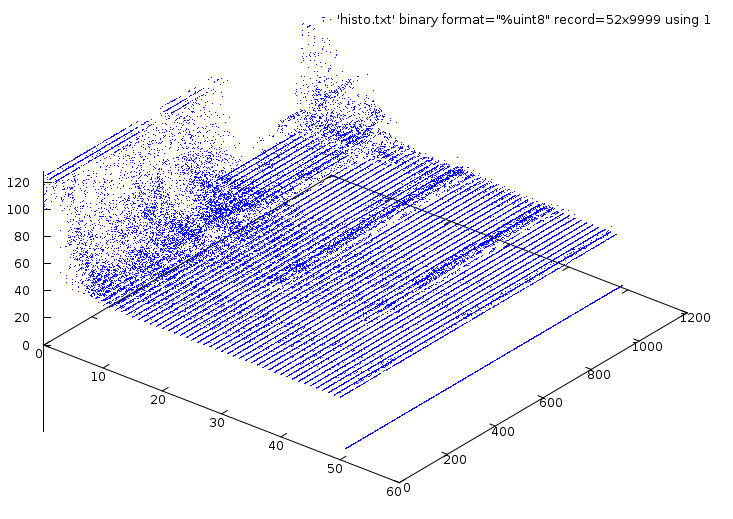
    Here are the histograms from an hour of WWVB reception during the late afternoon of New Year’s Day: watch the noise floor rise up and eat the WWVB signal…

    
    .........7OD............36............133..........
     .........BID1...........37.............6.1.........
     .1.......9O91..........262.............43..........
     ........27V2............272............421.........
     .........4Y41...........46............124.........2
     .........AP71...........2811..........123.........2
     .........AN9............731...........1.6..........
     12.111..28IB11.........1623.......2..1.42.....2....
     1412...125Q911..........461.....1......41..........
     1........8Q81..........137...1.........15..........
     .12....119N912.........116..........1.132..........
     1521..1.17O931...1......27...........1..5..........
     .12....12BKB2...........332....1......132.......2..
     25211.1.3AHB5......1...1143........1...14.........3
     45412...4BDA4..12.......25111..1.....1..22.........
     6A44322.26CI53.2.1...1..343...1.......1.11.........
     5D75531113FG511...12..212313.1........1.2..1.......
     1432.1.119GB41..........262.1...11.....14..........
     .5211..115MB4...........441............14.2........
     .4.1....25JB6...........442.........1..231.........
     6B443...27I772..........2322.....1.....1221......2.
     4555411.27HA321........3232......1....114..........
     3232.1.129GI1...1.......4321...1.1.1...111.........
     ...1..1.19O8..1....11...262............24..........
     11......2AN62...........622...........124..........
     111.....2BJ551..1......1522........3..141........21
     1421....29N611.......1.136............1231........2
     1.12.....AIB3........1..38...1........312..........
     7F42..1.28FE341.1.1.....351........1...12...1.....2
     .23......8GG2....11....2423............33..........
     112..13.1AK931.....2....142....2.11.1..3.1........2
     423111..44JD4.2..1.....1433........11111...........
     1413..1.3CL812..11......242..1....11...21.........2
     474112.34AI84.2...3.1...16.2.....1...1.11..........
     8LHC734657D857411..11...131......1..1.1...........2
     JuSFDCCDDCD662412...1..............................
     VmG376788AC8671.21.1..3.......1....................
     IlCB4576CFE532131.11.1..1.1........................
     KxN798EB98A7422...2.1...1..........................
     AYL96853CF7742121311.13..21....1...................
     8TDEB6649A7952..32.41..124.....1.....1............2
     DeO78638C9GA6142.15111..........1........2.....2...
     AcPC83426BD4823.122..11132.1.......................
     7SF31121AHFB73..2.111...321..1.1...................
     7F3221414GG5411.111121.133...1.1.1.................
     6RD9669647F7361.31.2..1212...1.....................
     6L71.2444ALB21...221.212321..2...1...1.............
     4LHFD7638C9B12.31341.22113...2..........1..........
     264321112EFA5.112.22.2.14111..1.....1...1.........2
     235511445BEC3.12..1131.131..1.1........11..........
     7UC741635AAC442.1..112.1..11311.......1.1.........2
     EVLCAB3598E752252133.111.1.1..........1...........2
     JnTE9913A59A452331.13..1222.............1..........
     f!!jHC6AB746312.2121..2.1..........................
     !!!iMB772.4532..1.1.1.1..1.........................
    
  • WWVB Time Code Format Diagram

    This is by-and-large the same diagram of the WWVB Time Code Format that you’ll find there, but with:

    • the PR frame reference pulse identified
    • the last four bits clearly labeled
    • some verbiage chopped out
    WWVB Time Code Format - with PR marker
    WWVB Time Code Format – with PR marker

    Memo to Self: Remember that…

    • The time code applies to the minute that’s currently happening, so …
    • The PR pulse happens before the rest of the time code arrives
    • You must know the end-of-month date to apply the leap second bit, but EOM isn’t part of the data stream
  • Extracting Text from PDF Documents

    Mary had to extract an extensive table from a PDF (think financial statements) and found that a simple cut-and-paste failed with mysterious symptoms. I’ve had that happen, too, as PDF documents sometimes have a complete disconnect between the rendered page and the original text; sometimes you can’t even select the text block you want without copying huge chunks of the surrounding document or pasting meaningless junk.

    Easy solution: feed the PDF into pdftotext and extract the table from the ensuing flat text file.

    It’s a command-line thing:

    
    pdftotext -layout whatever.pdf


    That produces whatever.txt with the ASCII characters bearing more-or-less the same spatial arrangement as the original PDF, minus all the font and graphic frippery. It tends to insert a ton of blanks in an attempt to make the formatting come out right, which may not be quite what you want.

    Omitting the -layout option gives you something vaguely resembling the PDF, although precisely arranged tables tend to fare poorly.

    If you have a bazillion-page PDF document and need the text from just a page or two, feed it into the pdftk brush chipper, extract the appropriate pages, and then run those files through pdftotext. You can probably get similar results using just pdftk, but pdftotext seems to work better on the files I’ve had to deal with.

    This is a GNU/Linux thing; the programs are likely part of your favorite distribution; follow the links if not. If you’re still using Windows, maybe they’ll work for you, but maybe it’d be easier to just go buy something similar.

  • WWVB Reception Quality

    Here on the East Coast of the US, WWVB reception is iffy during the day, due to low signal strength and high ambient noise. Actual data seems hard to come by, so here’s a small contribution.

    This is a plot of the number of glitches per minute, where a glitch is any pulse that’s not within ±60 ms of the expected pulse durations (200, 500, and 800 ms), for a 24-hour period starting at UTC 0257 on 25 Dec 2009 (9:57 EST Christmas Eve 2009). There are 1448 data points, each representing the glitches during the previous minute; each minute starts within 2 seconds of the WWVB on-time frame marker.

    Here’s the raw data, log-scaled on the Y axis to cover the dynamic range. Log scaling can’t handle 0-valued points, so I forced counts of 0 to 0.1 to make them visible.

    Glitchiness - raw - 24 hrs - 2009-12-24
    Glitchiness – raw – 24 hrs – 2009-12-24

    Here’s the same data, Bezier smoothed to make the trends more obvious;  all the points below 1.0 are approximations of a trend toward counts of 0.

    Glitchiness - smoothed - 24 hrs - 2009-12-24
    Glitchiness – smoothed – 24 hrs – 2009-12-24

    Even better, splines show the glitch-free minutes without forcing the data points.

    Glitchiness - splines - 24 hrs - 2009-12-24
    Glitchiness – splines – 24 hrs – 2009-12-24

    My firmware requires four successive glitch-free minutes of reception (plus some additional verification) before synching its local time to WWVB, so it’s exceedingly fussy. Despite that, it still synched 17 times during those 24 hours. The longest free-running time between synchs was 6.8 hours.

    Note that there are 17 downward peaks below 1.0 in that last graph.

    Winter is, of course, the time of best ground-wave propagation from WWVB, so this is about as good as it’s ever going to get.

    Memo to Self: useful Bash and Gnuplot commands…

    
    grep Glitch WWVB_2009-12-24a.log | cut -d H -f 1 > Glitches.txt
    
    set logscale y
    
    set samples 250
    
    plot 'Glitches.txt' using ($2<1?0.1:$2) with points lt 3 pt 2
    
    plot 'Glitches.txt' using 2 smooth csplines with linespoints lt 3 pt 0
    
    
    log-scaled on the Y axis to cover the dynamic range. Log scaling can’t handle 0-valued points, so I forced them to 0.1;