The Smell of Molten Projects in the Morning

Ed Nisley's Blog: Shop notes, electronics, firmware, machinery, 3D printing, laser cuttery, and curiosities. Contents: 100% human thinking, 0% AI slop.

Category: Software

General-purpose computers doing something specific

  • Rant: Software Testing

    I admit to having expectations, perhaps unreasonable expectations, about what should transpire after filing a bug report with a software project large enough to have a bug tracking system.

    • Acknowledge the report right away, lest it appear nobody cares.
    • Figure out what else you need to know; I give good bug report, but if you need more, ask now.
    • Triage, set, and meet a due date, lest your development process appear shambolic.
    • When we outsiders become the software testers, keep us in the loop.

    My experience shows that the larger and better-funded the organization, the less productive will be any given report: individual problems get lost in the noise. Firefox, Ubuntu, and the late OpenOffice serve as cautionary tales; their forums may help, but submitting a problem report doesn’t increase the likelihood of getting a timely fix.

    I cut one-horse open-source operations considerable slack, although they rarely need any. For example, a recent OpenSCAD problem produced turnaround time measured in hours, including a completely new source file cooked up by a bystander and the lead developer polishing it off a sleep cycle later. That was on Christmas Eve, from on vacation, in a low-bandwidth zone, evidently through an iDingus.

    Perhaps I’m more sensitive to software quality assurance than most folks, but for good reason.

    Quite some years ago, my esteemed wife earned an IBM Outstanding Technical Achievement Award for testing a major component of a major OS. They don’t hand those tchotchkes out lightly and rarely for anything other than development. She had skip-leveled(*) to her umpteenth-level manager: “IBM must not ship this product. It does not work. It is an embarrassment. I will not concur with any decision to ship.”

    The thing eventually shipped, half a year behind schedule, after the developers produced code that passed her test suite and she signed off on the results. Word has it that blood ran ankle-deep in the corridors toward the end.

    If you should ever encounter someone in need of a software-testing team leader who doesn’t take crap from anybody, let me know. She’ll definitely require considerable inducement to drag her back into the field, away from her gardens and quilting…

    So, anyway, we know a bit about software testing and verification and QC in these parts.

    Selah.

    (*) Old-school IBM jargon for walking around several levels of obstructive management to meet with a Big Shot in the corner office. Might not happen in the New IBM, alas.

  • Thing-O-Matic: Software Shuffling

    Having installed the 0.4 mm nozzle, being desirous of turning on Skeinforge’s Dimension plugin, and being therefore faced with recalibrating everything, I figured I might as well update all the software to the current versions before commencing. While this adventure turned out well in the end, it required fitting together a large number of moving parts; this is an overview / core dump of how I picked the pieces.

    Note: I’ve certainly gotten something wrong in this mess, perhaps drastically so. Let me know, but consider the entire assembly before suggesting a different part.

    ReplicatorG is the default Thing-O-Matic printer interface and consists of two parts: the Java-based Arduino-IDE-oid program on the PC and the firmware inside the printer (which is, itself, in two parts divided: Motherboard and Extruder Controller). Their mutual interfaces have become sufficiently tangled that they must upgrade in lockstep, as no versions have backwards or forwards compatibility.

    RepG 29 bundles Skeinforge 35 as its default STL-to-G-Code converter, with 40 and 41 as experimental (i.e., largely unsupported) options. Skeinforge 35 is now ten full clicks behind the current version, came out on 6 November 2010, and has a number of fairly well-known problems. Although I understand the need for upstream stability, SF35 long ago fell off the thick edge of the wedge and even SF41 is 8 months old.

    I have been using RepG with SF40 for much of the last year, having figured out the parameters essentially from scratch to suit my admittedly oddball configuration & preferences. Regressing to SF35 lacks appeal and, frankly, going just one click up to slightly less obsolescent SF41 isn’t in the cards, either. I have no particular aversion to using bone-stock Skeinforge, fetching the most current version as needed, and controlling the update process myself.

    RepG manages Skeinforge profiles that collect its myriad parameters into named groups that can be selected for a particular build. RepG also includes a Print-O-Matic function that pre-sets / computes key SF parameters based on desired extrusion parameters within a given profile, but (apparently) only for SF35. Given that I want a single printer configuration that produces known-good results, putzing around with multiple profiles isn’t of interest and I’m unwilling to use an obsolete version of Skeinforge to sidestep them.

    FWIW, I eventually figured out that having one master set of start.gcode, end.gcode, and alterations.csv files with symlinks from the profiles helps keeps the clutter under control, which is particularly important given the complexity of my homing routine. RepG doesn’t create symlinks in new profiles, but after you’re used to it, you just create a profile, blow away the copies, and install the symlinks.

    So RepG really doesn’t provide what the B-school gurus called a compelling value proposition for my use case. The STL models I cook up using OpenSCAD emerge properly scaled, properly located, properly oriented, and ready to build. All I need is a way to convert those STL models to G-Code, then send G-Code to the printer. Everything else RepG does simply gets in the way.

    The dealbreaker, however, was having RepG 28 occasionally freeze up solid, to the extent of requiring a killall java in a console window to dispose of the corpse. RepG 29 misbehaved the same way and both failed on two different machines with two different versions of Ubuntu. The hole may have been in my end of the boat, but I didn’t devote much time to diagnosing / reporting the problem, given the attention given to the last batch of tickets I opened.

    Freed from the confines of RepG, Skeinforge turns out to be not nearly so intimidating as one might be led to believe. Admittedly, a bit of option pruning helps, but after that you’re left with knobs controlling those things that need controlling.

    Slic3r seems to be the up-and-coming alternative G-Code generator. The key problem, at least for the objects I create, is the lack of an equivalent to the Skeinforge Cool setting that enforces a minimum time for each layer. Printing exactly one of those caliper repair parts at 15 seconds per layer worked perfectly: no fans, no slumping, no hysteria. One could, I suppose, slow the motion throughout the entire object to make the top come out right, but that’s not appropriate for large parts with small towers. Slic3r is under heavy development, so who knows what the New Year will bring?

    Incidentally, my experience with those earlier caliper parts explains why I’m unwilling to regress Skeinforge just to use RepG.

    Kliment’s Printrun wins, hands down, as the RepRap UI that does what I need and very little else. The pronterface GUI presents a reasonably clean, single window printer interface. Even better, from my perspective, is the pronsole command-line interface; I generally do everything except actually print while sitting upstairs in the Comfy Chair, so being able to drive the printer with a command-line interface through a simple SSH session (shared keys, an oddball port, no root logins) is wonderful.

    The pronterface G-Code preview pane has its origin at the lower-left corner, presumably from its RepRap lineage, while RepG puts (0,0) at the build platform’s dead center. Centering the origin avoids baking the platform dimensions into the G-Code and greatly simplifies the overall alignment, but the mismatch is not insuperable: I can ignore the preview and the printer will be perfectly happy.

    However, MBI firmware expects to receive a binary version of the G-Code file, known as S3G and documented there, from the PC through the UI. As nearly as I can tell, nobody else does it that way and none of the other UIs do S3G translation / compilation. Not using RepG means ditching the MBI firmware inside the printer in order to use any other UI.

    The current state-of-the-art open-source 3D printing firmware seems to be the Marlin branch of the Sprinter family tree. Its main appeal, at least for me, is motion control with acceleration limiting, which should resolve most of the problems with the MBI stock firmware and greatly enhance the printer’s performance & print quality. For more details on that topic, search herein for acceleration. Alas, Marlin runs on “single processor electronics” controllers, categorically excluding MBI’s Motherboard + Extruder Controller configuration.

    While I could junk the entire contents of the Thing-O-Matic’s electronics bay and pop in a RepRap RAMPS 1.4,  Generation 6, or Generation 7 electronics package just to use Marlin, that bears a strong resemblance to bad craziness, even by my relaxed standards (although, should another MBI stepper driver board go toes-up, it’ll make considerable economic sense). That comparison of various electronics packages may be helpful. The temperature sense hardware for most of those boards uses thermistors, which means tearing apart the Thermal Core to replace a thermocouple that delivers perfectly accurate results with a thermistor requiring fiddly calibration, which I’d be willing to do, but …

    As it turns out, ScribbleJ’s SJFW firmware runs on both RepRap and MBI electronics, includes acceleration limiting, features automagic endstop position settings for both min & max positions, and seems reasonably stable. It has some quirks (no G0 rapid motion, no G28 homing, weird G-Code parsing assumptions / failures), but on the whole it does what’s needed.

    So the software stack, from the top down, consists of:

    • OpenSCAD
    • Skeinforge
    • Printrun UI — pronsole / pronterface
    • SJFW Motherboard firmware
    • Bone-stock MBI Extruder Controller firmware

    Everything requires configuration / tweaking before plastic starts oozing out of the nozzle. Then I can begin retuning the printing process.

    The overall workflow looks like this:

    • Edit/save OpenSCAD program in external editor on right-hand portrait monitor
    • Watch/examine OpenSCAD 3D rendering on left-hand landscape monitor, iterate
    • Export to STL on file server
    • Convert to G-Code using Skeinforge on PC at printer via SSH
    • Examine proposed G-Code paths with Skeinlayer (set to auto-display), iterate
    • Load/print with pronsole / pronterface via SSH/VNC
    • Trot downstairs to watch the show

    For the relatively simple models I build, CPU load generally isn’t a big deal. I’ll move the Skeinforge config from ~/.skeinforge to the server and add symlinks to it from both PCs, so as to run SF from either PC with the same settings and eliminate synchronization hassles.

    I’ll be writing up my scattered notes over the next week or so…
  • Skeinforge: Simplified Plugin Selection Page

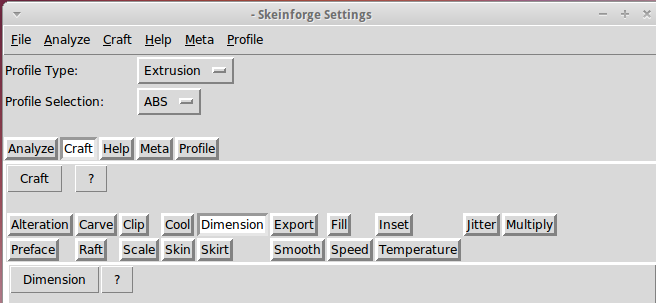
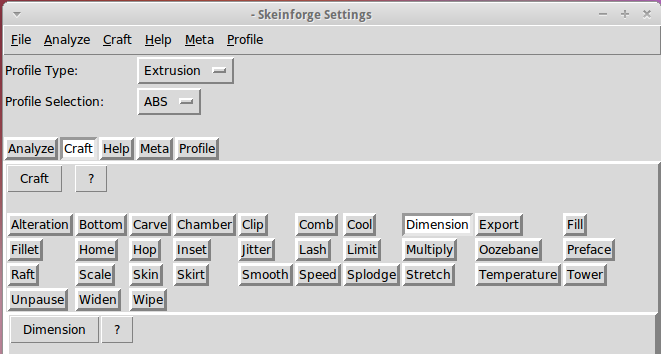
    The Skeinforge Craft window presents a formidable array of buttons, one for each possible plugin:

    Skeinforge standard
    Skeinforge standard

    I’ve disabled many of those plugins because, for example, limiting Z-axis speed isn’t relevant on my printer. If you’re sure you won’t use some of the plugins, remove them by editing /where-it's-installed/skeinforge_application/skeinforge_plugins/profile_plugins/extrusion.py thusly…

    In getCraftSequence(), located at about the midpoint of that file, duplicate the line that lists the plugins and add an octothorpe (OK, a hash) to make one line a Python comment, then remove the plugins you don’t care about from the other line:

    def getCraftSequence():
    	'Get the extrusion craft sequence.'
    #	return 'carve scale bottom preface widen inset fill multiply speed temperature raft skirt chamber tower jitter clip smooth stretch skin comb cool hop wipe oozebane splodge home lash fillet limit unpause dimension alteration export'.split()
    	return 'carve scale preface inset fill multiply speed temperature raft skirt jitter clip smooth skin cool dimension alteration export'.split()
    

    This being Python, do not change the indentation. If you get overenthusiastic and toss something useful overboard or just pine for the Good Old Days, swap the octothorpe to your modified line to restore the original plugin assortment.

    Save the result and you’ll see only the useful buttons:

    Skeinforge simplified
    Skeinforge simplified

    There, now, wasn’t that easy?

  • HP8591 Spectrum Analyzer Screen Dump Sizes

    The script I use to fetch screen dumps from my HP8591 spectrum analyzer works fine, but it turns out that the screen images have (at least) two sizes.

    The hp2xx program converts the screen dumps from HP-GL text files to PNG bitmaps:

    for f in *hgl ; do hp2xx -m png -c 1436 "$f" ; done
    

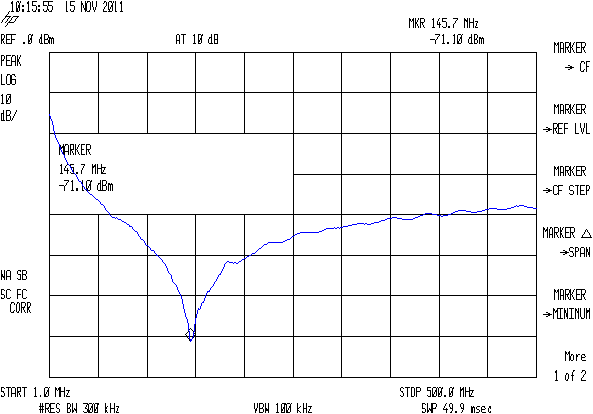
    The usual size is 593x414 pixels:

    SMD 470 pF - Comm Spec
    SMD 470 pF – Comm Spec

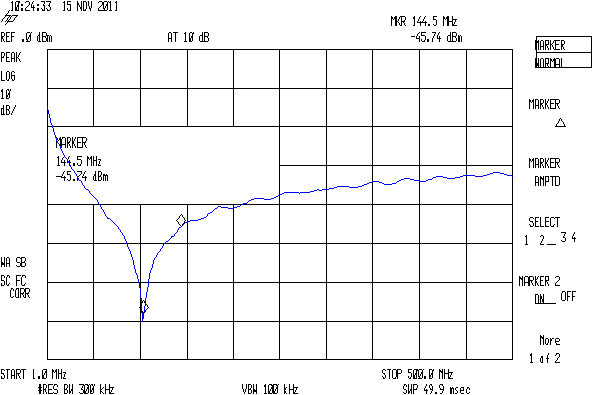
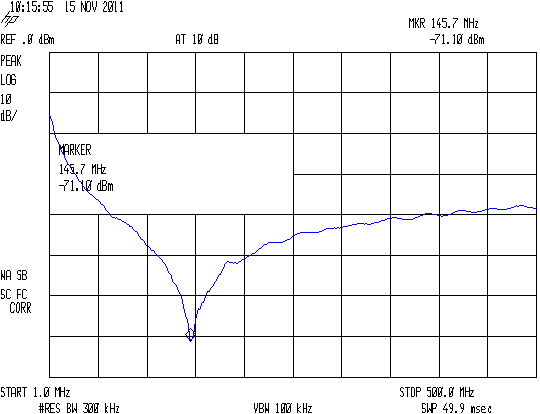
    The other size is 593x395 pixels:

    SMD 470 pF - Surplus
    SMD 470 pF – Surplus

    As nearly as I can tell, the spectrum analyzer mashes the Y coordinate when any of the soft keys along the right edge have reverse-video highlights, which print as outlined boxes. There may be other sizes; those are the two I’ve stumbled over so far. This doesn’t much matter unless I’m using the images in a column, in which case it’s awkward to have two sizes: a one-size-fits-all script to trim off the soft keys doesn’t produce the proper results.

    Musing on how to figure this programmatically…

    The file command gives the pixel dimensions, with the file name (which may contain blanks: so sue me) set off  with a colon:

    file "SMD 470 pF - Surplus.png"
    SMD 470 pF - Surplus.png: PNG image, 593 x 395, 8-bit colormap, non-interlaced
    

    Judicious application of cut extracts the relevant numbers, albeit with a trailing comma that requires another pass through the grinder:

    file "SMD 470 pF - Surplus.png" | cut -d\: -f2 | cut -d\  -f4,6
    593 395,
    

    Although I think a sed script might be better, that requires more skull sweat than I have available right now.

    Given that, then an appropriate mogrify would crop off the softkey labels; the first one is what’s in the script right now:

    mogrify -crop "540x414+0+0" SMD\ 470\ pF\ -\ Comm\ Spec.png
    mogrify -crop "515x395+0+0" SMD\ 470\ pF\ -\ Surplus.png
    

    Which looks like this:

    SMD 470 pF - Comm Spec cropped
    SMD 470 pF – Comm Spec cropped

    The two sizes come out pretty close to the same 1.3 aspect ratio, but resizing the smaller one to match the larger doesn’t work well:

    convert -resize '540x414+0+0!' SMD\ 470\ pF\ -\ Surplus.png SMD\ 470\ pF\ -\ Surplus\ resized.png
    

    You need single quotes around the geometry parameter to prevent Bash (or Dash or whatever) from gnawing on the bang character (yes, that’s how you pronounce “!”).

    The images are lossless PNGs because they consist entirely of single-pixel lines and characters; alas, resizing by non-integer factors close to 1.0 introduces nasty picket-fence aliasing artifacts:

    Resize x 1.049
    Resize x 1.049

    I resize the pix by a nice, even factor of two (which also adds aliasing artifacts, but in small and very regular doses) and set the dots/inch value so the images print at about the right size without further hassle along the production pipeline:

    mogrify -density 300 -resize 200% whatever.png
    

    Which looks like this:

    Resize 2.00
    Resize 2.00

    Resizing from the smaller images to (roughly) the final size in one step doesn’t look quite so awful:

    convert -density 300 -resize 209% "SMD 470 pF - Surplus.png" "SMD 470 pF - Surplus large.png"
    

    Like this, still with a distinctly garbled dBm:

    Resize 2.09
    Resize 2.09

    But it’s decidedly better than this result from a two-step enlargement, although not as wonderful as one might like:

    Resize x 1.049 x 2.00
    Resize x 1.049 x 2.00

    So the script needs a tweak for the file sizes, but …

    Memo to Self: It’d be simpler to not have highlighted softkeys when doing screen dumps!

  • Enabling Remote Desktop Sharing in Xubuntu

    I set up Xubuntu 11.10 on the Dell 531S driving the Thing-O-Matic, as the Unity UI seems surprisingly like crippleware: every feature that isn’t mandatory is prohibited. However, Xubuntu’s XFCE UI also has a long list of things that should be easy and aren’t, such as enabling remote desktop sharing. Gotta have that so I can fire up the printer and monitor progress from upstairs.

    It turns out that the Vino server is installed, but not enabled, so you must start by firing up vino-preferences in a terminal to set some preferences:

    This is a local machine behind a firewall, so a moderately secure password with no confirmation will suffice. Your paranoia may vary.

    Then drill down through the menu from Settings → Settings Manager → Session and Startup to the Application Autostart tab, then Add the Vino VNC Server to the list: /usr/lib/vino/vino-server. You can start it manually if you have the hots for immediate sharing.

    This seems to be impossible in Unity, trivially easy in GNOME, and unduly mysterious in XFCE.

  • Thing-O-Matic: Large Hole Calibration

    Flushed with success on the small-hole front, I conjured up a large hole testpiece using the same HoleAdjust function that proved unnecessary with the little ones:

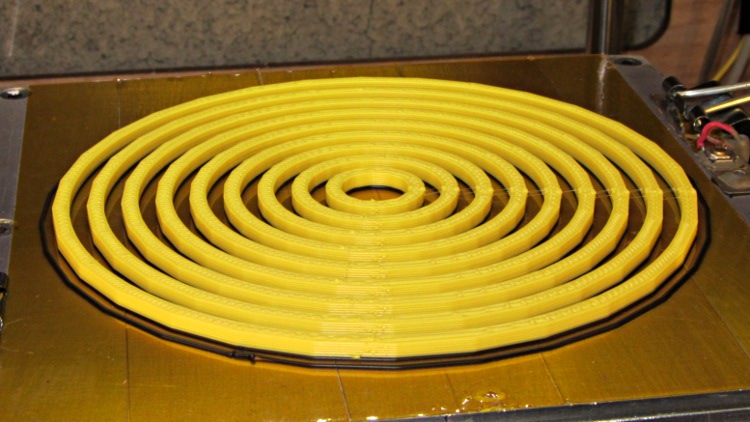
    Circle Calibration - solid model
    Circle Calibration – solid model

    The first version didn’t have the cross bars, which turned out to be a mistake, because the individual rings distorted even under minimal pressure from the calipers:

    Large circle cal - unlinked rings
    Large circle cal – unlinked rings

    However, measuring as delicately as I could, the holes seemed a scant 0.20 mm too small, more or less, kinda-sorta:

    Nominal Nom+0.0
    10 9.83
    20 19.75
    30 29.85
    40 39.84
    50 49.84
    60 59.72
    70 64.76
    80 79.28
    90 89.77

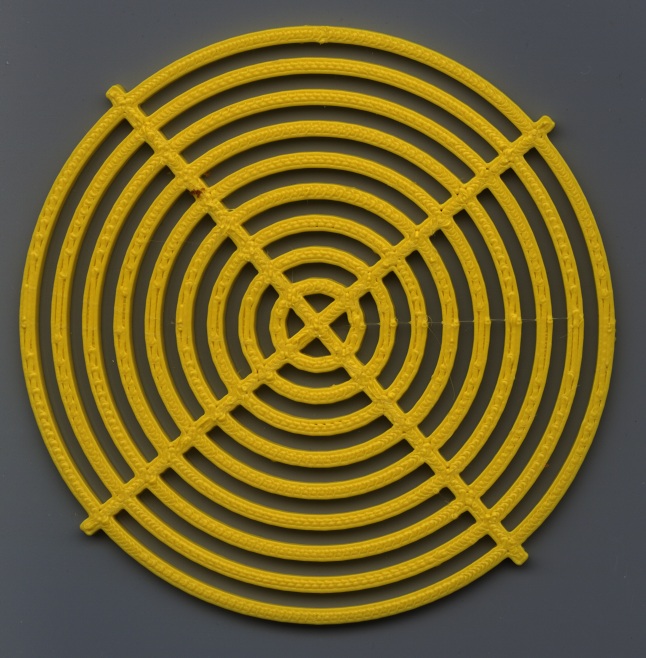
    So I fed in HoleFinagle = 0.20 and the second iteration looks like it’d make a great, albeit leaky, coaster:

    Large Circle Calibration object - HoleFinagle 0.20
    Large Circle Calibration object – HoleFinagle 0.20

    Measuring those holes across the center with the calipers on facets (rather than vertices), produced somewhat more stable results:

    Nominal Nom+0.20
    10 10.08
    20 20.17
    30 30.08
    40 40.08
    50 50.00
    60 60.02
    70 70.05
    80 79.98
    90 90.07

    Frankly, I don’t believe those two least-significant digits, either, because a different set of measurements across different facets looked like this:

    Nominal Nom+0.20
    10 10.13
    20 20.11
    30 29.84
    40 39.90
    50 49.88
    60 59.90
    70 69.84
    80 79.82
    90 89.66

    I also printed a testpiece with HoleFinagle = 0.25 that averaged, by in-the-head computation, about 0.05 larger than that, so the hole diameter compensation does exactly what it should.

    Applying the calipers to the 10.0 mm hole in the small-hole testpiece gives about the same result as in this one. The fact that HoleFinagle is different poses a bit of a mystery…

    The only thing I can conclude is that the measurement variation and the printing variation match up pretty closely: the actual diameter depends more on where it’s measured than anything else. The holes are pretty nearly the intended size and, should the exact size matter, you (well, I) must print at least one to throw away.

    All in all, a tenth of a millimeter is Good Enough. Selah.

    Oh. The ODs are marginally too small, even using PolyCyl.

    The OpenSCAD source, with both adjustments set to neutral:

    // Large circle diameter calibration
    // Ed Nisley KE4ZNU - Nov 2011
    
    //-------
    //- Extrusion parameters must match reality!
    //  Print with +1 shells, 3 solid layers, 0.2 infill
    
    ThreadThick = 0.33;
    ThreadWidth = 2.0 * ThreadThick;
    
    HoleFinagle = 0.00;
    HoleFudge = 1.00;
    
    function HoleAdjust(Diameter) = HoleFudge*Diameter + HoleFinagle;
    
    Protrusion = 0.1;			// make holes end cleanly
    
    function IntegerMultiple(Size,Unit) = Unit * ceil(Size / Unit);
    
    //-------
    // Dimensions
    
    Width = 2.5;
    Thickness = IntegerMultiple(2.0,ThreadThick);
    
    DiaStep = 10.0;
    
    NumCircles = 9;
    
    echo(str("Width: ",Width));
    echo(str("Thickness: ",Thickness));
    
    BarLength = (NumCircles + 1)*DiaStep;
    
    //-------
    
    module PolyCyl(Dia,Height,ForceSides=0) {			// based on nophead's polyholes
    
      Sides = (ForceSides != 0) ? ForceSides : (ceil(Dia) + 2);
    
      FixDia = Dia / cos(180/Sides);
    
      cylinder(r=HoleAdjust(FixDia)/2,h=Height,$fn=Sides);
    }
    
    module ShowPegGrid(Space = 10.0,Size = 1.0) {
    
      Range = floor(50 / Space);
    
    	for (x=[-Range:Range])
    	  for (y=[-Range:Range])
    		translate([x*Space,y*Space,Size/2])
    		  %cube(Size,center=true);
    
    }
    
    //------
    
    module Ring(RingID,Width,Thick) {
    
      difference() {
    	PolyCyl((RingID + 2*Width),Thick);
    	translate([0,0,-Protrusion])
    	  PolyCyl(RingID,(Thick + 2*Protrusion));
      }
    }
    
    //------
    
    ShowPegGrid();
    
    union () {
      for (Index = [1:NumCircles])
    	Ring(Index*DiaStep,Width,Thickness);
      for (Index = [-1,1])
    	rotate(Index*45)
    	  translate([-BarLength/2,-Width/2,0])
    		cube([BarLength,Width,Thickness]);
    }
    
  • EMC2 HAL Configuration by Eagle Schematics: The Code

    As part of that renaming adventure with the Logitech Gamepad configuration, I realized I hadn’t put my version of Martin Shoeneck’s Eagle-to-HAL conversion script anywhere useful.

    Edit: You may prefer my Kicad-to-HAL converter, which produces HAL files from carefully crafted Kicad schematics.

    Herewith, the script that you’ll apply to schematics built with parts from the hal-config-2.4.lbr.odt library (which you must rename to get ride of the ODT extension):

    /******************************************************************************
    * HAL-Configurator
    *
    * Author: Martin Schoeneck 2008
    * Additional gates and tweaks: Ed Nisley KE4ZNU 2010
    *****************************************************************************/
    #usage "<h1>HAL-Configurator</h1>Start from a Schematic where symbols from hal-config.lbr are used!";
    
    string output_path =    "./";
    string dev_loadrt =     "LOADRT";
    string dev_loadusr =    "LOADUSR";
    string dev_thread =     "THREAD";
    string dev_parameter =  "PARAMETER";
    
    string dev_names[] = {
    "CONSTANT",								// must be first entry to make set_constants() work
    "ABS",				// 2.4
    "AND2",
    "BLEND",			// 2.4
    "CHARGE-PUMP",		// 2.4
    "COMP",
    "CONV_S32_FLOAT",	// 2.4
    "DDT",				// 2.4
    "DEADZONE",			// 2.4
    "DEBOUNCE",			// 2.4
    "EDGE",
    "ENCODER",			// 2.4
    "ENCODER-RATIO",	// 2.4
    "ESTOP-LATCH",
    "FLIPFLOP",
    "FREQGEN",			// 2.4
    "LOWPASS",
    "MULT2",			// 2.4
    "MUX2",
    "MUX4",				// 2.4
    "MUX8",				// 2.4
    "NEAR",				// 2.4
    "NOT",
    "ONESHOT",
    "OR2",
    "SAMPLER",			// 2.4
    "SCALE",			// 2.4
    "SELECT8",			// 2.4
    "SUM2",
    "TIMEDELAY",		// 2.4
    "TOGGLE",			// 2.4
    "WCOMP",			// 2.4
    "XOR2",				// 2.4
    ""					// end flag
    };
    
    /*******************************************************************************
    * Global Stuff
    ******************************************************************************/
    
    string FileName;
    string ProjectPath;
    string ProjectName;
    
    void Info(string Message) {
    dlgMessageBox(";<b>Info</b><p>\n" + Message);
    }
    
    void Warn(string Message) {
    dlgMessageBox("!<b>Warning</b><p>\n" + Message + "<p>see usage");
    }
    
    void Error(string Message) {
    dlgMessageBox(":<hr><b>Error</b><p>\n" + Message + "<p>see usage");
    exit(1);
    }
    
    string replace(string str, char a, char b) {
    // in string str replace a with b
    int pos = -1;
    do {
    // find that character
    pos = strchr(str, a);
    // replace if found
    if(pos >= 0) {
    str[pos] = b;
    }
    } while(pos >= 0);
    
    return str;
    }
    
    // the part name contains an index and is written in capital letters
    string get_module_name(UL_PART P) {
    // check module name, syntax: INDEX:NAME
    string mod_name = strlwr(P.name);
    // split string at the : if exists
    string a[];
    int c = strsplit(a, mod_name, ':');
    mod_name = a[c-1];
    // if name starts with '[' we need uppercase letters
    if(mod_name[0] == '[') {
    mod_name = strupr(mod_name);
    }
    
    return mod_name;
    }
    
    string comment(string mess) {
    string str = "\n\n####################################################\n";
    if(mess != "") {
    str += "# " + mess + "\n";
    }
    
    return str;
    }
    
    // if this is a device for loading a module, load it (usr/rt)
    string load_module(UL_PART P) {
    string str = "";
    
    // it's a module if the device's name starts with LOADRT/LOADUSR
    if((strstr(P.device.name, dev_loadrt) == 0) ||
    (strstr(P.device.name, dev_loadusr) == 0)) {
    
    // now add the string to our script
    str += P.value + "\n";
    }
    
    return str;
    }
    
    // count used digital gates (and, or, etc) and load module if neccessary
    string load_blocks() {
    string str = "";
    
    int index;
    
    int dev_counters[];
    string dname[];
    
    // count the gates that are used
    schematic(S) { S.parts(P) {
    strsplit(dname,P.device.name,'.');		// extract first part of name
    if ("" != lookup(dev_names,dname[0],0)) {
    for (index = 0;  (dname[0] != dev_names[index]) ; index++) {
    continue;
    }
    dev_counters[index]++;
    }
    } }
    
    // force lowercase module names...
    
    for (index = 0; ("" != dev_names[index]) ; index++) {
    if (dev_counters[index]) {
    sprintf(str,"%sloadrt %s\t\tcount=%d\n",str,strlwr(dev_names[index]),dev_counters[index]);
    }
    }
    
    return str;
    }
    
    string hook_function(UL_NET N) {
    string str = "";
    
    // is this net connected to a thread (work as functions here)?
    int    noclkpins       = 0;
    string thread_name     = "";  // this net should be connected to a thread
    string thread_position = "";
    N.pinrefs(PR) {
    // this net is connected to a clk-pin
    if(PR.pin.function == PIN_FUNCTION_FLAG_CLK) {
    // check the part: is it a thread-device?
    if(strstr(PR.part.device.name, dev_thread) == 0) {
    // we need the name of the thread
    thread_name = strlwr(PR.part.name);
    // and we need the position (position _ is ignored)
    thread_position = strlwr(PR.pin.name);
    thread_position = replace(thread_position, '_', ' ');
    }
    } else {
    // no clk-pin, this is no function-net
    noclkpins++;
    break;
    }
    }
    
    // found a thread?
    if(noclkpins == 0 && thread_name != "") {
    // all the other pins are interesting now
    N.pinrefs(PR) {
    // this pin does not belong to the thread
    if(strstr(PR.part.device.name, dev_thread) != 0) {
    // name of the pin is name of the function
    //string function_name = strlwr(PR.pin.name);
    string function_name = strlwr(PR.instance.gate.name);
    // if functionname starts with a '.', it will be appended to the modulename
    if(function_name[0] == '.') {
    // if the name is only a point, it will be ignored
    if(strlen(function_name) == 1) {
    function_name = "";
    }
    function_name = get_module_name(PR.part) + function_name;
    }
    str += "addf " + function_name + "\t\t" + thread_name + "\t" + thread_position + "\n";
    }
    }
    }
    
    return str;
    }
    
    string set_parameter(UL_NET N) {
    string str = "";
    
    // is this net connected to a parameter-device?
    int    nodotpins       = 0;
    string parameter_value = "";
    N.pinrefs(PR) {
    // this net is connected to a dot-pin
    if(PR.pin.function == PIN_FUNCTION_FLAG_DOT) {
    // check the part: is it a parameter-device?
    //			str += "** dev name [" + PR.part.device.name + "] [" + dev_parameter + "]\n";
    if(strstr(PR.part.device.name, dev_parameter) == 0) {
    // we need the value of that parameter
    parameter_value = PR.part.value;
    //				str += "**  value [" + PR.part.value +"]\n";
    }
    } else {
    // no clk-pin, this is no function-net
    nodotpins++;
    break;
    }
    }
    
    // found a parameter?
    if(nodotpins == 0 && parameter_value != "") {
    // all the other pins are interesting now
    N.pinrefs(PR) {
    //			str += "** dev name [" + PR.part.device.name + "] [" + dev_parameter + "]\n";
    // this pin does not belong to the parameter-device
    if(strstr(PR.part.device.name, dev_parameter) != 0) {
    // name of the pin is name of the function
    //string parameter_name = strlwr(PR.pin.name);
    string parameter_name = strlwr(PR.instance.gate.name);
    // if functionname starts with a '.', it will be appended to the modulename
    //				str += "** param (gate) name [" + parameter_name + "]\n";
    if(parameter_name[0] == '.') {
    // if the name is only a point, it will be ignored
    if(strlen(parameter_name) == 1) {
    parameter_name = "";
    }
    parameter_name = get_module_name(PR.part) + parameter_name;
    //					str += "** param (part) name [" + parameter_name + "]\n";
    }
    str += "setp " + parameter_name + "\t" + parameter_value + "\n";
    }
    }
    }
    
    return str;
    }
    
    // if this is a 'constant'-device, set its value
    // NOTE: this is hardcoded to use the first entry in the dev_names[] array!
    string set_constants(UL_PART P) {
    string str = "";
    
    // 'constant'-device?
    if(strstr(P.device.name, dev_names[0]) == 0) {
    str += "setp " + get_module_name(P) + ".value\t" + P.value + "\n";
    }
    
    return str;
    }
    
    string connect_net(UL_NET N) {
    string str = "";
    
    // find all neccessary net-members
    string pins = "";
    N.pinrefs(P) {
    // only non-functional pins are connected
    if(P.pin.function == PIN_FUNCTION_FLAG_NONE) {
    string pin_name =  strlwr(P.pin.name);
    string part_name = strlwr(P.part.name);
    pin_name =  replace(pin_name,  '$', '_');
    part_name = replace(part_name, '$', '_');
    pins += part_name + "." + pin_name + " ";
    }
    }
    
    if(pins != "") {
    string net_name = strlwr(N.name);
    net_name = replace(net_name, '$', '_');
    str += "net " + net_name + " " + pins + "\n";
    }
    
    return str;
    }
    
    /*******************************************************************************
    * Main program.
    ******************************************************************************/
    // is the schematic editor running?
    if (!schematic) {
    Error("No Schematic!<br>This program will only work in the schematic editor.");
    }
    
    schematic(S) {
    ProjectPath = filedir(S.name);
    ProjectName = filesetext(filename(S.name), "");
    }
    
    // build configuration
    
    string cs = "# HAL config file automatically generated by Eagle-CAD ULP:\n";
    cs += "# [" + argv[0] + "]\n";
    cs += "# (C) Martin Schoeneck.de 2008\n";
    cs += "# Mods Ed Nisley 2010\n";
    
    FileName = ProjectPath + ProjectName + ".hal";
    
    cs += "# Path        [" + ProjectPath + "]\n";
    cs += "# ProjectName [" + ProjectName + "]\n";
    
    //cs += "# File name: [" + FileName + "]\n\n";
    
    // ask for a filename: where should we write the configuration?
    
    FileName = dlgFileSave("Save Configuration", FileName, "*.hal");
    
    if(!FileName) {
    exit(0);
    }
    
    cs += "# File name   [" + FileName + "]\n";
    cs += "# Created     [" + t2string(time(),"hh:mm:ss dd-MMM-yyyy") + "]\n\n";
    
    schematic(S) {
    // load modules
    cs += comment("Load realtime and userspace modules");
    S.parts(P) {
    cs += load_module(P);
    }
    
    // load blocks
    cs += load_blocks();
    
    // add functions
    cs += comment("Hook functions into threads");
    S.nets(N) {
    cs += hook_function(N);
    }
    
    // set parameters
    cs += comment("Set parameters");
    S.nets(N) {
    cs += set_parameter(N);
    }
    
    // set constant values
    cs += comment("Set constants");
    S.parts(P) {
    cs += set_constants(P);
    }
    
    // build nets and connect them
    cs += comment("Connect Modules with nets");
    S.nets(N) {
    cs += connect_net(N);
    }
    }
    
    // open/overwrite the target file to save the configuration
    output(FileName, "wt") {
    printf(cs);
    }