The Smell of Molten Projects in the Morning

Ed Nisley's Blog: Shop notes, electronics, firmware, machinery, 3D printing, laser cuttery, and curiosities. Contents: 100% human thinking, 0% AI slop.

Category: Software

General-purpose computers doing something specific

  • Capacity Test For USB Flash Drive Memory

    Centon 4 GB USB Flash Drives
    Centon 4 GB USB Flash Drives

    It’s always a good idea to verify that a USB flash drive works and has its rated capacity, even when you buy them from a reputable vendor.

    The easiest way to measure their capacity (quite different than measuring battery capacity):

    • Create a monster file of random data
    • Copy it to the drive
    • Verify that the copy matches the original
    • Delete the copy

    That doesn’t verify that you can successfully create a bazillion little files, but it’s a good rough-and-ready check that you haven’t gotten, say, a 2 GB drive mis-labeled as 4 GB. It could happen…

    Assuming you’ve deleted any shovelware (these were clean) and that the drives are now empty (as these were), find out how big they claim to be:

    df /media/ed/CENTON\ USB/
    Filesystem     1K-blocks  Used Available Use% Mounted on
    /dev/sdb1        4107284     4   4107280   1% /media/ed/CENTON USB
    

    Pour /dev/urandom into a file that will fill the available space (not the total space), which will take several minutes:

    time dd bs=1K count=4107280 if=/dev/urandom of=/tmp/test.dat
    4107280+0 records in
    4107280+0 records out
    4205854720 bytes (4.2 GB) copied, 450.883 s, 9.3 MB/s
    
    real	7m31.162s
    user	0m0.712s
    sys	6m54.166s
    

    Copy it to the drive, using rsync with a progress indicator:

    time rsync --progress /tmp/test.dat /media/ed/CENTON\ USB/
    test.dat
      4205854720 100%    8.45MB/s    0:07:54 (xfer#1, to-check=0/1)
    
    sent 4206368202 bytes  received 31 bytes  8772405.07 bytes/sec
    total size is 4205854720  speedup is 1.00
    
    real	7m59.035s
    user	0m24.490s
    sys	0m17.433s
    

    Verify that the two files match:

    time diff /tmp/test.dat /media/ed/CENTON\ USB
    real	3m32.576s
    user	0m0.588s
    sys	0m6.268s
    

    Then delete the file:

    rm /media/ed/CENTON\ USB/test.dat
    

    Repeat as needed for the other flash drives, using the same test.dat file. All these drives worked; one subsequently caught a disease at the library.

    And, yes, one of them is noticeably darker; four of the others seem lighter and five darker gray. Most likely, the cases came from three different anodizing batches and, I suppose, if I were to pry them apart, the innards could be radically different. Ya never know!

  • Why Friends Don’t Let Friends Run Windows: Conficker

    Mary gave a gardening presentation at the local library, popping a 4 GB USB memory stick with the presentation into a library computer connected to the display projector. Back home, she deleted the presentations and was about to add more files, when she noticed something interesting:

    drwx------  4 ed   ed    4096 Dec 31  1969 ./
    drwxr-x---+ 3 root root  4096 Jan 31 19:21 ../
    -r--r--r--  1 ed   ed   59288 Mar 21  2009 autorun.inf
    drwx------  3 ed   ed    4096 Jan 30 19:31 RECYCLER/
    drwx------  4 ed   ed    4096 Jan 31 19:10 .Trash-1001/
    

    Ubuntu 12.10 automagically mounts FAT filesystems with the current user as owner and group. The .Trash-1001 directory is the Linux trash heap, but where did all that other stuff come from? The autorun.inf definitely looks Window-y, doesn’t it?

    Perforce, the library runs Windows, but that shouldn’t add files to a USB memory stick that just was plugged in and used for a read-only presentation, should it?

    Huh. You know where this is going…

    Let’s hand autorun.inf to VirusTotal for a second opinion. The first three results from their long list confirm my suspicion:

    Antivirus Result Update
    Agnitum INF.Conficker.F 20130131
    AhnLab-V3 Win32/Conficker.worm 20130131
    AntiVir Worm/Kido.IH.40 20130131

    The executable file containing the actual payload is, of course, buried in a subdirectory that might look more innocent on a Windows box:
    /RECYCLER/S-5-3-42-2819952290-8240758988-879315005-3665/

    It sports a randomized name to evade a really stupid malware detector:
    jwgkvsq.vmx

    Here’s what VirusTotal reports from some heavy hitters in the AV field:

    Kaspersky Net-Worm.Win32.Kido.ih 20130131
    Kingsoft Worm.Kido.ih.(kcloud) 20130131
    Malwarebytes Worm.Conficker 20130131
    McAfee W32/Conficker.worm 20130201
    McAfee-GW-Edition W32/Conficker.worm 20130131
    Microsoft Worm:Win32/Conficker.B 20130131

    The Wikipedia article gives the details. I suppose that PC got it from somebody else’s USB stick, but the library really should be running some defensive software; Conficker dates back to 2008, so it’s not new news these days.

    That kind of Windows Genuine Advantage makes up for all the hassles of running Linux, right there. Mary reported the problem to the library; we’ll never know the rest of the story.

    [Update: We got an update!]

  • LibreOffice 3.6: Fixing Font Selection Problems

    This may not be a LibreOffice problem, but that’s where it shows up: the font selection dialog won’t display fonts with nonstandard Style names. There is, of course, no documentation anywhere (that I can find, anyway) on what Style names are permitted, so you discover this only when a font style that’s properly installed and accessible by other programs (like, say, Inkscape or Scribus) doesn’t render properly and doesn’t appear in the list.

    In Xubuntu 12.10, LibreOffice 3.6.2.2 can’t handle the American Typewriter font style called Medium, which is what I’ve been using for the return address field on my (very few, these days) mail envelopes. Over the years, various versions of OpenOffice and LibreOffice have alternately accepted and rejected the Medium style, so this isn’t exactly a regression. It is, however, Yet Another Annoyance.

    The solution, hinted at in that thread, involves using FontForge to rename the offending Style to, say, Regular, then saving the font. It’s actually the Weight property, hidden in Element → Font Info → PS Names tab. In this case, I changed the word “Medium” in the Fontname, Name for Humans, and Weight fields to “Regular”, which also updates the values in the TTF Names tab.

    I save the modified font files in ~/.local/share/fonts using TrueType format, just to be sure I don’t confuse them with the original Postscript version in /usr/share/fonts/custom, delete the original, and then run fc-cache -v -f to update the caches. This surely isn’t the cleanest way to make it happen and almost certainly isn’t allowed by the Adobe EULA I agreed to, back when I actually bought the fonts, but so it goes.

    And then It Just Works…

    LibreOffice vs American Typewriter font
    LibreOffice vs American Typewriter font
  • Fixing LibreOffice Document Graphic File Paths

    It turns out that if you put convenient symlinks in your directories, then use them to build a LibreOffice document, LO will cheerfully put those paths into the graphic file links inside its XML files. That will produce horrible breakage on a new system without those links. We’ve come to the conclusion that the only way to keep LO happy is to create a Pictures directory in whatever directory holds the document file, then put all of the document’s image files into that directory, and make sure LO stores relative paths. Of course, this leaves us with the prospect of updating a whole bunch of existing (and, alas, horribly broken) documents by hand, which is unappealing. My previous solution worked for a single file, but now it’s time for some scripting…

    This would probably be easier in Python, but Bash works fine after you get the quoting straightened out. This script builds several other scripts that actually do the heavy lifting, because that way you can inspect the scripts before running them to verify that you’re not about to make a bad situation much, much worse. I recommend copying the presentations into another directory, running this script, check the output scripts, run them by hand, and then copy the fixed files and the Pictures directory back where they belong.

    You must tweak the actual paths to the pictures to match your situation; for these documents, one simple change sufficed for all the image files. Those paths are not variables, because I can barely keep the quoting straight without adding another layer of indirection. Make sure all the paths match up, verify the scripts before you run them, and don’t trust anything you see.

    CAUTION: It’s highly likely that the multiple levels of character escaping required to make these listings appear correctly on the screen will produce incorrect results when copied-and-pasted. You can download the script file as FixGraphics.sh.odt, which is a bare-ASCII TXT file (which you must rename to eliminate the ODT extension, then make executable as a shell script), to see how it compares.

    The main FixGraphics.sh script, with some key lines highlighted:

    #!/bin/bash
    
    echo "Extract list of images from all ODP files"
    rm images.txt
    for f in *odp
    do
    	unzip -p "$f" content.xml | sed 's/></>\n</g' | grep Cameras | cut -d \" -f 2 | sort -u >> images.txt
    done
    
    echo "Make source file name list"
    # strip off leading relative pathing, set actual absolute path, un-quote blanks and special characters, add quotes
    sed 's/..\/..\/..\/../\/mnt/' images.txt | sed 's/%20/ /g' | sed 's/&amp;/\&/g' | sed 's/^.*/\"&\"/' > source.lst
    
    echo "Make target file name list"
    # set relative to current directory
    sed 's/\/mnt\/bulkdata\/Cameras\/MCWN/\.\/Pictures/' source.lst > target.lst
    
    echo "Make target directory list"
    # must add trailing quote stripped by dirname
    rm dirs.lst
    cat target.lst | while read tline ; do
    	tdir=`dirname "$tline"`
    	echo ${tdir}\"
    done > dirs.lst
    
    echo "Create target directory structure script"
    rm mkdirs.sh
    sort -u dirs.lst | while read dline ; do
    	echo mkdir --parents ${dline}
    done > mkdirs.sh
    chmod u+x mkdirs.sh
    
    echo "Create image file copy script"
    rm cpjpgs.sh
    cat dirs.lst | while read dline ; do
    	echo cp -n -t ${dline}
    done > cptemp.txt
    paste cptemp.txt source.lst > cpjpgs.sh
    chmod u+x cpjpgs.sh
    
    echo "Create ODP fixup script"
    echo "for f in *odp ; do" > fixodp.sh
    echo "unzip -p \"\$f\" content.xml > raw.xml" >> fixodp.sh
    echo "sed 's/..\/..\/..\/..\/bulkdata\/Cameras\/MCWN/\.\.\/Pictures/g' raw.xml > content.xml"  >> fixodp.sh
    echo "zip \"\$f\" content.xml"  >> fixodp.sh
    echo "done" >> fixodp.sh
    echo "rm raw.xml content.xml" >> fixodp.sh
    chmod u+x fixodp.sh
    

    Run mkdirs.sh, cpjpgs.sh, and fixodp.sh: then it Just Works.

    Some of the tricky parts:

    The content.xml file may be stored in unformatted mode, with everything mushed together into one huge line. To make it readable and parse-able, insert a newline between each pair of adjoining angle brackets:

    sed 's/></>\n</g'
    

    This burst of line noise un-escapes the file name from the way LO stores it internally. Note that the middle sed command really does have the literal escape sequence ampersand-amp-semicolon in it and the ampersand in the last one is the sed-ism for “the whole matching string”:

    sed 's/%20/ /g' | sed 's/&amp;/\&/g' | sed 's/^.*/\"&\"/'
    

    The difference between these two sed strings indicates the actual relative path to the Pictures subdirectory in the filesystem and the faked relative path from the LO pseudo-subdirectory where the document stores its internal state. The string of periods in the second command shows what LO stored for the original files in our documents; your mileage will certainly differ:

    sed 's/\/mnt\/bulkdata\/Cameras\/MCWN/\.\/Pictures/' source.lst > target.lst
    sed 's/..\/..\/..\/..\/bulkdata\/Cameras\/MCWN/\.\.\/Pictures/' raw.xml > content.xml
    

    I don’t know how they could make the file linkages work better, but it’d be really nice if there were a less horrible way to fix the breakage.

  • Samsung VAC-9048R Vacuum Cleaner: Nozzle Handle Hose Bushing

    The hose going into the handle of the neversufficently-to-be-damned Samsung VAC-9048R suck dog has been collapsing for quite some time, but I couldn’t figure out how to take the handle apart. Recently, the lock ring that I would have sworn was glued in place came loose, revealing the secret:

    Samsung vacuum cleaner - handle lock ring
    Samsung vacuum cleaner – handle lock ring

    You slide four lugs on the lock ring into the open slots, then turn the ring clockwise to force the lugs over barriers into recesses that capture them and hold the lock ring against the handle. The handle under the lock ring isn’t quite circular, nor is the lock ring, and I think (based on later events) that they expect the ring to deform as it turns in order to let the lugs spring over the barriers.

    Anyhow, with the lock ring loose, removing four screws released the two halves of the handle:

    Samsung vacuum cleaner - handle interior
    Samsung vacuum cleaner – handle interior

    The handle includes a switch for the powered floor brush, which we rarely use, and a suction control lever that’s basically a binary leak: on or off. With the handle opened in front of you, remove the innards, unwrap the decorative duct tape, unwind enough of the two power conductor / spring wire ribs to allow for rebuilding the electrical connections, and cut off the damaged part of the hose.

    Now, obviously, what that hose needs is a little bit of strain relief, along the lines of the hideous snout I’d affixed to its other end a while ago. The general idea is to replace the lock ring with a little attachment that will hold the heatshrink tubing in place. Something like this:

    Bushing Solid Model - top
    Bushing Solid Model – top

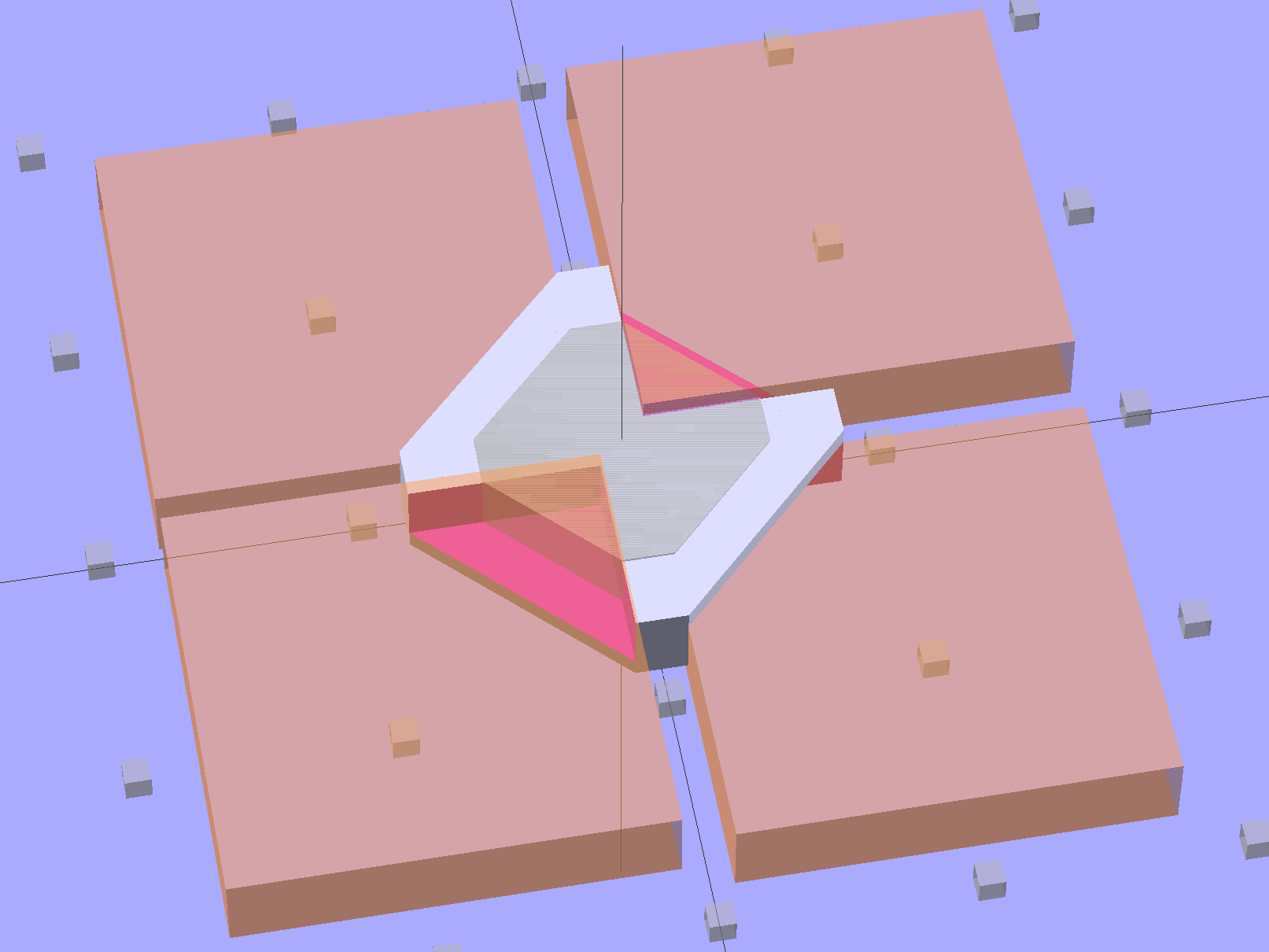
    The bottom view, looking up through the layer of 1 mm cubes defining the Z=0 plane, shows the lugs:

    Bushing Solid Model - bottom
    Bushing Solid Model – bottom

    I thought the slit would provide enough springiness to let the lugs bump over the ridges, but it wasn’t quite enough: the relatively stiff ABS isn’t nearly as springy as the original black plastic for about the same thickness. For the next version, I’ll try four slits, all of which must end at different levels to avoid concentrating the stress on a single layer.

    In any event, it came out about like you’d expect:

    Handle Bushing - on platform
    Handle Bushing – on platform

    As with many projects, though, I had to make a pair of simpler prototypes to get the measurements correct. The lugs, for example, are not 90° apart, spaced neatly around the handle’s midline seam, as I assumed for Prototype 1 on the right:

    Handle bushings - prototypes 2 and 1
    Handle bushings – prototypes 2 and 1

    Prototype 2, on the left, has a support structure holding up a horizontal step that butted against the handle, which turned out to be unnecessary. The OpenSCAD version substitutes a pair of conical transitions that worked much better; they’re at different levels with a thicker wall section between them.

    With the ring and somewhat preshrunk heatshrink tubing slipped along the hose, rewiring proceeds in reverse order. Next time, I’ll add a QD fitting in the hose-to-socket wire so I can take the whole thing apart again without cutting that wire:

    Samsung Vacuum Handle - wiring detail
    Samsung Vacuum Handle – wiring detail

    Assemble the handle, snap the glaring white strain relief fitting in place, shrink the tubing, add a cable tie mostly for show:

    Samsung Vacuum Handle - heatshrink over bushing
    Samsung Vacuum Handle – heatshrink over bushing

    I cut a few slits in the tubing’s end to improve its bendiness, but it’s already Much Better than it was.

    A few things I’d do differently:

    • Add a recess for the cable tie, with a flat spot for its latch
    • Four slits, not just one
    • Ribs on the snout to help anchor the tubing
    • Longer snout?

    The OpenSCAD source code for the final version, with a module for the support ring that you won’t need:

    // Samsung Vacuum cleaner hose bushing
    // Ed Nisley KE4ZNU January 2013
    
    // Layout options
    
    Layout = "Build";
                        // Overall layout: Show Build
                        // Parts: Ring Sleeve
    
    //- Extrusion parameters must match reality!
    //  Print with +1 shells and 3 solid layers
    
    ThreadThick = 0.25;
    ThreadWidth = 2.0 * ThreadThick;
    
    HoleWindage = 0.75;
    
    function IntegerMultiple(Size,Unit) = Unit * ceil(Size / Unit);
    
    Protrusion = 0.1;           // make holes end cleanly
    
    //----------------------
    // Dimensions
    
    HoseOD = 47.0;					// spiral tube diameter
    TubeWall = 1.4;					// heatshrink tubing wall thickness
    HandleRingLong = 8.5;			// length of ring stub on handle
    
    RingID = 51.0;					// lock ring over handle end
    RingOD = 58.0;
    RingLong = 12.0;
    
    Locks = 4;						// bumps inside lock ring
    LockLength = 4.0;
    LockWide = 4.0;
    LockThick = 0.75;
    
    LockAngleOffset = 52.0;			// offset of lock bump from handle top dead center
    LockAngleIncluded = 102.4;		// between first and second lock bump (also 3 & 4)
    LockAngles = [-LockAngleOffset,
    				-(LockAngleOffset+LockAngleIncluded),
    				-(LockAngleOffset+180),
    				-(LockAngleOffset+LockAngleIncluded+180)];
    
    BushID = HoseOD + 1.0;			// over spiral hose
    BushOD = RingOD - 2*TubeWall;	// allow flush heatshrink fit
    BushLength = 15.0;
    
    SlitWidth = 2*ThreadWidth;		// allow expansion of lock ring, sorta kinda
    SlitHeight = 20.0;
    SlitAngle = 0;
    SlitLength = max(RingOD,BushOD);
    
    RingSides = 4*8;
    RingAlign = 360/(2*RingSides);
    $fn = RingSides;
    
    //----------------------
    // Useful routines
    
    module PolyCyl(Dia,Height,ForceSides=0) {           // based on nophead's polyholes
    
    Sides = (ForceSides != 0) ? ForceSides : (ceil(Dia) + 2);
    
    FixDia = Dia / cos(180/Sides);
    
    cylinder(r=(FixDia + HoleWindage)/2,
             h=Height,
             $fn=Sides);
    }
    
    module ShowPegGrid(Space = 10.0,Size = 1.0) {
    
        Range = floor(50 / Space);
    
        for (x=[-Range:Range])
            for (y=[-Range:Range])
                translate([x*Space,y*Space,Size/2])
                %cube(Size,center=true);
    
    }
    
    //-------------------
    // Component parts
    
    module Ring() {
    	union() {
    		difference() {
    			union() {
    				cylinder(r=RingOD/2,h=(RingLong + Protrusion));
    				translate([0,0,RingLong])
    					cylinder(r1=(RingOD/2),r2=(BushOD - Protrusion)/2,h=(RingOD - BushOD));
    			}
    			translate([0,0,-Protrusion]) {
    				PolyCyl(RingID,(HandleRingLong + Protrusion),RingSides);
    				cylinder(r=BushID/2,h=(2*RingLong));
    			}
    			translate([0,0,(HandleRingLong - Protrusion)])
    				cylinder(r1=((RingID/2) / cos(180/RingSides) + HoleWindage),
    						 r2=BushID/2,
    						 h=(RingID - BushID)/2);
    		}
    		for (i=[0:Locks-1])
    			rotate(LockAngles[i] + RingAlign)
    				translate([(RingID/2),0,LockWide/2])
    					cube([2*LockThick,LockLength,LockWide],center=true);
    	}
    }
    
    module Sleeve() {
    	difference() {
    		cylinder(r=BushOD/2,h=(BushLength + Protrusion));
    		translate([0,0,-Protrusion])
    			cylinder(r=BushID/2,h=BushLength + 3*Protrusion);
    	}
    }
    
    module Bushing() {
    	difference() {
    		union() {
    			Ring();
    			translate([0,0,RingLong])
    				Sleeve();
    		}
    		rotate(SlitAngle)
    			translate([SlitLength/2,0,(SlitHeight - Protrusion)/2])
    				cube([SlitLength,SlitWidth,(SlitHeight + Protrusion)],center=true);
    	}
    }
    
    // This turned out to be unnecessary after tapering the transitions
    module Support() {
    
    SuppHeight = RingLong - ThreadThick;
    
    	color("Yellow")
    	union() {
    		difference() {
    			cylinder(r=(RingID/2 - LockThick - ThreadWidth/2),h=SuppHeight);
    			translate([0,0,-Protrusion])
    				cylinder(r=(BushID/2 - ThreadWidth),h=2*RingLong);
    			for (i=[0:RingSides-1])
    				rotate(i*2*RingAlign)
    					translate([RingID/4,0,SuppHeight - ThreadThick/2 + Protrusion/2])
    						cube([RingID/2,(LockLength - 3*ThreadWidth),(ThreadThick + Protrusion)],center=true);
    		}
    	}
    }
    
    //----------------------
    // Build it!
    
    ShowPegGrid();
    
    if (Layout == "Build")
    	union() {
    		Bushing();
    //		Support();
    	}
    
    if (Layout == "Show")
    	Bushing();
    
    if (Layout == "Ring")
    	Ring();
    
    if (Layout == "Sleeve")
    	Sleeve();
    
    if (Layout == "Support")
    	Support();
    
    
  • Monthly Science: Data Logging

    Starting in late 2006, I’ve have several Hobo dataloggers recording the temperature / humidity / light at various locations, under the principle that if you observe something long enough, it turns into science. Regrettably, logging the data is one thing, actually processing it into usable information is entirely another; there’s never a good time for the latter. Perhaps if I break it down into monthly chunks, I can actually make some progress on getting it done.

    The first problem is that the Hobo dataloggers lack a convenient user interface: the only way to extract data is through the Hoboware graphical program. Unfortunately, Hoboware stores the extracted data in their proprietary format, locked away from any other program. I eventually discovered the configuration setting that automatically saves the data in CSV format, but I didn’t find that until rather late in the game, didn’t always set it with new versions, and it seems their CSV format has changed slightly over the years. Thus, one of my to-do items is to manually process the remaining Hoboware files to produce the corresponding CSV files, then convert those into a standard format that’s useful with, say, Gnuplot.

    The intent is that I can simply concatenate all the CSV data files for a given sensor, run them through a Bash script to sanitize the data, plot what emerges, and then maybe slice-and-dice the data a few different ways. The less manual processing this requires, the more it will get done…

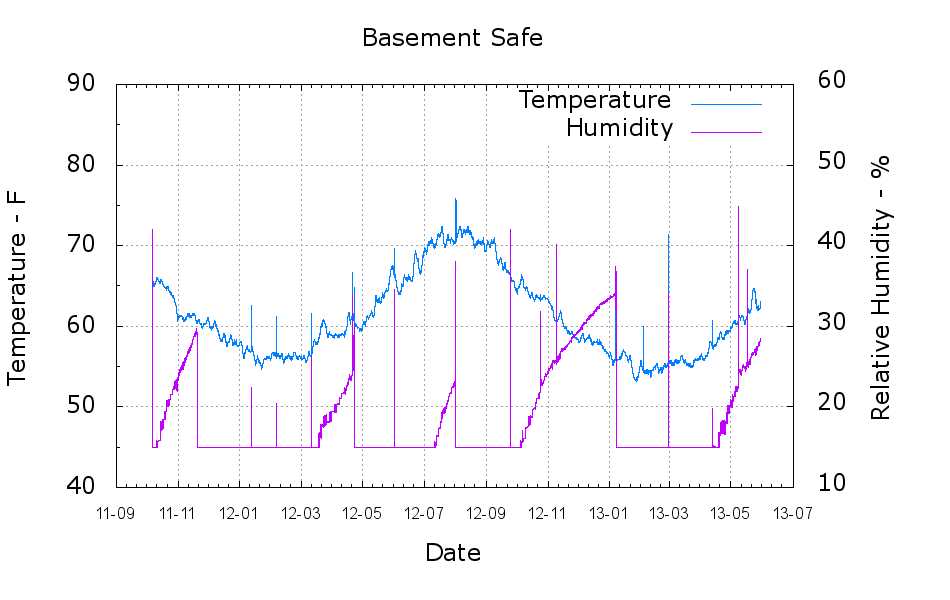
    But the first step is to show that something emerges from the data, so here’s the last year of data (recorded in 2012, which includes a bit of 2011 and not quite up to the end of 2012) from the logger that’s been monitoring the air temperature of the Basement Laboratory and the temperature at the house water inlet. I assume the minimum water temperature on the pipe at the basement wall tracks the ground temperature four or five feet down from the surface; more on the hardware behind the data in a while.

    Town_Water_Inlet
    Town_Water_Inlet

    The fuzz on the purple trace shows the relatively rapid temperature variation as we draw water from the supply: it falls as water moves into the house and rises as still water warms. The inlet always remains cooler than the air temperature, because it’s cemented to the wall, but a closer look (again, in a while) shows a nice exponential curve. The thin straight-line sections show gaps in the data record: sometimes I forget to do my monthly science for a few days or weeks.

    An extract from the CSV files, including some data not plotted above:

    "Plot Title: Town Water Inlet "
    "#","Time, GMT-04:00","Temp, °F","RH, %","Temp, °F","Host Connected","Stopped","End Of File"
    1,09/25/2012 09:20:00,66.344,58.707,64.632,,,
    2,09/25/2012 09:25:00,66.173,57.579,64.459,,,
    -- snippage --
    12962,11/09/2012 09:25:00,60.174,54.301,56.685,,,
    12963,11/09/2012 09:28:48,,,,Logged,,
    12964,11/09/2012 09:28:55,,,,,Logged,Logged
    -- snippage --
    "Plot Title: Town Water Inlet "
    "#","Time, GMT-05:00","Temp, °F()","RH, %()","Temp, °F()","End Of File()"
    1,11/09/12 08:35:00 ,64.247,52.282,56.728,
    2,11/09/12 08:40:00 ,63.304,51.465,56.728,
    -- snippage --
    14473,12/29/12 14:35:00 ,56.599,51.454,48.895,
    14474,12/29/12 14:40:00 ,56.599,51.485,49.116,Logged
    

    A touch of sed can handle the reformatting I’ve seen so far:

    • Convert headers to comments: sed 's/^\"/#&/'
    • Convert non-data events to comments: sed 's/^.*Logged/#&/'
    • Remove spurious trailing blanks in data fields: sed 's/ ,/,/'

    Here’s the Bash and Gnuplot source code that produced the graph, complete with cruft that may come in handy later:

    #!/bin/sh
    #-- overhead
    export GDFONTPATH="/usr/share/fonts/truetype/"
    base="${1%.*}"
    echo Base name: ${base}
    tfile1=$(tempfile)
    tfile2=$(tempfile)
    ofile=${base}.png
    echo Input file: $1
    echo Temporary files: ${tfile1} ${tfile2}
    echo Output file: ${ofile}
    #-- prepare csv Hobo logger file
    sed 's/^\"/#&/' $1 > ${tfile1}
    sed 's/^.*Logged/#&/' ${tfile1} > ${tfile2}
    #-- do it
    gnuplot << EOF
    #set term x11
    set term png font "arialbd.ttf" 18 size 950,600
    set output "${ofile}"
    set title "${base}"
    set key noautotitles
    unset mouse
    set bmargin 4
    set grid xtics ytics
    set timefmt "%m/%d/%Y %H:%M:%S"
    set xdata time
    set xlabel "Week of Year"
    set format x "%W"
    #set xrange [1.8:2.2]
    #set xtics 0,5
    #set mxtics 2
    #set logscale y
    #set ytics nomirror autofreq
    set ylabel "Temperature - F"
    #set format y "%4.0f"
    set yrange [30:90]
    #set mytics 2
    #set y2label "right side variable"
    #set y2tics nomirror autofreq 2
    #set format y2 "%3.0f"
    #set y2range [0:200]
    #set y2tics 32
    #set rmargin 9
    set datafile separator ","
    #set label 1 "label text" at 2.100,110 right font "arialbd,18"
    #set arrow from 2.100,110 to 2.105,103 lt 1 lw 2 lc 0
    plot	\
        "${tfile2}" using 2:3 with lines lt 3 title "Air", \
        "${tfile2}" using 2:5 with lines lt 4 title "Water"
    EOF
    
  • Better GIMPS Startup

    No, not GIMP, but GIMPS: the Great Internet Mersenne Prime Search.

    I’d been starting mprime from rc.local, but this time I used crontab, as suggested in that thread, to reduce the program’s privileges.

    Start the crontab editor:

    crontab -e

    Then add this line:

    @reboot ( /opt/Primenet/mprime & )

    It starts every time the box boots and run until you hit shutdown, which is exactly the way things should work.

    Power dissipation looks like this:

    • Idle: 40 W
    • mprime running: 88 W

    They estimate an additional 40 W, which comes out slightly low for this box. Their system info dump looks like this:

    CPU Information:
    Intel(R) Core(TM)2 Duo CPU     E8400  @ 3.00GHz
    CPU speed: 2992.40 MHz, 2 cores
    CPU features: Prefetch, SSE, SSE2, SSE4
    L1 cache size: 32 KB
    L2 cache size: 6 MB