The Smell of Molten Projects in the Morning

Ed Nisley's Blog: Shop notes, electronics, firmware, machinery, 3D printing, laser cuttery, and curiosities. Contents: 100% human thinking, 0% AI slop.

Category: Science

If you measure something often enough, it becomes science

  • StirlingTEK NP-BX1 Batteries

    Because the first pair of Wasabi NP-BX1 batteries for the Sony HDR-AS30V camera faded to the point where they weren’t useful for a typical bike ride, I bought a pair of SterlingTEK (a.k.a. STK) NP-BX1 batteries that, like the Wasabi batteries, claimed to have a 1600 mA·h capacity. These are “second tier” batteries, not the cheap eBay crap I’ve already dismissed, and run a bit under $10 apiece.

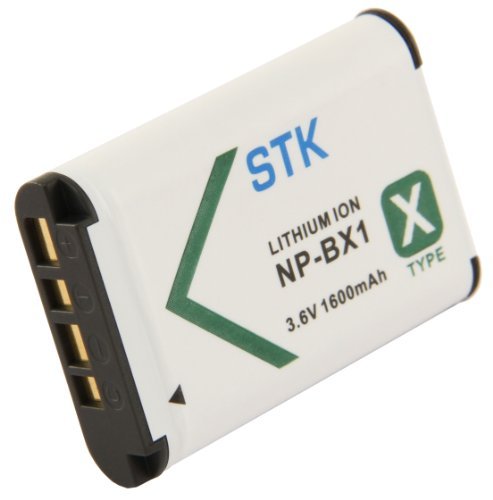
    Here’s the picture from their product description:

    SterlingTEK - STK NP-BX1 battery - as advertised
    SterlingTEK – STK NP-BX1 battery – as advertised

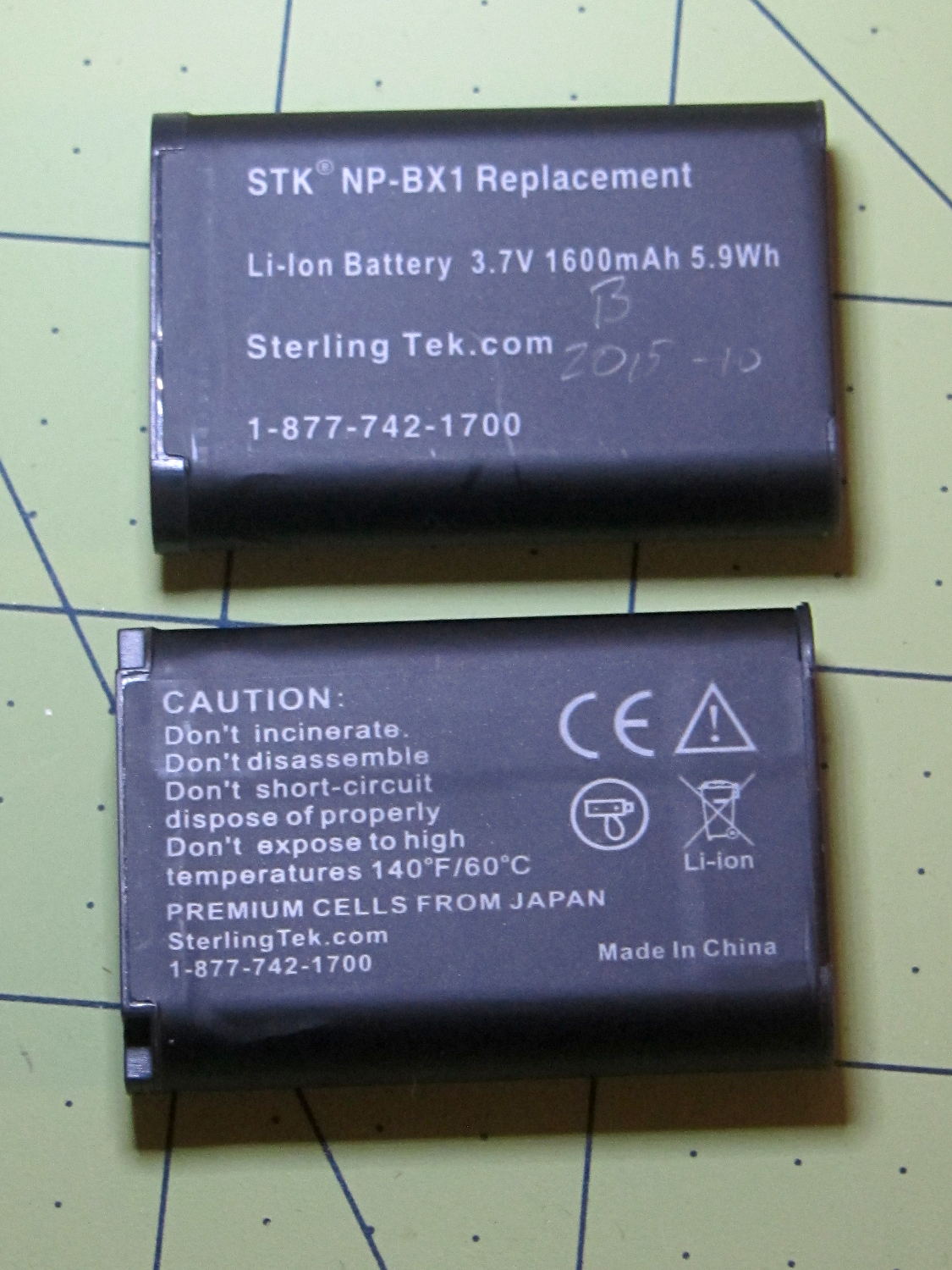
    Here’s what arrived:

    STK NP-BX1 batteries
    STK NP-BX1 batteries

    Huh.

    That’s  a red flag, right there. It’s remarkably tempting to ship a good product for a while, then swap in much cheaper junk that can ride on the good reviews. Not saying that’s what happened, but it’s a possibility.

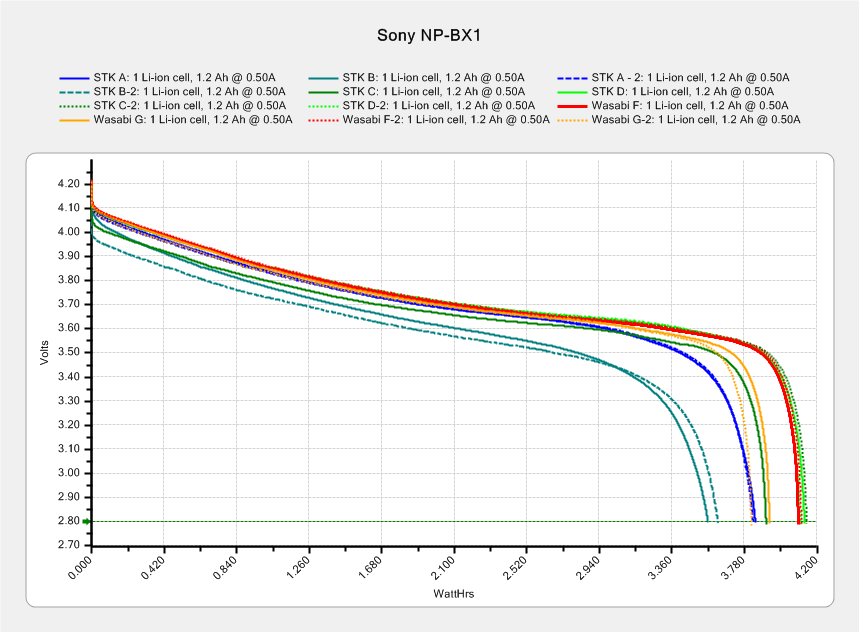
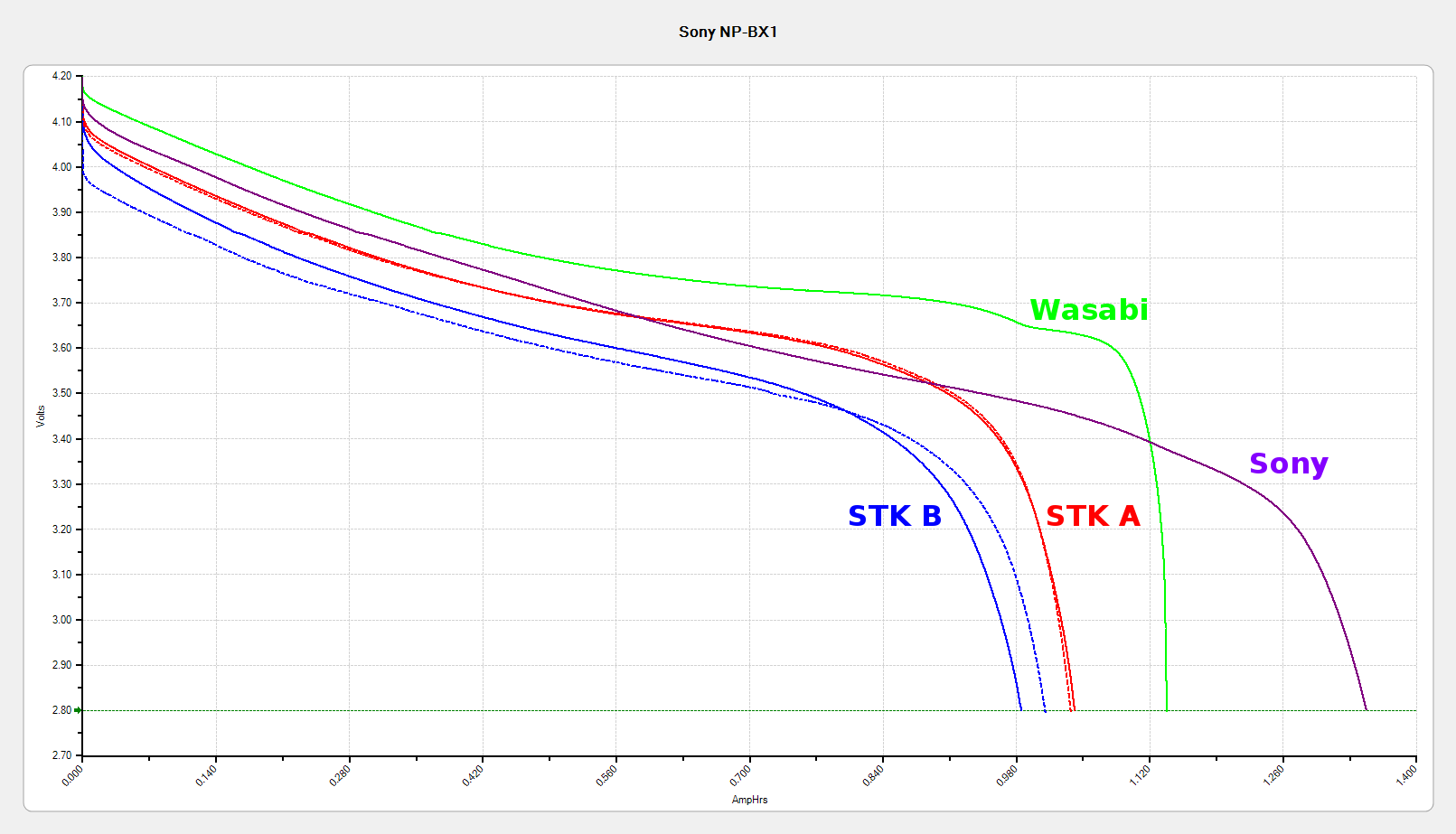
    Here’s how they performed:

    Sony NP-BX1 - Sony Wasabi STK - as received
    Sony NP-BX1 – Sony Wasabi STK – as received

    The red and blue curves show that the STK batteries produced less than 1000 mA·h in their first two charges, with the blue battery (I labeled it B) showing considerable variation that suggests it’ll suffer early failure. The green curve shows one of those Wasabi batteries and the purple curve is the OEM Sony battery, both in as-received condition.

    SterlingTEK will send two more batteries, in the belief that I received two sub-standard samples. We shall see…

  • Sony and Wasabi NP-BX1 Li-Ion Battery Life

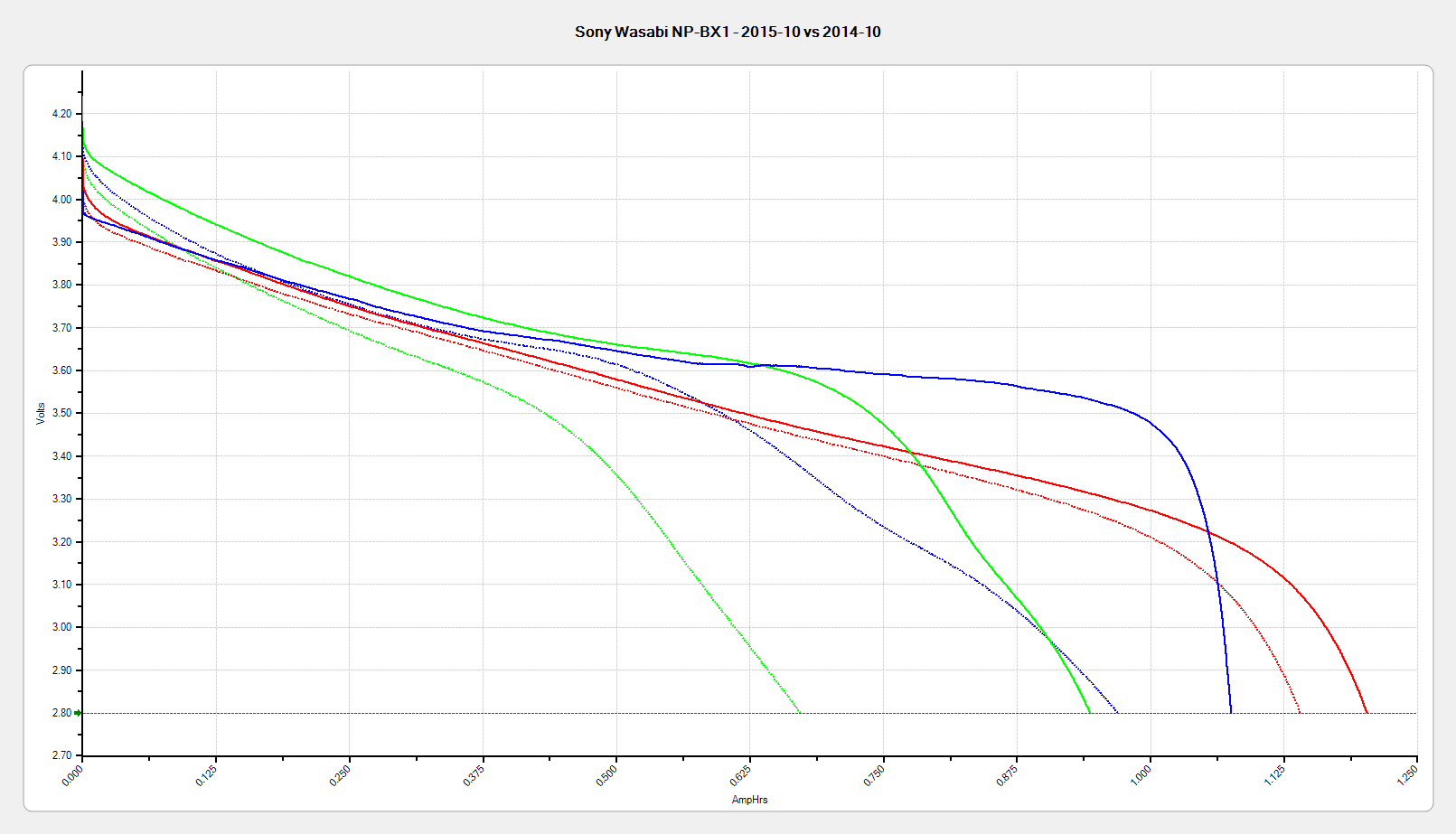
    Using the Sony HDR-AS30V helmet camera more-or-less daily during the bicycling season chews up batteries as well as MicroSD cards:

    Sony NP-BX1 - OEM Wasabi - 2015-10-25
    Sony NP-BX1 – OEM Wasabi – 2015-10-25

    The dotted traces show the most recent status and the solid traces are from almost exactly one year ago:

    • Red = Genuine Sony
    • Blue = Wasabi Power: cell D, August 2014
    • Green = Wasabi Power: cell B, January 2014

    All the tests are at 500 mA, approximately half the camera’s load. Oddly, the numeric values along the mA·h axis work out pretty close to the actual runtime in hours:

    • Sony – 1:30
    • Wasabi D – 1:15
    • Wasabi B – 0:40

    Given that a typical bike ride takes an hour, the two year old Wasabi B battery’s 40 minute runtime isn’t useful. The Wasabi D battery is a bit over a year old and looks very much like the B battery did last year.

    The Wasabi batteries march through the camera and charger in order, so each one gets used about once a week. The Sony battery gets used once every half-dozen complete cycles, just so I have a standard “good” battery.

    The Sony and Wasabi B cells over the course of two years:

    Sony NP-BX1 - OEM Wasabi - 2015-10 2014-10 2014-01
    Sony NP-BX1 – OEM Wasabi – 2015-10 2014-10 2014-01

    Much to my surprise, the Wasabi batteries started out slightly better than the Sony OEM battery, at least as measured by the available voltage and energy. The camera runs from an internal switching power supply, so the area under the curve (basically equal to energy in W·h) above the cutoff voltage is all that matters.

    In round numbers, I can expect 100 cycles out of each battery before the run time drops below the ride time; at $10/battery, that’s a dime a ride. Any claims that the batteries can be recharged “1000 times!” may be true, but they’ll have a useless fraction of their original capacity by then.

    Time to buy a few more batteries…

  • Monthly Science: Dehumidification by Rice

    As part of a discussion on the M2 forums about using rice to dehumidify 3D printer filament, I replaced the 500 g bag of silica gel in the basement safe with a bowl containing 200 g of long-grain brown rice from our rice supply and let it sit for a while:

    Basement Safe Humidity - Rice vs. Silica Gel - 2015-10-31
    Basement Safe Humidity – Rice vs. Silica Gel – 2015-10-31

    The abrupt drop in humidity from 52% to the logger’s minimum 15% marks the point where I replaced the rice with a fresh bag of silica gel, with a door opening shortly thereafter. The basement air outside the safe varied between 52% and 54% during that time, so the air inside the safe trended upward toward that goal.

    The rice still weighed exactly 200 g after its stay in the safe, so we can conclude it hadn’t absorbed or released any water.

    Conclusion: nope, rice doesn’t work as a dehumidifier…

  • USB-to-SATA Drive Adapter Performance

    The discussion about scrubbing hard drives suggested I really should be using larger block sizes to wring better performance from the hardware.

    So I ran variations on this theme:

    time sudo dd if=/dev/urandom of=/dev/sdc bs=4K count=32K
    

    For the BS (“block size”) parameter, 1K = 1024 and 1KB = 1000. Similarly for 1M vs. 1MB.

    The results, viewed as a picture because WordPress seems unable to import a formatted spreadsheet from LibreOffice like it used to:

    USB-SATA Adapter - Barracuda 7200.10 drive
    USB-SATA Adapter – Barracuda 7200.10 drive

    Each operation transfers 128 MB (128 x 220 = 131 x 106) bytes. The variations probably come from other stuff going on, most notably the USB-to-serial adapter driving the plotter while I’m testing a tweak to the Superformula demo code.

    Reads ever so much faster than writes, so the USB adapter definitely isn’t getting in the way; I assume the drive accepts the commands & data as fast as its little heads can carry them away. The data, being relentlessly pseudo-random, won’t get compressed along the way.

    So, in round numbers, the block size just absolutely does not make any difference.

    Update: Based on an early comment from Edward Berner to a previous post, I was looking in the wrong place:

    dd if=/dev/urandom of=/dev/zero bs=4K count=32K
    32768+0 records in
    32768+0 records out
    134217728 bytes (134 MB) copied, 9.63064 s, 13.9 MB/s
    dd if=/dev/urandom of=test.bin bs=4K count=32K
    32768+0 records in
    32768+0 records out
    134217728 bytes (134 MB) copied, 10.018 s, 13.4 MB/s
    dd if=test.bin of=/dev/zero bs=4K count=32K
    32768+0 records in
    32768+0 records out
    134217728 bytes (134 MB) copied, 0.0385358 s, 3.5 GB/s
    dd if=test.bin of=test2.bin bs=4K count=32K
    32768+0 records in
    32768+0 records out
    134217728 bytes (134 MB) copied, 0.45044 s, 298 MB/s
    

    I installed an SSD on this box a while ago, so the 3.5 GB/s disk-to-discard speed represents the SSD’s read rate. The 298 MB/s disk-to-disk speed would be its write speed, probably with some clever buffering going on.

    So the real bandwidth limitation in wiping a disk comes from the pseudo-random generator behind /dev/urandom, not the disk or USB interface. It would probably be faster to fill a 1 GB (or more) file with noise at 14 MB/s, then copy it enough times to fill the drive at whatever speed the drive can handle it.

    Thanks, Edward, for figuring that out!

  • Monthly Image: A Year in the Life of a Maple Twig, Resurrected

    In 1991 we lived in Tolland CT, where I took one picture of a maple twig every week:

    This slideshow requires JavaScript.

    That was with a film camera, of course, with negatives. I assembled the printed images into a poster and eventually (perhaps in 2001) scanned / digitally photographed them four-at-a-time, saved the result as a 330 MB Photoshop file with one 2×2 group in each of 13 layers (there are 50 images, probably because vacations), and burned that to a CD.

    All I can say: it must have made sense at the time.

    Anyhow, here in the future, I found that CD in a pile destined for the shredder, which shouldn’t ought to happen without some attention.

    Here’s how I extracted the separate images from that file into standalone JPEGs, cropped them to a uniform size, and smushed them to suitably low quality:

    convert A\ Year\ in\ the\ Life\ of\ Tolland\ CT\ -\ 1991.psd -quality 95 Tolland-1991-%02d.jpg
    for f in {01..13} ; do convert Tolland-1991-$f.jpg -crop "1212x1775+0+0" img-$f-0.jpg ; done
    for f in {01..13} ; do convert Tolland-1991-$f.jpg -crop "1212x1775+1212+0" img-$f-1.jpg ; done
    for f in {01..13} ; do convert Tolland-1991-$f.jpg -crop "1212x1775+0+1775" img-$f-2.jpg ; done
    for f in {01..13} ; do convert Tolland-1991-$f.jpg -crop "1212x1775+1212+1775" img-$f-3.jpg ; done
    for f in {01..13} ; do for g in {0..3} ; do convert img-$f-$g.jpg -crop "1100x1650+50+50" out-$f-$g.jpg ; done ; done
    sn=1 ; for f in {01..13} ; do for g in {0..3} ; do printf -v dn 'Tolland-1991-Maple-%02d.jpg' "$(( sn++ ))" ; convert img-$f-$g.jpg -crop "1100x1650+50+50" +repage -rotate 90 -define jpeg:extent=200KB $dn ; done ; done
    

    Then WordPress assembles the 50 images into a slide show.

    Of course, it didn’t go quite as smoothly as all that, but it took maybe half an hour of fiddling to get it right by iterating on the commands until I liked the results. One might tweak the exposures and suchlike, but that’s in the nature of fine tuning.

    Now I can shred the CD…

  • Monthly Science: Supermoon Eclipse

    Lunar eclipses happens so rarely it’s worth going outdoors into the dark:

    Supermoon eclipse 2015-09-27 2250 - ISO 125 2 s
    Supermoon eclipse 2015-09-27 2250 – ISO 125 2 s

    That’s at the camera’s automatic ISO 125 setting. Forcing the camera to ISO 1000 boosts the grain and brings out the stars to show just how fast the universe rotates around the earth…

    One second:

    Supermoon eclipse 2015-09-27 2308 - ISO 1000 1 s
    Supermoon eclipse 2015-09-27 2308 – ISO 1000 1 s

    Two seconds:

    Supermoon eclipse 2015-09-27 2308 - ISO 1000 2 s
    Supermoon eclipse 2015-09-27 2308 – ISO 1000 2 s

    Four seconds:

    Supermoon eclipse 2015-09-27 2308 - ISO 1000 4 s
    Supermoon eclipse 2015-09-27 2308 – ISO 1000 4 s

    Taken with the Sony DSC-H5 and the 1.7 teleadapter atop an ordinary camera tripod, full manual mode, wide open aperture at f/3.5, infinity focus, zoomed to the optical limit, 2 second shutter delay. Worked surprisingly well, all things considered.

    Mad props to the folks who worked out orbital mechanics from first principles, based on observations with state-of-the-art hardware consisting of dials and pointers and small glass, in a time when religion claimed the answers and brooked no competition.

    NASA takes much better moon pix, plus a bonus ISS transit, during the previous full moon:

    ISS Moon Transit - 2015-08-02 - NASA 19599509214_68eb2ae39f_o
    ISS Moon Transit – 2015-08-02 – NASA 19599509214_68eb2ae39f_o

    The next eclipse tetrad starting in 2032 won’t be visible from North America and, alas, we surely won’t be around for the ones after that. Astronomy introduces you to deep time and deep space.

  • Avalanche Noise Amp: Sampling

    The relatively low bandwidth of the amplified noise means two successive samples (measured in Arduino time) will be highly correlated. Rather than putz around with variable delays between the samples, I stuffed the noise directly into the Arduino’s MISO pin and collected four bytes of data while displaying a single row:

    unsigned long UpdateLEDs(byte i) {
    	
    unsigned long NoiseData = 0ul;
    	
    	NoiseData |= (unsigned long) SendRecSPI(~LEDs[i].ColB);				// correct for low-active outputs
    	NoiseData |= ((unsigned long) SendRecSPI(~LEDs[i].ColG)) << 8;
    	NoiseData |= ((unsigned long) SendRecSPI(~LEDs[i].ColR)) << 16;
    	NoiseData |= ((unsigned long) SendRecSPI(~LEDs[i].Row))  << 24;
    
    	analogWrite(PIN_DIMMING,LEDS_OFF);			// turn off LED to quench current
    	PulsePin(PIN_LATCH);						// make new shift reg contents visible
    	analogWrite(PIN_DIMMING,LEDS_ON);
    
    	return NoiseData;
    }
    

    The bit timing looks like this:

    SPI Sample - noise data - 01
    SPI Sample – noise data – 01

    The vertical cursors mark the LSB position in the first and last bytes of the SPI clock. The horizontal cursors mark the minimum VIH and maximum VIL, so the sampled noise should produce 0 and 1 bits at the vertical cursors. Note that there’s no shift register on the input: MISO just samples the noise signal at each rising clock edge.

    I picked those two bit positions because they produce more-or-less equally spaced samples during successive rows; you can obviously tune the second bit position for best picture as you see fit.

    Given a pair of sequential samples, a von Neumann extractor whitens the noise and returns at most one random bit:

    #define VNMASK_A 0x00000001
    #define VNMASK_B 0x01000000
    
    enum sample_t {VN_00,VN_01,VN_10,VN_11};
    
    typedef struct {
    	byte BitCount;					// number of bits accumulated so far
    	unsigned Bits;					// random bits filled from low order upward
    	int Bias;						// tallies 00 and 11 sequences to measure analog offset
       unsigned SampleCount[4];	// number of samples in each bin
    } random_t;
    
    random_t RandomData;
    
    ... snippage ...
    
    byte ExtractRandomBit(unsigned long RawSample) {
    	
    byte RetVal;
    
    	switch (RawSample & (VNMASK_A | VNMASK_B)) {
    	case 0:							// 00 - discard
    		RetVal = VN_00;
    		RandomData.Bias--;
    		break;
    	case VNMASK_A:					// 10 - true
    		RetVal = VN_10;
    		RandomData.BitCount++;
    		RandomData.Bits = (RandomData.Bits << 1) | 1;
    		break;
    	case VNMASK_B:					// 01 - false
    		RetVal = VN_01;
    		RandomData.BitCount++;
    		RandomData.Bits  = RandomData.Bits << 1;
    		break;
    	case (VNMASK_A | VNMASK_B):		// 11 - discard
    		RetVal = VN_11;
    		RandomData.Bias++;
    		break;
    	}
    	
    	RandomData.Bias = constrain(RandomData.Bias,-9999,9999);
    	RandomData.SampleCount[RetVal]++;
    	RandomData.SampleCount[RetVal] = constrain(RandomData.SampleCount[RetVal],0,63999);
    
    	return RetVal;
    }
    

    The counters at the bottom track some useful statistics.

    You could certainly use something more complex, along the lines of a hash function or CRC equation, to whiten the noise, although that would eat more bits every time.

    The main loop blips a pin to show when the extractor discards a pair of identical bits, as in this 11 sequence:

    SPI Sample - noise flag - 11
    SPI Sample – noise flag – 11

    That should happen about half the time, which it pretty much does:

    SPI Sample - noise flag - 1 refresh
    SPI Sample – noise flag – 1 refresh

    The cursors mark the same voltages and times; note the slower sweep. The middle trace blips at the start of the Row 0 refresh.

    On the average, the main loop collects half a random bit during each row refresh and four random bits during each complete array refresh. Eventually, RandomData.Bits will contain nine random bits, whereupon the main loop updates the color of a single LED, which, as before, won’t change 1/8 of the time.

    The Arduino trundles around the main loop every 330 µs and refreshes the entire display every 2.6 ms = 375 Hz. Collecting nine random bits requires 9 x 330 µs = 3 ms, so the array changes slightly less often than every refresh. It won’t completely change every 64 x 8/7 x 3 ms = 220 ms, because dupes, but it’s way sparkly.

    In the spirit of “Video or it didn’t happen!”, there’s a low-budget Youtube video about that…