The Smell of Molten Projects in the Morning

Ed Nisley's Blog: Shop notes, electronics, firmware, machinery, 3D printing, laser cuttery, and curiosities. Contents: 100% human thinking, 0% AI slop.

Category: Recumbent Bicycling

Cruisin’ the streets

  • HT GPS+Voice Interface: ICOM Z1A vs. W32A vs. Wouxun KG-UV3D

    Here’s a great example of painting yourself into a corner…

    Back in the day, I made a voice-only interface that adapted a helmet-mounted electret mic and earbud to an ICOM IC-Z1A HT. A pair of those let us talk companionably as we rode along.

    Rule One: Never shout at your wife.

    Then I made an interface that combined GPS data (from a Byonics TinyTrak3+ encoder) with the voice audio, all mounted on our Tour Easy recumbents; the interface also supported an external battery for radio power and lived inside a machined case. Eventually, we had two identical radios, interfaces, antennas, and setups on our bikes.

    Along comes our daughter, with her shiny-new Technician amateur radio license. I took an early version of the Z1A interface board, force-fitted it into an early version of the machined case that lacked a top, acquired an ICOM W32A HT and another TT3+, did some tweakage, and defined the result as Good Enough. Time passes, she’s promoted to Larval Engineer, goes off to college, and leaves the bike behind (a faired Tour Easy is ill-suited to being left out in the rain and is not a dorm-room-friendly bike).

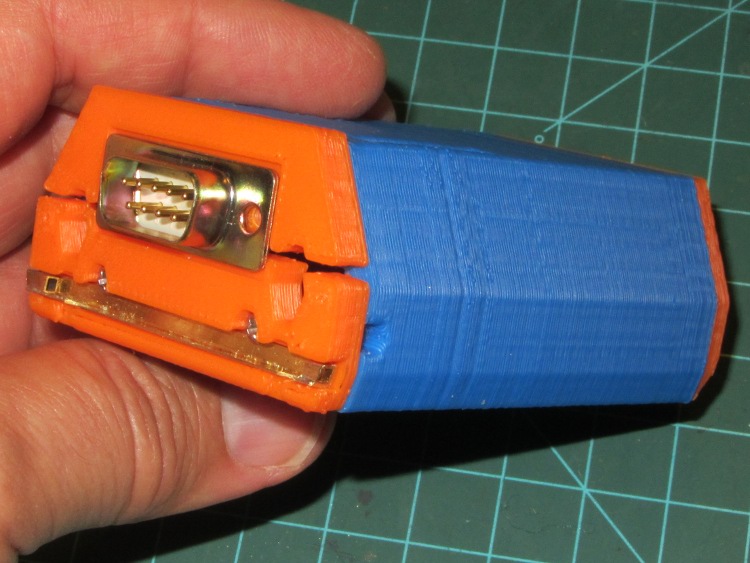
    Knowing that the Z1A on my bike is failing, I get a Wouxun KG-UV3D HT and modify the Z1A interface to match. Then I build an interface PCB for the KG-UV3D, conjure up a nice case (which is why I bought a 3D printer), chop the TT3+ out of the W32A lashup, put everything together, and it’s all good.

    Here’s the carcass of the W32A interface in its half-case:

    W32A PCB in case
    W32A PCB in case

    Whereupon our Larval Engineer returns from college and once again needs a radio for her bike. At that point:

    • The W32A interface now lacks its TT3+.
    • The W32A PCB doesn’t fit in the Z1A case
    • The Z1A interface that would fit the W32A radio has the KG-UV3D modifications.
    • The Z1A radio has failed completely; it no longer even turns on.

    Some alternatives:

    1. Get another KG-UV3D, build another interface PCB + case, make it work
    2. Transplant the TT3+ back to the W32A interface
    3. Undo the KG-UV3D mods from the Z1A interface, put it on the W32A

    Given that she’s going to vanish in another three months, tops, Choice 1 is out. Although the transplant in Choice 2 seems straightforward, it requires tedious soldering and produces an interface in a partial case.

    So Choice 3 it is…

    The Z1A board with the KG-UV3D modifications started out like this:

    Z1A PCB modified for Wouxun KG-UV3D
    Z1A PCB modified for Wouxun KG-UV3D

    Un-modified again and back in its machined case:

    Z1A board minus mods - milled case
    Z1A board minus mods – milled case

    Buttoned up and ready to roll:

    Z1A board on W32A - ferrite core
    Z1A board on W32A – ferrite core

    I put a clamp-on ferrite tumor around the GPS receiver cable to keep RF out of the TT3+, which seems quite sensitive to RFI; the poor thing locked up quite dependably on the bench with 5 W into a long rubber duck antenna, but not into a dummy load. The mobile antenna sits relatively far from the radio on the bike, but I think the TT3+ had problems in the early KG-UV3D lashup.

    The TT3 audio level will probably require adjustment, as I’d cranked it up for the KG-UV3D, but that will require some on-the-air testing. Ditto for mic level.

    When I get a KG-UV3D for Mary’s bike, I’ll buy two radios and build two interfaces, so as to finally have a working radio + interface on the shelf.

    I’m mildly tempted by the new Yaesu VX-8GR, but that’s over $350 for a radio that also requires a new interface board design, a new case design, a new set of adapters, and other odds&ends. Not to mention that the radio’s built-in GPS antenna would live at the bottom of the seat frame beside the wheel and below my shoulder. I suppose I could conjure up an entirely new radio mount, but … the deterrents seem overwhelming.

    Various versions of the schematics & PCB layouts for all those boards, plus solid models for the 3D printed case, are scattered here & there on other posts.

  • New Aztek Brake Shoes

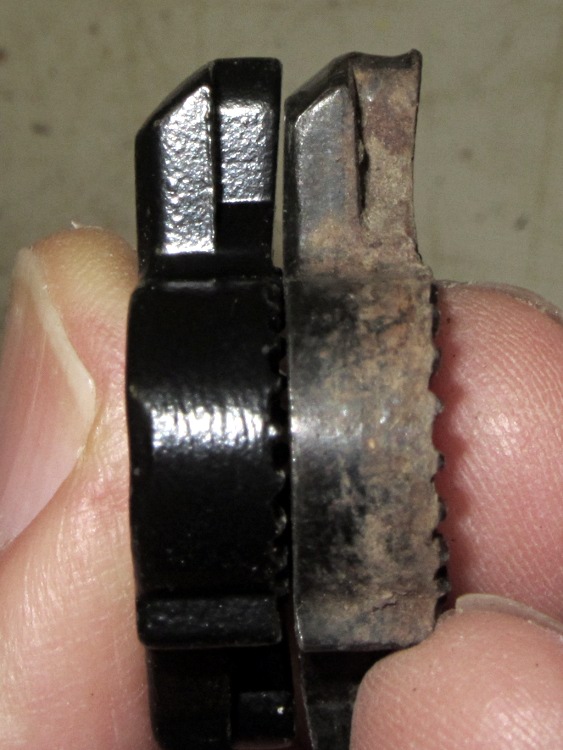
    The front brake on my bike started sounding more gritty than usual on a recent ride, which led to pulling the pads off, which led to discovering that one pad had worn completely through:

    Worn-through brake pad
    Worn-through brake pad

    The rim had a slight scuff where that aluminum tab stuck through, but nothing worth worrying about. The wear indicators aren’t reliable, because the pad curve matches 27-ish inch wheels and the Tour Easy has a 20 inch front wheel. If you align the pads to the outside of the rim, as I do, the inside edge gets light wear. So I let ’em wear, check them when the tire gets a flat, and this is the first time a pad has worn through. I think that means the front tire hasn’t had a flat in quite a while…

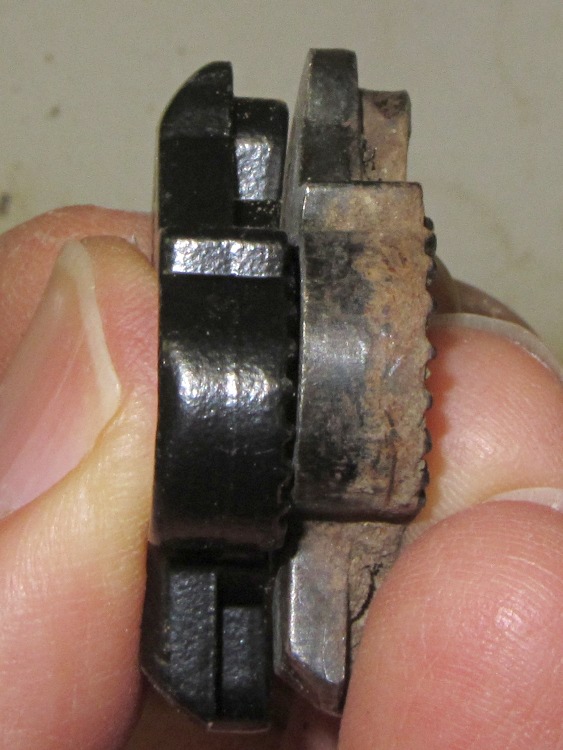
    While I was at it, I replaced all the pads on both our bikes. The rear pads didn’t have nearly as much wear, which is about what you’d expect, although the wear indicator grooves have just about bottomed out:

    Worn replaceable pads
    Worn replaceable pads

    Those are replaceable pads, which work quite well on the new brake arms. I suspect by the time I get around to needing new inserts (I bought a bunch, of course) they’ll be obsolete and unobtainable.

    I file the pads flat to save a bit of time wearing them in:

    Filed replaceable pads
    Filed replaceable pads

    I don’t hold with the notion of toeing in the pads to avoid squealing, vastly preferring crisp brakes with very little travel. Whatever the material is in Aztek pads, they don’t squeal after they’ve fitted themselves to the rim… but, of course, this new pair howled worse than the Freezer Dog when I got them out on the road.

    Squealing brakes aren’t entirely a bad thing, as they scare the daylights out of oblivious pedestrians, but I’d rather use the bell. So I gripped a strip of fine sandpaper between pad and rim, gently squeezed the brake lever, and rolled the bike about two wheel revolutions. Repeat on the other side and the rim’s now nice and clean and grippy. Flip the sandpaper over, scrub the pad surface, and they don’t make a sound.

    Ding!

  • Isolated Internet Access for Guests

    We provide a camping spot for touring bicyclists riding through the Hudson Valley and, as you’d expect, most of them arrive toting netbooks, tablets, and other net-enabled doodads. While I’m a nice guy and they’re uniformly nice folks, I’d rather not hand them the keys to our house network, so I recently set up a WiFi Internet-only access point that’s firewalled from the LAN.

    The general idea:

    • Use a stock WiFi router to handle DHCP / DNS / WiFi for guests (192.168.2.x)
    • Add a second NIC to the file server as eth1 (192.168.3.1), connected to the router’s WAN port (192.168.3.2)
    • Forward packets between eth0 (house network 192.168.1.x) and eth1, except …
    • Use iptables to prevent router clients from seeing the house network

    The network layout:

    Guest Internet Access Overview
    Guest Internet Access Overview

    The parts came from the Big Box o’ Network Stuff:

    • Linksys / Cisco WRT54G router (Version 8, so OpenWRT won’t run)
    • NetGear 10/100 Mb/s Ethernet PCI card

    The router setup:

    • Static WAN at 192.168.3.2
    • Router base address 192.168.2.1
    • DHCP range 192.168.2.100 through .149, lease time 1 hour
    • DNS entries 4.2.2.1 (L3), 65.88.88.2 (NY Public Library), 129.250.35.250 (NTT)
    • WiFi access to the web admin page disabled (admin only via CAT5 in the Basement Laboratory)
    • Non-broadcast SSID, not that it matters very much
    • WPA2-PSK with an XKCD-style password

    The NIC Just Worked: the drivers come along with the kernel. Because it’s not a general-purpose network interface from the server side, eth1 setup doesn’t require much effort:

    ifconfig eth1 192.168.3.1 netmask 255.255.255.0
    

    I discovered the hard way that trying to define the eth1 interface with Network Manager caused no end of heartache & confusion, not least of which is that having two NICs somehow activates Ubuntu’s internal firewalling & port forwarding. Suffice it to say, just set the NM’s GUI to Ignore the eth1 NIC and do what needs to be done manually.

    With one NIC, Ubuntu runs iptables in “let it be” mode: everything’s allowed, nothing’s blocked, and all packets get forwarded. The tables are empty and the default ACCEPT policy passes everything.

    Adding a rule to the FORWARD chain prevents the router from sending packets to the house network:

    iptables -A FORWARD -i eth1 --destination 192.168.0.0/16 -j REJECT
    

    That still allows a ping response from the file server’s eth0 NIC at 192.168.1.2 back to the WiFi clients, because packets addressed to the server pass through the INPUT chain. This rule squelches those packets:

    iptables -A INPUT -i eth1 --destination 192.168.0.0/16 -j REJECT
    

    Although packet forwarding is enabled by default, another rule turns on the NAT machinery required to shuttle packets between the 192.168.3.x network and the outside world:

    iptables -A POSTROUTING -t nat -j MASQUERADE
    

    While fiddling with iptables rules that involve packet state tracking (which these do, at least implicitly, I think), you must reset the packet state memories to ensure new packets aren’t regarded as part of an established connection. Install the conntrack utilities, then reset the state as needed:

    sudo conntrack -F
    

    And then it Just Worked.

    Now, back in the day, you’d just put those configuration lines in /etc/rc.local and be done with it. Unfortunately, nowadays the upstart process kicks off rc.local well before the system is in a usable state: somewhat before eth0 is active, which means any automagic network-related activity falls flat on its face.

    So an upstart configuration script is in order… more on that later.

    Some useful, albeit occasionally befuddling references:

    One could, of course, buy dedicated hardware to do all that and more, but it’s nothing you couldn’t accomplish with a bit more configuration on a stock Linux box. Heck, you could even serve an Upside-Down-Ternet to anyone who deserves it; the original has some other suggestions that made the big time.

    A tip o’ the cycling helmet to Dragorn of Kismet for getting me started…

  • Gas Flareoff

    While I was on that ride, I found this at the bottom of a smoky pillar rising along the Hudson River:

    Turns out Central Hudson Gas & Electric has a pipeline under the Hudson at that point and I’d admired their spherical storage tank from ground level some years back:

    Gas Storage Tank
    Gas Storage Tank

    I don’t know what they’re flaring off, but it looks messier than, say, propane. There’s another flare nozzle just out of the picture on the lower left, both along the edge of the circular concrete pad left over from a cylindrical storage tank, so they do this often enough to have some permanent infrastructure.

  • Sloop Clearwater: Sailing on the Hudson River

    Back in the old days, the Hudson was clogged with sailing ships; now only a few carefully tended reproductions remain:

    Sailing ship under Walkway Over the Hudson
    Sailing ship under Walkway Over the Hudson

    That’s the Sloop Clearwater as seen from the middle of the Poughkeepsie Bridge on an overcast day that brings out the vignetting in the long telephoto image.

    A bit earlier I was westbound on the Walkway Over the Hudson while the Clearwater was headed northbound:

    Sloop Clearwater
    Sloop Clearwater

    Turns out they carry a GPS tracker (accessible from a link on their site):

    Sloop Clearwater Track - 2012-05-14
    Sloop Clearwater Track – 2012-05-14

    So do I:

    KE4ZNU-9 APRS Track - 2012-05-14
    KE4ZNU-9 APRS Track – 2012-05-14

    It was a fine day for a ride (or a sail) before the storm!

  • Kai and Yen: T2 Bicycle Trailer

    Kai and Yen stayed with us over the weekend; they’re about 18 months into a two-year trip around the world. Kai was pulling an interesting single-wheel T2 trailer. Unlike my BOB Yak, the rear wheel has what looks like an active torsion-spring suspension:

    T2 trailer suspension
    T2 trailer suspension

    They’re taking the northern route across the US and Canada on their way back to Taiwan:

    Kai and Yen - ready to roll
    Kai and Yen – ready to roll

    They make our bicycling adventures fade to pale gray… which is OK with us!

  • Wouxun KG-UV3D GPS Interface: First Ride

    That circuit works pretty well for APRS tracking, I’d say, based on a 23 mile out-and-back ride over the Walkway:

    KE4ZNU - Wouxun KG-UV3D - first ride
    KE4ZNU – Wouxun KG-UV3D – first ride

    Had I gone further westward along Rt 299, however, the track would end: the bluffs on the east side of the Wallkill River Valley block much of the RF and Illinois Mountain (just to the west of Poughkeepsie) finishes the job. Evidently, nobody runs an APRS iGate or digipeater anywhere within sight of New Paltz…

    FWIW, the Walkway’s hand-scrawled notice boards now entreat “Bicyclists: ride SLOW and YIELD to pedestrians.” OK, fair enough, but how about equal time: “WALKERS: keep RIGHT, remove earbuds, and PAY ATTENTION”. It’s amazing how four people can block nearly the entire width of a 25 foot path, then look startled after not hearing a bicycle bell that’s been dinging steadily for 15 seconds…