Ed Nisley's Blog: Shop notes, electronics, firmware, machinery, 3D printing, laser cuttery, and curiosities. Contents: 100% human thinking, 0% AI slop.
There’s now There was a webcam[Update: dead link] watching the recently opened Walkway Over the Hudson, put on by the Dutchess County Tourism folks.
I couldn’t quite figure out where it was, though, because there aren’t any tall buildings or towers near the Walkway. The area used to be hard industrial, with plenty of smokestacks, but those days and those structures are long gone.
On a recent trip I parked the bike at the end of the chain-link fence on the north side of the bridge, eyeballed back five-and-a-half sections of fence on the south side, and spotted what I’d been missing.
The camera is a bit more than half a mile away, atop the Interfaith Towers building at 66 Washington St, on the northwest corner at Mansion Street. The Google overhead view isn’t up to date; the Walkway’s concrete decking is done and they’re tweaking some of the electrical work even as I type.
The camera’s gooseneck mount lets that loooong telephoto lens vibrate in high winds. When the webcam image looks broken up, new weather is on its way!
The picture is a crop from a larger image, with a bit of color correction and gamma tweakage.
Heard two Cooper’s Hawks doing a call-and-response exchange a few mornings ago, with the nearest bird in a tall pine in the back yard. I’m surprised that a one-pound bird can perch on the very tippy-top branch of a pine without bending it over, but they seem to do this quite often.
The picture is a crop from the full frame, taken with a Sony DSC-H5 at full optical zoom with a VCL-HGD1758 1.7x Tele Conversion Lens. There’s plenty of violet fringing in evidence, which is one reason I try not to take high-contrast backlit shots like this.
Here’s a dot-for-dot crop of just the bird to show how bad the fringing really is.
Coopers Hawk Detail – Violet Fringing
It’s better than no picture at all, the way I see it…
Took some pix of the high school marching band yesterday and the whole lot came out one stop underexposed… exactly as I intended.
Their uniforms are dead black wool with a yellow left-shoulder flap. The camera looks at all that black, desperately attempts to make it neutral gray, and blows out all the highlights. Given that the only highlights are the face and hands, the absolutely critical part of the image looks awful.
Auto Exposure
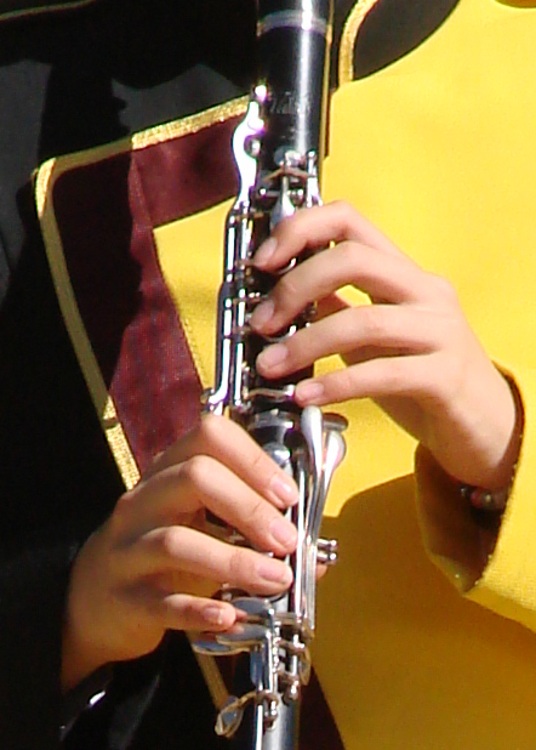
The first picture (a small crop from a much bigger image) shows what the auto-exposure algorithm comes up with:
Exposure Bias : 0
Exposure Mode : Auto
Exposure Program : Auto
Exposure Time : 1/1000 s
FNumber : F4
Flash : No, auto
Focal Length : 60.1 mm
ISO Speed Ratings : 125
Light Source : Daylight
Metering Mode : Center weighted average
Notice the burned-out highlights: the left hand is flat, the clarinet keys reflect retina-burn white, and the yellow shoulder is monochrome.
Under those circumstances, the only thing to do is override the camera’s opinion and force some underexposure. You can either meter each shot manually or just tell it to knock the auto-exposure back a bit. I generally choose the latter, if only because the camera comes up with a reasonable approximation of a good exposure faster than I can. If I don’t lay the center-weighted spot on the black side of a uniform, that is.
Minus 1 stop
So the second picture (another small crop) is “underexposed” by a stop:
Exposure Bias : -1
Exposure Mode : Manual
Exposure Program : Auto
Exposure Time : 1/1250 s
FNumber : F5.6
Flash : No, auto
Focal Length : 60.1 mm
ISO Speed Ratings : 125
Light Source : Daylight
Metering Mode : Center weighted average
Much better.
We can quibble about the color quality, but at least the highlights aren’t blown out and there’s some texture to the uniform. The black part of the uniform is a dead loss, but that’s pretty much the way it’s got to be: the camera simply doesn’t have enough dynamic range to handle a dead-black uniform and glare-white reflections.
One of the band members has absolutely gorgeous deep-dark-brown skin that I have yet to get right. Either the highlights burn out or her skin blends into the shadows. Twiddling the gamma doesn’t help much.
More on the details of why you want underexposure, even in what look like evenly illuminated scenes is there.
Sometimes, though, you just gotta fix it in the mix, as described there.
Memo to Self: Set the color balance to “daylight”, too, because bright primary colors against black can be confusing.
I recently bought two dozen Tenergy Ready-to-Use NiMH cells, rated at 2.3 Ah, with the intent of making up three 8-cell packs (identified as A, B, and C, for lack of anything smarter) for the amateur radio HTs we use on our bikes. However, one of the packs measured a consistently short runtime and I suspected one weak cell.
So I ran pairs of cells from the weak pack and found these results:
DSC-H5 Battery – Tenergy RTU NiMH AA Cells
Observations…
These are all measured just after charging, so they’re all the best you can expect from the cells. I haven’t done any self-discharge tests yet.
The overall capacity at 1 A load is roughly 65% of the 2.3 Ah rating.
The red trace falls far short of the others, so that’s the pair with the weak cell. I charged & tested those two cells individually, which are the lower two traces: cell A4 has 58% of nominal capacity. Admittedly, that’s 90% of the capacity of the rest, but, still …
I’ll use the other three pairs of cells through the Sony DSC-H5 camera, for reasons described there. Cell A4 is destined for the shelf…
Now, the question becomes: who should I buy the next batch of cells from?
My Sony DSC-H5 uses a pair of AA NiMh cells and, it seems, drains them rather rapidly. I’ve been cycling a motley assortment of paired cells through the thing and figured some measurements were in order.
Click on the graph to get a bigger image with readable labels:
DSC-H5 Battery – Old NiMh AA Cells
Some observations…
All of the cells, except for the Tenergy RTUs, have been cycled through the camera many times over the last few years. I charged the cells before testing, so these are hot-from-the-charger values without the usual self-discharge that afflicts all NiMh cells.
I picked a 1 A load for convenience. I think the camera presents a much heavier, although intermittent, load to the cells, as the actual runtime is far less than the 1.5 to 2.3 hours you see on the graph. In round numbers, the camera rejects the weaker cells in about 15 minutes, which means its load is much heavier.
The topmost blue-gray line is from the original pair of Sony Stamina cells that came with the camera, which still deliver decent runtime. Rated at 2.5 Ah and delivering very nearly that much into a 1-A load.
The green line is the same pair of cells loaded at 2.5 A, just to see what happens. They still work pretty well; the lower voltage is to be expected. A mere 0.14 Ω of lead resistance will account for that entire difference and I’m not sure how much the cells contribute.
The red and black lines are from the quartet of 2.2 Ah Energizer cells that came with an Energizer 15-minute (!) charger. They’re rated at “Min 2.05 Ah” and are still well within that spec. However, they deliver a relatively short runtime. I just noticed that the graph legend has the wrong capacity values for the red trace (cells C&D): oops.
The short purple line that dunks down in the middle of the graph is a new pair of the disappointing Tenergy Ready-to-Use cells, with a nominal capacity of 2.3 Ah and delivering barely 1.5 Ah.
The blue line is a pair of Tenergy 2.6 Ah cells with a similarly low actual capacity at a much lower voltage. They give a very brief runtime.
As nearly as I can tell, the only thing that matters for camera runtime is the battery voltage. Large currents cause a correspondingly large voltage drop, so even cells with good open-circuit voltage will fail early.
Internal cell resistance is probably the determining factor, as that increases with age. Even though the Energizers have plenty of capacity, they deliver it with a terminal voltage that’s too low for the camera.
The Tenergy RTU cells have a pitifully small capacity compared to their ratings, but they last much longer in the camera than I expected. Their output voltage stays above 2.3 V until fairly late in their discharge, so the camera remains happy.
I’ll continue using the Sony cells, along with a quartet of the Tenergy RTUs. The rest are destined for flashlights and such…
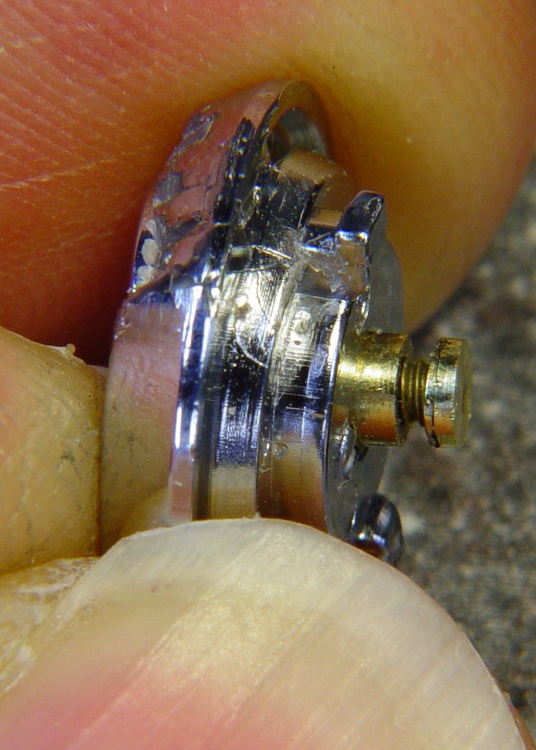
Bezel bottom 3.3 mm thick, excluding depression on bottom surface
Screw head sticks out of depression 0.9 mm
Some deft work on the bezel installed in the camera, using the blunt end of a transfer punch, a pin vise, and a calculator reveals these protrusions:
1.4 mm does not trigger anything
2.1 mm triggers the half-pushed focus action
2.4 mm reliably triggers the shutter
So the new stem can stick out about 1.4 mm when the button is released and must not stick out more than 2.4 mm with the button fully depressed: a whopping 1 mm of travel!
Eyeballing the shutter release on my DSC-H5, that seems to be about right. I think it has more travel between “released” and “half pressed” than those measurements indicate, but it’s close. And sloppy, too: the H5’s button has a lot of side-to-side wobble, indicating that the stem is not a close fit in the bezel hole.
The screw head is 3 mm dia after being turned down and that’s about the right size for the nut that will adjust the travel distance, as it must fit into the recess in the bezel. The nut sets the protrusion when the shutter button is released: 1.4 mm.
The distance from the shutter button’s bottom to the bezel sets the travel from “released” to “click”: 1 mm, more or less. They’re held apart by the spring, so that’s the default state.
Circular Milling the Nut
I re-centered the 3-jaw chuck under the spindle, put a 1-72 nut on the turned-down screw, and applied some gentle manual CNC to convert the nut from a hex to a disk. The trick is to approach the nut from the right side (the +X side) and go clockwise around it (climb milling), so that the cutting force tends to jam the nut against the screw head. Do it the other way and the nut will zip downward away from the cutter
Surprisingly, I got that right the first time.
Using a 2 mm end mill and figuring a 2.9 mm final diameter, the radius of the circle to move the end mill around the nut is: R = (2.9 + 2.0) / 2
So the G-code for one pass looks like:
#<R>=[[2.9+2.0]/2]
G1 X#<R> F150
G2 I[0-#<R>]
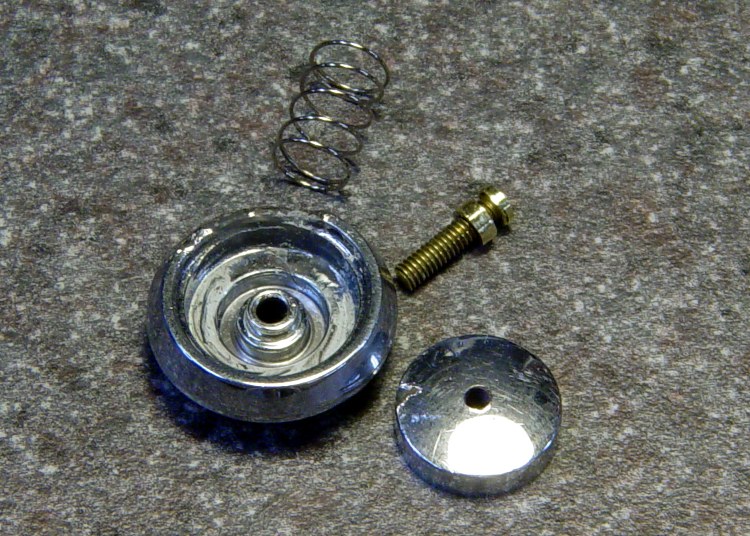
Shutter Button Parts
Now, given the fragility of that setup, you don’t cut it all at once. You start from a diameter of maybe 4 mm and go down by 0.2 mm until you hit 3.0, then make a final pass at 2.9 mm. EMC2’s AXIS MDI mode makes this easy enough: type in the commands for a pass at 4.0 mm, then click on the previous command, change 4.0 to 3.8, and then just clickety-click.
Spindle far too slow at 3000 RPM, feed at 150 mm/min seemed fine. Sissy cuts worked out OK.
After the first few passes, my dim consciousness became aware of the fact that this is how I should have turned down the screw head…
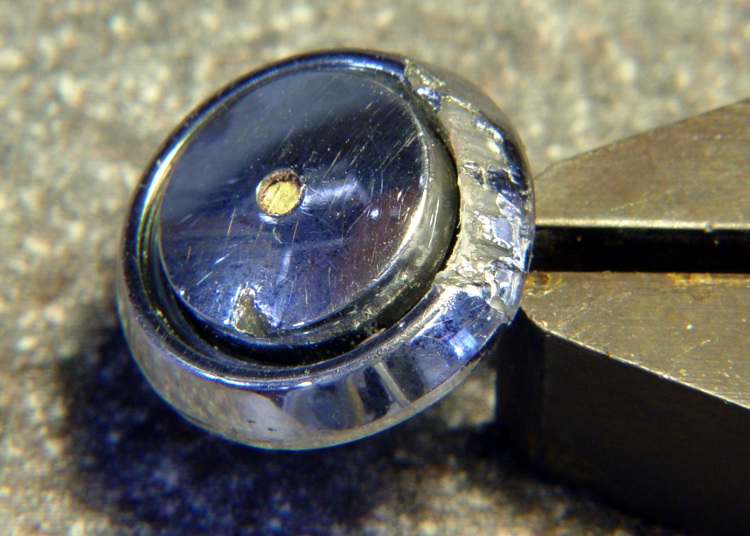
Button Assembly – Top
I cleaned up the bezel by putting it in an ultrasonic cleaner to shake the crud off, put it on a warm firewall router overnight to dry it out, then slobbered some Plastruct solvent adhesive into the cracks and clamped it for another night. The bezel was slightly out-of-round from the damage, so I hand-trimmed the bent plastic using a “high speed cutter” (#193, basically an end mill) in a Dremel flexible shaft at about 1/3 max speed until the shutter button bottomed out smoothly within the inner recess. Not a bit of CNC to be seen: hand held all the way.
Button Assembly – Bottom
Then loosen the nut a bit, poke the screw through the bezel, put the spring on, and screw the shutter button in place. Adjust the nut so the screw head is 1.4 – 1.5 mm from the bottom of the bezel with the nut resting in the recess.
Button Assembly – Pressed
Twiddle the shutter button until the screw head protrudes 2.4 mm from the bezel with the button pressed down.
That’s measured with the hole-depth tang of a caliper, sitting atop the screw head. I don’t believe there’s 0.1 mm accuracy in the measurements, but they’re close enough. I did file off a few mold flash bumps from the shutter button & bezel during this adventure.
Mark the screw threads above the button, unscrew it, chop the screw off with a stout diagonal cutter (it’s brass and not very thick, it’s OK), file the end flat, clean up the threads.
The trick seems to be that the button must rest just below the inner ring of the bezel, so that it bottoms out smoothly when pressed. If it’s above the ring, then one side will hang up. The ring depth thus seems to limit the maximum travel, although I can’t say whether this is the way it’s supposed to work or not.
I iterated & filed until the screw was flush with the top of the button with it screwed down to the proper position. It helped to figure out that one turn of the shutter button on the screw changed the “pressed” protrusion by 1/72″ = 0.35 mm.
Urge some low-strength Loctite under the nut and into the shutter button’s hole, reassemble everything, and you’re done.
Urethane Adhesive on Body Socket
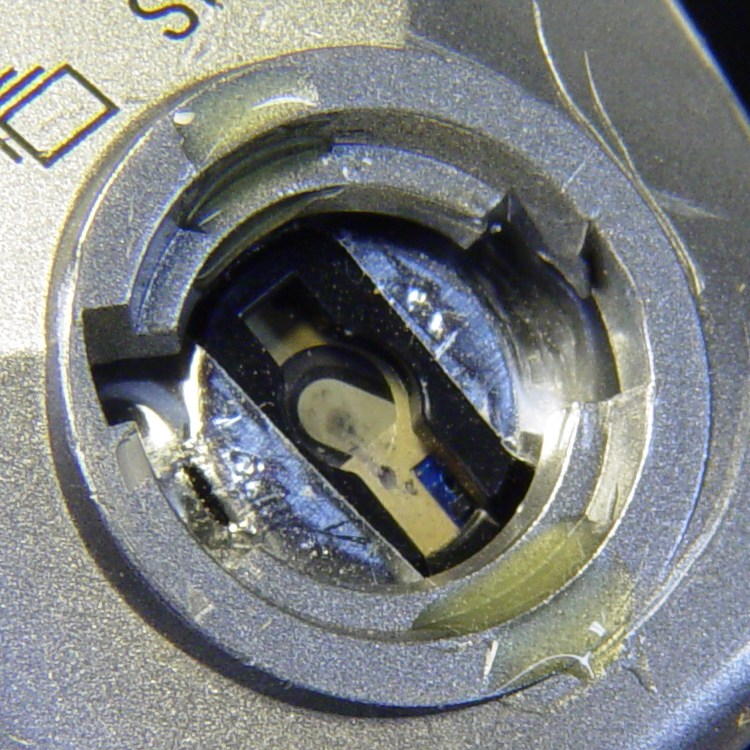
The fall bent the bezel tabs so they no longer latch firmly in the camera body. I put two dabs of urethane adhesive on the socket in the body. The adhesive expands (foams!) as it cures; I hope it will lock the bezel in place while still allowing it to be removed if needed.
I dabbed off most of the adhesive you see in the picture before installing the bezel; it’s not as awful as it looks!
The final result has slightly less travel than the (undamaged, original) shutter button in my DSC-H5, but it works perfectly: half-press to focus, full press to trigger the shutter.