The Smell of Molten Projects in the Morning

Ed Nisley's Blog: Shop notes, electronics, firmware, machinery, 3D printing, laser cuttery, and curiosities. Contents: 100% human thinking, 0% AI slop.

Category: Photography & Images

Taking & making images.

  • Dell 75UYF Battery Teardown: Part 1

    One of the batteries on the ancient Dell Inspiron 8100 laptop died completely and our Larval Engineer reports the other battery isn’t far behind; it gets her from outlet to outlet and not much more. Pursuant to that comment about harvesting reasonably good cells from dead batteries to build an extended-life external battery for the Canon SX230HS camera, I made a preliminary pack probe.

    The label says it’s a 14.8 V battery, so you’d expect four 3.7 V lithium cells in series. The 3.8 A·h capacity suggests parallel cells:

    Dell 75YUF battery - label
    Dell 75YUF battery – label

    Indeed, peeling off the label shows four cells pairs in series:

    Dell 75YUF battery - under label
    Dell 75YUF battery – under label

    The case joint seems firmly welded together and resisted simple attempts to crack it open. I might run a slitting saw around the edge, although I’ll probably just crunch it in the vise because the patient need not survive the operation.

    A single cell should have a 1.9 A·h capacity, although in an awkward cylindrical form factor. The 3.5 A charging current would drop to 1.7 A for a (string of) single cells.

    The Canon SX230HS uses a single 3.7 V, 1.1 A·h prismatic “battery”, which means replacing that with a single external cell wouldn’t be a major win; the size difference shows how much lithium energy storage tech has advanced in the last decade or so. A pair of cells in parallel would quadruple the runtime, which might be enough. Three in parallel would be fine, although that would require attention to matching their capacity; the nominal 5.2 A charging current (1.5 × 3.5 A) seems aggressive.

    Time to start mulling charging circuits…

  • Sony NP-FS11 Battery Rebuild Repair

    One of the battery packs I’d re-rebuilt failed in short order, which I wrote off to a bad cell and tossed it on the heap. Having recently found a small stack of Round Tuits, I’ve been cleaning off the bench and took the pack apart again. Turns out I blundered the solder joint between the positive cell terminal and the protective circuit board: the strap in the foreground joining those two points didn’t make a good connection to the cells.

    I suppose it was just another cold solder joint:

    Rebuilt NP-FS11 battery - Pack A
    Rebuilt NP-FS11 battery – Pack A

    That’s an awkward joint at best, because the protective circuit doesn’t come willingly out of the housing and you (well, I) must solder it without scorching the cells, the plastic case, or the PCB. It can be done, but it’s not easy.

    Charged it up and it’s back in the A/B/C pack rotation again.

    Memo to Self: Tough to find good repairmen these days, eh?

  • Macro Lens Focus Stacking

    Begin by mounting the Canon SX230HS on the macro lens adapter, zooming to about the maximum, fiddling with a ruler to put the end at the closest focus point, and eventually get an overall view like this:

    Ruler - macro mid-focus
    Ruler – macro mid-focus

    The images below were batch cropped from similar views with ImageMagick:

    for f in $(seq 17 22) ; do convert -crop '1500x1126+1900+1800' \
       img_18${f}.jpg img_18${f}-crop.jpg ; done
    

    Yes, I’ve taken a bit over 1800 images since getting that camera… the old DSC-F505V recently rolled over at 10K images.

    Take a set of six identically exposed pictures starting with the focus at infinity (about 95 mm in real life):

    macro far focus
    macro far focus

    And ending with the closest focus at about 1 meter for this zoom setting (and 80 mm in real life):

    macro near focus
    macro near focus

    Then apply enfuse (from the Ubuntu repositories) with a handful of parameters suggested there that combine the sharpest parts of each image into a single image:

    enfuse --verbose --exposure-weight=0 --saturation-weight=0 \
       --contrast-weight=1 --hard-mask --output=stacked.jpg \
       img_18??-crop.jpg
    

    Which produces this nice result:

    Ruler - macro combined focus
    Ruler – macro combined focus

    It’s not perfect, it needs a few more intermediate images, there’s fringing around high-contrast edges, and so forth and so on, but for a first pass it ain’t bad at all.

    I bar-clamped the camera & macro adapter to the desk in order to eliminate all motion. My usual tripod mount for the macro setup isn’t all that stable and the microscope stand isn’t particularly rigid, either, so I must improve a bunch of mechanical structures. In principle, you can post-process the pictures to realign them, although the tolerances seem daunting enough to make mechanical fixturing look downright attractive by comparison.

    Now, if it should turn out that the SX230HS supports the CHDK USB remote trigger, that’d be nice. Or maybe the right way to proceed involves converting the problem to A Simple Matter of Software by writing a CHDK script that tweaks the focus by multiples rather than increments.

  • Canon Hack Development Kit for SX230HS

    Although the macro lens adapter and microscope mount work well enough, the relatively small sensor and lens in my Canon SX230HS make for a razor-thin depth of field:

    Macro lens depth of field
    Macro lens depth of field

    Those are, of course, millimeter divisions on the ruler.

    A bit of rummaging leads to the notion of Focus Stacking, which involves taking a sequence of images with identical exposure settings and different focus points, then compositing the in-focus parts of each image to produce a single image with everything in focus. Although some examples show a manual process involving layers in, say, The GIMP or Photoshop, I think an automated process would be better.

    Given that I have a Canon SX230HS camera, the first step is to download the proper version of the Canon Hack Development Kit, unpack it onto a spare SD card, and get used to it.

    As it turns out, the focus bracketing works exactly as intended, but doesn’t do quite what I need: it changes the focus in linear steps by adding a constant bracketing distance. The macro lens adapter drags the “infinity” focus point inward to maybe 15 mm beyond the innermost focus point, but the camera’s focus range still shows 1 m to ∞. Stepping in 1 m increments generates a bazillion pictures that don’t differ by much at all after 5 m, but you still need a few near the far end.

    However, it seems the only way to get a bazillion pictures is by holding the shutter button down with the drive mode set to Continuous, as the camera’s Custom Timer mode has a 10 shot upper limit. If I must do that, I may as well adjust the focus manually: the assumption being that the camera shall be firmly mounted to keep the pix in alignment, which currently isn’t true in any of my setups and certainly won’t be true with my finger on the button.

    The camera already has exposure bracketing, although not to the extreme range available through CHDK. RAW images (or the roughly equivalent DNG format) might come in handy at some point, but right now they’re just a temping digression available only through CHDK.

    If I’m going to keep using CHDK, I must conjure up an artificial NB-5L battery with an external power source. Those cheap eBay batteries work fine for the usual duty cycle, but constant zooming & focusing & suchlike chew them pretty hard…

  • Gas Flareoff

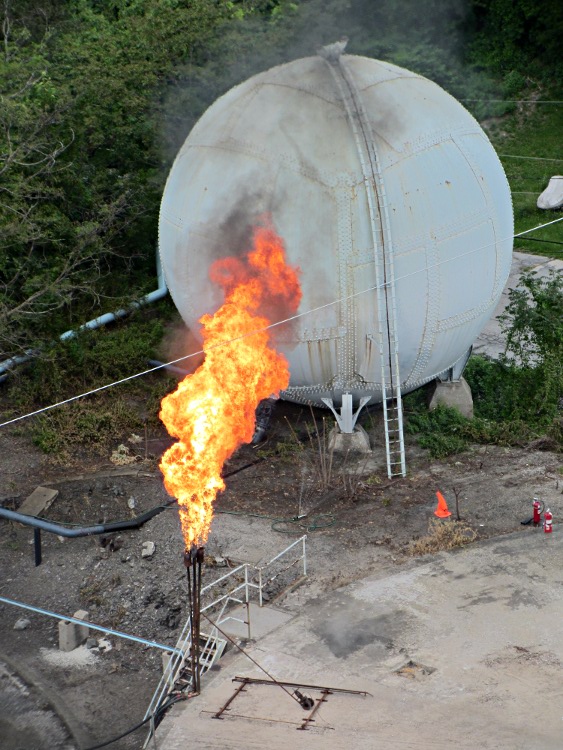
    While I was on that ride, I found this at the bottom of a smoky pillar rising along the Hudson River:

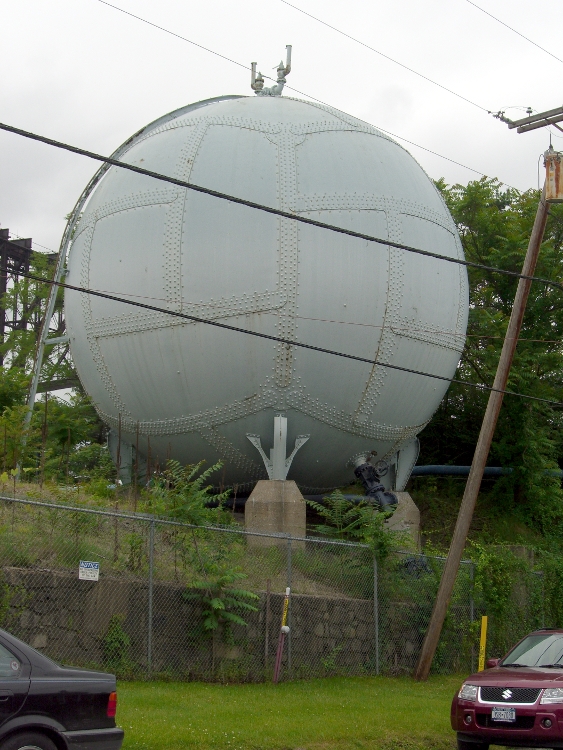
    Turns out Central Hudson Gas & Electric has a pipeline under the Hudson at that point and I’d admired their spherical storage tank from ground level some years back:

    Gas Storage Tank
    Gas Storage Tank

    I don’t know what they’re flaring off, but it looks messier than, say, propane. There’s another flare nozzle just out of the picture on the lower left, both along the edge of the circular concrete pad left over from a cylindrical storage tank, so they do this often enough to have some permanent infrastructure.

  • Ladybugs!

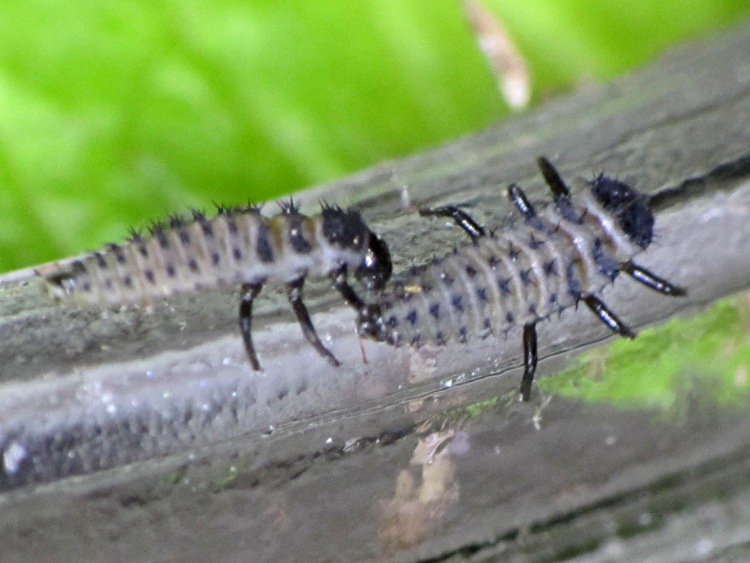
    These freshly hatched alligator-oid critters:

    Ladybug larvae
    Ladybug larvae

    …. quickly become something even more fearsome, at least to aphids smaller than they are:

    Ladybug Larva Eating Aphid
    Ladybug Larva Eating Aphid (by Cheryl Hearty – CCE/DC)

    Eventually they turn into Ladybugs who relentlessly stalk larger aphids on garden plants:

    Ladybug with aphids
    Ladybug with aphids

    And then they do this and the wheel goes around:

    Ladybugs mating
    Ladybugs mating

    Gardeners love them ever so much…

  • Sloop Clearwater: Sailing on the Hudson River

    Back in the old days, the Hudson was clogged with sailing ships; now only a few carefully tended reproductions remain:

    Sailing ship under Walkway Over the Hudson
    Sailing ship under Walkway Over the Hudson

    That’s the Sloop Clearwater as seen from the middle of the Poughkeepsie Bridge on an overcast day that brings out the vignetting in the long telephoto image.

    A bit earlier I was westbound on the Walkway Over the Hudson while the Clearwater was headed northbound:

    Sloop Clearwater
    Sloop Clearwater

    Turns out they carry a GPS tracker (accessible from a link on their site):

    Sloop Clearwater Track - 2012-05-14
    Sloop Clearwater Track – 2012-05-14

    So do I:

    KE4ZNU-9 APRS Track - 2012-05-14
    KE4ZNU-9 APRS Track – 2012-05-14

    It was a fine day for a ride (or a sail) before the storm!