The Smell of Molten Projects in the Morning

Ed Nisley's Blog: Shop notes, electronics, firmware, machinery, 3D printing, laser cuttery, and curiosities. Contents: 100% human thinking, 0% AI slop.

Category: PC Tweakage

Remembering which tweaks worked

  • Xubuntu: Separate X Sessions

    Although XFCE is rather short on creature comforts, it handles my dual output video card with separate X sessions on two monitors and doesn’t fall flat on its face with the right-hand monitor rotated into portrait mode. Some apps don’t maximize quite correctly, thinking the bottom is at 1200 (1080?) rather than 1680, but overall it works fine.

    The XFCE version shipped with Xubuntu 8.10 is now backlevel, but you can fetch the latest & greatest from www.xfce.org. Add the repository (and corresponding public key), then do a normal upgrade.

    You’ll also want to install/upgrade OpenOffice 3 from the PPA repository. Do the obvious search to find the most current links. There’s no need for the manual install hocus-pocus using a tarball from the OOo site.

    You can’t have separate wallpaper on each virtual desktop, you must have the same number of desktops in each X session, and there are some other aggravations, but … no showstoppers so far.

    Bottom line: It (pretty much) Just Works.

    More on the system setup in a bit, as I get some useful results.

  • Separate X Sessions Do Not Work in Kubuntu 8.10

    I sent this in as a bug to Launchpad, where it became Bug 337777 (not octal, BTW) and was marked as a duplicate of Bug 192413. It’s been triaged as Low priority, so I think my days of using KDE are, alas, pretty much finished.

    Herewith, the straight dope, just in case you were thinking of doing the same thing.

    ————-

    In Kubuntu 7.04, I managed to manually configure separate X sessions using two nVidia video cards driving two monitors. The setup involves a 1600×1200 landscape monitor on the left and a 1680×1050 monitor rotated 90 degrees CCW on the right.

    In Kubuntu 7.10, this worked reasonably well.

    In Kubuntu 8.04 / KDE3, this works poorly. X seems to regard the right-hand monitor as being 1600 (1680?) x 1200, so all windows maximize incorrectly and “centered” dialogs appear off-center to the upper right on that screen. I installed an nVidia-based dual-head card in the hopes that it would work better, but that made no difference. The setup is usable (I’m using it now), but not desirable.

    The automatic configuration tools fall flat on their face: any attempt to use the standard KDE display tools pooches xorg.conf. I must carefully tweak xorg.conf to keep this setup working in the face of any X changes.

    In Kubuntu 8.10 / KDE4.2, this configuration flat-out doesn’t work. After considerable manual fiddling, I got a blank X session on the right with the default X cursor and a black background; the mouse pointer moves from one screen to the other, but that’s as good as it gets. The left screen works more-or-less normally, but with some weirdnesses. Diligent searching reveals this is the common endpoint for all folks attempting this configuration: KDE4 simply doesn’t support separate X sessions.

    I do not want Twinview / Xinerama (which also work poorly for this configuration), because I typically edit a single document in portrait mode on the right screen while flipping between circuit simulators / web browsers / PDF documents / PCB layout editors on the left screen. A single X session using two screens does not support that functionality; particularly in KDE4 which seems to lack the advanced window positioning controls of KDE3.

    Because KDE4 is mandatory with 8.10, I can’t downgrade to KDE3, which might work.

    Although KDE4 seems to be the future, it would be immensely more usable if it didn’t introduce serious regressions from previous functionality. I will gladly trade off all the Plasmoid foo-foos and Compiz go-fast-stripes to get stable X capabilities that work the same way as 7.04.

    The to-be-expected alpha-version issues in 9.04 prevent me from even installing it at this point, so I cannot say whether it’s an improvement or not. From what I read in the forums, things do not look promising.

    Perhaps this is less of a “bug report” and more of a plea for stability: please, first make KDE4 *work*, then make it pretty!

    ————-

    For what it’s worth, I installed Xubuntu in that partition, added one line (Option “Rotate” “CCW”) to xorg.conf, and It Just Worked. XFCE is a bit lacking in creature comforts, but it works in this configuration. I think I can get used to that.

  • Old PCs: The Gift That Keeps on Giving

    A friend gave me an old Aptiva, upon which I was going to install Puppy Linux.

    But, first I let it start up Win ME just for old time’s sake. What the heck, it’s a classic.

    The first thing up is a prompt asking permission to install Compuserve, which I really don’t need. As is usually the case with shovelware, that program doesn’t show up in the Start Menu, so I did some rummaging around.

    Firing up msconfig and looking at the auto-started stuff revealed, among the usual stuff, this interesting file:

    c:\windows\nav.exe                   .vbs

    That pretty much pushes the Compuserve popup to the back of the queue.

    Note the long string of blanks in the middle. That, in combination with Windows Explorer’s default “Hide known file extensions” setting, is an old trick, but, then, this is an old box.

    Sooo, at one time there was a virus on that box masquerading as good ol’ Norton AntiVirus. The offending file seems to be missing now, so something killed it without removing its auto-start setting.

    Either my friend removed NAV, too, or the virus shot it in the head. There’s all manner of NAV config files and clutter lying around, but no executables.

    In goes the Puppy CD, reboot, and I install its slightly backlevel ClamAV package. No problem with that; it’ll use the most recent virus signatures and, heck, any problems on this box are half a decade old.

    After mulling over the Windows ME partition for a while, ClamAV reported:

    /mnt/sda1/Program Files/Netscape/Users/Default/Mail/Trash: W95.Matrix.SCR FOUND
    /mnt/sda1/Program Files/Netscape/Users/Default/Mail/Inbox: W32.Magistr.B FOUND
    /mnt/sda1/_RESTORE/ARCHIVE/FS346.CAB: Worm.Kido-18 FOUND
    ----------- SCAN SUMMARY -----------
    Known viruses: 513471
    Engine version: 0.91.2
    Scanned directories: 1821
    Scanned files: 44557
    Infected files: 3
    Data scanned: 10721.32 MB
    Time: 73200.595 sec (1220 m 0 s)

    Feeding the obvious keywords into Google produces the comforting result that these are all old news:

    However, Kido is a Conficker / Downadup variant, which is disturbing. The hit is almost certainly a false positive, as it’s in a CAB file, we don’t run any Windows machines, and they’re behind a hardware firewall that’s in full effect.

    Handing the offending file to VirusTotal shows that ClamAV is the outlier and all the others are perfectly happy: Current status: finished Result: 1/39 (2.57%)

    To quote Ripley: “I say we take off and nuke the entire site from orbit. It’s the only way to be sure.

    Memo to Self:

    • Run ClamAV (not ClamWin) before booting Windows
    • Do not plug in the network cable until the box is known-clean
    • It’s time for a reverse wireless firewall when our young lady invites friends over

    Windows: http://www.clamwin.com/

    Linux: http://www.clamav.net/

  • X Server Auto-Configuration Requires a Monitor: Duh

    The used Optiplex GX270 that will eventually become my mother’s “new” PC has been booting absolutely reliably in the basement, so whatever was troubling it a few months ago seems to have Gotten Better By Itself. I don’t have to like that, but so far, so good.

    This morning I ssh-ed into it, as I do every few days, then fired up krdc on my desktop, which immediately complained that there wasn’t anything there to connect with. Uh-oh

    But the ssh worked, so at least there’s a Linux system at the end of that network cable.

    A changing cast of PCs has gone through the basement lab in that time and I’ve been swapping the desktop monitor among them. Most recently, a friend gave me an ancient Aptiva that might turn into a dedicated controller and I’d left the monitor connected to it.

    After I figured out that the monitor wasn’t hitched to the Optiplex, traced the cable, and fixed that oversight, I was confronted with a command-line prompt. A bit of rummaging in /var/log/Xorg.0.log turned up some useful information:

    (II) intel(0): Output VGA disconnected
    (EE) intel(0): No valid modes.
    ... <snippage> ...
    (EE) Screen(s) found, but none have a usable configuration.
    Fatal server error:
    no screens found

    In the Bad Old Days, you told X exactly what output to produce by providing modelines that specified the exact video timings. That was fraught with peril, as you could do the Digibomber thing to a fussy fixed-frequency monitor by specifying timings beyond its abilities.

    Nowadays, the X server feels around, detects the video card, asks it what it can produce, detects the monitor, asks it what it can display, figures out the best match from the ensuing matrix of possibilities, and shazam slaps up a GUI. Might not be exactly what you want, but more likely than not it’ll be pretty close and you can apply some tweakage to get it right.

    If there’s no monitor connected, then the X server doesn’t know quite what to do. I’m sure it’s possible to specify a default fallback configuration, but maybe it’s better to just ensure the monitor is always connected. Those cute little screws on the connector might be a clue, eh?

    The command line continues to work, of course, so you can figure this stuff out either locally or through ssh. Alas, it’s really hard to reconnect a monitor cable through ssh.

    If you’re still not convinced to improve your command-line chops, I commend to your attention Stephenson’s In the Beginning was the Command Line.

    Memo to Self: Use the Screws!

  • KDE Window Behavior Tweakage

    My mother does email and not much else, so I set up her PC to power on in the morning, shut down in the evening, sign her in automatically, fire up Kontact (which starts in Kmail mode), and (oh by the way) let me do remote admin via SSH from 250 miles away.

    Works like a champ.

    I’ve tweaked the KDE Window Behavior settings for Kontact so that it runs full-screen (with no border), thus eliminating a bunch of clutter and many opportunities for things to go wrong. To do this, click the small icon on the far left of the window’s title bar and select Configure Window Behavior.

    You can also fire up System Settings -> Window Behavior -> Window-Specific Settings, then use the Detect button to load the window ID stuff from the window you’re tweaking. Then select

    • Geometry tab, Fullscreen -> Force -> checkmark

    This differs in some subtle ways, which I don’t understand, from the combination of

    • Geometry tab: Maximize horizontally -> Force -> checkmark
    • Geometry tab: Maximize vertically -> Force -> checkmark
    • Preferences tab: No Border -> Force -> checkmark

    Remember this magic keystroke: Alt-F3. This pops up the same menu you get from the small icon in the far left of the title bar, which just ain’t there for borderless windows. You can also wade through System Settings, but Alt-F3 is faster.

    I also set the Kontact Composer (why not Komposer?) window to behave the same way, so that the only obvious way out is to either send the message or close the window using the toolbar icons.

    Now, I wanted to set up Firefox similarly and it looked like it should work fine.

    Alas, there’s a non-obvious interaction with new windows triggered by Javascript. If they’re the sort of pesky windows that suppress the Firefox menu & tab bar, then there’s no way out unless you happen to remember Ctrl-W or Alt-F4 will close the current window. Maybe you know that and use it every day, but it’s not reasonable to expect my mother to remember such trivia.

    So I set up Firefox thusly:

    • Geometry tab: Maximize horizontally -> Force -> checkmark
    • Geometry tab: Maximize vertically -> Force -> checkmark

    By not selecting the No Border option, Firefox and all its subsequent pop-ups fill the screen, but each window also has a normal border with the all-important Close button in the upper-right corner. Thus (desired) popups, like video players, can be killed when they’re done, even if they lack a separate Close This Window option.

    Yes, Firefox is running Adblock Plus and all the usual extensions…

  • Logitech Trackball: Tilting Thereof

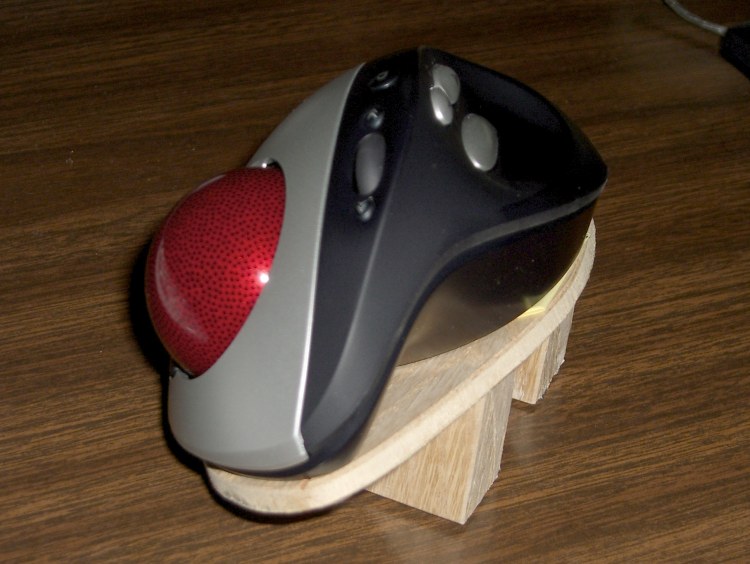
    Trackball platform
    Trackball platform

    The right-hand trackball by my keyboard is a Logitech Cordless Optical Trackman, which I fixed a while ago with a laying-on-of-hands repair. If you do a lot of typing and want to save your wrists, a trackball might be just what you need.

    This trackball’s shape is strongly right-handed and I found that my wrist was happier when I tilted the trackball about 30 degrees to the right, making the ball almost vertical and the thumb buttons to the upper left. Evidently my wrist wants to work at a more clockwise angle, not at whatever Logitech found suitable.

    I made the platform from thin oak-veneer plywood left over from a bookshelf project, with oak wedges holding it up. Polyurethane glue, my favorite wood adhesive, holds everything together. I presented the bottom to the belt sander to get a nice flat surface and bevel the down-side edge of the platform, then applied non-skid rubber stair tread tape to the wedges.

    Conveniently, Logitech held the trackball’s case together with four plastic-tapping screws. I removed a screws at each end, drilled two matching holes in the platform, and used similar-size machine screws. The threads don’t quite match, but it’s close enough.

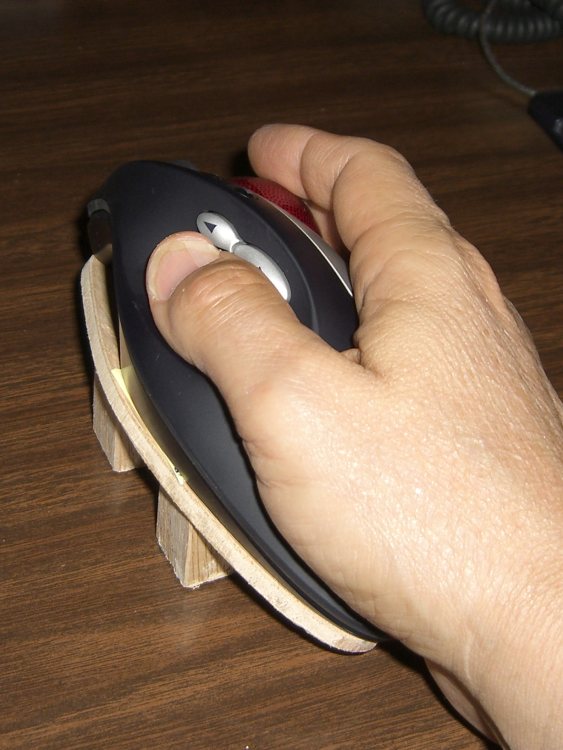
    Rotated trackball in use
    Rotated trackball in use

    Here’s what it looks like in use…

    The platform makes battery replacement a bit more tedious. Much to my surprise, the two AA cells run for half a year at a time, so that’s not a big issue.

    However, the trackball occasionally (every few weeks) loses sync with its base receiver, requiring a poke of buttons on both units. I think that’s partly due to the Logitech wireless mouse on my esteemed wife’s desk ten feet away.

    On the whole, I like it a lot. If Logitech made one for southpaws, too, I’d get a bookend set, but they don’t.

    Oh, yeah, if only evdev allowed button reconfiguration, without using a bunch of batshit kludges, I’d be ecstatic. As of the last time I fiddled with it, the standard mouse xorg driver couldn’t handle the number of buttons and evdev didn’t allow button mapping. Mostly, it works, but I’d like to reassign a few of the buttons.

  • Arduino Command Line Programming: Avrdude Puzzlement

    For all the usual reasons, I’d like to compile & download Arduino programs from the command line, rather than through the (excellent!) IDE. That is supposed to work and, for most folks, apparently it does.

    Not here, alas.

    I’ve installed the 0012 Arduino Java IDE (x86 or x86_64 as appropriate) from http://code.google.com/p/arduino/ on three different systems, all with Kubuntu 8.04:

    • Dell Dimension 9150 – x86_64, which seemed like a good idea at the time
    • Dell Inspiron E1405
    • Dell Inspiron 8100

    In all cases the IDE works perfectly, compiles & downloads programs just fine, and behaves exactly as you’d expect. I had a few minor quibbles with sorting out various paths & suchlike, but, on the whole, it has no troubles at all with either a Diecimila or a Sparkfun Arduino Pro (with a Sparkfun FTDI Basic USB gizmo).

    I tweaked ~/.arduino/preferences.txt to include:

    console.auto_clear=false
    build.verbose=true
    upload.verbose=true

    Here’s the final step in the IDE compile-and-download dance. Backslashes indicate continuations of the same line; the original is all on single line:

    hardware/tools/avrdude -Chardware/tools/avrdude.conf -v -v -v -v -pm168
    -cstk500v1 -P/dev/ttyUSB0 -b19200 -D
    -Uflash:w:/mnt/bulkdata/Above the Ground Plane/
    2009-06 Solar Data Logger/Firmware/Logger/applet/Logger.hex:i 
    
    avrdude: Version 5.4-arduino, compiled on Oct 22 2007 at 13:15:12
             Copyright (c) 2000-2005 Brian Dean, http://www.bdmicro.com/
    
             System wide configuration file is "hardware/tools/avrdude.conf"
             User configuration file is "/home/ed/.avrduderc"
             User configuration file does not exist or is not a regular file, skipping
    
             Using Port            : /dev/ttyUSB0
             Using Programmer      : stk500v1
             Overriding Baud Rate  : 19200
    avrdude: Send: 0 [30]   [20]
    avrdude: Send: 0 [30]   [20]
    avrdude: Send: 0 [30]   [20]
    avrdude: Recv: . [14]
    avrdude: Recv: . [10]
             AVR Part              : ATMEGA168

    The IDE evidently does the reset-from-USB trick through the standard USB hardware.

    I set up the command-line Makefile from http://www.arduino.cc/en/Hacking/CommandLine, although that’s for the 0011 IDE, then made the recommended tweaks. The make section does exactly what you’d expect: compiles the source program.

    Running make upload fails every time, on every PC, with both boards. Indeed, in all cases, running avrdude on the command line produces the dreaded “not in sync” errors, showing that it’s unable to communicate with the Arduino board. Blipping the reset button on the Arduino board generally makes the USB transfer work fine, with the failures most likely due to my lack of dexterity & timing precision.

    The usual debugging suggestions aren’t relevant, as they all assume there’s a basic communication failure caused by anything from a completely dead board to mysterious library incompatibilities. In this case, however, I have an existence theorem: the IDE works perfectly before and after the command-line failure.

    It turns out that the IDE includes a specially patched avrdude, so I tried running that version from the directory where the IDE lives, using exactly the same command-line flags as the IDE does. Surprisingly, that doesn’t work. Again, backslashes indicate continuations of the same line and I added quotes to the file name to protect the blanks…

    hardware/tools/avrdude -Chardware/tools/avrdude.conf -v -v -v -v -pm168
    -cstk500v1 -P/dev/ttyUSB0 -b19200 -D
    -Uflash:w:"/mnt/bulkdata/Above the Ground Plane/
    2009-06 Solar Data Logger/Firmware/Logger/applet/Logger.hex":i
    
    avrdude: Version 5.4-arduino, compiled on Oct 22 2007 at 13:15:12
             Copyright (c) 2000-2005 Brian Dean, http://www.bdmicro.com/
    
             System wide configuration file is "hardware/tools/avrdude.conf"
             User configuration file is "/home/ed/.avrduderc"
             User configuration file does not exist or is not a regular file, skipping
    
             Using Port            : /dev/ttyUSB0
             Using Programmer      : stk500v1
             Overriding Baud Rate  : 19200
    avrdude: Send: 0 [30]   [20]
    avrdude: Send: 0 [30]   [20]
    avrdude: Send: 0 [30]   [20]
    avrdude: Recv: . [1e]
    avrdude: stk500_getsync(): not in sync: resp=0x1e
    avrdude: Send: Q [51]   [20]
    avrdude: Recv: . [0f]
    avrdude: stk500_disable(): protocol error, expect=0x14, resp=0x0f

    There’s no difference between the /opt/arduino/lib/librxtxSerial.so and /usr/lib/librxtxSerial.so libraries, which normally causes some confusion on x86_64 systems. I think that means the x86_64 version of the IDE has the correct library.

    I’ve also tried the stock Kubuntu avrdude, which is at V 5.5, to no avail.

    Given that the IDE works, that I’m running the same avrdude executable, and that the libraries match, I’m not sure where to go from here.

    While I’m generally dexterous enough to run make upload and blip the Arduino board’s reset button with my other hand, I’m bringing up a shield-like board that plugs atop the Arduino and, alas, lacks both a reset button and a hole over the Arduino’s button.

    The board is, of course, that one.

    Update: As a reasonable workaround, I’ve set the IDE up to use an external editor. Then I can tweak the programming, flip to the IDE, click the Download button, and away it goes. Not quite as easy as a full command-line solution, but close enough.