So I got a classic Jordan Electronics CD V-750 dosimeter charger (for V-742 dosimeters) from the usual eBay supplier, mostly because I’m writing a Circuit Cellar column and need a MacGuffin to talk about HV transformers and power supplies.
The charger had some corrosion on the cast aluminum (?) knobs, but seemed largely unscathed by four decades in its original box. The charging circuitry depends on a few electrical contacts and, as you might expect, those were badly intermittent.
A bit of background…

The charging pedestal has two parts visible from the outside: an outer sleeve that’s firmly secured to the case and an inner cylinder that slides within the sleeve, with springs inside the charger pressing it outward. Well, there’s a nut, toothed washer, and the bead-chain cap assembly, but those don’t count.
The inner cylinder has a transparent plastic insert crimped in place, with a metal rod protruding about 2 mm from the flat top of the plastic. That rod presses against the middle contact of the dosimeter and connects the charging voltage to the electrostatic fiber. The outer body of the dosimeter fits snugly over the cylinder to make the other electrical contact.
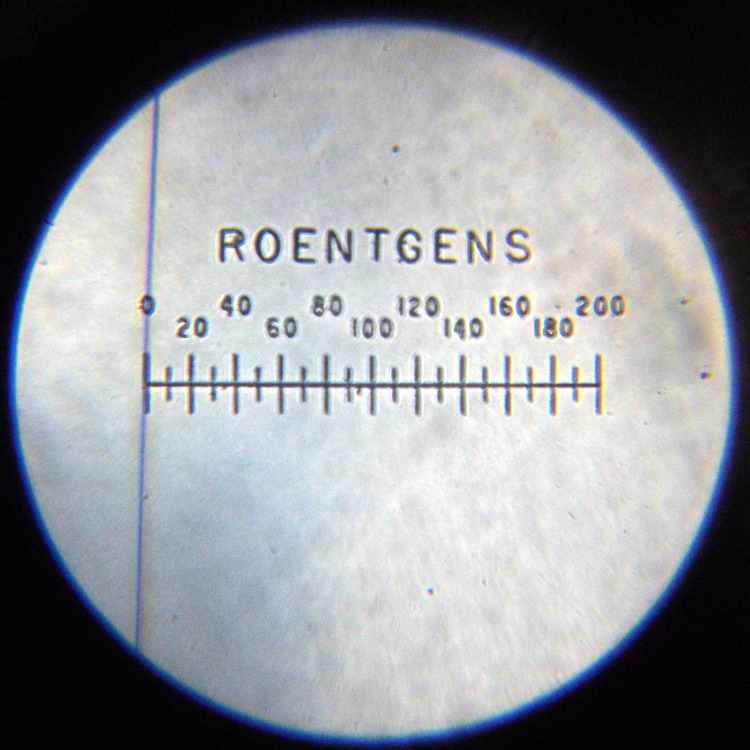
The directions tell you to press the dosimeter down gently to read it. A weak spring holds the cylinder outward with about 1.5 lb of force. After about 1 mm of travel an incandescent bulb (remember those?) turns on, transmits light through the plastic insert, and lights up the dosimeter scale and fiber.
To charge the dosimeter, you press down firmly and twiddle the adjusting knob to position the fiber. Pressing hard enough to force the dosimeter body down to the sleeve, another 3 mm of travel, compresses the dosimeter’s internal bellows (or plastic seal) enough to complete the circuit to the fiber; a sealed dry air gap normally isolates the fiber from the dosimeter’s external contact. A stout leaf spring holds the cylinder outward with (according to one instruction manual) 7.75 lb of force, so it takes more pressure than you’d expect to hold the dosimeter down.
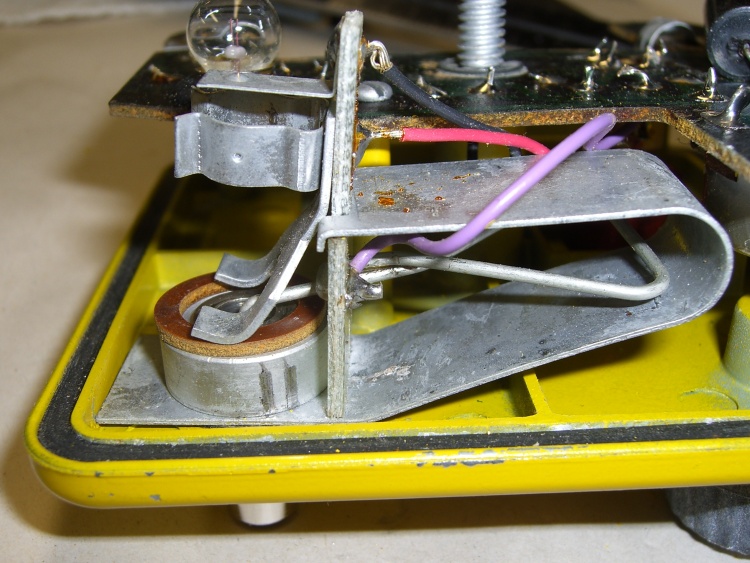
The internal parts of the charging pedestal makes all that stuff work without any formal switch contacts. That, unfortunately, causes the intermittent operation.
The gray “wire” inside the large 7-lb leaf spring is both the 1-lb spring and the high-voltage electrical contact. The purple wire soldered to the end of the wire spring carries the HV charging potential from the circuitry.
The black and red wires connect to the incandescent bulb, which fits into the holder near the top of the circuit board sticking up vertically just to the right of the pedestal base; I removed it to reveal the other parts. For what it’s worth, the bulb holder doesn’t do a good job of securing the bulb; I have some improvements in mind for that, too.
Note the spare bulb just beyond the center bulb contact near the top of the picture. The rubber grommet securing that has turned into black Gummi-bear substance; that sucker is in there forever.
The battery’s positive terminal connects to the case; this is a positive-ground circuit!
The leaf spring hitches over two shoulders on the circuit board and presses it firmly against the other side of the spring. The curved fork fingers pressing against the brown insulating washer are firmly mounted to the circuit board and act as one side of the switch contacts.
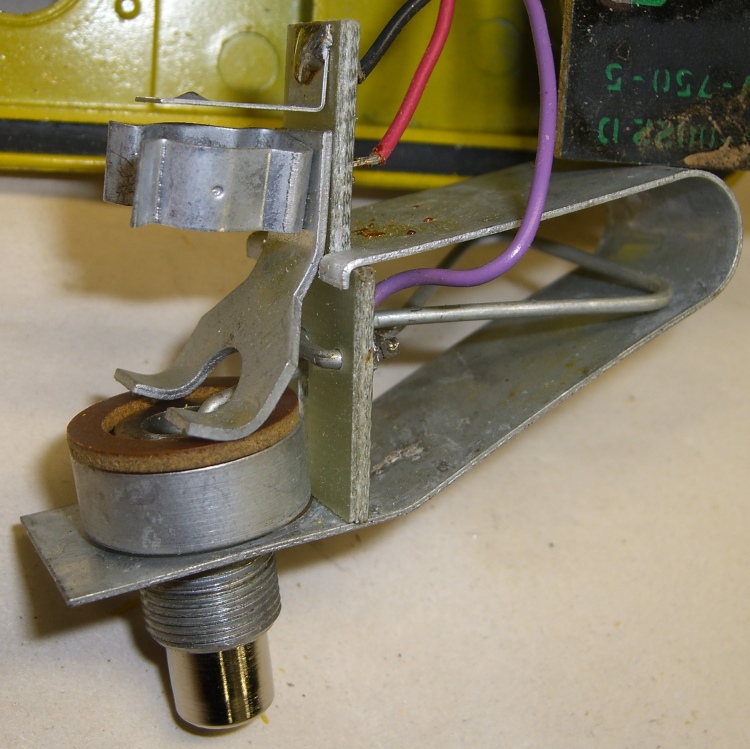
When you push the dosimeter against the sleeve, the base of the cylinder slides through the ID of the fiber washer and contacts the fork fingers. Bingo, that completes the circuit, lights the lamp, and fires up the HV circuitry. The charging voltage doesn’t reach the dosimeter fiber because the leaf spring hasn’t started pressing the cylinder against the dosimeter’s innards: there’s no connection inside the dosimeter.
With that out of the way, here’s what’s needed to get the pedestal working reliably.
Get the whole pedestal assembly out of the charger, which requires a bit of wiggly jiggly action. This will be easier if you unsolder the three wires, which I didn’t do until I was sure it was absolutely necessary.
Grab the leaf spring on both sides of the bulb circuit board, pull up while pushing down on the spring’s base with some other fingers, and lift the tabs off the circuit board shoulders. This requires a surprising amount of force; don’t let the spring get you by the soft parts!
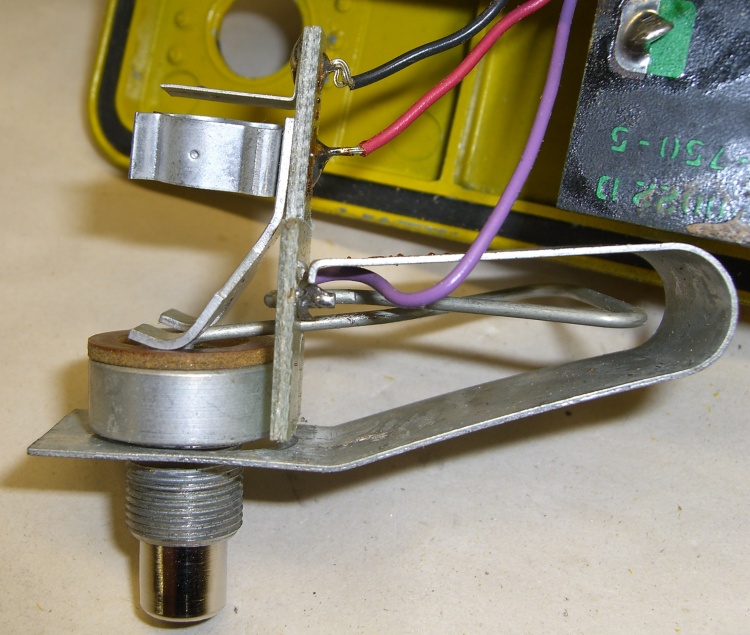
A small crimped metal connector mates the end of the wire spring to the center contact in the cylinder. Pay attention as you maneuver the pedestal out of the leaf spring: you don’t want to deform that connector too much. Or, much worse, lose it under your workbench.
There’s a rubber O-ring inside the outer sleeve that’s barely visible in the picture of the parts. The 1-lb wire spring had trouble forcing the cylinder back out through the O-ring, leaving the switch just barely closed even with the dosimeter removed. A touch of silicone gasket lube on the O-ring made it wonderfully slippery again.
The inner cylinder has wire snap ring in a groove that adds a bit of stability and maybe some contact friction inside the sleeve. You need not remove the snap ring; they’re not called Jesus clips for nothing. It’s outside the O-ring’s protection, exposed to the world.
Basically, clean everything without yielding to the Siren Call of sandpaper. What you want to do is get the oxidized metal off the base material without scarring it.

I applied a tiny drop of Caig DeoxIT Red to the snap ring, worked it around & around, then wiped off the residue.
The actual switch “contacts” are the wide base of the inner cylinder (to the right in the picture) and the rounded end of the fork attached to the lamp base circuit board. The contact area is broad, smooth, plated-steel-on-steel, and utterly unsuited to the job. Wipe both of them clean, add DeoxIT, wipe them clean again.
I applied another minute drop of DeoxIT to the base of the cylinder after putting everything back together, rotated it against the fork, and wiped it off. Most likely that had only psychological benefit, but what the heck.
The parts go back together in the obvious way, again taking care not to let the leaf spring bite you. I routed the wires a bit differently, but I doubt it makes any difference.
Now the charger works perfectly again!
Memo to Self: replace that bulb with nice soldered-in-place LED
Update: It seems you can actually buy V-750 dosimeter chargers new from www.securityprousa.com/doch.html. However, eBay is significantly less expensive and you might get some quality shop time out of it. Your choice.



 The Smell of Molten Projects in the Morning