The Smell of Molten Projects in the Morning

Ed Nisley's Blog: Shop notes, electronics, firmware, machinery, 3D printing, laser cuttery, and curiosities. Contents: 100% human thinking, 0% AI slop.

Category: Machine Shop

Mechanical widgetry

  • Vole Traps: Rebaited

    Vole Traps: Rebaited

    Although the drilled sunflower seeds worked reasonably well, various critters gnawed through the threads and escaped unharmed with the seeds. We tried gluing seeds to the trigger with good old Elmer’s Non-Toxic School Glue, only to find garden ants absolutely love the stuff.

    Well, if voles like seeds, they’ll surely like nuts:

    Rat traps - walnut halves
    Rat traps – walnut halves

    Those are rat traps (much bigger than mouse traps) with walnut halves secured to the top and bottom of the trigger with hot melt glue.

    Yes, the plywood plates under the traps hold them together. There’s no reason to put fancy new traps outdoors where they succumb to weather in short order; these are veterans from previous episodes.

    Having taken out two voles with sunflower seeds over the course of a week, the walnuts accounted for two more voles in three days. Mary thinks a neighbor vole needs a day to notice its buddy has gone missing, so the average pace may be a vole every other day.

    Bonus: Gnawing on the nuts or trying to pull them away triggers the trap, so those walnuts are still out there.

    The community gardens have enough voles to attract Red Tailed Hawks, which have started perching on fence posts and stooping on voles foolish enough to run along the paths or into grassy areas. Some gardeners seem disconcerted by the presence of such large birds in close proximity, but Mary assures them they’re helpers.

  • Prusa MK4 Platform Protector

    Prusa MK4 Platform Protector

    While cleaning the bird’s nest off the extruder, the need for a protector over the steel build plate became obvious:

    Prusa MK4 - platform cover sheet
    Prusa MK4 – platform cover sheet

    Yes, it’s laser cut, which trivialized the two little holes for the locating screws in the back.

    Given the dimensions, it should take you five minutes, tops, to cut your own from some chipboard:

    Prusa MK4 Platform protector sheet doodles
    Prusa MK4 Platform protector sheet doodles

    The blobs along the front edge mark the magnets where you could add a bit of steel to snap the protector in place, if you’re inclined to remove the plate. I just let it sit there, which seems entirely sufficient.

    Long ago I made a similar corrugated cardboard sheet for the M2 that is still covering its glass platform today.

  • Prusa MK4 + MMU3 Test Piece

    Prusa MK4 + MMU3 Test Piece

    The slanted layers mean this simple block requires something like 180 filament changes while verifying the Prusa MK4 + MMU3 / filament buffer setup:

    Prusa MK4 MMU test piece - finished
    Prusa MK4 MMU test piece – finished

    Because of all the color changes, the Wipe Tower holding the extruder waste is much much larger than the block:

    Prusa MK4 MMU test piece - on platform
    Prusa MK4 MMU test piece – on platform

    The first attempt taught me, once again, the value of cleanliness:

    Prusa MK4 MMU test piece - birds nest as found
    Prusa MK4 MMU test piece – birds nest as found

    The extruder head required tedious cleaning:

    Prusa MK4 MMU test piece - extruder tangle
    Prusa MK4 MMU test piece – extruder tangle

    Scrubbing the steel plate with dish detergent and wiping it with isopropyl alcohol improved the outcome, but one corner of the Wipe Tower still lifted:

    Prusa MK4 MMU test piece - wipe tower corner lifting
    Prusa MK4 MMU test piece – wipe tower corner lifting

    All’s well that ends well, but perhaps glue stick / hair spray under future Wipe Towers will ensure they don’t wander off.

  • Cutting Board Shim

    Cutting Board Shim

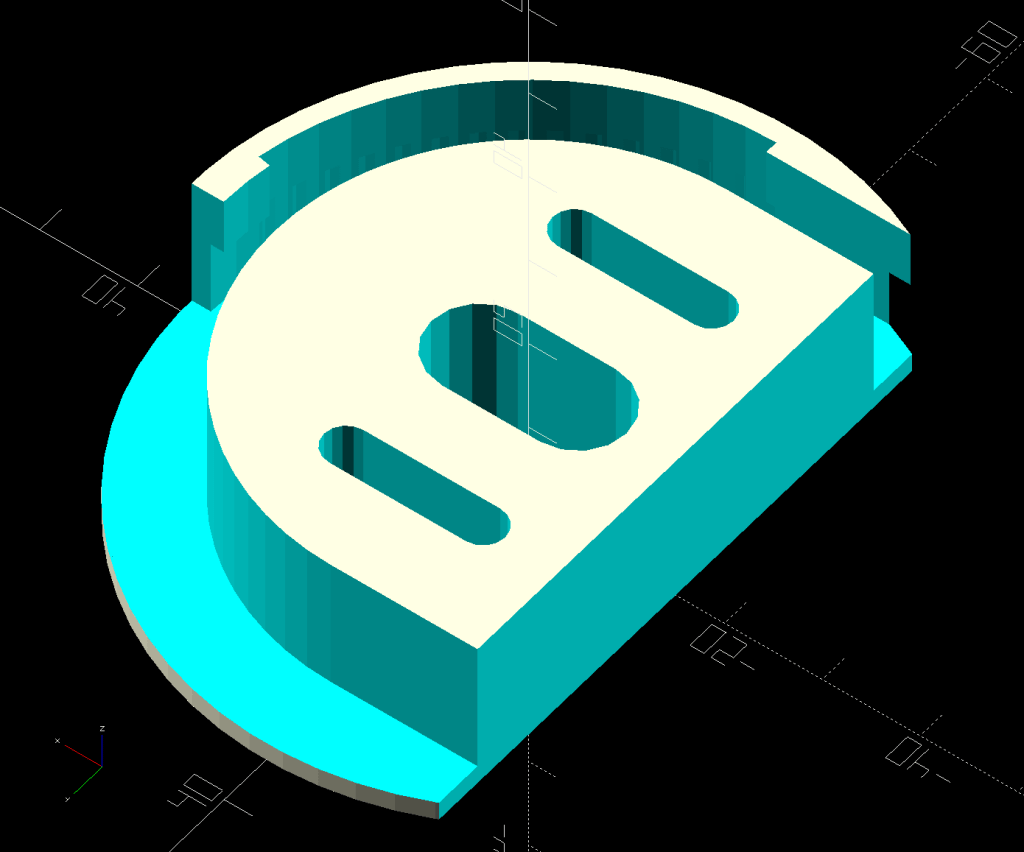
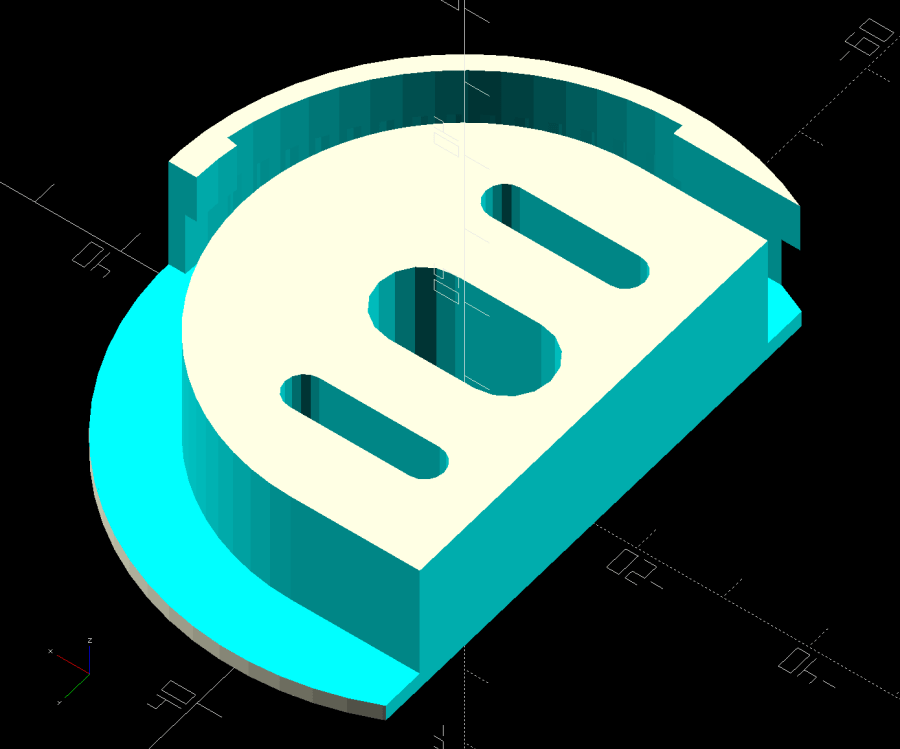
    The kitchen counter has only two useful places for the cutting board and the spot Mary favors puts a distinct swale under one corner. A bit of measuring and solid modeling produced a simple shim to make the answer come out right:

    Cutting Board shim - solid model
    Cutting Board shim – solid model

    The basic shape is union() of a trio of hull() operations forming the three sides, with the text label as a separate object to verify I understood how to build a multi-material object.

    Export it as a 3mf file, open it in PrusaSlicer, slice, print:

    Cutting Board shim - label
    Cutting Board shim – label

    Putting the label on the bottom surface takes advantage of the nubbly finish on the Textured Steel Sheet to make it look like it just grew in there.

    The label is just barely visible from the top, despite extending only 1/4 of the way through the 1.6 mm bottom slab:

    Cutting Board shim - top
    Cutting Board shim – top

    So white PETG needs more than 1.2 mm of thickness to hid a black feature. Today I Learned, etc.

    Multi-material printing produces a Wipe Tower to hold all the extruded junk during color changes:

    Cutting Board shim - wipe tower
    Cutting Board shim – wipe tower

    The curl under the nozzle comes from the final ramming used to shape the end of the filament into a point for reliable material / color changing.

    Although a shim is something of a nuisance, it works perfectly:

    Cutting Board shim - in use
    Cutting Board shim – in use

    Much easier than installing an L-shaped Corian slab with a sink cutout!

    The faded engraving dates back to the early days of the laser

    The OpenSCAD source code as a GitHub Gist:

    // Cutting Board alignment shim
    // Ed Nisley KE4ZNU – 2024-08-20
    //—–
    // Dimensions
    ShimThick = 1.6; // thickness of shim under board
    /* [Hidden] */
    ShimOA = [25.0,25.0,15.0]; // overall size of shim
    WallThick = 4.0;
    ShimRadius = WallThick/2;
    LabelThick = ShimThick/4;
    NumSides = 3*4;
    //—–
    // Build it
    union() {
    hull()
    for (i=[0,1])
    translate([i*(ShimOA.x – ShimRadius),0,0])
    cylinder(r=ShimRadius,h=ShimOA.z,$fn=NumSides);
    hull()
    for (j=[0,1])
    translate([0,j*(ShimOA.y – ShimRadius),0])
    cylinder(r=ShimRadius,h=ShimOA.z,$fn=NumSides);
    hull() {
    for (i=[0,1])
    translate([i*(ShimOA.x – ShimRadius),0,0])
    cylinder(r=ShimRadius,h=ShimThick,$fn=NumSides);
    translate([0,1*(ShimOA.y – ShimRadius),0])
    cylinder(r=ShimRadius,h=ShimThick,$fn=NumSides);
    }
    }
    color("Black")
    translate([ShimOA.x/3,ShimOA.y/3,LabelThick])
    rotate([180,0,90 + 45])
    linear_extrude(height=LabelThick,convexity=20)
    text(text=str(ShimThick),size=6,spacing=1.00,
    font="Arial:style:Bold",halign="center",valign="center");
  • Under-cabinet LED Light Brick Mounts

    Under-cabinet LED Light Brick Mounts

    Descending directly from the holders for the MPCNC power brick, slightly smaller brackets for the power bricks attached to the under-cabinet LED strip light in the kitchen:

    Kitchen Under-cabinet light power brick mounts - slicer view
    Kitchen Under-cabinet light power brick mounts – slicer view

    Made from black PETG (because they’re in the kitchen) they fit fine:

    Under-cabinet light - brick B
    Under-cabinet light – brick B

    Although the elegance depends on which way the brick points:

    Under-cabinet light - brick A
    Under-cabinet light – brick A

    They have the distinction of being the first “real” objects from the Prusa MK4. All my hard-won knowledge of forcing solid models into reality through a 3D printer is obsolete: the default slicer settings on a new printer work perfectly, with no fiddling required.

    The OpenSCAD source code as a GitHub Gist:

    // Power Supply Brick brackets
    // Ed Nisley KE4ZNU 2024-08-19
    Layout = "Show"; // [Show,Build]
    //– Extrusion parameters
    /* [Hidden] */
    ThreadThick = 0.20;
    ThreadWidth = 0.45;
    HoleWindage = 0.3; // enlarge hole dia by this amount
    function IntegerMultiple(Size,Unit) = Unit * ceil(Size / Unit);
    Protrusion = 0.1; // make holes look good and joints intersect properly
    //– Useful sizes
    ID = 0;
    OD = 1;
    LENGTH = 2;
    //– Bracket Dimensions
    Brick = [115.0,51.0,32.0]; // overall size, add details in module
    Socket = [20.0,10.0]; // binocular power socket
    Cable = [5.0,12.0]; // DC output cable ID=wire OD=strain relief
    //Socket = [30.0,24.0]; // IEC power socket
    //Cable = [6.0,15.0]; // DC output cable ID=wire OD=strain relief
    WallThick = 3.0; // default wall thickness
    BaseThick = 4.0;
    Screw = [5.1,10.0,3.0]; // screw size, more-or-less 10-32, OD & LENGTH for head
    NumSides = 3*4;
    //———————-
    // Useful routines
    module PolyCyl(Dia,Height,ForceSides=0) { // based on nophead's polyholes
    Sides = (ForceSides != 0) ? ForceSides : (ceil(Dia) + 2);
    FixDia = Dia / cos(180/Sides);
    cylinder(r=(FixDia + HoleWindage)/2,
    h=Height,
    $fn=Sides);
    }
    //———————-
    // Models
    module BrickMount(End="Both") {
    difference() {
    union() {
    hull() // main block
    for (i=[-1,1], j=[-1,1], k=[0,1])
    translate([i*(Brick.x/2 + WallThick – WallThick),
    j*(Brick.y/2 + WallThick – WallThick),
    k*(Brick.z + WallThick – WallThick)])
    sphere(r=WallThick,$fn=NumSides);
    hull() // screw flanges
    for (i=[-1,1], j=[-1,1])
    translate([i*(Brick.x/2 + WallThick – BaseThick),
    j*(Brick.y/2 + WallThick + 2*Screw[OD] – BaseThick),
    0])
    sphere(r=BaseThick,$fn=NumSides);
    }
    for (i=[-1,1], j=[-1,1]) // remove screw holes
    translate([i*(Brick.x/2 + WallThick – Screw[OD]),
    j*(Brick.y/2 + WallThick + Screw[OD]),
    -Protrusion])
    rotate(180/6)
    PolyCyl(Screw[ID],2*WallThick,6);
    translate([0,0,Brick.z/2]) // remove center part to leave ends
    cube([(Brick.x + 2*WallThick – 4*Screw[OD]),2*Brick.y,2*Brick.z],center=true);
    if (End == "Socket")
    translate([Brick.x/2,0,Brick.z/2]) // remove cable end to leave socket
    cube([(Brick.x + 2*WallThick – 4*Screw[OD]),2*Brick.y,2*Brick.z],center=true);
    if (End == "Cable")
    translate([-Brick.x/2,0,Brick.z/2]) // remove socket end to leave cable
    cube([(Brick.x + 2*WallThick – 4*Screw[OD]),2*Brick.y,2*Brick.z],center=true);
    translate([0,0,Brick.z/2 – Protrusion/2]) // remove power supply brick from interior
    cube(Brick + [0,0,Protrusion],center=true);
    translate([0,0,-Brick.z]) // remove below XY plane
    cube(2*Brick,center=true);
    translate([0,0,Brick.z/2]) // remove AC socket
    rotate([0,-90,0])
    rotate(90)
    linear_extrude(height=Brick.x,convexity=2)
    square(Socket,center=true);
    translate([0,0,Brick.z/2]) // remove DC cable
    rotate([0,90,0])
    rotate(180/8)
    PolyCyl(Cable[OD],Brick.x,8);
    translate([Brick.x/2,0,Brick.z/4 – Protrusion/2]) // … and wire slot
    cube([Brick.x,Cable[ID],Brick.z/2 + Protrusion],center=true);
    }
    }
    //———————-
    // Build it
    if (Layout == "Show")
    BrickMount("Both");
    if (Layout == "Build") {
    translate([5,0,Brick.x/2 + WallThick])
    rotate([0,90,0])
    BrickMount("Cable");
    translate([-5,0,Brick.x/2 + WallThick])
    rotate([0,-90,0])
    BrickMount("Socket");
    }
  • Water Shutoff Valves: Autopsy

    Water Shutoff Valves: Autopsy

    After a bit more than half a century, the rubber washer in the cold water shutoff valve for the kitchen sink had fossilized:

    Sink shutoff - cold washer
    Sink shutoff – cold washer

    The hot water washer was in much worse condition:

    Sink shutoff - hot washer
    Sink shutoff – hot washer

    The shutoff valve for the hose bib in the front of the house, mounted knob-downward, has been dripping quietly for many many years before I replaced it:

    Hose valve shutoff - knob corrosion
    Hose valve shutoff – knob corrosion

    I’d turned the valve off to no avail, so this was no surprise:

    Hose valve shutoff - washer
    Hose valve shutoff – washer

    While it is theoretically possible to replace those washers, even the professionals know better than to disturb a sleeping valve:

    Dishwasher valve doubling
    Dishwasher valve doubling

    The tandem valve was likely installed half a decade ago, along with the dishwasher it services. Perhaps the washer inside remains soft.

  • GripStic Shortening

    GripStic Shortening

    We’ve been using GripStic Bag Sealers on bags around the kitchen with good results, but the “XLarge” pink sticks far exceed the largest bags we have. While not the worst problem I’ve encountered in the last year, I can fix that:

    Gripstic - shortened assortment
    Gripstic – shortened assortment

    An elaborate latch aligns the yellow rod along the axis of the outer shell:

    Gripstic - rod end feature
    Gripstic – rod end feature

    I shortened the stick with Tiny Bandsaw™, cleaned up the ends, squirted hot melt glue into the shell, set it on a bench block, rammed the yellow rod into the glue, and paused for contemplation:

    Gripstic - shortened glue
    Gripstic – shortened glue

    Trim off the blob and it’s all good.

    The WordPress AI suggests “Additionally, including tips for handling the Tiny Bandsaw™ and hot melt glue would be beneficial.” So, as always, use your tools carefully, OK?

    Adding the preceding paragraph changed the AI suggestion to “To further improve the content, consider adding tips for handling the Tiny Bandsaw™ and hot melt glue for the readers’ benefit. Always prioritize safety when using tools.” I recommend not juggling Tiny Bandsaw™ and a hot melt glue gun, particularly went they’re running.