Ed Nisley's Blog: Shop notes, electronics, firmware, machinery, 3D printing, laser cuttery, and curiosities. Contents: 100% human thinking, 0% AI slop.
I’ve managed to lose enough weight off my butt (it doesn’t go away, it just becomes leg muscle for a few months) that I must move the seat on my Tour Easy forward maybe 5 mm. Alas, I’ve run out of adjustment room: the frame is a Medium Large and I probably should have gotten a Medium; that decision was forced by getting a much-too-small Linear many years ago.
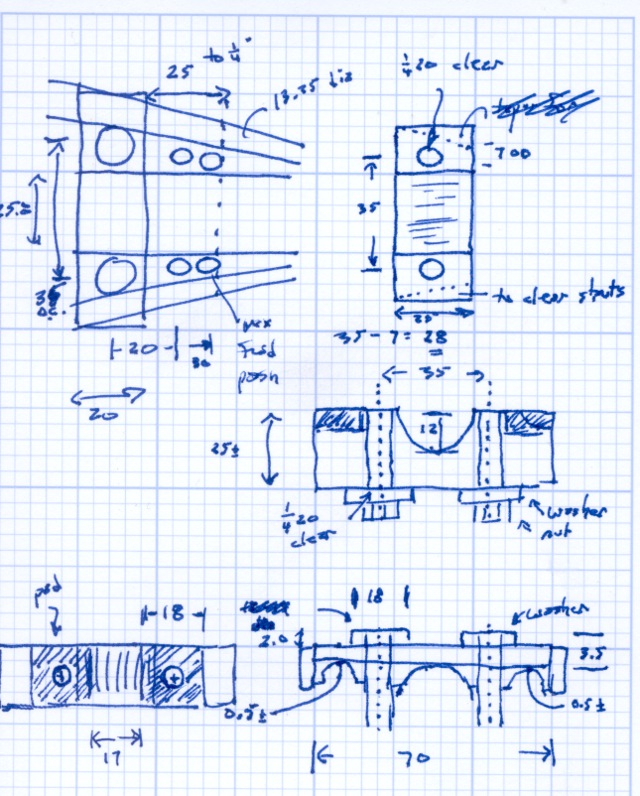
The general idea here is to bolt the seat to an aluminum circumferential clamp just forward of the plate and tubes that normally secure the seat to the frame. That moves the clamping bolts about 15 cm forward, but they slide in slots along the seat bottom.
The bolts are 1/4-20 stainless carriage bolts, with the square shank under the head sliding in those slots. I think the clamp can be about the same thickness as the existing tubes, so the same bolts will work.
The main frame tube runs slightly above the two small tubes that stiffen the rear triangle. It’s not clear those clearances in the clamp must be contoured to fit the tubes exactly; a simple flat cutout will probably work just fine.
The top of the clamp must have two bosses to support the seat base around the clamping screws. A line of rivets down the middle secures the seat base to the contoured (carbon?) fiberglass pan holding the foam cushion.
With the jack in hand, I idly poked a coaxial plug into it and realized that the amount the plug stuck out was just about exactly equal to the thickness of the black plastic cap on its tip. Some rummaging turned up one of the six plugs with a missing tip, at which point both the problem and its solution were obvious.
Broken vs original coaxial power tips
A bit of tedious work with a tiny screwdriver and a needle convinced the socket to disgorge the plastic ring from its bowels …
Broken tip extracted from jack
Now, I suppose I could have figured this out without taking the case apart, but actually fixing the problem would still require surgery, soooo there’s no wasted effort. That’s my story and I’m sticking with it.
If you think you could extract that ring from the outside, there’s a joke about that.
I put the case back together with a few dabs of silicone snot adhesive (despite what I know about letting acetic acid loose near electronics) to anchor the circuit board, applied a belly band of tastefully color-coordinated (i.e. silver) duct tape, and it’s all good.
Actually, the pack was stone cold dead until I plugged it into the charger to reset its battery protection circuitry. Evidently, disconnecting and reconnecting the battery tripped the protection logic. I’ve seen that in other Li-Ion packs, so it wasn’t quite so scary as it was the first time around.
As for the coaxial power tip: a dab of solvent glue, an overnight clamping session, and I think it’ll work fine forever more.
I should machine up some stabilizing collars around the sockets to match that obvious shoulder on the plug, shouldn’t I?
The power lead into the Li-Ion pack I’m using for the bike radio became badly intermittent on a recent ride. When I got back I swapped in a different pack and the problem Went Away, but I noticed that the coaxial power plug didn’t seem to seat all the way into the jack on the failed pack. I’d noticed that before, although I attributed it to getting two different sets of the packs; it didn’t seem to make any difference.
Given that I was going to have to either repair or replace the jack, dismantling the offending pack was next on the list. Some preliminary poking showed that there were no screws concealed under the label, so the two halves of the pack were either snapped or bonded together.
The case didn’t respond to the usual wedging and prying by revealing an opening, which suggested that it was bonded. That meant I must saw the thing apart.
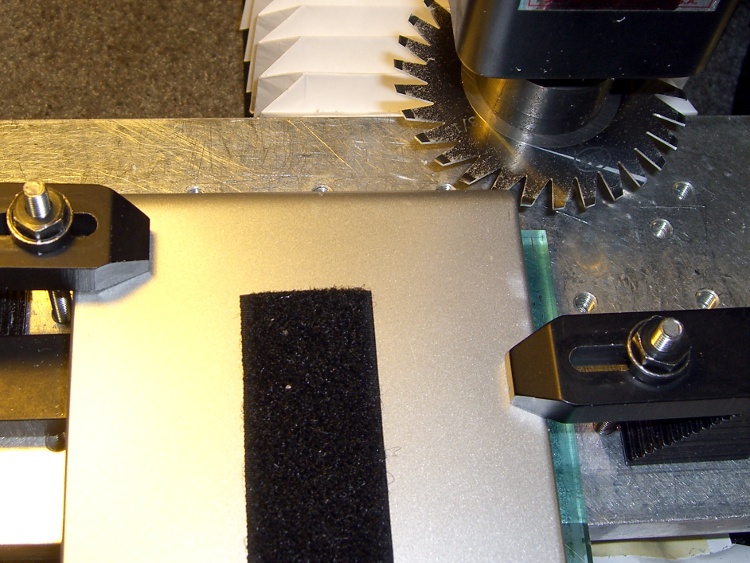
I set up a 31-mil slitting saw on the Sherline and clamped the pack atop a random plastic slab atop the tooling plate. The Sherline’s limited throat depth meant I had to cut the far side of the pack. I aligned the saw to the Z-axis level of the joint along the middle of the pack by eyeballometric guesstimation.
Slitting saw setup
Key point:
You absolutely do not want to saw into a lithium-ion cell, not even a little bit.
Therefore:
The pack must be aligned parallel to the cutter’s travel
The cuts must proceed in tiny increments, and
You must verify that each cut doesn’t reveal any surprises.
In this setup, the pack aligns against a clamp on the left side and to a parallel block (removed while cutting) along the rear edge of the tooling plate. I could then unclamp the pack, rotate it to put the next edge in place, and use the same XYZ origin with the edge parallel to X.
Here’s the view from the back of the table.
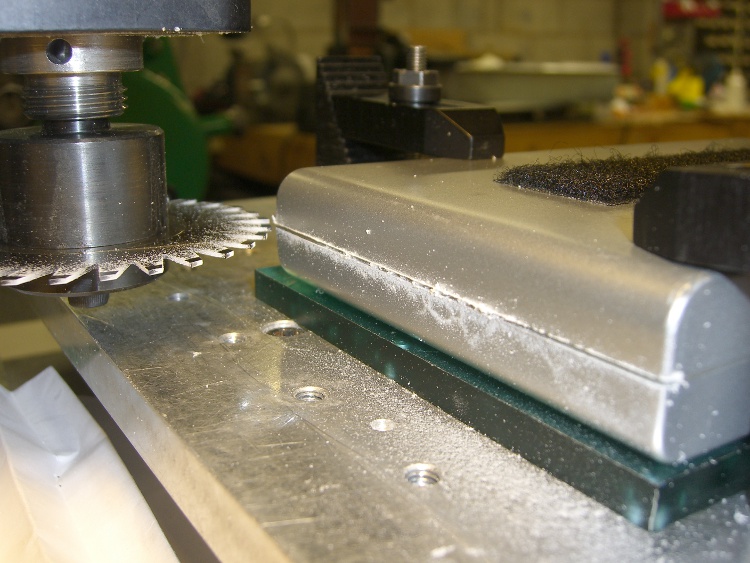
Sawing the case
I ran the spindle at 5 k RPM and cut about 15 inch/secminute. I’m sure the pros do it faster, but that was enough to warm up the blade and that’s fast enough for me. [Update: typo on the units. Thanks!]
Cuts were 0.020 inch per pass, which is about 0.5 mm. I expected the case to be some hard-metric dimension and wasn’t disappointed.
After the cuts reached 0.060 inch, I manage to pry the remaining plastic in the joint apart and split the halves apart along the connectors and LEDs at the front where I couldn’t do any sawing.
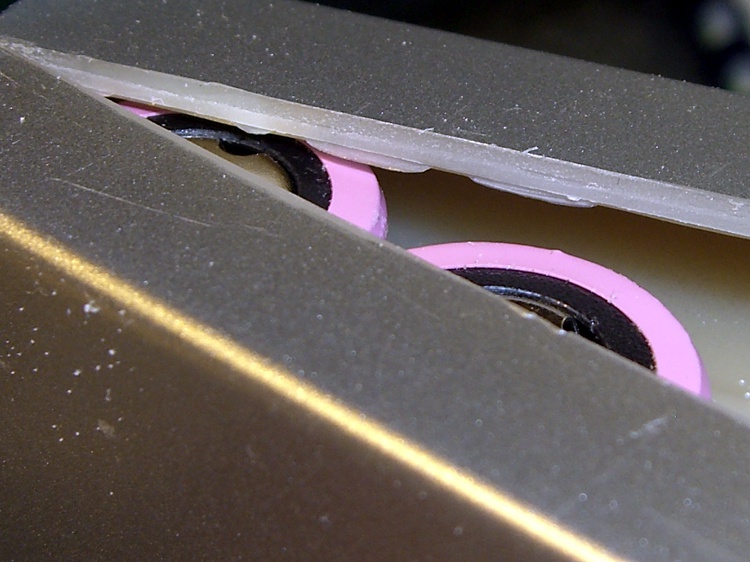
Here’s a close look at the cut, just above the battery terminals. The case turned out to be 2 mm thick, about 0.080 inch, so I was just about all the way through. The cut was perfectly aligned with the case and cracked open neatly along the entire length.
Tight tolerance on the cut depth
An interior view, showing that the cells adhered to the left half of the case and the electronics to the right: of course. I pried the cells loose from the left side, which provided enough access to unsolder the things, as the terminals were against the case. Notice that there’s absolutely nothing between the inside of the case and the outside of the cell, so cutting just slightly too deep would be a Bad Thing™.
First look inside the case
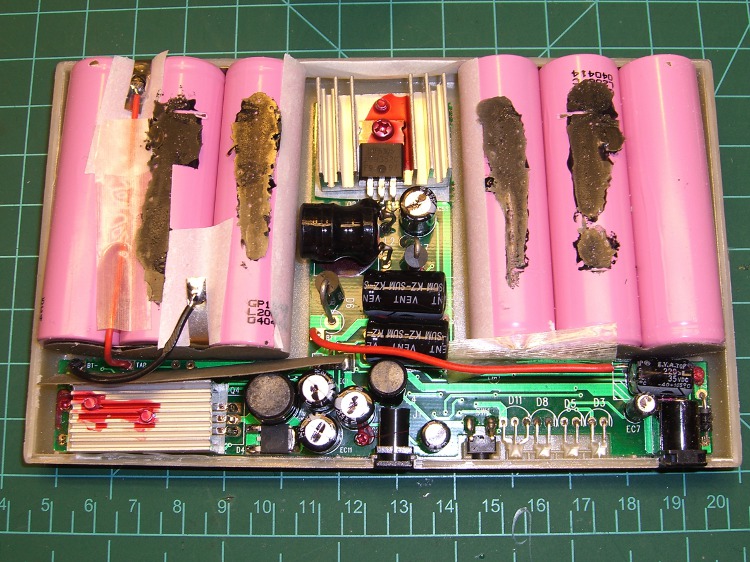
After a bit of work, here’s the entire layout…
Battery pack internal layout
Much to my surprise, the battery consists of two series-connected sets of three cells: 2 x 3.7 V = 7.4 V. I expected three series sets for about 3 x 3.7 = 11.1 V, with a linear regulator down to the 9.0 V output.
As it turns out, they used two switching regulators: the one between the two triplets controls the charging voltage and the one to the lower-left boosts the battery to the pack’s 9.0 V output. I had hoped for a resistor divider that I could tweak to get 9.6 V out, but it certainly wasn’t obvious.
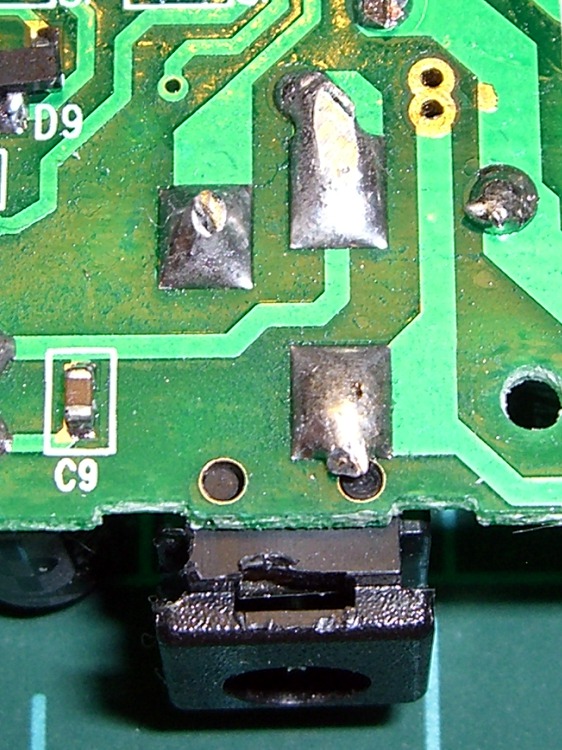
I unsoldered the cells, dismounted the circuit board, and puzzled over it for a bit, after which the problem was obvious.
The story continues tomorrow, with a dramatic denouement…
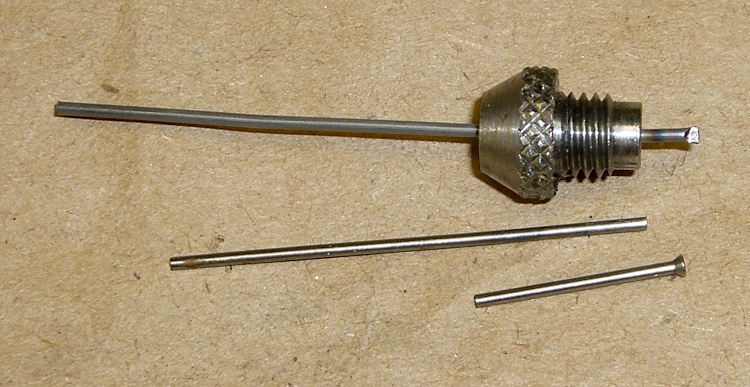
I have a quartet of nice pin punches with hardened pins in various diameters. I managed to drop the smallest punch, didn’t get my foot under it in time, it struck sparks from the concrete floor when it hit, and the pin snapped.
Not being able to replicate the pin’s neat mushroom head, I contented myself by chopping off a length of music wire and grinding the ends flat. Annealed one end over the kitchen stove, whacked it with another punch to get a flat, and it’s all good.
Replacement pin for punch
The music wire isn’t quite perfectly straight, but you don’t beat on things with a 40-mil punch, anyway.
Half a year after replacing the O-rings on the kitchen faucet, it’s dribbling again. This time, the symptom looked like a leak from the top of the faucet, which implied the three O-rings on the Spacer plate rather than big O-rings that seal the spout.
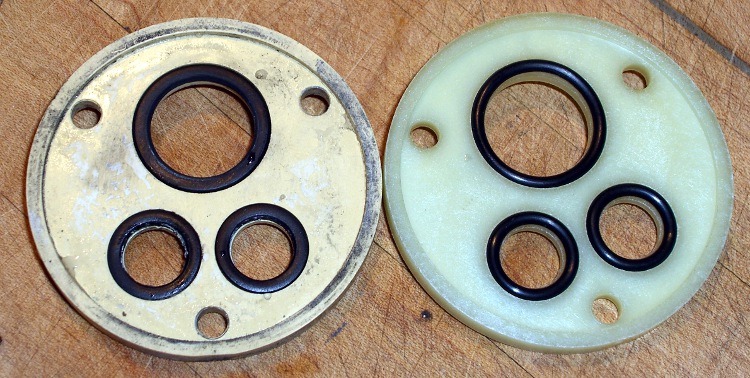
You can see the O-rings look different on the old and new spacers …
Old and New Faucet Spacers
Indeed, the old O-rings are flattened out. It’s most visible over on the right edge of the lower ring; the top ring is new.
Flattened O-ring
Replacing them is no big deal; follow the directions in the earlier post to get everything apart. But: only half a year?
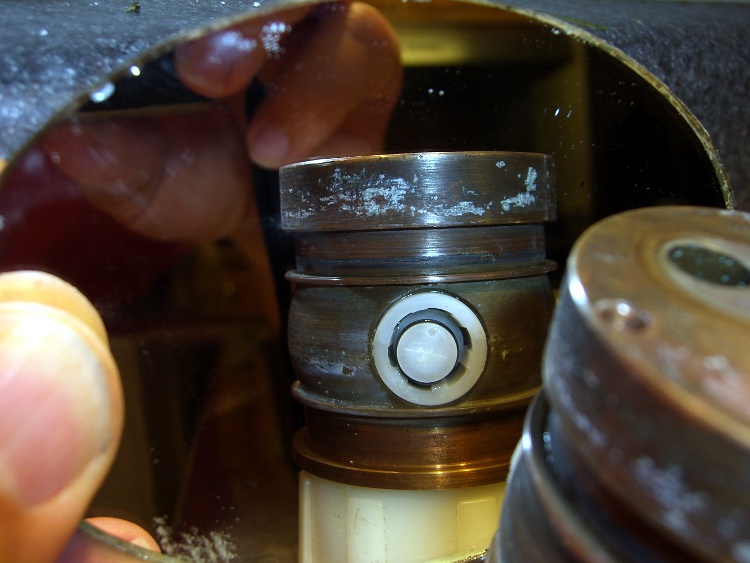
Here’s a view of the diverter on the back of the column.
Diverter viewed in mirror
Notice that the larger O-rings that seal the spout to the column had glued themselves to the column and left shreds when I removed them. A narrow strip of Scotch-Brite scouring pad, applied shoe-shine style, cleaned the O-ring debris off the column and made it nice & shiny. I suppose as long as they slip freely on the spout, then it’s all good, but there are new ones in place now.
I used a bit more silicone grease on the O-rings this time; we’ll see if that makes it better or worse.
The external antenna jack on the Totally Featureless Clock is, by necessity, recessed way down in a hole (because I can’t get to the inside of the now-finished half-inch-thick case to gnaw it out from there). Perforce, that puts the locking nut out of reach.
Solution: a pin spanner wrench. I’m sure they’re available commercially, but what’s the fun in that?
The male threaded part of the jack is 0.230 inch OD, the nut is 0.313 OD, and the notches are 0.030 wide and 0.020 deep. Raw material is about two inches of 5/16-inch air-hardening drill rod, not that I’m actually going to heat treat it for this application.
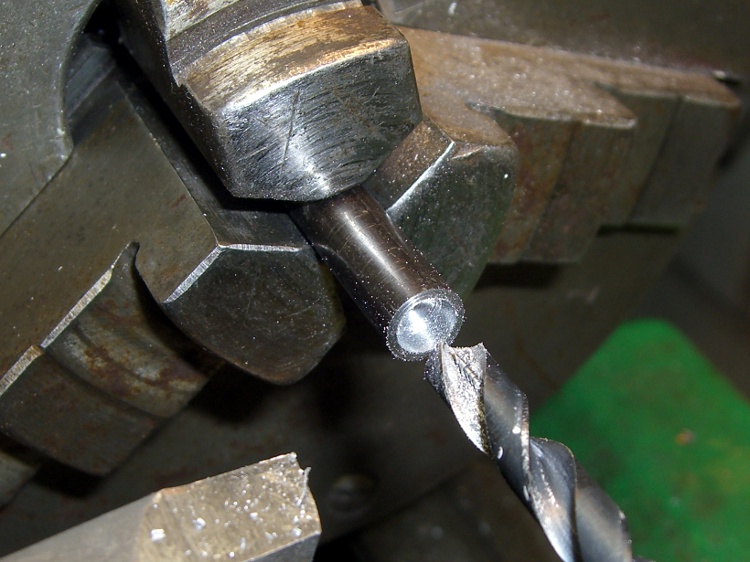
Face off the end and drill the guts out with a 15/64-inch drill.
Drilling central recess
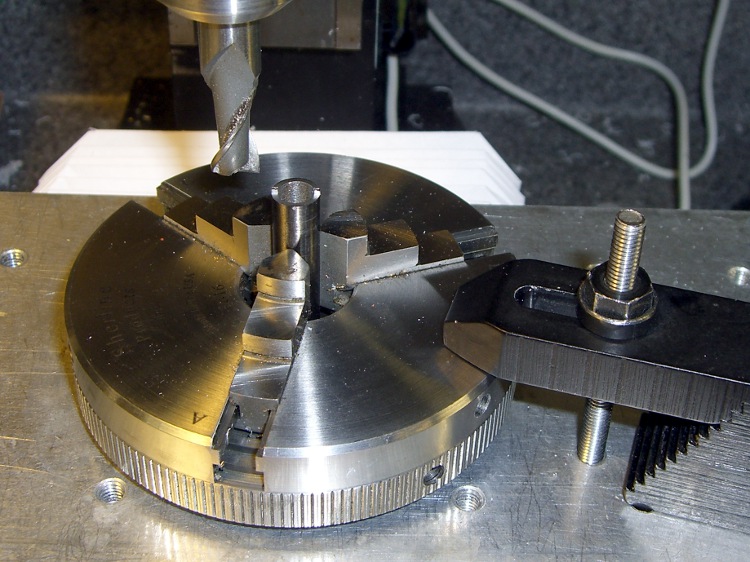
Grab it in the 3-jaw chuck bolted firmly to the table, then mill off anything that isn’t a pin. Don’t grab it in the milling vise, which doesn’t have enough oomph to hold a slick steel cylinder in place; don’t ask how I know this.
Milling pins in 3-jaw chuck
Set Z=0 at the top surface of the spanner-to-be and XY = 0 on the axis of the cylinder, of course.
Manual CNC, feeding the commands into EMC2’s MDI slot and then mouse-clicking the stored commands to avoid reduce typing errors. For my setup, Y=±0.171 to produce the 30-mil pin and X=±0.4 to clear on both sides.
After cutting the first side at 3 k RPM, feed 2 inches/min, and 10 mils per pass, I whacked the other side off in one giant 20-mil bite. I’m such a sissy…
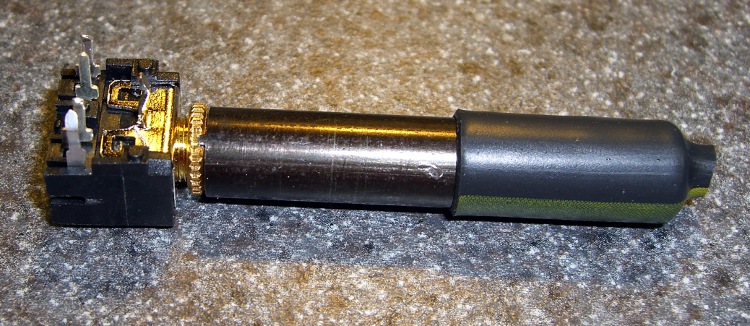
A bit of heatshrink tubing improves the griptivity and it’s all good.
Finished spanner engaged in nut
This is the sort of thing you do once, drop in the baggie with the rest of the connector nuts, and use for years thereafter. I should’a done it years ago, but I’ve been able to not quite butcher the nuts with a needle-nose pliers…
[Update: It turns out a commercial nut driverwas available, at least in one special shop in one special place, but no longer. For my delicate uses, that shaft into the jack isn’t really needed.]
I had to drill a 1/4-inch hole in the Totally Featureless Clock’s case for the antenna jack. Fortunately, I have a 1/4-inch collet, because there was nowhere near enough room for the Jacobs chuck in there.
Removing the tooling plate wouldn’t help: the chuck setup needed another inch!
In truth, the headroom is rarely the limiting factor. Another inch or two of throat distance and maybe that much more Y travel would be nicer, while we’re at it.
Ah, well, it’s all a matter of tradeoffs. If the mill were much bigger, I’d just want to make bigger projects, right?





 The Smell of Molten Projects in the Morning