Ed Nisley's Blog: Shop notes, electronics, firmware, machinery, 3D printing, laser cuttery, and curiosities. Contents: 100% human thinking, 0% AI slop.
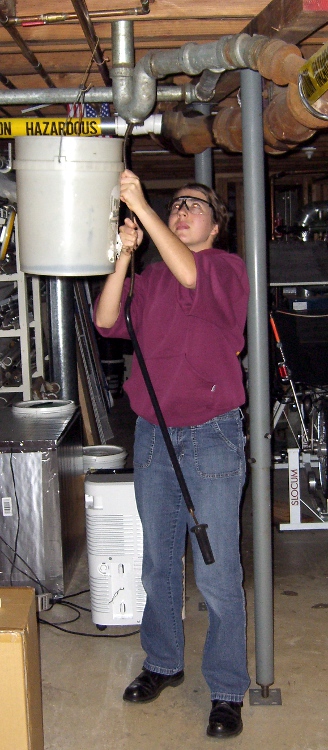
My shop assistant bears most of the hair in the household, so it seemed entirely appropriate that she clear the clog from the shower drain. She says she’s going to take a picture of the hairball and show her friends what her parents make her do…
I pointed out that plumbers are ecstatic when they get a call for this sort of problem and will charge maybe 150 bucks to make the clog Go Away. When she’s writing the check, she can make whatever choice she wants.
For now, this is how it gets done; the snake hangs on the garage wall.
While shoveling things off the workbench, I encountered a old wooden ruler with brass-colored metal edges, one of which had popped out of its groove. No wonder: the poor thing was bent into an arc the hard way. I have no idea how that happened, honest.
Distorted ruler edge
Anyhow, I figured I could fix it with the same technique I apply to straighten copper wire: grab one end in the bench vise, the other in a Vise-Grip, and whack the pliers with a hammer to stretch the wire a percent or two. So I did that and failed completely: the metal strip is actually copper / brass plating on steel.
But it was straight enough to tuck back into the groove, where friction seems to be holding it in place, and all is well.
(If I’d found it before I put a dot of epoxy into the sunglasses hinge, I’d have dabbed some dots along the groove and secured it in place forever. No such luck… the workbench is really buried this time.)
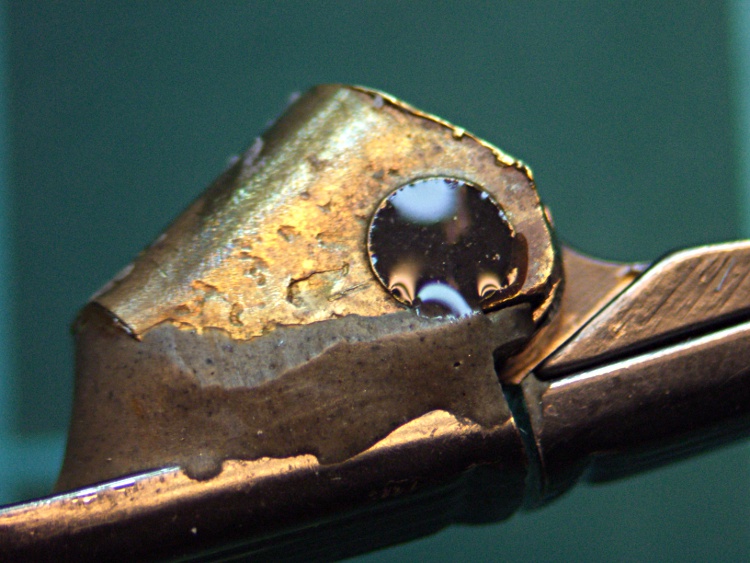
While excavating the top of my workbench and putting things away, I managed to drop my favorite needle-nose tweezers… which, of course, landed point-down on the concrete floor:
Mismatched tweezer jaw
Well, that gave me an excuse to match up the jaws. If you take a close look at most of your tweezers, they’ll have jaws that don’t quite come together evenly, so you’re trying to grab things with a single point instead of between two flat surfaces.
A brief session with coarse and medium diamond files produced this pleasing result (with a mm scale for size):
Matching tweezer jaws
Much better!
Another trick that works well: grab a piece of fine sandpaper in the tweezers, scrub sideways, and repeat for the other jaw. That’ll flatten out the jaws, make them reasonably parallel, and put the scratches in the direction that helps the most when you’re pulling something. Works best if the jaws are already pretty well aligned.
After the hinge repair described there, those old sunglasses have been working fine and I use them regularly. The screw recently worked its Loctite loose and was held in largely by blind faith.
It’s obvious why:
Sunglass hinge screw – loose
A tiny dab of JB KWIK should solve that problem for the foreseeable future:
Sunglass hinge screw – epoxy
In the highly unlikely event I must remove that screw, I’ll just refer to this picture and mill the epoxy out.
This is a proof-of-concept lashup for a camera-mounted spectrometer; I wanted to find out if the image processing would work, but needed some images without devoting a lot of time to the hardware.
The general idea is that a direct-view spectrometer produces a focused-at-infinity image for your eye. Substitute a camera for your eye and you get an image with the spectral components laid out in a spatial array, suitable for measurement and calculation.
The trick is holding the spectrometer on the lens axis while blocking ambient light. I figured that I could mount the spectrometer in a disk that fit into the camera’s 58 mm filter threads, then hold it in place for the few pix I’d need to get started.
The end result was Good Enough for the purpose, although it’s definitely a kludge…
Spectrometer mounted on camera
The (admittedly cheap) prism-based direct-view spectrometer has a slide-to-focus mechanism that substitutes heavy grease for mechanical precision. A guide screw in a slot prevents the focusing tube from rotating in the body tube, so I decided to replace that with a locking screw to clamp the tubes together. It’s a very fine thread, undoubtedly metric, screw, but a bit of rummaging in my teeny-screw drawer turned up a match (those are mm divisions on the scale):
Spectrometer screw vs standard thread
I think the spectroscope makers filed down the head of an ordinary brass screw to fit the slot, rather than using an actual fillister screw. That’s a Torx T-6 head on the flat-head screw, which probably came from a scrapped hard drive. I eventually found a round-head crosspoint screw (requiring a P-1 bit) that worked better, with a brass washer underneath for neatness.
That got me to this stage:
Spectrometer with locking screw
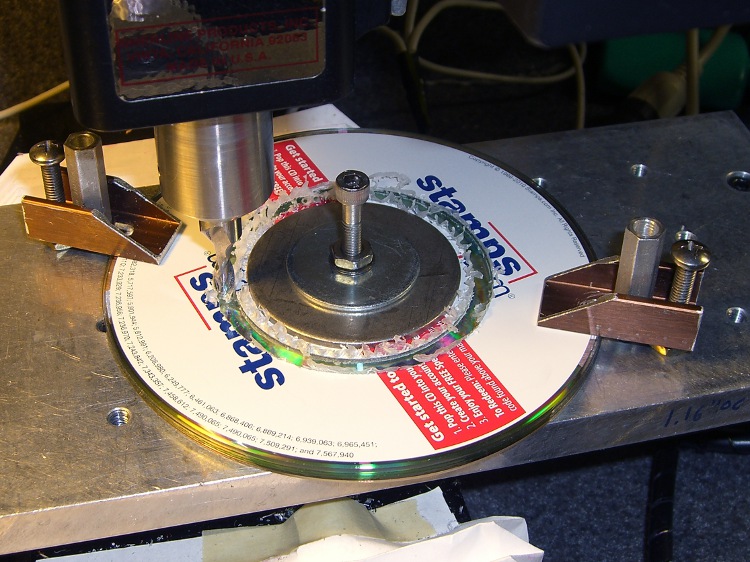
Making the adapter disk involved, as usual, a bit of manual CNC to enlarge the center hole of a CD from 15 to 15.75 mm, then cut out a 57 mm cookie. A stack of CDs makes a perfectly good sacrificial work surface for this operation, with some fender washers clamping the pile to the tooling plate. Those homebrew clamps are smaller than the Official Sherline clamps and work better for large objects on the small table.
Milling outside diameter
I briefly considered milling a thread into the OD, but came to my senses… I still have that pile of 10-32 taps, but now is not the time!
While in the Machine Tool Wing of the Basement Laboratory, I bored a short plastic bushing to a tight slip fit on the focusing tube to clamp the disk to the eyepiece, with the intent of keeping the eyepiece from whacking the camera lens. That’s the small white cylinder in the first picture.
As it turned out, I had to mount the whole affair on a sunshade that screwed into the camera filter mount, because the eyepiece protruded far enough to just barely kiss the lens.
A liberal covering of black electrical tape killed off all the stray light. Hand-holding all the pieces together and aiming it at the CFL tube over the Electronics Workbench produced this First Light image:
First light – warm-white CFL – no adjustments
Believe it or not, that’s pretty much in focus. Much of the width in the red & green lines seems to come from the phosphors, as there’s a bar-sharp narrow blue line to the far right, beyond the obvious blue line.
Settings: manual focus at infinity, manual exposure 1/60 @ f/2.4, auto ISO = 100. Maybe 30 cm from the 27 W CFL tube: way more light than I’ll ever get through a liquid sample in a cuvette.
Now, having seen what we’ve been living through, you might ask yourself
Wouldn’t It Be Nice If there was some way to be absolutely sure that mumble does not happen to me?
There isn’t, but you can stack the odds in your favor by disinsecting everything that enters your house. In particular, when you return from a trip, you must treat your luggage with the same casual regard as you apply to any lump of highly radioactive waste.
Because all bed bug stages die when exposed to temperatures over 45°C (113°F, which I round to 120°F), the simplest way to ensure that you’re not bringing any passengers home is to heat your luggage / packages / clothing / whatever to an internal temperature around 120°F, then let it soak for maybe an hour to ensure all the occupants get the message.
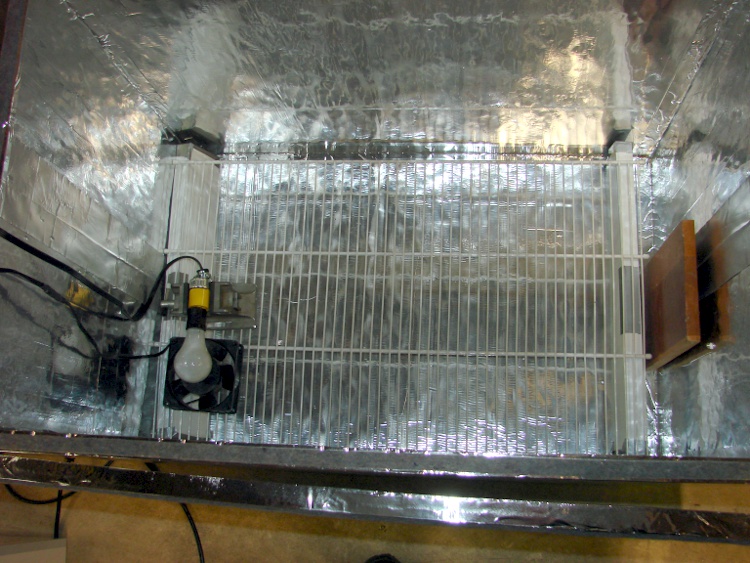
What you need is a box that gets hot on the inside, but not hot enough to set your luggage on fire. As with all things sold for bed bug problems, the commercial solution seems grossly overpriced for what looks like an uninsulated ripstop nylon bag containing a rack, a heater, and a fan.
It should come as no surprise that I built something that’s bigger, uglier, and harder to use… but it produces data and you can do science. And, with liberal use of my parts heap, the overall price is maybe 10 dB down from the commercial version…
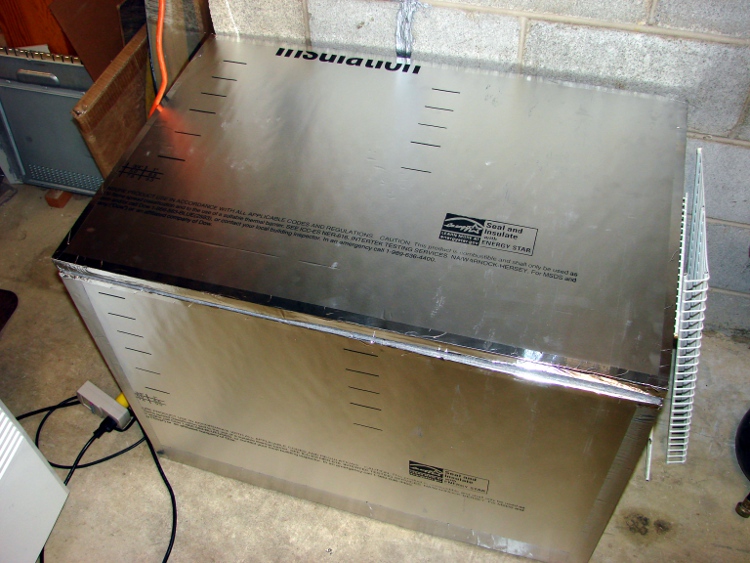
Hot box exterior
I figured that this widget is going to be a major part of our lives from now on, so a foldable / storable heater wasn’t particularly useful. In point of fact, we’ve been using it heavily and I don’t expect that to stop any time soon.
Inside, I used lengths of wire shelving to support the thing-to-be-baked. After we’ve used it a bit more, I’ll conjure up permanent supports for the second level shelving (stacked on the right of the exterior picture); right now, they’re supported on wood blocks as needed.
Hot box interiorHot Box – Dimension sketch
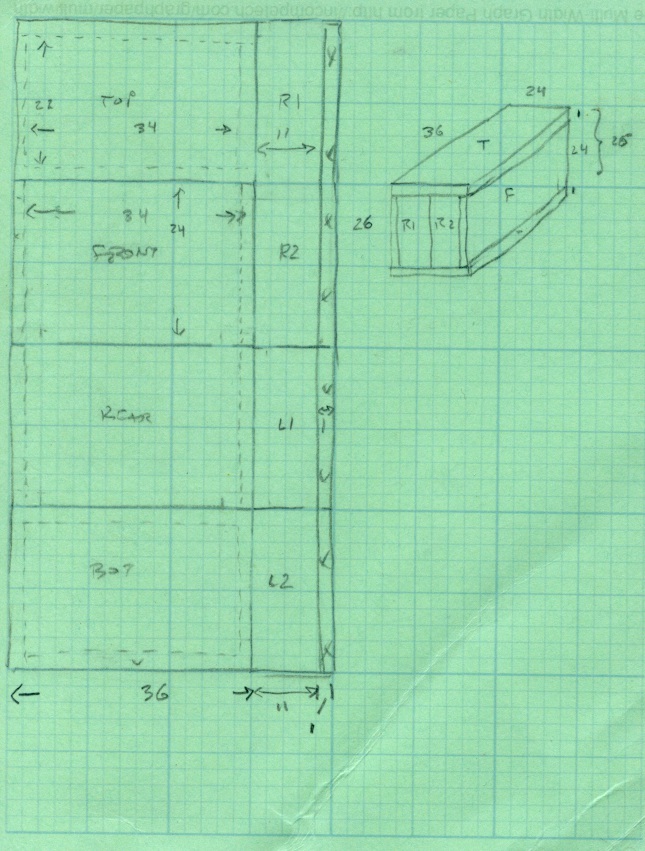
The interior dimensions work out to 34x22x24 inches: it’s made from a single 4×8 foot sheet of insulating board. Here’s my working sketch showing how the parts lay out and fit together. (clicky the pic for more dots).
The only waste is the 1-inch strip along the right edge; the slab I bought came with a molding imperfection, so discarding that edge was OK.
I cut the sheet into four 2×4 foot strips, cut a 13-inch strip off each plank, then trimmed the 1 inch waste. That seemed less prone to catastrophic blundering than (trying to) make a pair of 8-foot cuts and whack each resulting strip in quarters. An ordinary razor utility knife worked fine, although I found that making two passes along each cut produced cleaner results than trying to do it all in one.
I assembled it with the heavy / shiny aluminum foil side inward, although I doubt it makes any difference. Cover all the edges with tape, tape all the joints both inside and outside, and it becomes a nice rigid box when you’re done. Pay attention to getting the sides at right angles; I used a framing square.
The board allegedly has an insulating mojo of:
R = 6.5 ft2 • h • °F/Btu
Figuring a surface area of 32 ft2 and a temperature differential of 120 – 60 = 60°F, the box should require 295 BTU/hr = 87 W to maintain that temperature.
Which, as it turns out, is pretty close to how it worked out:
Hot Box – Temp vs Time – First light
The lower curve shows a 60 W bulb with a 10 W 120 VAC fan heats the interior to a bit over 100°F in 100 minutes, where it looks to be stabilizing. That was the first test and showed that I was on the right track.
The second test, with a pair of 60 W bulbs and the fan produced the two upper curves: one for air, the other inside some cloth jammed inside a plastic bucket to simulate a (tiny) suitcase. The combined 130 W heats the box over 150°F in two hours, with the somewhat insulated bucket trailing neatly behind as you’d expect.
Without opening the box, I connected the bulbs and fan to a Variac plugged into my Kill-A-Watt meter and dialed it for 100 W total dissipation. The temperature fell to slightly over 130°F in 80 minutes and looks like it would stabilize near there.
Ambient temperature was 67°F, so
R = 32 ft2 • 67°F / (341 BTU/hr) = 6.3
Close enough, I’d say. Given those few data points, it looks like the temperature sensitivity around 130°F is 0.7°F / W. [Update: typo in the equation. Doesn’t change the answer much at all.]
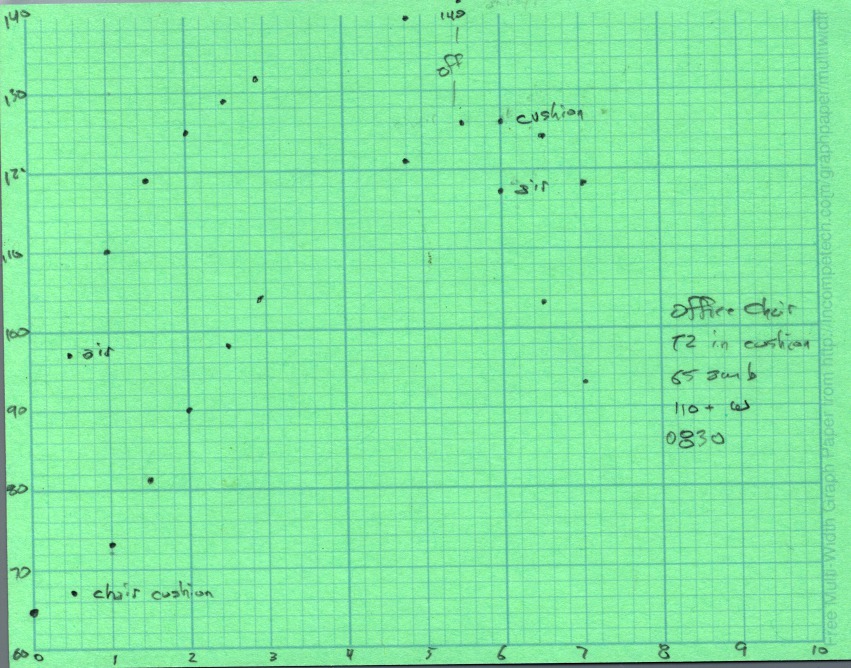
I swapped in a 100 W bulb, removed the Variac, and heated the cushions from my office chair.
Hot Box – Chair cushions
One thermocouple is hanging in mid-air, the other is wedged inside one of the cushions. After nearly 5 hours the cushion is up to killing temperature and I turned the heater off. The air temperature drops rapidly, but the cushion stays over 120°F for another two hours.
The light bulb is just a proof of concept, because it’s entirely too hot: if the fan fails, your luggage ignites. I plan to build a rather subdued heater with a surface temperature around 140°F and a controller that monitors several sensors to ensure the contents reach killing temperatures and stay there long enough.
But that’s a project for another day…
[Update: If you’re arriving from a link, start at the overview to get The Whole Story.]
In general, you cannot solve a bed bug problem by attracting and trapping bugs: there are simply too many bugs that are breeding ahead of their losses. We had (presumably) brought very few bugs home in our luggage, so every one we trapped was one less bug in the room. In any event, the number of bugs caught in the traps would give some idea of how much trouble we were in.
The bottom line: we trapped one or two bed bug instars and no adults.
Anything labeled for use against bed bugs carries a staggering markup and considerable smoke-and-mirrors marketing, but if you go back to the original sources (see the references in the first post), you’ll find out what actually works, which is quite different from what’s advertised.
The study by Wang, et. al., tested carbon dioxide, heat, and chemical lures. Tested singly: CO2 is pretty good, heat is OK, chemical lures definitely come in last. Basically, I think there are way too many significant figures in their results, but under idealized test conditions in a small arena, they collected about 80% of the bugs after six hours.
One key number: the CO2 flow rate was about 170 ml/min, roughly that produced by an adult human.
Another interesting number:
The visual inspections found ≤23 bed bugs in each apartment and they were considered as low levels of infestations.
CO2 mug and powder trap
Based on that, we decided to build some CO2 traps, which led to those observations. Our version of a dry-ice trap used a huge insulated mug filled with dry ice, perched atop an inverted dog food dish. We deployed two traps like that.
The dog dish has a cloth skirt (so the bed bugs can get traction on the way in) and a layer of talcum powder inside (so they can’t get any traction on the way out). The gas flow rate was in the right ballpark.
After several days, we had collected exactly zero bed bugs.
That wasn’t surprising, of course, because we knew we didn’t have all that many bugs, but we were still getting bitten in other parts of the house. Like, alas, the guest-room bed where we’d moved after gutting our bedroom.
Using dry ice as a CO2 source is relatively expensive and exceedingly inconvenient. We went through two iterations and decided that this was far too expensive, given the expected results.
It turns out that baker’s yeast metabolizes sugar into ethanol and carbon dioxide as the yeast gradually dies in a sea of dilute ethanol; if you have a distillation rig handy, you can probably get a decent yield of vodka from this project. Normally I use the carbon dioxide to stretch bread dough, but in this case it came in handy all by itself.
You can buy, for $50, a Bed Bug Beacon or you can build your own carbon dioxide lure and trap from ordinary household items for pretty close to zero dollars. Your choice.
I built and deployed four yeast reactor lures, built from gallon milk jugs and Tygon tubing from the parts heap. This picture tells you pretty nearly everything you need to know.
Yeast CO2 generator
I used a hollow punch to poke those the neat holes in the lids, but a razor knife will suffice. Seal the opening on the bottle cap with something sticky; nothing adheres well to polyethlyene and Tygon, although the contact cement I got with the dryer rear seal worked well.
Cap detail
Put three quarts / liters of warm water in the jug, add a cup of sugar (lots of sugar = longer production = more gas) and a teaspoon of yeast (lots of yeast = more production = live hard, die young), put on a solid cap, and shake vigorously to mix. Swap in the cap with the tubing and deploy. The recipe is totally non-critical and would make a great science fair project…
The dingus on the other end of the hose is the bottom of a cottage cheese container, artfully sculpted into a shallow dish with four small feet between low arched openings. Basically, it’s a little cover to trap the CO2 in a confined area and let it leak out in relatively concentrated streams. I have no idea if that’s how it works, but it was easy to do and keeps the hose from wandering away.
What they don’t tell you is that the gas production from a small yeast reactor is maybe 5%, tops, of the 150-200 ml/min required to mimic a human: I bubbled the gas into an inverted 60 ml syringe and used a stopwatch. The gas production varies strongly with time; after a week it’s down to essentially zero, so I’d say the “11 day” claims for the BBB’s lifetime are, mmmm, fanciful, at best.
Gas production is proportional to the total number of active yeast. Methinks a cup of sugar in three quarts of water will yield more yeast than a packet of sugar in, what, a pint jar? If you drop fifty bucks on a BBB, make some measurements and let me know, OK?
Maybe they use brewer’s yeast, which is an ethanol-tolerant strain of ordinary baker’s yeast. The end product, after a week, smells strongly of ethanol, so I’m not sure how much difference that would make.
In any event, my opinion is that such a minimal gas flow can attract bugs from only a very limited radius, so the results are far less conclusive than dry ice or pressurized-gas lures. Of course, if you have floors crowded with bed bugs, a few of them will stumble across the lure simply by accident.
Of course, there is one lure that’s absolutely guaranteed to attract bed bugs from across the room: you. I’ll discuss that after covering traps and barriers…








 The Smell of Molten Projects in the Morning