Ed Nisley's Blog: Shop notes, electronics, firmware, machinery, 3D printing, laser cuttery, and curiosities. Contents: 100% human thinking, 0% AI slop.
The ATX power supplies commonly used in PCs generally require a minimum load of about an amp on the +5 V and +12 V lines to ensure good voltage regulation, but the Thing-O-Matic Motherboard has only a 30 Ω power resistor that draws 170 mA. They’re also designed for relatively constant-current loads, which the Thing-O-Matic is not, by any stretch of the imagination, so it’s no wonder the voltages jump all over the place.
I think, but cannot prove, that many of the random problems plaguing long-duration prints arise from power glitches. That load resistor on the +5 V line was, at best, a stop-gap measure, and this is what I had in mind from the start. There are additional constant loads here and there throughout the Thing-O-Matic, but it really does not apply a known minimum load to the power supply.
I got a stock of 6 Ω resistors for that heater project and used a trio here: one draws 800 mA from +5 V (about an amp, including the MB load) and the other two in series draw 1 A from +12 V. The little fan runs from +12 V, although I may connect it to +5 V to make it quieter; the 16 W total power dissipation is too high for convection cooling.
Power resistors on heat spreader
Note that these are 50 W resistors dissipating 6 W apiece while running at room temperature. Yes, they look like extruder heater resistors, but this is an application they’re designed for.
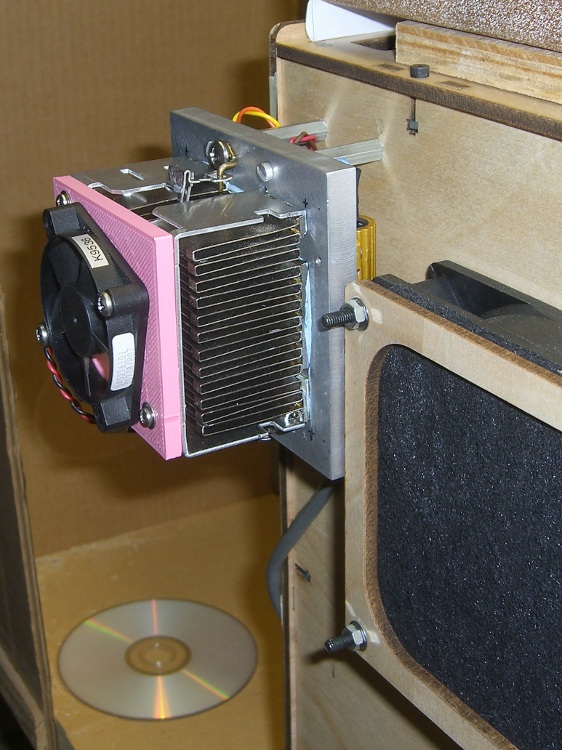
A bit of machining mated a junked CPU cooler to a half-inch slab of aluminum that serves as a heat spreader. The cooler had many tabs and protuberances on its bottom surface that I simply sliced off with an abrasive wheel. Two pieces of brass shim stock filled in a mysterious recess along the right edge in this picture. The cooler’s spring clamp engages a pair of wire tabs screwed to the spreader and the force smushes a layer of thermal compound into the air gaps.
CPU heatsink on aluminum spreader
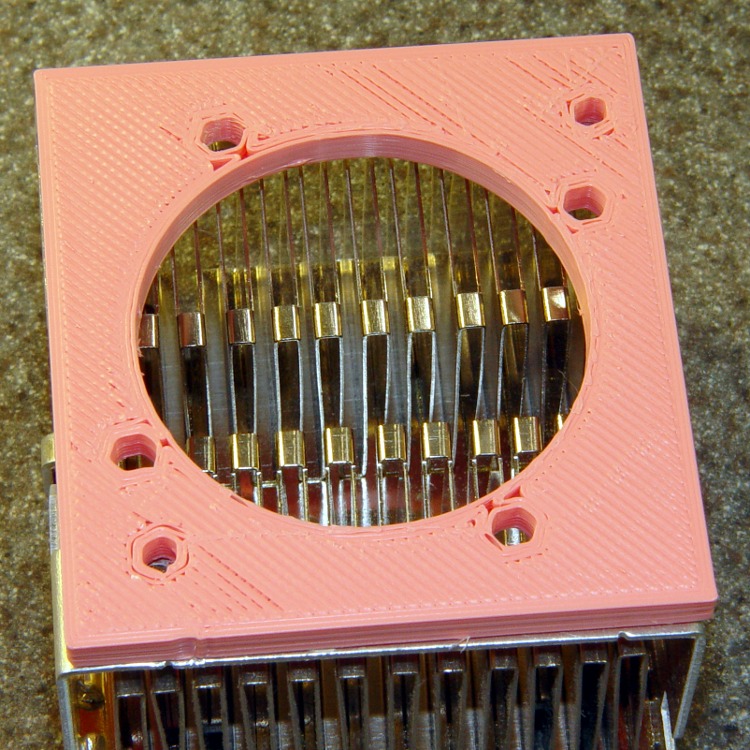
The holes atop the cooler didn’t match up with any fans in my collection, but that’s why I have a Thing-O-Matic. I had to rotate the fan case to get the holes to fit, which was trivially easy in OpenSCAD.
Fan Adapter Plate Model
And then it built about like you’d expect:
Fan adapter plate
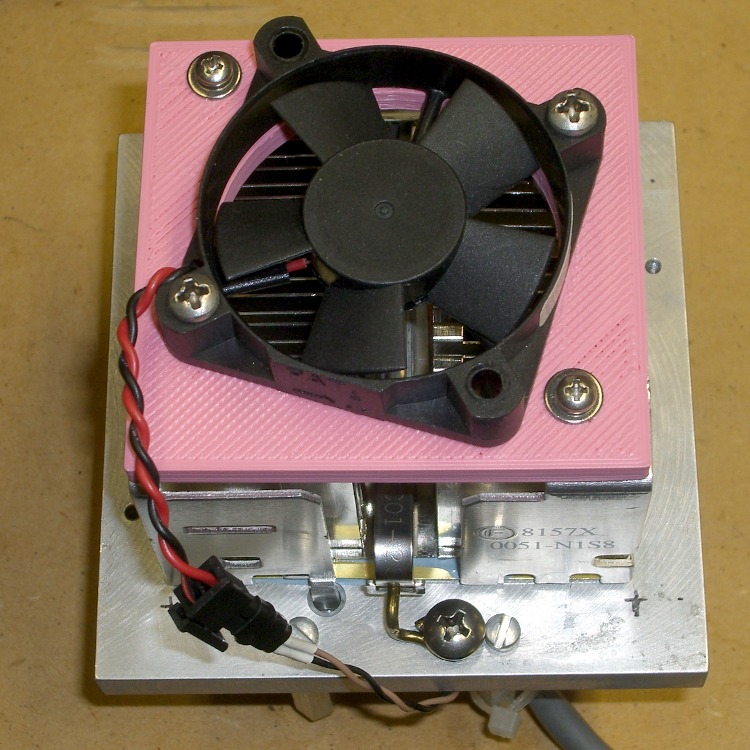
Yes, it really needs a finger guard, but that’s in the nature of fine tuning…
Assembled dummy load
The OpenSCAD source code, with a rather fat ThreadWidth setting. IIRC, this was fallout from a random walk through the Skeinforge parameter space.
// Fan adapter plate for CPU cooler
//  Used for Thing-O-Matic minimum current loads
// Ed Nisley - KE4ZNU - Mar 2011

// Build with...
//	extrusion parameters matching the values below
//	+2 extra shells
//	3 solid surfaces at top + bottom

include </home/ed/Thing-O-Matic/lib/MCAD/units.scad>

// Extrusion parameters for successful building

ThreadWidth = 1.0;					// should match extrusion width
ThreadZ = 0.33;						// should match extrusion thickness

HoleWindage = ThreadWidth;			// enlarge hole dia by extrusion width

// Plate dimensions

PlateX = 70.0;
PlateY = 66.0;
PlateZ = 5.0;

FrameHoleSpace = 50.0;				// mounting holes in frame
FrameHoleXOffset = 10.0;			//  ... offset from front left
FrameHoleYOffset = 10.0;			//  ... which are *not* symmetrical!
FrameHoleDia = 3.0 + HoleWindage;	// from frame holes
FrameHoleRadius = FrameHoleDia/2;

FanHoleSpace = 40.0;				// fan hole separation in X & Y
FanHoleDia = FanHoleSpace * sqrt(2);	// diameter of hole circle
FanHoleRadius = FanHoleDia / 2;

FanAngle = acos(FrameHoleSpace / FanHoleDia) - 45;

FanDuctDia = 48.0;
FanDuctRadius = FanDuctDia/2;

FanCenterX = PlateX/2;
FanCenterY = PlateY/2;

FanScrewDia = 4.0 + HoleWindage;	// from fan frame holes
FanScrewRadius = FanScrewDia/2;

// Convenience settings

BuildOffsetX = 3.0 + PlateX/2;		// build X spacing between top & bottom plates
BuildOffsetY = 3.0 + PlateY/2;		//	... Y

Protrusion = 0.1;					// extend holes beyond surfaces for visibility
HoleZ = PlateZ + 2*Protrusion;

//-- Build it!

  difference() {
	cube([PlateX,PlateY,PlateZ],center=true);

	translate([(FrameHoleXOffset - FanCenterX),(FrameHoleYOffset + FrameHoleSpace - FanCenterY),0])
	  cylinder(r=FrameHoleRadius,h=HoleZ,center=true,$fn=6);
	translate([(FrameHoleXOffset + FrameHoleSpace - FanCenterX),(FrameHoleYOffset - FanCenterY),0])
	  cylinder(r=FrameHoleRadius,h=HoleZ,center=true,$fn=6);

	cylinder(r=FanDuctRadius,h=HoleZ,center=true,$fn=48);

	rotate(a=[0,0,FanAngle]) {
	  for(x=[-FanHoleSpace/2,FanHoleSpace/2]) {
		for(y=[-FanHoleSpace/2,FanHoleSpace/2]) {
		  translate([x,y,0])
			cylinder(r=FanScrewRadius,h=HoleZ,center=true,$fn=6);
		}
	  }
	}
  }
The original as-it-was-being-machined heat spreader dimensions:
Much to my surprise, the build plate maintained its alignment during the thrashing around while installing the new X axis motor. Measuring the alignment with that routine gave these results in mm above the sub-platform:
0.8
0.8
0.8
0.9
1.0
1.0
0.7
0.9
1.0
Bearing in mind that the overall measurement accuracy isn’t any better than 0.05 mm (and I have serious reservations about that), the plate moves as perpendicular-ly to the nozzle as one could expect. I tweaked it a bit, but probably just rearranged the offsets.
So it’s stable. I must add a Z-height probe to the plate so that the machine can set itself up as the platform expands & contracts. The trick will be getting 0.1 mm accuracy at a constant offset from the upper build plate.
Increasing the Y driver to 900 mA, the Y motor can traverse at 6500 mm/min. It began losing steps at 6600 mm/min.
Increasing the X driver to 900 mA, the X motor can traverse at 6000 mm/min with both aluminum build plates.
At 900 mA with both aluminum build plates, both axes can dependably traverse at 6000 mm/min = 100 mm/sec.
Large moves shake the printer, small patterns rattle it like a castanet, and you (probably) can’t print plastic at that speed, but the XY axes can traverse at 100 mm/s. That’s with about 200 g of aluminum plates atop an HBP, making it far heavier than even the ABP.
Because the firmware does not apply velocity ramping (aka control the motor acceleration), the stages must start or stop within two full step positions to avoid stalling the motors.There’s some belt deformation (not stretch), the Y idler pulley isn’t rigidly mounted, and the stages themselves have plenty of slightly bendy parts.
At 200 full step/rev, a 17 tooth pulley, and a 2 mm pitch belt, 1 full step = 0.17 mm and 2 step = 0.34 mm. I don’t have a good measurement for the other factors, but let’s assume a little bit of slop and go for 0.5 mm of total start / stop distance.
The acceleration required for an abrupt 100 mm/s speed change is therefore:
(0.12)/(2 * 5x10-4) = 10 m/s2
The entire XY stage assembly weighs about 1 kgf, so F = m·a tells us that the force is 10 N. There’s another 1 kg = 10 N from belt / pulley friction, so the total force is 20 N.
The pulley radius is 5.5 mm, so torque = F·r tells us the required motor torque is 20 * 0.0055 = 110 mN·m.
Although I don’t have the exact motor specs at hand (a peril of using eBay as my parts locker), NEMA 17 motors with 38 mm case lengths produce around 200-300 mN·m at 1 A. That matches the Y axis numbers pretty well, given the one-significant-figure accuracy of the measurements.
The X stage motor has a 34 mm case length and is likely good for 150-ish mN·m at 1 A. The 0.5 kgf of X axis belt friction dominates the acceleration force, so that result is in the right ballpark, too.
The motor have winding resistances around 2 Ω, so they’re dissipating something under 2 W at 0.9 A. The cases and driver chips get barely warm to the touch; there’s no need for heatsinks or active cooling!
Because the motors run well within their rated currents and the winding voltage is far lower than 12 V, microstepping is in full effect. The motors hum quietly and the stages move with authority. This is the quietest motion I’ve ever heard from the Thing-O-Matic; isolating the bolt heads from the panels probably improved that, too.
Remember to increase the per-axis speed limits in machines.xml to allow higher speeds; it’s all too easy to fool yourself that changing F6000 to F7000 in the G-Code file makes a difference, even while the XML file caps the speed at F5000.
Now that RepG has a setting for the homing speeds, I can set the maximum XY speed to 6000 mm/s, home at 2500 mm/s, and be done with it.
I might just saw the leadscrew off the damn Z axis motor and replace that puppy, too, although that’s not in the critical path right now.
Note: Don’t replace the motors on your TOM without going through the whole mechanical and electrical upgrade process I’ve described over the last few months. The X axis rod follower is extremely important, but the rest of the mods I’ve described help make the printer work smoothly and reliably. Adding more power won’t make those problems Go Away; you’ll just break something else!
After pondering the stepper motor data collected there and the driver data there, plus running some experiments with different motors, I’ve concluded that the MBI stepper motors aren’t appropriate for the Thing-O-Matic. This post summarizes my doodles and provides some background and justification for what I’ve been doing…
During the next week or two I’ll continue writing up the results of installing better stepper motors in my TOM, plus some mods required to take advantage of the improved performance. I’ll do a wrapup of the new motors when everything’s settled down and I (think I) understand what’s going on.
The ideal situation
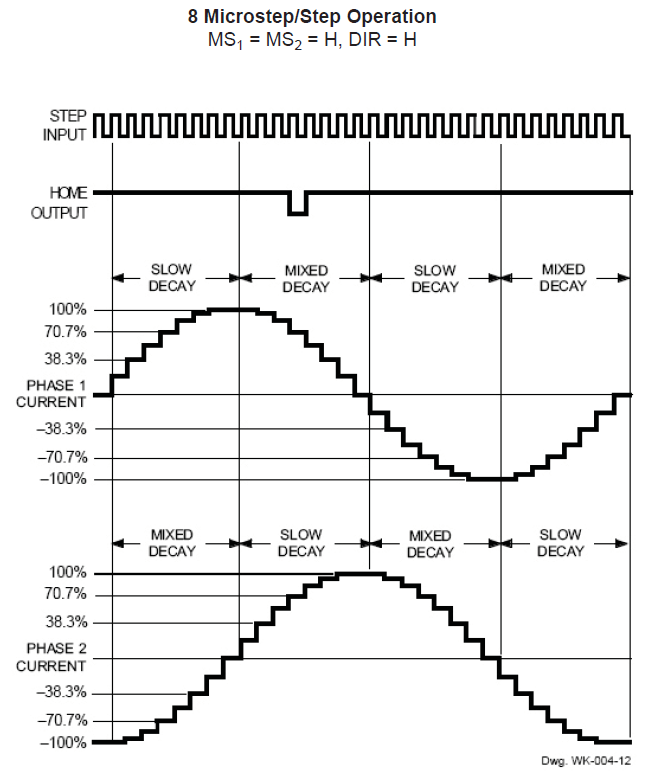
This diagram from page 15 of the Allegro A3977 datasheet shows how the current varies in each winding during the course of 32 microsteps. The motors have 200 full steps/rev and 1600 microsteps/rev, so this diagram repeats 50 times during the course of one complete shaft rotation.
Allegro A3977 microstepping current waveforms
The peak current of each waveform corresponds to the REF pot setting on the MBI driver board:
current in amperes = (REF pot voltage) / 2
That peak current must not exceed the motor’s rated Maximum Current, because the winding resistance dissipates that much power as heat. The maximum temperature occurs deep in the windings, far from the metal part of the armature, so blowing air on the motor helps, but does not cure, an overtemperature problem.
The driver adjusts the current in each winding to generate an approximation of a sinusoid waveform for each microstep. Because the motor torque varies directly with the winding current, the REF pot sets the maximum torque available from the motor.
The A3977 driver controls the current by switching the MOSFETs on and off: on = increasing current, off = decreasing current. You can fiddle with the rates of increase and decrease, but those are all in the nature of fine tuning. What’s important is that the A3977 shuts off the winding current when it exceeds the product of the REF pot setting and the sinusoidal value for the microstep, then turns it back on when it falls below a somewhat lower level.
Therefore, the current isn’t actually constant: the whine you hear when the motors are standing still is an audible harmonic or sub-harmonic of the switching frequency. That’s not a bug, it’s a feature!
At the microsteps corresponding to the peaks of each sinusoidal waveform, one winding carries the maximum current and the other winding carries zero current. There are 200 such positions, each corresponding to one full motor step. At those points, the armature holds the rotor in position with the much-quoted Holding Torque.
For all other microsteps, the A3977 controls the Pythagorean sum of the two currents to equal the maximum current setting. The two currents pull the rotor toward two adjacent full-step positions, with the actual (nominal) rotor position determined by a bit of trig.
The power dissipation in the motor at every microstep is therefore:
(peak current)2 x (winding resistance)
All that applies to the DC situation with the motor halted at a particular microstep. In order to turn the rotor, the drive must change the winding currents to the values for the next microstep.
The motor windings are basically inductors with energy stored in their magnetic field, so the current cannot change instantly. The ratio of the inductance (L) and the total circuit resistance (R) is the time constant, abbreviated with a Greek tau (τ):
τ = L/R
The current change from one microstep to the next requires 3 time constants to settle within 5% of the final value and 5 time constants to settle within 1%. Those are characteristics of the exponential function and have nothing to do with the particular circuit; once you know the time constant, you know what’s going to happen.
The voltage applied to the motor winding determines the final value of the current that you use with the time constant. Microstepping drivers expect to apply a voltage far higher than the winding’s rated voltage, then limit the current to the winding’s rated value: the current never reaches the “final value”, but that’s still what you use in the computation. If the supply voltage equals the winding’s rated voltage, then the final value is simply the winding’s rated current.
The MBI Situation
The MBI motors (all of them, XYZ and Stepstruder) in a Thing-O-Matic do not operate like that. I’ll use the XY motors as examples, but feel free to run the same analysis on the others.
To summarize the datasheet values:
Inductance L = 44 mH
Resistance = 35 Ω
Rated voltage = 14 V
Rated current = 400 mA
The motors operate from a +12 V supply, so the maximum winding current will be at most 12 / 35 = 340 mA. The actual power supply voltage seems to around 11.5 V with the heaters running, the A3977 MOSFETs (inside the chip) have a total on-state resistance of about 800 mΩ, and I’ll assume another ohm of wiring resistance along the way. All that reduces the actual maximum current to around 300 mA; I’ll use that, because it’s within 10% off the actual value.
The MBI-recommended REV voltage setting of 1.5 V sets a 750 mA output current. However, there’s no magic involved: the motors cannot draw more than 300 mA in a Thing-O-Matic, no matter what the REF trimpot may call for.
With the REF trimpot set to 750 mA and the maximum current limited to 300 mA by the circuit, the A3977 cannot produce the correct current for most of the microsteps. Whenever the microstep current exceeds 300 mA, the A3977 cannot make that happen.
This diagram shows the actual winding current in the MBI motors for each of the 32 microsteps in four full motor steps:
Allegro A3977 waveform – current saturation
The 100% level corresponds to the 750 mA set by the REF trimpot and, as above, the nice sinusoids show the target current for each microstep. The red line shows the actual current for each microstep, none of which can exceed the 300 mA limit. That limit corresponds to 300/750 = 40% of the maximum, just slightly over the 38.3% for the second microstep in each sequence.
The pink zones mark the microsteps where both windings become current-limited to 300 mA. During those microsteps, the current in the windings doesn’t change and the motor cannot move. Of the 32 microsteps in each group of four full steps, the motor can move during only 16.
The horrible sounds you hear from an MBI motor happen as the rotor encounters those pink zones: the rotor literally jams to a stop when both windings limit at 300 mA, remains immobile while the currents remain steady, then jerks across the 4 microsteps in the pink zone when the current in one winding drops below 300 mA. This is obviously not conducive to smooth motion or high torque.
Try this: reduce REF to, say, 400 mV to limit the peak current to 200 mA. Run the motor slowly, because it won’t have much torque, and listen. Set REF back to 1.5 V, run it at the same speed, and listen.
The power dissipation for all the microsteps in the pink rectangles is:
2 x (300 mA)2 x 35 = 6.4 W
The factor of 2 comes from the fact that both windings carry 300 mA in that condition.
The motor’s rated maximum power is:
(400 mA)2 x 35 = 5.6 W
There’s no factor of 2 because the rating applies to one winding carrying the rated current.
During the other microsteps the power drops slightly, with the best case when one winding carries zero current:
(300 mA)2 x 35 = 3.2 W
That’s why MBI motors overheat: they operate at the ragged edge of their power limit while tucked inside a thermally insulating plywood box. If the motor stops on a microstep inside those pink zones, it’ll dissipate 6.4/5.6 = 114% of its rated power.
Changing the current between microsteps also poses a problem. The time constant for the MBI XY motors is:
τ = 44 mH / 35 Ω = 1.3 ms
That means the current settles within 5% in 4 ms and 1% in 6 ms.
Stock Thing-O-Matics move at about 30 mm/s. The motor pulley has 17 teeth and the belt has teeth on a 2 mm pitch, so the motor must turn at 1 rev/s to move the stage at 34 mm/s. With 1600 microsteps/rev, each microstep takes 625 µs, which is half the time constant.
I think you can see where this is going…
The microsteps outside the pink zones could have active current limiting, because the A3977 has some voltage headroom. The first microstep has a current limit 20% of the 750 mA maximum (set by the trimpot = what you want) = 150 mA.
The current starts rising toward the actual 300 mA maximum (set by the supply voltage and winding resistance = what you get) and after 625 µs it reaches:
300 mA × (1 - e-0.5) = 120 mA
So the current doesn’t quite reach the target and the A3977 doesn’t get a chance to do active current limiting.
The next microstep has a 38% current limit that sets a target of 285 mA, marginally below the 300 mA limit set by the winding resistance. The A3977 continues to apply the full supply voltage, so the winding doesn’t notice anything’s changed and the current continues to rise. At the end of the second microstep the current has reached:
300 mA × (1 - e-1) = 190 mA
Which is about 2/3 of the target and the A3977 still doesn’t do active current limiting.
The full analysis is messier than that, but what you see is pretty close. I won’t go into what happens when the A3977 is trying to reduce the winding current, but a similar analysis applies.
Also, when the motor rotates slower the microsteps last longer and the current can get closer to the target value. Print at 15 mm/s to get microsteps about 1 time constant long; that’s still short, but it’s better.
If the motor stops on a microstep outside the pink zones, then the two winding currents will eventually exceed the values for that microstep and the A3977 will begin active current limiting: that’s when you hear the chopper whine. However, if the motor stops on a microstep inside the zones, then it’s dead silent: the currents never reach the level where the A3977 can apply active current limiting.
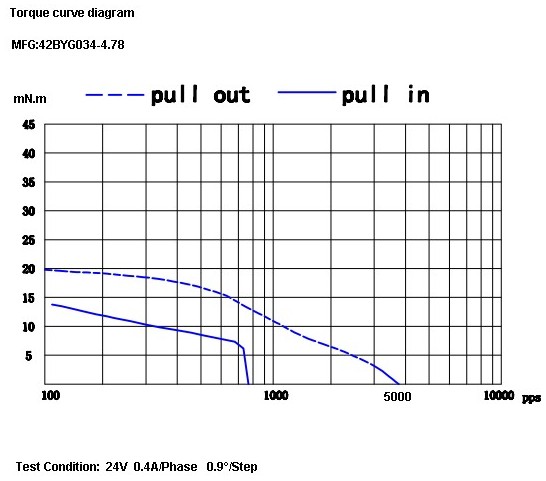
Because torque is proportional to current, the motor never delivers its rated torque in any microstep while it’s turning. The motor datasheet includes this torque-speed curve:
Cupcake TOM Stepper Torque Curve
The much-quoted Holding Torque is irrelevant. That measures the motor’s ability to hold its position with an external torque applied to the shaft. Unlike CNC milling machines, 3D printers do not impose torques on the XY motors due to forces from a cutting tool.
What’s important is the bottom curve showing the pull-in torque: the torque available to accelerate the load from a dead stop to the speed shown along the bottom, given in full-step pulses per second.
At 1 rev/sec the motor sees 200 full steps/sec, at which speed the pull-in torque is about 12 mN·m. However, that’s at the 400 mA full rated current applied from a 24 V source through a current-limiting driver. Because the maximum torque depends on the current and the resistance limits the maximum current to 300 mA, the maximum pull-in torque scales to 9 mN·n.
I’ll grant the possibility that there’s a misprint and Kysan simply dropped a zero. Pull-in torque around 150 mM·m seems more common with short NEMA 17 motors, but the data sheet is what the data sheet is. The motors behave as though they have no mojo, which leads me to believe the printed word.
Anyhow, that torque assumes the driver applies the proper winding current in each microstep, which, as you’ve just seen, doesn’t happen. Oddly, the MBI motors provide the highest torque in the pink zones, where the Pythagorean sum of the resistance-limited winding currents is:
√(2 x 300 mA2) = 420 mA
So the motors run in a crippled full-step mode that produces more-or-less the rated torque only when the motor isn’t moving, while dissipating too much power. When the motor is moving, the current never reaches the proper level.
The measurements I made when I had the printer apart indicate that the X and Y stages require far more torque than the MBI motors can provide, even if they were driven correctly. The fact that they work at all has more to do with good luck and spec tolerances than anything else.
The inadequate torque also answers the question of whether a higher power supply voltage will improve things: no, not much. A 24 V supply (as specified in the datasheet!) will permit operation at the rated current with correct microstepping, but that torque is still far too low.
I don’t have any inside knowledge, but I think what happened is that these motors date back to the Cupcake printer, which used a simple H-bridge without active current limiting. For that type of driver, the rated voltage of the winding must equal the supply voltage, because the winding resistance provides the current limiting.
Using A3977 drivers seemed like a simple upgrade to produce the Thing-O-Matic, but a microstepping driver must apply a voltage much higher than the winding’s rated voltage in order to get fast current changes and apply active current limiting. The old motors simply aren’t suited for the new drivers.
Tomorrow: what better motors can do for a Thing-O-Matic.
I’m certain I’ve made at least one error in what you’ve just read; comments, criticisms, and corrections are welcome. However, before you comment, RTFM for the A3977 driver, the MBI stepper motors, and any other hardware you’re proposing. Run the numbers first, OK?
Update: A reader suggests a rule of thumb relating voltage to inductance …
A group of 34 mm NEMA 17 steppers arrived from the usual eBay seller, I wired one up, and popped it in place under the original cork sheet. The bolts sit on steel washers riding atop compliant bushings from the batch of 43 mm NEMA 17 steppers that drive the extruder and Y axis.
[Update: Not that you’ll ever find another one, but here’s the straight dope directly from the motor label…
Astrosyn P/N FH5-1043 02
Minebea 17PM-J034-P2VS
No. T6Z01-03
]
Putting a cork sheet under each motor was a nice idea, but it didn’t work as intended: the bolts quite effectively couple the vibration to those resonant acrylic and plywood sheets. I had to cut the two front bushings in half to ease the bolt heads under the X axis stage at that end of its travel, but the motor is now isolated from the Y stage. I’m sure the bolts touch the slots, but even I am unwilling to fit compliant bushings around the bolts.
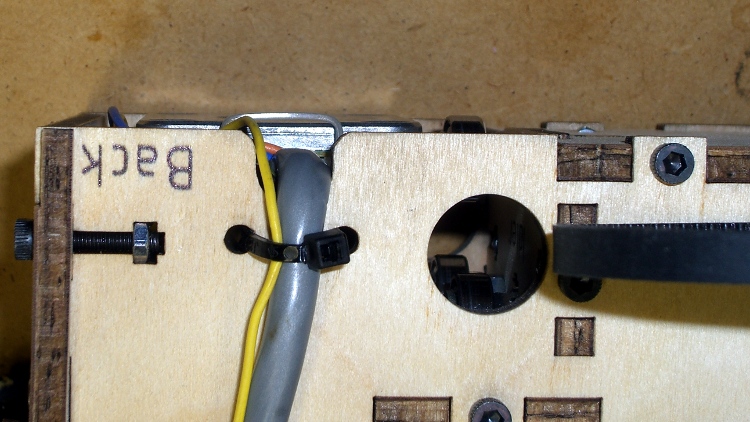
Lashing the cable to the side of the box should suffice for strain relief, as the jacket forces it to flex in a large upward loop with no sharp bends.
X axis motor wire strain relief
That picture’s inverted so the flash lights up the stuff sticking out of the bottom of the box. The thin silvery arch is a cable tie around the motor connector holding it securely against the motor frame, but the Y axis follower bearing just to its right actually sticks out slightly more.
This motor has six active terminals and could run in either unipolar or bipolar mode. The wiring harness has four leads and that’s why I bought it: the MBI driver board expects a bipolar motor.
The winding resistance is a mere 2 Ω, compared to the MBI motor’s 35 Ω. Of course, I don’t have any specs for this motor, but similar Minebea 17PM-J0xx motors run around an amp with 130-180 mN·m of pull-in torque, compared to the MBI motor’s 14-ish mN·m. I expect to run it around 500-750 mA at half the rated torque, where it’ll dissipate maybe a watt, tops, with no overheating.
The G-Code in BenJackson’s Smooth Motion test does a good job of identifying mechanical constraints and stepper motor problems. Even after doing all the rod alignments and sundry tweaks, my TOM wasn’t reliable around 4000 mm/min = 65 mm/s and had terrible mechanical resonances around 5000 mm/min. While normal extrusion feeds run around 30 to 40 mm/s (1800 to 2400 mm/min), I didn’t have a warm fuzzy feeling that everything was operating correctly and, in fact, the TOM suffered the occasional missed step.
The per-axis speeds in thingomatic.xml limit the maximum speed attainable in the G-Code; you can set the F value in the G-Code as high as you like, but the axis won’t move any faster than it’s allowed. I think ReplicatorG applies those limits when it converts human-readable G-Code into binary Sanguino3G code.
After installing the new Y axis stepper motor and X rod follower, I ran through another series of tests to see what was new & different. With all the mechanical binding eliminated and a decent Y motor at 800 mA, the TOM now traverses reliably up to about 5500 mm/min = 90 mm/s. The X axis loses steps dependably by 6000 mm/min = 100 mm/s with the current set to 300 mA.
Note that this is not printing, just moving. Printing requires attention to a whole bunch of details, but first you gotta have reliable motor control.
So I set the upper limit at 5000 mm/min and we’re both perfectly happy. Indeed, with the new Y axis motor, the mechanical resonances have vanished and it’s a much quieter machine at the normal speeds. As a confidence builder, that one will suffice for now.
I have a 34 mm NEMA 17 in hand to replace the X axis motor; it’ll be all good.
It’s actually a snub-nosed version of that, cut down by 15 mm to fit the TOM’s vertical space; the nozzle homed 3 mm above the last of the 345 layers.
I wanted to discover three things:
Are there any axis skips in a 4 hour print?
Can ABS film + aluminum plate anchor a tall object?
Can I use up all the pink filament?
Answers: no, just fine, not quite.
I did not re-check the platform alignment after installing the new Y axis motor and fiddling a bit with the Y axis rods. Quite to my dismay, the platform was about 0.5 mm too high (crunch!), so I gave the Z axis leadscrew a mighty twist and salvaged the first layer during the Outline extrusion. Despite that, the first layer seemed to be flat within the usual 0.2 mm (eyeballometrically measuring the first infill, as the Outline was trashed) and adhesion was fine.
The grip delaminated a bit and the butt pulled the film up, which isn’t entirely unexpected for huge objects.
I enclosed the build chamber before starting this print, but the temperature still isn’t all that high in the Basement Laboratory and the plastic was barely warm when I took it out. I’m not convinced any reasonable chamber temperature will solve the problem; it may work out better to assemble large objects from thinner parts.
This was the first full-up test of the X Rod Follower and the new Y axis stepper motor. Prior to printing this thing, I did a quick torture test (about which, more later) and dialed the motor currents back:
X REF = 0.63 V → 315 mA
Y REF = 1.76 V → 880 mA (in a 2 Ω winding)
Z REF = 0.54 V → 270 mA
A REF = 0.99 V → 450 mA (in a 2 Ω winding)
After four hours the Y, Z, and A steppers were barely warm to the touch and a thermocouple stuck into one of the X stepper’s bolt holes reported it was 38 °C, just above barely warm. I’m adducing evidence that the MBI steppers aren’t appropriate for the TOM’s requirements and that the default current settings are much too high.







 The Smell of Molten Projects in the Morning