
These emerged from some recent printing sessions, where they served to join two successive colors as I changed ABS filaments.
Whenever I give a talk, these are the last tchotchkes to go. Maybe some festive party fins will help?
The Smell of Molten Projects in the Morning
Ed Nisley's Blog: Shop notes, electronics, firmware, machinery, 3D printing, laser cuttery, and curiosities. Contents: 100% human thinking, 0% AI slop.
Mechanical widgetry
These emerged from some recent printing sessions, where they served to join two successive colors as I changed ABS filaments.
Whenever I give a talk, these are the last tchotchkes to go. Maybe some festive party fins will help?
So, as you might expect, I couldn’t let the aneurysm on that tire get away without a closer look: had to haul the poor thing out of the trash and dissect it. Here’s what it looked like on the bike:
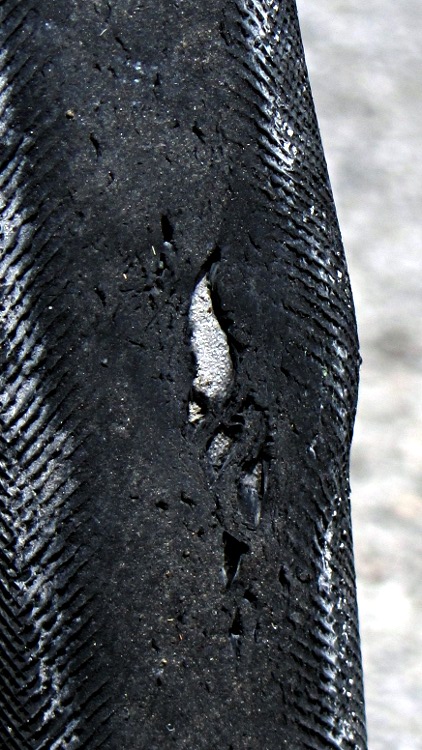
The outer rubber has disintegrated and is pulling away from the Kevlar belt underneath, but it’s still holding air!
Cutting that section out of the tire and flattening it makes things look almost normal:

Peeling the rubber off the carcass reveals that the body cords have either broken or ripped loose under the belt:
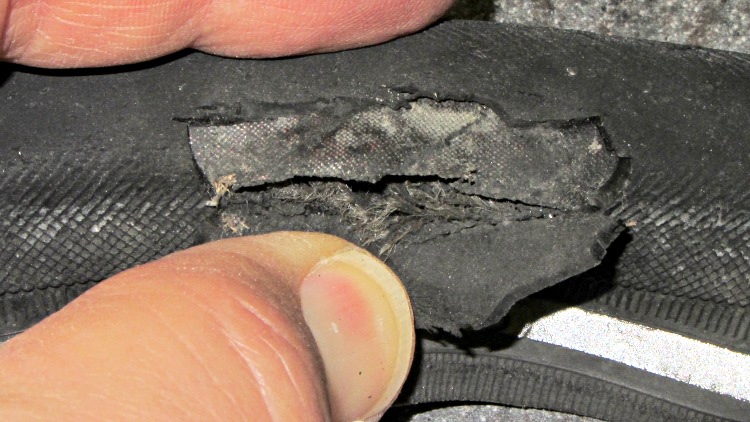
There was no external damage over that part of the tire and I was wrong about a gash in the Kevlar belt. However, the ends of the belt overlap just above and to the right of my thumb, so perhaps there’s a manufacturing flaw in there somewhere.
Now it’s in the trash!
A three-pack of 100-tooth 2 inch cutoff saw blades followed me home from Harbor Freight a while ago. Although they’re intended for a craptastic HF tabletop saw, I thought they might come in handy on the Sherline for slicing lengths of brass tubing. The reviews for the saw indicate the blades are no good for steel, barely adequate for brass, and dandy for wood; they have nowhere near enough teeth for a screw cutoff blade.
None of the arbors in my collection fit a blade with a 3/8 inch hole, so a bit of lathe work produced one while the 3D printer cranked out a GPS+audio case:
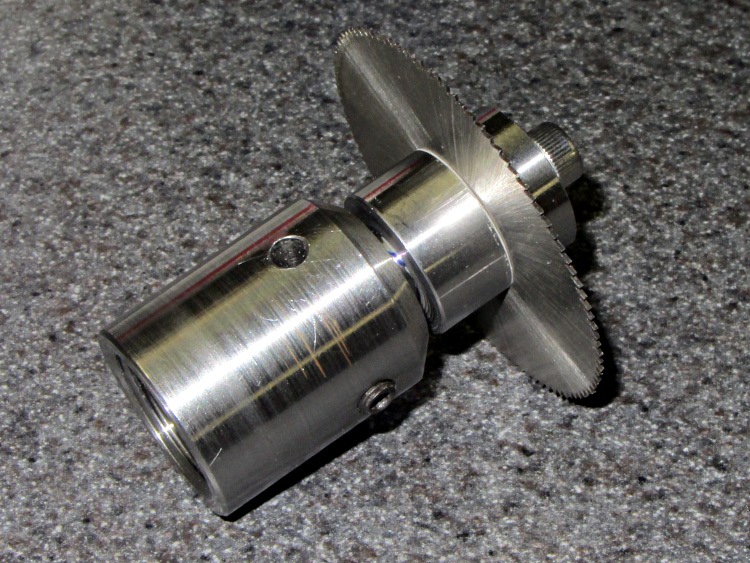
The shaft is 3/8 inch drill rod and the collars are 3/4 inch drill rod, both of O1 oil-hardening steel that will remain forever unhardened, fitting into a Sherline endmill toolholder. I drilled-and-bored the collars to a slip fit on the shaft, then epoxied the rear one in place:
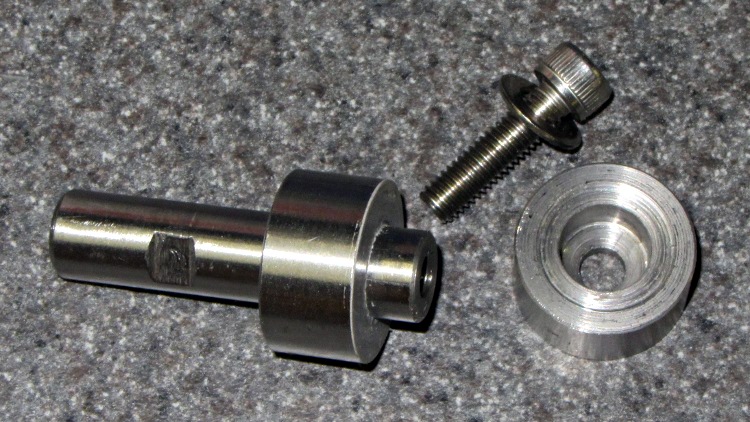
I drilled a 0.6 inch deep blind hole in the shaft and tapped it 10-32 all the way down for a 1/2 inch SHCS. A bag of assorted 10-32 taps produced a bottoming tap that came in handy, but I put tapping in the same category as parallel parking: I’ll walk half a mile to not parallel park the van. Couldn’t avoid it this time.
The flat on the shaft came from a bit of hand filing, which was easier than setting up the mill.
The front collar’s undercut ensures just the rim contacts the blade. The photo shows the vanishingly thin layer of epoxy on the rear collar that mooshed out as I clamped the stack together:
After the epoxy cured, a pass through the lathe skimmed off that thin epoxy layer and trued up the fixed collar face to eliminate the last bit of wobble. The radial runout remains just enough so that one tooth tings before the others engage, but I’m not entirely convinced that’s due to the (minimal) shaft-to-blade clearance.
In use, putting the split lockwasher between the loose collar and the SHCS provides a little clamping compliance.
At some point, I’m sure this thing will come in handy…
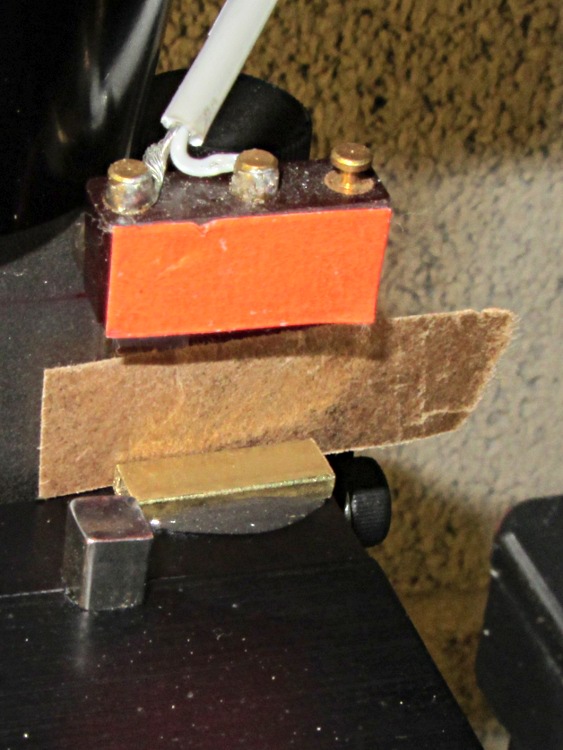
After drilling that PCB, I noticed that the Z axis saddle locking lever (which also functions as the backlash adjustment) had come loose. It turns out that if you don’t tighten the thumbscrew or it works loose, then the locking lever can turn with the leadscrew and, at the very top of the Z axis travel, can walk off the leadscrew thread.
A snippet of rectangular brass tubing epoxied to the top of the Z axis saddle solves that problem by removing 3/32 inch of precious travel. A slip of brown waxed paper (yes, harvested from the new Y axis leadscrew wrapper) kept the epoxy off the dovetail.
Just for consistency, I removed 0.09 inch from the Z axis home offset, but that really won’t make any difference.
HOME_OFFSET = 6.84
HOME = 6.5
Now, I’d put the switch in that position because the saddle jams against the preload nut exactly at the end of the switch button travel. Now I can crush the switch by manually running the Z axis beyond its Home position …
Based on that comment and faced with two sacks of LEDs, I thought an LED curve tracer might come in handy at some point. While I could modify the MOSFET tester to work with LEDs, they have a higher forward voltage and a much lower current than that hardware can handle without some serious chopping & slicing.
At least for the cheap 5 mm LEDs I’m considering, a forward drop well under 4 V and current under 75 mA should suffice. That suggests a +5 V supply for the LED, a fairly high current-sense resistor, and an Arduino for a quick-and-dirty controller.
The overall idea:
The MOSFET current depends on the gate-to-source voltage, which varies with the current through the sense resistor, so the firmware must measure the actual current and adjust the gate voltage to make the answer come out right. This being a DC application, it can probably monotonically increase VGS and stop when it sees the right current. The MOSFET must have a logic-level gate, so that voltages around +4 V will produce sufficient drain current.
The PWM must run at 32 kHz to minimize the size of the filter cap.
If the LED supply is slightly lower than the Arduino’s VCC supply, then the analog input can report the actual voltage and the forward drop is VCCLED - VDrain. Given a regulated supply, that’s as good measuring the voltage against the ground reference.
The current is VSource / RSense. For a current under, say, 100 mA, a 10 Ω sense resistor will drop 1 V, leaving about 4 V of headroom for VGS. The default 5 V reference means the ADC steps are 5 mV, so the current steps will be 0.5 mA. One could use the Arduino’s internal 1.1 V band-gap reference for higher resolution: 0.11 mA. Changing that is a simple matter of software.
So, after a bit of doodling and a pair of afternoon thunderstorms that forced a complete computer shutdown (and forced me into the Basement Laboratory), here it is:
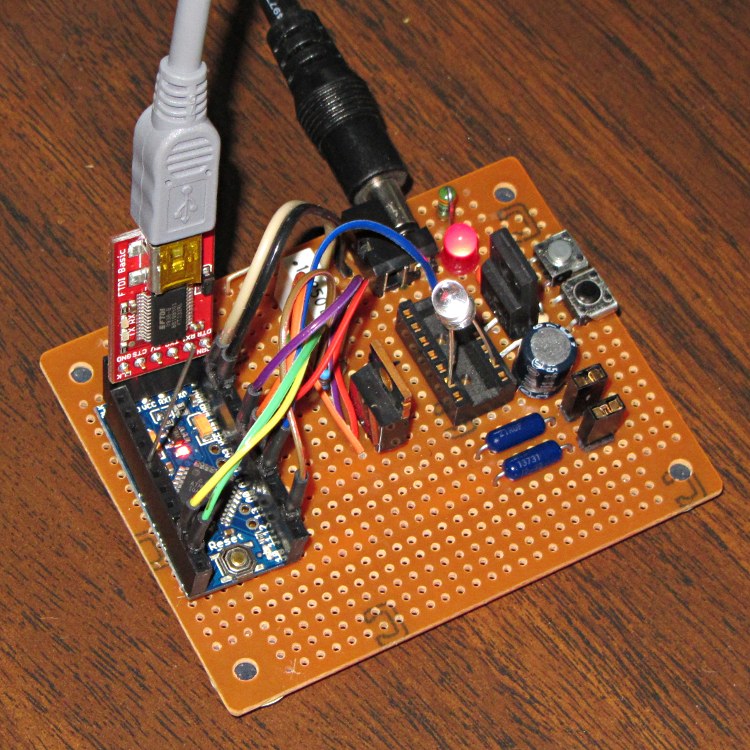
The Arduino Pro Mini board (it’s actually a cheap knockoff) has female headers for all the usual signals and a male header to match the sockets on the FTDI Basic programmer board, all from my heap. The connections use flying leads stripped from a length of ribbon cable, soldered to male header pins snipped from a stick, and reinforced with heatstink tubing. The Pro Mini isn’t anchored in place and probably never will be.
Another view, minus cables and FTDI:
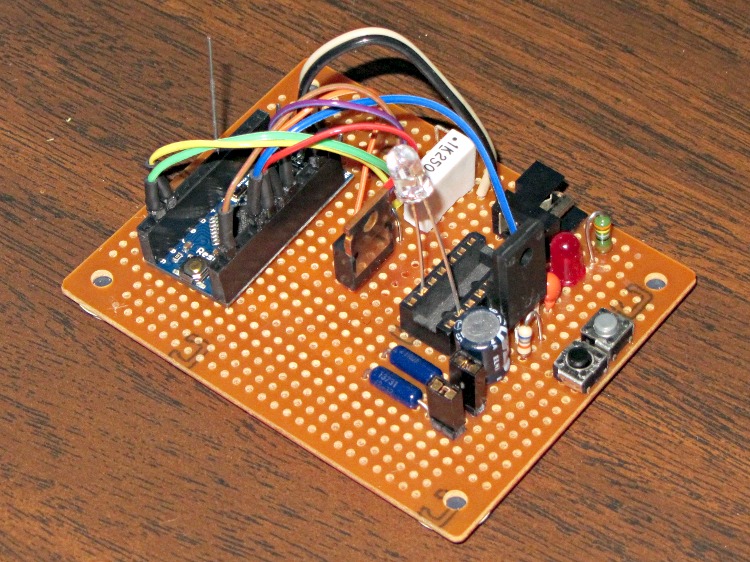
The LED leads just jam into an old IC socket. The top pushbutton triggers the test, the bottom one doesn’t do anything yet.
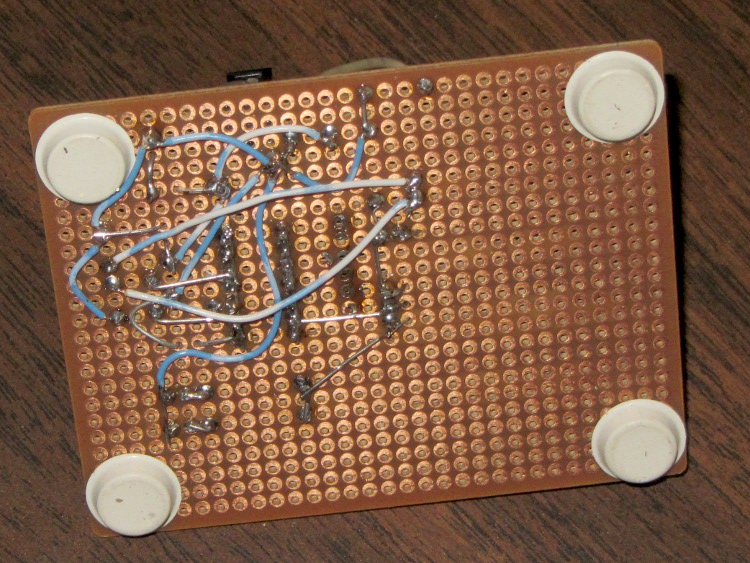
Nothing fancy at all; I hand-wired it to avoid all the usual DIY PCB hassles.The bottom view shows all the wiring:
The schematic, such as it is:
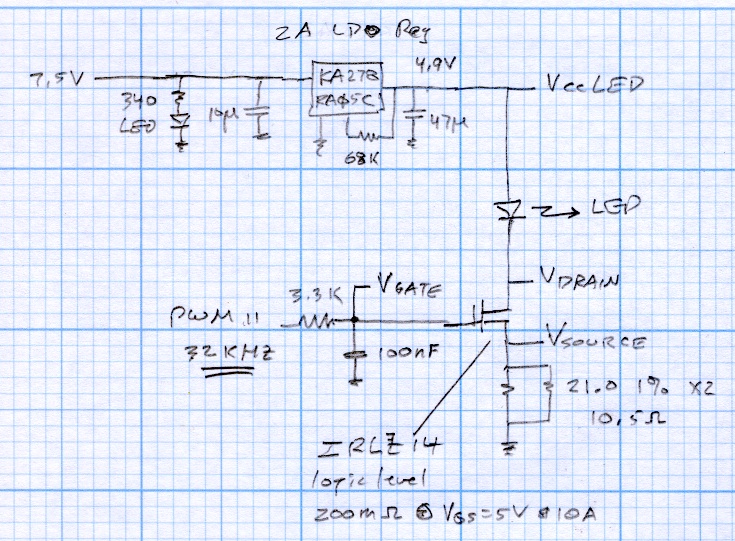
The regulator is a random Fairchild KA278RA05C +5 V LDO, obtained surplus. The 68 kΩ resistor trims the internal divider to pull the output to 4.87 V, just a touch under the Arduino’s 4.93 V regulator. The power supply is a 7.5 V 2 A surplus lump with no pedigree.
The MOSFET is an IRLZ14 logic-level FET with grossly excessive qualifications.
The sense resistor is a pair of 21.0 Ω 1% resistors in parallel = 10.5 Ω. That’s just a firmware constant, so I don’t care what the actual value works out to be.
Next, a dab of firmware…
The whole point of tweaking the Sherline was to get it ready to drill the Wouxun KG-UV3D GPS+voice PCB. While setting up for that, I drilled two #5 holes in the maximum-size PCB platen for 10-32 socket head cap screws to hold it to the tooling plate:

The sloppy hole fit lets the platen align to the tooling plate with the outer two 6-32 screws on the back edge.
Most of the PCB boards I make aren’t nearly as wide as the platen, which means the new SHCS won’t get in the way. The screws require a nut (as a spacer) to keep them from bottoming out on the Sherline’s table underneath the tooling plate and the washers are just because I can’t do it any other way; I should just shorten the screws and store them with the platen.
Masking tape holds small PCBs to the platen reasonably well, probably because I use an unreasonably high 50 mil travel clearance. I have a defunct dehumidifier that might make a dandy low-volume vacuum pump to eliminate any lifting in the middle: a project that has been on the to-do list for far too long…
While I had the tooling plate off, I cleaned the crud out of the tapped holes and ran a handful of 1/4 inch stainless steel 10-32 setscrews just below the surface:

They’re pretty much invisible, of course, but they’re all present. FWIW, you need a 3/32 inch hex wrench for 10-32 setscrews.
In the event that I gouge the aluminum surface (you can see the odd ding and blind hole) through a setscrew, I’ll regret doing this. Not having to remove the plate to dig swarf out of the last clamping hole after carefully aligning a part seems like a win.
 The Smell of Molten Projects in the Morning