Ed Nisley's Blog: Shop notes, electronics, firmware, machinery, 3D printing, laser cuttery, and curiosities. Contents: 100% human thinking, 0% AI slop.
We got a boom box so Mom could have background music; the Olde Family Tube Radio was far beyond its Best Used By date.
Prompted by recent events around here, I checked it on a recent visit and, yup, more corrosion. In all fairness, the cells suggest “Best If Installed By Jan 99”, so they’re well past their date, too.
This used to be a whole lot less of a problem when flashlights and radios (without clocks!) were the only things using “dry cells”: when the battery went dead, the thing didn’t work and you replaced the cells.
Nowadays, we expect alkaline cells to supply keep-alive trickle current for memory backup; even after the cell corrodes, it still supplies that tiny current and we never notice what’s happening inside.
I’m beginning to loathe alkaline cells just like I loathe the small internal combustion engines in yard equipment.
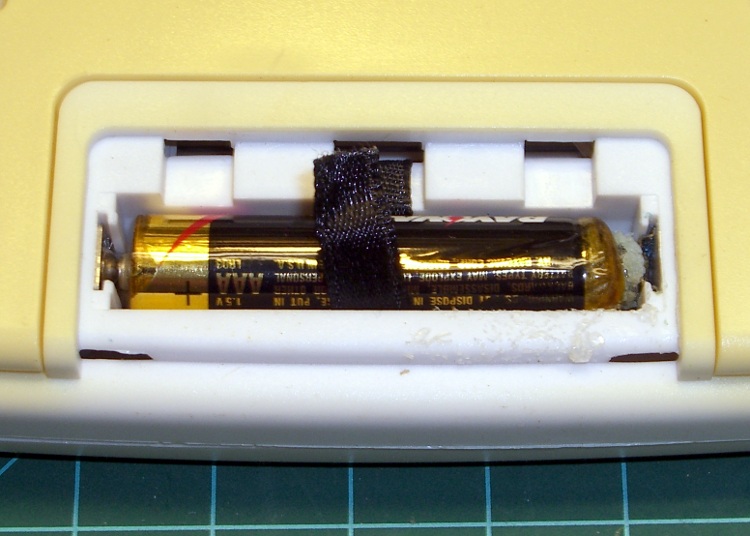
The outdoor thermometer over my desk (which also displays UTC so I don’t have to reset the mumble clock twice a year) started blinking. That’s the usual sign of a dead battery and, yup, when I opened it up, that “leakproof” Eveready was pretty far gone.
Surprisingly, at least to me, the cell hovered around 1.1 V open-circuit and 800 mV under the meter’s “battery test” load. Given the amount of corrosion, I thought it would be flat dead.
The corrosion had crawled out of the compartment along the negative terminal and coated the entire metal tab with bluish-green crystals. Some protracted dabbing with vinegar, rinsing with wet cotton swabs, and drying put things pretty much back in order.
I usually scrawl the date on each cell when I install it, but either I didn’t do that here or the corrosion ate the ink. All I know is that it’s been up there for quite a few years; look at the discoloration where it faces the sun through the window!
The thing was a surplus freebie to begin with and has long since been fully depreciated…
Mary has been quilting up a storm lately and wanted a larger surface to handle a bed-sized quilt. A table in the basement was big enough, but she wanted a larger flat surface around the sewing machine adjacent to the table.
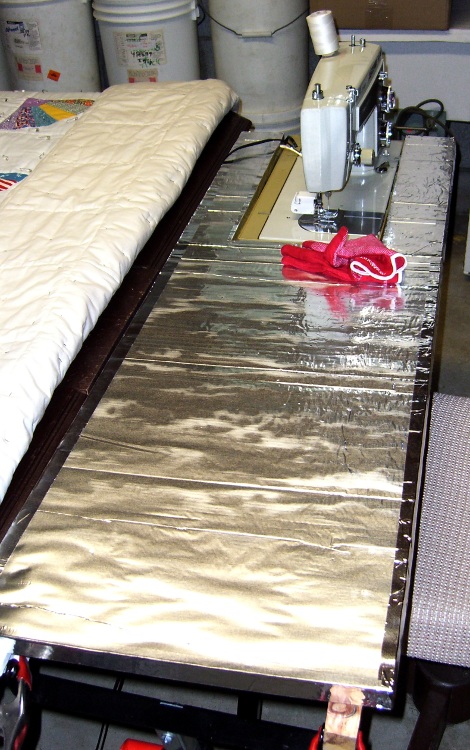
I converted the typing return (*) from her upstairs desk into a table, then cut a piece of aluminum-clad 1-inch foam insulation board to fit. It’s 4 feet long, a convenient length to cut from the 4×8-foot insulation board, and slightly narrower than the typing return. Cutting it required a long X-Acto knife blade, but a really sharp utility knife would work as well.
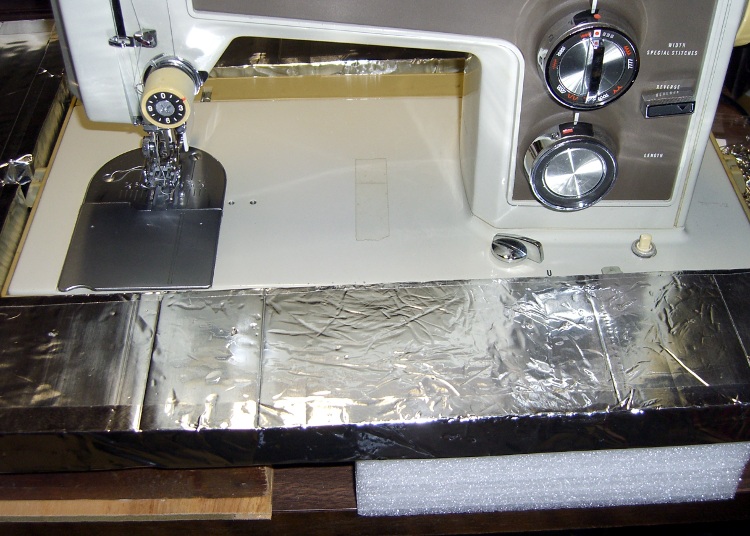
Some stainless-steel tape finished off the edges. The tape itself is lethally sharp-edged, but it’s perfectly harmless if you do a good job of smoothing it against the foam board…
A pair of closed-cell rigid foam blocks held one end of the board at the proper height around the sewing machine, while a pair of cutoffs from the wood pile were just the right thickness & length to extend under the other end. It turns out that precise height isn’t nearly as vital as we expected; close enough is fine.
I cannibalized a pair of table-saw feed roller stands for this project; they had just the right height adjustment and shape to support the typing return and the foam board.
The end result aligns the surface of the sewing machine with both the top of the table and the surface of the foam board. The quilt slides easily over the whole affair and doesn’t bunch up like it did before. Success!
Foam support blocks
(*) A “typing return” is the little table that sticks out from a desk, upon which you put a typewriter, back in the day when typewriters ruled the land. Nowadays, she uses it for her sewing machine, which normally lives at her desk, because there’s no practical way to type at right angles to one’s desk.
That’s the sort of item you can’t do web searches for, because all the terms are so heavily overloaded. Give it a try; you’ll find one or two useful hits. There’s a difference between syntax and semantics; we’re not in the semantic web yet by long yardage.
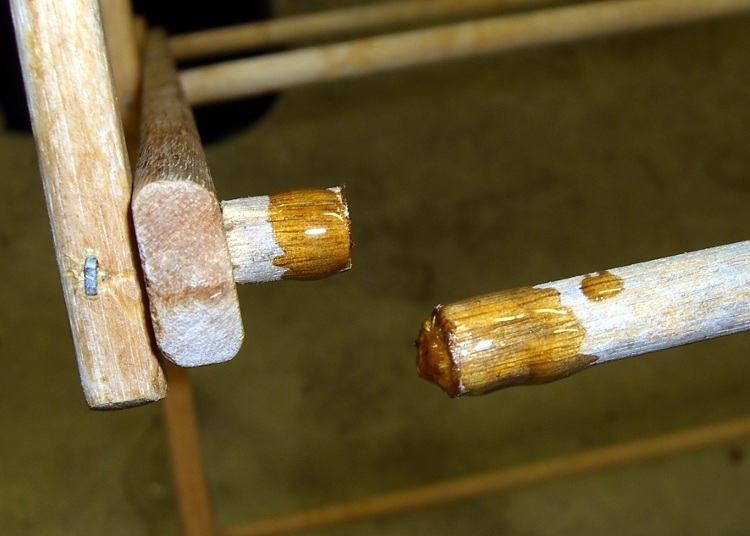
Mary picked up a rather well-used wooden-dowel clothes drying rack at a tag sale for essentially nothing; one of the dowels was missing. That’s easy enough to fix, as I have a stash of dowels from what seems to be another rack of the same type on my wood stockpile…
Of course, those dowels are just an inch or two shorter than needed.
So…
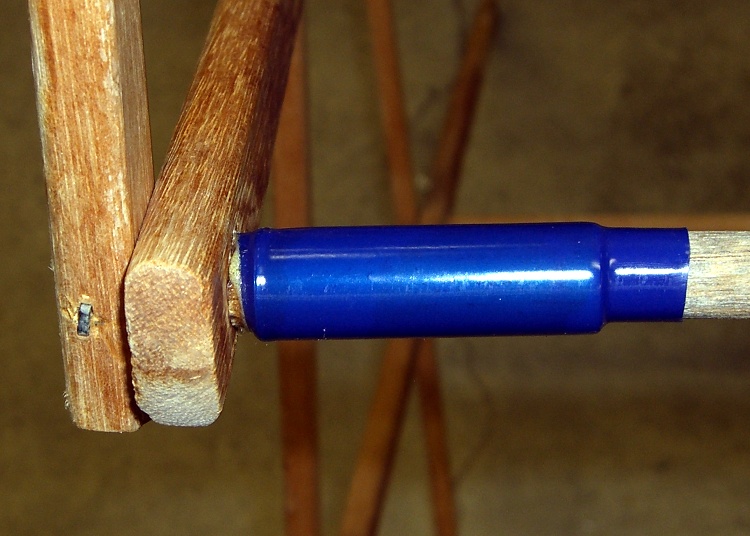
Turn down the ends of two dowels to 0.29″ x 3/4″ to fit the holes in the support struts
Sand a small taper on the ends
Pull the staples, insert the longer dowel and mash the staple back in place
Eyeball the length of the other dowel, hacksaw to fit, install similarly
Find a length of brass tubing that slips over the dowels
Cut some heat stink shrink tubing to fit
Spliced dowels
I used urethane adhesive, because it expands as it cures and will fill the gaps inside the brass tubing. The heat stink tubing is just for nice… although it does make for a rather stunning contrast to the aged wood dowels, I’ll agree.
And it’s all good!
(Use it up, wear it out, repair it, wear it out again, then save the pieces because they’ll come in handy for something else.)
After nigh onto a year of twice-weekly baking, I finally managed to destroy our Pyrex Bake-A-Round tube, in exactly the manner I expected. Despite liberal buttering-up before inserting the dough, sometimes the bread sticks to the tube and requires a bit of probing with a long knife along the sides to release it. Given that the tube just came out of the oven, I’m holding it one-handed with a pad… it fell over onto the wood cutting-board counter.
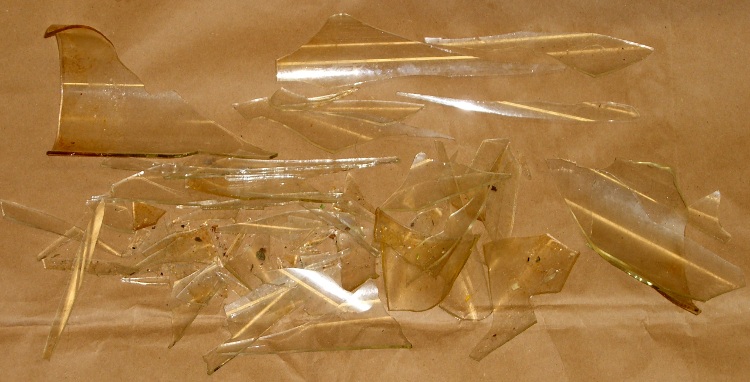
The loaf inside is remarkably akin to a two-pound dead-blow hammer and, as you’d expect, the tube shattered like, uh, glass. Fortunately, I was belly-up to the counter and facing into a corner, so the fragments remained mostly in place.
Shattered Bake-A-Round tube
What surprised me, though, was that (at least for this 30-year-old B-A-R tube) the glass wasn’t tempered. The fragments are long, thin, razor-sharp daggers.
Glass fragments
Now we must get used to eating rectangular bread slices again…
In other good news, there weren’t many minuscule glass fragments on the loaf. I was surprised at how closely baked flax-seed meal resembles either chitin or glass, but a thorough scan with my headband magnifier and a bit of deft brushing cleared the loaf for consumption.
After some of the stuff I’ve eaten over the years, an errant glass chip or two isn’t going to do me a bit of harm. The ladies figured if I was willing to eat it, they couldn’t back down, so it’s all good.
(Top pic with flash, bottom without: it’s hard to take a picture of glass!)
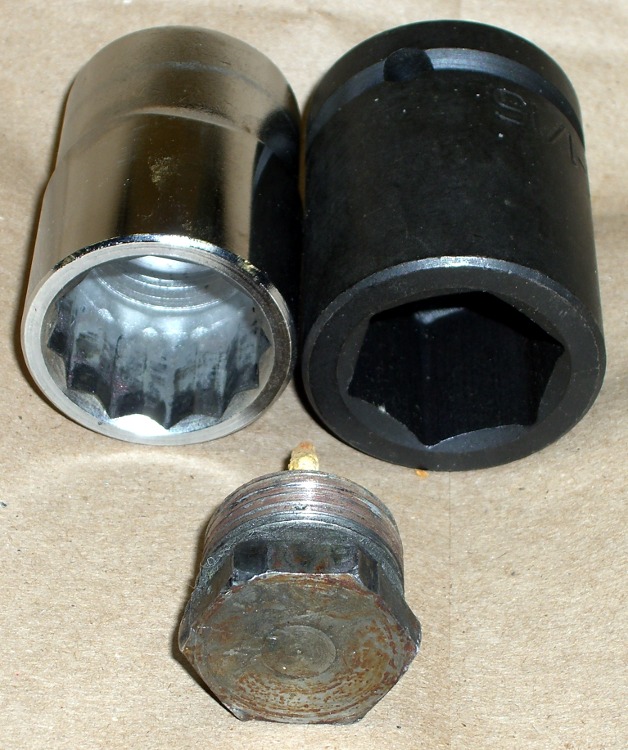
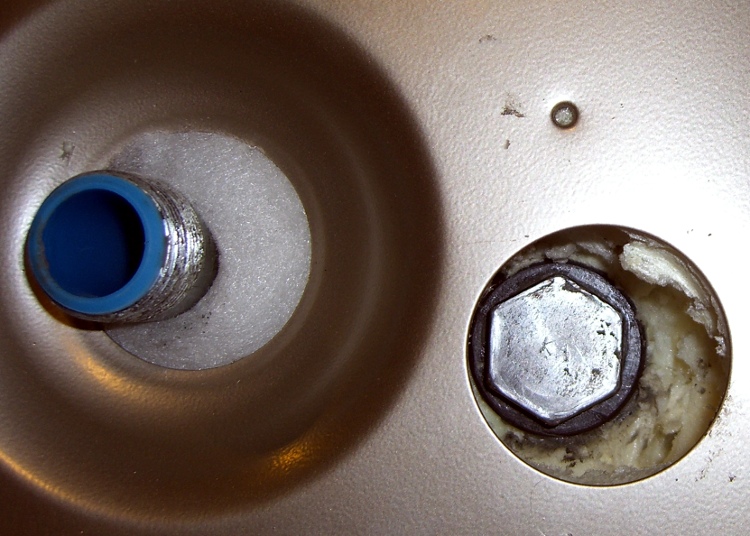
As mentioned there, removing a water heater anode rod generally requires considerable, umm, persuasion. I used a 12-point socket wrench, as I didn’t have a 1-1/16″ impact wrench on hand. Now I do…
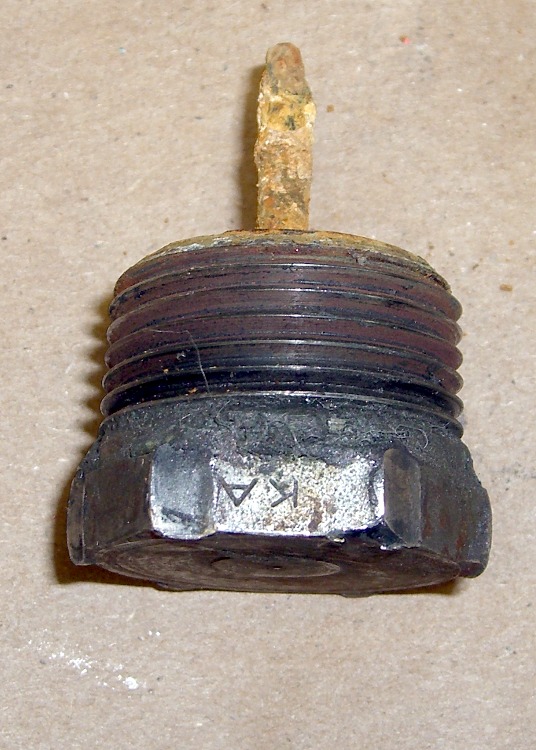
The first pic shows the head in front of the two sockets; the 6-point socket on the right will do a much better job of not ruining the anode rod bolt head because it grips along the entire length of all six sides.
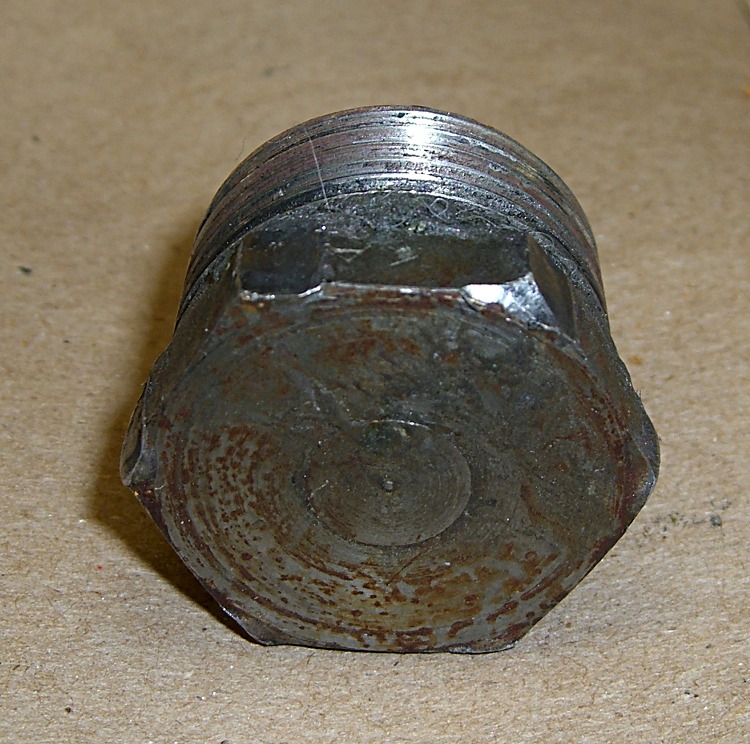
Now, in general, you don’t care about ruining the head, because the rod’s pretty much not going to be there by the time you remember to check it. What you do not want: the wrench rips the corners off the head before loosening the thread.
Goobered anode rod headGoobered anode rod head – side view
The thread on this anode rod was in great shape (I’d wrapped it in Teflon tape the last time it was out), but it was still firmly jammed in place. These pix show what the 12-point socket did to the bolt head during the beatdown.
Bottom line: right now, while you’re thinking about it, buy yourself the nice 6-point 1-1/16-inch impact socket you’ll need to extract the anode rod from your water heater. If you don’t already have a honkin’ big breaker bar, get one of those, too; this is no job for a sissy 3/4″-drive ratchet wrench.
The real problem is holding the water heater in place while you beat on the breaker bar. I have yet to see a good solution.
Offset Tank – 2009
That husky 6-point socket isn’t going to fit into the stupidly offset hole in the top of the water heater, even after applying the nibbling tool to get the 12-point socket in place, but that’s in the nature of fine tuning…
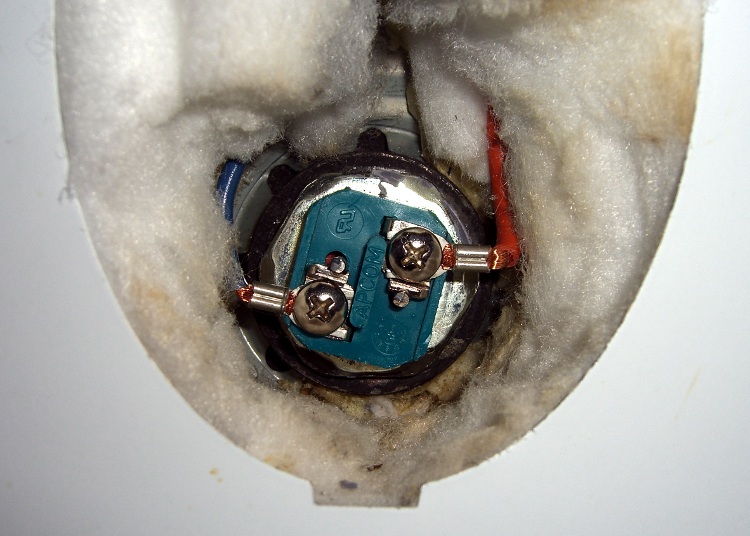
Removing a water heater element is no big deal: apply the appropriate socket (1-1/2 inch for this heater) to the hex head and turn it out. The trouble comes during installation, when you must hold that long rod exactly horizontal inside the tank, gripping the electrical fittings inside a narrow access port amid all the insulation.
My fingers can’t hold the element horizontal and twist it at the same time, so I made a tool: cross-threading the heating element and goobering the threads in the tank port is not an option!
Improvised heating element installation tool
A 32 mm socket just cleared the square blue electrical insulation block and butted against the 1-1/2 inch hex head. Because the block is square and the socket is hex, it was a pretty loose fit, but this was the right general idea.
I put a layer of masking tape on the inside of the socket and covered the electrical connections on the element.
Then I mixed up a batch of Bondo auto-body repair epoxy, buttered up the end of the heating element, and gooshed it into the socket. The Bondo filled in the gaps between hex and square, turning the wrench into a custom-fit tool that firmly gripped the heating element.
Reinstalled heating element
A brief pause for Bondo curing, pop an extension into the socket to use as a handle, return to the water heater, and screw that sucker right in place. Worked like a charm!
There’s a flexible gasket sealing the element to the tank port and I gave the element a few degrees more twist when I tightened it up, so the insulation block isn’t neatly aligned.
Getting the socket off wasn’t too difficult: twist to the side, pull, and the Bondo pops off the masking tape. Peel the tape off the element and it looks pretty much like it did before. The Bondo fell out of the socket when the element came out, so that was easy enough.
I was busy getting the water heat back in action and didn’t take any detailed pix, but I think you get the idea…