Ed Nisley's Blog: Shop notes, electronics, firmware, machinery, 3D printing, laser cuttery, and curiosities. Contents: 100% human thinking, 0% AI slop.
The instructions for our Weber gas grill would have us lavish more care on it than we do on our car, which isn’t actually saying much. Nonetheless, once a year I gotta clean the crud out, whether it needs it or not, because not even I believe heat kills that stuff.
Used to be, that was a thoroughly disgusting job of hand-scraping carbonized gunk and scrubbing gooey muck in cramped quarters. Having acquired a pressure washer, cleaning the grill is almost enough fun that I might do it more often. It even gets the mildew (or whatever that schmutz might be) off the wood handles & platforms, which I would have bet was impossible.
Pressure washer side effects
However, if you’re even a teensy bit fussier than we are about the looks of your castle, you might want to not lay the grates & “flavorizer bars” on the driveway to blast ’em clean. Turns out that the overspray strips the grunge right out of the top layer of asphalt, leaving a white trail behind.
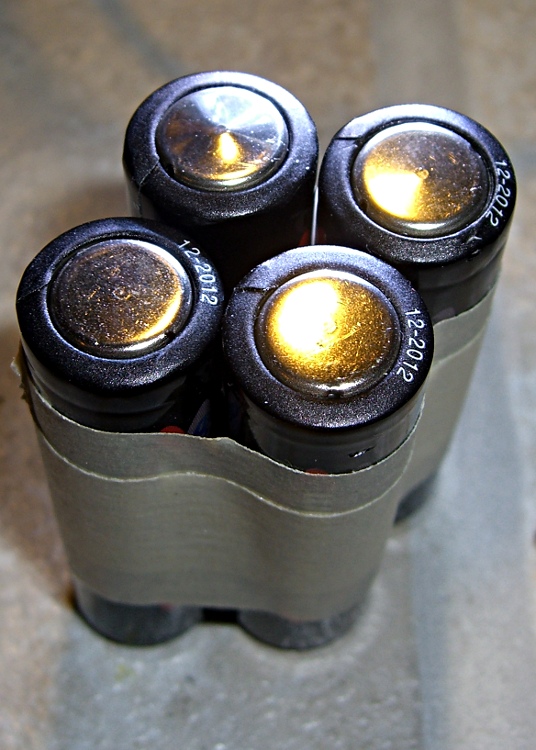
I’ve bought plenty of batteries from batteries.com over the years, but the alkaline AA cells I picked up last year have been a real disappointment: some had very short service lives. It took quite a while to figure this out, as I mentioned there, and when I finally got around to checking the rest of the package, most of them were dead… in Spring 2009 with a 12-2012 date code.
One characteristic of the weak / dead cells is that the negative terminal is swollen, even on the deaders direct from the package. This picture shows four cells removed from service: the front two are used with some remaining charge, the rear two are dead.
When I checked the package, most of the dead-on-delivery cells had swollen bottoms, so I suspect they had a manufacturing problem with at least one batch of cells.
A query to batteries.com asking about this got no reply. Perhaps they were busy dealing with the aftermath of their security breach?
A 48-pack of alkaline cells from the late Circuit City, bought about the same time, seems just fine.
Some years ago, a friend convinced me I needed an Inova X1 LED flashlight. He was right; I’ve carried one in my belt pack ever since and, in fact, added a couple of X5s to the household armory.
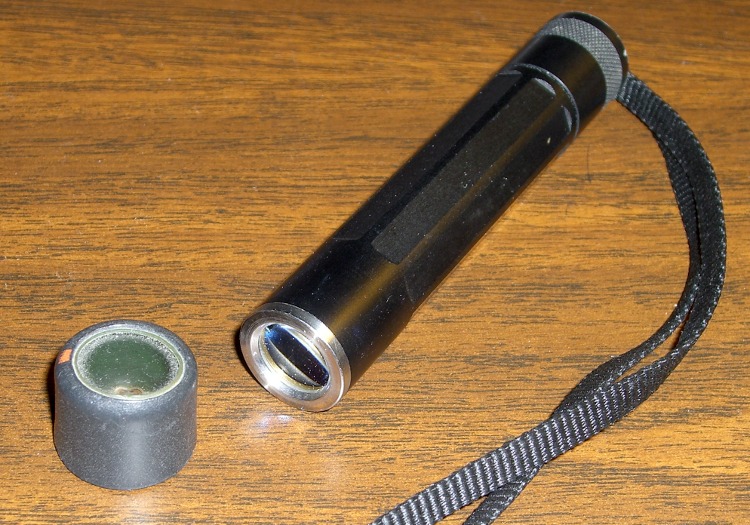
Perforce, this is an old X1 with a coated glass lens to make the best of the LED. Newer X1s don’t have (or, likely) need the lens, as LED technology has made great strides in the last few years.
I couldn’t bear the thought of that lens rattling around in my belt pack, chewed upon by the assortment of other crap in there. So I made a lens protector: a length of heatshrink tubing with a polypropylene window. You might want to do the same for your flashlight to keep from grinding up the optical surfaces on its shiny end.
This tubing has an internal thermoplastic glue, but ordinary tubing would likely work as well. Position the tubing over the end of the flashlight with a few millimeters sticking out. Cut a circle from the clamshell case around some piece of consumer electronics, drop it on top of the lens, and shrink the tubing around the flashlight: watch it wrap right over the end and hold the circle in place. A dot or three of urethane glue may help for glue-less tubing.
It’s transparent enough for most purposes, but when you really need more light or a tighter beam, pull it off. That’s aided by dabbing a trace of oil on the X1, which you can get directly from the (outside) of your nose. Yeah, gross, but it’s a renewable natural resource…
Mary dropped a pair of her sunglasses that disintegrated on impact: both earpieces broke off. She has trouble finding sunglasses that fit, so this is not to be taken lightly…
The sunglasses had interchangeable lenses, a feature which she’d never used, and the lower of the two tabs that snapped into the earpieces had broken off — on both sides, simultaneously. These weren’t high-snoot items, but they were name-brand: Rudy Project from, IIRC, nashbar.com.
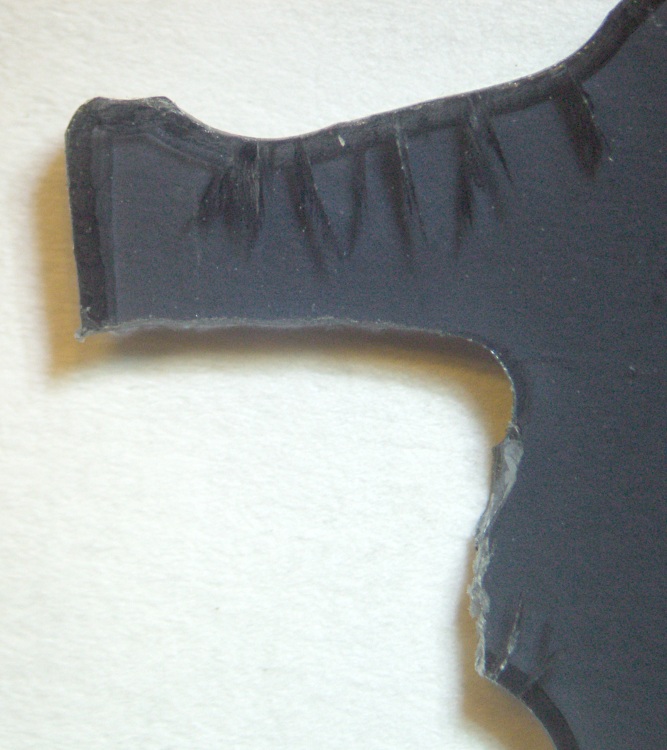
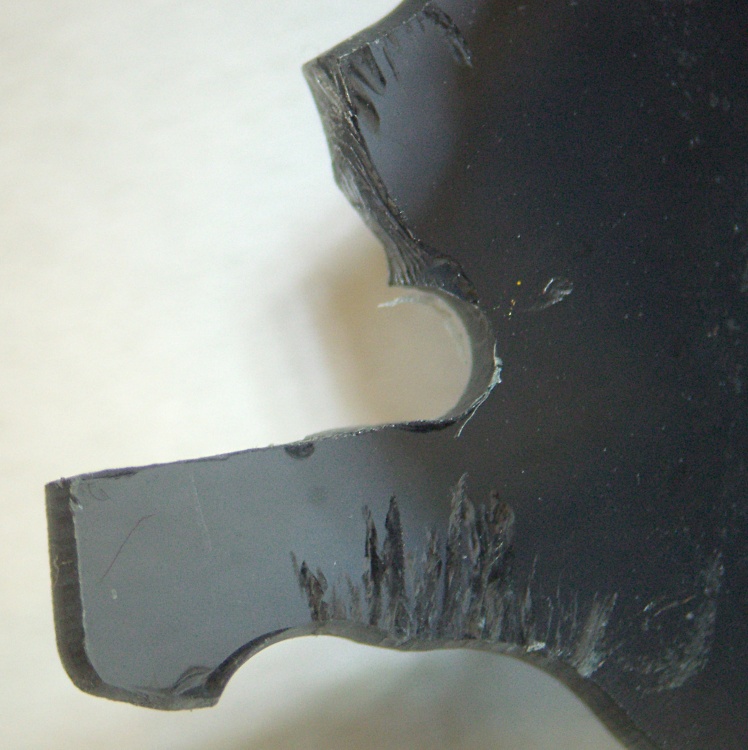
Peering through the microscope, it turns out that the lens material may have been pretty good optically, but wasn’t up to the mechanical task: the two remaining tabs had deep stress cracks. The right-side picture shows the lens upside-down, as that was the easiest way to set up the shot.
Notice the many, many cracks that penetrate nearly all the way through the tabs. The tabs didn’t break because she dropped the glasses on the floor, they broke because there was barely anything left holding the tabs in place.
Mind you, she’d never removed the lenses from the earpieces, so this isn’t a case of failure-from-overuse, either. They’re about a year old, more or less, and have been used in stressful tasks like gardening and the occasional bike ride.
Urethane adhesive foam-in-place
I slobbered urethane glue into the ends of the earpieces to mechanically lock the remaining tabs in place and fill all the voids. It looks rather ugly here, but the excess adhesive simply snaps off because it doesn’t chemically bond with either of the other two plastics.
Rudy sunglasses stress cracking – center
After screwing everything back together again, I noticed that there’s another stress crack growing in the middle of the lens, just over the nosepiece. These sunglasses are not long for this world: that failure will be an end-of-life event.
The frames claim “Designed in Italy” which doesn’t win any points with me; the design is fundamentally flawed.
Yo, Rudy, how about designing some sunglasses with a high-tech feature like durability… rather than style?
Oh, yeah, I suppose this repair voids the Warranty. Perhaps buying from Nashbar on sale triggers this clause: “Buying Rudy Project sunglasses, goggles or helmets from an online retailer at a price below the suggested retail price (MSRP) voids your warranty.” The expense of sending them in negates any possible benefit, which I’m sure they realize, too.
Just got a letter from Canada, allegedly from the Readers Digest Sweepstakes, but with a letterhead address of 1125 Cornell Ave, Atlanta GA 33412. The phone/fax number is 912-480-0353, oddly not a toll-free business number. The letter has medium production values, pixellated Readers Digest logos, surprisingly few typos, and a painfully ersatz signature.
I’m to believe I’ve won $255,069.00 in a contest I’ve never entered (the way I see constests, while you’ve got to play to win, entering doesn’t improve your chances of winning). The “69” is a nice touch, I’d say.
Enclosed is an exceedingly valid-looking check for $3892.91 “to help you cover any charges that may be required before you receive your funds.” Check number 1100912681, if you can believe that. It has excellent production values, a genuine artificial watermark on the back, and is nominally drawn on an actual Canadian bank.
Bogus check
Obviously, a fraud. International and postal, no less.
I’m impressed at the level of effort they went to, but it seems that with an actual telephone number (the address is surely faked), some branch of law enforcement should be able to fly right into their ears. No, I am not going to call that number…
I gave the FBI a tip, but I’m reasonably sure nothing will come of it.
[Update: Well, maybe the FBI didn’t do anything, but there’s an absolutely wonderful riff based on this letter. I’ll only quibble about the 57 Chevy… it was really a Studebaker.]
They’re doing well in their new home, building out comb on the foundation. The queen is in good shape, laying eggs as soon as the workers finish the cells. The workers seem to be feeding pollen directly to the larvae rather than storing it, which makes perfect sense. They’re taking two quarts of 1:1 sugar water every day!
Either you already know what this is all about or you really don’t want to know.
Luggage now comes with a pair of sliders on each zipper, which means that the two sliders come together when the zipper is closed. That allows you to lock the slider pulls together, which is a nice touch for those of you who think luggage locks actually improve security.
It also means that the metallic pull tabs jingle and jangle merrily together in the back of the van all the way to grandmother’s house as we go, we go.
Not to be tolerated, sez I.
Apply a length of heat shrink tubing to each tab. If you’re a locking kind of person, leave the holes on the end exposed. If you’re a real cheapskate, you could get away with shrinking just one tube per pair, but even I’m not that far gone.





 The Smell of Molten Projects in the Morning