Ed Nisley's Blog: Shop notes, electronics, firmware, machinery, 3D printing, laser cuttery, and curiosities. Contents: 100% human thinking, 0% AI slop.
As part of the Great Kitchen Cleaning, I was charged with replacing a missing foot on the banana gallows we received as a gift many years ago. I found a tiny hole in the bottom that we’d never noticed before, most likely because we mistook it for an ink dot or an imperfection in the wood.
The spot seemed to have something inside and a pass under the microscope showed the remains of a pupal case. I pried it out, destroying it in the process. The insect was, of course, long gone.
Those are millimeter ticks on the scale along the top edge, so the hole is the better part of 1.5 mm in diameter. Perfectly round, of course, as only an insect programmed to drill holes can produce.
The hole was 8 mm deep (likely deeper before the wood was planed), so the bug was qualified for gun drilling!
The stand is marked “Made in Thailand”, but who knows where the wood came from or where it’s been? We’ve had the stand for many years now, but I’m pretty sure the critter was in there when we got it.
Thinking of my parents’ 1957 Studebaker President (in the context of our mixer leaking oil) prompted me to do a search on the obvious keywords, which produced this link. Search for “police unit” and you’ll find a nice picture of a black-and-white President with a gumball machine on the top. Here’s that picture, just in case link rot sets in.
That’s my parents’ car, right there!
Turns out that Mom sold it to a Canadian firm (probably Fawcett Movie Cars and a deep link there) that supplies cars to moviemakers; she’d put an ad in the Hershey Antique Auto Show flyer and it worked. A guy showed up with a trailer, money changed hands, and he hauled the poor thing away.
They transplanted a functional engine from a donor hulk, restored the dual exhaust system that my grandfather had the garage strip out (“Two mufflers cost too much!”), and did a perfect restoration of the rusted eyebrows over the headlights where road mud and salt always collected. While they had the hood up, they installed power steering; that thing always turned like a truck, what with a big iron V8 over the front wheels.
On the way to Rebound
The car appeared in Moonshine Highway in police livery and HBO’s Angel of Harlem (a.k.a. Rebound) in civilian dress. Here’s what it looked like on the way to the Rebound set.
A private collector in Ontario bought it from the movie folks and found a registration card in my father’s name stuffed behind the glove box. A bit of searching turned up me and now I know what happened to it.
So, if you just bought a nice black-and-white 1957 Studebaker President from a guy in Canada, there’s a bit of its history. I can tell you more, but nobody else really cares, I suspect…
Our KitchenAid mixer gets plenty of use turning out bread dough, but it tends not to get moved around a lot, because it’s an awkward and top-heavy bit of gear. Mary moved it recently and discovered oil puddles underneath. The scene put me in mind of my parent’s 1957 Studebaker President: it had a bad rear main seal and the oil leaked out just slightly slower than we could pour it in.
Anyhow, it seems our mixer isn’t the only one to have a slight incontinence problem, as a casual search on the obvious keywords will reveal.
Rear housing view
I usually leave the mixer angled up, which caused the oil to drain to the rear of the housing, where it followed the main support strut downward into the stand. From there, it spread out and dripped off several local minima, forming perhaps four puddles. Most folks leave it horizontal, whereupon the oil evidently drips out of the lower cover into the bowl.
The rear view of the guts shows the oil oozing out both sides along the bottom of the joint between the housing and the end bell.
A rag and some denatured alcohol cleaned things up pretty well, but I do wonder what’s going on with KitchenAid… I’m not looking forward to replacing the piece-of-crap plastic bevel gear that evidently strips out after a while.
For the first time ever, Digikey sent me a full-line catalog.
Digikey catalog
It’s 2778 pages long, three inches thick, and weight 2 kg.
Some time ago I made the mistake of replacing our large rusted-out mailbox with a much smaller one: the catalog presented a solid wall of paper when I opened the door.
Here’s a closeup…
Digikey catalog vs Arduino Duemilanovae
Now, I’d love to have you believe I’m such a high-rollin’ kind of engineer that Digikey spares no expense on my behalf, but the only explanation for this embarassing situation I can come up with is that their customer service system blew a gasket in my general direction…
What makes it even more ironic is that they’d recently sent me a survey asking how I’d like to get their catalog. I’d emphatically replied that I did not need a paper catalog or a USB stick with the PDFs. Just let me do the on-line searching and occasionally refer to the appropriate PDF pages and I’ll be fine.
The damned thing is basically useless; I hate to just toss it in the recycling, but I can’t think of any reason to keep it around.
I just removed my mailing address from their list, presumably leaving my account info intact; we’ll see if that sticks.
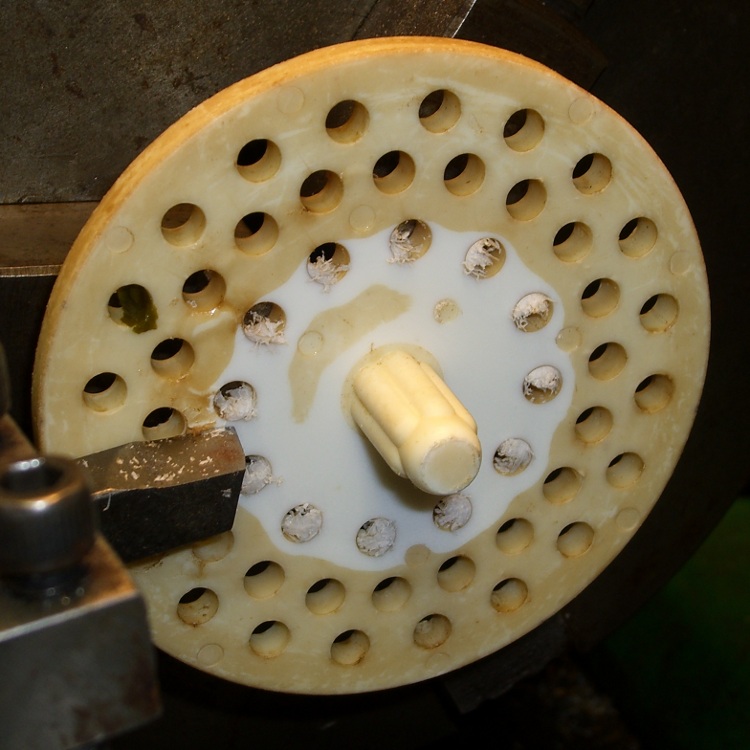
We have a (formerly) white plastic strainer in the kitchen sink that has acquired a brown biofilm layer. Bleach is moderately effective, but the surface is just ooky.
Green tea is suspected, but the evidence is not, at least according to me, conclusive. More research is in order.
Took the evidence to the Basement Laboratory’s Machine Shop WIng and skim-cut both faces, cleaned up the rim, drilled out the holes, countersunk the holes to get rid of the chaff, and it’s all good. The surface is probably too rough, but we’ll see what happens.
I figure I can do that maybe twice more before I must make a new one; looks like a perfect match for CNC, doesn’t it?
I use a blender to mix up the pancake batter every few days. Over the last week or so, the rotary switch Pulse position wasn’t returning to Off all by itself. After having replaced the impeller bearings, I couldn’t just ditch the mumble thing without at least trying to fix it…
A search for replacement parts reveals that Farberware kitchen appliances are disposable crap: they’re so cheap nobody stocks repair parts. IIRC, this blender was maybe ten or twenty bucks after rebate, which gets you through the shipping charge for the repair part. I would love to believe that paying more for kitchen appliances actually bought better quality.
Switch wire connections
As you’d expect, the four silicone rubber feet pop off to reveal machine screws that hold the plastic base to the metal body. This picture shows the wire connections to the switch:
L = brown
1 = orange
2 = no connection
3 = red
I couldn’t pull the switch knob off the shaft, so I dismantled enough of the motor mount to ease it to one side, apply a right-angle screwdriver to the switch body screws, and loosen the switch. That gave me enough room to jam a screwdriver between the switch and the mounting bracket to pry the knob off. It’s a plastic-on-plastic friction fit.
After the fact, it turns out that two screws behind the knob secure the mounting bracket to the bezel. Remove those screws, the bracket comes off, and it’s trivially easy to remove the switch screws.
The wires attach through those horrible spring-loaded push-and-pray connections: jam the wires in, pull back, and it’s supposed to be a gas-tight joint forever. I don’t believe a word of it. Remove the wires by poking a small screwdriver into the opening and forcing the brass tab away from the wire. Yuch!
Opening switch with slitting saw
The switch body parts are, of course, bonded firmly together: no user serviceable parts inside. I deployed a slitting saw on the Sherline mill, grabbed the switch in the vise, and sliced 2.5 mm deep along the line between the two body parts.
The switch is some sort of engineering plastic, so I ran the saw at about 2000 rpm, cut at 100 mm/min, and dribbled water on the blade to keep it cool. You can see the grayish-brown residue under the switch.
The thing came apart easily enough after that…
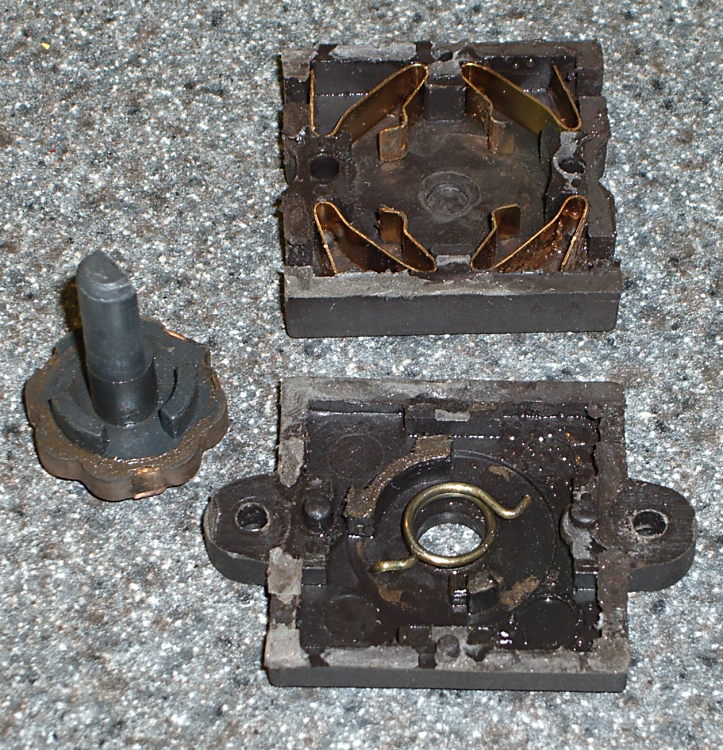
Switch Guts
These pics show the switch components. Note how the spring fits in the body and the four cunningly folded brass strips that simultaneously attach the wires, make the switch contacts, and spring-load the rotary detents.
I took the liberty of bending the strips to restore the clamping force on the wires; poking the tabs with a screwdriver tends to bend them a bit.
So it goes.
There wasn’t anything obviously wrong inside, but after a bit of puzzling, I discovered the problem residing in the coil spring that returns the switch to Off…
Cracked spring
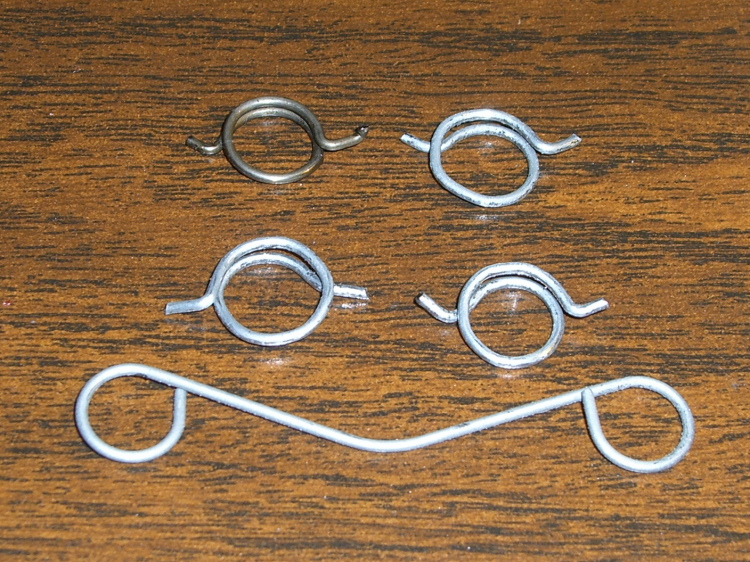
The spring wire is 1 mm diameter. A bit of rummaging in Small Spring Box Number Two disgorged a bag of spring-clip thingies with the proper wire size and just about the right coil diameter, too.
The right way to make a spring is to start with straight music wire, anneal it, make a mandrel, bend up a spring, then heat-treat the spring to make it just the right hardness and toughness for the job.
Spring iterations
I deployed my wire-bending pliers, made a few trial runs (well, OK, they weren’t trial runs when I started…), and got close enough by the third attempt (lower right).
Yup, cold-bending spring steel. It is to shudder, huh?
I bent the wire just off straight and worked my way around the coil about 0.5 mm per bend to produce a rather lumpy coil spring. This is definitely the wrong way to go, because the wire’s much too hard for that treatment: it wants to stay straight and doesn’t like those right-angle bends to form the end tabs. I think this will work well enough for long enough, though.
The spring’s chirality turns out to be important; the coil wants to tighten around the shaft when the knob’s in the Pulse position. The spring-clip thing has two ends; only one produces the correct result, which is perfectly obvious in retrospect.
Spring on switch rotor
The spring fits on the rotor like this, but with a whole lot more preload tension than you’d expect. The end result was a somewhat smaller coil diameter than I started with; I shrank the coil, re-bent a new tab on one end, chopped off about 4 mm of wire, and it was all good.
I also backed off the ramp on the notches that engage the brass contacts in the Pulse position so the switch wasn’t so prone to hang up. That was what motivated me to fix the thing: one morning I manged to leave the switch in Pulse because it didn’t quite snap back to Off, took the lid off the bowl, and the blender started up again. Fortunately, the batter is too thick to jump out of the bowl, but it was a near thing.
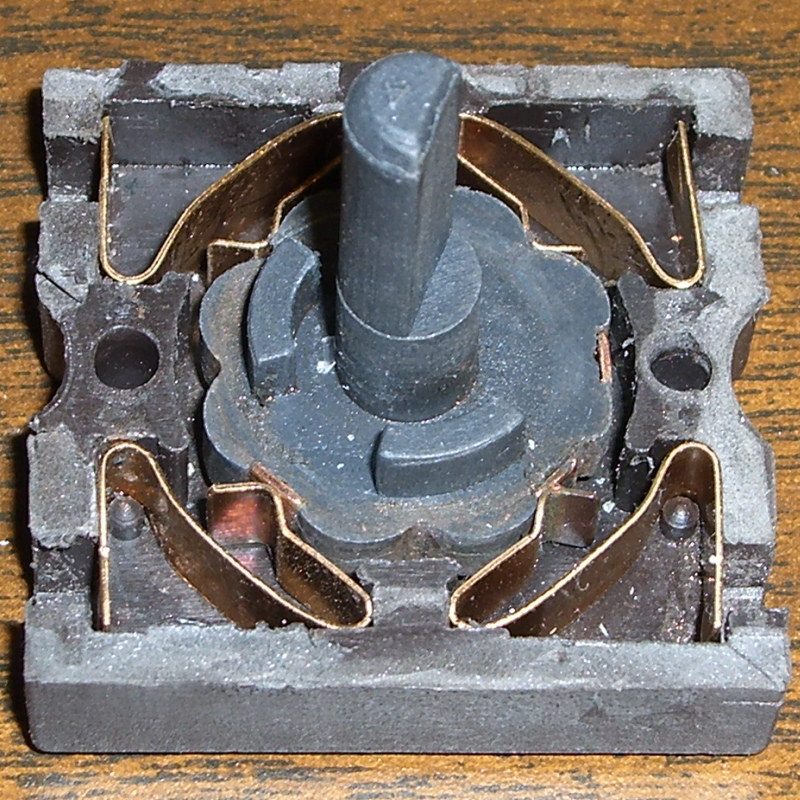
Here are the four switch positions and their contacts, in order from Pulse (most counterclockwise) to Speed 2 (most clockwise). You could, I suppose, conjure up a replacement switch if you puzzled out the connections; all the rotor tabs are connected together.
Switch contacts – PulseSwitch contacts – Off
Notice that, although switch contact 2 is unused, it is connected when the switch is in the Off position.
The back of the switch body takes pressure on the switch knob, as well as engaging the end of the rotor to hold it in the middle of the body. I wasn’t comfortable just gluing the body together again, because I suspect none of my adhesives will actually bond to the plastic.
So I chopped off a length of aluminum U-channel, poked two holes it in, shortened a pair of salvaged screws, and made a clamp for the switch body’s back. The body has three locating pins, so the two parts aren’t shifting with respect to each other, and the clamp holds the back firmly in position.
Repaired switch with back clamp
Reassembly is in reverse order, paying a bit of attention to securing the wires in those crappy push-and-pray contacts and keeping everything away from the cooling fan as the bottom snaps into place.
Done!
The economics of this sort of repair make absolutely no sense at all, but I hate throwing stuff away just because some cheap part failed. In this case, I’d be happy to replace the switch… let me know where you can find one with the requisite contacts and spring arrangement!
My mother’s pantry disgorged a can of Hershey’s Cocoa dating back to the mid-90s (if I’m interpreting the 94P date code correctly). Their Favorite Hot Cocoa recipe is straightforward:
SINGLE SERVING: Combine 1 heaping teaspoon HERSHEY’S Cocoa, 2 heaping teaspoons sugar, and dash salt in mug, add 2 teaspoons milk and stir until smooth. Heat 1 cup milk: fill mug. Stir and serve.
Browsing in the grocery store revealed that the current recipe has considerably more stiffness: two tablespoons of both cocoa and sugar.
One tablespoon = 3 teaspoons. How they interpret “heaping” I don’t know, but it’s under a factor of two. Maybe cups are bigger these days, but surely not by a factor of four or five.
Zowie!
The Official Recipe from the Hershey’s website lists 2-3 teaspoons of cocoa and 2 tablespoons of sugar. I love this suggestion:
VARIATIONS
Rich and Adult: Increase cocoa to 2 tablespoons …












 The Smell of Molten Projects in the Morning