Ed Nisley's Blog: Shop notes, electronics, firmware, machinery, 3D printing, laser cuttery, and curiosities. Contents: 100% human thinking, 0% AI slop.
I’ll go into the motivation for optocouplers along with the laser controller wiring details.
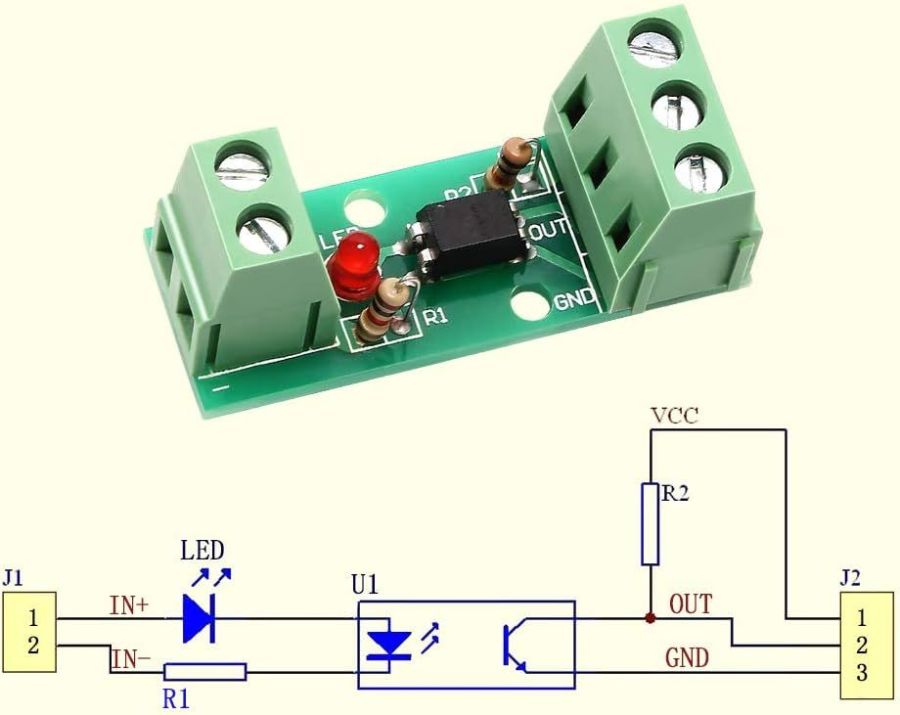
As delivered, the PCB has:
R1 = 1 kΩ (a convenient 1 V/mA current sense)
R2 = 10 kΩ (a rather high-value pullup)
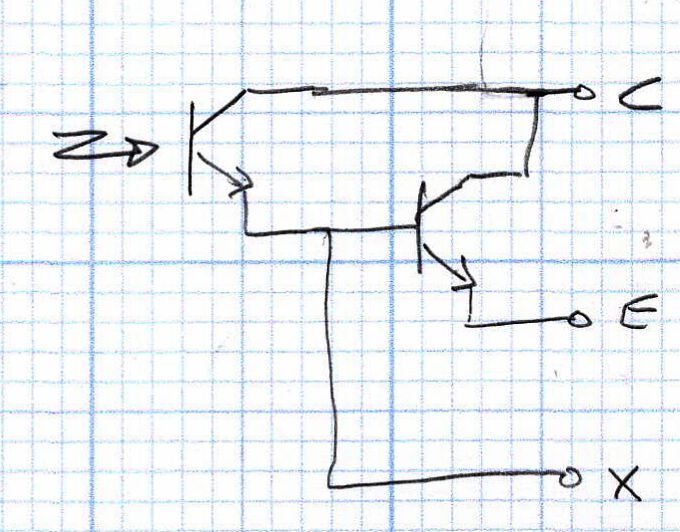
The idea is to add an able-bodied transistor to the output in a Darlington configuration:
Optoisolator – Darlington output
Some rummaging produced a small bag of 2N3904 transistors, although nearly any small NPN transistor will suffice. Removing R2 cleared the field for modification:
Optoisolator modification – top
The 2N3904 transistor (with the usual EBC pinout) fits face-down under the PCB:
Stack Light – optoisolator transistor
The cross-legged layout conceals the emitter and base leads being soldered snugly to the former OUT and GND terminals, respectively, with the collector going to the VCC terminal. The terminals thus become:
VCC → Collector
OUT → Emitter
GND→ X (no connection)
Although I have little reason to believe the EL817 chips are anything other than what they claim to be, their topmarks seemed rather casual:
EL817 optocoupler – top view
The other four chips carried C333 rank + date codes.
The datasheet says the C means the Current Transfer Ratio is 200% to 400%: the output current should be 2× to 4× the diode current. The test condition are 5 mA into the diode and 5 V across the transistor terminals. A quick test:
2 mA → 4 mA = 2×
5 mA → 15 mA = 3×
10 mA → 35 mA = 3.5×
12 mA → 40 mA = 3.3×
The output transistor is rated only to 50 mA, so I stopped at 40 mA. The CTR is between 200% and 350% over that range, suggesting the parts are really real.
The 2N3904 should have an hFE above 60 in that current range and multiply the EL817 gain by about that amount. Another quick test in the Darlington configuration, now with the 5 V supply across the 2N3904:
100 µA → 8.1 mA = 81×
250 µA → 43 mA = 172×
500 µA → 83 mA = 166×
The overall current gain is 40× to 50×, less than the estimate, but plenty high enough for my purposes. If you cared deeply, you’d run a circuit simulation to see what’s going on.
Knowing I needed only 50-ish mA, stopping with the transistor burning half a watt (because VCE is held at 5 V) seemed reasonable. In actual use, VCE will be on the order of 1 V and the dissipation will be under 100 mW.
A quick test shows they work as intended:
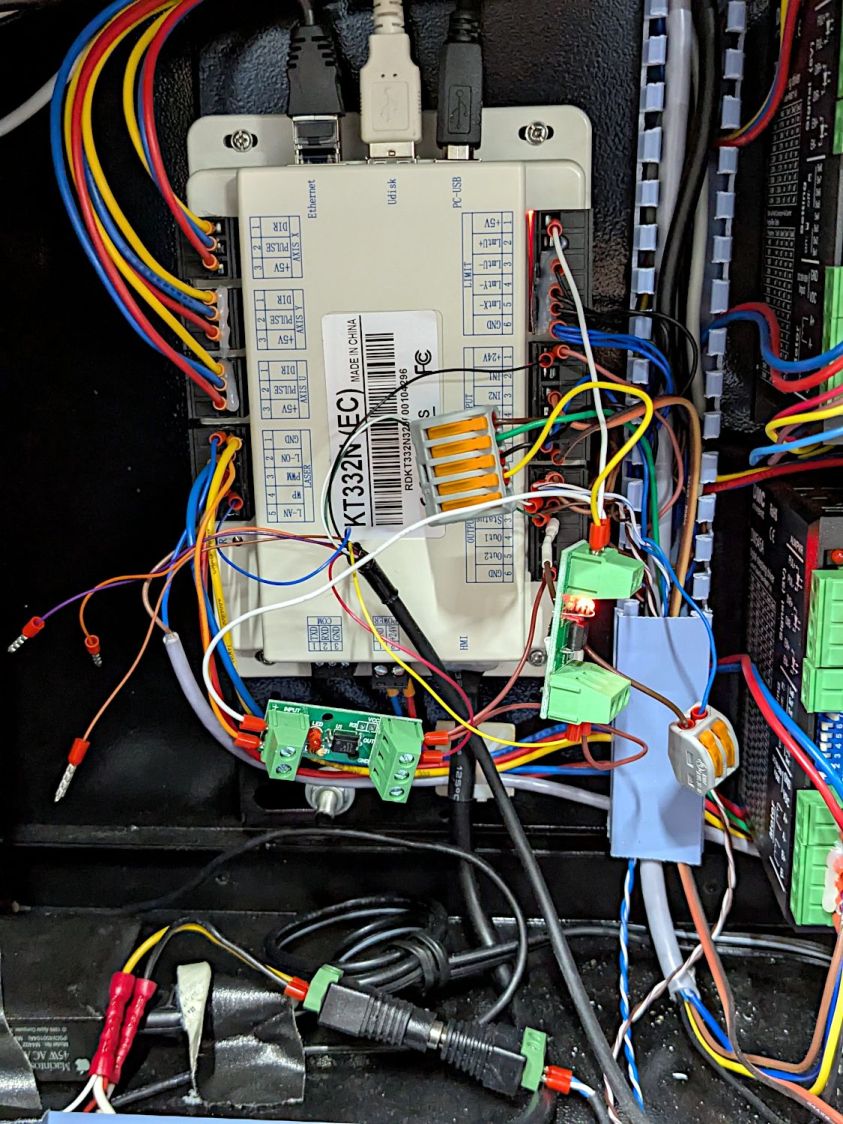
Stack Light – controller hairball wiring
But, yeah, talk about hairballs. Those things cry for little housings to keep them out of trouble.
Having external indications for the laser cutter’s internal status signals seemed like a good idea and, rather than build the whole thing, I got a five-layer stack light:
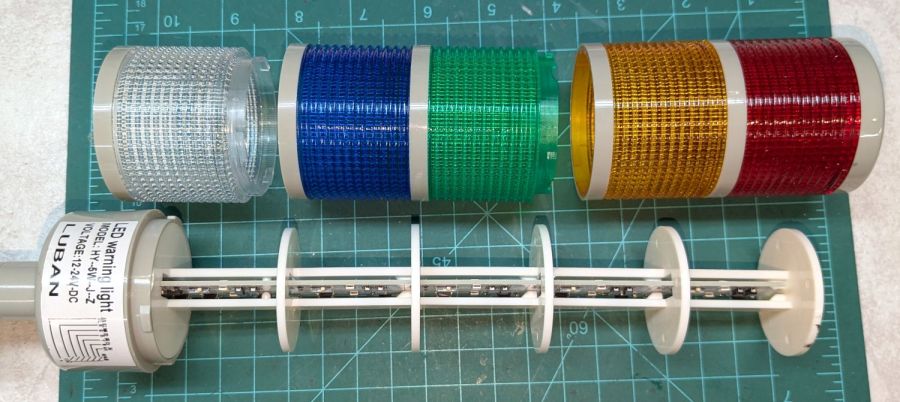
Stack Light – disassembly
It arrives sans instructions, apart from the data plate / wiring diagram label on the housing, so the first puzzle involves taking it apart to see what’s inside. My motivation came from a tiny chip of blue plastic on the kitchen table where I’d opened the unpadded bag. Apparently, a mighty force had whacked the equally unpadded box with enough force to crack the blue lens, but I have no idea how the sliver escaped the still-assembled stack.
Anyhow, hold the blue/green lenses in one hand and twist the red/yellow lenses counterclockwise as seen looking at the cap over the red layer. Apply more force than you think appropriate and the latches will reluctantly give way. Do the same to adjacent layers all the way down, then glue the blue chip in place while contemplating other matters.
A switch on each layer selects either steady (the default and what I wanted) or blinking (too exciting for my needs). Reassemble in reverse order.
A Stack Light generally mounts on a production-line machine which might have a suitable cutout for exactly that purpose. I have no such machine and entirely too much clutter for a lamp, so I screwed it to a floor joist over the laser:
Stack Light – installed
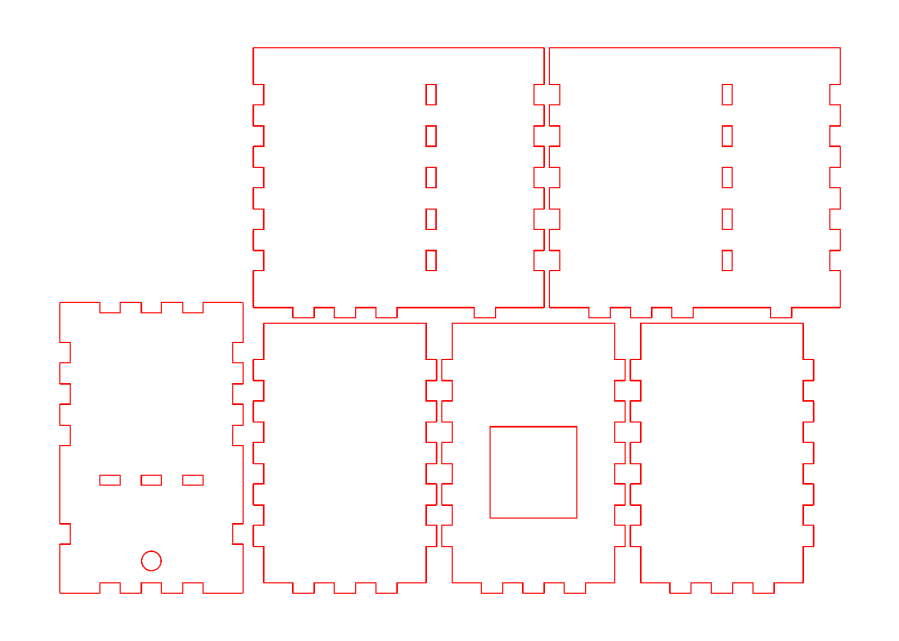
The tidy blue PETG-CF base started as a scan of the lamp’s base to serve as a dimension reference:
Stack Light – base scan
Import into LightBurn:
Draw a 70 mm square centered on the workspace
Round the corners until they match the 13 mm radius
Draw one 5.6 mm circle at the origin
Move the circle 52/2 mm left-and-down
Turn it into a 4 element array on 52 mm centers
Verify everything matches the image
Export as SVG
Import into Inkscape:
Put the perimeter on one layer
Put the four holes on another
Center around an alignment mark at a known coordinate
Save as an Inkscape SVG
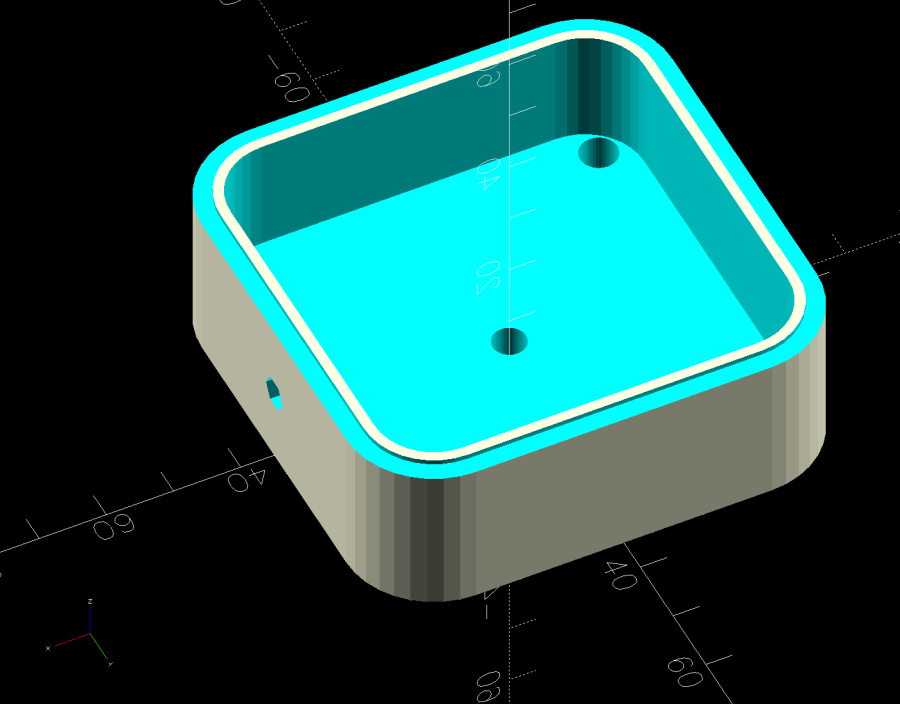
Import into OpenSCAD, extrude into a solid model, and punch the holes:
Stack Light Mount base – solid model
The lip around the inner edge aligns the lamp base.
If I ever make another one, I’ll add pillars in the corners to put the threaded brass inserts close to the top for 10 mm screws instead of the awkward 30 mm screws in this one. More than a single screw hole in the bottom would align it on whatever you’re indicating.
This file contains hidden or bidirectional Unicode text that may be interpreted or compiled differently than what appears below. To review, open the file in an editor that reveals hidden Unicode characters.
Learn more about bidirectional Unicode characters
Because I must eventually diagnose and fix the HQ Sixteen’s Motor Stall Heisenbug, I printed out several views of the power supply PCB on glossy photo paper for best visibility.
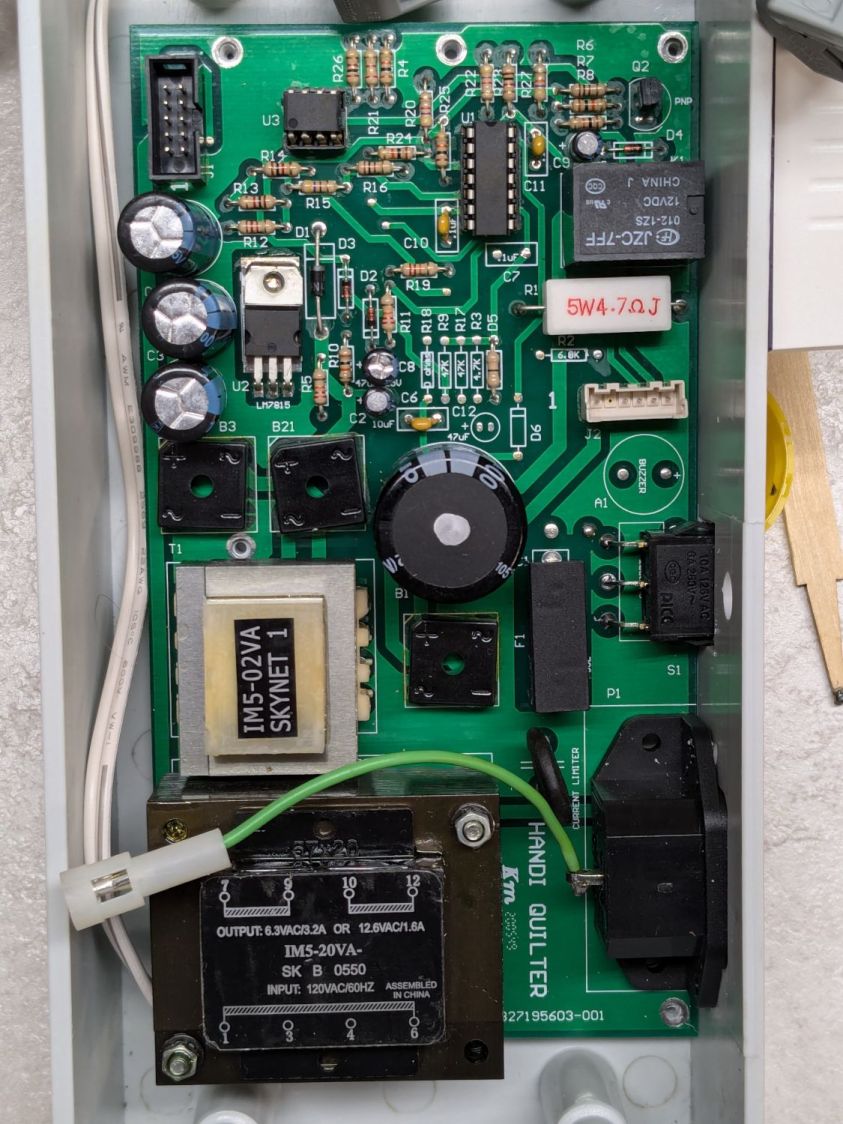
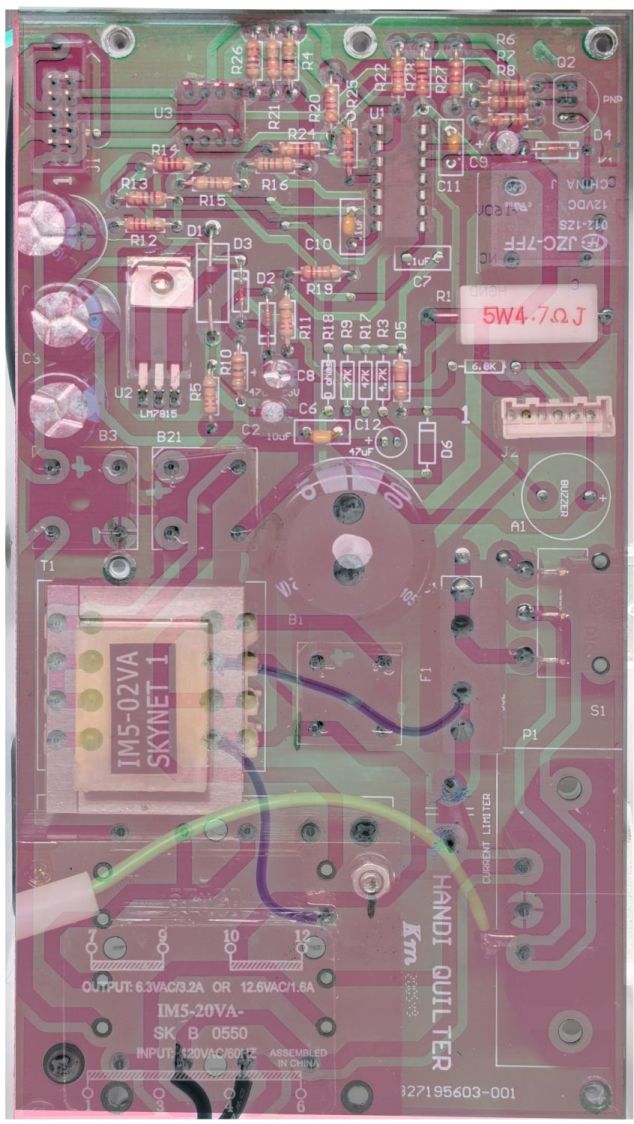
The component side:
Power PCB – components
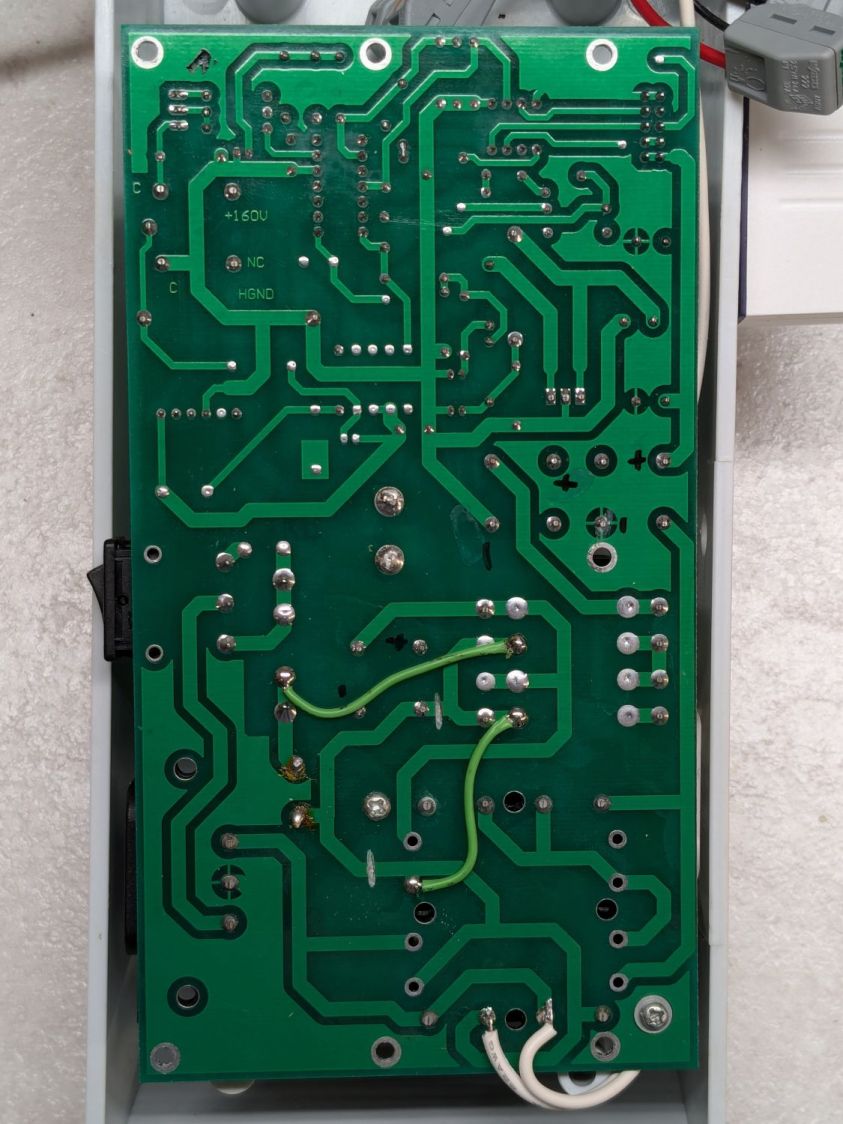
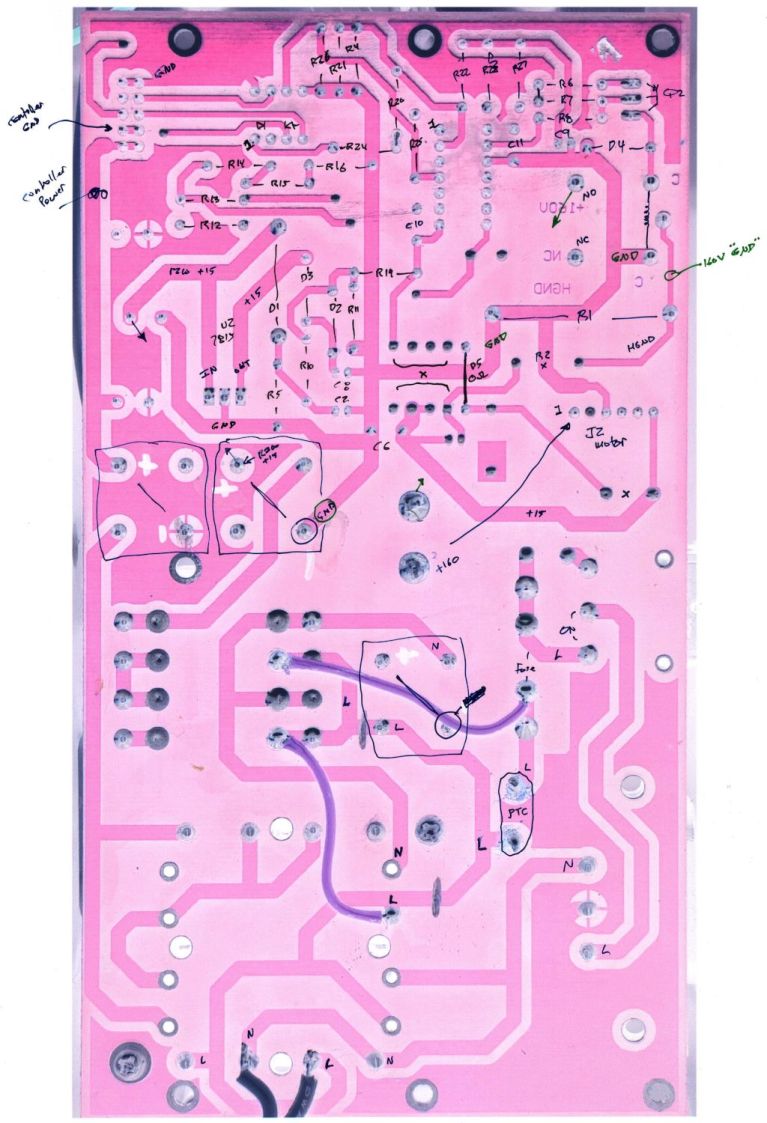
The solder side:
Power PCB – solder
The X-ray view:
Power PCB – overlaid
Considerable pondering and sketching produced an annotated view of the solder side:
HQ Sixteen – Power PCB – solder side – component labels – reduced
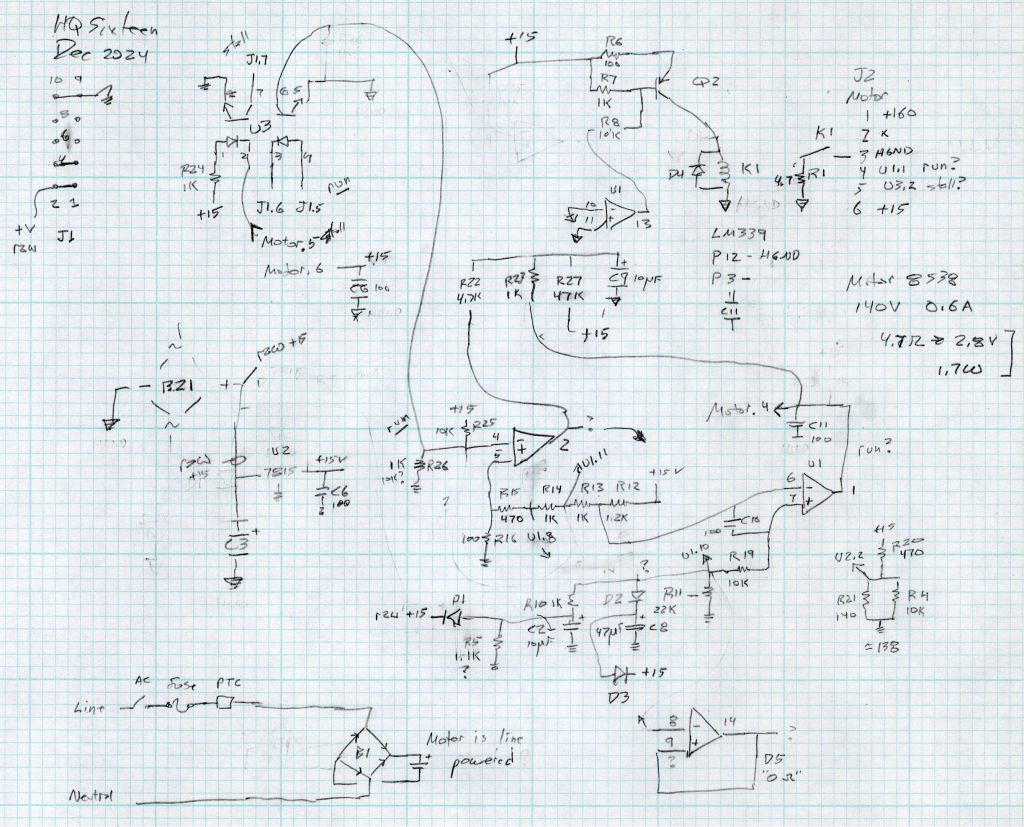
Here’s a tentative schematic drawn on the fly while extracting it from the PCB traces:
HQ Sixteen – Power PCB – rough schematic
!!CAUTION!! I have not verified the schematic against the actual hardware / PCB / components, as the Heisenbug has not reoccurred and I had no occasion to take the machine apart for checking. Do not assume any connections or components are correctly drawn.
Before I redraw the schematic in a more useful format, I must verify several nodes, because not everything in there makes sense.
In particular, the elaborate resistor string in the middle of the page seems to establish reference voltages for everything else, from the motor power supply turn-on delay to the RUN signal starting the motor.
The optoisolators definitely get the RUN command signal from the controller and feed the STALL motor status back to it. That’s assuming I understand enough to pin those labels on those connections.
!!CAUTION!!Read my caveats about the direct-from-the-AC-line non-isolated +160 VDC motor supply before connecting your instruments. The GND traces are not isolated from the AC line and are not at the normal “0 V” AC neutral potential.
But if this mess gets you further along with whatever you were doing, let me know how it all worked out for you.
I want to put the HLP-200B Laser Power Meter at the tube’s exit, just upstream from Mirror 1, where it can measure the laser’s power output before the mirrors get into the act. Reaching the Pulse button on the machine console requires much longer arms than any normal human can deploy, plus a certain willingness to lean directly over a laser tube humming with 15 kV at one end.
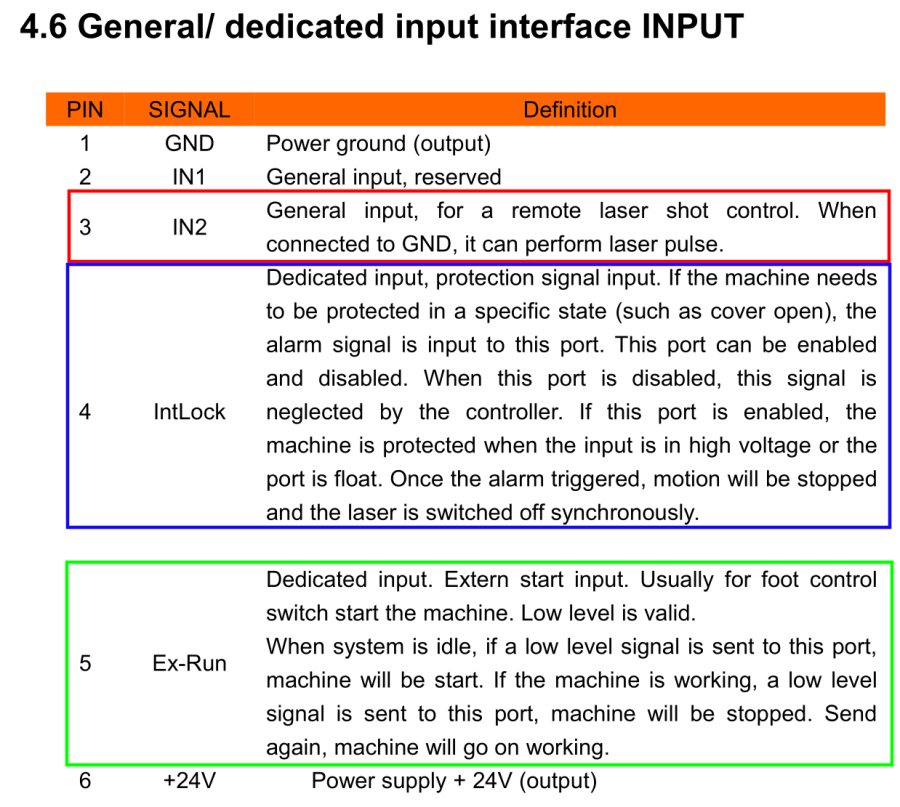
Perusing the KT332N doc brings up a hint, blocked in red so you can make some sense of it:
Another few minutes produces the box from Trocraft Eco, which is not quite thin enough for the switch (from my Box o’ Clicky Buttons) to snap into place, but a few dabs of hot melt glue hold it down:
Laser remote pulse button – installed
Double-sided foam tape sticks the box to the laser frame and the red-n-black cable snakes all the way across the back of the machine and through the electronics bay to the IN2 and GND terminals of the KT332N INPUT block:
Laser remote pulse button – Ruida KT332N wiring
With the laser head parked at a safe spot and all interlocks happy, it works:
Laser remote pulse button – demo
That is a re-enactment, because I lack sufficient dexterity to handle a phone with my left hand, poke the button with my right finger, and not damage anything important.
The general idea is to make it very difficult to inadvertently press that button: you must want to fire the laser with the tube compartment hatch up (it has no interlocks) and the control panel out of sight on the top-front of the machine.
Setting the power to 30% and putting the meter in harm’s way:
HLP-200B – Laser tube exit
Again, a reenactment based on actual events.
Five pulses later:
40.8
W
42.4
42.3
41.2
40.7
41.5
W avg
0.82
W std dev
For the record, those five pulses dumped about 5 × 42 W × 10 x ≅ 2000 W·s = 2 kJ into the meter, raising it from “chilly basement ambient” to “be careful where you hold it”, thus making the meter’s aluminum case the least-efficient handwarmer in existence.
The large standard deviations prevent firm conclusions, but, yeah, the power at the tube exit seems about right, before two mirrors and ≅800 mm of path length take their toll.
The HLP-200B Laser Power Meter Handheld comes fully calibrated at 10.6 μm (CO2). Each laser power meter we calibrate is directly traceable to NIST absolute standards because we use GOLD standards as a reference for each calibration. You will obtain the most accurate result possible
A line in the description says “+/- 3% within the central section”, but that’s not much help. Back in the day, any error percentage referred to the meter’s full-scale value, which would be ±6 W for a 200 W meter.
So I plunked the meter in the middle of the laser platform:
HLP-200B Laser Power Meter – platform center
Then took five measurements at each of ten power levels:
PWM %
10
20
30
40
50
60
70
80
90
99
°C
17.2
17.9
18.4
19.0
19.4
20.3
20.0
20.0
20.5
19.4
Tube Current
3
4
7
10
14
16
18
20
22
24
W
7.1
21.0
42.0
51.8
59.1
63.0
67.8
69.6
74.7
64.0
6.0
19.8
37.2
48.9
52.7
56.0
65.1
69.6
72.4
71.8
6.4
21.1
39.3
45.6
56.5
53.2
61.1
60.7
74.6
75.2
5.6
17.8
37.1
40.4
55.3
53.2
55.1
64.2
74.9
73.5
6.0
17.7
36.9
45.1
54.5
53.1
62.2
69.9
72.2
70.9
Avg Power
6.2
19.5
38.5
46.4
55.6
55.7
62.3
66.8
73.8
71.1
std dev
0.57
1.66
2.19
4.29
2.39
4.26
4.78
4.16
1.34
4.29
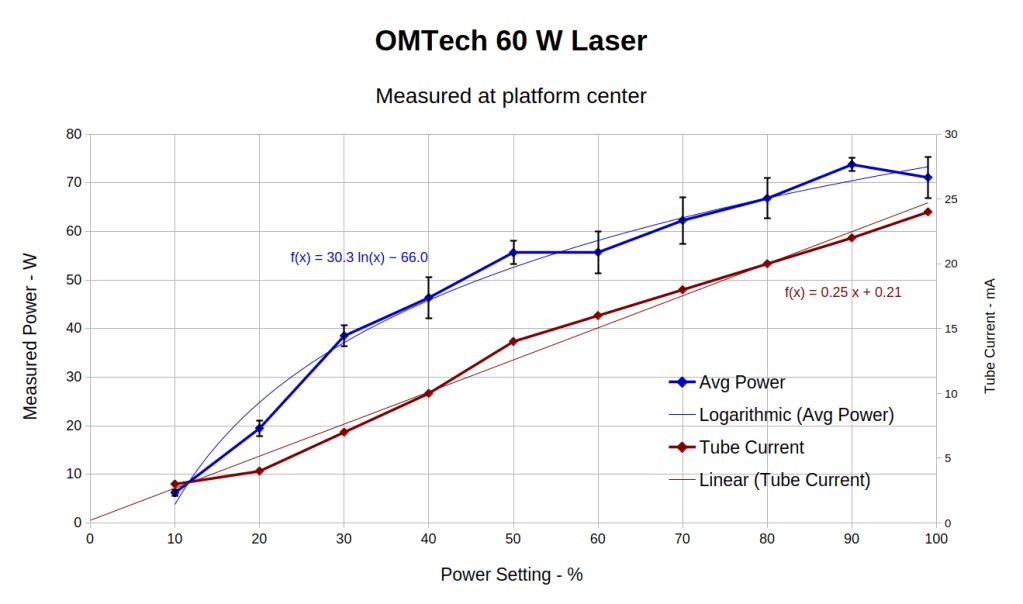
That’s easier to digest from a graph:
HLP-200B Laser Power Meter – 60 W platform center measurements
The absurdity of computing the sample standard deviation from five measurements taken at each power level does not escape me, but this just surveys the situation.
Earlier measurements of the tube current vs. PWM setting, using an RMS value computed by the oscilloscope’s firmware, produced a plot resembling the brown points (read the mA scale on the right) at the high end and differing greatly on the low end. These values come from the power supply’s digital meter, but the straight-line fit doesn’t look absurdly forced and the zero intercept seems plausible. I *assume* it’s actually measuring the tube current, rather than displaying a value computed from the PWM input, but I don’t know for sure.
The rather sketchy paperwork accompanying the laser had one handwritten “21 mA” seemingly corresponding to 60 W output, which looks approximately correct. The instruction manual has a table of power vs. current suggesting that 65-ish W corresponds to 18 mA, with 100 W at 23 mA; it’s unclear whether that is for the 60 W tube in the machine or applies to the entire range of available tubes. The manual recommends not using more than 95% PWM, with which I heartily agree.
Because my meter stand holds the target in the same position relative to the beam during successive measurements much better than I could by hand, I think the pulse-to-pulse variation comes from meter and tube repeatability.
Earlier measurements with a grossly abused Gentec ED-200 joulemeter suggested the laser has some pulse-to-pulse timing variation, down in the millisecond range, but produced roughly the right power for middle-of-the-range PWM settings. This meter integrates the beam power over about ten seconds, so I think variations will be due to (possible) tube power changes and meter repeatability, rather than timing errors.
Obviously, you must not depend on any single-shot measurement to fall within maybe 10% or several watts of the right answer.
With all that in mind and assuming the meter is delivering approximately the right numbers on average, the power supply overcooks the tube at any PWM setting above 50%. I’ve noticed some beam instability / defocusing over 80% while cutting recalcitrant materials, which is surely due to the tube not lasing properly. I generally avoid doing that.
The log fit to the measured power looks better than I expected, although I’m unprepared to compute natural logs in my head.
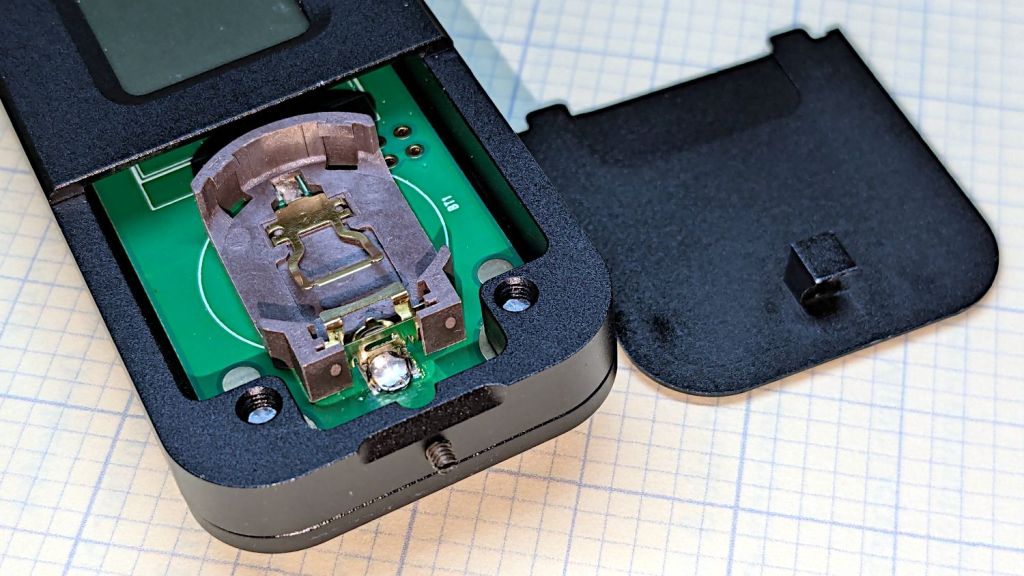
The manual does not exactly match the hardware. In particular, “so users won’t need any tools to replace the battery” is incorrect:
HLP-200B – battery lid screw
Until you loosen the M2 setscrew below the finger notch a couple of turns, “Use just fingers to remove the battery cover” will merely scuff your fingerprints. Apply a 1.5 mm or 1/16 inch straight screwdriver bit with no more than finger torque and, after two or three turns, the lid comes free.
The meter arrives without a battery, so you passed the first test.
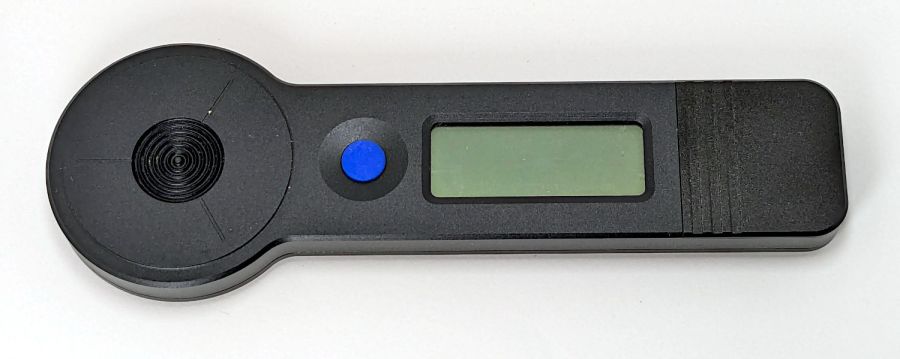
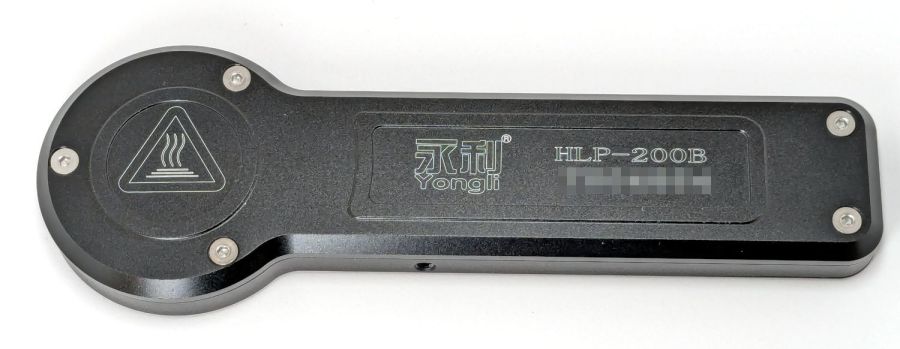
Despite the “another screw hold (M4) is added”, there’s only one tapped hole in the case, as visible in the back panel photo. Seen from the front, it’s above the four digit LCD.
Operation is at best awkward and at worst hazardous:
Press the blue button to turn it on and hear a beep
It’s ready to measure within three seconds
Hit it with the laser beam until it beeps
The LCD shows the power for six seconds
It shuts off with a beep
Bonus: If the meter doesn’t detect any energy, it shuts off 20-ish seconds after the button press
Minus my power ears, the beeps are completely inaudible.
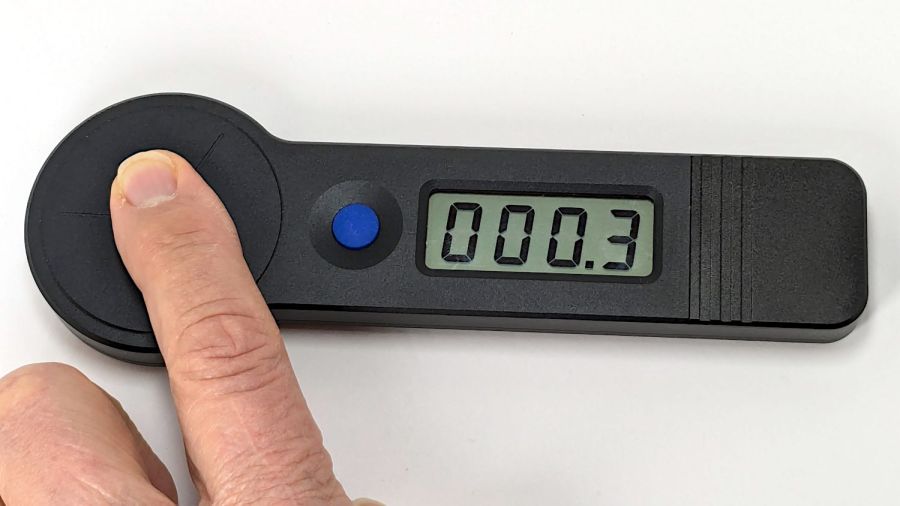
The meter is sensitive enough to respond to weak heat sources like LED bulbs and even fingertips, so you can test it without firing the laser. The numeric value shows the power from a CO₂ laser beam dumping an equivalent amount of energy into the sensor:
HLP-200B – finger heat response
The sensor target is 20 mm OD, although the instructions remind you to “Ensure the laser is emitted to the center of the sensor”. I suspect hitting the sensor with a focused laser spot will eventually damage the surface.
Making a real measurement requires:
Set the Pulse button for continuous output
Set the power level
Defeat the lid interlock switch on the laser cabinet
Push the blue button on the HLP-200B
Quickly position the meter target accurately in the beam path
Hold down the laser Pulse button
Freeze in that position until the meter beeps
Release the Pulse button
Quickly reorient the meter and read the display
I have a visceral reluctance concerning safety interlock overrides, misgivings about poking my head inside the cabinet, and no yearning to put one hand near the beam line with the other on the console. Yes, I have known-good laser safety glasses.
The meter generates plausible results for the (claimed) 60 W tube in my machine, but further tests await conjuring fixtures to keep various irreplaceable body parts out of harm’s way.
Mary’s Handi-Quilter HQ Sixteen is new-to-her, but it’s had two previous owners over the past two decades. Neither of them reported any particular problems with it, but it now displays an intermittent Motor Stall error on its LCD panel(s). This post summarizes what I know and guesstimate to date.
The Motor Stall error happens at the first motor motion after turning the machine on, upon pressing either the Needle Up/Down or Start/Stop button on the handlebars. The motor does not move at all during the slight pause between pushing the button and seeing the error message. Pressing either button again clears the error message, although I (obviously) do not know if doing so affects any of the microcontroller’s internal status flags; the error dependably reoccurs after doing so.
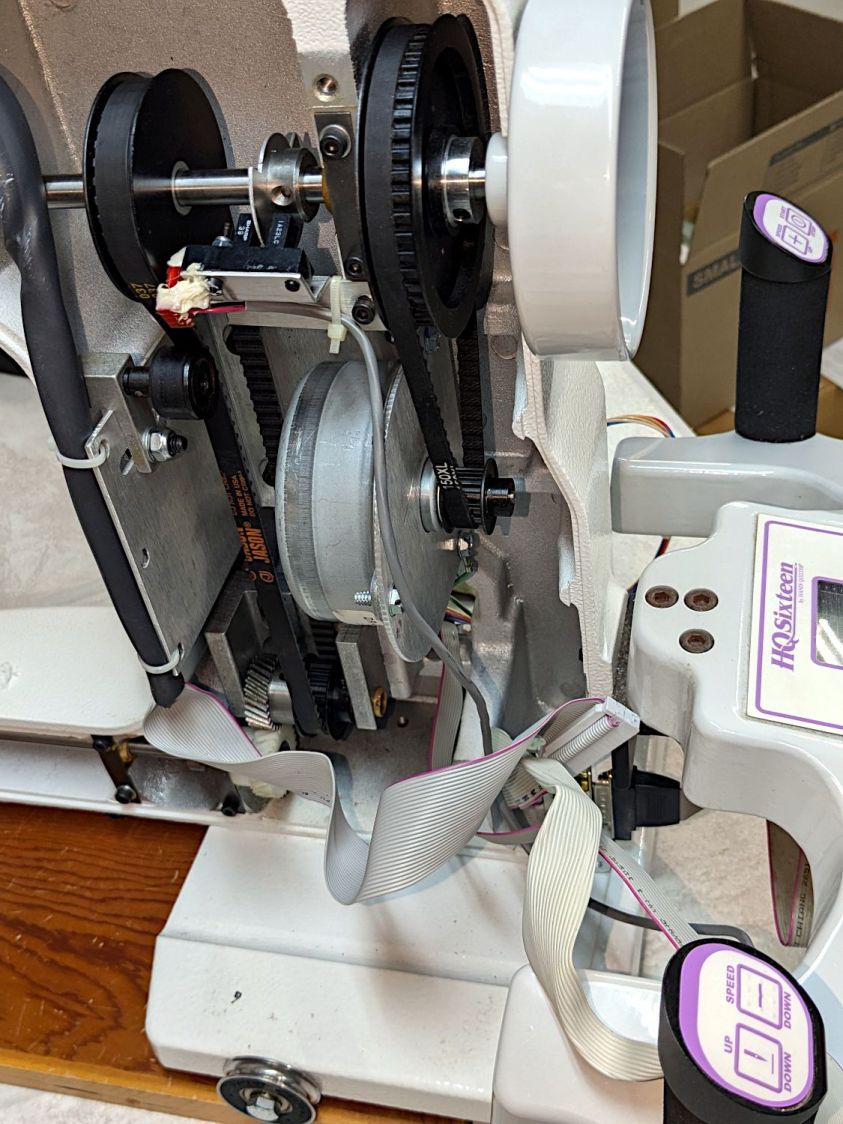
A separate sector disk on the machine’s shaft sets the needle-up and needle-down positions through an optointerrupter:
The white silicone snot on the interrupter connector is original.
After the error occurs, slowly turning the machine handwheel while pressing either button generally prevents the error message from reappearing, suggesting the “stalled” signal from the motor is working and the signal reaches the microcontroller.
Turning the handwheel while pressing the Up/Down button does not produce an error message due to the “motor” not stopping at the appropriate edge of the sector disk.
The InterWebs suggest a thread jam, crud in the bobbin, and a needle crash can trigger a Motor Stall. When the machine is operating correctly, running it at slow speed and stopping the handwheel by hand (it has little torque) triggers the Motor Stall error message. However, the controller will clear the message and the machine will resume normal operation thereafter.
Conversely, when the Motor Stall error occurs at startup, it remains absolutely consistent and survives the usual “Reboot that sucker!” power cycle. Leaving the machine turned off and untouched for a few hours / overnight may reset whatever is wrong, after which it will run normally through many power cycles.
Long enough, indeed, to finish an entire practice quilt over the course of several days:
HQ Sixteen – remounted handlebars in use
The component side of the power supply / motor interface PCB inside the pod:
Power PCB – components
Connections:
Microcontroller board at top left
BLDC shaft motor middle right
Frame ground on green wire
AC power input on the IEC jack
Power switch just above IEC jack
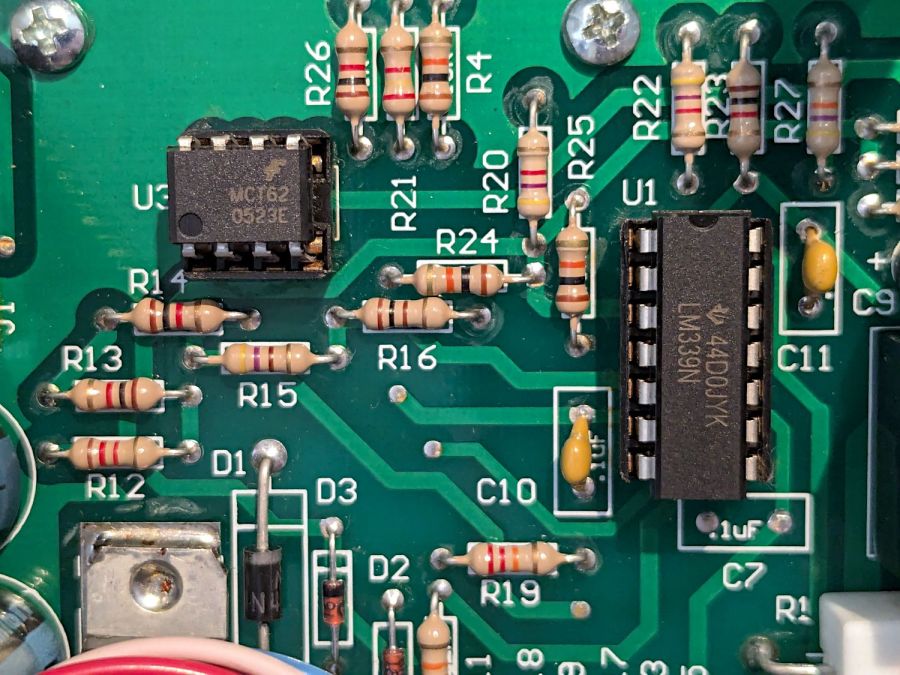
A closer view of the ICs:
Power PCB – IC detail
Some initial thoughts on the circuitry, without detailed PCB tracing …
Although the date codes suggest it was built in 2005, the electrolytic caps show no signs of The Plague.
The TO-220 package is a classic LM7815 regulator with its tab soldered to a copper pad. No extensive copper pour on either side serves as a heat spreader.
The 8 pin DIP is an MCT62 dual optoisolator handling the motor speed control and stall sense feedback.
The big transformer at the bottom sends raw DC to the microcontroller board through B3 and J1, filtered by two of the electrolytic caps along the left edge. I think the low side remains isolated from the power board’s common, thus isolating the microcontroller from the AC power line.
The Skynet (‽‽) transformer produces +15 V through the 7815 regulator and B21 bridge, filtered by the middle electrolytic cap along the left edge of the board. All of the circuitry on the board uses that supply, with the low side as circuit common.
The 160 VDC (!) supply for the BLDC motor comes directly from the AC power line with no isolation through the Current Limiter PTC, the B1 bridge, and the hulking electrolytic cap in the middle of the board. The relay in the upper right energizes just after the power goes on, connecting the motor power return lead to circuit common through the 5W 4.7Ω sandbox resistor. The “common” side of B1 is, thus, not connected to the neutral side of the power line and, more importantly, none of the circuitry on the PCB is isolated from the power line.
As a result, casually clipping a line-powered oscilloscope’s “ground” probe lead to what’s obviously the circuit “common” will, in the best case, turn the ground lead into a fuse. I’ve done this exactly once, deep in the past, with a Tektronix 7904 mainframe oscilloscope priced (with plugins) somewhat higher than the house we owned at the time; suffice it to say I learned from that mistake.
I think (part of) the LM339 quad comparator determines the relay’s time delay, perhaps in response to a signal from the microcontroller after it wakes up.
The solder side of the same board:
Power PCB – solder
The two green wires and trace cuts are original, apparently to power just B21 (the motor supply) from the AC line through the fuse + PTC, with the two transformers connected directly to the AC line through the switch & fuse. The two white wires on the bottom go to the power supply I added for the Chin Light; the Motor Stall problem predates that modification and the handlebar relocation.
After cleanup / squaring / tweaking, the two images combine into an X-ray view:
Power PCB – overlaid
With all that in mind, some possible causes …
Taking the power supply and microcontroller pods off the machine and poking all the obvious spots has no effect. Not taking them off and not touching the machine may resolve the problem by the next day, after having it fail consistently during most of the previous day.
The motor label says DR-8538-937, which does not appear anywhere online, so this must be a unique Handi-quilter part. An overview of DR-8538 motors suggests they’re available with a variety of windings, none of which match the machine’s 160 VDC supply voltage. Because the PCB has no high-voltage / high-current switching components, other than the bulk DC supply, the motor contains the BLDC control & drive circuitry. The closest matching catalog page conspicuously does not identify the motor wiring connections.
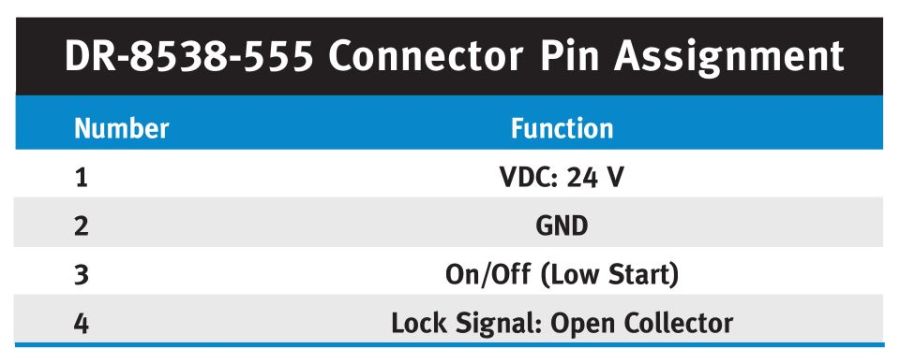
This figure from another catalog suggests the motor accepts a DC speed control and outputs an open-collector “locked rotor” signal:
BLDC DR-8538-555 Motor pinout
The Handi-Quilter DR-8538-937 motor has five leads in the J2six pin header which could match thusly to the four pins in the figure:
Pin 1 = 160 VDC (pin 1 → 24 VDC )
Pin 2 = missing
Pin 3 = common (pin 2 → GND)
Pin 4 = ? (pin 3 → -On)
Pin 5 = ? (pin 4 → Lock ?)
Pin 6 = +Buzzer and elsewhere (?)
This will obviously require reverse engineering the schematic from the PCB traces, thus the X-ray view above.
The most obvious cause of a Motor Stall would be a defective / failing motor. Through a cosmic coincidence, a motor “removed from a working HQ Sixteen” was available on eBay when I looked. It behaves no differently than the original motor and, while it’s possible both motors have the same internal fault, that seems unlikely. The “new” motor now runs the machine, with the original motor neatly bagged in a box against future need.
Re-seating all the ICs on both boards produced ominous crunching sounds, but no improvement. Wiping DeoxIT on the leads of the two ICs on the power board had no effect.
Replacing the 10-conductor ribbon cable between the two boards had no effect. I knew I was saving those insulation displacement connectors for a good reason.
The MCT62 optoisolator has a minimum current transfer ratio of 100% at 10 mA diode current. A gimmicked test setup produced 8 mA in the output transistors with 6 mA through the diodes, which seems good enough.
The relay clicks audibly, even with my deflicted ears, suggesting that it’s working, although we have not had a motor failure while we were listening. It is possible the contacts are intermittent, letting the relay click without making contact; we’re now listening intently.
The machine lives upstairs, my instruments live in the basement, and I am unwilling to lug an awkward and invaluable 50 pound lump between the two. The next time the motor stalls, I must dismount the power pod from the side of the machine, haul a bunch of gear (including an isolation transformer!) upstairs, and probe various points while it remains defunct.
Things to find out:
What each of the five motor wires do
Discover the circuitry handling the optoisolator signals
What drives the relay?
Even though the machine ran perfectly for a week, a fundamental Debugging Rule applies: If you didn’t fix it, it ain’t fixed.
You’ve just seen more tech info on the HQ Sixteen than previously existed on The InterWebs.













 The Smell of Molten Projects in the Morning

