The Smell of Molten Projects in the Morning

Ed Nisley's Blog: Shop notes, electronics, firmware, machinery, 3D printing, laser cuttery, and curiosities. Contents: 100% human thinking, 0% AI slop.

Category: Electronics Workbench

Electrical & Electronic gadgets

  • D-Cell Corrosion: Prepare for Liftoff!

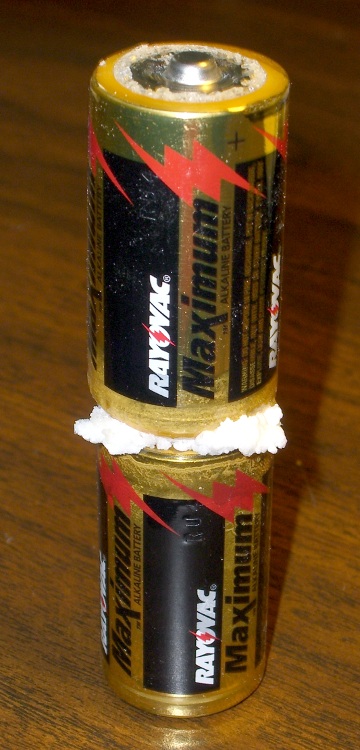
    Corroded Alkaline C Cells
    Corroded Alkaline C Cells

    Surprisingly, the flashlight holding these cells wasn’t damaged.

    Judging from the position of the switch, my mother tried to turn the thing on, it didn’t light up, and she just dumped it back in the drawer. Time passed, corrosion never sleeps, and the weak link (fortunately, between the two cells) let the alkaline nastiness out.

    I gotta collect all these pix in one big pile…

    (These are not the D-cells from the Maglite adventure.)

  • Tenergy AA NiMH Cell Self-Discharge

    Got a set of Tenergy 2600 mAh AA NiMH cells a while ago and ran some self-discharge tests.

    Tenergy 8 AA NiMH Pack Self-Discharge
    Tenergy 8 AA NiMH Pack Self-Discharge

    The three curves on the far right (two overlap pretty closely) are freshly charged. All three packs exhibit pretty much the same 1.8 Ah capacity, about 1.8 Ah or 70% of the advertised value.

    I must say that Tenergy cells aren’t exactly Tier 1 quality.

    The little stubby red curve on the far left is the as-received capacity. They’re not advertised as ready-to-use and, for sure, they’re not. My analysis of some RTU cells is there.

    The two curves on the left of the main group, after six and seven weeks, are down to 1.4 Ah. That’s 78% of the actual fresh-charge capacity, a mere 54% of nominal.

    Condensing the endpoints into a table, we have:

    Pack Charge Date Discharge Date Storage Time Capacity
    A 09/04/09 09/04/09 0 1.82
    A 09/04/09 09/11/09 7 1.64
    B 09/04/09 09/24/09 20 1.58
    C 09/04/09 10/25/09 51 1.41
    A 09/11/09 10/25/09 44 1.41
    B 09/24/09 10/25/09 31 1.48

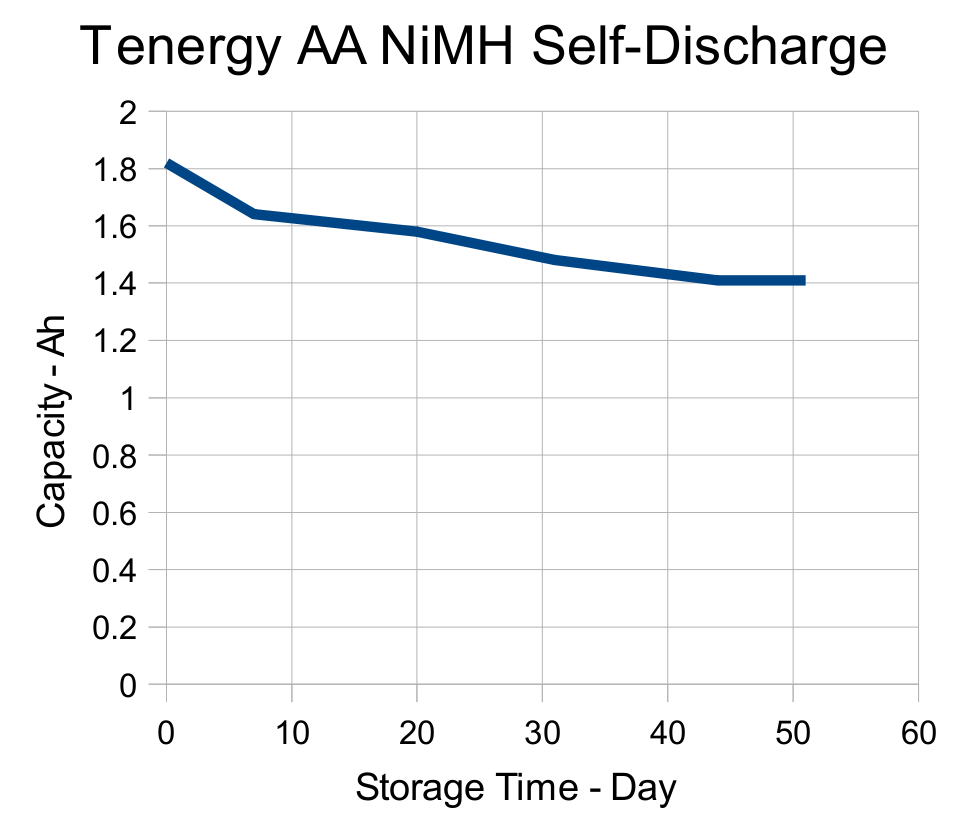
    A picture being worth a kiloword, a quick-and-dirty graph is in order:

    Tenergy AA NiMH Self-Discharge
    Tenergy AA NiMH Self-Discharge

    Ignoring the first and last points, the slope is more-or-less constant at 6 mAh/day.

    Call it 0.3%/day after the first week: store the cells for 50 days and you’re down 15%.

    Remember, that’s measured from the actual as-charged and as-measured capacity, not the nominal as-read-about-in-the-spec-sheet capacity.

  • Alpha-Geek Clock

    You’ve probably seen “ultimate geek clocks” floating around on the web, which seem to be Nixie tubes, binary readouts, or analog clocks with lightly encoded markings.

    Poseurs, all of them!

    If you’re an alpha geek, this is how you tell time…

    Absolute Geek Clock
    Absolute Geek Clock

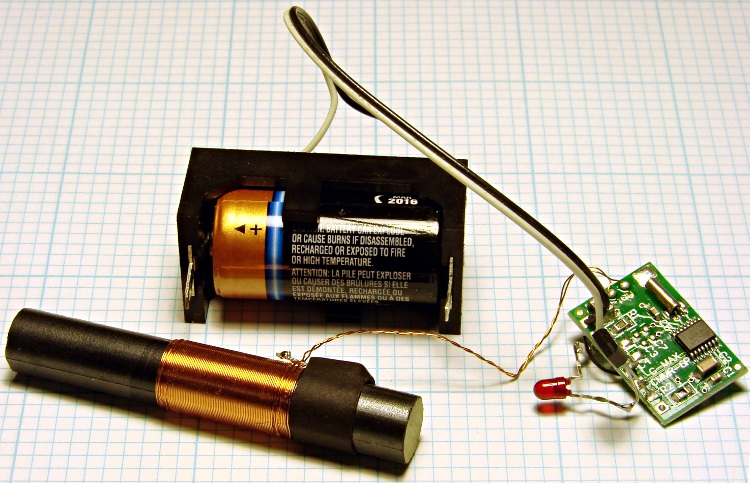
    It’s a WWVB receiver wired up to a CR123A primary lithium cell. The time display is a single red LED, driven by a low-threshold FET. Yeah, you can package it up in a cute little box (which is the picture on hackaday.com), but this is the essence of the thing.

    Over the course of a minute, the LED blinks out the hour, minute, year, day-of-year, Daylight Saving Time, leap year, leap second, and some other stuff in binary-coded decimal.

    The key to the format is there and the bit format is straightforward:

    • Long = frame marker
    • Medium = binary 1
    • Short = binary 0

    You just watch the LED, catch the frame marker, decode BCD data on the fly, convert from UTC to local time, and that’s all there is to it.

    Sheesh, it’s only one bit a second: anybody can handle that, right?

    Truth to tell, I can hang on long enough to get the minute, but I taper off pretty quickly after that.

    Tech detail…

    Basically, you get the receiver and CR123 cell holder from DigiKey for maybe fifteen bucks. Wire up a FET (ZVNL110A or some such) to the receiver’s inverted-polarity output, so the LED is ON during the data bit’s active time (carrier drops 10 dB). I blobbed on a 300 ohm SMD resistor, so the total current is maybe 250 µA with the LED on. If you’re going crude, you can probably wire the LED & resistor directly to the receiver’s positive-polarity output.

    A primary CR123A is good for 1500 mAh and the average current is maybe 150 µA, so the clock will run for nearly a year. The LED is pretty dim, but perfect for late-night viewing.

    Reception is iffy during the day here in the Hudson Valley. At night it’s just fine. Interference from LCD panels with near-60-kHz refresh is a real problem, so it doesn’t play well near PCs.

    I put the clock on a shelf where I can watch it when I wake up in the middle of the night: it knocks me out again pretty quickly.

    In real life, I put this together to verify my WWVB simulator… but I might just box up a spare for the shelf, too.

  • Still More Alkaline Cell Corrosion

    This is depressing …

    Alkaline Cell Corrosion in Boom Box
    Alkaline Cell Corrosion in Boom Box

    We got a boom box so Mom could have background music; the Olde Family Tube Radio was far beyond its Best Used By date.

    Prompted by recent events around here, I checked it on a recent visit and, yup, more corrosion. In all fairness, the cells suggest “Best If Installed By Jan 99”, so they’re well past their date, too.

    This used to be a whole lot less of a problem when flashlights and radios (without clocks!) were the only things using “dry cells”: when the battery went dead, the thing didn’t work and you replaced the cells.

    Nowadays, we expect alkaline cells to supply keep-alive trickle current for memory backup; even after the cell corrodes, it still supplies that tiny current and we never notice what’s happening inside.

    I’m beginning to loathe alkaline cells just like I loathe the small internal combustion engines in yard equipment.

  • More Alkaline Cell Corrosion

    Must be something going around…

    Corroded clock-thermometer cell
    Corroded clock-thermometer cell

    The outdoor thermometer over my desk (which also displays UTC so I don’t have to reset the mumble clock twice a year) started blinking. That’s the usual sign of a dead battery and, yup, when I opened it up, that “leakproof” Eveready was pretty far gone.

    Surprisingly, at least to me, the cell hovered around 1.1 V open-circuit and 800 mV under the meter’s “battery test” load. Given the amount of corrosion, I thought it would be flat dead.

    The corrosion had crawled out of the compartment along the negative terminal and coated the entire metal tab with bluish-green crystals. Some protracted dabbing with vinegar, rinsing with wet cotton swabs, and drying put things pretty much back in order.

    I usually scrawl the date on each cell when I install it, but either I didn’t do that here or the corrosion ate the ink. All I know is that it’s been up there for quite a few years; look at the discoloration where it faces the sun through the window!

    The thing was a surplus freebie to begin with and has long since been fully depreciated…

  • HP8591E Spectrum Analyzer: Capturing Screen Images Therefrom

    While I’m thinking about instrument screen shots, this is the script for my Hewlett-Packard 8591E Spectrum Analyzer.

    You’ll need C-Kermit, ImageMagick, and hp2xx for this one, too.

    The cable must cross-connect RTS/CTS for hardware flow control.

    Set the spectrum analyzer to

    • print-to-plotter
    • 19200 b/s (limited by USB-to-RS-232 converter)
    • One plot per page

    Turning menus off doesn’t seem to have any effect on screen captures from the serial port, so the script crops off that part of the image.

    Copy-n-paste the following text into a file (gethp8591), make it executable (chmod u+x gethp8591), and run it with a file name (./gethp8591 test).

    Unlike the (well, my) 54602 ‘scope, the 8591 responds to serial commands just like the Fine Manual says. So before you run this script, make sure the screen shows what you want.

    #!/usr/bin/kermit +
    # Fetches screen shot from HP8591E spectrum analyzer
    # Presumes it's set up for plotter output...
    # Converts HPGL to PNG image
    
    set modem none
    set line /dev/ttyUSB0
    set speed 19200
    set flow rts/cts
    set carrier-watch off
    
    # Make sure we have a param
    if not defined \%1 ask \%1 {File name? }
    
    set input echo off
    set input buffer-length 200000
    
    # Tell it what size to plot
    echo Triggering plot output...
    output plot 0,0,60000,40000;
    
    log session "\%1.hgl"
    
    # Wait for end of data stream
    input 400 SP;
    
    echo ... HPGL data captured
    
    close session
    close
    
    echo Converting HPGL in
    echo --\%1.hgl
    echo to PNG in
    echo --\%1.png
    
    run hp2xx -m png -c 143 "\%1.hgl"
    
    echo Cropping and resizing
    run mogrify -crop "515x395+0+0!" "\%1.png"
    run mogrify -density 300 -resize 200% "\%1.png"
    
    echo Finished!
    
    exit 0
    

    Here’s a picture of the FM broadcast band, as seen from the Basement Laboratory. The marker looks a bit off from 104.7 MHz, but that’s a combination of broad span and skinny peaks.

    Spectrum Analyzer Screen Capture
    Spectrum Analyzer Screen Capture
  • HP 54602B Oscilloscope: Capturing Screen Images Therefrom

    Back in the early 90s I bought a Hewlett Packard 54602B digital oscilloscope: 150 MHz bandwidth, 4 channels. By and large, a fine piece of gear that’s been worth every penny.

    Over the objections of the HP sales force, I got the HP 54651A RS-232 interface rather than the HP 54650A HPIB (aka GPIB, aka IEEE-488) interface. Reasoning: I’d need a matching interface on the PC side and PC architecture is anything but stable. Turns out that was a good decision, as you’ll realize if you count up the number of different buses since those days and factor in the cost of an IEEE-488 interface for each iteration. RS-232 is slow and not well-suited for complex arrays of test gear, but mostly I needed the scope for screen shots to go with my Circuit Cellar columns.

    Here’s how that works…

    Configure the scope by poking the RS-232 softkey in Print/Utility:

    • Connect to: HP Plot
    • Factors: On (this is absolutely vital)
    • Resolution: High
    • Baud Rate: 19200 (yes, “baud rate” is an oxymoron)
    • Handshake: DTR

    Now the scope will dump HPGL to what it thinks is a plotter, so the trick is to make the PC look like a plotter. Turns out that’s not particularly difficult.

    Despite the name, DTR handshaking does not use the scope’s DTR pin. The relevant manual section looks like this (click the thumbnail for full-size image):

    HP54602B Oscilloscope Serial Port Pin Functions
    HP54602B Oscilloscope Serial Port Pin Functions

    So DTR remains high and the flow-control signaling actually uses the RTS/CTS pins. The cable I’ve been is basically a null modem connection with the appropriate gender on each end:

    PC RS-232 HP 54602B Oscilloscope
    9-pin F Signal 25-pin M Signal
    1 DCD 20 DTR
    2 RxD 2 TxD
    3 TxD 3 RxD
    4 DTR 6 DSR
    also-> 8 DCD
    5 Gnd 7 GND
    6 DSR 20 DTR
    7 RTS 5 CTS
    8 CTS 4 RTS
    9 RI n/c

    Note:

    • PC 1 and 6 <- scope 20
    • PC 4 -> scope 6 and 8

    I wired the cable like that mostly because I have a lifetime supply of nice 9-conductor shielded cable lying around. You could connect the scope’s DTR to its own DSR and DCD pins, apply similar trickery on the PC end, and everybody would be perfectly happy with 5-conductor cable, maybe even 4-conductor if you ran the ground through the shield.

    Using XON/XOFF flow control seems to not work well, although I admit to not trying too hard to figure it out.

    These days, I use a USB-to-RS-232 converter with the now-standard 9-pin connector. The port identifier may be nearly anything after udev/hotplug has its way with the hardware, but it usually works out to /dev/ttyUSB0.

    The script requires C-Kermit (likely the ckermit package), ImageMagick, sed, and hp2xx (yes, spelled exactly like that), all of which should be packages in your favorite Linux distro. Haven’t a clue how this might work with Windows.

    With all that in hand, copy-n-paste the following text into a file (I used gethp54602, for lack of anything more original), make it executable (chmod u+x gethp54602) and run it with a file name (./gethp54602 test). Poke the Print Screen softkey on the scope and settle back for a bit. The scope can’t keep up a steady flow of data at 19200 b/s, so the whole affair takes a minute or three for the 50-ish kB of text in a dual-trace image.

    You’ll end up with three files:

    • test.hgl — raw HPGL text from the ‘scope
    • test.eps — raster conversion from HPGL
    • test.png — bitmapped screen-capture image

    The magic script…

    #!/usr/bin/kermit +
    # Fetches screen shot from HP54602B oscilloscope
    # Presumes it's set up for plotter output...
    # Converts HPGL to PNG image
    
    set modem none
    set line /dev/ttyUSB0
    set speed 19200
    set flow rts/cts
    set carrier-watch off
    
    # Make sure we have a param
    if not defined \%1 ask \%1 {File name? }
    
    set input echo off
    set input buffer-length 200000
    
    # Wait for PRINT button to send the plot
    echo Set HP54602B for HP Plotter, FACTORS OFF, 19200, DTR
    echo Press PRINT SCREEN button on HP54602B...
    
    log session "\%1.hgl"
    
    # Wait for final character
    input 480 \x03
    
    close session
    close
    
    echo Converting HPGL in
    echo --\%1.hgl
    echo to PNG in
    echo --\%1.png
    
    # Without factors
    #run hp2xx -m png -a 1.762 -h 91 -c 14 "\%1.hgl"
    #run mogrify -density 300 -resize 200% "\%1.png"
    
    # With factors
    run sed '/lb/!d' "\%1.hgl" > "\%1-1.hgl"
    run hp2xx -q -m eps -r 270 -a 0.447 -d 300 -w 130 -c 14 -p 34 -f "\%1.eps" "\%1-1.hgl"
    run rm "\%1-1.hgl"
    run convert -density 300 -resize 675x452+2+2 "\%1.eps" "\%1.png"
    
    echo Finished!
    exit 0
    

    [Update: WordPress unpredictably and ruthlessly mangles source code by incorrectly escaping some symbols. The line with sed should have a greater-than symbol to pipe the result into the .hgl file. A more recent version (albeit using my SENA PS410 serial server) hosted as a GitHub gist may help.]

    Here’s a sample of what pops out; it’s the scope’s own calibrator waveform, nothing exciting, but you get the general idea.

    Screen Capture of Calibrator Signal
    Screen Capture of Calibrator Signal

    The commented-out section labeled “Without Factors” converts the format you get with Factors Off. Turns out that there’s no unique ending string without factors, which puts a real crimp in getting the data. The advantage is that the HPGL converts directly to PNG and looks good. The only way I’ve found to capture the scope data is to just time out after a while.

    With Factors On, however, the image data has a unique ending character (ASCII ETX, 0x03) after the label text, but the layout is rotated to plot in landscape mode. A direct conversion to PNG looks awful, perhaps because hp2xx must do software character generation, and I eventually figured out that making a bank shot off EPS vector format produced much better results.

    However, hp2xx dutifully renders the text into the EPS image, but it doesn’t inject a carriage return after each linefeed: the text dribbles off to the far right of the actual screen image. To fix that, the sed editor hacks off the label text following the lb command. Mercifully, hp2xx doesn’t choke on the incomplete command.

    And then convert does its usual magic. The image size is just right to drop into my Circuit Cellar columns; you may want something different for your purposes.

    [Update: The PNG has an alpha channel that selects only the traces, so the background color depends on where you put it. A small tweak is there.]

    For reasons that I absolutely do not understand, I cannot control the oscilloscope through the serial interface. The scope sends data to the PC just fine and I can get the scope to complain about the character format if I send truly bogus junk (like, mismatching the baud settings), but it simply will not respond to commands. Maybe the interface is broken or, more likely, I’m screwing something up. Hasn’t been a problem, though, for my simple needs.

    Memo to Self: One of these days, eBay will have a 54652B serial/parallel interface that might work better.