Ed Nisley's Blog: Shop notes, electronics, firmware, machinery, 3D printing, laser cuttery, and curiosities. Contents: 100% human thinking, 0% AI slop.
Sony no longer offers the NP-FS11 Li-Ion batteries required for my DSC-F505V camera, so I’ve been using “generic” replacements for quite some time. My experience has been mixed: some batteries provide a reasonable amount of run time, others provide almost none.
Feeding the appropriate keywords into Froogle gives you a range of battery suppliers, with offerings from, as of this writing, $3 to $103. Perhaps not surprisingly, the image for a $70 battery exactly matches the one on my desk that cost perhaps $15 a few years ago… although I’m certain that the actual battery you’d get wouldn’t match that picture.
I just bought three NP-FS11 batteries from the usual low-buck Hong Kong eBay supplier: six bucks apiece, shipped halfway around the world. The eBay listing claimed 1800 mAh, which seemed aggressive, and the batteries sport a 3900 mAh label, which is flat-out impossible.
Frankly, I didn’t expect much and here’s the discharge test graph to show I wasn’t disappointed. I used a 1-amp rate as a reasonable guess at the camera’s peak draw, although that might be a touch high for a continuous discharge.
Generic Sony NP-FS11 Li-Ion Batteries
The top blue curve is from a two-year-old literally no-name battery (no logo, no nothing!) that still provides decent run time; it’s the one matching that $70 battery. It provides about 1100 mAh, reasonably close to its 1300 mAh rating.
The middle curves, black and purple, are two of the new cells that provide about 900 mAh: half the as-listed-on-eBay capacity, 25% of the absurd label value. Their very low terminal voltage during most of the discharge says that these won’t provide much run time at all.
The green curve piddling off on the bottom is the third new cell, which is obviously defective. As I said, I didn’t expect much and I certainly wasn’t surprised.
The red curve is an old and completely defunct batteries.com offering that never provided good service.
Here’s another plot of three successive charge-discharge cycles for just the three new batteries. The first curves (at 1.0 A) correspond to what you see above, the remaining two sets (at 0.5 A) are the next two cycles. Batteries G and I have improved, H remains a dud.
MaxPower NP-FS11 Battery Tests
Given the varied offerings on the Web, I believe that there is no way to ensure you’re getting a known-good battery from a reputable supplier. It’s absolutely certain that price does not correlate with quality; the ones I bought simply establish that low-end offerings are crap.
The purchase was worth it for the amusement value alone; I don’t expect any action from the vendor, although I did send a copy of that graph with some explanatory text. The question is whether I should give them a five-star rating for prompt delivery…
As it happens, there’s enough room to slide a standard CR123A-size cell into the battery compartment. I think a bit of Quality Shop Time applied to a dead NP-FS11 battery case (and the vital Sony “Infolithium” DRM module) will provide a baseplate with all the proper connectors. Perhaps I can conjure up a “battery” containing a single cell of known-good quality?
Primary CR123A cells supply only 3 V, not the 3.6 V the camera really wants, so I can’t use disposable cells.
I have an X10 CM11A “Two Way Computer Interface” handling the very very very few scheduled events for our house. Basically, it turns the living room lights on in the evening and everything off much later.
As a result, I tend to ignore it for years at a time. A recent power outage killed the regularly scheduled events, which suggested that the backup batteries needed changing… and, yes, they were pretty well corroded.
With that out of the way, I discovered that the last time I’d loaded a program into the thing was so long ago that the heyu config files had either gone missing or were on a system not near the top of my heap. It’s easy enough to configure, so I installed heyu and spun up a new set of config files.
All the doc I can find says the CM11A has an RJ11 modular phone jack, which mates with the standard 6-position 4-conductor dingus found on the end of every phone in this part of the world. My CM11A, however, has a 4P4C jack, the narrower dingus found on phone handsets. Given that heyu reports
Firmware revision Level = 1
I suspect that this thing is slightly older than some of the folks reading this post and the X10 factory switched to a somewhat less bizarre connector in mid-stream.
Anyhow, the DB9 (yeah, it’s a DE9, but nobody calls it that) connector has “X10 Active Home” printed on it in my very own handwriting, with a standard RJ11 plug on the end. A double-jack adapter connects a hank of cable with an RJ11 plug on one end and a 4P4C connector on the other. I have no idea where that cable came from; perhaps I replaced the 4P4C plug with something less bizarre to add that extension so the cable would stretch from PC to wall outlet?
I plugged the thing into a USB-RS232 adapter and heyu had no trouble talking to the CM11A. However, trying to execute
heyu dim n13 10
produced the discouraging report
RI serial line may be stuck.
A bit of deft multimeter work produced this pinout list, which agrees with most of the doc you’ll find elsewhere. Hold the 4P4C connector with the tab down and the cable away from you: the pin numbers are 4 3 2 1 from left to right. The RS-232 pins are printed right on the DB-9 connector.
4P4C   DB9
 1      2 RxD
 2      9 RI
 3      3 TxD
 4      5 Gnd
It’s entirely possible the USB converter doesn’t support RI or it doesn’t do a good job of it. I jammed the cable into the serial port on the back of the PC and shazam it works perfectly.
The x10.conf file, for the next time around
TTY /dev/ttyS0

HOUSECODE N

LATITUDE 	41:40N
LONGITUDE	73:53W

ALIAS MBR_Dresser	N1
ALIAS Front_Hall	N5
ALIAS RV_XCVR		N9
ALIAS Couch		N10
ALIAS Mary_Reading	N11
ALIAS LR_Ceiling	N12
ALIAS Fireplace		N13
ALIAS Kitchen		N14
ALIAS Patio		N15
ALIAS Garage_Spots	N16

START_ENGINE	AUTO

LOG_DIR		/var/log/heyu/

DATE_FORMAT	YMD '-'
Got the replacement X10 controller from the usual eBay source and it works fine, except it has a red LED that’s on unless it’s sending an X10 command.
That’d be OK, except that I’ve spent the last few months associating a red LED at that spot on the dresser with a jammed X10 controller.
Not to mention that red LEDs are sooo 20th Century…
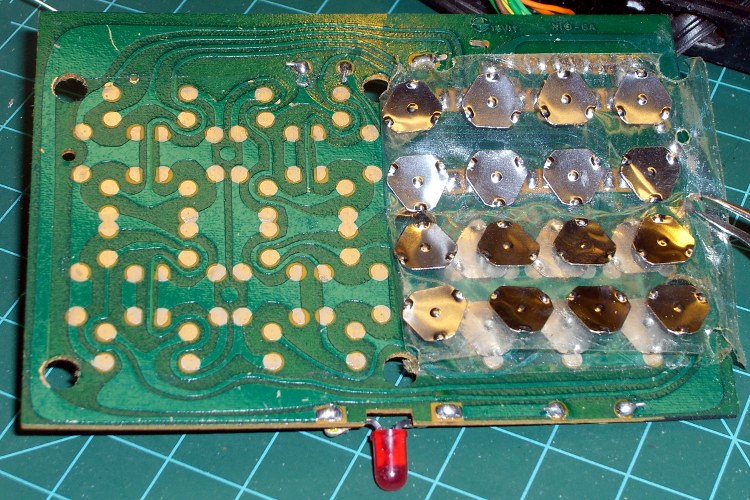
Four screws hold the baseplate in place; it takes a bit of prying to release the stiffening collars around the front screws and remove the baseplate. One more screw holds the circuit board in place.
Surprisingly, they used the same metal-dome switch plates!
Anyhow, with the board out, it’s easy to unsolder the red LED and replace it with a green one from my bag o’ mixed LEDs. It’s not quite the same shape and doesn’t have a big shoulder to keep it in place, but it’s good enough for me.
New green LED
The heat of soldering melted the thermoplastic glue that held the original LED in place. The new one isn’t quite as firmly bonded, but I don’t intend to jam a paperclip into the hole after shoving the LED out of the way.
In the process of pulling together a talk for the Trinity Robotics contest, I rediscovered my spreadsheet of spectral response data. It’s been compiled over the years from myriad sources (utterly without attribution), suffers from gaps & interpolations, and undoubtedly emits a fairly high bogon flux density.
To wit: trust nothing!
Spectral Response
Horizontal scale has UV on the left and IR on the right.
Vertical scale is linear, roughly corresponding to power in or out at a particular wavelength. It should, of course, be logarithmic, but that’s in the nature of fine tuning, as no source data has that much resolution.
Things to note:
Human eyes are tuned to see chlorophyll and not much else. That must’a been important at one time or another…
The nice bumps on the left are visible LEDS: violet blue green orange yellow red. The IR LED over on the right stands alone.
There’s no overlap between human vision and IR LED emission, but you can still see a dim red glow if you stick it right up against your eye.
Don’t do that with a UV LED, though.
White LEDs are just blue LEDs with fancy phosphors. That’s why the spectrum looks like a blue LED with a bump in the yellow-orange neighborhood. They’re not well-balanced at all.
High-pressure sodium lights kill IR sensors stone cold dead. Look at that peak, perfectly aligned with the photodiode response. If you could see in IR, you’d go blind. That’s what made the Trinity contest so challenging for so many years; they recently switched to fluorescent lighting and the complaints dropped dramatically.
Those emission spikes are why camera color correction doesn’t work well: if there’s no energy in a region, you can’t crank the gain up enough to make a difference.
An 87C Wratten filter is great for excluding visible light, but the overlap with that HP-Na spike tells you it won’t do jack with that sort of lighting.
Fluorescent tubes produce intense spikes at 436 and 546, corresponding to mercury emission lines. Their phosphor emissions extend far into the IR, too, but the data I have doesn’t include that region.
Ditto for metal halide bulbs.
To produce the graph, apply this bash script to the CSV file…
#!/bin/sh
export GDFONTPATH="/usr/share/fonts/TTF/"
gnuplot << EOF
#set term x11
set term png font "arialbd.ttf" 24 size 1200,800
set output "Spectral Response.png"
set title "Spectral Response"
#set key 28,-0.75 Left reverse samplen 2 noautotitles
#set key right noautotitles
unset key
unset mouse
set bmargin 4
set grid xtics ytics
set xlabel "Wavelength - nm"
set format x "%3.0f"
#set xrange [0:9]
#set xtics 0,10
#set mxtics 4
set ytics nomirror autofreq
set ylabel "Relative Response"
#set format y "%3.0f"
set yrange [0:1.1]
#set y2label "Panel Power - mW"
#set format y2 "%3.0f"
#set y2range [0:800]
#set y2tics 200
set datafile separator ","
set label 1 "Eye" at 550,1.05 font "arialbd,14" center
set label 2 "White" at 480,1.05 font "arialbd,14" center
set label 3 "IR" at 940,1.05 font "arialbd,14" center
set label 4 "87C Filter" at 1050,0.85 font "arialbd,14" center
set label 5 "Photodiode" at 825,1.05 font "arialbd,14" center
set label 6 "Tungsten" at 1050,1.00 font "arialbd,14" center
set label 7 "Fluor" at 410,0.42 font "arialbd,14" right
set label 8 "Halide" at 680,0.41 font "arialbd,14" left
set label 9 "HP-Na" at 805,0.60 font "arialbd,14" right
set label 10 "Violet" at 410,1.05 font "arialbd,14" center
set label 11 "Red" at 635,1.05 font "arialbd,14" center
plot    "Spectral Response Curves.csv" \
 using 1:2 with lines lt -1  lw 3 title "Eye", \
 "Spectral Response Curves.csv" \
 using 1:3 with lines lt 1 lw 2 lc rgb "light-blue" title "White" , \
 "Spectral Response Curves.csv" \
 using 1:4 with lines lt 1 lw 2 lc rgb "dark-violet" title "Violet" , \
 "Spectral Response Curves.csv" \
 using 1:5 with lines lt 1 lw 2 lc rgb "blue" title "Blue" , \
 "Spectral Response Curves.csv" \
 using 1:6 with lines lt 1 lw 2 lc rgb "green" title "Green" , \
 "Spectral Response Curves.csv" \
 using 1:7 with lines lt 1 lw 2 lc rgb "gold" title "Yellow" , \
 "Spectral Response Curves.csv" \
 using 1:8 with lines lt 1 lw 2 lc rgb "orange" title "Orange" , \
 "Spectral Response Curves.csv" \
 using 1:9 with lines lt 1 lw 2 lc rgb "red" title "Red", \
 "Spectral Response Curves.csv" \
 using 1:10 with lines lt 1 lw 2 lc rgb "magenta" title "IR" , \
 "Spectral Response Curves.csv" \
 using 1:11 with lines lt 1 lw 2 lc rgb "dark-red" title "Photodiode" , \
 "Spectral Response Curves.csv" \
 using 1:12 with lines lt 1 lw 2 lc rgb "dark-gray" title "87C Filter" , \
 "Spectral Response Curves.csv" \
 using 1:13 with lines lt 1 lw 2 lc rgb "dark-yellow" title "Tungsten" , \
 "Spectral Response Curves.csv" \
 using 1:14 with lines lt 1 lw 2 lc rgb "orange-red" title "HP-Na" , \
 "Spectral Response Curves.csv" \
 using 1:15 with lines lt 1 lw 2 lc rgb "brown" title "Halide" , \
 "Spectral Response Curves.csv" \
 using 1:18 with lines lt 1 lw 2 lc rgb "midnight-blue" title "Fluorescent"
EOF
And the data in CSV format because WordPress doesn’t allow spreadsheets…
After 30-some-odd years, the X10 controller we’ve been using to turn off all the lights at bedtime finally stopped working. For the last few months it had been occasionally jamming ON, even when nobody pushed any keys, and the only way to reset it was pulling the plug.
The big silver can on the white cable is an ultrasonic mic, so perhaps the circuitry around that was getting cranky: the ultrasonic cleaner in the bathroom (which we use for eyeglasses) would reliably jam it. I think the controller was responding to the third harmonic of the 40-ish kHz cleaner power, delivered through the power line.
As you’d expect, all the electrolytic caps were shot; ESR for the big one was “open”, the smaller ones around 5 Ω. The capacitance values were entirely within spec, of course. I replaced all three.
X10 Controller keyboard
While I had the hood up, I cleaned the switch contacts, even though that probably had nothing to do with the problem. Back in the day, they used actual metal deformable domes, stuck under an adhesive layer that did a fine job of keeping the crud and dust out.
Put everything back together, fired it up, and it misbehaved the same way. I’d say we got our money’s worth out of it, though.
A replacement is on the order of $15 from the usual eBay suppliers, so it’s not the end of the world.
The new one probably doesn’t have the ultrasonic receiver, so it shouldn’t respond to the ultrasonic cleaner with the same enthusiasm.
The Totally Featureless Clock has been running continuously for the last few months, with a laptop dutifully recording its trace output. Occasionally the USB link will disconnect, but on the whole it works pretty well; the clock continues to run even when the USB link fails.
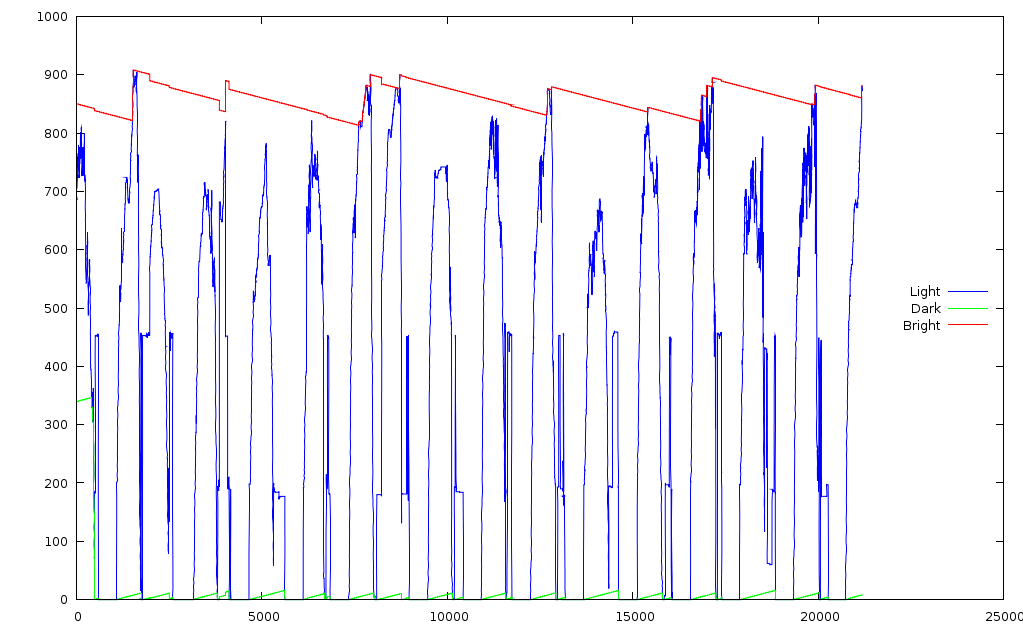
Here’s about three weeks of light intensity record. The red trace is the max value, green is minimum, and blue the current intensity. The min and max tend toward the middle, one count per hour, so they don’t stick at the extremes.
Light Intensity
The peaks represent daylight hours, zeros are overnight, and the overall scale is roughly logarithmic, more or less, kinda-sorta.
The general idea is that the LED brightness matches the room illumination, with the min & max values tracking the actual ambient light range to get the most benefit out of the TLC5916’s limited dynamic range.
You can spot the data dropouts where the red trace steps abruptly; it should decline smoothly from each peak and the peaks should be evenly spaced about 24 hours (1440 minutes) apart. Each minute generates three lines with the exact time, so it would be possible to futz around and timestamp each record, but …
The clock dumps the ADC values in hexadecimal, which gnuplot can’t handle, so a bit of preprocessing is in order.
cat *log > 0.txt
grep Light 0.txt > 1.txt
sed 's/Light: /0x/g;s/Min=/0x/g;s/Max=/0x/g' 1.txt > 2.txt
gnuplot
set key on right center
plot "2.txt" using 1 with lines lt 3 title "Light", (and so forth)
All in all, it seems to be working as intended. When I put it inside the case, I’ll probably have to increase the resistor to account for the dark-gray faceplate.
A friend mentioned a sale at Overstock.com (likely gone by now) that offered an Initial RB-270 9 V, 5.4 Ah lithium-ion battery pack, with a built-in charger, for $16. The pack was intended to keep a DVD player alive for long enough to avoid back-seat mayhem on long trips (for those toting undisciplined brats, anyway), but I saw it as a plug-in replacement for the NiMH AA-cell packs I’ve been using with the HTs on our bikes.
The NiMH cells have been a major disappointment, as described there and there and there, with barely 1.5 Ah of capacity from nominal 2.4 Ah cells.
Much to my surprise, all three of the Li-Ion packs delivered pretty nearly their advertised ratings. I varied the discharge level, but they’re all quite close…
Initial External Li-Ion packs
It looks like the packs include an internal regulator and over-discharge monitor, as the voltage is bar-flat right up to the point where it drops to zero. I’m mildly surprised at the regulator; I’d expect that they’d just deliver whatever the cells were producing, rather than waste any energy in the regulator.
Notice that the 200 mA rate produced a lower total capacity than the 1 A rate. I’m guessing that’s power lost in the regulator over the protracted run time; 4.9 Ah at 200 mA added up to nearly a day of testing, far over the “up to six hours play per charge” rating.
Let’s see: 5.4 Ah @ 6 hours makes the nominal load about 900 mA. So it delivered maybe 4.8 Ah at 1 A. Not what’s claimed, but much closer than those Tenergy NiMH cells.
Next steps:
Butcher the nice coily-cord cables to add Powerpole connectors that will click right into the bike radios
Take one apart to see what bypassing the regulator would entail