Ed Nisley's Blog: Shop notes, electronics, firmware, machinery, 3D printing, laser cuttery, and curiosities. Contents: 100% human thinking, 0% AI slop.
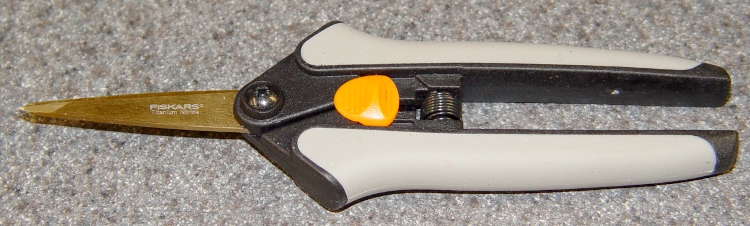
These Fiskars scissors[Update: they’ve moved to the Gardening section. Try there or there. ] seem to be intended for sewing & quilting, but they work just fine for snipping plastic filament, cutting tape, and severing hangnails…
Fiskars Softouch Scissors
The titanium nitride coating probably doesn’t add much value to the mix, but that’s what they had at JoAnne Fabric when I bought ’em.
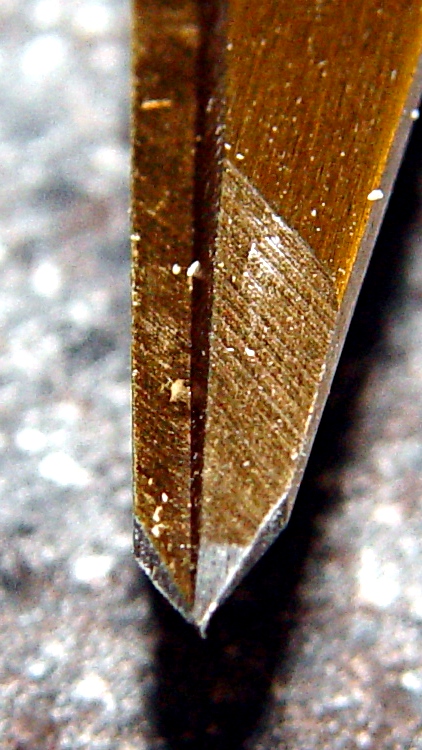
Fiskars scissors tip detail
This detail of the tip shows why they’re so great for detail work: each blade ends in a two-way taper to a genuine cutting point. Of course, that means they’ll survive exactly zero falls to the shop’s concrete floor, but they’re fine while they last.
The trick is to sign up for JoAnne sale flyers, which regularly deliver “40% off any one item” discount coupons, then make a targeted shopping expedition. Those coupons account for the green self-healing cutting mat that’s in the background of so many pictures around here, too…
The general idea: a thermal switch detects an overtemperature condition and shuts off the power supply for the heaters and the extruder motor.
A sketch that should accomplish that goal:
Thermal Cutout Doodle
The -Power On pin is 14 in the 20-pin Motherboard connector and 16 in the default ATX 20+4-pin connector.
The thermal switches in my heap have their case connected to one lead, so it makes more sense to put ’em on the low side of the circuit, with the case grounded. That way you can attach ’em directly to, say, the Thermal Core… or at least not worry about inadvertent shorts.
How it works
When you turn the ATX supply’s AC power switch on, the +5VSB supply goes active and the AC On LED lights up. Nothing else happens: the relay remains open and the Thing-O-Matic appears to be dead. This is how it should work!
The +5VSB supply provides initial power to this circuit; all other ATX power outputs are disabled and all Thing-O-Matic boards are inactive. The AC On LED indicates that the standby supply is active.
The Test/Fault LED is lit in this condition to indicate that the relay is inactive; there seems to be no way to unambiguously indicate a thermal fault without at least one more relay. On the upside, you know the LED works.
Pressing the Power On pushbutton closes the DPST relay, assuming the Normally Closed (NC) 65 °C Thermal Switch is closed and the Estop button is not pressed. I happen to have such a thermal switch in my Parts Heap, but a higher temperature may be desirable; they’re stock items at Digikey / Mouser. See below for a discussion of the sensor location.
You can use a DPDT relay, which may be easier to find.
One pole of the relay bridges the Power On pushbutton switch, holding the relay active when you release the button. The other pole pulls the ATX -Power On input low to enable the ATX supply voltages to the rest of the Thing-O-Matic, which lights up and begins working as usual.
The +Power Good signal eventually goes high and turns on the Power OK LED.
If the temperature exceeds 50 °C, the Normally Open (NO) 50 °C Thermal Switch closes and the Heat Alert LED goes on. That temperature may be too low.
If the temperature exceeds 65 °C, the Normally Closed (NC) 65 °C Thermal Switch opens and releases the relay. That releases the -Power On input and immediately turns off all the ATX supply voltages: the Thing-O-Matic hardstops. Because the other relay pole no longer bridges the Power On switch, the relay remains off.
As suggested there, putting a high-temperature thermal fuse directly on the Thermal Core insulation blanket would be a Good Thing. That fuse goes directly in series with the 65 °C Thermal Switch as a deadman cutout: when it blows, you cannot turn the Thing-O-Matic on until you replace it.
The Test/Fault LED goes on when the 65 °C Thermal Switch cools off enough to close. That’s suboptimal, although the 50 °C Heat Alert LED will be on while it’s cooling.
Pressing the Estop pushbutton switch also releases the relay. That switch is Normally Closed (NC) because most wiring faults involve a wire not making contact. A Normally Open (NO) switch wouldn’t give any indication of the wiring problem, while an NC circuit simply won’t allow the TOM to power up.
As nearly as I can tell, the Motherboard ignores its own Estop switch input.
Important: don’t get clever by replacing the relay with a semiconductor. You want something dead simple that won’t suffer from static discharge damage or software failures. Relays, buttons, and switches tend to be very simple, easy to test, easy to verify, and not prone to weird failures.
Thermal Switch Locations
The ideal location has a physical attachment to the Thermal Core, rather than an air gap. The top of the Thermal Riser Tube seems ideal, but I measured the heatsink temperature as exceeding 90 °C with the Core at 220 °C.
What’s worrisome about that: the glass transition temperature for acrylic plastic is in the 85-165 °C range. The top of that tube is much hotter than it really should be, given the stresses imposed on the Filament Drive frame.
I’m thinking of adding a heatsink across the top, extending out of the openings under the top of the support structure. That should cool the Tube, make the acrylic happier, and provide a location where the temperature remains below 50 °C in normal operation. When the Core exceeds, say, 300 °C, the switches would trip.
I think that’s messy, but putting higher temperature switches on the existing Tube doesn’t avoid that problem. Obviously, running the TOM in a hot room will produce different results; there’s a tradeoff between false trips and burning the house down.
More study is needed…
ATX Power Supply Signals
These must be hijacked from the ATX power connector at the Thing-O-Matic Motherboard, maybe using square pins & heatshrink to fake a connector. You could repurpose the 4-pin +12 V / Ground CPU power connector, but then you’d be forced to come up with a mating cable connector.
Or just solder a cable to the Motherboard, cut the -Power On, splice in the wires, and be done with it.
The +5VSB (9 Purple) supply is active with the AC line switch turned on. This supplies power to bootstrap the protection circuit, much as it does in an ordinary PC.
The -Power On (14/16 Green) signal has an internal (and unspecified) pullup resistor. The Motherboard pulls that line to ground, so the new connection must be spliced into the middle of the existing ATX wire. The pin number is 14 in the 20-pin block and 16 in the 24-pin block.
The +Power Good (8 Gray) signal remains low until all output voltages get within the tolerance limits, then it goes high. There’s no spec for output current, but we assume it can drive an LED. Presumably this goes low when any voltage goes out of spec, so a glitch catcher should be instructive.
A Common or Ground (7 Black) line provides the circuit ground. The Motherboard has very low current requirements, so stealing any of the Ground wires will be OK.
A pair of 25 W cartridge heaters can get from (a cold!) room temperature to 230 °C in about 16 minutes, after which the Extruder Controller begins cycling the heater power. The bump at 4 minutes comes from a momentary lapse of attention.
The PID constants were P=100, I=0, D=0, which forces the Extruder Controller to run in bang-bang mode: heater on below the setpoint, heater off above it. The firmware uses a built-in hysteresis of 2 °C, so there’s a built-in ripple of a bit more than that.
Cooling it down from 230 °C to (almost) room temperature:
Cartridge Heater 2x25W – Cooldown
Now, isn’t that just the cutest little exponential you’ve ever seen? Here’s the same data in a semilog plot, which shows that it really is suspiciously exponential:
Cartridge Heater 2x25W – Cooldown – log scale
For some reason, OpenOffice figures the trend line in the form y=m^x + c, which isn’t helpful. The first part looks to be the most closely exponential part of the curve, so let’s pick a couple of points and see how they fare.
The equation we want is of the form:
temp(t) = (room temp) + (temp rise) • e-t/τ
Room temperature was 14 °C and the temperature rise was 216 °C = 230 – 14. The Basement Laboratory gets entirely too cold during this part of the year!
Solving for the time constant τ:
τ = (-t)/loge((temp - room temp)/(temp rise))
That’s the natural logarithm, of course, not the decimal logarithm.
At t=5:
τ = (-5)/(-0.222) = 22.5
At t=15:
τ = (-15)/(-0.712) = 21.1
At t=30:
τ = (-30)/(-1.42) = 21.1
So the time constant looks to be a bit over 21 minutes, almost exactly twice that of the unmodified MK5 Thermal Core with resistors. The additional steel around those cartridge heaters basically doubles the heated mass and, thus, the time constant. I’d guesstimated a 30 minute time constant.
That gives a better estimate of the worst-case temperature with the cartridge heaters jammed on. The temperature rise at t = (0.1 • τ) is 9% of the total temperature rise. A bit of interpolation says the initial rise was 34 °C (= 48 – 14), so the final rise is 378 °C and the Core would top out just shy of 400 °C = 750 °F.
That’s lower than I originally estimated, based on the First Light data, but it’s still plenty hot enough for some serious damage. Don’t install cartridge heaters without a dead-simple thermal cutout to prevent runaway!
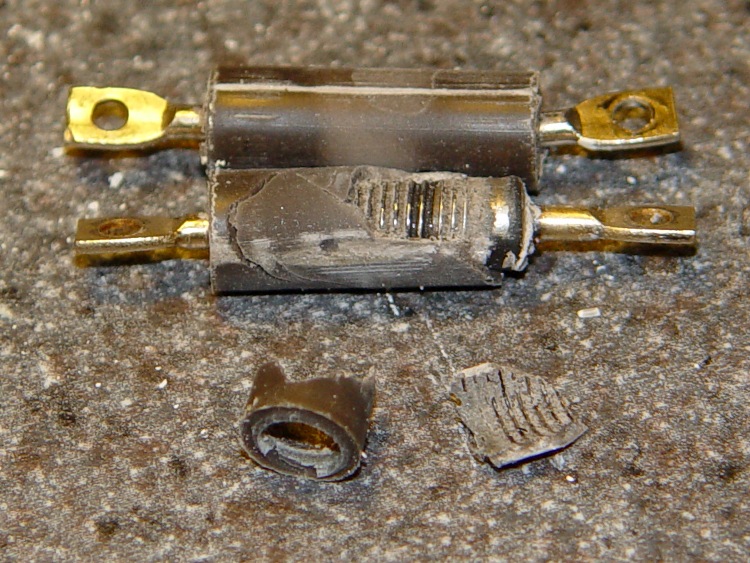
Having built cartridge heater mounting blocks, I autopsied the two aluminum-case power resistors I’d been using on the MK5 Thermal Core. They weren’t dead yet, but I have some spares in case the cartridge heaters don’t work out as expected.
First observation: the blue-tinted thermal compound I’d put under the resistors turned white! It has a 200 °C maximum rating, so it’s been cooked well beyond any reasonable limit. On the other paw, it was still soft and didn’t have any air bubbles; the resistors were pretty firmly glued in place.
Based on those thermal measurements, I had replaced the original parallel-connected 5 Ω resistors with series-connected 2 Ω resistors, thus reducing the power dissipation in each resistor from 28.8 W to 18 W. While that’s still far beyond the specification, every little bit of reduction helps.
In round numbers, the resistors ran at 50-75% duty cycle to maintain Thermal Core temperatures in the 200-230 °C range. I guesstimate I had 10-15 power-on hours on the resistors, but that may be a lowball estimate: time passes quickly when you’re having fun.
Anyhow, I slipped a brass tube around one resistor terminal, braced the other end on the drill press vise, and pressed the cores out.
Resistor elements
The top core literally fell out without any urging, which means that it had shrunk and separated from the housing. That means the resistor was well on its way to failing: a loose core gets hotter and deteriorates faster.
The bottom core was still firmly attached and disintegrated as I forced it out, which means it was in good condition. Paradoxically, the crumbled resistor core in the picture came from the resistor in the best shape.
Given that I ran these resistors at 63% of the original power level, the fact that one was well on its way to heat death after only (at most) a few tens of hours suggests that you shouldn’t expect much life from the stock MK5 resistors. If you haven’t already done so, electrically isolate the thermocouple bead from the Thermal Core to protect the Extruder Controller.
I’m unwilling to sacrifice a new resistor to see if that discoloration is normal, but I suspect it’s not. The ends should be the coolest part of the resistor, which means the middle is discolored, but that picture suggests the opposite, so I really don’t know.
I’d hoped the ID of the resistor bodies would match the OD of the cartridge heaters. That didn’t work out: 0.275 vs 0.250. They’re also a bit too short. If the match was closer, I could see slipping a shim in there, but having two air gaps around the heater just doesn’t make any sense at all.
MBI sent me a selection of 1/4-inch cartridge heaters to evaluate, seeing as how I’ve been such a pest on the subject of those poor aluminum-case power resistor heaters. Thanks, Zach!
I initially thought I could punch the cores out of the resistors and slip the cartridge heaters into the holes, but it turns out the resistor bodies aren’t quite the right size: slightly too short with slightly too large holes. So it goes. Some earlier thoughts live there.
This is a first pass at building mounting blocks to attach cartridge heaters to a stock MK5 Thermal Core. Ideally, you want a solid Thermal Core with a hole or two for the heaters next to the filament extrusion nozzle, but that requires fancier machining that I’m ready for right now. The fabled nophead shows how that looks for a ceramic power resistor.
The obvious question is whether you want a single high-wattage cartridge heater or a pair of low(er)-wattage units. I think a core-with-hole can get away with a single heater, which is also the lower-cost option. My thermal measurements suggest the Core is pretty much isothermal, so there’s no problem with distributing the heat evenly from one side to the other.
However, adding two lower-wattage heaters to a stock MK5 Thermal Core makes more sense, because the interface between the blocks and the Core seems to run a bit under 1 °C/W. A single 40 W heater would thus run 30-40 °C higher than the Core: call it 260 °C. IMO, that’s much too high for something an inch away from a plywood frame and an acrylic support structure.
A pair of 25 W heaters would run at 245 °C-ish. That’s still pretty hot, but every little bit helps. I’ll start with that arrangement and see how it works.
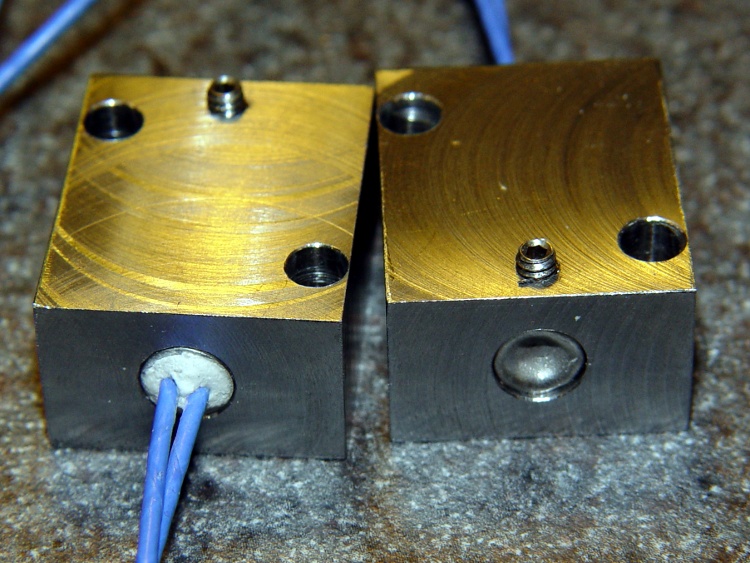
Block top and bottom
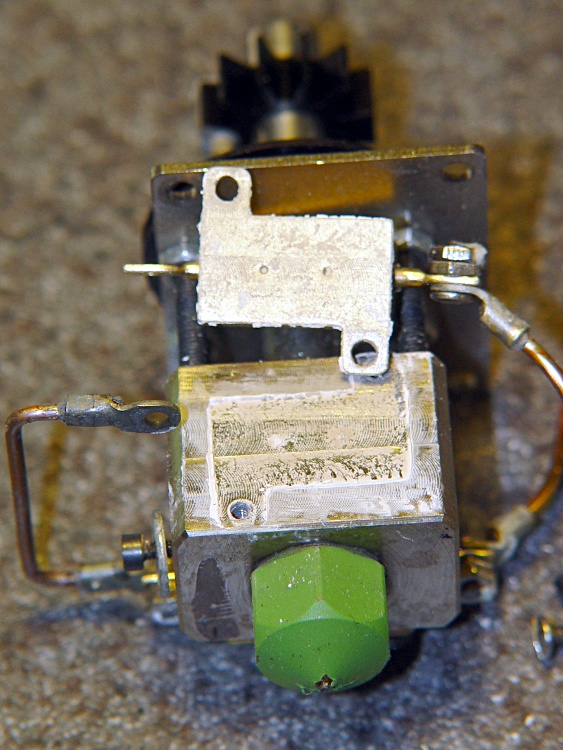
The blocks are ordinary steel from the Scrap Box: a convenient length of 1×1-inch bar stock that somebody else had made into something else a long time ago. I bandsawed off four 1×1-inch slabs, each about 5/8″ thick. A second bandsaw cut turned the square slabs into rectangles. I finished two blocks; the other two slabs await more experience with how these work.
I squared up the blocks with a flycutter in the Sherline, then sanded down the bottom surface a bit. The thermal tests suggest the contact is Good Enough with a reasonably flat surface, so I settled for a used-car finish: high shine and deep scratches. They’re actually smoother than the pictures would have you believe.
The Thermal Core has hard inch dimensions (minus cleanup cuts): 1 inch front-to-back and 13/16 inch tall. I generally work in metric, so the sketch at the bottom has everything in millimeters.
The mounting blocks have holes matching the resistor footprint. I drilled clearance holes for the heads of the original M2 socket head cap screws, ran an end mill down the hole to flatten the bottom, then drilled clearance holes for the threads. Those holes are perilously close to the edge, but the blocks really don’t want to be any taller. Perhaps use a less-generous clearance?
The alternative would be to mill a flange along the edge to match the resistor mounts and put the SHCS heads in free air, but that seemed like more work and it would cramp the thermal path from cartridge to block.
I also thought about chamfering the edges to make the blocks look less, well, blocky, but that’s in the nature of fine tuning.
The cartridge heaters slip-fit into a nominal 0.250 hole; the samples are 0.247 to 0.248 and (from what I read) the diameter tolerance stays on the minus side of 0.250. I don’t have a 0.250 reamer, which is how you get a precise hole ID, so I’ll go with drilled holes. Fortunately, I have a set of letter-size drills in nearly new condition:
A drill = 0.234 to poke a hole in the block
E drill = 0.250 to get the final diameter
The final holes worked out to be exactly 0.250 inch, to the limits of my measurement ability, which I will declare to be Good Enough. The cartridges have a loose slip fit with no side-to-side play.
The cartridges expand when heated and squeeze against the hole to make good thermal contact. While cool, however, they can slide out without much urging, so I added a 4-40 setscrew. It’s on the butt end of the cartridge heater shell, away from the leads, so if a cartridge becomes one with the block I can drive it out with a pin punch. Putting the setscrew at the end with the wire leads makes more sense (it’s cooler there), but then you’d be beating the entire length of the cartridge out past the setscrew hole.
The setscrew and the M2 SHCSs get a liberal dose of anti-seize grease before assembly.
Here’s what the holders looked like, just before bolting them in place:
Cartridge heaters in blocks
Doodles with the more-or-less as-built dimensions:
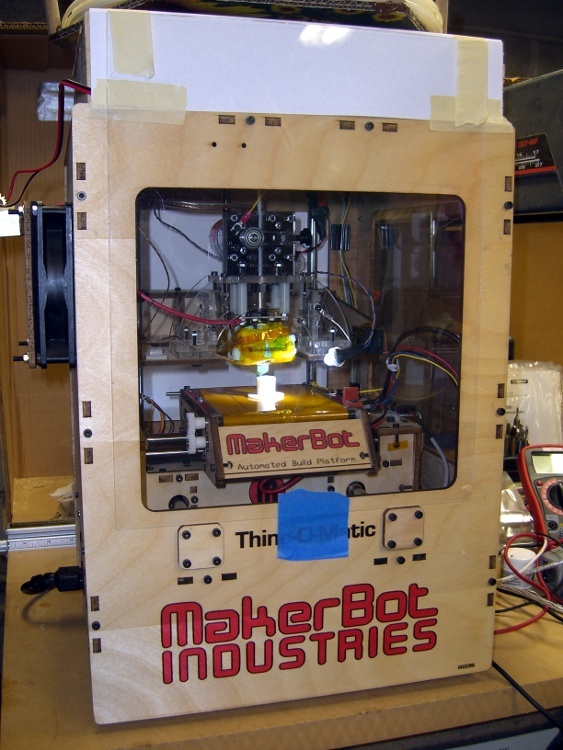
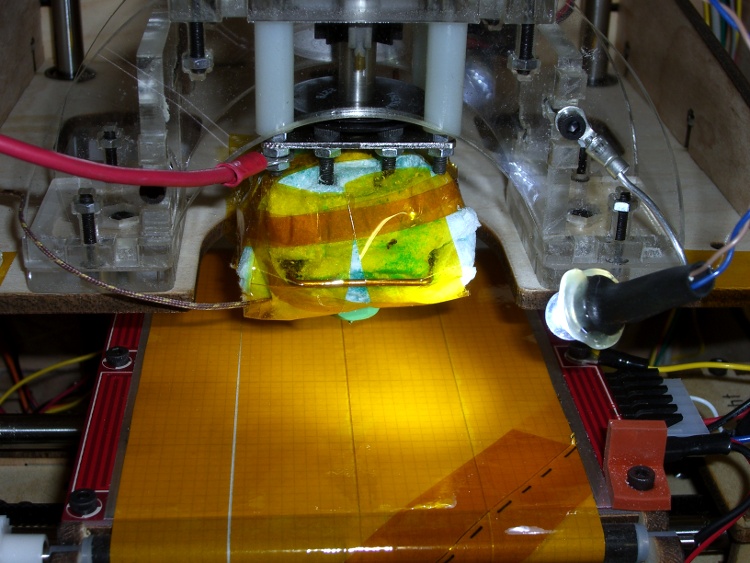
The inside of a Thing-O-Matic gets pretty dark, particularly with the Lazy Susan spool parked on top, so I added a spot light to the Z stage.
The alternative seems to be LED strip lighting all over the inside, but my Parts Heap doesn’t have any of those yet and it did have a 10 mm white LED. The thing runs at 100 mA, so a 15 Ω 1/2 W resistor (to a +5V tap), a few snippets of heat-shrink tubing, and a blob of hot-melt glue did the trick.
Some sculpture armature wire that’s been kicking around for years holds the LED (wrap it around, add hot-melt glue) and doesn’t mind the occasional bump. I crimped the wire in a solderless connector and grabbed it in one of the Extruder Frame screws. It’s allegedly fatigue-proof, but it looks a lot like aluminum.
A bit more detail, with a Kapton-and-graph-paper belt (about which, more later) on the ABP:
The MK5 Extruder’s DC motor seems prone to a shorted-winding failure that reduces the DC resistance of (at least) one pole to (at best) a few ohms. The A3949 H-bridge driver has an upper limit of 2.8 A, but the failed winding jams too much current through the chip and eventually (instantly?) kills it stone cold dead.
Discussions on the Makerbot Wiki tended to favor fuses. My buddy Eks suggested putting an incandescent lamp in series with the motor leads, as described there, and that’s what I’ve done. That discussion is also informative.
It’s worth noting that the A3949 datasheet has this to say about overloads:
Output current rating may be limited by duty cycle,
ambient temperature, and heat sinking. Under any
set of conditions, DO NOT exceed the specified
IOUT or TJ.
So all this may be irrelevant: any transient overload could kill the driver chip stone cold dead, regardless of how clever you (think you) are.
Anyhow.
Yesterday I came across my Big Box of Fuses and said the obvious thing:
Note: that’s not the same as the Famous Last Words “Hold my beer. Watch this!”
I clipped the oscilloscope across a 1 Ω power resistor, set a 3 A bench power supply to 12.0 V, and connected a Device Under Test between the +12 V lead and the resistor:
The #89 bulb from my TOM
A Littelfuse 3AG 1 A fast-blow fuse (actually, two of ’em)
A dead short
I used a 1 A fuse because that’s what I have. I strongly suspect a 1/2 A fuse would behave about the same way.
The oscilloscope trace starts at 0 V, jumps when the DUT contacts the resistor, and then settles at the final current. The 1 Ω resistor makes the vertical scale read directly in amps. Pay attention to the horizontal scale.
First, the lamp:
Type 89 Lamp
The peak current hits 4.5 A before the bulb lights up and limits the current to about 600 mA in the steady state. The supply’s current limiter doesn’t seem to come into play: the bulb wrestles the current under 3 A before the supply notices what’s going on. Indeed, it’s under 3 A in 2 ms and below 1 A in 20 ms.
Next, the fuse:
Littelfuse 3AG 1A Fast – 50 ms
The peak current starts off-scale high, well in excess of 7A, drops to the power supply’s 3 A limit, then falls to zero when the fuse blows 76 ms later.
Finally, the dead short:
Bare 1 ohm resistor
I changed the vertical scale to capture the initial peak, which tops out just under 10 A, obviously not limited by the power supply. The supply eventually clamps the current to 3 A and, because there’s no fuse, the current just sits there.
So…
The lamp does a much better job of protecting the H-bridge chip than the fuse:
The peak current is lower
It cuts off sooner
And the sustained current falls well within the chip’s limit
The TOM does not have a current-limited +12 V supply, which means a nominally “protective” fuse will conduct whatever current the failing motor’s winding will permit until it eventually blows. The time-to-blow depends on the fault current: if the winding fails at, say, 6 Ω the fuse will last much longer while it passes 2 A than with the 3 A you see here.
Here’s an example of how that works. The first time I tapped the fuse to the resistor, I flinched and it fell off:
Littelfuse 3AG 1A Fast – 20 ms
That’s indistinguishable from a blown fuse, but the same fuse subsequently produced this result (another fuse died to produce the first fuse picture):
Littelfuse 3AG 1A Fast – 100 ms
Moral of the story: a 1 A fuse can pass 3 A for 80 ms and live to tell the tale!
Of course, I knew how this would work out: Eks didn’t accumulate 100+ patents during his career by not knowing what he was doing…







 The Smell of Molten Projects in the Morning