Ed Nisley's Blog: Shop notes, electronics, firmware, machinery, 3D printing, laser cuttery, and curiosities. Contents: 100% human thinking, 0% AI slop.
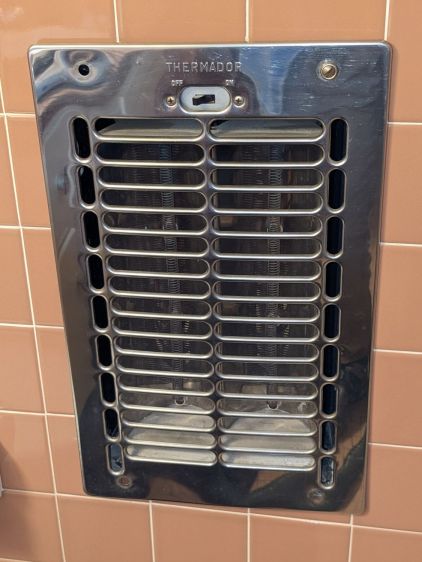
Our house dates back to 1955 and features several fancy items not found in contemporary dwellings. Take, for example, the Thermador in-wall heater in the front bathroom:
Thermador In-Wall Heater
It has a finger-friendly design apparently intended to admit a small finger through the grille, where it can easily contact the resistance heating coil, so while we were moving in I snapped a GFI circuit breaker into that slot in the breaker panel. We advised our (very young) Larval Engineer of the hazard and had no further problem; as far as I know, that breaker never tripped and no fingers were damaged.
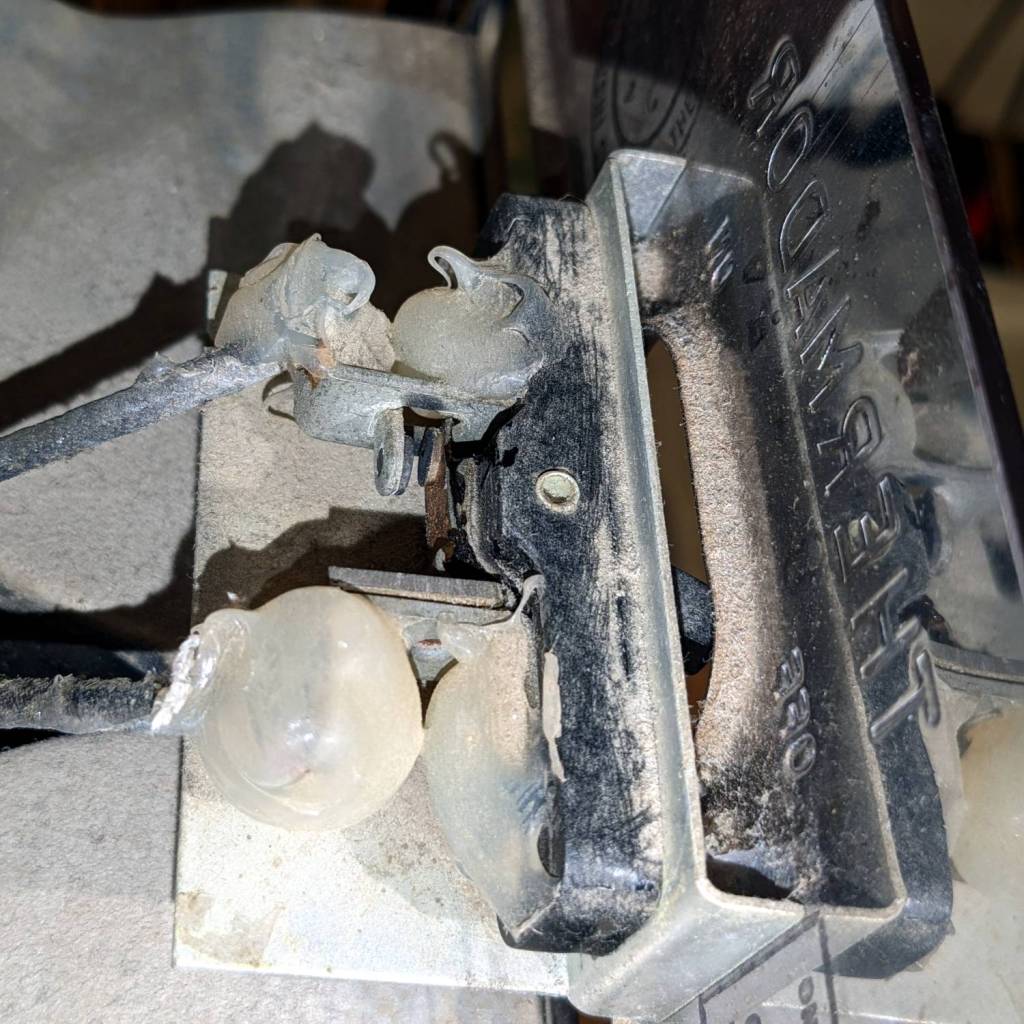
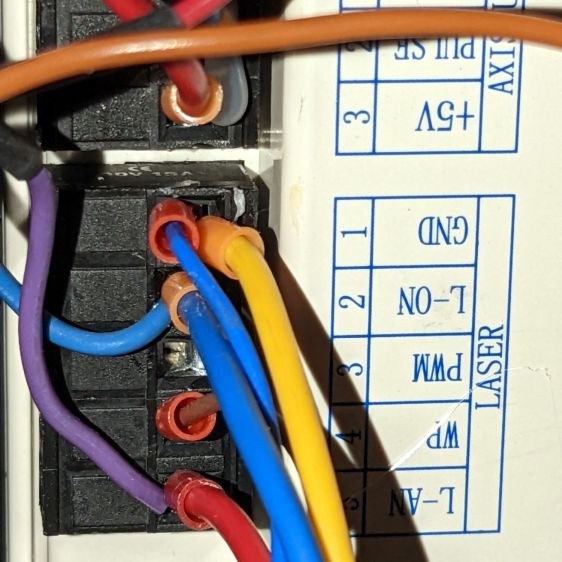
Back then, while adding that breaker and cleaning the first half-century of fuzz out of the thing, I evidently blobbed silicone rubber on the screw terminals of the switch:
Thermador In-Wall Heater – switch contacts
They don’t make switches like that any more.
For reasons not relevant here, we’ll be using it for the first time since we moved in, so I spent a while cleaning / blowing / brushing another two decades of fuzz out of it.
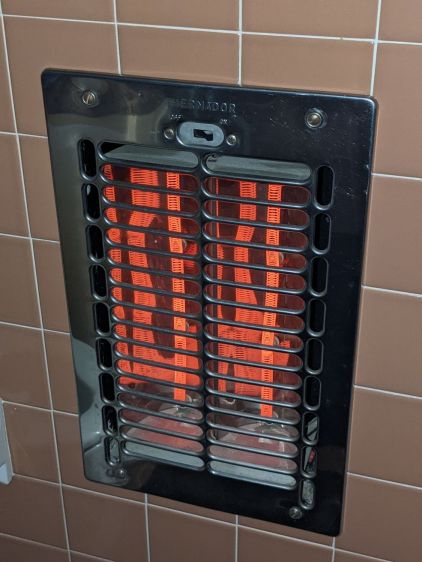
Minus the fuzz, the heater no longer smells like a house on fire:
The usual measurements of voltages and currents assume a constant load impedance, where the power varies with the square of the measured value. In this case, the laser tube is most definitely not a constant resistance, because it operates at an essentially constant voltage around 12 kV after lighting up at maybe twice that voltage. As a result, the power varies linearly with the measured voltages and currents, so the usual Bode plot “20 dB per decade” single-pole filter slope does not apply.
Because the laser tube power varies roughly with the current, I’ve been using the current as a proxy for the power, so the half-power points are where the current is half its value at low frequencies.
The controller’s analog voltage output is linearly related to the tube current and power, so the same reasoning applies.
That reasoning is obviously debatable …
Anyhow, it seems the PWM digital output is the primary signal source, with the L-AN analog output filtered from it. If you had a use for the analog voltage that didn’t involve sending it through a second low-pass filter, it might come in handy, but that’s not the case with the laser’s HV power supply.
Looking across the graph at the tube current’s half-power level of 12-ish mA shows 150 Hz for the L-AN output and 250 Hz for the PWM output. That’s roughly what I had guesstimated from the raw measurements, but it’s nice to see those lines in those spots.
In practical terms, grayscale engraving will operate inside an upper frequency limit around 200 Hz. Engraving a square wave pattern similar to the risetime target requires a bandwidth perhaps three times the base frequency for reasonably crisp edges, which means no faster than 100 Hz = 100 mm/s for a 1 mm bar.
It may be easier to think in terms of the equivalent risetime, with 200 Hz implying a 1.5 ms risetime. The rise and fall times of the laser tube current are not equal and only vaguely related to the usual rules of thumb, but 1.5 ms will get you in the ballpark.
The usual tradeoff between scanning speed and laser power for a given material now also includes a maximum speed limit set by the feature size and edge sharpness. Scanning at 500 mm/s with a 1.5 ms risetime means the minimum sharp-edged feature should be maybe three times that wide: 5 ms / 500 mm/s = 2.5 mm.
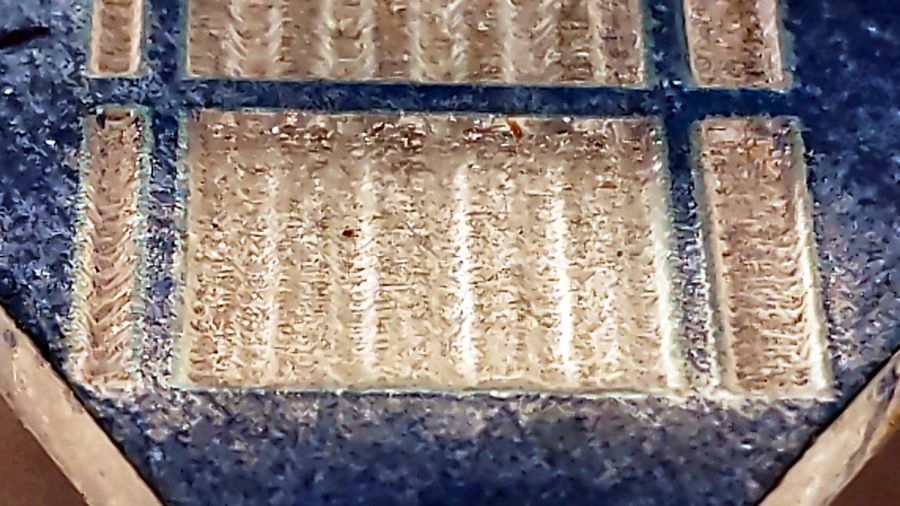
The sine bars at 400 mm/s come out very shallow, both rectangular bars have sloped edges, and the 1 mm bar on the left resembles a V:
Sine bars – acrylic – 400 mm-s 100pct
At 100 mm/s, all the features are nicely shaped, although the sidewalls still have some slope:
Sine bars – acrylic – 100 mm-s 25pct
In all fairness, grayscale engraving with a CO₂ laser may not be particularly useful, unless you’re making very shallow and rather grainy 3D relief maps.
Intensity-modulating a “photographic” engraving on, say, white tile depends on the dye / metal / whatever having a linear-ish intensity variation with exposure, which is an unreasonable assumption.
The L-ON digital enable also has a millisecond or two of ramp time, so each discrete dot within a halftoned / dithered image has a minimum width.
Return the laser power supply’s IN terminal (and the purple wire to the oscilloscope) to the Ruida KT332N controller’s PWM output:
Ruida KT332 – PWM laser control wiring
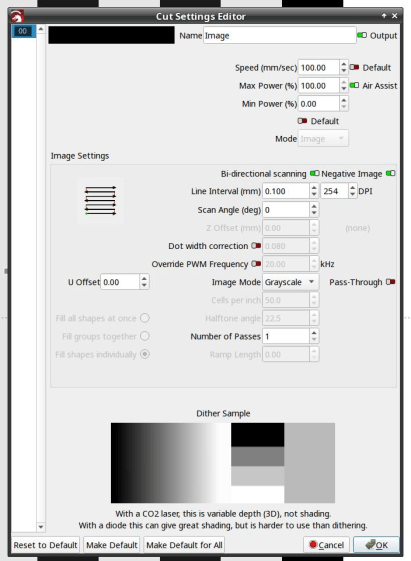
Engraving the pattern in grayscale mode at 254 dpi produces 0.1 mm pixels and makes each bar 1 mm wide:
LightBurn – bandwidth test pattern setup
Engraving at 50 mm/s = 50 Hz lets the laser current once again hit full scale:
Tube Current – PWM bandwidth – 10 sine – 50mm-s – 10ma-div – 254dpi
The traces:
1 X axis DIR, low = left-to-right (yellow)
2 L-ON laser enable, low active (magenta)
3 PWM digital signal (cyan)
4 tube current – 10 mA/div (green)
The PWM signal runs at 20 kHz and presents itself as a rather blurred trace, but you can see both the general tendency and the discrete steps between the vertical gray bars. As far as I can tell, the signal never reaches 0% or 100%, most likely to prevent the PWM filters from saturating in either condition.
The tube current drops from 23.8 mA to 13.8 mA, just over the half-power level of 12 mA, at 200 Hz:
Tube Current – PWM bandwidth – 10 sine – 200mm-s – 10ma-div – 254dpi
So the PWM bandwidth is a little over 200 Hz, slightly higher than the analog bandwidth of a little under 200 Hz.
All of the measurements as a slide show:
Tube Current – PWM bandwidth – 10 sine – 25mm-s – 10ma-div – 254dpi
Tube Current – PWM bandwidth – 10 sine – 50mm-s – 10ma-div – 254dpi
Tube Current – PWM bandwidth – 10 sine – 100mm-s – 10ma-div – 254dpi
Tube Current – PWM bandwidth – 10 sine – 200mm-s – 10ma-div – 254dpi
Tube Current – PWM bandwidth – 10 sine – 300mm-s – 10ma-div – 254dpi
Tube Current – PWM bandwidth – 10 sine – 400mm-s – 10ma-div – 254dpi
Tube Current – PWM bandwidth – 10 sine – 500mm-s – 10ma-div – 254dpi
Now, with all the measurements in hand, maybe I can reach some sort of conclusion.
As before, with the Ruida KT332N controller’s L-AN analog output connected to the HV power supply IN terminal:
Ruida KT332 – analog laser control wiring
This time the scope traces include both the controller’s output voltage and the laser tube current:
The traces:
1 X axis DIR, low = left-to-right (yellow)
2 L-ON laser enable, low active (magenta)
3 L-AN analog voltage (cyan)
4 tube current – 10 mA/div (green)
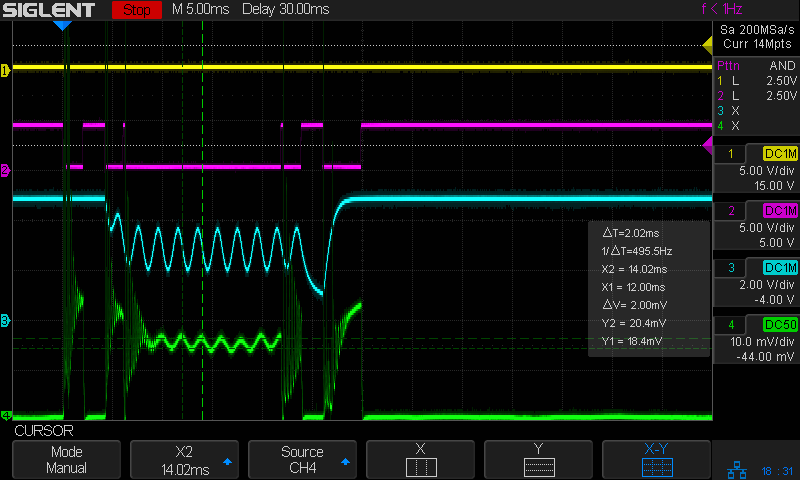
At 50 mm/s = 50 Hz both the L-AN analog voltage and the laser current hit full scale:
Tube Current – analog bandwidth – 10 sine – 50mm-s – 10mA-div – 254dpi
The laser current resembles a damped RLC oscillation when started at nearly full scale and is entirely chaotic when started from zero, but behaves reasonably well for the rest of the cycle.
The power supply’s current bandwidth is definitely smaller than the controller’s voltage bandwidth, as shown by all those sampling steps simply vanishing.
As expected, at 200 mm/s = 200 Hz the L-AN analog voltage is down 3 dB:
Tube Current – analog bandwidth – 10 sine – 200mm-s – 10mA-div – 254dpi
At that frequency the tube current is down 8 dB, from 23.4 mApp to 9.4 mApp, showing how much the power supply’s PWM filter contributes to the rolloff. Since we’re interested in the overall bandwidth, the tube current is down 2.4 dB to 17.8 mA at 100 Hz, suggesting the -3 dB (16.6 mA) frequency is just slightly higher:
Tube Current – analog bandwidth – 10 sine – 100mm-s – 10mA-div – 254dpi
However, I think that’s the wrong way to calculate the -3 dB point of the laser power, because the tube operates at essentially constant voltage, which means both the analog voltage and the tube current are linearly related to the laser tube power, rather than being proportional to its square root.
If that’s the case, then the analog output voltage is down by ½ at 300 Hz and the tube’s half-power point occurs at 23.4 mA/2 = 11+ mA, closer to 200 Hz than 100 Hz. Given the resolution of the measurements, this doesn’t make much difference, but it’s worth keeping in mind.
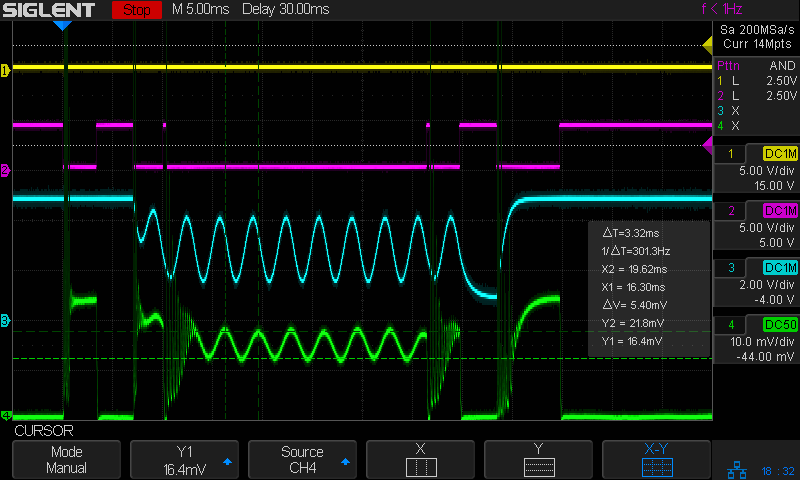
Applying a 100 Hz PWM pulse (thus, a sharp step) to the power supply shows the laser tube current has a risetime (and falltime) around 2 ms, about what you’d expect from a single 200 Hz lowpass filter inside the power supply:
As far as I can tell, the controller’s “analog” output is just its digital PWM output passed through a 200 Hz low-pass filter. It would be useful as an analog input to a power supply without an additional PWM filter, but combining those two filters definitely cuts the overall bandwidth down.
All of the measurements as a slide show:
Tube Current – analog bandwidth – 10 sine – 25mm-s – 10mA-div – 254dpi
Tube Current – analog bandwidth – 10 sine – 50mm-s – 10mA-div – 254dpi
Tube Current – analog bandwidth – 10 sine – 100mm-s – 10mA-div – 254dpi
Tube Current – analog bandwidth – 10 sine – 200mm-s – 10mA-div – 254dpi
Tube Current – analog bandwidth – 10 sine – 300mm-s – 10mA-div – 254dpi
Tube Current – analog bandwidth – 10 sine – 400mm-s – 10mA-div – 254dpi
Tube Current – analog bandwidth – 10 sine – 500mm-s – 10mA-div – 254dpi
To round this out, I must measure the laser tube current bandwidth using the controller’s PWM signal. Because PWM passes through only the power supply’s lowpass filter, the bandwidth should be slightly higher.
Overall, though, the bandwidth seems surprisingly low.
Engrave it in grayscale mode as a negative image with 0.1 mm line spacing:
LightBurn – bandwidth test pattern setup
Monitor the Ruida KT332N controller’s analog laser power control output:
Tube Current – analog bandwidth – 10 sine – 25mm-s – beam off – 254dpi
The traces:
1 X axis DIR, low = left-to-right (yellow)
2 L-ON laser enable, low active (magenta)
3 L-AN analog voltage (cyan)
The scope triggers when the top two traces go low during a left-to-right scan with the laser beam active. The trigger point lies far off-screen to the left, with the delay set to pull the interesting part of the scan into view.
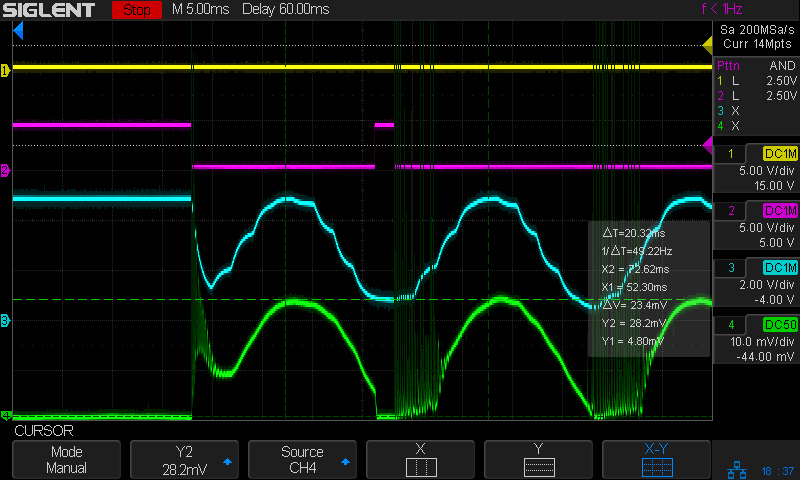
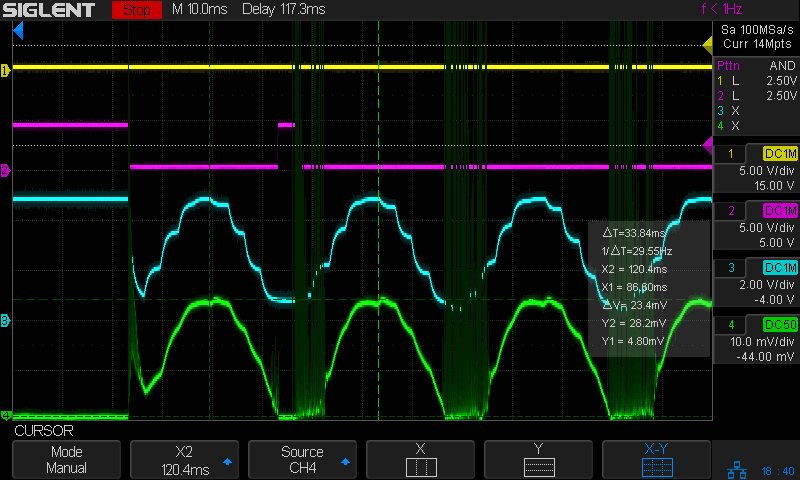
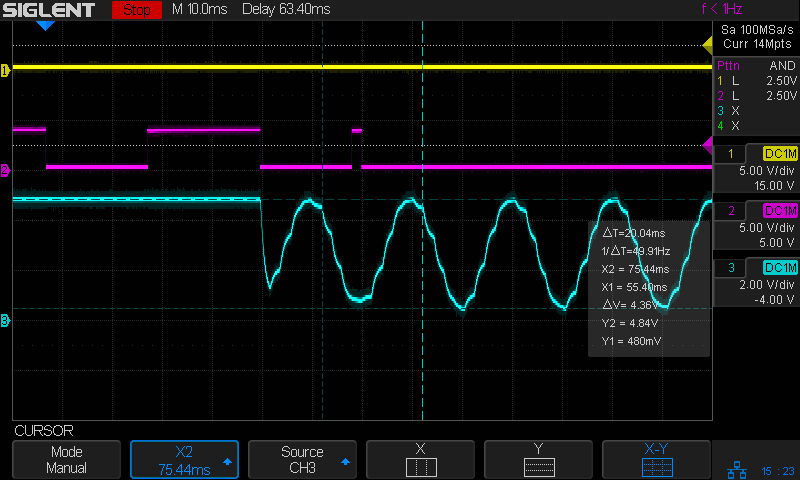
Although both the controller’s L-AN output and the laser’s IN input specify a signal range of 0 V to 5 V, the analog output voltage never goes below 0.4 V, but (as will seen later) that produces 0 mA from the laser power supply.
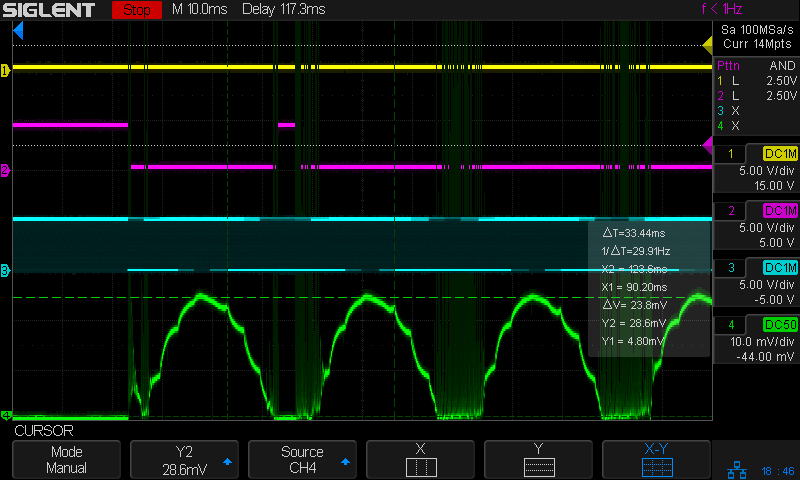
Set the X cursors to the top and bottom of the sine wave and read off the 4.36 V peak-to-peak value.
Set the Y cursors to matching points on successive cycles and read off ΔT=33.44 ms. Because each cycle is 1 mm wide, the scan speed is set to 25 mm/s and traveling 1 mm should require 40 ms, puzzle over that number and the related fact that 1/ΔT=29.91 Hz. This seems to happen only for speeds under 50-ish mm/s, for which I have no explanation.
Repeat the exercise at various speeds up through 500 mm/s:
Tube Current – analog bandwidth – 10 sine – 500mm-s – beam off – 254dpi
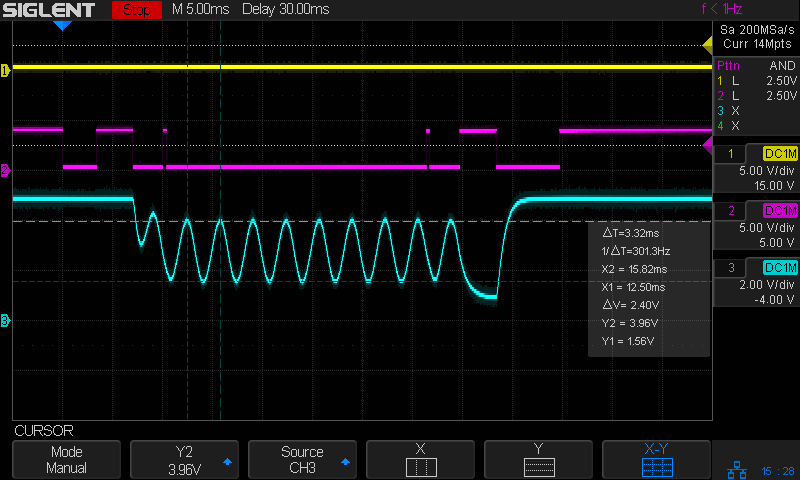
The analog output voltage has dropped to 1.56 Vpp.
The average voltage increases from 2.66 V at 25 (or is it 33?) Hz to 2.78 at 500 Hz, which is reasonably close to the same value.
The signal’s -3dB point would be at √½ × 4.36 Vpp = 3.1 Vpp, which happens at 200 mm/s = 200 Hz:
Tube Current – analog bandwidth – 10 sine – 200mm-s – beam off – 254dpi
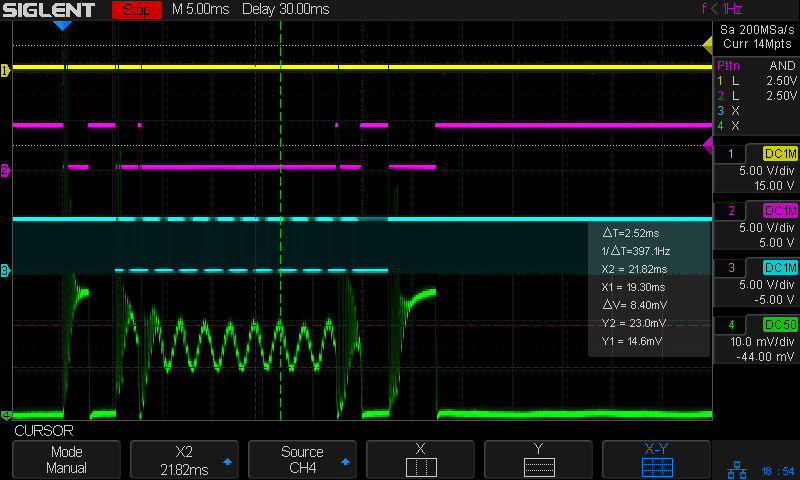
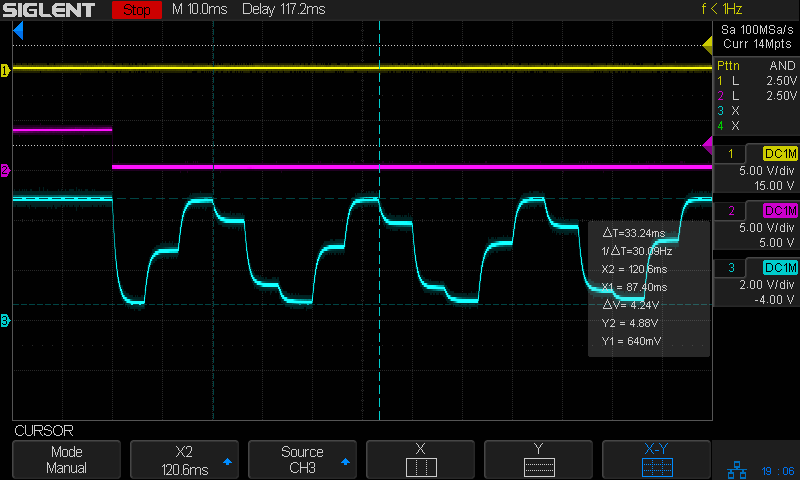
Then if you tell LightBurn to engrave the pattern with a line-to-line (vertical) spacing of 127 dpi = 5 pixel/mm, it will sample every other pixel in each row, producing a rather peculiar sine-ish wave:
Tube Current – analog bandwidth – 10 sine – 25mm-s – beam off – 127dpi
You must engrave at 254 dpi = 10 pixel/mm in order to get all the pixels in the output stream:
Tube Current – analog bandwidth – 10 sine – 25mm-s – beam off – 254dpi
That still looks gnarly, but it’s more along the lines of what the coarse 10 samples / cycle pattern calls for.
The risetime for each of those steps is on the order of 2 ms, so the controller’s analog output bandwidth isn’t much better than 150-ish Hz.
Close examination of the bar pattern shows the end of the first cycle really does hit exactly 0% intensity where the controller raises L-ON (magenta trace) to force the output current to zero. The other minima remain a few percent above zero and cannot be squashed flat.
Today I Learned: LightBurn enforces square pixels at the line spacing distance for grayscale engraving.
I think this means you must resize / resample the grayscale image to match the engraving line spacing, because LightBurn could take the nearest adjacent pixel or average two adjacent pixels if its horizontal sampling doesn’t match the image resolution.
The pattern gets plunked into the same white/black frame as before, using GIMP because it’s easy.
Importing the resulting PNG image into LightBurn allows configuring the laser parameters. Each sine wave is 1 mm (ten whole pixels!) wide, so engraving at 250 mm/s covers one cycle every 4 ms for a 250 Hz signal:
Tube Current – analog – 10 sine – 250mm-s – 10 ma-div
Changing the engraving speed will change the test signal frequency, although the laser can’t get much beyond 500 mm/s.
The sine wave pattern goes from 0% to 100%, but at 250 Hz the controller output doesn’t reach those extremes, suggesting the output filter rolloff is lower than the 200 Hz inferred from the 1.5 ms risetime and falltime values.
Because the power supply output current isn’t matching the controller voltage excursion and its waveform is much rounder, its bandwidth is even lower.




















 The Smell of Molten Projects in the Morning