Ed Nisley's Blog: Shop notes, electronics, firmware, machinery, 3D printing, laser cuttery, and curiosities. Contents: 100% human thinking, 0% AI slop.
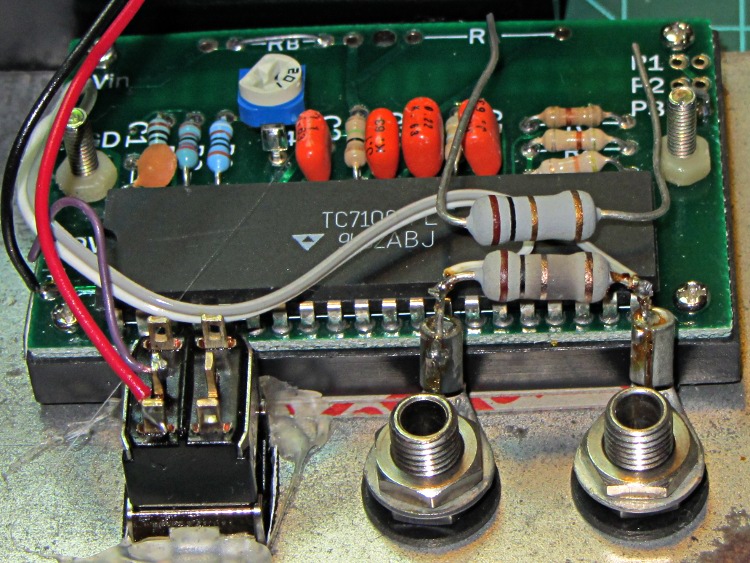
The bench supplies I use have current limiting, but the 10 mA meter resolution leaves a lot to be desired, so I conjured up a simpleminded 200 mA meter from a panel-mount meter and a 1 Ω sense resistor. That means it’s good for only 200 mA, so I insert it in series with the supply only when it’s needed. Lately it’s been reading more than a little bit high and I took it apart to find this obvious evidence of abuse:
Homebrew millammeter with burned sense resistor
The loose resistor sitting atop the chip shows what the burned resistor soldered in the circuit should look like.
The power supply has a 3 A current limit. No surprise: 9 W is more than the unfortunate 5 W resistor can handle.
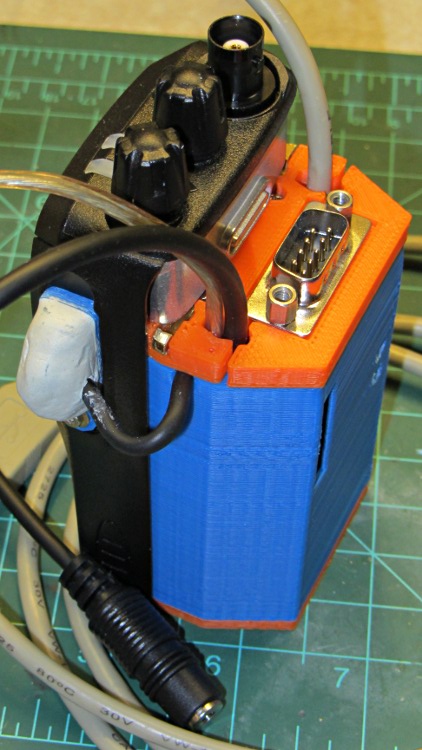
Both of the GPS+voice interfaces for the Wouxun KG-UV3D radios have been working fine for a while, so I should show the whole installation in all its gory detail.
If you haven’t been following the story, the Big Idea boils down to an amateur radio HT wearing a backpack that replaces its battery, combines the audio output of a Byonics TinyTrak3+ GPS encoder with our voice audio for transmission, and routes received audio to an earbud. Setting the radios to the APRS standard frequency (144.39 MHz) routes our GPS position points to the global packet databaseand, with 100 Hz tone squelch, we can use the radios as tactical intercoms without listening to all much of the data traffic.
The local APRS network wizards approved our use of voice on the data channel, seeing as how we’re transmitting brief voice messages using low power through bad antennas from generally terrible locations. This wouldn’t work well in a dense urban environment with more APRS traffic; you’d need one of the newfangled radios that can switch frequencies for packet and voice transmissions.
So, with that in mind, making it work required a lot of parts…
The flat 5 A·h Li-ion battery pack on the rack provides power for the radio; it’s intended for a DVD player and has a 9 V output that’s a trifle hot for the Wouxun radios. Some Genuine Velcro self-adhesive strips hold the packs to the racks and have survived surprisingly well.
Just out of the picture to the left of the battery pack sits a Byonics GPS2 receiver puck atop a fender washer glued to the rack, with a black serial cable passing across the rack and down to the radio bag.
A dual-band mobile antenna screws into the homebrew mount attached to the upper seat rail with another circumferential clamp. It’s on the left side of the rail, just barely out of the way of our helmets, and, yes, the radiating section of the antenna sits too close to our heads. The overly long coax cable has its excess coiled and strapped to the front of the rack; I pretend that’s an inductor to choke RF off the shield braid. The cable terminates in a PL-259 UHF plug, with an adapter to the radio’s reverse-polarity SMA socket.
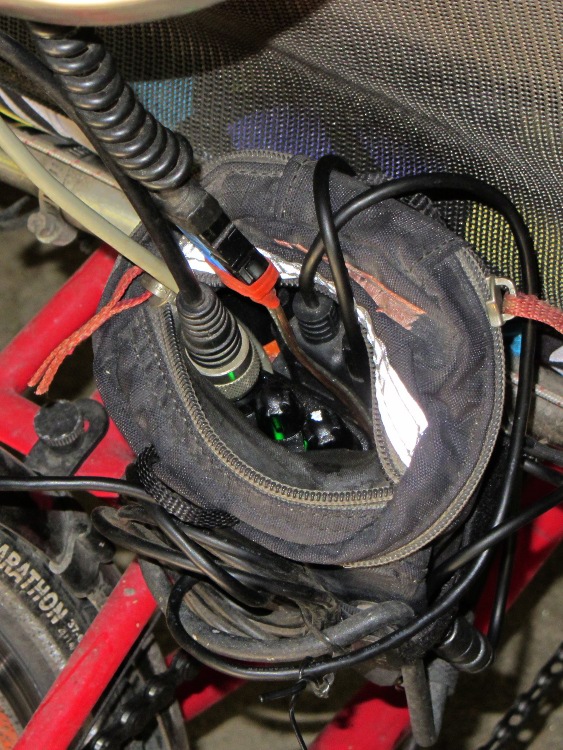
The push-to-talk button on the left handgrip isn’t quite visible in the picture. That cable runs down the handlebar, along the upper frame tube, under the seat, and emerges just in front of the radio bag, where it terminates in a 3.5 mm audio plug.
The white USB cable from the helmet carries the boom mic and earbud audio over the top of the seat, knots around the top frame bar, and continues down to the radio. USB cables aren’t intended for this service and fail every few years, but they’re cheap and work well enough. The USB connector separates easily, which prevents us from being firmly secured to a dropped bike during a crash. I’d like much more supple cables, a trait that’s simply not in the USB cable repertoire. This is not a digital USB connection: I’m just using a cheap & readily available cable.
I long ago lost track of the number of Quality Shop Time hours devoted to all this, which may be the whole point…
In other news, the 3D-printed fairing mounts, blinky light mounts, and helmet mirror mounts continue to work fine; I’m absurdly proud of the mirrors. Mary likes her colorful homebrew seat cover that replaced a worn-out black OEM cover for a minute fraction of the price.
My buddy Duggles, from far-off NH, restored his ’83 Vanagon to its original hippie-chick-magnet state. Late in the process, he realized that the once-fancy CD+radio widget in the dashboard lacked a line input for his iPod / iPad / iDingus. Knowing my foibles, he asked for advice.
Fortunately, he’d already discovered the service manual, without which life is always much more difficult. Search for PIONEER DEH2850MP SERVICE MANUAL and pick the site you prefer.
The trouble with jamming a new line input into the existing circuitry is that you must match the DC levels as well as the audio amplitude. The schematic on page 19 shows the selector IC has capacitor-coupled inputs and outputs to strip off the DC level.
It would be very easy if the multiplexer (IC151, top of page 19, detail shown) had separate control inputs that we could override, but it uses a serial control stream from the CPU. No practical way to mess with that, alas.
As nearly as I can tell, the best way to do this would be to hack a DPDT switch between the FM/AM tuner and the amp, upstream of the mux. You pick the Radio input, flip the DPDT switch, and the iDingus plays through the Radio inputs.
However, an easier way is to simply inject the iDingus audio in parallel with the tuner audio, but set the tuner to an FM frequency without a radio station. The radio output should mute, leaving the field clear for the iDingus audio. This might not work, but it’ll be dead simple to try. If it’s acceptable, then you’re done.
The obvious problem is that we don’t know if the iDingus line level matches the tuner’s line level. The mux is upstream of the volume settings, so there’s hope that this will all Just Work. If it’s way too loud, that’s fixable. If it’s too soft, that’s a problem.
So, to begin…
DEH2850MP PCB Radio Jumpers
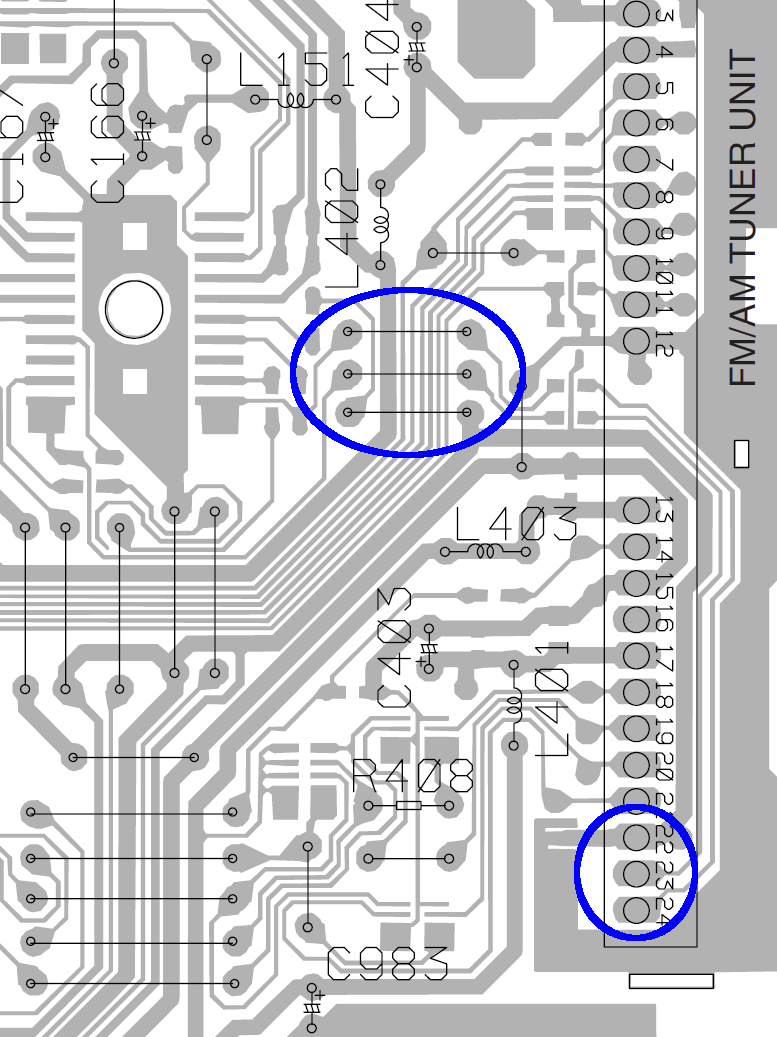
The diagram on page 36/37 shows the A side of the PCB, with all the connectors & suchlike. The FM/AM Tuner Unit is over along the right side, with the audio output on pins 23/24 near the bottom and ground on pin 22. The traces proceed upward along the edge of the PCB, cross the connector near its middle, the audio passes through caps C151/152 on the B side, go through two jumpers on the A side across a mess of traces, and then dive to the B side and wriggle into the IC151 mux.
Quite conveniently, the ground trace follows along with them and is the lower of the three traces just to the right of the mux.
If I interpret the part number for C151 correctly (page 45, top right):
C 151 ... CKSRYB224K10
it’s a 220 nF cap. Anything around that value should work. This one from Radio Shack is grossly overpriced; anything with the same or larger value is OK (voltage rating doesn’t matter): NTE MLR224K100 – 0.22MF 100V Mylar Capacitor
Solder one lead of each cap to the top two jumpers, solder suitable wires to the other cap leads, solder the ground / shield wire to the bottom jumper, solder a suitable jack to the cable, plug iDingus into jack, fire that mother up, and see what happens.
The right channel is on pin 24, which goes to the top jumper of the three. Don’t bother trying to figure out which pin of the iDingus corresponds to that channel; just solder the damn wires and fix it later if it’s wrong enough to be objectionable.
I have no idea where or if you can drill hole(s) to snake the cable(s) through the housing. If the Vanagon doesn’t have a rear power amp, you could probably cut the traces under those RCA jacks (CN352, top right on page 37, above the FM/AM tuner) and repurpose them.
Give it a go…
We both attended Lehigh U, but Duggles realized early on that he lacked the personality flaws common to engineers and bailed out before damaging himself too badly. So his reply didn’t surprise me in the least…
I read your instructions carefully, examined the kindly supplied circuit diagram, and pored over the circuit boards with a magnifier. Then I blew you off (!!), threw caution to the winds, hacked off an old headphone cord, snaked the wires in, and soldered right to the very convenient L/R outputs on the RF board. Fired it up ,,, shitz, tons of background hiss, no quieting on the FM signal! A skein of obscenities was loosed in the mountain air until I thought to turn the iThang on … boom, full quieting, no hiss, and a quite substantial sound. No level issues at all, quite clean and detailed, and I didn’t even use the capacitors! (What was their purpose btw?)
The mux has a DC bias on its signal lines, with caps on both the input and output to isolate it from the surrounding circuitry. Back in the day, analog switches were fussy about their DC bias, so you had to go overboard to make them work at all.
I don’t know if the iDingus also has DC blocking caps on its output and figured that injecting raw DC from the mux into its guts could be a Bad Thing. But, eh, those engineers at Apple (‘s contractor) are smart folks and (probably) anticipated this sort of (mis)behavior.
The hiss you get with the iDingus turned off probably comes from dragging the mux bias to ground. I don’t know that’s a Truly Bad Thing, but adding those caps should eliminate any future problems.
You could even play DJ by combining radio & iDingus audio!
Rock on…
Seeing as how Duggles actually was a DJ for quite some years, I wouldn’t be surprised in the least to hear he does exactly that. We’ll be visiting him later this Autumn and I’ll inspect his work.
Each of the three chandeliers in the Poughkeepsie Train Station sports 36 bulbs in two rings. When the station opened in 1918 they installed those newfangled incandescent bulbs that were all the rage at the time. The color of the bulbs in this Wikipedia picture, dated October 2007, suggests that tungsten ruled for at least nine decades:
Poughkeepsie Train Station Interior
Since then, they installed chunky compact fluorescent bulbs that probably provide the same amount of light, minus the pinpoint highlights from tungsten filaments in clear bulbs. This view from below the central chandelier shows the layout and some detail of the carving & decorative sockets:
Pok RR Station Middle Chandelier – detail
In addition to being decorative, those chandeliers also give useful data on the reliability of compact fluorescent bulbs. With the contrast stretched the other way to make the bulbs easier on the eye, count the number of deaders in …
Chandelier 1:
Pok RR Station Chandelier 1
Chandelier 2:
Pok RR Station Chandelier 2
Chandelier 3:
Pok RR Station Chandelier 3
I took each picture from a vantage point showing all the deaders; the bulbs hidden behind the central dingus work.
Let us assume all 108 bulbs were installed at the same time and, given the number of deaders, haven’t been touched since then (although they’re not covered in fuzz, which suggests that they’ve been dusted within living memory). I was there in mid-afternoon, so the bulbs probably burn 24 hours/day and aren’t subject to early failure from frequent starts.
So, in no more than five years, 108 CFL bulbs have a 4.6% failure rate, which works out to 0.9%/year, more or less, ignoring any infant mortality. If they’ve been up there for the last 2.5 years, then it’s 1.8%/year. Replacing deaders since installation, of course, makes it worse than that.
Over the course of a decade, a compounded 0.9% failure rate will kill 9.4% of the bulbs. After 20 years, 20% will be dead. A 1.8% annual failure rate kills 20% and 43%, respectively.
Now, I’ll grant you that tungsten bulbs burn far more energy over that time, but replacing a percent or two of those complex and somewhat eco-hostile CFL bulbs every year cuts away a big chunk of the rainbows-and-pink-unicorns delight involved in Saving The Planet.
After our Larval Engineer tweaked the code to track the maximum speed for the current run, so that the color always hits pure blue at top speed and red near standstill, we can prove it happened: we have a video! It’s much less awful than the First Light video, but with plenty of cinéma-vérité camera shake, lousy focus, and bloopers:
Longboard In Action
That’s a frame extracted from one of the raw videos files using ffmpegthumbnailer:
for t in `seq 0 10 100` ; do ffmpegthumbnailer -i mov07117.mpg -o Longboard-$t.jpg -t $t% -q 10 -s 640 ; done
This view of the 3D printed case shows the power switch and the Hall effect sensor cable snaking out of the truck just below the near axle:
Longboard RGB LED Electronics – right front view
She filled the case corners that pulled up from the build platform with a thin layer of epoxy, getting a plane surface by curing it atop waxed paper on the shop’s surface plate, to keep the polycarbonate sheet flat. I didn’t have any acorn nuts to top those nylon lock nuts, alas.
The 4-cell Li-ion battery lives in the slice between the white aluminum plates, where it takes about four hours to charge from 3.0 V/cell. The Arduino Pro Mini lives behind the smoked polycarb sheet, where its red LED adds a mysterious touch. Maybe, some day, she’ll show the 1/rev pulse on the standard Arduino LED for debugging.
A view from the other side shows the hole for the charger above the circuit board, with the Hall sensor out of sight below the far axle:
Longboard RGB LED Electronics – left front view
Yes, the cable to the LEDs deserves better care. She learned that you must provide strain relief at cable-to-component junctions, which we achieved by pasting the wires to the board beside the LED strip with double-stick tape. The rest of the LED strip interconnections live atop similar tape strips. There’s nothing much protecting the LEDs or their delicate SMD resistors, butit works!
Actually, one red LED in an RGB package went toes-up and wasn’t revived by resoldering its leads. So we jumpered around the package, subjecting the remaining two red LEDs in that string to a bit more current than they’d prefer, and that’s that.
There’s a whole bunch not to like one could improve in both the mechanics and electronics, butit works! If you’ll grant it alpha prototype status, then I’d say it’s Good Enough; this is her project and she’ll learn a lot from how it works and how it fails, just like we all do.
Having gone to great pains to put the center of the contact studs on the GPS+voice case exactly at the center of the screws on the back of the radio:
HT-GPS Case – Wouxun KG-UV3D rear view
I now discover why Wouxun used 7 mm square pads on the batteries: the springy contacts hit the pack so far off-center from the studs that they very nearly miss the heads on the 4-40 brass screws I’m using as contacts. This family portrait shows the radio, the battery pack, and the GPS+voice case:
Wouxun KG-UV3D – battery contact locations – GPS case
The lines on the masking tape highlight where the spring contacts touch the case and barely kiss the screw heads:
KG-UV3D contact marks on GPS case
Squinting at the marks on the battery case contacts (you can’t see it in the pictures), the contact line is maybe 2.5 mm beyond the centerline of the square pads. How this worked on the first case I built, I have no clue. For this version, I deliberately filed the heads a bit less and recessed them into the case a bit more; obviously, that was the wrong thing to do, as the connection was intermittent at best.
For the purposes of getting things working, I wrapped snippets of copper mesh tape (from NASA, according to the surplus blurb, with conductive adhesive) around thin chunks of conductive foam, then put them over the studs. The scars in the plastic came from an abortive attempt to get the springs far enough into the case surface to kiss the very edge of the studs:
Copper mesh on GPS case contacts
There’s no point in having a contact patch on the near side of the radio springs, because nothing ever touches there. So the right thing to do is simply move the contact studs to the far side by 3 mm, centering them around the actual contact point. That means changing the PCB layout by the same amount. That’s easy enough to do, but … drat!
When I took the case apart to boost the mic gain, I replaced those neatly filed studs with unfiled pan head 4-40 brass screws from the same parts stock. The heads were tall enough to touch the radio spring contacts closer to their centers and make perfect contact. Not elegant, but better than that copper braid tape.
The one thing I do not like about the Wouxun battery packs: the radio contact pads are flush with the pack surface, so there’s absolutely no protection against casual shorts when the pack isn’t on the radio. The packs also sport four bare round contacts on their outer surface that mate with the charger, two of which make direct contact with the battery; those sit inside a shallow molded recess that helps prevent inadvertent shorts.
I assume there’s a protective circuit inside the pack that turns off the current on a dead short, but I am most assuredly not going to test that assumption. When the packs aren’t on the radio (which they never will be, effective immediately), they sport a strip of tape across those radio contact pads.
Five PL605060 lithium cells (prismatic, 3.7 V, 2 A·h) for the longboard project arrived and underwent incoming inspection. The lower curves show the as-received charge state (about halfway) and the upper curves show the first charge:
PL605060 Li-Ion Cell
The crinkly sections come from me nudging the wires (held on by the most tenuous of alligator clip connections) and don’t really affect the results. The five cells charged to within a few percent of each other, which is Good Enough.
As is turns out, that charger is rated for 700 mA current, exactly the same as the 4-cell charger we’ll use for the longboard battery, so the overall charge rate should be about the same. The Canon cells run around 1.1 A·h and the PL605060 is 2.0 A·h; I figured 2.0 was approximately 1.1 for small values of 2.0. The charge cycle required only a little more time than usual, which isn’t surprising because I stopped the discharge at 3 V rather than 2.8 or whatever.
Cell C has the highest discharge voltage of the litter, so I’ll conjure it into becoming an external battery for the camera (which prefers higher voltages over higher capacity). I’m not sure how to mount it; a case that screws into the tripod socket is obvious, but it would interfere with the macro lens adapter. Of course, I could just print another macro lens adapter with an integral battery case …











 The Smell of Molten Projects in the Morning