The Smell of Molten Projects in the Morning

Ed Nisley's Blog: Shop notes, electronics, firmware, machinery, 3D printing, laser cuttery, and curiosities. Contents: 100% human thinking, 0% AI slop.

Category: Electronics Workbench

Electrical & Electronic gadgets

  • Arduino Snippets: LED Bargraph Display

    An LED bargraph display comes in handy for displaying a tuning center point, monitoring a sensor above-and-below a setpoint, and suchlike.

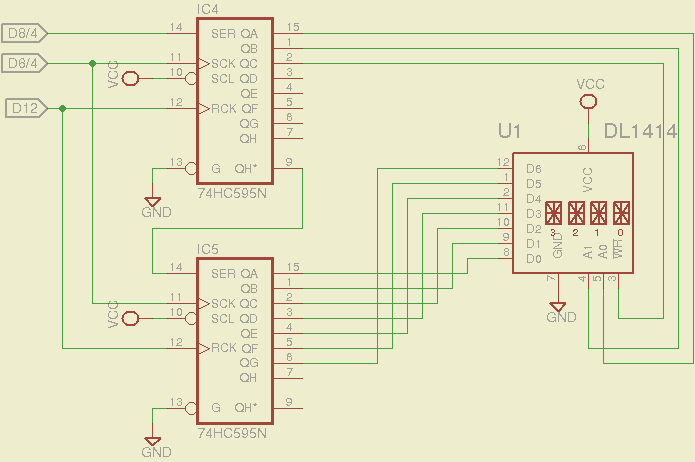
    Given the number of output bits, this requires a pair of ‘595 shift registers. There’s no particular need for speed, so the shiftOut() function will suffice. That means the register control bits don’t need the dedicated SPI pins and won’t soak up the precious PWM outputs required by, say, the RGB LED strip drivers.

    LED Bargraph Display
    LED Bargraph Display

    It’s Yet Another Solderless Breadboard Hairball:

    LED Bargraph Display - breadboard
    LED Bargraph Display – breadboard

    The upper LED bargraph is an HPSP-4836 RRYYGGYYRR block, the lower one is an all-green GBG1000. The bottom four LEDs aren’t connected; you could add another ‘595 shift register, but then you’d have four bits left over and you’d be forced to add more LEDs. Four bricks and five ‘595 chips would come out even, if you’re into that.

    The LEDs run at about 4 mA, which would be enough for decoration in a dim room and seems about the maximum the poor little 74HC595 chips can supply. If you need more juice, you need actual LED drivers with dimming and all that sort of stuff.

    You need not use LED bargraphs, of course, and discrete LEDs for the lower six bits make more sense. They’ll be good for mode indicators & suchlike.

    The demo code loads & shifts out alternating bits, then repeatedly scans a single bar upward through the entire array. Note that the bar is just a bit position in the two bytes that get shifted out every time the array updates (which is every 100 ms); the array is not just shifting a single position to move the bar. Verily, the bar moves opposite to the register shift direction to demonstrate that.

    The Arduino source code:

    // LED Bar Light
    // Ed Nisley - KE4ANU - November 2012
    
    //----------
    // Pin assignments
    // These are *software* pins for shiftOut(), not the *hardware* SPI functions
    
    const byte PIN_MOSI = 8;			// data to shift reg
    const byte PIN_SCK  = 6;			// shift clock to shift reg
    const byte PIN_RCK  = 7;			// latch clock
    
    const byte PIN_SYNC = 13;			// scope sync
    
    //----------
    // Constants
    
    const int UPDATEMS = 100;				// update LEDs only this many ms apart
    
    #define TCCRxB 0x02						// Timer prescaler
    
    //----------
    // Globals
    
    word LEDBits;
    
    unsigned long MillisNow;
    unsigned long MillisThen;
    
    //-- Helper routine for printf()
    
    int s_putc(char c, FILE *t) {
      Serial.write(c);
    }
    
    //-- Send bits to LED bar driver register
    
    void SetBarBits(word Pattern) {
    
    	shiftOut(PIN_MOSI,PIN_SCK,MSBFIRST,Pattern >> 8);
    	shiftOut(PIN_MOSI,PIN_SCK,MSBFIRST,Pattern & 0x00ff);
    
    	digitalWrite(PIN_RCK,HIGH);
    	digitalWrite(PIN_RCK,LOW);
    
    }
    
    //------------------
    // Set things up
    
    void setup() {
    	pinMode(PIN_SYNC,OUTPUT);
    	digitalWrite(PIN_SYNC,LOW);	// show we arrived
    
    //	TCCR1B = TCCRxB;					// set frequency for PWM 9 & 10
    //	TCCR2B = TCCRxB;					// set frequency for PWM 3 & 11
    
    	pinMode(PIN_MOSI,OUTPUT);
    	digitalWrite(PIN_MOSI,LOW);
    
    	pinMode(PIN_SCK,OUTPUT);
    	digitalWrite(PIN_SCK,LOW);
    
    	pinMode(PIN_RCK,OUTPUT);
    	digitalWrite(PIN_RCK,LOW);
    
    	Serial.begin(9600);
    	fdevopen(&s_putc,0);				// set up serial output for printf()
    
    	printf("LED Bar Light\r\nEd Nisley - KE4ZNU - November 2012\r\n");
    
    	LEDBits = 0x5555;
    	SetBarBits(LEDBits);
    	delay(1000);
    
    	MillisThen = millis();
    
    }
    
    //------------------
    // Run the test loop
    
    void loop() {
    
    	MillisNow = millis();
    
    	if ((MillisNow - MillisThen) > UPDATEMS) {
    
    		digitalWrite(PIN_SYNC,HIGH);
    		SetBarBits(LEDBits);
    		digitalWrite(PIN_SYNC,LOW);
    
    		LEDBits = LEDBits >> 1;
    		if (!LEDBits) {
    			LEDBits = 0x8000;
    			printf("LEDBits reset\n");
    		}
    
    		MillisThen = MillisNow;
    	}
    
    }
    
  • Arduino Snippets: RGB LED Strip With MOSFET Drivers

    For obvious reasons, I need some Arduino-based sensors and displays…

    First up, an RGB LED strip with MOSFET drivers:

    RGB Strip with MOSFET Drivers
    RGB Strip with MOSFET Drivers

    The MOSFETs must have logic-level gates for this to work, of course. The tiny ZVNL110A MOSFETs have a channel resistance of about 3 Ω that limits their maximum current to around 300 mA, so the LED strip can have maybe a dozen segments, tops. If you use logic-level power MOSFETs, then the sky’s the limit. This also works with a single RGB LED on the +5 V supply with dropping resistors; you probably shouldn’t drive it directly from the port pins, though, particularly with an Arduino Pro Mini’s tiny regulator, because 60-ish mA will toast the regulator.

    You may want gate pulldown resistors, 10 kΩ or so, to prevent the gates from drifting high when the outputs aren’t initialized. No harm will come with the single LED segment I’m using, but if the MOSFET gates float half-on with a dozen segments, then the transistor dissipation will get out of hand.

    The usual LED test code seems pretty boring, so I conjured up a mood light that drives the PWM outputs with three raised sinusoids having mutually prime periods: 9, 11, and 13 seconds. That makes the pattern repeat every 21 minutes, although, being male, I admit most of the colors look the same to me. The PdBase constant scales milliseconds of elapsed time to radians for the trig functions:

    const double PdBase = 1.00 * 2.0 * M_PI / 1000.0;

    For an even more mellow mood light, change the leading 1.00 to, say, 0.01: the basic period becomes 100 seconds and the repeat period covers 1.5 days. You (well, I) can’t see the color change at that rate, but it’s never the same when you look at it twice.

    All the pins / periods / intensity limits live in matching arrays, so a simple loop can do the right thing for all three colors. You could put the data into structures or classes or whatever, then pass pointers around, but I think it’s obvious enough what’s going on.

    Rather than bothering with scaling integer arithmetic and doping out CORDIC trig functions again, I just used floating point. Arduinos are seductive that way.

    The main loop runs continuously and updates the LEDs every 10 ms. There’s no good reason for that pace, but it should fit better with the other hardware I’m conjuring up.

    You can see the individual intensity steps at low duty cycles, because the 8 bit PWM step size is 0.4%. So it goes.

    Despite my loathing of solderless breadboards, it works OK:

    RGB LED Strip Driver - breadboard
    RGB LED Strip Driver – breadboard

    The MOSFETs stand almost invisibly between the drain wires to the LEDs and the gate wires to the Arduino.

    The Arduino source code:

    // RGB LED strip mood lighting
    // Ed Nisley - KE4ANU - November 2012
    
    //#include <stdio.h>
    //#include <math.h>
    
    //----------
    // Pin assignments
    
    const byte PIN_RED = 9;				// PWM - LED driver outputs +active
    const byte PIN_GREEN = 10;
    const byte PIN_BLUE = 11;
    
    const byte PIN_HEARTBEAT = 13;		// DO - Arduino LED
    
    //----------
    // Constants
    
    const int UPDATEMS = 10;						// update LEDs only this many ms apart
    
    const double PdBase = 1.00 * 2.0 * M_PI / 1000.0;		// scale time in ms to radians
    
    const byte Pins[] = {PIN_RED,PIN_GREEN,PIN_BLUE};
    const float Period[] = {(1.0/9.0) * PdBase,(1.0/11.0) * PdBase,(1.0/13.0) * PdBase};
    const float Intensity[] = {255.0,255.0,255.0};
    
    #define TCCRxB 0x02						// Timer prescaler
    
    //----------
    // Globals
    
    unsigned long MillisNow;
    unsigned long MillisThen;
    
    //-- Helper routine for printf()
    
    int s_putc(char c, FILE *t) {
      Serial.write(c);
    }
    
    byte MakePWM(float MaxValue,double SineWave) {
    	return trunc((SineWave + 1.0) * MaxValue/2.0);
    }
    
    //------------------
    // Set things up
    
    void setup() {
      pinMode(PIN_HEARTBEAT,OUTPUT);
      digitalWrite(PIN_HEARTBEAT,LOW);	// show we arrived
    
      TCCR1B = TCCRxB;					// set frequency for PWM 9 & 10
      TCCR2B = TCCRxB;					// set frequency for PWM 3 & 11
    
      pinMode(PIN_RED,OUTPUT);
      analogWrite(PIN_RED,0);			// force gate voltage = 0
    
      pinMode(PIN_GREEN,OUTPUT);
      analogWrite(PIN_GREEN,0);
    
      pinMode(PIN_BLUE,OUTPUT);
      analogWrite(PIN_BLUE,0);
    
      Serial.begin(9600);
      fdevopen(&s_putc,0);				// set up serial output for printf()
    
      printf("RGB LED Mood Lighting\r\nEd Nisley - KE4ZNU - November 2012\r\n");
    }
    
    //------------------
    // Run the test loop
    
    void loop() {
    
    	MillisNow = millis();
    
    	if ((MillisNow - MillisThen) > UPDATEMS) {
    		digitalWrite(PIN_HEARTBEAT,HIGH);
    
    		for (byte i = 0; i < 3; i++)
    			analogWrite(Pins[i],MakePWM(Intensity[i],sin(MillisNow * Period[i])));
    
    		digitalWrite(PIN_HEARTBEAT,LOW);
    
    		MillisThen = MillisNow;
    	}
    }
    
    
  • Peltier Module PWM Frequency

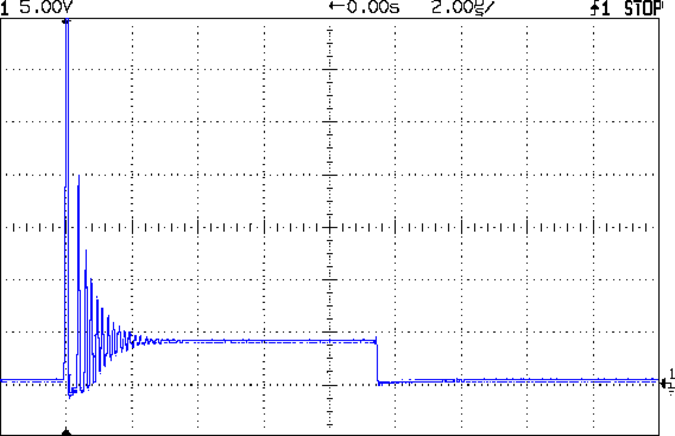
    The tech reviewer for my Circuit Cellar columns on the MOSFET tester commented that the 32 kHz PWM frequency I used for the Peltier module temperature controller was much too high:

    Peltier Noise - VDS - PWM Shutdown
    Peltier Noise – VDS – PWM Shutdown

    He thought something around 1 Hz would be more appropriate.

    Turns out we were both off by a bit. That reference suggests a PWM frequency in the 300-to-3000 Hz range. The lower limit avoids thermal cycling effects (the module’s thermal time constant is much slower) and, I presume, the higher limit avoids major losses from un-snubbed transients (they still occur, but with a very low duty cycle).

    Peltier Turn-Off Transient
    Peltier Turn-Off Transient

    The Peltier PWM drive comes from PWM 10, which uses Timer 1. The VDS and ID setpoints come from PWM 11 and PWM 3, respectively, which use Timer 2. So I can just not tweak the Timer 1 PWM frequency, take the default 488 Hz, and it’s all good. That ever-popular post has the frequency-changing details.

    I’d still use a snubber:

    Peltier Drain - 82 ohm 3.9 nF snubber
    Peltier Drain – 82 ohm 3.9 nF snubber
  • Waterproof RGB LED Strip

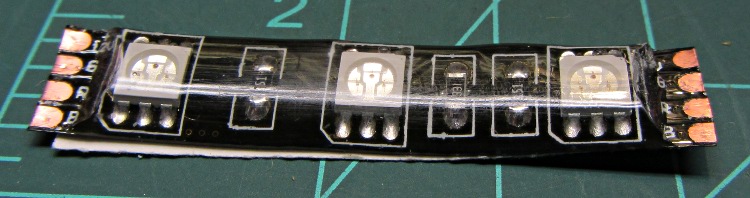
    Another package from halfway around the planet brought 5 meters of waterproof RGB LED strip, which may be useful for projects like longboard lighting. Not having worked with a waterproof strip before, I snipped off a segment:

    Waterproof RGB LED Strip - one segment
    Waterproof RGB LED Strip – one segment

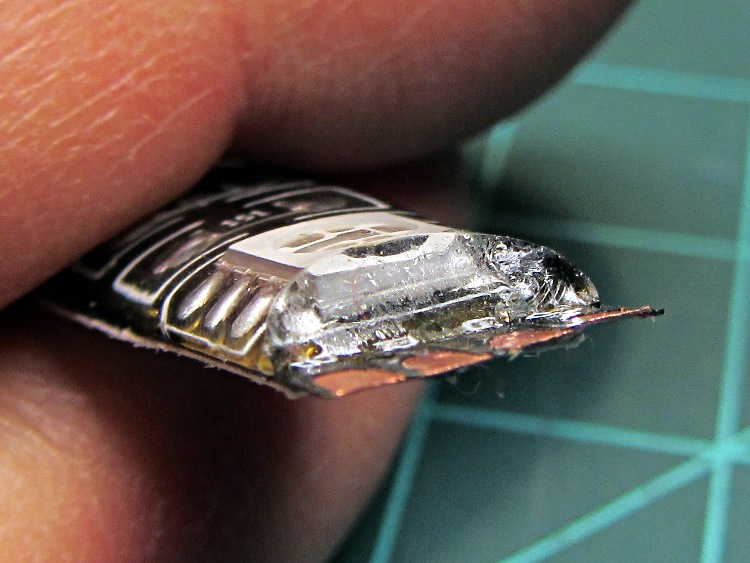
    The waterproof coating seems to be a soft silicone or acrylic pour with roughly the consistency of Gummy Bear tummy, so cutting it off requires a delicate touch to avoid slicing the flex circuit board:

    Waterproof RGB LED Strip - peeled top
    Waterproof RGB LED Strip – peeled top

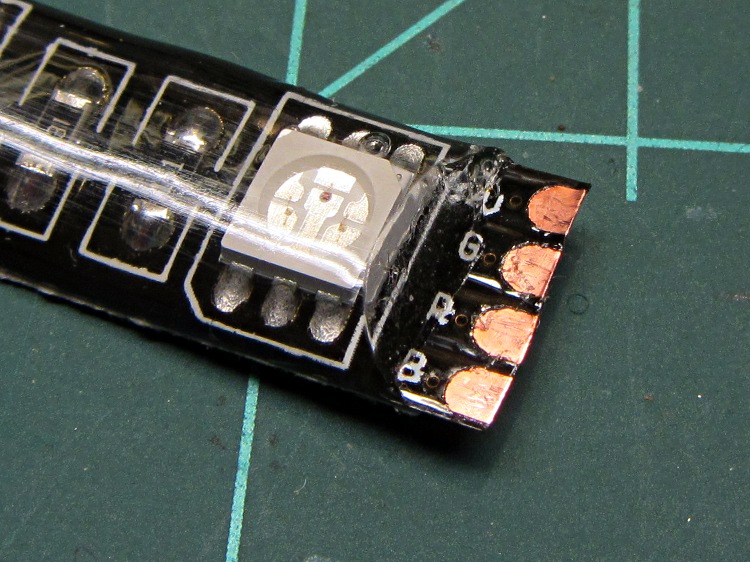
    It doesn’t actually bond to the circuit board, though, and if you get a sharp blade underneath, can be peeled away. I suspect this means water will eventually make its way into the circuitry and you shouldn’t expect to submerge the strip in a fish tank. I scraped the contacts clean, which probably isn’t the right way to do it:

    Waterproof RGB LED Strip - end view
    Waterproof RGB LED Strip – end view

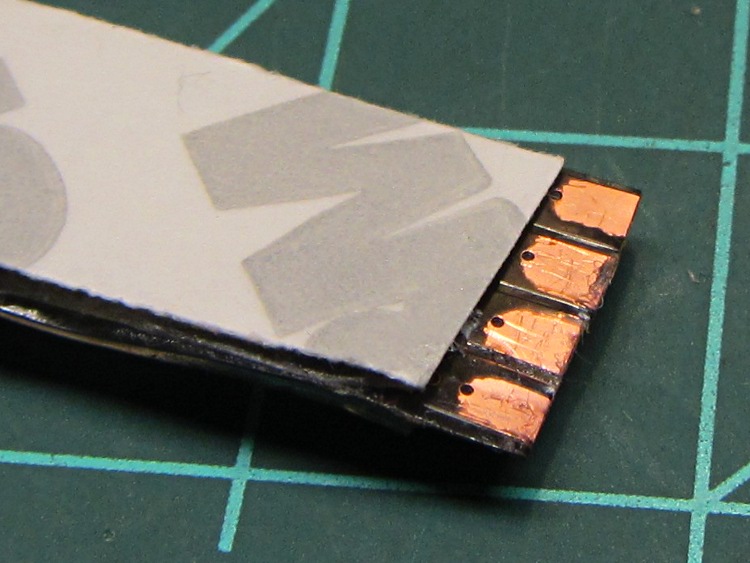
    The underside makes no pretension of being waterproof and you can peel / roll / rub the adhesive off the contacts:

    Waterproof RGB LED Strip - peeled bottom
    Waterproof RGB LED Strip – peeled bottom

    Does anyone else doubt the authenticity of that 3M logo? The production values look rather low, but maybe it’s just me.

    The trouble with soldering contacts to the bottom is the ensuing lump that prevents good adhesive bonding. The trouble with soldering contacts on the top is the surgery required to remove the coating. You can get punch-through contacts with snake-bite fangs, but even the vendors admit to about a 20% failure rate, which implies it’s pretty much a crapshoot.

  • AH49E Hall Effect Sensor Connections

    AH49E Hall effect sensor - breadboard
    AH49E Hall effect sensor – breadboard

    Two lots of linear Hall Effect sensors arrived from halfway around the planet, labeled AH49E and OH49E, and roughly corresponding to the original Honeywell SS49E. The Honeywell datasheet has a non-obvious pinout diagram (that one is better), so I poked one of them into a breadboard and tried it out.

    Fortunately, I got it on the first try. Facing the tapered side, with the leads downward, pin 1 is on your left:

    1. Power – typically +5 V
    2. Ground
    3. Output – 0 gauss = 2.5 V

    The chip [may | may not], depending on which datasheet you use and which part you have, include an internal 65 μA load on the current source, so you [may not | may] need an external load resistor.

    Without a load resistor, this one worked fine. Old-school ferrite and ceramic magnets push it about 1 V off-center, neodymium magnets saturate the output.

    That Honeywell / Micro Switch handbook should dispel many misconceptions about proper use, calibration, polarity, and suchlike.

    Memo to Self: verify the output voltage for both units with typical load resistors.

  • Electrical Grounding: Not Like This

     Corroded Grounding Strap - Walkway Over the Hudson
    Corroded Grounding Strap – Walkway Over the Hudson

    Spotted this through the railing on the north side of the Walkway Over the Hudson:

    I’m not sure what it’s bonding to the bridge structure, but the corrosion where the braid touches the I-beam suggests an electrical potential drives the reaction. There’s stout bonding braid connecting all the railing sections together, but this braid wanders off below the decking and seems too casual / flimsy for lightning protection.

    The rivets date back to the late 1800s. I suspect that bolt won’t last nearly as long…

  • APRS Electronics Case: Battery Contacts, Again

    Although the contacts passing power to the Wouxun HT worked well, they were obviously (in retrospect, as always) in the wrong place. Recently I rode the bike over a major bump and heard the radio reboot (it gives off two low-speed Morse “M” characters), which suggests at least one of the screw heads just barely touches the radio’s spring contacts.

    Two folded-under strips of copper tape may work around that problem until I build a whole ‘nother interface:

    Copper foil on power contacts
    Copper foil on power contacts

    The black tape adds emphasis to the lightly sticky end of the copper tape. The folded-under ends lie to the left in the picture, so there’s a continuous copper sheet connecting the radio battery contacts to the screw heads on the green case. It’s not a huge cross-sectional area, but … it’s better than no area at all.

    The last time I tried this fix, I used woven copper mesh tape. This time, the solid copper tape was on top of the TLB (Tape Lookaside Buffer) holding the specialty tapes. Either should work fine.