The Smell of Molten Projects in the Morning

Ed Nisley's Blog: Shop notes, electronics, firmware, machinery, 3D printing, laser cuttery, and curiosities. Contents: 100% human thinking, 0% AI slop.

Category: Electronics Workbench

Electrical & Electronic gadgets

  • Quartz Resonator Test Fixture: 3.58 MHz Crystal Test

    Just to see if the resonator test fixture produced meaningful results, I plugged a 3.57954 MHz color burst crystal into the socket:

    Quartz test fixture - 3.57954 MHz crystal
    Quartz test fixture – 3.57954 MHz crystal

    This is a staged recreation based on actual events; pay no attention to the Colpitts oscillators growing in the background.

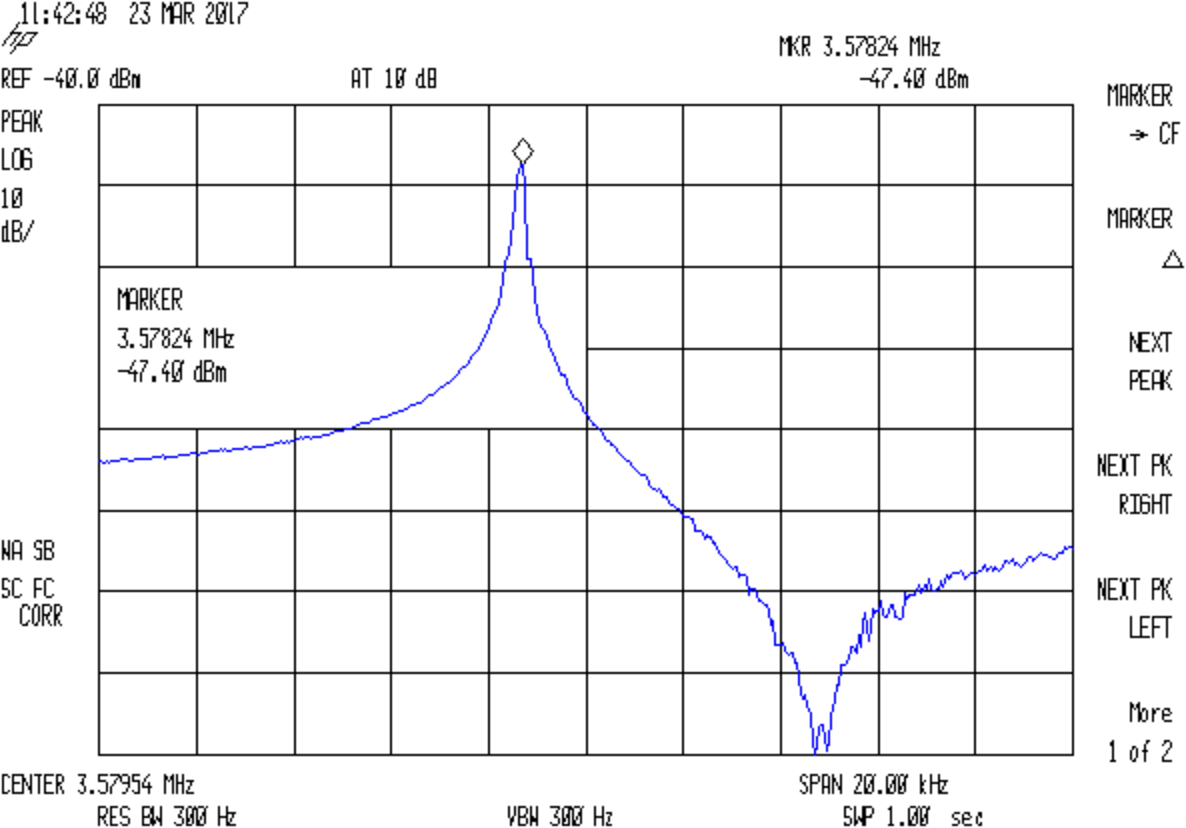
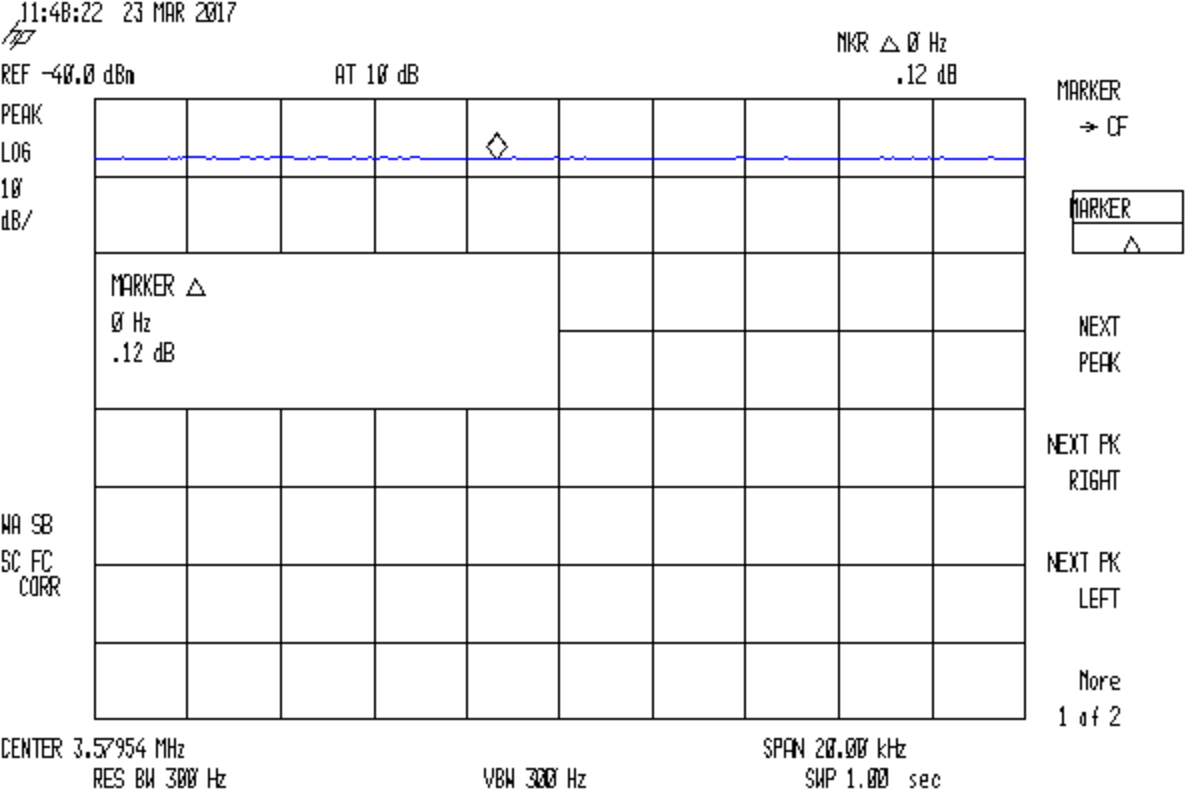
    Attaching goesinta and goesouta cables to the HP 8591 spectrum analyzer & tracking generator showed it worked just fine:

    Quartz 3.57954 MHz - no cap
    Quartz 3.57954 MHz – no cap

    The reference level is -40 dBm, not the usual 0 dBm, due to the loss in those resistive pads. Unsurprisingly, the parallel resonance valley looks pretty ragged at -120 dBm = 1 nW = 7 µV.

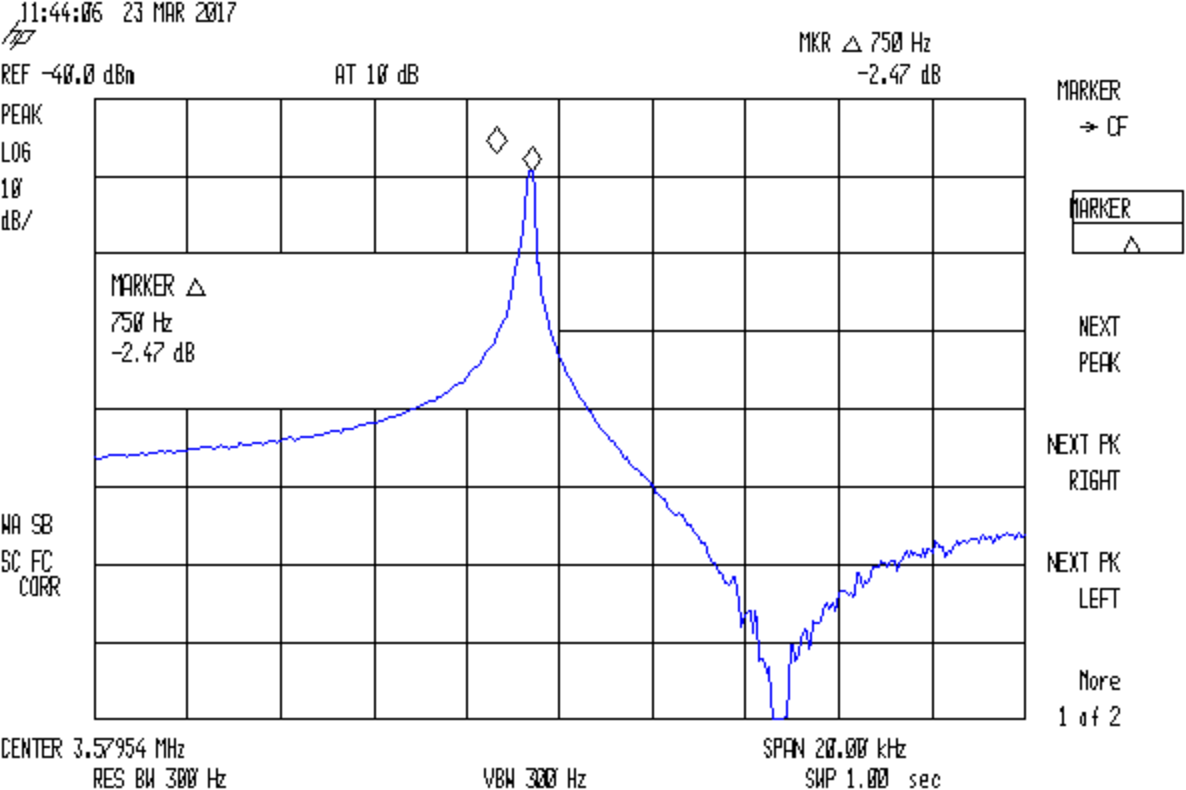
    Remove the jumper to put the capacitor in series:

    Quartz 3.57954 MHz - 36.4pF
    Quartz 3.57954 MHz – 36.4pF

    The marker delta resolution surely isn’t 1 Hz, but 750 Hz should get us in the right ballpark.

    Substituting a 72 Ω resistor, found by binary search rather than twiddling a pot:

    Quartz 3.57954 MHz - 72ohm
    Quartz 3.57954 MHz – 72ohm

    Which gives us all the measurements:

    • Fs = 3.57824 MHz
    • Fc = Fs + 750 Hz = 3.57899 MHz
    • Rm = 72 Ω
    • C0 = 3.83 pF
    • Cpar = 3.70 pF

    Turn the crank and the crystal motional parameters pop out:

    • Lm = 117 mH
    • Cm = 17 fF
    • Rm = 72 Ω
    • Q = 36 k

    Looks like a pretty good crystal to me!

  • Quartz Resonator Test Fixture

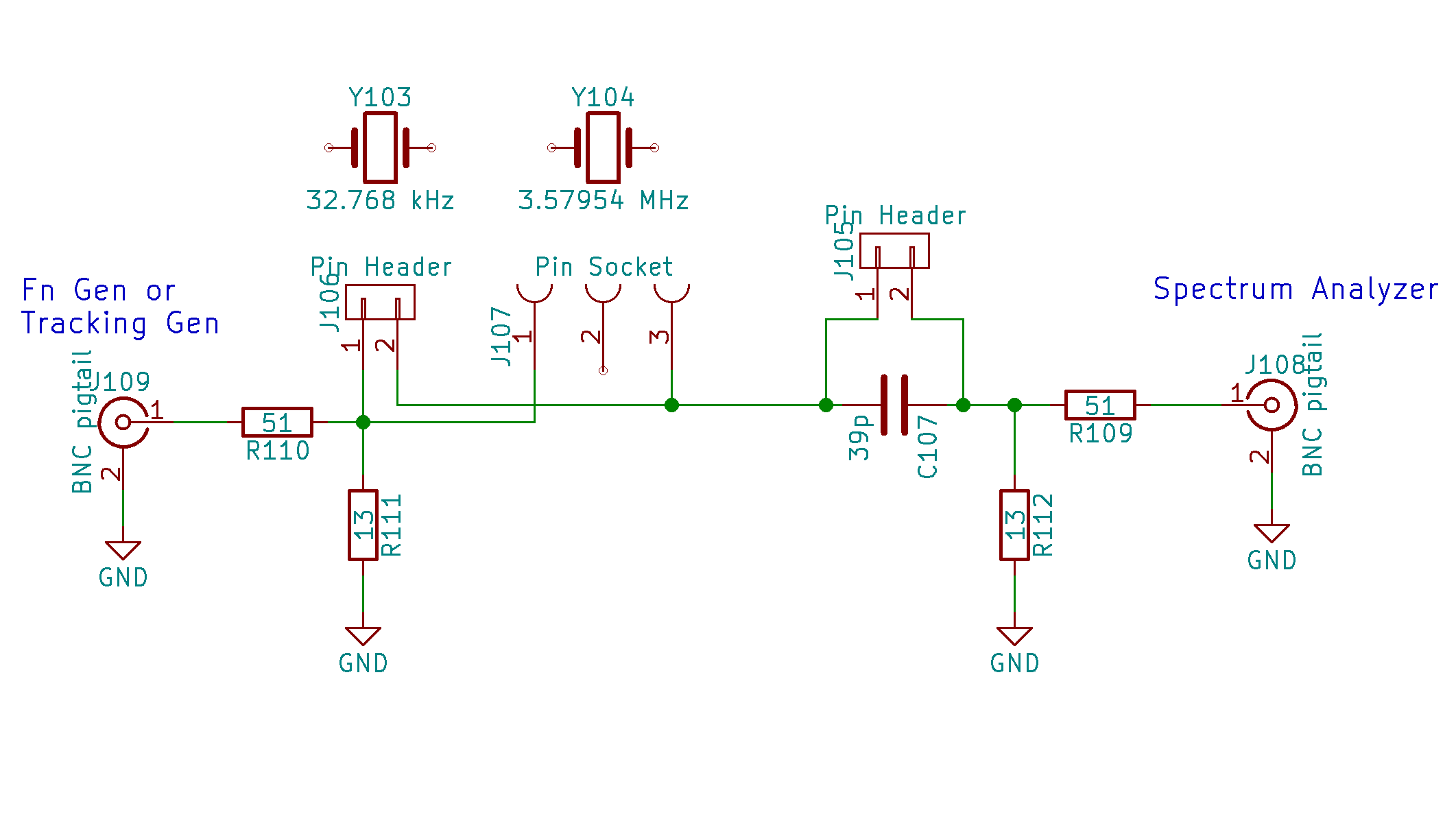
    A recent QEX article (Jan/Feb 2017 2016; sorry ’bout that), Crystal Measurement Parameters Simplified, Chuck Adams K7QO) suggested a simplified version of the K8IQY crystal parameter test fixture would work just as well for low-frequency quartz resonators:

    Quartz crystal resonance test fixture - schematic
    Quartz crystal resonance test fixture – schematic

    The resistive pads eliminate the fussy toroids and their frequency dependence.

    Tossing a handful of parts on a small proto board:

    Quartz crystal resonance test fixture
    Quartz crystal resonance test fixture

    I found two absurdly long hunks of RG-174 coax with BNC connectors, so that’s how it connects to the outside world; sacrificing a short SMA jumper would reduce the clutter, but that’s in the nature of fine tuning. At the frequencies this fixture will see, coax properties don’t matter.

    I can’t think of a better way to mount those AT26 cans than by soldering the wire leads directly to a pin header; pushing them under spring clips seems fraught with peril, not to mention excessive stray capacitance.

    Measure the actual in-circuit capacitance for the 33 pF cap (shown as 39 pF in the schematic, it’s not critical), which worked out to 34.6 pF.  That’s the external series capacitance Cx.

    The overall procedure, slightly modified from the original:

    • Measure C0 with resonator in capacitance fixture
    • Solder resonator to pins
    • Remove jumper to put capacitor Cx in series
    • Find series-resonant peak = Fc
    • Install jumper to short Cx
    • Find series-resonant peak = Fs < Fc
    • Remember the peak amplitude
    • Unsolder crystal
    • Install suitable trimpot = Rm in socket
    • Adjust trimpot to produce same output amplitude

    Crunch the numbers to get the crystal’s motional parameters:

    Rm = trimpot resistance
    Lm = 1 / [4 π2 (Fs + Fc) (Fs - Fc) (C0 + Cx)]
    Cm = 1 / [(2 π Fs)2 Lm]
    Q = [2 π Fs Lm] / Rm

    Then you’re done!

  • AADE LC Meter: AT26 Crystal Capacitance Fixture

    Crystals (or resonators) in AT26 packages have vanishingly small capacitances, so I conjured a little fixture for my AADE L/C Meter IIB (*) that holds them securely under little fingers snipped from an EMI shield:

    AT26 crystal capacitance fixture - Cpar detail
    AT26 crystal capacitance fixture – Cpar detail

    The finger on the right sits atop a snippet of rectangular brass tube so it need not bend so far.

    The base is a snippet of double-sided PCB with copper tape soldered around the edges. I drilled the holes slightly oversize and soldered copper tape there, giving the top foil a direct connection to the terminals. The raggedy slot looks like it came from a hacksaw; no false advertising there.

    The meter reports 6.5 pF of stray capacitance and nulls it to zero as usual. Without the fixture, it shows 2.5 pF.

    With the crystal in that position, the meter measures Cpar, the parasitic capacitance from both terminals to the can, which should be (roughly) twice the capacitance from either terminal to the can.

    Two more clips measure C0, the plate-to-plate capacitance:

    AT26 crystal capacitance fixture - C0 detail
    AT26 crystal capacitance fixture – C0 detail

    The meter drive is about 200 mV at 700 kHz, far away from resonance. Assuming the resonator’s effective series resistance is 25 kΩ (tuning forks aren’t crystals!), it’s dissipating 1.5 µW (and less as the ESR goes up). That may be slightly hot for some resonators, but it’s surely survivable.

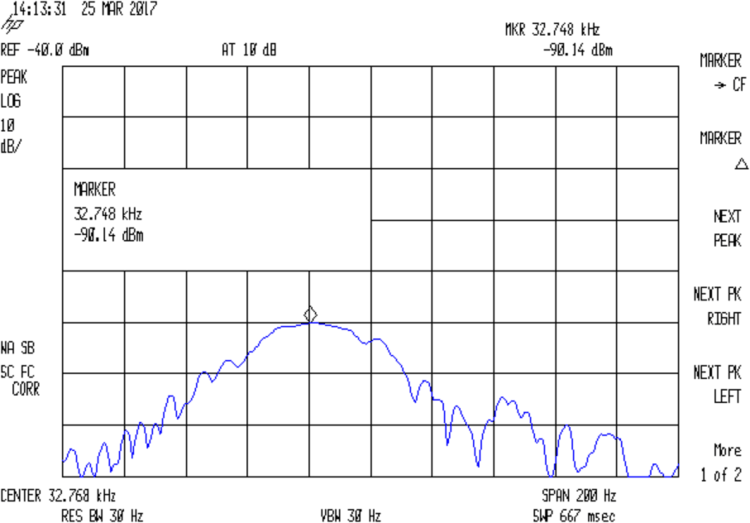
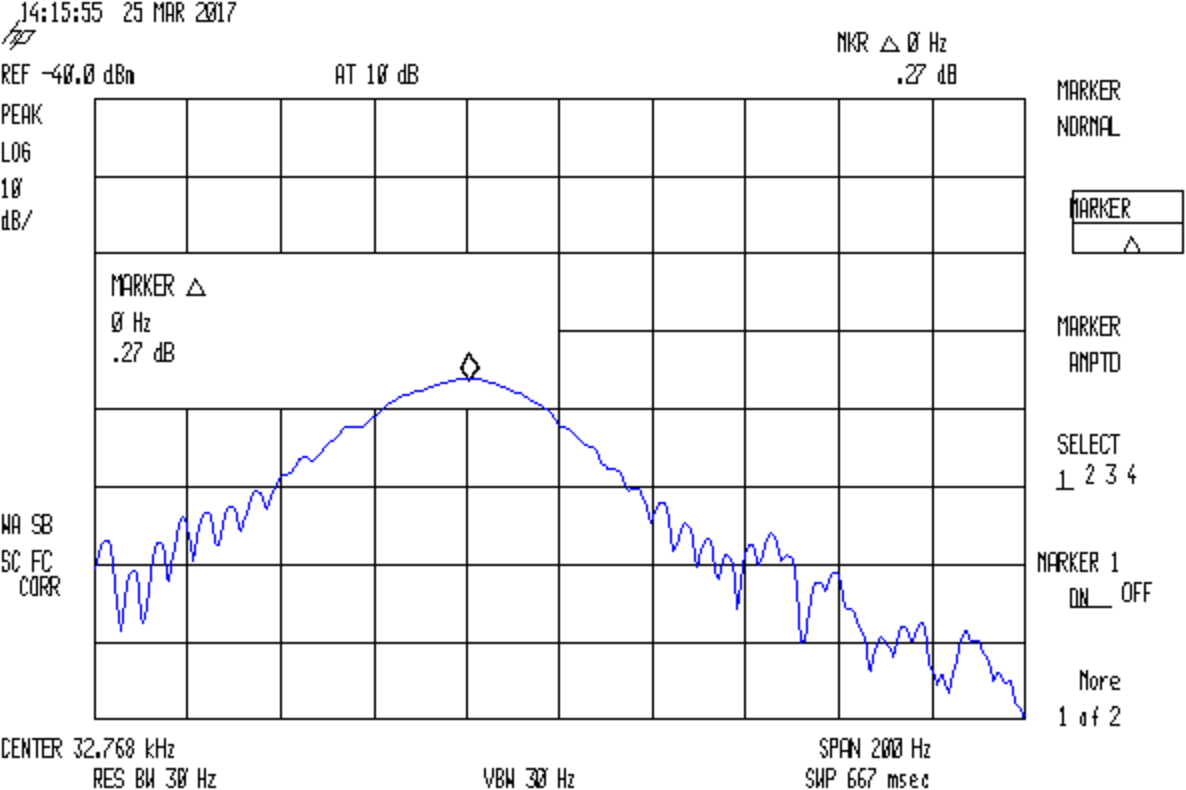
    Some preliminary data on five 32.768 kHz crystals shows Cpar = 0.4 pF and C0 = 0.9 pF. I don’t trust those numbers very much, but they’re reproducible within 0.1-ish pF.

    (*) Almost All Digital Electronics and its website vanished after the owner died; the meter continues to work fine. The cheap knockoffs flooding eBay and Amazon may get you close to the goal.

  • Quartz Tuning Fork Resonator Teardown

    Thinking of a 60 kHz crystal filter front end for the WWVB receiver brought a little bag of 32.768 kHz crystals to the surface; I figured I could use them as crash test dummies while a bag of 60 kHz crystals travels around the planet. Come to find out they don’t behave quite like crystals and a bit of investigation shows the little cans contain tuning fork resonators, not crystal slabs.

    I had to see that, so I grabbed the base of one in a pin vise:

    Quartz resonator - pin vise
    Quartz resonator – pin vise

    I don’t know the part number for those resonators, but it’s something like AT26, where the “26” means a cylindrical can 2 mm OD and 6 mm long, more or less.

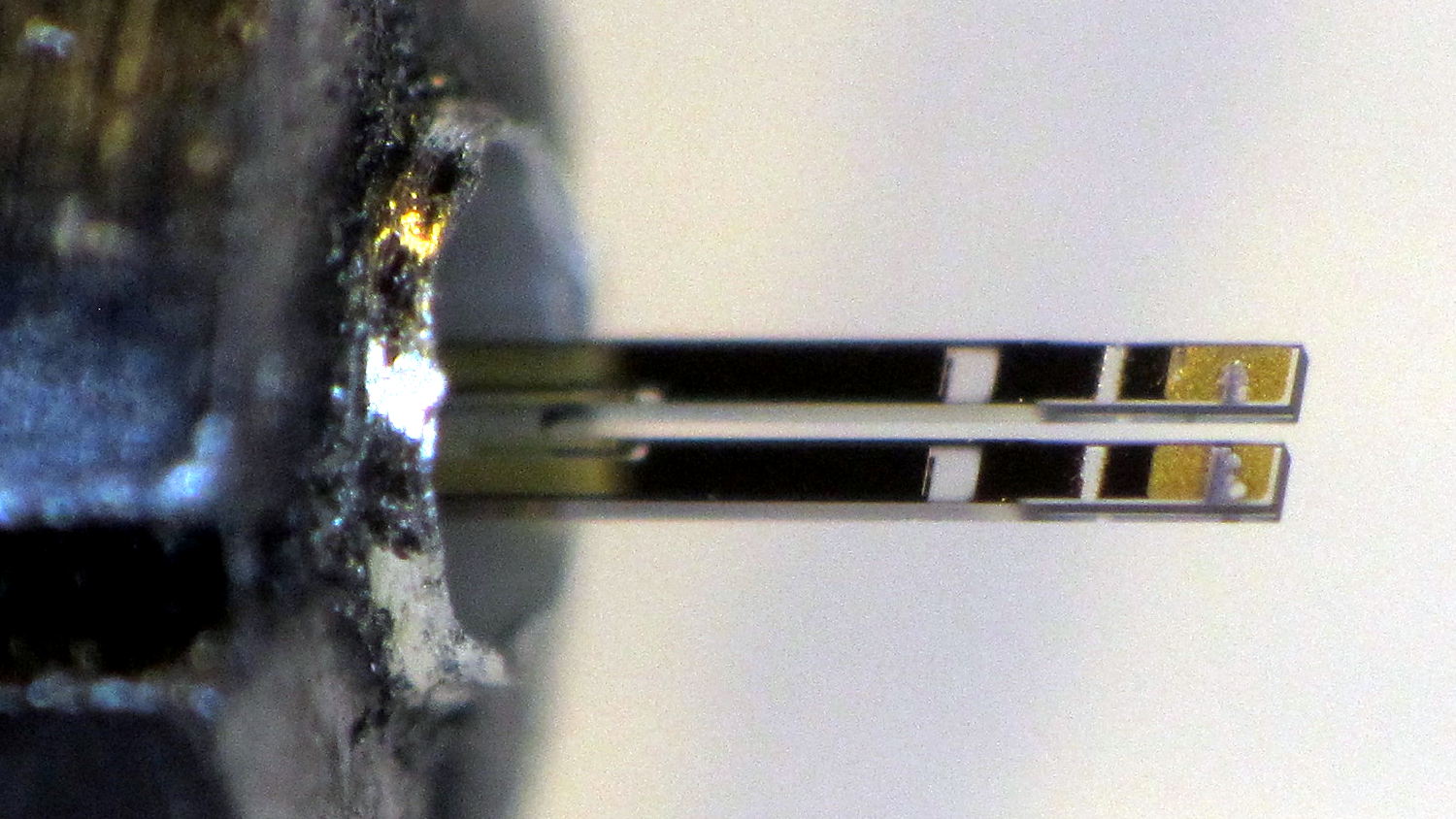
    Notching the can at the chuck with a triangular file, then wiggling the can with needle-nose pliers, eventually broke it off:

    Quartz resonator - A side
    Quartz resonator – A side

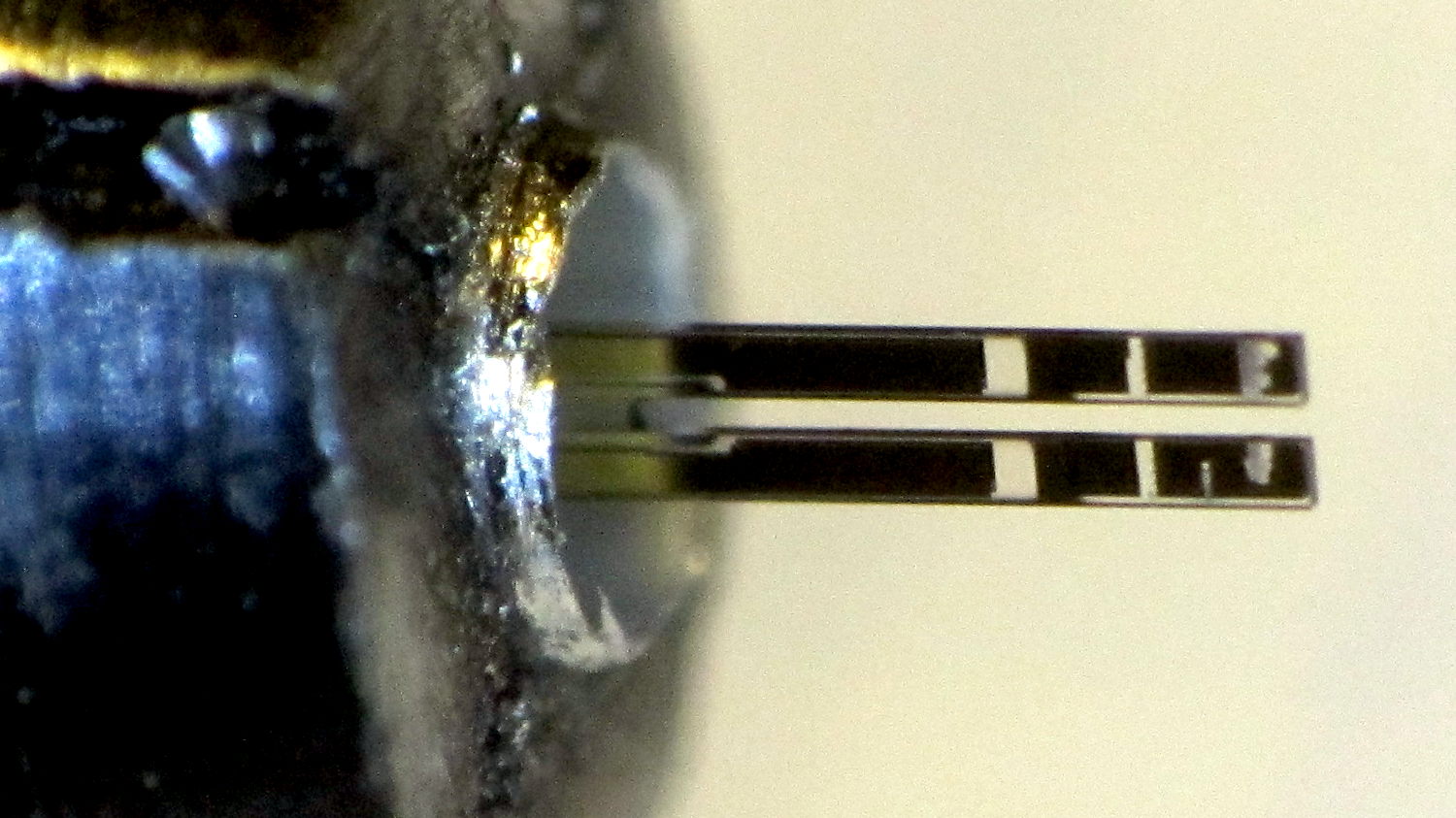
    The other side:

    Quartz resonator - B side
    Quartz resonator – B side

    A look through the microscope show they’re transparent, with laser trim scars on the ends:

    Quartz resonator - detail
    Quartz resonator – detail

    The “holes” are unplated quartz areas, clear as the finest glass.

    Not what I was expecting to see, at all!

  • Vacuum Tube Lights: Duodecar Rebuild

    You’ll recall the LED atop the 21HB5A tube failed, shortly after replacing the bottom LED and rewiring the ersatz plate lead, which led me to rebuild the whole thing with SK6812 RGBW LEDs. So I printed all the plastic parts again, because the duodecar tube socket’s pin circle can fit into a hard drive platter’s unmodified 25 mm hole, then drilled another platter to suit:

    Duodecar disk drilling
    Duodecar disk drilling

    The hole under the drill fits the 3.5 mm stereo socket for the ersatz plate lead, so it’s bigger than before.

    I’ve switched from Arduino Pro Minis with a separate USB converter to Arduino Nanos with an on-board CH340 USB chip, because the fake FTDI chips on the converters are a continuing aggravation:

    21HB5A base - interior
    21HB5A base – interior

    Adding those wire slots to the sockets definitely helps tidy things up; the wires no longer need a crude cable tie anchoring them to the socket mounting screws.

    I wanted to drive the LEDs from the A7 pin, rather than the A3 pin I’d been using on the Pro Minis, to keep the wires closer together, but it turns out that A6 and A7 can’t become digital output pins. So I used A5, although I may come to regret the backward incompatibility.

    In any event, the 21HB5A tube looks spiffy with its new LEDs in full effect:

    21HB5A with RBGBW LEDs - cyan violet phase
    21HB5A with RBGBW LEDs – cyan violet phase

    I dialed the white LED PWM down to 32, making the colors somewhat pastel, rather than washed-out.

    The Arduino source code as a GitHub Gist:

    // Neopixel mood lighting for vacuum tubes
    // Ed Nisley – KE4ANU – June 2016
    // September 2016 – Add Morse library and blinkiness
    // October 2016 – Set random colors at cycle end
    // March 2017 – RGBW SK6812 LEDs
    #include <Adafruit_NeoPixel.h>
    #include <morse.h>
    #include <Entropy.h>
    //———-
    // Pin assignments
    const byte PIN_NEO = A5; // DO – data out to first Neopixel
    const byte PIN_HEARTBEAT = 13; // DO – Arduino LED
    #define PIN_MORSE 12
    //———-
    // Constants
    // number of pixels
    #define PIXELS 2
    // index of the Morse output pixel and how fast it sends
    boolean Send_Morse = false;
    #define PIXEL_MORSE (PIXELS – 1)
    #define MORSE_WPM 10
    // lag between adjacent pixel, degrees of slowest period
    #define PIXELPHASE 45
    // update LEDs only this many ms apart (minus loop() overhead)
    #define UPDATEINTERVAL 50ul
    #define UPDATEMS (UPDATEINTERVAL – 1ul)
    // number of steps per cycle, before applying prime factors
    #define RESOLUTION 500
    //———-
    // Globals
    // instantiate the Neopixel buffer array
    Adafruit_NeoPixel strip = Adafruit_NeoPixel(PIXELS, PIN_NEO, NEO_GRBW + NEO_KHZ800);
    uint32_t FullWhite = strip.Color(255,255,255,255);
    uint32_t FullOff = strip.Color(0,0,0,0);
    uint32_t MorseColor;
    struct pixcolor_t {
    unsigned int Prime;
    unsigned int NumSteps;
    unsigned int Step;
    float StepSize;
    float Phase;
    byte MaxPWM;
    };
    unsigned int PlatterSteps;
    byte PrimeList[] = {3,5,7,13,19,29};
    // colors in each LED
    enum pixcolors {RED, GREEN, BLUE, WHITE, PIXELSIZE};
    struct pixcolor_t Pixels[PIXELSIZE]; // all the data for each pixel color intensity
    uint32_t UniColor;
    unsigned long MillisNow;
    unsigned long MillisThen;
    // Morse code
    char * MorseText = " cq cq cq de ke4znu";
    LEDMorseSender Morse(PIN_MORSE, (float)MORSE_WPM);
    uint8_t PrevMorse, ThisMorse;
    //– Figure PWM based on current state
    byte StepColor(byte Color, float Phi) {
    byte Value;
    Value = (Pixels[Color].MaxPWM / 2.0) * (1.0 + sin(Pixels[Color].Step * Pixels[Color].StepSize + Phi));
    // Value = (Value) ? Value : Pixels[Color].MaxPWM; // flash at dimmest points for debug
    return Value;
    }
    //– Select three unique primes for the color generator function
    // Then compute all the step parameters based on those values
    void SetColorGenerators(void) {
    Pixels[RED].Prime = PrimeList[random(sizeof(PrimeList))];
    do {
    Pixels[GREEN].Prime = PrimeList[random(sizeof(PrimeList))];
    } while (Pixels[RED].Prime == Pixels[GREEN].Prime);
    do {
    Pixels[BLUE].Prime = PrimeList[random(sizeof(PrimeList))];
    } while (Pixels[BLUE].Prime == Pixels[RED].Prime ||
    Pixels[BLUE].Prime == Pixels[GREEN].Prime);
    do {
    Pixels[WHITE].Prime = PrimeList[random(sizeof(PrimeList))];
    } while (Pixels[WHITE].Prime == Pixels[RED].Prime ||
    Pixels[WHITE].Prime == Pixels[GREEN].Prime ||
    Pixels[WHITE].Prime == Pixels[BLUE].Prime);
    printf("Primes: %d %d %d %d\r\n",Pixels[RED].Prime,Pixels[GREEN].Prime,Pixels[BLUE].Prime,Pixels[WHITE].Prime);
    Pixels[RED].MaxPWM = 255;
    Pixels[GREEN].MaxPWM = 255;
    Pixels[BLUE].MaxPWM = 255;
    Pixels[WHITE].MaxPWM = 32;
    unsigned int PhaseSteps = (unsigned int) ((PIXELPHASE / 360.0) *
    RESOLUTION * (unsigned int) max(max(max(Pixels[RED].Prime,Pixels[GREEN].Prime),Pixels[BLUE].Prime),Pixels[WHITE].Prime));
    printf("Pixel phase offset: %d deg = %d steps\r\n",(int)PIXELPHASE,PhaseSteps);
    for (byte c=0; c < PIXELSIZE; c++) {
    Pixels[c].NumSteps = RESOLUTION * Pixels[c].Prime; // steps per cycle
    Pixels[c].StepSize = TWO_PI / Pixels[c].NumSteps; // radians per step
    Pixels[c].Step = random(Pixels[c].NumSteps); // current step
    Pixels[c].Phase = PhaseSteps * Pixels[c].StepSize;; // phase in radians for this color
    printf(" c: %d Steps: %d Init: %d Phase: %d deg",c,Pixels[c].NumSteps,Pixels[c].Step,(int)(Pixels[c].Phase * 360.0 / TWO_PI));
    printf(" PWM: %d\r\n",Pixels[c].MaxPWM);
    }
    }
    //– Helper routine for printf()
    int s_putc(char c, FILE *t) {
    Serial.write(c);
    }
    //——————
    // Set the mood
    void setup() {
    pinMode(PIN_HEARTBEAT,OUTPUT);
    digitalWrite(PIN_HEARTBEAT,LOW); // show we arrived
    Serial.begin(57600);
    fdevopen(&s_putc,0); // set up serial output for printf()
    printf("Vacuum Tube Mood Light – RGBW\r\nEd Nisley – KE4ZNU – March 2017\r\n");
    Entropy.initialize(); // start up entropy collector
    // set up pixels
    strip.begin();
    strip.show();
    // lamp test: a brilliant white flash
    printf("Lamp test: flash white\r\n");
    for (byte i=0; i<5 ; i++) {
    for (int j=0; j < strip.numPixels(); j++) { // fill LEDs with white
    strip.setPixelColor(j,FullWhite);
    }
    strip.show();
    delay(500);
    for (int j=0; j < strip.numPixels(); j++) { // fill LEDs with black
    strip.setPixelColor(j,FullOff);
    }
    strip.show();
    delay(500);
    }
    // get an actual random number
    uint32_t rn = Entropy.random();
    printf("Random seed: %08lx\r\n",rn);
    randomSeed(rn);
    // set up the color generators
    SetColorGenerators();
    // set up Morse generator
    Morse.setup();
    Morse.setMessage(String(MorseText));
    MorseColor = strip.Color(255,random(32,64),random(16),0);
    PrevMorse = ThisMorse = digitalRead(PIN_MORSE);
    printf("Morse enabled: %d at %d wpm color: %08lx\n [%s]\r\n",Send_Morse,MORSE_WPM,MorseColor,MorseText);
    MillisNow = MillisThen = millis();
    }
    //——————
    // Run the mood
    void loop() {
    if (!Morse.continueSending()) {
    printf("Restarting Morse message\r\n");
    Morse.startSending();
    }
    ThisMorse = digitalRead(PIN_MORSE);
    MillisNow = millis();
    if (((MillisNow – MillisThen) >= UPDATEMS) || // time for color change?
    (PrevMorse != ThisMorse)) { // Morse output bit changed?
    digitalWrite(PIN_HEARTBEAT,HIGH);
    if (Send_Morse && ThisMorse) { // if Morse output high, overlay flash
    strip.setPixelColor(PIXEL_MORSE,MorseColor);
    }
    PrevMorse = ThisMorse;
    strip.show(); // send out precomputed colors
    boolean CycleRun = false; // check to see if all cycles have ended
    for (byte c=0; c < PIXELSIZE; c++) { // compute next increment for each color
    if (++Pixels[c].Step >= Pixels[c].NumSteps) {
    Pixels[c].Step = 0;
    printf("Cycle %d steps %d at %8ld delta %ld ms\r\n",c,Pixels[c].NumSteps,MillisNow,(MillisNow – MillisThen));
    }
    else {
    CycleRun = true; // this color is still cycling
    }
    }
    // If all cycles have completed, reset the color generators
    if (!CycleRun) {
    printf("All cycles ended: setting new color generator values\r\n");
    SetColorGenerators();
    }
    for (int i=0; i < strip.numPixels(); i++) { // for each pixel
    byte Value[PIXELSIZE];
    for (byte c=0; c < PIXELSIZE; c++) { // … for each color
    Value[c] = (Pixels[c].MaxPWM / 2.0) * (1.0 + sin(Pixels[c].Step * Pixels[c].StepSize – i*Pixels[c].Phase));
    }
    UniColor = strip.Color(Value[RED],Value[GREEN],Value[BLUE],Value[WHITE]);
    strip.setPixelColor(i,UniColor);
    }
    MillisThen = MillisNow;
    digitalWrite(PIN_HEARTBEAT,LOW);
    }
    }
    view raw TubeMorse.ino hosted with ❤ by GitHub
  • Cheap WS2812 LEDs: Failure Waveforms

    The failed WS2812 pixel remains defunct:

    WS2812 array - failure 1
    WS2812 array – failure 1

    Attach scope probes to its data input and output pins (with the fixture face-down on the bench):

    WS2812 LED - fixture probing
    WS2812 LED – fixture probing

    The output no longer comes from the Land of Digital Signals:

    WS2812 Array Fail 1 - in vs out
    WS2812 Array Fail 1 – in vs out

    I immediately thought the broken bits occupied the first 24 bit times, when the WS2812 controller should be absorbing those bits from the incoming stream. The vertical cursors show the failed bits occupy 54 µs = 40-ish bit times at 800 kHz (or you can count them), so it’s worse than a simple logic failure.

    A closer look:

    WS2812 Array Fail 1 - in vs out - detail
    WS2812 Array Fail 1 – in vs out – detail

    At least for those bits, neither output transistor works well at all. On the other paw, the output shouldn’t even be enabled for the first 24 bits, so there’s that to consider.

    Lo and behold, it also fails the Josh Sharpie Test:

    WS2812 LED - test array failure 1 - ink test
    WS2812 LED – test array failure 1 – ink test

    You may recall it passed the leak test shortly before I assembled the test array a month ago. Evidently, just few days of operation suffices to wreck the seal, let air / moisture into the package, and kill the controller. Not a problem you’d find during a production-line test (assuming there is such a thing), but it should certain appear during the initial design & production qualification test phase (another assumption).

    Weirdly, a day after taking that photo, the controller began working perfectly again and the LEDs look just like they should: there is no explaining that!


  • Raspberry Pi Streaming Radio Player: OLED Display

    With the OLED wired up to the Raspberry Pi, the LUMA.OLED driver makes it surprisingly easy to slap text on the screen, at least after some obligatory fumbling around:

    RPi OLED Display - Plenitude
    RPi OLED Display – Plenitude

    Connect the hardware, install the driver, then the setup goes like this:

    import textwrap
    
    from luma.oled.device import sh1106
    from luma.core.serial import spi
    from luma.core.render import canvas
    from PIL import ImageFont
    
    … snippage …
    
    font1 = ImageFont.truetype('/usr/share/fonts/truetype/dejavu/DejaVuSansMono.ttf',14)
    font2 = ImageFont.truetype('/usr/share/fonts/truetype/dejavu/DejaVuSans.ttf',11)
    
    wrapper = textwrap.TextWrapper(width=128//font2.getsize('n')[0])
    
    StatLine = 0
    DataLine = 17           # allow for weird ascenders and accent marks
    LineSpace = 16
    
    Contrast = 255          # OLED brightness setting
    
    serial = spi(device=0,port=0)
    device = sh1106(serial)
    device.contrast(Contrast)
    

    The Python Imaging Library below the LUMA driver supports Truetype fonts that look much better than the default fonts. For these tiny displays, DejaVu Sans comes close enough to being a single-stroke (“stick”) font and, being proportional, packs more text into a fixed horizontal space.

    The textwrap library chops a string into lines of a specified length, which works great with a fixed-width font and not so well with a proportional font. I set the line length based on the width of a mid-size lowercase letter and hope for the best. In round numbers, each 128 pixel line can hold 20-ish characters of the size-11 (which might be the height in pixels) font.

    It also understands hyphens and similar line-ending punctuation:

    Felix Mendelssohn-
    Bartholdy - Piano
    Concerto No.01 in
    

    It turns out whatever library routine blits characters into the bitmap has an off-by-one error that overwrites the leftmost column with the pixel columns that should be just off-screen on the right; it may also overwrite the topmost row with the bottommost row+1. I poked around a bit, couldn’t find the actual code amid the layers of inherited classes and methods and suchlike, and gave up: each line starts in pixel column 1, not 0. With textwrap generally leaving the rightmost character in each line blank, the picket-fence error (almost) always overwrites the first column with dark pixels.

    Display coordinates start at (0,0) in the upper left corner, but apparently the character origin corresponds to the box around an uppercase letter, with ascenders and diacritical marks extending (at least) one pixel above that. The blue area in these displays starts at (0,16), but having the ascenders poke into the yellow section is really, really conspicuous, so DataLine Finagles the text down by one pixel. The value of Linespace avoids collisions between descenders and ascenders in successive lines that you (well, I) wouldn’t expect with a spacing equal to the font height.

    The display has a variable brightness setting, called “contrast” by the datasheet and driver, that determines the overall LED current (perhaps according to an exponential relationship, because an α appears in the tables). I tweak the value in Contrast based on where the streamer lives, with 1 being perfectly suitable for a dark room and 255 for ordinary lighting.

    The LUMA package includes a scrolling terminal emulator. With maybe four lines, tops, on that display (in a reasonable font, anyhow), what’s the point?

    Instead, I homebrewed a panel with manual positioning:

    def ShowStatus(L1=None,L2=None,L3='None'):
      with canvas(device) as screen:
        screen.text((1,StatLine),Media[CurrentKC][0][0:11],
                 font=font1,fill='white')
        screen.text((127-(4*font1.getsize('M')[0] + 2),StatLine),'Mute' if Muted else ' ',
                 font=font1,fill='white')
    
        screen.text((1,DataLine),L1,
                 font=font2,fill='white')
        screen.text((1,DataLine + 1*LineSpace),L2,
                 font=font2,fill='white')
        screen.text((1,DataLine + 2*LineSpace),L3,
                 font=font2,fill='white')
    

    Yeah, those are global variables in the first line; feel free to object-orient it as you like.

    The LUMA driver hands you a blank screen inside the with … as …: context, whereupon you may draw as you see fit and the driver squirts the bitmap to the display at the end of the context. There’s apparently a way to set up a permanent canvas and update it at will, but this works well enough for now.

    That means you (well, I) must mange those three lines by hand:

    ShowStatus('Startup in ' + Location,
               'Mixer: ' + MixerChannel + ' = ' + MixerVol,
               'Contrast: ' + str(Contrast))
    

    Chopping the track info string into lines goes like this:

    if TrackName:
      info = wrapper.wrap(TrackName)
      ShowStatus(info[0],
                 info[1] if len(info) > 1 else '',
                 info[2] if len(info) > 2 else '')
    else:
      ShowStatus('No track info','','')
    

    Something along the way ruins Unicode characters from the track info, converting them into unrelated (and generally accented) characters. They work fine when shipped through the logging interface, so it may be due to a font incompatibility or, more likely, my not bothering to work around Python 2’s string vs. byte stream weirdness. Using Python 3 would be a Good Idea, but I’m unsure all the various & sundry libraries are compatible and unwilling to find out using programming as an experimental science.

    The Python source code as a GitHub Gist:

    from evdev import InputDevice,ecodes,KeyEvent
    import subprocess32 as subp
    import select
    import re
    import sys
    import time
    import logging
    import logging.handlers
    import os.path
    import argparse as args
    import textwrap
    from luma.oled.device import sh1106
    from luma.core.serial import spi
    from luma.core.render import canvas
    from PIL import ImageFont
    # URL must be last entry in command line list
    Media = {'KEY_KP7' : ['Classical',False,['mplayer','-playlist','http://stream2137.init7.net/listen.pls'%5D%5D,
    'KEY_KP8' : ['Jazz',False,['mplayer','-playlist','http://stream2138.init7.net/listen.pls'%5D%5D,
    'KEY_KP9' : ['WMHT',False,['mplayer','http://wmht.streamguys1.com/wmht1'%5D%5D,
    'KEY_KP4' : ['Classic 1k',True,['mplayer','-playlist','http://listen.radionomy.com/1000classicalhits.m3u'%5D%5D,
    'KEY_KP5' : ['Love',True,['mplayer','-playlist','/home/pi/Playlists/LoveRadio.m3u']],
    'KEY_KP6' : ['WAMC',False,['mplayer','-playlist','http://playerservices.streamtheworld.com/pls/WAMCFM.pls'%5D%5D,
    'KEY_KP1' : ['60s',True,['mplayer','-playlist','http://listen.radionomy.com/all60sallthetime-keepfreemusiccom.m3u'%5D%5D,
    'KEY_KP2' : ['50-70s',True,['mplayer','-playlist','http://listen.radionomy.com/golden-50-70s-hits.m3u'%5D%5D,
    'KEY_KP3' : ['Soft Rock',True,['mplayer','-playlist','http://listen.radionomy.com/softrockradio.m3u'%5D%5D,
    'KEY_KP0' : ['Zen',False,['mplayer','http://iradio.iceca.st:80/zenradio'%5D%5D,
    'KEY_KPDOT' : ['Ambient',False,['mplayer','http://185.32.125.42:7331/maschinengeist.org.mp3'%5D%5D,
    'KEY_KPMINUS' : ['Relaxation',True,['mplayer','-playlist','/home/pi/Playlists/Frequences-relaxation.m3u']],
    'KEY_KPPLUS' : ['Plenitude',True,['mplayer','-playlist','/home/pi/Playlists/Radio-PLENITUDE.m3u']]
    }
    # these keycode will be fed directly into mplayer
    Controls = {'KEY_KPSLASH' : '//////',
    'KEY_KPASTERISK' : '******',
    'KEY_VOLUMEUP' : '*',
    'KEY_VOLUMEDOWN' : '/'
    }
    # stream title keywords that trigger muting
    MuteStrings = ['TargetSpot', # common Radionomy insert
    'Intro of','Jingle','*bumper*', # Radio-PLENITUDE
    '[Unknown]','Advert:','+++','—','SRR','Srr', # softrockradio
    'PEACE LK1','PEACE J1'] # Frequences-relaxation
    # Set up default configuration
    CurrentKC = 'KEY_KP7' # default stream source
    MuteDelay = 6.5 # delay before non-music track; varies with buffering
    UnMuteDelay = 9.0 # delay after non-music track
    MixerChannel = 'PCM' # default amixer output control
    MixerVol = '30' # mixer gain
    RestartDelay = 10 # delay after stream failure
    Contrast = 255 # OLED brightness setting
    # Set up command line parsing
    cmdline = args.ArgumentParser(description='Streaming Radio Player',epilog='KE4ZNU – http://softsolder.com&#39;)
    cmdline.add_argument('Loc',help='Location: BR1 BR2 …',default='any',nargs='?')
    args = cmdline.parse_args()
    # Set up logging
    LogFN = '/home/pi/Streamer.log'
    LogFmt = logging.Formatter('%(asctime)s %(levelname)s: %(message)s')
    LogHandler = logging.handlers.RotatingFileHandler(LogFN,backupCount=9)
    LogHandler.setFormatter(LogFmt)
    logger = logging.getLogger('StreamLog')
    logger.addHandler(LogHandler)
    logger.setLevel(logging.INFO)
    # Tweak config based on where we are
    Location = vars(args)['Loc'].upper()
    logger.info('Player setup for: ' + Location)
    if Location == 'BR1':
    CurrentKC = 'KEY_KPDOT'
    MixerVol = '5'
    Contrast = 1
    elif Location == 'BR2':
    MuteDelay = 4.5
    UnMuteDelay = 8.5
    MixerVol = '5'
    Contrast = 1
    elif Location == 'LR':
    MixerVol = '40'
    CurrentKC = 'KEY_KPPLUS'
    # set up event inputs and polling objects
    # This requires some udev magic to create the symlinks
    k = InputDevice('/dev/input/keypad')
    k.grab()
    kp = select.poll()
    kp.register(k.fileno(),select.POLLIN + select.POLLPRI + select.POLLERR)
    # if volume control knob exists, then set up its events
    VolumeDevice = '/dev/input/volume'
    vp = select.poll()
    if os.path.exists(VolumeDevice):
    logger.info('Volume control device: %s',VolumeDevice)
    v = InputDevice(VolumeDevice)
    v.grab()
    vp.register(v.fileno(),select.POLLIN + select.POLLPRI + select.POLLERR)
    # set up file for mplayer output tracing
    lw = open('/home/pi/mp.log','w') # mplayer piped output
    # set the mixer output low enough that the initial audio won't wake the dead
    subp.call(['amixer','-q','sset',MixerChannel,MixerVol])
    if Media[CurrentKC][1]:
    subp.call(['amixer','-q','sset',MixerChannel,'mute'])
    Muted = True # squelch anything before valid track name
    logger.info('Audio muted at startup')
    else:
    subp.call(['amixer','-q','sset',MixerChannel,'unmute'])
    Muted = False # allow early audio
    logger.info('Audio unmuted at startup')
    # Set up OLED display
    font1 = ImageFont.truetype('/usr/share/fonts/truetype/dejavu/DejaVuSansMono.ttf',14)
    font2 = ImageFont.truetype('/usr/share/fonts/truetype/dejavu/DejaVuSans.ttf',11)
    wrapper = textwrap.TextWrapper(width=128//font2.getsize('n')[0])
    StatLine = 0
    DataLine = 17 # allow one line for weird ascenders and accent marks
    LineSpace = 16
    serial = spi(device=0,port=0)
    device = sh1106(serial)
    device.contrast(Contrast)
    def ShowStatus(L1=None,L2=None,L3='None'):
    with canvas(device) as screen:
    screen.text((1,StatLine),Media[CurrentKC][0][0:11],
    font=font1,fill='white')
    screen.text((127-(4*font1.getsize('M')[0] + 2),StatLine),'Mute' if Muted else ' ',
    font=font1,fill='white')
    screen.text((1,DataLine),L1,
    font=font2,fill='white')
    screen.text((1,DataLine + 1*LineSpace),L2,
    font=font2,fill='white')
    screen.text((1,DataLine + 2*LineSpace),L3,
    font=font2,fill='white')
    ShowStatus('Startup in ' + Location,
    'Mixer: ' + MixerChannel + ' = ' + MixerVol,
    'Contrast: ' + str(Contrast))
    # Start the player with the default stream, set up for polling
    logger.info('Starting mplayer on %s -> %s',Media[CurrentKC][0],Media[CurrentKC][-1][-1])
    p = subp.Popen(Media[CurrentKC][-1],
    stdin=subp.PIPE,stdout=subp.PIPE,stderr=subp.STDOUT)
    pp = select.poll() # this may be valid for other invocations, but is not pretty
    pp.register(p.stdout.fileno(),select.POLLIN + select.POLLPRI + select.POLLERR)
    #——————–
    #— Play the streams
    while True:
    # pluck next line from mplayer and decode it
    if [] != pp.poll(10):
    text = p.stdout.readline()
    if 'Error: ' in text: # something horrible went wrong
    lw.write(text)
    lw.flush()
    logger.info('Unsolvable problem! ' + text)
    logger.info('Exiting')
    LogHandler.doRollover()
    logging.shutdown()
    sys.exit('Exit streamer on mplayer error –' + text)
    if 'ICY Info: ' in text: # these lines may contain track names
    lw.write(text)
    lw.flush()
    trkinfo = text.split(';') # also splits at semicolon embedded in track name
    # logger.info('Raw split line: %s', trkinfo)
    for ln in trkinfo:
    if 'StreamTitle' in ln: # this part probably contains the track name
    NeedMute = False # assume a listenable track
    trkhit = re.search(r"StreamTitle='(.*)'",ln) # extract title if possible
    if trkhit: # regex returned valid result?
    TrackName = trkhit.group(1) # get string between two quotes
    else:
    logger.info('Regex failed for line: [' + ln + ']')
    TrackName = 'Invalid StreamTitle format!'
    logger.info('Track name: [%s]', TrackName)
    if Media[CurrentKC][1] and ( (len(TrackName) == 0) or any(m in TrackName for m in MuteStrings) ) :
    NeedMute = True
    if NeedMute:
    if Media[CurrentKC][1] and not Muted:
    time.sleep(MuteDelay) # brute-force assumption about buffer leadtime
    subp.call(['amixer','-q','sset',MixerChannel,'mute'])
    Muted = True
    logger.info('Track muted')
    else:
    if Muted:
    if Media[CurrentKC][1]:
    time.sleep(UnMuteDelay) # another brute-force timing assumption
    subp.call(['amixer','-q','sset',MixerChannel,'unmute'])
    Muted = False
    logger.info('Track unmuted')
    if TrackName:
    info = wrapper.wrap(TrackName)
    ShowStatus(info[0],
    info[1] if len(info) > 1 else '',
    info[2] if len(info) > 2 else '')
    else:
    ShowStatus('No track info','','')
    elif 'Exiting.' in text: # mplayer just imploded
    lw.write(text)
    lw.flush()
    logger.info('EOF or stream cutoff: [' + text + ']')
    ShowStatus('Killing dead Mplayer','','')
    pp.unregister(p.stdout.fileno())
    p.terminate() # p.kill()
    p.wait()
    logger.info('Discarding keys')
    while [] != kp.poll(0):
    kev = k.read
    time.sleep(RestartDelay)
    logger.info('Restarting mplayer')
    ShowStatus('Restarting Mplayer','','')
    p = subp.Popen(Media[CurrentKC][-1],
    stdin=subp.PIPE,stdout=subp.PIPE,stderr=subp.STDOUT)
    pp.register(p.stdout.fileno(),select.POLLIN + select.POLLPRI + select.POLLERR)
    logger.info(' … running')
    ShowStatus('Mplayer running','','')
    # accept pending events from volume control knob
    if [] != vp.poll(10):
    vev = v.read()
    lw.write('Volume')
    lw.flush()
    for e in vev:
    if e.type == ecodes.EV_KEY:
    kc = KeyEvent(e).keycode
    if kc in Controls:
    try:
    p.stdin.write(Controls[kc])
    except Exception as e:
    logger.info('Error sending volume, restarting player: ' + str(e))
    try:
    pp.unregister(p.stdout.fileno())
    except Exception as e:
    logger.info('Cannot unregister stdout: ' + str(e))
    ShowStatus('Vol error','Restarting',' Mplayer')
    time.sleep(RestartDelay)
    p = subp.Popen(Media[CurrentKC][-1],
    stdin=subp.PIPE,stdout=subp.PIPE,stderr=subp.STDOUT)
    pp.register(p.stdout.fileno(),select.POLLIN + select.POLLPRI + select.POLLERR)
    logger.info(' … running')
    # accept pending events from keypad
    if [] != kp.poll(10):
    kev = k.read()
    lw.write('Keypad')
    lw.flush()
    for e in kev:
    if e.type == ecodes.EV_KEY:
    kc = KeyEvent(e).keycode
    if kc == 'KEY_NUMLOCK': # discard these, as we don't care
    continue
    if (kc == 'KEY_BACKSPACE') and (KeyEvent(e).keystate == KeyEvent.key_hold):
    if True:
    logger.info('Shutting down')
    LogHandler.doRollover()
    logging.shutdown()
    p.kill()
    q = subp.call(['sudo','shutdown','-P','now'])
    q.wait()
    time.sleep(5)
    else:
    logger.info('Exiting from main')
    LogHandler.doRollover()
    logging.shutdown()
    sys.exit('Exit on command')
    break
    if KeyEvent(e).keystate != KeyEvent.key_down: # now OK to discard key up & hold
    continue
    if kc == 'KEY_KPENTER': # toggle muted state
    if Muted:
    logger.info('Forcing unmute')
    subp.call(['amixer','-q','sset',MixerChannel,'unmute'])
    Muted = False
    else:
    logger.info('Forcing mute')
    subp.call(['amixer','-q','sset',MixerChannel,'mute'])
    Muted = True
    continue
    if kc in Controls:
    logger.info('Control: ' + kc)
    try:
    p.stdin.write(Controls[kc])
    except Exception as e:
    logger.info('Error sending controls, restarting player: ' + str(e))
    ShowStatus('Ctl error','Restarting',' Mplayer')
    try:
    pp.unregister(p.stdout.fileno())
    except Exception as e:
    logger.info('Cannot unregister stdout: ' + str(e))
    p.terminate() # p.kill()
    p.wait()
    time.sleep(RestartDelay)
    p = subp.Popen(Media[CurrentKC][-1],
    stdin=subp.PIPE,stdout=subp.PIPE,stderr=subp.STDOUT)
    pp.register(p.stdout.fileno(),select.POLLIN + select.POLLPRI + select.POLLERR)
    logger.info(' … running')
    ShowStatus('Mplayer',' running','')
    if kc in Media:
    logger.info('Switching stream: ' + Media[kc][0] + ' -> ' + Media[kc][-1][-1])
    oldname = Media[CurrentKC][0]
    CurrentKC = kc
    ShowStatus('Switching from',oldname,'Halt Mplayer')
    try:
    pp.unregister(p.stdout.fileno())
    except Exception as e:
    logger.info('Cannot unregister stdout: ' + str(e))
    try:
    p.communicate(input='q')
    except Exception as e:
    logger.info('Mplayer already dead? ' + str(e))
    try:
    p.terminate() # p.kill()
    p.wait()
    except Exception as e:
    logger.info('Trouble with terminate or wait: ' + str(e))
    if Media[CurrentKC][1]:
    subp.call(['amixer','-q','sset',MixerChannel,'mute'])
    Muted = True
    logger.info('Audio muted for restart')
    else:
    subp.call(['amixer','-q','sset',MixerChannel,'unmute'])
    Muted = False
    logger.info('Audio unmuted for restart')
    time.sleep(RestartDelay)
    logger.info('Restarting Mplayer')
    p = subp.Popen(Media[CurrentKC][-1],
    stdin=subp.PIPE,stdout=subp.PIPE,stderr=subp.STDOUT)
    pp.register(p.stdout.fileno(),select.POLLIN + select.POLLPRI + select.POLLERR)
    logger.info(' … running')
    ShowStatus('Started Mplayer','','')