Ed Nisley's Blog: Shop notes, electronics, firmware, machinery, 3D printing, laser cuttery, and curiosities. Contents: 100% human thinking, 0% AI slop.
Looking at the calendar shows I missed 16 March… so I’ll just go back and rewrite history.
I generally have two or three weeks of posts scheduled for release, one a day, just before 8 am Eastern US time. That way I can write ’em when I have the time, edit them a bit to make the answer look better (or, in some cases, come out right), and not have to worry about being somewhere else in the morning.
Yes, I agree that’s a bit sneaky. Perhaps a blog post should appear when the spirit moves me, but all in all I’d rather not dump a dozen entries in two days, then go dry for a week.
That’s how it works… and now I’ve filled in the hole.
Memo to self: scan the dates a little closer next time, eh?
Back in 2000, I replaced the ballast in our bathroom light; the old one failed after a mere 45 years. The casing didn’t sport any PCB-free labels (no surprise there), so I disposed of the carcass at a town hazmat day.
Under normal circumstances you’d replace the whole fixture, but this is a slender 4-foot chromed steel base with a matching chromed shield over a 4-foot fluorescent tube: charming, in a retro-mid-50s sort of way. We couldn’t find anything suitable at the local big-box home supply stores, so I just cleaned it up and stuck a new ballast inside.
I indulged in the luxury of a warm-white tube so I didn’t look quite so dead in the morning.
That ballast just failed, after a mere 9 years, which I confirmed by swapping in a new tube. It seems nothing lasts any more.
We went through the same “should we get a new fixture?” exercise and, unwilling to drop more than $150 on a really cheesy two-tube fixture that would be way too bright, I bought Yet Another Ballast from, oddly enough, the same manufacturer and possibly even the same Mexican town.
This time I got an electronic ballast, with an A sound rating which comes mostly for free without that big magnetostrictive iron core. Costs twice what the magnetic ballast does, but I figure you only go around once, right?
It comes with a scary label telling you to insulate the unused lead (it can drive two tubes) “for 600 V”. That turns out to be the standard wire-nut rating, so I clipped off the exposed copper end and screwed the nut in place over the insulation. Wired the leads up per the diagram and that’s the end of that story.
Now, I’m here to tell you that going from a nearly dead magnetic ballast to a shiny new electronic ballast is a wonder to behold: the tube pops on at full brilliance, far brighter than it ever was before, and is (no surprise) flicker-free.
It’s almost enough to make me preemptively re-ballast the kitchen fixtures …
Update: Which I did, a few months later. The 4-tube kitchen light pops on and is much brighter. However, that may be due to new tubes as much as anything; the ballasts wanted T8 tubes. Alas, I couldn’t find 3000 K warm-whites and had to settle for 3500 K soft-whites. All in all, a good improvement.
it’s about that time of the year again: get ready to stock up on Kosher Coke!
Turns out that Coca Cola produces sugar-based Coke shortly before Passover each year; their usual high fructose corn syrup, while Kosher, falls into the Chametz category of grains that cannot be eaten during Passover.
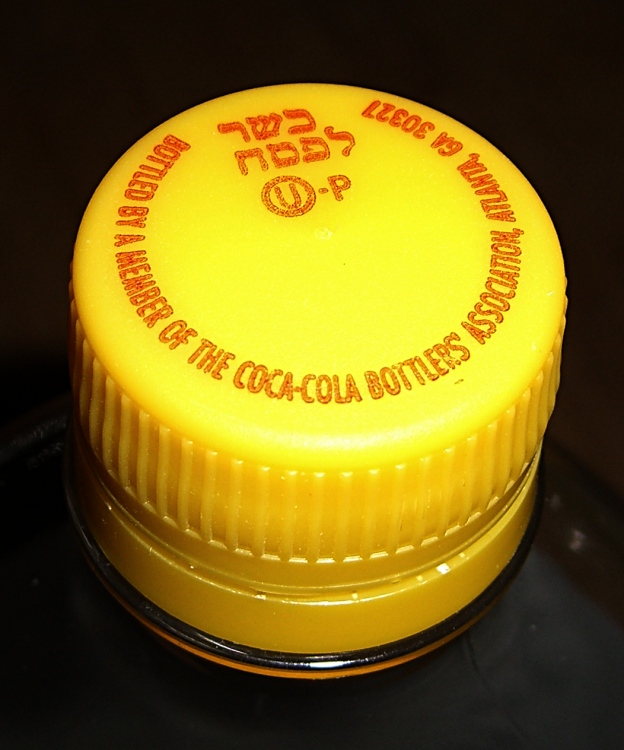
Kosher-for-Passover Coca Cola bottle cap
Bottles containing the special sugar-based formula wear a distinctive yellow cap, so they’re easy to spot against the usual all-red array. To cross-check: the ingredients list runs: Carbonated Water, Sucrose …
A friend brought me a few two-liter bottles from a Jewish grocery store in the metro NYC/NJ area last year, shortly before I discovered that the local Target had a generous stockpile on the top shelf of their soda section. It’s allegedly available in cans, but I’ve never seen any.
NB: Pepsi uses yellow caps around this time of year to mark their bottles for some dimbulb contest. At least they did that last year and I’m sure it’s no coincidence. If the cap doesn’t have distinctive Hebrew symbology and the ingredients still include HFCS, it ain’t been cleared for Passover consumption.
While sugar-based Passover Coke is not the same as the old-school Coke you remember from long ago if you’re enough of an Olde Farte to do so, it’s as close as you’re going to get in these degenerate times.
In actual point of fact, sugar Coke tastes pretty much like HFCS Coke. That should not be entirely surprising, given the bazillion dollars they spend on development. Run your own side-by-side comparison, blind if you can, and report back.
If you plan to stock up on the stuff anyway, give the caps an extra twist to ensure they’re on tight before you put ’em on the shelf. I just cracked the final bottle from last year and it’s still plenty fizzy enough for me.
The phosphoric acid in either formulation is really hard on your teeth & gut, so don’t overdo it.
Update: As of 22 April, the local Target had a shelf full of yellow-cap Coke; they had none the week before Passover. Perhaps they got the last pallet a day too late? In any event, I stocked up my year’s supply in one shot. Admittedly, it’s $1.89 / 2 liter bottle, but it’s just for special occasions… and half a dozen bottles is a year’s supply for me.
Although XFCE is rather short on creature comforts, it handles my dual output video card with separate X sessions on two monitors and doesn’t fall flat on its face with the right-hand monitor rotated into portrait mode. Some apps don’t maximize quite correctly, thinking the bottom is at 1200 (1080?) rather than 1680, but overall it works fine.
The XFCE version shipped with Xubuntu 8.10 is now backlevel, but you can fetch the latest & greatest from www.xfce.org. Add the repository (and corresponding public key), then do a normal upgrade.
You’ll also want to install/upgrade OpenOffice 3 from the PPA repository. Do the obvious search to find the most current links. There’s no need for the manual install hocus-pocus using a tarball from the OOo site.
You can’t have separate wallpaper on each virtual desktop, you must have the same number of desktops in each X session, and there are some other aggravations, but … no showstoppers so far.
Bottom line: It (pretty much) Just Works.
More on the system setup in a bit, as I get some useful results.
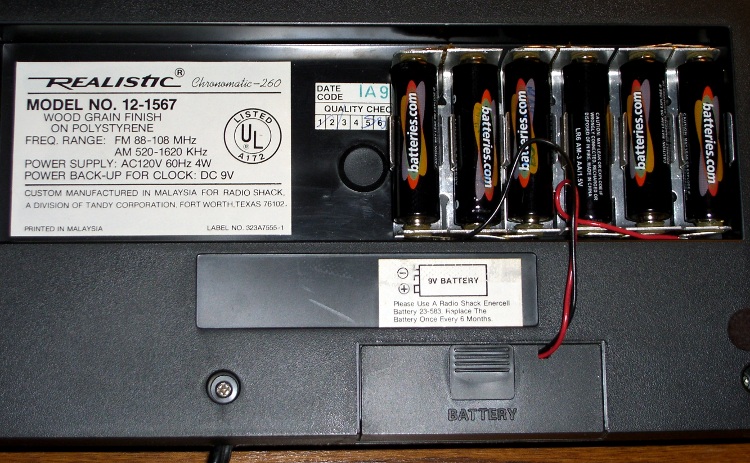
The little red Battery Sentinel LED on our old Realistic (a.k.a. Tandy a.k.a. Radio Shack) clock radio was on this morning, which means that, once again, the backup battery needs attention.
It’s supposed to use an ordinary 9V battery, but it ate two or three of those a year. Given the absurd cost of 9V batteries relative to AA cells, that stopped making sense pretty quickly.
Most devices with backup batteries draw essentially zero power from them during normal operation. This gadget draws 6 µA.
An alkaline 9V battery has a capacity of about 500 mAh, maybe more with a low-drain load like this. That should last for a few years:
500e-3 / 6e-6 = 83k hours = 500 weeks = 10 years
Alas, the clock battery monitor is really fussy and triggers the LED when the voltage drops under about 8.5 V.
[Update: the clock does a “battery test” every day, which probably accounts for the short battery life. I haven’t measured that current… or the duration of the test.]
Fortunately, the clock case has a recessed bottom that fits a standard AA cell holder like a glove. I wired up 1-1/2 4-cell holders (yes, I should have used 7 cells, but I wasn’t sure what the upper voltage limit might be) to a standard 9V battery snap connector and screwed the assembly to the case.
Now all I must put up with are the weak AA cells I got from batteries.com; the most recent order was a disappointment.
Memo to Self: That snap connector has red = negative / black = positive!
I sent this in as a bug to Launchpad, where it became Bug 337777 (not octal, BTW) and was marked as a duplicate of Bug 192413. It’s been triaged as Low priority, so I think my days of using KDE are, alas, pretty much finished.
Herewith, the straight dope, just in case you were thinking of doing the same thing.
————-
In Kubuntu 7.04, I managed to manually configure separate X sessions using two nVidia video cards driving two monitors. The setup involves a 1600×1200 landscape monitor on the left and a 1680×1050 monitor rotated 90 degrees CCW on the right.
In Kubuntu 7.10, this worked reasonably well.
In Kubuntu 8.04 / KDE3, this works poorly. X seems to regard the right-hand monitor as being 1600 (1680?) x 1200, so all windows maximize incorrectly and “centered” dialogs appear off-center to the upper right on that screen. I installed an nVidia-based dual-head card in the hopes that it would work better, but that made no difference. The setup is usable (I’m using it now), but not desirable.
The automatic configuration tools fall flat on their face: any attempt to use the standard KDE display tools pooches xorg.conf. I must carefully tweak xorg.conf to keep this setup working in the face of any X changes.
In Kubuntu 8.10 / KDE4.2, this configuration flat-out doesn’t work. After considerable manual fiddling, I got a blank X session on the right with the default X cursor and a black background; the mouse pointer moves from one screen to the other, but that’s as good as it gets. The left screen works more-or-less normally, but with some weirdnesses. Diligent searching reveals this is the common endpoint for all folks attempting this configuration: KDE4 simply doesn’t support separate X sessions.
I do not want Twinview / Xinerama (which also work poorly for this configuration), because I typically edit a single document in portrait mode on the right screen while flipping between circuit simulators / web browsers / PDF documents / PCB layout editors on the left screen. A single X session using two screens does not support that functionality; particularly in KDE4 which seems to lack the advanced window positioning controls of KDE3.
Because KDE4 is mandatory with 8.10, I can’t downgrade to KDE3, which might work.
Although KDE4 seems to be the future, it would be immensely more usable if it didn’t introduce serious regressions from previous functionality. I will gladly trade off all the Plasmoid foo-foos and Compiz go-fast-stripes to get stable X capabilities that work the same way as 7.04.
The to-be-expected alpha-version issues in 9.04 prevent me from even installing it at this point, so I cannot say whether it’s an improvement or not. From what I read in the forums, things do not look promising.
Perhaps this is less of a “bug report” and more of a plea for stability: please, first make KDE4 *work*, then make it pretty!
————-
For what it’s worth, I installed Xubuntu in that partition, added one line (Option “Rotate” “CCW”) to xorg.conf, and It Just Worked. XFCE is a bit lacking in creature comforts, but it works in this configuration. I think I can get used to that.
One of Mary’s first investments when she got out of college was a sewing machine and she’s been using it ever since. Of late, it’s gotten a bit sporadic and the foot control seemed to be at fault.
The symptoms were that the foot control required too much travel (equivalently: foot pressure) to get up to speed, it started abruptly (poor speed regulation), and sometimes cut out without warning.
So I took it apart to see what I could do.
Two pins in the side hold the top cover in place and serve as pivots. Loosen the two visible screws in the center of two of the bottom feet, hold the top half of the case down, and slide the pins out.
A wedge on the top half presses down on the middle of the steel bar, pressing it into the rheostat. A dab of silicone lube on the wedge greatly improved that action.
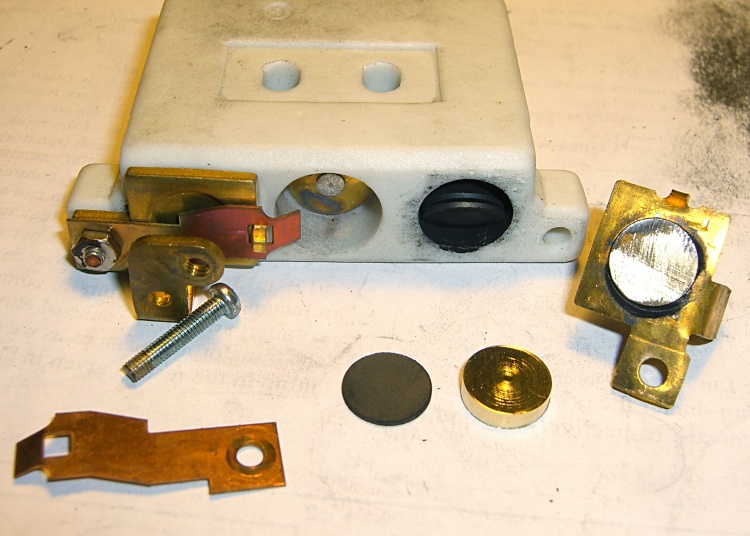
Rheostat graphite wafers and contacts
The speed control itself is brutally simple: a carbon-pile rheostat in series with the 120 VAC 1 A sewing machine motor. The ceramic case and heatsink tab tell you that things get pretty toasty inside that Bakelite case.
Disassembly is obvious, which is one of the nice things about old electrical gadgets: you can puzzle out how they work and how the parts fit together just by looking. A slew of graphite disks slides out from two cylindrical tunnels in the ceramic case, followed by two graphite contact buttons. The brass fittings on the front have carbon dust on their raised surfaces, but are basically just stamped & machined metal parts.
No fancy electronics, no firmware, just a high-power (and utterly non-inductive!) carbon variable resistor.
The rheostat has three modes, in increasing order of pressure:
Off — no pressure on the foot control
Resistive speed control — resistance varies with foot pressure
Full throttle — rheostat resistance shorted by front switch
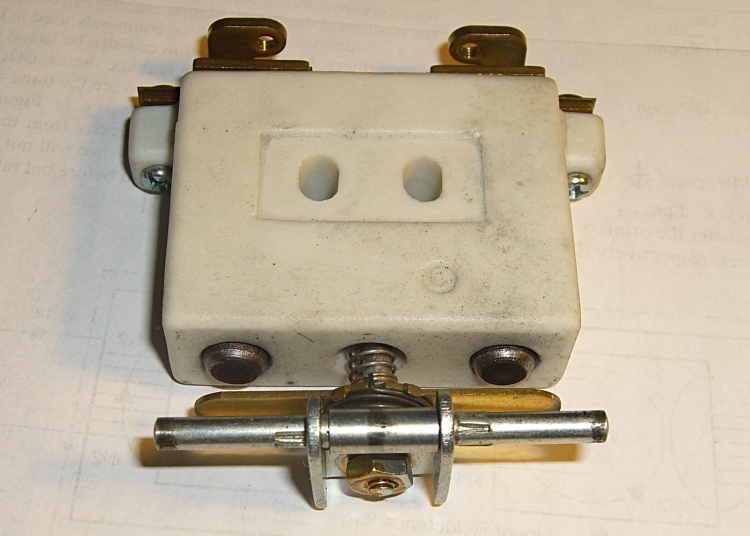
Rheostat speed control contacts
With no pressure on the foot control, there’s a generous gap between the contact bar on the back surface and the two graphite buttons sticking out of the ceramic case. There’s no way for the contacts to close by shaking or accident.
A bit more foot pressure connects those two buttons through the shorting bar across the back. Light pressure on the graphite disks means a relatively high resistance, on the order of several hundred ohms, and relatively low current to the motor. Of course, that also means the motor has poor starting torque, but … a sewing machine doesn’t need a lot of torque.
Increasing foot pressure squeezes the disks together and decreases the resistance. It drops to a few tens of ohms, perhaps lower, but it’s hard to get a stable measurement. The motor averages all that out and trundles along at a reasonably steady pace.
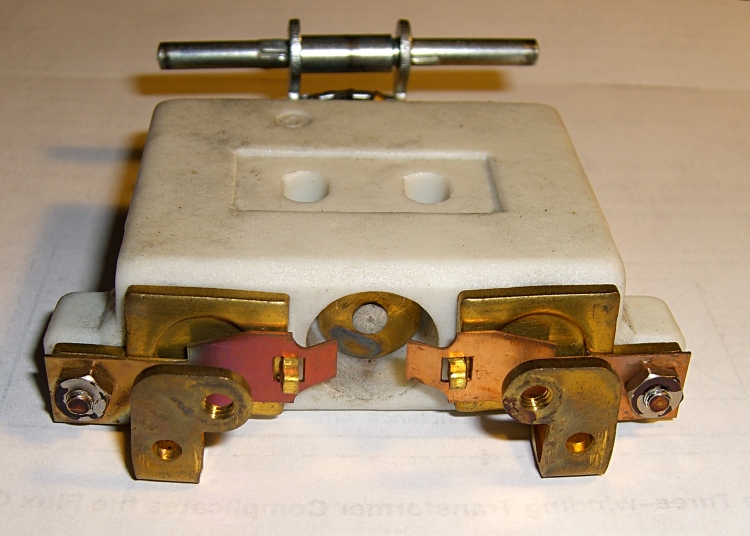
Rheostat full-speed contacts
Finally, the brass disk in the central case tunnel shorts the tabs on the two brass end contacts and lets the motor run at full speed. Increasing the foot pressure beyond that point doesn’t change anything; the spring-loaded shaft can’t deform the tabs.
The steel shaft and contact disk can short one or the other of the two piles, but that just decreases the already small resistance by about half. That might give the motor a speed boost instantly before jumping to full speed.
As nearly as I can tell, the carbon disks evaporated over the decades, as the piles seems quite loose and required a lot of foot motion to reach the first contact point. I lathe-turned a pair of brass disks about three wafers thick, so that they’d take up the empty space in the piles.
I also filed the brass end fittings flat so that they contact the disks over more of their surface. The first two disks looked like they had hot spots: loose carbon collected in the areas where the contacts didn’t quite touch them. I doubt that actually improved anything, but it’s the thought that counts.
The spacers worked reasonably well, although I wound up removing one graphite disk from each pile to ensure the full-speed contacts would close properly. They’re in a small plastic bag tucked under the aluminum heatsink tab, where they can’t get lost. With any luck, the bag won’t melt around them.
Rheostat with brass spacer button
A few days later, the sewing machine stopped working entirely. The foot control itself seemed to be working correctly, but a bit of poking around showed that the cord had a broken conductor just outside the strain relief. I cut the cord off at the strain relief, hacksawed the strain relief apart, then rewired it. The cord is now four inches shorter and everything works fine again.
I think this would be a nice candidate for a PWM controller, but then I’d have to shoehorn all that circuitry into the base of the sewing machine or add another cord to the foot control. Ptui, this works well enough.


 The Smell of Molten Projects in the Morning