The Smell of Molten Projects in the Morning

Ed Nisley's Blog: Shop notes, electronics, firmware, machinery, 3D printing, laser cuttery, and curiosities. Contents: 100% human thinking, 0% AI slop.

Author: Ed

  • Bird Box Entrance Reducer

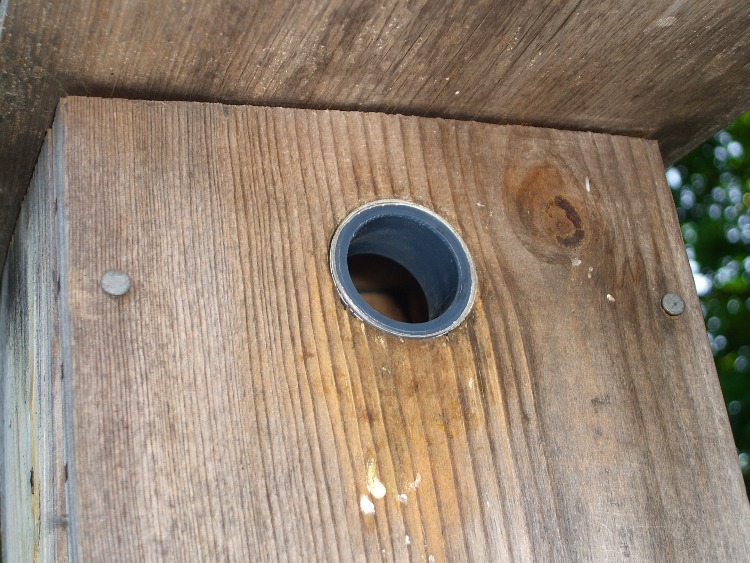
    Wren-sized entrance reducer in place
    Wren-sized entrance reducer in place

    We put out bird boxes to encourage more House Wrens, but House Sparrows often take over the boxes. This year we kept the boxes down until the sparrows had already started their nests in the bushes, hoping that the wrens would get a head start on their nests. Two days after we put the boxes up, we had a nesting pair of wrens… and two days later a pair of sparrows had evicted them and were installing their own nest.

    Rechecking the box specs, it seems wrens prefer a hole somewhere between 7/8″ and 1-1/8″, but I’d drilled 1-1/2″ holes for bluebirds (a long time ago, before we knew bluebirds vastly preferred the edges of open fields). Making a hole larger is easy, making one smaller is more difficult.
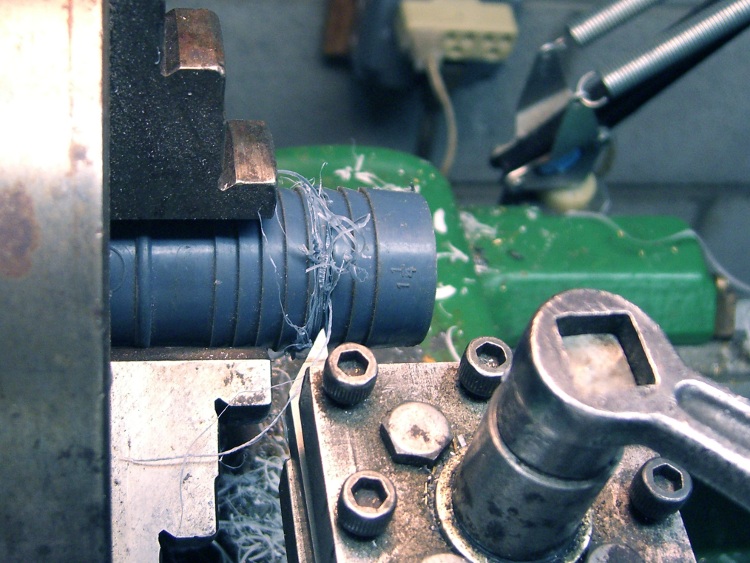
    Cutting off the barb
    Cutting off the barb

    I thought of making a wood bushing, then came to my senses: a 3/4″ thick wood ring with 1/4″ walls just wasn’t going to work. Given that the wrens (or their ancestors or relatives) have already tried nesting in our gardening boots, bicycle helmets, and tool trays, I figured they wouldn’t be too fussy about the material around their entrance hole.

    To the Basement Laboratory Machine Shop Wing!

    The parts heap disgorged a box of huge hose barb fittings, one of which had a 1.1″ ID and a 1.4″ OD: close enough. I parted off 3/4″ from the end of the barb, using a bit not really suited for the purpose that gave a nearly perfect edge in the soft plastic. One swipe with a deburring tool and it’s done.
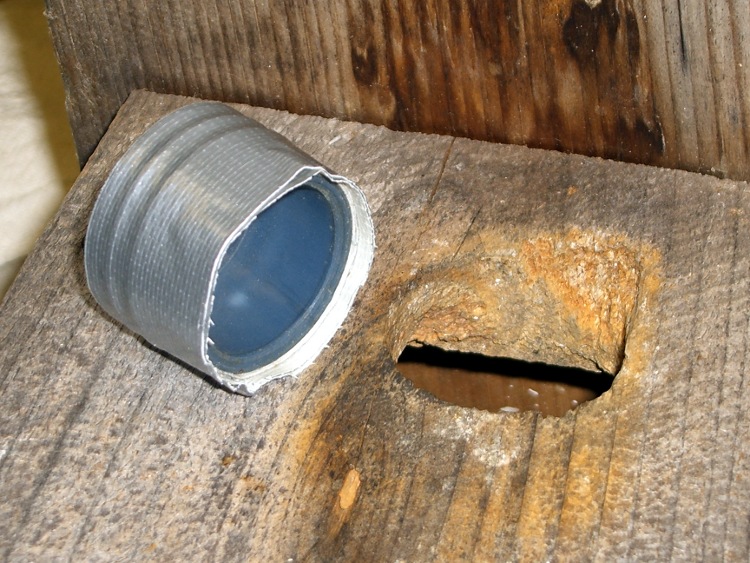
    Bushing ready to install
    Bushing ready to install

    A few wraps of duct tape provided a nice press fit and a springy retaining force without gluing the barb in place. This is pretty, mmmm, barbaric, but if it survives one nesting cycle I’ll do something much nicer.

    Time is definitely of the essence here, as we fear the wrens have been driven away: we haven’t heard them since their eviction. I did three boxes in about half an hour; we’ll see what transpires.

    The bottom pic shows the box from the front yard, where Downy Woodpeckers nested for a few years. They thought the hole needed a bit of renovation… and they have the tools for the job!

  • Terracycle Idler Shaft Cleanup

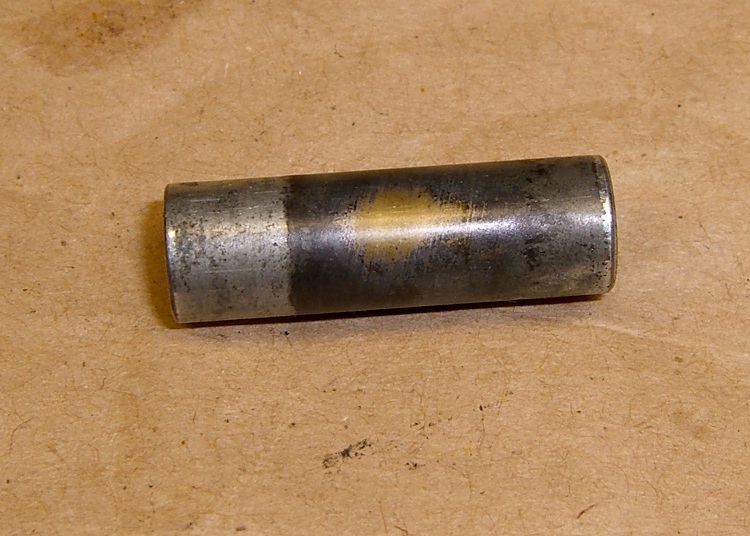
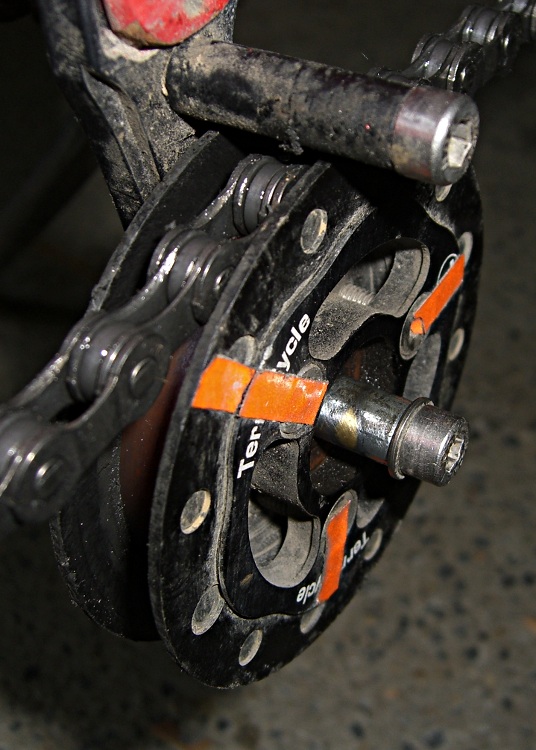
    Crusty Sliding Shaft
    Crusty Sliding Shaft

    I installed a Terracycle Idler on Mary’s Tour Easy when the old chain tensioner wore out. It’s significantly quieter than a double-idler tensioner, but the rear derailleur can barely handle the 11-34 sprocket / 30-42-52 chainring combination.

    She likes it, that’s what counts.

    Anyhow, while poking around under the bike, I noticed that the idler no longer slid left-to-right on the shaft through the bearing. The bearing itself spun fine, but the shaft… ugh, they should have used stainless steel.

    The sliding motion is important, as the idler should self-adjust to the chainline during shifting. I don’t know how long this one has been jammed, but it could contribute to the noises she’s been mentioning of late and that have prompted me to embark on a major maintenance project.

    Cleaned Shaft Installed
    Cleaned Shaft Installed

    It shined up nicely with a Scotchbrite wheel in the drill press and now looks merely horrible; you can see the copper plating (wrong: see Update below) showing through. I had to hit one end of it with a medium diamond file to knock off an invisible high spot.

    I added a bit of lube and reinstalled it; the bearing slides back & forth like it used to, but I have my doubts as to how long this will last. Fairly obviously, the plating is shot.

    The next time it fails, I’m sure I’ll wind up trying to turn an exact 0.3125-inch diameter stainless-steel shaft with a polished surface…

    Oh, and the three orange retro-reflective strips? The idler turns backwards because it’s on the return side of the chain: it’s rather disconcerting and I figured it’d be fun to highlight it.

    Update: The folks at Terracycle say it’s plated zinc over a brass bushing… which (Ah-ha!) explains the corrosion.

    The zinc forms an anode against everything else on the bike; nothing is more anodic than zinc. Because the plating has no volume, it turns into a Fizzy at the merest sight of the usual road salt around here.

    Unplated brass would be better: more volume, cathodic against steel, anodic but pretty close to stainless, just as slippery. Might tend to wear against the inner bearing race, but I’d expect it to be at least as durable as the plating.

    Worn Terracycle Idler shaft
    Worn Terracycle Idler shaft

    Here’s a pic of the shaft from another Terracycle Idler I had on my TE for a while. While it’s not corroded, it’s worn through to the brass underneath. So maybe the plating isn’t buying much, anyway.

    I spent some quality one-on-one shop time with a random hunk o’ stainless hex rod, came up with a good-looking 0.304-inch OD (a nasty bit of overshoot, but I haven’t done any lathe filing in recent memory and forgot how fast it removes metal), and verified that the race will cock-and-jam rather than sliding nicely.

    The Terracycle folks will send a replacement shaft; they’re good folks who build quality stuff and stand by their products. I’m obviously abusing the poor thing…

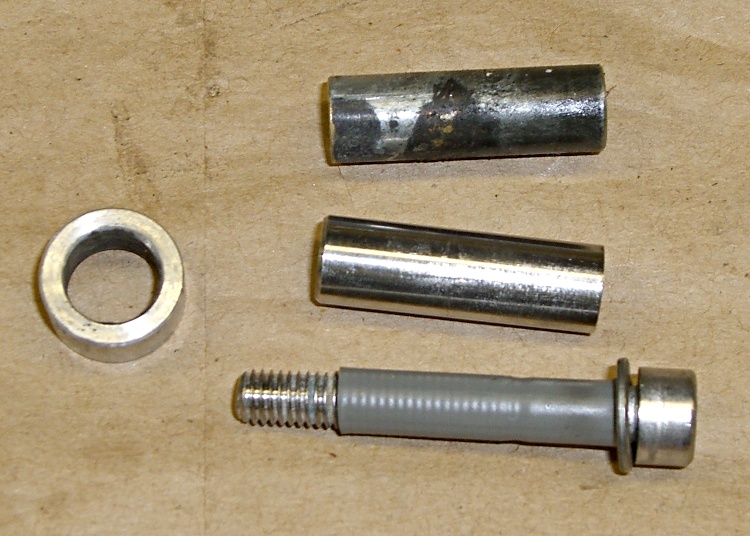
    Update: The stainless shaft arrived and is sized for the 6 mm bolt they’re using in new production. When we discussed this, I said it’d be no big deal for me to adapt it to the existing 5 mm bolt. A length of heat-shrink tubing does the deed, as it’s rigidly held on both ends. A dab of Loctite, a dot of oil, and it’s back in service. We’ll see what happens after a few months of riding under my regime of benign neglect.

    Old brass shaft, new stainless steel shaft, 5 mm bolt with heatshrink
    Old brass shaft, new stainless steel shaft, 5 mm bolt with heatshrink

    A tip o’ the cycling helmet to Terracycle!

  • Quieter Luggage

    Muted zipper pull tabs
    Muted zipper pull tabs

    Luggage now comes with a pair of sliders on each zipper, which means that the two sliders come together when the zipper is closed. That allows you to lock the slider pulls together, which is a nice touch for those of you who think luggage locks actually improve security.

    It also means that the metallic pull tabs jingle and jangle merrily together in the back of the van all the way to grandmother’s house as we go, we go.

    Not to be tolerated, sez I.

    Apply a length of heat shrink tubing to each tab. If you’re a locking kind of person, leave the holes on the end exposed. If you’re a real cheapskate, you could get away with shrinking just one tube per pair, but even I’m not that far gone.

  • Phone Charger: PowerPole-to-USB Adapter

    I have a Virgin Mobile Kyocera Marbl phone, for reasons discussed there. It’s sufficiently nonstandard that the “fits most phones” headsets and chargers don’t. In particular, I have yet to see a charger with the proper adapter dingus for this phone.

    Fortunately, the charger is rated at 5 V @ 350 mA… that’s easy enough.

    Phone charger with Powerpoles
    Phone charger with Powerpoles

    Cut the charger’s cable in the middle, more or less, and install Anderson Powerpole connectors. The standard color code for 5 V is white / black; don’t use red / black for fear you’ll eventually plug it into a 12 V source and toast the phone.

    The charger wires are most likely a far smaller gauge than the 15 A (!) connector pins prefer, so strip the conductors twice as long, double the ’em over and perhaps add a short length of multistrand hookup wire to fill out the barrel before you crimp it.

    Check the polarity before you poke the pins in the housings: you want the +5 V pin in the white housing!

    I aligned the housings to match the ARES / RACES standard, as described there, as that’s what I’ve done with all my other Powerpole connectors. If your phone expects some weird-ass voltage, maybe you want to make certain it can’t possibly mate with anything that’ll kill it stone cold dead. Oh, and in that case pick a suitably different color. Blue seems to be the standard for 9 V, at least in the ham radio arena, for whatever that’s worth.

    Add heatshrink tubing for strain relief (it might slip over the finished pins if you forget), wrap cold-vulcanizing rubber tape around the whole connector for more strain relief, and you’re done. It’ll make your charger cable resemble an anaconda eating a pig, but that’s OK with me.

    USB charger to phone cable
    USB charger to phone cable

    Now the phone can commune with a bench power supply, a bulk 5 V supply, or nearly anything that you’ve hacked into using Powerpoles. It’s your job to make sure the voltage matches up!

    Now, if you haven’t already, make a USB-to-Powerpole adapter. Alas, even though the phone uses 5 V, it draws too much current to charge directly from a standard USB port. However, I have a Black & Decker Pocket Power battery pack with a regulated USB outlet that can allegedly supply 250 mA and seems to handle the phone just fine.

    So: cut a spare USB cable, verify that the red conductor is 5 V and the black is common (hell hath no fury like that of an unjustified assumption and we’re dealing with bottom-dollar suppliers here), crimp, align housings, add strain relief, and try it out.

    This should work for any phone with a dumb, bulk-power charger. If you cut the cable and find three conductors, solder that devil back together again; there’s no telling what’s passing along that third rail!

  • Windows KB967715 Doesn’t Install: Fixed

    I fire up the Token Windows Laptop more or less monthly, to download data from our gaggle of Onset Computer Hobo dataloggers. As a result, the laptop gets broadsided with Windows updates from the Mother Ship and, although I look at ’em before installation to see wassup, I don’t really remember any particular update from month to month.

    It seems that, in order to solve the really-disable-Autorun-dammit problem, the patch described in KB967715 must update a registry entry that’s nailed down by some other program. As a result, the patch either doesn’t install, installs-but-fails-quietly, or installs-but-fails-loudly.

    It eventually percolated to the front of my dim consciousness that I’d seen all of those outcomes over the last few months…

    A bit of trawling turned up the usual collection of uninformed blather, plus what seems to be the Definitive Answer direct from the Mother Ship. Go there for the details.

    Update 967715 may be reoffered if the HonorAutorunSetting registry setting that is described in this article is not added to the registry hive. This issue may occur if some other program that is installed on the computer blocks the update from writing the registry entry. Such software may block the update during the installation of the update or may remove the registry entry after the computer is restarted.

    (“Registry hive”? WTF?)

    Basically, you download the patch as an executable file, save it somewhere convenient, reboot in Safe Mode (hold F8 down as Windows starts up, then pick Safe Mode from the menu), clickety-click on the patch program, and give it permission to have its way with your PC.

    So far, it’s all good. Maybe I won’t have to remember this for another month…

    Memo to Self: if all else fails, MS doesn’t charge for security-related patch assistance phone support.

  • Where To Put Too Many Clamps

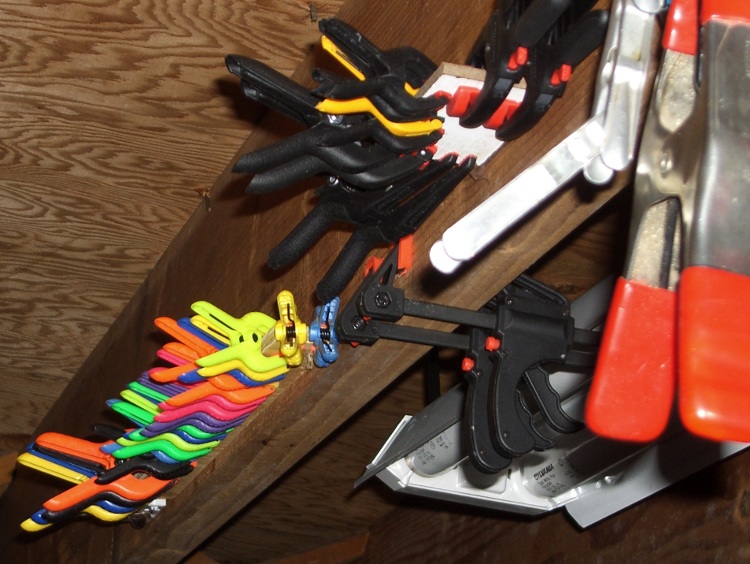
    Clamp storage plates on floor joist
    Clamp storage plates on floor joist

    Not in a drawer, that’s for sure…

    Whack a narrow rectangle from some random scrap of thin wood-like substance, squirt hot-melt glue along one edge, stick it to the floor joist over your tool chest, align it pretty much horizontally, take two deep breaths while the glue solidifies, then neatly affix your clamps.

    Repeat as needed when you get more clamps: you can never have enough clamps!

    The red-handled spring clamps on the far right hang from a row of nails where, this being directly in front of my tool cabinet, they don’t quite knock me on the head. I really wish the original owner of this house had sprung for one more course of concrete block; another nine inches of headroom would have been just ducky.

  • Experian Triple-Alert Signup: FAIL

    So batteries.com had the usual security breach, lost the usual list of customer info, and sent out the usual letter advising the victims that they could get a free signup with Experian’s credit-report monitoring service.

    So I signed up, which involved the usual exposure of sensitive parts of my ID anatomy, and was eventually told (despite answering everything correctly, AFAICT) that they couldn’t verify that I was, in fact, me and would send a paper form to my (presumably known-to-them) USPS address for confirmation.

    The next day I get an email from “Triple Alert Redemption Customer Care <mumble-mumble@consumerinfo.com>” with this helpful offer:

    We employ a rigorous identity verification system in order to protect your personal information. Unfortunately, we could not validate your identity due to either technical difficulties with the system or information submitted that could not be confirmed.

    To continue the order process, please contact customer care at 1-866-mum-bles, Monday-Friday from 6 a.m. to 6 p.m., Saturday-Sunday 8 a.m. to 5 p.m. Pacific Time.  Please provide this Reference number (required):

    Reference number: make-up-your-own

    A representative will attempt to confirm your identity by asking you questions based on the information contained in your credit report.  Please be sure to familiarize yourself with data such as the names of your lenders and account balances before you call.  Once your identity has been confirmed, you will be provided access to your Triple Alert(SM) Credit Monitoring membership.

    Now, it’s highly likely that the email is on the up-and-up, but this seems to be precisely one of those situations they warn about:

    • you get an official-looking email
    • call the phone number
    • talk to the nice person
    • answer a bunch of probing questions
    • be assured that something pleasant will happen

    Instead, I called the “Contact Us” number from their website. The nice lady didn’t see anything wrong with them sending out an email like that. Nay, verily, she offered to do the deed right over the phone. I respectfully declined… I can wait.

    It’s worth noting that although it’s an Experian thing, the websites & email addresses involved include:

    • experian.com
    • consumerinfo.com
    • experiandirect.com

    It’s enough to make you think longingly of cutting up your cards, digging a hole, climbing down, and pulling it in after you.

    [Update: after a month or so, I got an email telling me that all was quiet on my Triple-Alert front and my delicate personal bits were in fine shape. A few days later, the long-awaited paper arrived with my confirmation numbers. So I suppose it’s working, but sheesh it doesn’t inspire much confidence.]