The Smell of Molten Projects in the Morning

Ed Nisley's Blog: Shop notes, electronics, firmware, machinery, 3D printing, laser cuttery, and curiosities. Contents: 100% human thinking, 0% AI slop.

Author: Ed

  • Tree Frog: The Video

    Frog walking on tent
    Frog walking on tent

    Watching the tree frogs crawl up the tent from inside let us see how they move: hand-over-hand up the fabric. A dozen of them crawling along was spooky…

    I took a movie with my pocket camera that turned into an 8 MB AVI, which I can’t upload here. Most of it isn’t all that interesting, anyway, an observation which hasn’t stopped YouTube dead in its tracks yet, but we can do better than that.

    A pair of Free Software programs extracts the interesting part and produces a (somewhat) smaller animated GIF that works with WordPress.

    First, shatter the AVI into separate JPG images:

    mkdir frames
    ffmpeg -i cimg3781.avi -sameq frames/frame-%03d.jpg

    A bit of browsing showed that I wanted frames 227 through 265 and that the frog was pretty much in the upper-middle of the image. So, crop a 320×240 image around the frog from those 640×480 frames:

    cd frames
    mkdir stills
    for f in `seq 227 265` ; do convert frame-$f.jpg -crop 320x240+160+60 stills/still-$f.jpg ; done

    Then convert them into an animated GIF with a 500-ms frame rate (the -delay ticker is 10 ms):

    cd stills
    convert -delay 50 still-2* frogwalk.gif

    It’s a 1.6 MB wad, but gets the message across: frogs keep three paws stuck to the floor.

    Remember, that little guy is moving at glacial speed in the GIF: those 40 frames of video last just over a second in real time.

    Memo to self: MPEG-1 and MPEG-2 only support video-style frame rates around 30 fps.

    Update: Regular reader Przemek Klosowski showed me how to generate those numeric sequences on the fly, without using a for loop:

    There's this neat Bash construct {1..10} that you can use directly after ffmpeg:
    convert -delay 50 still-{227..430}* result.gif
    
    You can even skip every nth frame:
    convert -delay 50 still-{227..430..5}* result.gif
    

    Thanks!

  • Tree Frogs!

    Tree Frog - View Through Tent
    Tree Frog – View Through Tent

    We bicycled along the Pine Creek Gorge rail-trail in north-central Pennsylvania on a Rails-to-Trails Conservancy group ride, camping at schools and campgrounds along the trail. Quick summary: for four days we rode in the sun and slept in the rain.

    Tree Frog - Natural Light
    Tree Frog – Natural Light

    As we set up camp at Pettecote Junction, the wet ground was hopping with tiny tree frogs. It was impossible to avoid stepping on the critters. When we got the tent set up, they swarmed up the sides between the tent and the rain fly; perhaps they had an imperative to get above the flood?

    The lines in the tent fabric are about 3.7 mm apart, so the frogs are perhaps 10 mm from snout to butt. That size rules out everything in our RTP Eastern Reptiles & Amphibians book except the Little Grass Frog, which used to live only south of Virginia. The spot pattern doesn’t match, either, although they’re said to be highly variable. Who knows what’s going on in these degenerate days?

    cimg3787 - Tree Frog - Flash
    Tree Frog – Flash Illumination

    They didn’t like the mesh vent screens, favored the rougher tent fabric over the smoother seam binding, and didn’t seem to mind falling off the tent.

    Things are different when you’re small.

    Tomorrow: the video

  • Pedal Cadence Sensor Magnet Attachment

    Cadence Sensor Magnet Pedestal
    Cadence Sensor Magnet Pedestal

    We’ve been using Cateye Astrale “computers” on our bikes for decades, mostly to get the cadence function. After all this time, we pretty much know how fast to pedal, but old habits die hard.

    The cadence sensor counts pedal revolutions per minute, which requires a magnet on the crank arm. They provide a small plastic-encased magnet with a sticky-tape strip that’s worked fine on our previous crank arms.

    Our daughter’s Tour Easy arrived with fancy curved pedal crank arms that put the cadence sensor magnet much too far from the frame. You really want the magnet & sensor close to the bottom bracket so that it doesn’t get kicked and doesn’t snag anything as you pedal, but that just wasn’t going to work out here.

    A turd of JB Weld epoxy putty solved the problem: mix up a generous blob, shape it into a pedestal, glom the magnet atop it, adjust so the magnet is parallel to and properly spaced from the sensor, then smooth the contours a bit.

    Add the cable tie for extra security; you don’t want to lose the magnet by the side of the road!

    The black electrical tape is mildly ugly, but serves the purpose of keeping the cable from flapping in the breeze. The adhesive lasts about a year, then it’s time for routine maintenance anyway.

  • Tektronix 492 Spectrum Analyzer Backplane Pin Spacing

    Tek 492 Memory Board
    Tek 492 Memory Board

    My buddy Eks asked me to help fix his new-to-him and guaranteed broken Tek 492 spectrum analyzer, which turned into a tour-de-force effort. One sub-project involved sucking the bits out of an existing “known-good” Tek memory card, which meant building a backplane connector and a circuit that behaved like a 6800 microcontroller… fortunately, it could be a lot slower.

    [Update: It seems searches involving “Tektronix 492” produce this page. You may also be interested in these posts…

    If those aren’t what you’re looking for, note that the correct spelling is “Tektronix“.

    Good luck fixing that gadget: it’s a great instrument when it works!]

    You can tell just by looking that this board was designed back in the day when PCB layout involved flexible adhesive tape traces and little sticky donut pads. Ground plane? We don’t need no stinkin’ ground plane!

    Actually, it’s a four-layer board done with the usual Tek attention to detail. They didn’t need a ground plane because they knew what they were doing. Remember, this is in a spectrum analyzer with an 18-GHz bandwidth and 80 dB dynamic range; a little digital hum and buzz just wouldn’t go unnoticed.

    Tek 492 Backplane Geometry
    Tek 492 Backplane Geometry

    Anyhow, the backplane pins are on a 0.150-inch grid within each block. The center block (pins 13-36) is 0.200 inches from the left block (pins 1-12) and 0.250 from the right block (pins 37-60).

    That means the left and right blocks are neatly aligned on the same 0.150-inch grid, with the middle block offset by 50 mils. You can’t plug the board in backwards unless you really work at it.

    Of course, Eks had some genuine gold-plated Tek pins in his stash: 24 mils square and 32 mils across the diagonal. They have 1/4″ clear above the crimped area that anchors them to the black plastic spacer and are 1/2″ tall overall. They’re not standard header pins, but I suspect you could use some newfangled pins in a pinch.

    Here’s what the reader board finally looked like, hacked traces and all, with the board connector to the rear. The memory board didn’t use all the backplane pins, so I only populated the ones that did something useful. The power-and-ground pins (left side of right pin block) stand separately from the other because I had to solder them to both the top and the bottom of the board: no plated-through holes!

    Tek 492 Memory Board Reader
    Tek 492 Memory Board Reader

    I cannot imagine this being useful to anybody else, but I defined an Eagle part for the connector so I could CNC-drill the board. Drop me a note and I’ll send it to you.

    [Update: this turned into a Circuit Cellar column, so you can fetch a ZIP file from their FTP site that has all manner of useful stuff.]

    Memo to Self: The drill size follows the pin’s diagonal measurement… not the side! Duh.

  • Front Derailleur Cable Breakage: Prevention Thereof

    Front derailleur cable with broken strand
    Front derailleur cable with broken strand

    Although recumbent bikes use ordinary bicycle components, they tend to have somewhat different frame geometries (to put it mildly). Our Tour Easy ‘bents seem to put a particular strain on the front derailleur cables, perhaps because the cable enters from a different angle than the derailleur designers expected. The little finger that’s supposed to guide the cable actually concentrates all the bending force at one spot… precisely where the cable breaks.

    If you look carefully, you’ll see a little brass disk (between the derailleur body and cable) that cradles the cable. I made that for the previous derailleur, but this one has Yet Another Geometry. I know there’s a difference between “high pull” and “low pull” front derailleurs, and perhaps this is the wrong one for this application, but there seems no algorithmic way to sort this stuff out.

    Cable guide pulley
    Cable guide pulley

    The solution is to make Yet Another Cable Guide Pulley, with a groove around the perimeter, an off-center hole, and a notch to clear the finger. It’s not exactly a pulley, but I’m not sure what else to call it. Maybe just a cable guide?

    This was a quick-and-dirty manual lathe project, two days before leaving on a trip: turn down some brass stock, put a groove around the perimeter, part it off, drill a hole, and cut the notch. Not a trace of CNC to be found: all done by guess and by gosh, marked out with Sharpies on the actual part in real time running.

    The general notion is that the cable rides the groove smoothly throughout the derailleur’s entire travel range and, thus, doesn’t bend around the finger. This changes the shift geometry just slightly, but, fortunately, long-wheelbase ‘bents have a sufficiently relaxed chainline that indexed front shifting isn’t much of a problem even with slightly misplaced positions. Besides, that’s why SRAM grip-shifter have all those clicky stops, right?

    (The shifting is actually a bit goobered, with the outer chainring shift a bit too close to the middle. When we get back, I’ll re-do this with somewhat more attention to detail.)

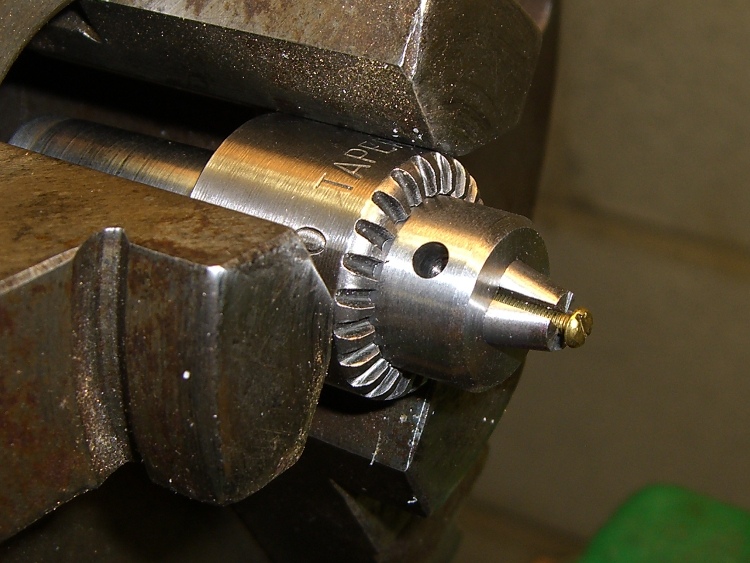
    Pulley in action
    Pulley in action

    Here’s what it looks like in action. I’ve had good success with this sort of thing over the years, so I think this one will work just fine, too. It simply takes one broken cable on each new derailleur to spin up enough enthusiasm for making Yet Another Pulley…

  • Useful Hex and Binary File Utilities

    I’m doing some work with a one-off ROM reader & EPROM programmer, so it’s once again time to mess around with Intel HEX files, raw binary images, and the like.

    The key routine (which runs on an Arduino Decimila) to dump a ROM in HEX format goes like this, with all the constants & variables & functions doing the obvious things:

    void DumpHC641(void) {
    
    word Address,Offset;
    byte DataRd,Checksum;
    
     for (Address = 0; Address < ROM_SIZE; Address += IHEX_BYTES) {
      sprintf(PrintBuffer,":%02X%04X00",IHEX_BYTES,(word)Address);           // emit line header
      Serial.print(PrintBuffer);
      Checksum = IHEX_BYTES + lowByte(Address) + highByte(Address) + 0x00;   // record type 0x00
      for (Offset = 0; Offset < IHEX_BYTES; ++Offset) {
       digitalWrite(PIN_HEARTBEAT,HIGH);
       DataRd = ReadHC641(Address + Offset);
       digitalWrite(PIN_HEARTBEAT,LOW);
       Checksum += DataRd;
       sprintf(PrintBuffer,"%02X",DataRd);                                   // data byte
       Serial.print(PrintBuffer);
      }
      Checksum = -Checksum;                                                  // two's complement
      sprintf(PrintBuffer,"%02X",Checksum);
      Serial.println(PrintBuffer);
     }
     Serial.println(":00000001FF");                                          // emit end-of-file line
    }
    

    So getting an Intel HEX file is just a matter of capturing the serial output, whacking off any debris on either side of the main event, and saving it.

    The srec_cat program handles conversions among a myriad formats, most of which I can’t even pronounce. The few I use go a little something like this:

    srec_cat mumble.hex -intel -o mumble.bin -binary
    srec_cat mumble.bin -binary -o mumble.hex -intel
    srec_cat mumble.bin -binary -o mumble.txt -hex_dump
    srec_cat -generate 0x0000 0x2000 -constant 0x00 -o mumble.txt -intel
    

    It’s sometimes handy to apply srec_cat to a group of similarly suffixed files, in which case some Bash string chopping comes in handy. For example, to convert some hex files into binary:

    for f in 27HC641*hex ; do echo ${f%%hex} ; srec_cat "$f"  -intel -o "${f%%hex}"bin -binary ; done
    

    Good old diff works fine on text files, but in this case it’s better to see which bytes have changed, rather than which lines (which don’t apply in the context of a binary file). The vbindiff program looks great on a portrait-mode display.

    I don’t do much binary editing, but tweak serves my simple needs. Confusingly, members of this class of program are called “hex editors”, but they really work on binary files.

    There’s also diff3, for those rare cases where you must mutually compare three text files. Makes my head spin every time…

    All those programs are likely packages in your favorite Linux distro.

  • Bicycle Water Bottle Cap: Relaxed

    Water bottle cap
    Water bottle cap

    Being cyclists, we were doing the resuable-water-bottle thing long before it became trendy, but now that we use hydration packs, we just tote bottles along when we’re driving or on some other sort of outing. Eventually the bottles wear out / get lost and we page a new one in from the essentially infinite stash in the bottle cupboard.

    This one had a cap that simply couldn’t be pried open with bare hands, no how, no way. I eventually got it open by main force and the threat of high temperatures.

    Turns out there were two problems: the aperture in the pull-up ring is a wee bit small on the sealing nub and the ridge on the screw cap is about two wee bits large for the recess in the ring.

    The former succumbed to an O (letter Oh) drill, which I pulled & pushed through the hole by hand to enlarge the aperture from 0.320 to 0.332. It still seals reasonably well, although it’ll pee a thin stream under more pressure than you should apply to such a bottle, which means I put a slight scratch on the aperture.

    The latter required gently shaving the ridge with a box cutter (gasp). It’s still rather stiff, but entirely workable. That doesn’t affect the seal, because the ring’s skirt is a snug fit against the screw cap.

    Why not just throw the fool thing out? After all, it’s just a freebie water bottle…

    We run on the “Use it up, wear it out, fix it once, wear it out again, then put it on the shelf because maybe you can use the parts for something” principle.

    Now, that’s not the way things are done these days, but it works for us…