
OK, so half-dollar coins aren’t all that common these days… but it seems to me that a vending machine shouldn’t jam on anything.
Author: Ed
-
Poor Design Specs
50 cent coins will jam this machine -
Cooper’s Hawk in Christmas Angel Mode

Coopers Hawk Heard two Cooper’s Hawks doing a call-and-response exchange a few mornings ago, with the nearest bird in a tall pine in the back yard. I’m surprised that a one-pound bird can perch on the very tippy-top branch of a pine without bending it over, but they seem to do this quite often.
The picture is a crop from the full frame, taken with a Sony DSC-H5 at full optical zoom with a VCL-HGD1758 1.7x Tele Conversion Lens. There’s plenty of violet fringing in evidence, which is one reason I try not to take high-contrast backlit shots like this.
Here’s a dot-for-dot crop of just the bird to show how bad the fringing really is.

Coopers Hawk Detail – Violet Fringing It’s better than no picture at all, the way I see it…
-
Still More Alkaline Cell Corrosion
This is depressing …

Alkaline Cell Corrosion in Boom Box We got a boom box so Mom could have background music; the Olde Family Tube Radio was far beyond its Best Used By date.
Prompted by recent events around here, I checked it on a recent visit and, yup, more corrosion. In all fairness, the cells suggest “Best If Installed By Jan 99”, so they’re well past their date, too.
This used to be a whole lot less of a problem when flashlights and radios (without clocks!) were the only things using “dry cells”: when the battery went dead, the thing didn’t work and you replaced the cells.
Nowadays, we expect alkaline cells to supply keep-alive trickle current for memory backup; even after the cell corrodes, it still supplies that tiny current and we never notice what’s happening inside.
I’m beginning to loathe alkaline cells just like I loathe the small internal combustion engines in yard equipment.
-
Not Quite Weatherproof Any More

Fatigue-fractured weatherproof switch boot Building equipment to withstand outdoor conditions is really, really difficult. Anything metallic corrodes, anything organic deteriorates, and anything flexible fractures.
The weatherproof boot on this outdoor sign switch has a tiny crack where the toggle enters the body. Not very big, but it’s the beginning of the end…
If the rest of the box had an air-tight seal, then things would get really ugly. Diurnal pumping can suck enough water vapor in through that little hole to eventually fill the entire box with water. Long before then, though, the electrical gadgetry will corrode.
Even though this sign seems to have plenty of openings around the lighted panels, the switch will eventually fail all by itself. Then they’ll likely throw the whole thing out; nobody fixes anything these days, right?
Here’s a detail view.

Switch boot – detail -
More Alkaline Cell Corrosion
Must be something going around…
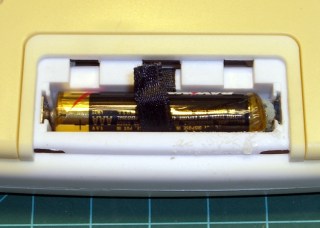
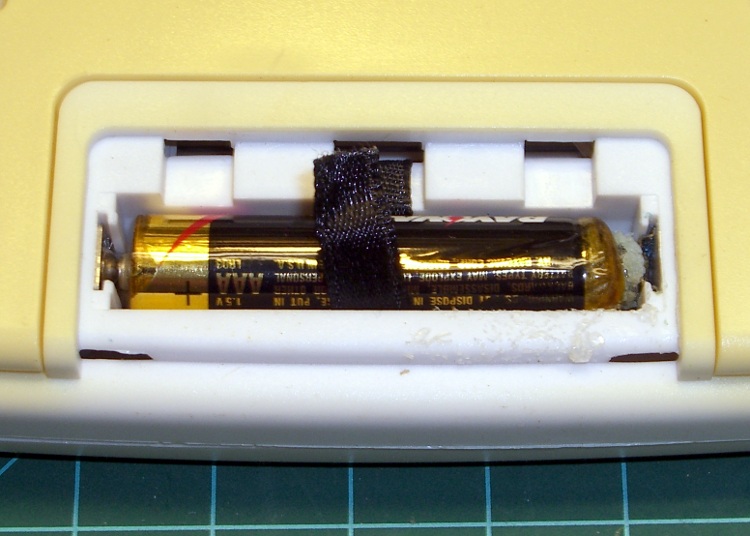
Corroded clock-thermometer cell The outdoor thermometer over my desk (which also displays UTC so I don’t have to reset the mumble clock twice a year) started blinking. That’s the usual sign of a dead battery and, yup, when I opened it up, that “leakproof” Eveready was pretty far gone.
Surprisingly, at least to me, the cell hovered around 1.1 V open-circuit and 800 mV under the meter’s “battery test” load. Given the amount of corrosion, I thought it would be flat dead.
The corrosion had crawled out of the compartment along the negative terminal and coated the entire metal tab with bluish-green crystals. Some protracted dabbing with vinegar, rinsing with wet cotton swabs, and drying put things pretty much back in order.
I usually scrawl the date on each cell when I install it, but either I didn’t do that here or the corrosion ate the ink. All I know is that it’s been up there for quite a few years; look at the discoloration where it faces the sun through the window!
The thing was a surplus freebie to begin with and has long since been fully depreciated…
-
HP8591E Spectrum Analyzer: Capturing Screen Images Therefrom
While I’m thinking about instrument screen shots, this is the script for my Hewlett-Packard 8591E Spectrum Analyzer.
You’ll need C-Kermit, ImageMagick, and hp2xx for this one, too.
The cable must cross-connect RTS/CTS for hardware flow control.
Set the spectrum analyzer to
- print-to-plotter
- 19200 b/s (limited by USB-to-RS-232 converter)
- One plot per page
Turning menus off doesn’t seem to have any effect on screen captures from the serial port, so the script crops off that part of the image.
Copy-n-paste the following text into a file (gethp8591), make it executable (chmod u+x gethp8591), and run it with a file name (./gethp8591 test).
Unlike the (well, my) 54602 ‘scope, the 8591 responds to serial commands just like the Fine Manual says. So before you run this script, make sure the screen shows what you want.
#!/usr/bin/kermit +
# Fetches screen shot from HP8591E spectrum analyzer
# Presumes it's set up for plotter output...
# Converts HPGL to PNG image

set modem none
set line /dev/ttyUSB0
set speed 19200
set flow rts/cts
set carrier-watch off

# Make sure we have a param
if not defined \%1 ask \%1 {File name? }

set input echo off
set input buffer-length 200000

# Tell it what size to plot
echo Triggering plot output...
output plot 0,0,60000,40000;

log session "\%1.hgl"

# Wait for end of data stream
input 400 SP;

echo ... HPGL data captured

close session
close

echo Converting HPGL in
echo --\%1.hgl
echo to PNG in
echo --\%1.png

run hp2xx -m png -c 143 "\%1.hgl"

echo Cropping and resizing
run mogrify -crop "515x395+0+0!" "\%1.png"
run mogrify -density 300 -resize 200% "\%1.png"

echo Finished!

exit 0
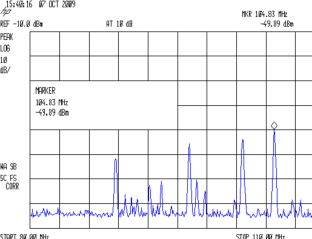
Here’s a picture of the FM broadcast band, as seen from the Basement Laboratory. The marker looks a bit off from 104.7 MHz, but that’s a combination of broad span and skinny peaks.
Spectrum Analyzer Screen Capture





 The Smell of Molten Projects in the Morning